Spreed: Public room feature too hidden?
Hello,
I just discover that I can't create public room in Nextcloud Talk since i updated to version 16..
It's weird because former public room still works but I can't make a room public for the new one
I'm in Firefox but i check in Chromium also.
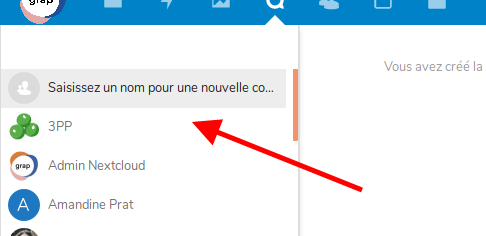
When i create a new room, there is no more the "Create a public room"
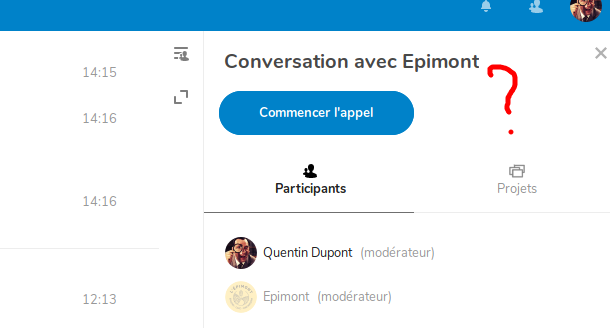
And in a room, there is share button anymore..
Did I miss something ??
Browser
Operating system: Ubuntu 18.04
Browser name: Firefox & Chromium last update
Spreed app
Spreed app version: 6.0.2
Server configuration
Operating system: Ubuntu
Web server: Nginx
Database: Maria
PHP version: 7.2.15
Nextcloud Version: 16
 quentinDupont
All 9 comments
You need to start typing a name for the room.
We changed to with Nextcloud 16, that rooms always need to have a name set.
 nickvergessen
on 28 Jun 2019
nickvergessen
on 28 Jun 2019
Thanks for your quick answer !
I don't find this very intuitive.
An other thing not intuitive for my collegues was the button "Share the link" (in french anyway) in conversation group.
I think it will be more clear with the name "Make the conversation public" or something like that.
What do you think ? Maybe open a other issue.
quentinDupont
on 28 Jun 2019
Let's reopen it for now and think a bit about it.
nickvergessen
on 28 Jun 2019
cc @jancborchardt @jenniferpiperek
nickvergessen
on 28 Jun 2019
hi @nickvergessen I'm also confused. And sorry for my silly answer but I don't get how to set now the conversation name. Any help?
 easyfic
on 28 Jun 2019
easyfic
on 28 Jun 2019
Hm, I don’t remember the discussion where we decided to change this, was it in an issue?
So it seems we should have a "New public conversation" entry as the first thing in the list, right?
And the issue in the second screenshot is another one? Being that the share controls are not shown?
 jancborchardt
on 28 Jun 2019
jancborchardt
on 28 Jun 2019
Which then turns into a "input box asking for the conversation name"?
cc @jenniferpiperek
nickvergessen
on 2 Jul 2019
Maybe you should ask "profane" users about their understanding and ergonomics thoughts before releasing updates. Like your grandmother or daily users.
Sincerely the previous release was so much simple to handle for new users. Now that's not simple at all
easyfic
on 2 Jul 2019
This is fixed with the upcoming version, where the dialog to create a conversation looks like this :)
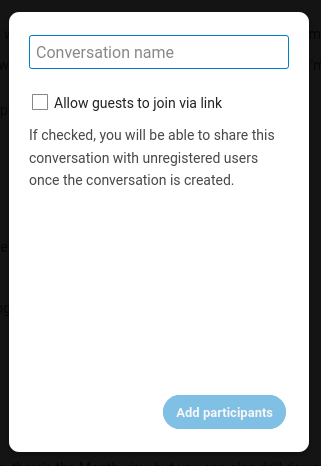
Was fixed by https://github.com/nextcloud/spreed/pull/2499
jancborchardt
on 31 Dec 2019
Related issues
 jospoortvliet
·
4Comments
nickvergessen
·
5Comments
jospoortvliet
·
3Comments
jospoortvliet
·
4Comments
nickvergessen
·
5Comments
jospoortvliet
·
3Comments
 ma12-co
·
3Comments
ma12-co
·
3Comments
 cbacit
·
3Comments
cbacit
·
3Comments
Most helpful comment
Hm, I don’t remember the discussion where we decided to change this, was it in an issue?
So it seems we should have a "New public conversation" entry as the first thing in the list, right?
And the issue in the second screenshot is another one? Being that the share controls are not shown?