Similar to: https://github.com/SynoCommunity/spksrc/pull/3803
Can we please create a beta testing package for Radarr v3? The Sonarr v3 package installed without a hitch and has been auto-updating itself well, it'd be great if we could get the same treatment to test Radarr v3.
Thanks!
 epheterson
All 29 comments
Would also be very happy with a v3 package!
 WodKa78
on 29 May 2020
WodKa78
on 29 May 2020
Yes please.
I managed previously to install v3 by simply changing the branch, won't update any longer.
--EDIT
Updating to v3 has been fixed by the devs at Radarr. I think an SPK will likely need to wait until there is an official release they can target. The change of branch from aphrodite to either develop or master when it happens means another will need to be built. The latest update doesn't recognize when the package is running, even though it is, but least it works.
 DejaVu
on 15 Aug 2020
DejaVu
on 15 Aug 2020
+1 to this request, V3 has some really important features like restoring from a backup. I tried changing the branch on the existing spk, but it refused to boot after that.
 Casuallynoted
on 24 Sep 2020
Casuallynoted
on 24 Sep 2020
+1 to this request, V3 has some really important features like restoring from a backup. I tried changing the branch on the existing spk, but it refused to boot after that.
- Take a backup of V2
- Remove radarr from your NAS
- Install radarr V2 again clean, do not set it up but update it to latest v2 version
- Change branch to aphrodite
- Update to latest V3 (leave it untill it says to reload the page)
- Restore your V2 backup in V3 (leave it again untill it says to reload the page)
From now on you will be running V3 and it will update every day automatically.
 ThaMichie
on 24 Sep 2020
ThaMichie
on 24 Sep 2020
+1 to this request, V3 has some really important features like restoring from a backup. I tried changing the branch on the existing spk, but it refused to boot after that.
- Take a backup of V2
- Remove radarr from your NAS
- Install radarr V2 again clean, do not set it up but update it to latest v2 version
- Change branch to aphrodite
- Update to latest V3 (leave it untill it says to reload the page)
- Restore your V2 backup in V3 (leave it again untill it says to reload the page)
From now on you will be running V3 and it will update every day automatically.
Woah, that did it! Thank you so much! I think the step I was missing before was waiting until it said to reload the page. Only thing is I do see a prompt to upgrade to the .net core version. That's probably not something we can do with the current package is it?
Casuallynoted
on 24 Sep 2020
One thing I had to do to get V3 to be detected as running by synology correctly was to manually edit the service script to change the pid file name from nzbdrone to radarr (i.e. here: https://github.com/SynoCommunity/spksrc/blob/master/spk/radarr/src/service-setup.sh#L12)
 SWu
on 28 Sep 2020
SWu
on 28 Sep 2020
So, I was able to upgrade just by switching the branch to "aphrodite" in the settings, and then clicking "upgrade." The only issue I am seeing is that I get the warning message "Please upgrade to the .NET Core version of Radarr" and I am not sure the best way to go about doing that on a Synology with the package installed via SynoCommunity.
Any pointers? Should I just leave it, or is there a way to move to the .NET Core version?
 cleverdevil
on 14 Oct 2020
cleverdevil
on 14 Oct 2020
So, I was able to upgrade just by switching the branch to "aphrodite" in the settings, and then clicking "upgrade." The only issue I am seeing is that I get the warning message "Please upgrade to the .NET Core version of Radarr" and I am not sure the best way to go about doing that on a Synology with the package installed via SynoCommunity.
Any pointers? Should I just leave it, or is there a way to move to the .NET Core version?
I have the same error.
 Ltek
on 19 Oct 2020
Ltek
on 19 Oct 2020
One thing I had to do to get V3 to be detected as running by synology correctly was to manually edit the service script to change the pid file name from nzbdrone to radarr (i.e. here: https://github.com/SynoCommunity/spksrc/blob/master/spk/radarr/src/service-setup.sh#L12)
Can you clarify where that is changed? I looked through the system and couldn't find it. Did you repackage the installer with this change?
 timrettop
on 8 Nov 2020
timrettop
on 8 Nov 2020
Ahh found it here /var/packages/radarr/scripts/service-setup
and updated with this synopkgctl correct-cfg radarr
timrettop
on 8 Nov 2020
Any pointers? Should I just leave it, or is there a way to move to the .NET Core version?
Changing it would require changing things to how the service is started. Considering the Mono versions still works and you're and a sort of Frankenstein beta-version of what a correct package would do anyway, I'd say staying on Mono for now is the best option. Once the devs properly release v3 and an actual package can be made for it you should just be able to either upgrade or, if that's not possible, back up your database, remove the package, install the new one and recover the backup.
 NMe84
on 14 Nov 2020
NMe84
on 14 Nov 2020
One thing I had to do to get V3 to be detected as running by synology correctly was to manually edit the service script to change the pid file name from nzbdrone to radarr (i.e. here: https://github.com/SynoCommunity/spksrc/blob/master/spk/radarr/src/service-setup.sh#L12)
Thanks @SWu for identifying this fix. With the V3 of Radarr now in production this bug is causing me startup issues on my Synology. I've created a pull request https://github.com/SynoCommunity/spksrc/pull/4276 based on your research and hopefully it will get merged soon.
 houndtt
on 30 Nov 2020
houndtt
on 30 Nov 2020
So my Radarr AUTOMAGICALLY upgraded itself to V3 early yesterday morning....
 Djangox
on 30 Nov 2020
Djangox
on 30 Nov 2020
And mine just refuses to start after the last update to 3.0.0.4224. The service now logs this :(
Wed Dec  2 22:50:51 PST 2020
Starting radarr command env PATH=/var/packages/mono/target/bin:/volume1/@appstore/radarr/bin:/sbin:/bin:/usr/sbin:/usr/bin:/usr/syno/sbin:/usr/syno/bin:/usr/local/sbin:/usr/local/bin HOME=/volume1/@appstore/radarr/var LD_LIBRARY_PATH=/volume1/@appstore/radarr/lib /var/packages/mono/target/bin/mono /volume1/@appstore/radarr/share/Radarr/Radarr.exe
[Info] Bootstrap: Starting Radarr - /volume1/@appstore/radarr/share/Radarr/Radarr.exe - Version 3.0.0.4224


[Fatal] ConsoleApp: EPIC FAIL!

[v3.0.0.4224] System.Reflection.ReflectionTypeLoadException: Exception of type 'System.Reflection.ReflectionTypeLoadException' was thrown.
Could not load file or assembly 'System.Text.Json, Version=4.0.1.2, Culture=neutral, PublicKeyToken=cc7b13ffcd2ddd51' or one of its dependencies.
Could not load file or assembly 'System.Text.Json, Version=4.0.1.2, Culture=neutral, PublicKeyToken=cc7b13ffcd2ddd51' or one of its dependencies.
Could not load file or assembly 'System.Text.Json, Version=4.0.1.2, Culture=neutral, PublicKeyToken=cc7b13ffcd2ddd51' or one of its dependencies.
Could not load file or assembly 'System.Text.Json, Version=4.0.1.2, Culture=neutral, PublicKeyToken=cc7b13ffcd2ddd51' or one of its dependencies.
Could not load file or assembly 'System.Text.Json, Version=4.0.1.2, Culture=neutral, PublicKeyToken=cc7b13ffcd2ddd51' or one of its dependencies.
Could not load file or assembly 'System.Text.Json, Version=4.0.1.2, Culture=neutral, PublicKeyToken=cc7b13ffcd2ddd51' or one of its dependencies.
Could not load file or assembly 'System.Text.Json, Version=4.0.1.2, Culture=neutral, PublicKeyToken=cc7b13ffcd2ddd51' or one of its dependencies.
  at (wrapper managed-to-native) System.Reflection.Assembly.GetTypes(System.Reflection.Assembly,bool)
  at System.Reflection.Assembly.GetExportedTypes () [0x00000] in <4a89e81f3d9644e6a5d556824ae3eaf1>:0
  at NzbDrone.Common.Composition.ContainerBuilderBase..ctor (NzbDrone.Common.EnvironmentInfo.IStartupContext args, System.Collections.Generic.List`1[T] assemblies) [0x00052] in <b6dd07529b8b4fc8bcb447437d72534d>:0
  at Radarr.Host.MainAppContainerBuilder..ctor (NzbDrone.Common.EnvironmentInfo.StartupContext args, System.Collections.Generic.List`1[T] assemblies) [0x00000] in <061ade740cce44ffb68cb0560efe2e40>:0
  at Radarr.Host.MainAppContainerBuilder.BuildContainer (NzbDrone.Common.EnvironmentInfo.StartupContext args) [0x00048] in <061ade740cce44ffb68cb0560efe2e40>:0
  at Radarr.Host.Bootstrap.Start (NzbDrone.Common.EnvironmentInfo.StartupContext startupContext, Radarr.Host.IUserAlert userAlert, System.Action`1[T] startCallback) [0x0003b] in <061ade740cce44ffb68cb0560efe2e40>:0
  at NzbDrone.Console.ConsoleApp.Main (System.String[] args) [0x0002f] in <def5936587ed4688a98b0995dfec9d16>:0
System.IO.FileNotFoundException: Could not load file or assembly 'System.Text.Json, Version=4.0.1.2, Culture=neutral, PublicKeyToken=cc7b13ffcd2ddd51' or one of its dependencies.
File name: 'System.Text.Json, Version=4.0.1.2, Culture=neutral, PublicKeyToken=cc7b13ffcd2ddd51'
System.IO.FileNotFoundException: Could not load file or assembly 'System.Text.Json, Version=4.0.1.2, Culture=neutral, PublicKeyToken=cc7b13ffcd2ddd51' or one of its dependencies.
File name: 'System.Text.Json, Version=4.0.1.2, Culture=neutral, PublicKeyToken=cc7b13ffcd2ddd51'
System.IO.FileNotFoundException: Could not load file or assembly 'System.Text.Json, Version=4.0.1.2, Culture=neutral, PublicKeyToken=cc7b13ffcd2ddd51' or one of its dependencies.
File name: 'System.Text.Json, Version=4.0.1.2, Culture=neutral, PublicKeyToken=cc7b13ffcd2ddd51'
System.IO.FileNotFoundException: Could not load file or assembly 'System.Text.Json, Version=4.0.1.2, Culture=neutral, PublicKeyToken=cc7b13ffcd2ddd51' or one of its dependencies.
File name: 'System.Text.Json, Version=4.0.1.2, Culture=neutral, PublicKeyToken=cc7b13ffcd2ddd51'
System.IO.FileNotFoundException: Could not load file or assembly 'System.Text.Json, Version=4.0.1.2, Culture=neutral, PublicKeyToken=cc7b13ffcd2ddd51' or one of its dependencies.
File name: 'System.Text.Json, Version=4.0.1.2, Culture=neutral, PublicKeyToken=cc7b13ffcd2ddd51'
System.IO.FileNotFoundException: Could not load file or assembly 'System.Text.Json, Version=4.0.1.2, Culture=neutral, PublicKeyToken=cc7b13ffcd2ddd51' or one of its dependencies.
File name: 'System.Text.Json, Version=4.0.1.2, Culture=neutral, PublicKeyToken=cc7b13ffcd2ddd51'
System.IO.FileNotFoundException: Could not load file or assembly 'System.Text.Json, Version=4.0.1.2, Culture=neutral, PublicKeyToken=cc7b13ffcd2ddd51' or one of its dependencies.
File name: 'System.Text.Json, Version=4.0.1.2, Culture=neutral, PublicKeyToken=cc7b13ffcd2ddd51'


Press enter to exit...
 kcgthb
on 3 Dec 2020
kcgthb
on 3 Dec 2020
Turns out the Radarr internal updater failed to update Radarr. More details at https://github.com/Radarr/Radarr/issues/5469
kcgthb
on 3 Dec 2020
hello, i am a old user of radarr on synology ds214 play without big issues.
Without doing anything lately, radarr got updated to V3 version. Really nice UI and i enjoy it.
It seems that i have the same issue than other people in this topic.
However, i am notifying something strange. The synology package is not started but Radarr works fine!
When i force to launch radarr on DSM, there is an error message, in french:
"échec lors du lancement de la reparation du paquet"
it means "fail when starting to repair the package"
It's really strange because Radarr is working great and DSM saying that the package is not started.
If you can give me any help, i will appreciate, thanks. (i am not an expert about linux)
Also, i saw another problem since a couple of update. It's impossible to make email notifications working properly using yahoo mail or gmail. If you have a perfect setup with smtp, port, and the rest, it would be amazing.
Thanks a lot anyway for the wonderful job.
 Nakash23
on 4 Dec 2020
Nakash23
on 4 Dec 2020
Hey @Nakash23, this sounds like the issue that @SWu identified which I based my pull request on. For a manual fix, @timrettop identified what needed to be changed in his post above, however if you need a step by step fix this should work:
- In your DSM, open your Control Panel and click on Terminal & SNMP
- Check Enable SSH service and click Apply
- Connect to your NAS in _Terminal_ (MacOS) or _Putty_ (Windows) via SSH. On MacOS that would look something like this:
ssh -l [admin] [nas-address] - Once connected, go to the Radarr scrips folder like this:
cd /var/packages/radarr/scripts/ - Backup your existing script like this:
sudo cp service-setup service-setup.bak - Edit the existing script like this:
sudo sed -i 's/nzbdrone.pid/radarr.pid/' service-setup - Verify the change like this:
diff service-setup service-setup.bak. The output should look like:
< PID_FILE="${CONFIG_DIR}/Radarr/radarr.pid"
---
> PID_FILE="${CONFIG_DIR}/Radarr/nzbdrone.pid"
- Restart Radarr from within the application and the status in the Package Center should be _Running_. If this does not happen you may need to reboot your NAS
- Log out of the SSH session on your NAS with
exit - In the Control Panel, uncheck Enable SSH service within Terminal & SNMP
Hope this helps.
houndtt
on 4 Dec 2020
thanks a lof for your help.
it works like a charm, i confirm.
Nakash23
on 5 Dec 2020
do you have an idea with my other issue and email notifications?
Nakash23
on 5 Dec 2020
do you have an idea with my other issue and email notifications?
This isn't general Radarr support. Try their own support channels.
NMe84
on 5 Dec 2020
Based on the great feedback from @publicarray, I have updated my pull request (https://github.com/SynoCommunity/spksrc/pull/4276) to not only fix the PID file issue but include a full upgrade to v3. This fulfils the original request by @epheterson above.
What I would really appreciate is if some persons can test it. My initial tests were for upgrades of the package as well as new installs. You can use the packages from the test build: https://github.com/houndtt/spksrc/releases/tag/radarr-v3-build. There are builds for various architectures; to see which version you need:
https://github.com/SynoCommunity/spksrc/wiki/Architecture-per-Synology-model (Models that have (x64) listed can use the general x64 testing packages). You can perform a manual install in your Package Center to help test it out and provide feedback.
houndtt
on 10 Dec 2020
+1 to this request, V3 has some really important features like restoring from a backup. I tried changing the branch on the existing spk, but it refused to boot after that.
- Take a backup of V2
- Remove radarr from your NAS
- Install radarr V2 again clean, do not set it up but update it to latest v2 version
- Change branch to aphrodite
- Update to latest V3 (leave it untill it says to reload the page)
- Restore your V2 backup in V3 (leave it again untill it says to reload the page)
From now on you will be running V3 and it will update every day automatically.
@ThaMichie
you need to update these
1) nit - v0.2 not v2
2) aphrodite has been dead for while
3) v3 is now stable.....
 bakerboy448
on 10 Dec 2020
bakerboy448
on 10 Dec 2020
Based on the great feedback from @publicarray, I have updated my pull request (#4276) to not only fix the PID file issue but include a full upgrade to v3. This fulfils the original request by @epheterson above.
What I would really appreciate is if some persons can test it. My initial tests were for upgrades of the package as well as new installs. You can use the packages from the test build: https://github.com/houndtt/spksrc/releases/tag/radarr-v3-build. There are builds for various architectures; to see which version you need:
https://github.com/SynoCommunity/spksrc/wiki/Architecture-per-Synology-model (Models that have (x64) listed can use the general x64 testing packages). You can perform a manual install in your Package Center to help test it out and provide feedback.
Heya. So i tried installing the radarrv3 package on my synology and it's running smoothly but there's a warning saying "Please upgrade to the .NET Core version of Radarr" dont know what to do and I'm kinda new to all this. Can u help?
 steelrose1337
on 10 Dec 2020
steelrose1337
on 10 Dec 2020
Heya. So i tried installing the radarrv3 package on my synology and it's running smoothly but there's a warning saying "Please upgrade to the .NET Core version of Radarr" dont know what to do and I'm kinda new to all this. Can u help?
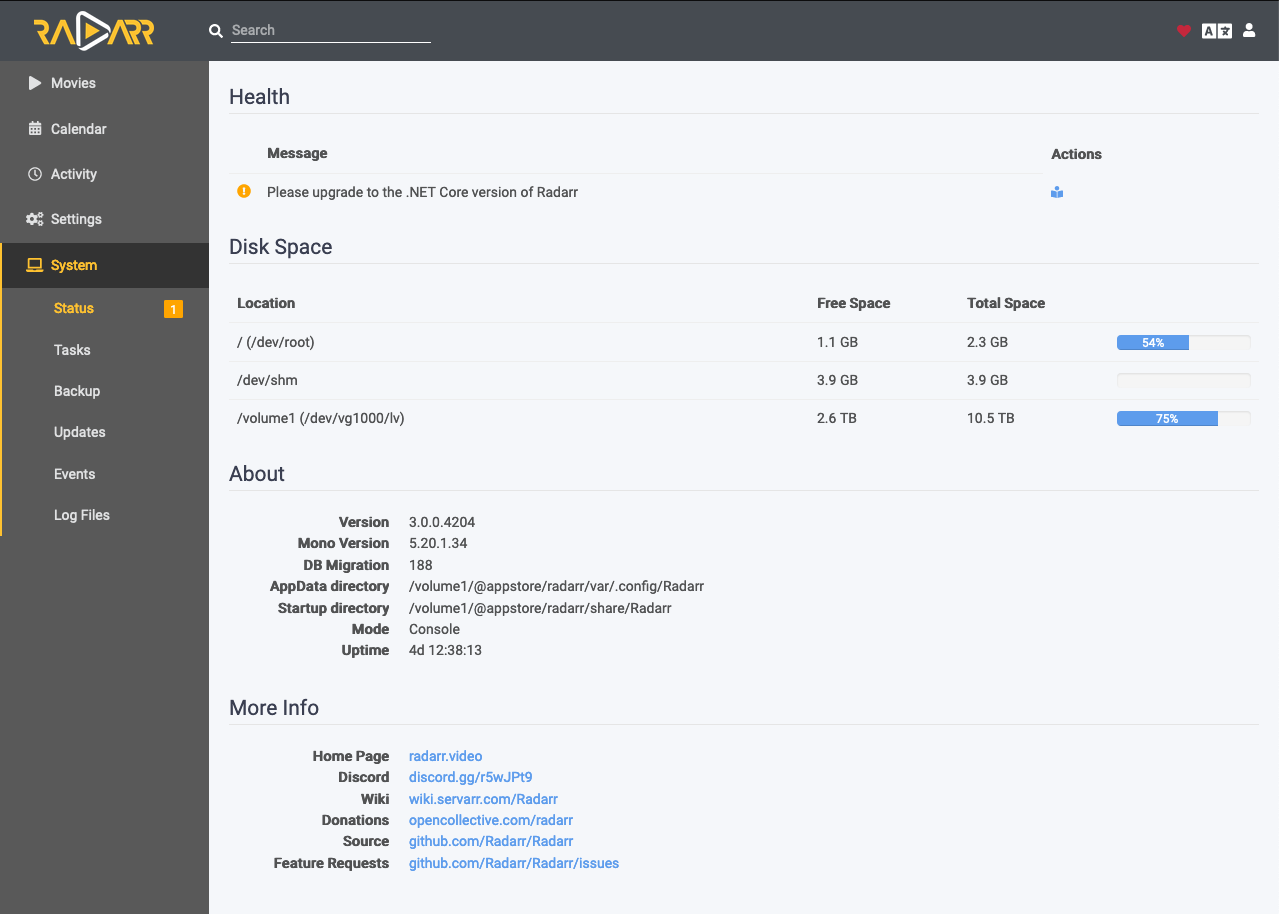
Thanks for the feedback. Do include information on which platform you tested it on (model of Synology and which .spk file you used). As for the "_Please upgrade to the .NET Core version of Radarr_" message this seems to be related to changes in Microsoft's .NET which is the language that Radarr is written in.
My understanding based on the article "Differences between mono and .NET Core" is that .NET Core is a new version that runs on multiple platforms (Windows, Linux and Mac) whereas we currently use Mono that allows the older .NET Framework to run on non-Windows platforms. The new Radarr has been compiled on a few platforms using .NET Core including x64, arm64 and arm.
Getting those specific versions cross compiled into packages is a bit beyond my expertise but I have started working on it. For now, all this warning says in my view is that you are running on Mono rather than .NET Core. Both types run the same from my tests so far.
See below for the screenshots of Radarr v3 running on both .NET Core and Mono variants.
_VirtualDSM (DSM 6.2.3)_

_DS916+ (DSM 6.2.3)_
houndtt
on 10 Dec 2020
Thanks for the feedback. Do include information on which platform you tested it on (model of Synology and which .spk file you used).
Since you asked: I'm on a DS1819+, so Denverton packages. I don't think there's much of a rush in upgrading though, Mono will probably still be fine for a while.
NMe84
on 10 Dec 2020
Feedback from a user here! I installed the SPK successfully (I went with the x64 package, as I am on a DS1019+). Everything loads and things generally seem to be running. I restored from a backup.
A few things aren't working. First and foremost, I cannot add new movies. When I search, it spins and eventually times out.
Second, if I look in the logs I see a fair number of timeouts for network requests:
[v3.0.0.4204] System.Net.WebException: The operation has timed out.: 'https://radarr.servarr.com/v1/update/nightly?version=3.0.0.4204&os=linux&arch=X64&runtime=mono&runtimeVer=5.20.1.34&active=true' ---> System.Net.WebException: The operation has timed out.
  at System.Net.HttpWebRequest.RunWithTimeoutWorker[T] (System.Threading.Tasks.Task`1[TResult] workerTask, System.Int32 timeout, System.Action abort, System.Func`1[TResult] aborted, System.Threading.CancellationTokenSource cts) [0x000e8] in /spksrc/native/mono/work-native/mono-5.20.1.34/mcs/class/System/System.Net/HttpWebRequest.cs:956
  at System.Net.HttpWebRequest.GetResponse () [0x0000f] in /spksrc/native/mono/work-native/mono-5.20.1.34/mcs/class/System/System.Net/HttpWebRequest.cs:1218
  at NzbDrone.Common.Http.Dispatchers.ManagedHttpDispatcher.GetResponse (NzbDrone.Common.Http.HttpRequest request, System.Net.CookieContainer cookies) [0x00125] in <c3304113e0934557b92848ed63d0f8d1>:0
   --- End of inner exception stack trace ---
  at NzbDrone.Common.Http.Dispatchers.ManagedHttpDispatcher.GetResponse (NzbDrone.Common.Http.HttpRequest request, System.Net.CookieContainer cookies) [0x001ee] in <c3304113e0934557b92848ed63d0f8d1>:0
  at NzbDrone.Common.Http.HttpClient.ExecuteRequest (NzbDrone.Common.Http.HttpRequest request, System.Net.CookieContainer cookieContainer) [0x00080] in <c3304113e0934557b92848ed63d0f8d1>:0
  at NzbDrone.Common.Http.HttpClient.Execute (NzbDrone.Common.Http.HttpRequest request) [0x00008] in <c3304113e0934557b92848ed63d0f8d1>:0
  at NzbDrone.Common.Http.HttpClient.Get (NzbDrone.Common.Http.HttpRequest request) [0x00007] in <c3304113e0934557b92848ed63d0f8d1>:0
  at NzbDrone.Common.Http.HttpClient.Get[T] (NzbDrone.Common.Http.HttpRequest request) [0x00000] in <c3304113e0934557b92848ed63d0f8d1>:0
  at NzbDrone.Core.Update.UpdatePackageProvider.GetLatestUpdate (System.String branch, System.Version currentVersion) [0x000de] in <d190c5eb47524ebc878d54daaf20567d>:0
  at NzbDrone.Core.Update.CheckUpdateService.AvailableUpdate () [0x00016] in <d190c5eb47524ebc878d54daaf20567d>:0
  at NzbDrone.Core.Update.InstallUpdateService.GetUpdatePackage (NzbDrone.Core.Messaging.Commands.CommandTrigger updateTrigger) [0x00015] in <d190c5eb47524ebc878d54daaf20567d>:0
  at NzbDrone.Core.Update.InstallUpdateService.Execute (NzbDrone.Core.Update.Commands.ApplicationCheckUpdateCommand message) [0x00007] in <d190c5eb47524ebc878d54daaf20567d>:0
  at NzbDrone.Core.Messaging.Commands.CommandExecutor.ExecuteCommand[TCommand] (TCommand command, NzbDrone.Core.Messaging.Commands.CommandModel commandModel) [0x000e0] in <d190c5eb47524ebc878d54daaf20567d>:0
  at (wrapper dynamic-method) System.Object.CallSite.Target(System.Runtime.CompilerServices.Closure,System.Runtime.CompilerServices.CallSite,NzbDrone.Core.Messaging.Commands.CommandExecutor,object,NzbDrone.Core.Messaging.Commands.CommandModel)
  at System.Dynamic.UpdateDelegates.UpdateAndExecuteVoid3[T0,T1,T2] (System.Runtime.CompilerServices.CallSite site, T0 arg0, T1 arg1, T2 arg2) [0x0011e] in /spksrc/native/mono/work-native/mono-5.20.1.34/external/corefx/src/System.Linq.Expressions/src/System/Dynamic/UpdateDelegates.Generated.cs:1874
  at (wrapper dynamic-method) System.Object.CallSite.Target(System.Runtime.CompilerServices.Closure,System.Runtime.CompilerServices.CallSite,NzbDrone.Core.Messaging.Commands.CommandExecutor,object,NzbDrone.Core.Messaging.Commands.CommandModel)
  at NzbDrone.Core.Messaging.Commands.CommandExecutor.ExecuteCommands () [0x0008c] in <d190c5eb47524ebc878d54daaf20567d>:0
If I manually visit the network address in the log via a web browser or curl, it works just fine. My understanding is that this may be an issue with Mono, but I am not sure.
Finally, when I go to the System -> Updates tab, I get only the message "Failed to fetch updates." That's it.
Any ideas on any of the above?
cleverdevil
on 13 Dec 2020
Okay, rapid response to my own issues above! I found something out on the web that said Radarr under Mono has some trouble with IPv6, and sure enough, I disabled IPv6 on my Synology, restarted Radarr, and now everything seems to work again.
cleverdevil
on 13 Dec 2020
@cleverdevil, I'm glad you got the issue resolved and thanks for sharing. @publicarray was kind enough to merge my PR into the main codebase so we should see a new build released to the SynoCommunity soon. This should bring this open issue to a close at that point.
houndtt
on 14 Dec 2020
Thanks to @houndtt's contribution radarr works again with v3. If anyone has a problem with the latest release (v20201214-13) please open a new issue.
 publicarray
on 18 Dec 2020
publicarray
on 18 Dec 2020
Related issues
 eL-Zotto
·
6Comments
eL-Zotto
·
6Comments
 regblade85
·
8Comments
regblade85
·
8Comments
 R1skNt
·
6Comments
R1skNt
·
6Comments
 charmisuk
·
5Comments
charmisuk
·
5Comments
 krazun
·
7Comments
krazun
·
7Comments
Most helpful comment
One thing I had to do to get V3 to be detected as running by synology correctly was to manually edit the service script to change the pid file name from nzbdrone to radarr (i.e. here: https://github.com/SynoCommunity/spksrc/blob/master/spk/radarr/src/service-setup.sh#L12)