Spksrc: Beta / Test packages for DSM 6
Updated 14-07-2018: This issue is now closed as bulk-package-conversion has finished.
Up-vote the issue for the package you are missing here or open a new issue in case we don't have one for the package you need!
~### New packages converted for generic service account, DSM6 compatibility and new architecture compatibility. All are still in testing!~
~### Check the version you need here. Note that the x64 package covers multiple architectures.~
- Syncthing (not finished!)
~Packages will be removed once they are published via the regular repository. Packages downloaded here will then automatically update to the latest official version.*~
 Safihre
All 289 comments
Continuing our discussion from https://github.com/SynoCommunity/spksrc/pull/3121#issuecomment-363897704 I had to manually fix all the download/media folders to make it work. That includes every location added to Sonarr if you have more than one. (I have external drives)
 Stanzilla
on 9 Feb 2018
Stanzilla
on 9 Feb 2018
I have managed to get the apollo lake versions of Sonarr and Radarr working well with Mono/Jacket etc behind also appear to work well on my DS918+.
Today I tried Transmission and although it seemed to install fine, where I used login credentials for a user I created just for transmission that I have just given read/write permissions to my downloads folder, on launch I get:
401:unathorised
unauthorised user
I saw that the SC-download group had a custom permission for my downloads folder so I tried changing this to read/write but this still gives me the same problem. I also uninstalled and reinstalled a couple of times and triple checked permissions and credentials in the GUI.
Does this mean there is a package problem or am I doing something incorrect?
Thanks and have donated
UPDATE - I tried reloading the IP with :9091 and I got a login window. I first tried my normal disk station login but no dice, then out of pure interest I tried logging in with the credentials I created for transmission. Amazingly this worked. It is strange (at least for me) that I would have to login as the transmission user, as I do not have to login for the sonarr or radarr users I created for those apps...
 ghost
on 10 Feb 2018
ghost
on 10 Feb 2018
You are mixing things up I think. During the installation you can choose the username/password for the interface, this is also mentioned clearly.
Seperatly there is the disk permissions, which are managed through sc-download and have default read/write and some more.
These are not linked and it was mentioned during first installation in the wizard.
Safihre
on 10 Feb 2018
Thanks for clarifying. Clearly I need to play closer attention to the instructions on page!
ghost
on 10 Feb 2018
@Safihre @ymartin59
I was looking at some of the package you made available here and noticed some issue's
First of all the folder conf containes double version of files.
Probably a file and hard link.
This can cause problems during installation of a package.
Secondly:
I noticed in the INFO file the following.
thirdparty= "yes"
This is not applicable anymore as of DSM 5
ctl_stop="yes"
Does not belong in the INFO file.
It is not a command known to DSM
Thirdly:
I was doing some testing of my own packages and I noticed something changed.
The package is run as root if I do not use the "su" command to run it as the desired user.
So maybe this must be changed in the start-stop-status script, just as the command used for DSM 5.
 BenjV
on 13 Feb 2018
BenjV
on 13 Feb 2018
@BenjV
The package is run as root if I do not use the "su" command to run it as the desired user.
On DSM6? I didn't test specifically, but all files created by the packages have the right user:group and the packages don't have access to non-package-user locations. So seems they are not root?
@ymartin59 Will you fix the other things as part of #3123?
Safihre
on 13 Feb 2018
This is on DSM 6 only.
I shall test again, maybe I made a mistake myself.
I just tested it on my own package (a python) application and saw that the pid file created by the application had as owner "root".
This changes to the correct user when I put su ${SYNOPKG_PKGNAME} in front of the start command in the start-stop-status script.
I installed your sickbeard_custom and indeed it is running as sickbeard_custom and not as root.
So I have to find out what is wrong with my own package.
By the way your package does not create a shortcut in DSM desktop nor does it create a startup link in the package centre.
I am not sure why but I shall try to find out.
BenjV
on 13 Feb 2018
@BenjV Yes if you could find out why that shortcut fails, that would be great. Maybe the symlinks? We already found a problem with the JSON. It should be "allUsers": true and not "allUsers": "true". But I changed that locally and it didn't give me a link.
Here's other stuff listed that's holding things up, including the shortcut thing: https://github.com/SynoCommunity/spksrc/pull/3123#issuecomment-364740501
As side note to confirm correct user for the listed packages:
sabtest@XPTest:/$ ls -ltr /volume1/@appstore/couchpotatoserver/var
-rw-rw-rw- 1 sc-couchpotatoserver couchpotatoserver     6 Dec 26 14:40 couchpotatoserver.pid
sabtest@XPTest:/$ ls -ltr /volume1/@appstore/sabnzbd/var
-rw------- 1 sc-sabnzbd sabnzbd    5 Feb 12 18:00 sabnzbd.pid
I just found that "allUsers": true mistake by myself and changing that gave me a link in the package centre, but no icon on the dsm desktop.
BenjV
on 13 Feb 2018
Please also support for ds3617xs. Almost nothing shows up in package manager
 IndoDanny
on 13 Feb 2018
IndoDanny
on 13 Feb 2018
@IndoDanny we are testing the packages, that's the whole point of this post...
You can download the packages right here, you need the broadwell packages.
Safihre
on 13 Feb 2018
Can someone explain to me what it means when it asks me to give permission to use the "fork" for Sickbeard. Sorry new around GitHub... used to just installing packages.
 remirr
on 13 Feb 2018
remirr
on 13 Feb 2018
Thx for your answer! If I download the packages and install them manually, will they get updates with the package manager in the future, when everything is working ok again?
IndoDanny
on 13 Feb 2018
@Safihre @ymartin59
I just found out why the package icons are not appearing on the DSM desktop
You have to change the app/conf file.
Most application are not local but have a browser interface and so grantPrivilege has to be set to "all" and not to "local".
Possible settings for "grantPrivilege" are:
  "all"
  "local"
  "ldap"
I would also suggest to add the "advanceGrantPrivilege" to this file.
That will give the possibility to more settings via the DSM control panel, privilege settings.
You can now grant access for an applicatie to for example a group of users.
So add the two lines below for all packages.
  "grantPrivilege": "all"
  "advanceGrantPrivilege" : true
Is there someone who can answer my question above? I am still postponing manual install because I am still hesitating due to not knowing this..
IndoDanny
on 15 Feb 2018
@IndoDanny I confirm that manual install does not break standard update process from Package Center.
 ymartin59
on 15 Feb 2018
ymartin59
on 15 Feb 2018
@ymartin59 Thank you for your answer. Then I will manually install the packages that are mentioned above in the list.
IndoDanny
on 15 Feb 2018
Added Deluge to the list.
In case of problems, please post:
/volume1/@appstore/deluge/var/delug.log and
/volume1/@appstore/deluge/var/delug_install.log
Safihre
on 15 Feb 2018
I can't install CouchPotato, it says missing package python, but python is installed: DS718+/DSM 6.1.5-15254

 carles-estevadeordal
on 15 Feb 2018
carles-estevadeordal
on 15 Feb 2018
Did you use the Python package from this post? https://github.com/Safihre/spksrc/releases/tag/python-dsm61-new-all
Stanzilla
on 15 Feb 2018
Thank you for your quick response, no, I had no Idea I had to manually install that python package... Which one do I have to use?
carles-estevadeordal
on 15 Feb 2018
The one for your platform, https://github.com/SynoCommunity/spksrc/wiki/Architecture-per-Synology-model
Stanzilla
on 15 Feb 2018
I found it already it is apollolake, thank you very much!
edit
It still does not work though:


carles-estevadeordal
on 15 Feb 2018
@Safihre the Python package doesnt work with hydra and multi search. are there any fixes?
 Err0r0815
on 15 Feb 2018
Err0r0815
on 15 Feb 2018
What do you mean by "doesn't work"?
Safihre
on 15 Feb 2018
this message show up:
https://user-images.githubusercontent.com/3859554/36272341-88a65292-1281-11e8-8ec8-b4c715c883d1.png
Err0r0815
on 15 Feb 2018
@oneirik install the couchpotato version you downloaded from this page, not from the Community tab.
Safihre
on 15 Feb 2018
mmm I suppose you mean:

from: https://github.com/Safihre/spksrc/releases?after=python-dsm61-new-all
I will give it a try, I really did not know where to find the packages to install them manually...
carles-estevadeordal
on 15 Feb 2018
It installed although with a warning:

I actually do not know if I should see it in the Main Menu or anywhere, but the information about it is that it is running although it doesn't seem to appear anywhere in the UI.
Edit:
I looked through the configuration and I am able to access the couchpotato configuration at the port 5050. So it is a partial success and it is working :-) thank you very much.
carles-estevadeordal
on 15 Feb 2018
The warning is there to tell you that you have to grant access rights to files needed by the package has to be done via the group sc-download.
The same is true is you want to give another application or user access right to the files produced by the package.
As of DSM 6 all packages are running under an hidden user that is also no in the group "users" so privileges has to be granted via the sc-download group.
The fact that there is no icon on the desktop is a glitch in all the test packages at the moment, as I explained in an earlier post in this topic.
BenjV
on 15 Feb 2018
As of now, I have decided to wait until the final packages are released. I have just spent 2 weeks re-setting up my NAS due to a filesystem error during a read/write operation and cannot do that again. I understand it was in no part the fault of these packages but I cannot take the risk.
Is there any timeline on when these will be final? Specifically, Python and Sabnzbd? I see that Sickbeard and Cloudstation already are. (I am referring to the about Apollolake Chipset - DS918+.)
remirr
on 15 Feb 2018
Thank you very much for the explanation! I'm just happy that there is a workaround to the issue.
carles-estevadeordal
on 15 Feb 2018
@Safihre you may remove MC from your list as I have just published it
ymartin59
on 15 Feb 2018
@remirr If you have the possibility, you could install Virtual DSM and test the packages there first
IndoDanny
on 15 Feb 2018
Can't get deluge running on my Synology 918+. Each time I run the package, it comes back with _"Failed to run the package service."_
I installed the Python package python_apollolake-6.1_2.7.14-17, followed by deluge_apollolake-6.1_1.3.15-9.
Log files attached, although _deluge.log_ doesn't update each time I try to run the package.
 tnaseem
on 16 Feb 2018
tnaseem
on 16 Feb 2018
@tnaseem could you maybe also share /var/log/synpopkg.log? Only need the last parts of it, from yesterday/today.
Safihre
on 16 Feb 2018
Here you go...
synopkg.log
From that log it looks like it can't locate the start-stop-status. The scripts folder is also missing in the /volume1/appstore/deluge folder. Could this be the problem?
As a side note, if I run _deluge-web_ directly from the command line (in _volume1/appstore/deluge/env/bin_), the web interface does run. However, I get the following warning as it runs...
:0: UserWarning: You do not have a working installation of the service_identity module: 'No module named pyasn1.codec.der.decoder'. Please install it from https://pypi.python.org/pypi/service_identity and make sure all of its dependencies are satisfied. Without the service_identity module, Twisted can perform only rudimentary TLS client hostname verification. Many valid certificate/hostname mappings may be rejected.
Then when I attempt to start the daemon in the web ui _Connection Manager_, the following error pops up in the Terminal:
[ERROR ] 19:43:03 client:585 Deluge cannot find the 'deluged' executable, it is likely that you forgot to install the deluged package or it's not in your PATH.
[ERROR ] 19:43:03 json_api:240 Error calling methodweb.start_daemon
[ERROR ] 19:43:03 json_api:241 [Errno 2] No such file or directory
Traceback (most recent call last):
File "/volume1/@appstore/deluge/env/lib/python2.7/site-packages/deluge-1.3.15-py2.7.egg/deluge/ui/web/json_api.py", line 232, in _handle_request
result = self._exec_local(method, params, request)
File "/volume1/@appstore/deluge/env/lib/python2.7/site-packages/deluge-1.3.15-py2.7.egg/deluge/ui/web/json_api.py", line 199, in _exec_local
return meth(*params)
File "/volume1/@appstore/deluge/env/lib/python2.7/site-packages/deluge-1.3.15-py2.7.egg/deluge/ui/web/json_api.py", line 863, in start_daemon
client.start_daemon(port, get_config_dir())
File "/volume1/@appstore/deluge/env/lib/python2.7/site-packages/deluge-1.3.15-py2.7.egg/deluge/ui/client.py", line 588, in start_daemon
raise e
OSError: [Errno 2] No such file or directory
Hope this extra info helps.
tnaseem
on 16 Feb 2018
What if you run the daemon from the command line?
sudo env PYTHON_EGG_CACHE=/volume1/@appstore/env/cache /volume1/@appstore/env/bin/deluged
I presume you meant:
sudo env PYTHON_EGG_CACHE=/volume1/@appstore/deluge/env/cache /volume1/@appstore/del uge/env/bin/deluged
I get the same error on the command line:
:0: UserWarning: You do not have a working installation of the service_identity module: 'No module named pyasn1.codec.der.decoder'. Please install it from https://pypi.python.org/pypi/service_identity and make sure all of its dependencies are satisfied. Without the service_identity module, Twisted can perform only rudimentary TLS client hostname verification. Many valid certificate/hostname mappings may be rejected.
And the web interface this time is not running. "Site cannot be reached" ERR_CONNECTION_REFUSED.
tnaseem
on 16 Feb 2018
This is the Deluge daemon? Not the web-daemon, but the actual program?
Safihre
on 16 Feb 2018
Yes. Sorry.
If I then run deluge-web, the daemon still shows as offline.

Hitting Start Daemon there, I get:
[ERROR ] 20:16:52 client:585 Deluge cannot find the 'deluged' executable, it is likely that you forgot to install the deluged package or it's not in your PATH.
[ERROR ] 20:16:52 json_api:240 Error calling methodweb.start_daemon
[ERROR ] 20:16:52 json_api:241 [Errno 2] No such file or directory
Traceback (most recent call last):
File "/volume1/@appstore/deluge/env/lib/python2.7/site-packages/deluge-1.3.15-py2.7.egg/deluge/ui/web/json_api.py", line 232, in _handle_request
result = self._exec_local(method, params, request)
File "/volume1/@appstore/deluge/env/lib/python2.7/site-packages/deluge-1.3.15-py2.7.egg/deluge/ui/web/json_api.py", line 199, in _exec_local
return meth(*params)
File "/volume1/@appstore/deluge/env/lib/python2.7/site-packages/deluge-1.3.15-py2.7.egg/deluge/ui/web/json_api.py", line 863, in start_daemon
client.start_daemon(port, get_config_dir())
File "/volume1/@appstore/deluge/env/lib/python2.7/site-packages/deluge-1.3.15-py2.7.egg/deluge/ui/client.py", line 588, in start_daemon
raise e
OSError: [Errno 2] No such file or directory
tnaseem
on 16 Feb 2018
There is a problem with the Python package I see now. It's an older version that lacks pyasn1 and start-stop-daemon. Will report back when I have recompiled. Travis is not listening to me right now..
Safihre
on 16 Feb 2018
I do not see git anymore in the package center for ds3617xs in my VM DSM. Has it been removed? Also not in the list above.
IndoDanny
on 16 Feb 2018
If I look at the errorlog from @tnaseem then there is something wrong with the deluge package and not with python.
The virtual environment which hold the site packages is addressed with "/volume1//env/lib/python2.7/.....
The double slash after volume1 (//) is wrong and should be just one slash (/).
BenjV
on 17 Feb 2018
Thanks for point that out, the whole path is wrong. It should include the @appstore location etc. Will investigate.
Safihre
on 17 Feb 2018
Instead of "volume1/ " you should use ${SYNOPKG_PKGDEST} in the script.
BenjV
on 17 Feb 2018
@BenjV it's weird, I do that everywhere: https://github.com/SynoCommunity/spksrc/pull/3153/files
Or do you see a place where I forgot?
Safihre
on 17 Feb 2018
@tnaseem could you download the newly compiled Python package here and then re-install the Deluge package and see if it runs then? (regularly from the package center, not command line)
Indeed there was also a problem with pyasn1.
Safihre
on 17 Feb 2018
@Safihre Just installed that version and deluge ran fine this time :) Many thanks for sorting this!
I did have issues trying to download anything, but it turned out to be a permissions problem on the Download folder. It looks like deluge applies _sc-deluge:deluge_ ownership to the downloads. So, I just gave that user (_sc-deluge_) RW access to the download folder, which seems to have fixed it. Funny thing is, it did write to the folder and only complained about a permissions error half way through the download, having already written into the folder. Very strange. I've included the deluge.log if it's any use:
Also noticed that the env folder has _root:root_ ownership. Is this correct?

The deluge-web.log has errors which state it doesn't have write access to the cache within, so wondering if this is the reason. Will change it and see what happens.
Apart from that, all seems to be working great! Many thanks for persevering with this. :)
UPDATE:
I changed the ownership of the _env_ folder to _sc-deluge:deluge_ and it no longer complains about not having write access to the cache folder. Hope this helps.
tnaseem
on 17 Feb 2018
The whole user/groups situation is big mess atm :/ especially when mixing released packages with the testing ones here.
Stanzilla
on 17 Feb 2018
No it is not a big mess, you just don't understand the way it works.
As of DSM 6 new packages are no longer running as an normal user but as a hidden user to whom you cannot give privs.
Also this hidden user is no longer member of the group 'users'.
So it was decided to add this hidden user to a normal group being sc-media (or sc-download) and via that group give the enduser the possibility to grant privs to files and folders they create (or must read).
Privs has to be given via the group sc-media, but you have to remember that existing folders and files keep their old setting if you just give that group access rights.
You have to change the access rights of existing folders and files explicit.
And most application don't set the privs of folders explicit, which means they get the same privs of the folder they are writing the file to.
BenjV
on 17 Feb 2018
So what do I have to change the download and media folder privs to? Download folder is sc-transmission:transmission atm and media is root:sc-media
Stanzilla
on 17 Feb 2018
@tnaseem Thanks for pointing out that root:root problem, this is something I will fix 👍
@Stanzilla In theory having sc-download and sc-media permissions everywhere should work. Since all the packages are part of those groups.
Safihre
on 17 Feb 2018
@Stanzilla
You obviously have no idee how the linux privilege system works despite the fact that you are trying to use the commandline functions.
So I suggest you just stay to the DSM gui.
As I said before make sure the existing folder, subfolders and all the files in there are accessible via the group sc-media.
Use FileStation to recursively set the group sc-media to all those.
New files created in those folder will automatically be accessible by everybody in the sc-media group.
Don't try to use the package user for anything, that will give unexpected result from DSM!!!!!
The package user belongs to DSM and is not to be used by you.
BenjV
on 17 Feb 2018
@Safihre On that subject... I forgot to mention that the first thing I did was to set the Downloads folder (in fact the whole share, at one point, to test) to the _sc-download_ group. I thought it was enough as deluge appeared to be writing to the folder fine, until mid-way through when it gave permissions errors. That's when I also added the 'sc-deluge' to have RW to the folder too.
Don't try to use the package user for anything, that will give unexpected result from DSM!!!!!
The package user belongs to DSM and is not to be used by you.
@BenV - Thanks. I didn't try _mc-media_ group so will give this a go next (removing _sc_deluge_ user permissions!), although it doesn't appear to be listed in the Filestation/Control Panel, unlike _sc-download_. Will just do it via the command line, I guess...
Update:
The _sc-media_ group doesn't appear to exist on my NAS. Checked _/etc/groups_ too. I then created the group just to see what happens and used that, but doesn't affect anything, as I suspected. Bit confused... So, just gone back to giving permission to the _sc-deluge_ user again for now.
tnaseem
on 17 Feb 2018
@tnaseem
The confusion is that some packages are using sc-media and some sc-download.
That was due to historical reasons.
You just have to use the one that is created by the package and not create one yourself.
And as I said before stay away from doing anything with the sc-....... users (like sc-deluge) that will mess-up the DSM rights system.
@ymartin59 @Safihre
As you can see using(keeping) two different sc- groups (sc-media and sc-download) is very confusing and can result in conflicts
Please consider removing the sc-download from all packages.
If a package such as transmission uses sc-download to create folders and files and a package like SickRage-Custom (that needs those files and folders) uses sc-media then there is a conflict because a folder or file cannot belong to two groups.
If you insist on using both (sc-media and sc-download) then you have to make sure that all the package users are in both groups.
BenjV
on 18 Feb 2018
Indeed we already agreed to switch all download related stuff, including the processing tools to sc-download.
I also created the code to add users that used to belong to sc-media also to that group again, to preserver backwards permission compatibility. https://github.com/SynoCommunity/spksrc/pull/3092
Unfortunately still not checked or merged (@ymartin59!) and thus I cannot change the other packages to be sc-download...
Safihre
on 18 Feb 2018
@BenjV Many thanks for the extra info. All makes sense. Of course, I'll remove the _sc-deluge_ user permissions once the groups thing has been sorted.
So, just to clarify, I'm guessing that this _sc-download_ group hasn't been applied to the deluge package yet, which is why I can't get it to gain RW access to the Downloads folder without the aforementioned 'hack'? (I guess this is for @Safihre!)
PS. Just a quick one to say many thanks for working so tirelessly to keep these packages alive. You guys rock. And on that note, it's only right that I should donate... Done :)
tnaseem
on 18 Feb 2018
The sc-download is also active in the Deluge package, so I don't really know why it's not working..
Safihre
on 18 Feb 2018
Don't forget that permissions settings don't effect existing folders and files.
BenjV
on 18 Feb 2018
@BenjV we do extract in most packages the download and other directories from the Config files, in order to apply the right permissions recursively during upgrade. However, in the case of packages like Sonarr we don't do that for every show folder. Hopefully that's caught by adding the user to the existing sc-media group. But not for files that were created when it was still users.
Safihre
on 18 Feb 2018
Yes existing file and folder are the problem and the folders are the main issue because most packages (like Sonarr) don't do anything with file privs so new file will get the privs from the existing folder.
Adding the user to sc-media does not help in this case, because that does not affect existing files and folders, they keep there existing user:group settings.
This problem cannot be solved by the package installation, this has to be done by the endusers themselves, but is hard to explain to them because most endusers do not understand the linux privilege system at all.
BenjV
on 18 Feb 2018
I did set _sc-download_ group to have RW access originally (after reading the info that popped up during the deluge package install). What then happened was that during a torrent download, the file does get written to the folder, but part way through it would give me a permissions error. Only setting RW to _dw-deluge_ user would get around it.
Having said all that, I've just tried it again now (removed _sc-deluge_ and leaving _sc-download_ with RW access) and it now seems to be working! I'm wondering then (and now clutching at straws) whether that root:root permissions in the deluge folder had anything to do with it before?
Anyway, seems to be working now for some reason!
tnaseem
on 18 Feb 2018
Just commenting to say that nzbget works like a charm on my 218+. Did not need to install any additional packages, permissions were set as expected.
Thanks Safihre for all your hard work.
 grinningrock
on 19 Feb 2018
grinningrock
on 19 Feb 2018
Sonarr and Radarr work perfectly on my ds918+. Trying to install Mylar though and it complains about python, so i installed the one here but still got the same missing package message.
Seems to be the same problem as @oneirik
 hipstersmoothie
on 21 Feb 2018
hipstersmoothie
on 21 Feb 2018
Yes, it doesn't like that combination. I am waiting on the merging of #3092 so that I can update Mylar.
Safihre
on 21 Feb 2018
@Safihre I did an internal update of Radarr and after that it didn't start up anymore.
I was already running your beta pkg, now installed the latest pkg, but not starting either.
What do you want me to provide for analysis?
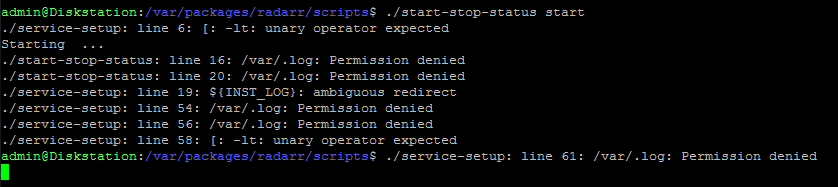
 piejanssens
on 21 Feb 2018
piejanssens
on 21 Feb 2018
@piejanssens In Package Center, just try to start it. Then click View log in Package Center after a while (at least on my NAS it's really slow to start). Output should be there.
Safihre
on 21 Feb 2018
@Safihre Ha! Through Package Center it is now running! So the pkg update you created sure fixed something :smile: Thanks!
piejanssens
on 21 Feb 2018
Yes the new start-stop-status files cannot be run standalone anymore :)
Safihre
on 21 Feb 2018
@Safihre Sorry to bother you but are there any plans for NZB Hydra?
ghost
on 21 Feb 2018
Hello everybody,
can someone tell me which package I would have to install from ffmpeg: https://github.com/m4tt075/spksrc/releases/tag/ffmpeg-3.3.3-arm for my DS2415 +? @m4tt075
Is there perhaps still a little feedback when it is again "officially" supported and whether the installation would have any effect on my system for Emby?
Sure you noticed my questions that it's all pretty new to me, so thank you very much for your help and feedback.
Best regards
Seger
 Seger85
on 22 Feb 2018
Seger85
on 22 Feb 2018
Try the x64 one.
Safihre
on 22 Feb 2018
That went fast, thanks for the quick feedback. If the package is offered again officially, it updates the library again, right? Can you tell me again in general, if it makes sense to install the package for the better support for Emby, or does the issolated package have no effect on Emby or any other programs at all?
Edit 1: DS2415x runs perfectly with x64
Thanks again and best regards
Seger85
on 22 Feb 2018
NZBHydra added to the list!
@Seger85 Sorry I don't know that as I am not a user of those packages myself :/
Safihre
on 22 Feb 2018
@Safihre Hi, is there any plans for subliminal updated working addon ?
 Teryon
on 22 Feb 2018
Teryon
on 22 Feb 2018
@Diaoul Would you be able to fix Subliminal? I looked at it, but this package is setup completly different, I have no idea where to start.
Safihre
on 23 Feb 2018
I have problems with permissions even with new packages :/
SabNZBd : Cannot change permissions of /volume1/Media/Downloads/Incomplete
Downloads done with Sickbeard-custom are unavailable from my windows.
I've gave full control autorisation to sc-media and sc-download !
Is it something because of old package settings ?
I've empty my DS, wath is the good ways to do with fresh install ?
Do I need to create all folder by myself before setting them in some package ?
Do I only need to give full acces to sc-download and/or sc-media ?
I'm lost.
Teryon
on 23 Feb 2018
You should give full access to yourself (administrators) and indeed to both sc-media and sc-download. Note that this later will be sc-download only in the final packages!
Make sure to also check the option that it applies to sub-folders.
Safihre
on 23 Feb 2018
RuTorrent doesn't start any more will this also be updated
 MichiDe
on 23 Feb 2018
MichiDe
on 23 Feb 2018
@Safihre will NZB Hydra have an apollolake version? Installing the noarch version causes a git error.
ghost
on 23 Feb 2018
There is only 1 version since it's just a bunch of python files. What do you mean by git error? During installation? During usage?
Safihre
on 23 Feb 2018
Tried the most recent "x64" and "apollolake" python releases.
After installing python, I still get an error that the python package is missing when attempting to install packages that require it.
Let me know if there's a trick to getting these to work or if they still need some work.
 ChrisAnonymous
on 23 Feb 2018
ChrisAnonymous
on 23 Feb 2018
@Safihre NZB Hydra said Git not installed. Had Git Server installed, but I installed your Git from package center and it installs now. Sorry about that.
ghost
on 23 Feb 2018
@ChrisAnonymous in the Package Center settings, set that you trust packages from Any Publisher. I think this way you can use this Python for other packages. Otherwise you can only use packages listed in this post for now.
Hoping @ymartin59 will release this new Python soon for more archs via the official repository. Your package should auto update after that.
Safihre
on 24 Feb 2018
i installed the latest beta for nzbget. it seems that the persmissions are not always getting set correctly on files downloaded by nzbget. the sc-download group is not being added to files but it is on folders. and persmission inheritance does also not work.
 M0UL
on 24 Feb 2018
M0UL
on 24 Feb 2018
Packages like nzbeget do not set permissions on folders and files they create.
Instead the files get the default permission e.g. the permissions of the folder.
So if nzbget download something to an existing folder then the file will get the permission of that folder.
When installing a package the existing files and folders are not change.
BenjV
on 24 Feb 2018
We do set the Synology permissions specifically to inherit, but if the app forces some Linux permissions this might brake. There's not much more we can do than take care of the folders and hope the app's don't force too many permissions themselves.
Safihre
on 24 Feb 2018
great, so i have to reset the permission every time nzbget download something.
M0UL
on 24 Feb 2018
No, try setting through File Station again the permissions on the folder and put the checkmark that they should propagate to sub folders/files.
For me this wasn't nessecary, it automatically applied the right permissions because nzbget was running as this user, so it's strange that's not happening for you.
Safihre
on 24 Feb 2018
Transmission-all is only available for 5.2, is it the same one for DSM 6.1 ?
Teryon
on 24 Feb 2018
@Teryon oops sorry! It seems the compilation failed due to failed downloads of dependencies. Restarting now.
Safihre
on 24 Feb 2018
@Safihre done already a few times but it keeps happing, for newly downloaded flles only have nzbget and sc-nzbget permissions. and it is working for folders
M0UL
on 24 Feb 2018
@M0UL aah, yes this is exactly what should happen and should work, because sc-nzbget is part of sc-download. Isn't that the case?
Since sc-download is also used by the other packages and package-users, they should be able to access each others files.
Safihre
on 24 Feb 2018
if that is true why is sonarr complaining that it cannot access the files?
M0UL
on 24 Feb 2018
Could you update to the newest Sonarr? I rebuild a new version yesterday (new link). It didn't used to be part of sc-download but of sc-media, this could be the problem. Or add sc-nzbget to sc-media.
Safihre
on 24 Feb 2018
doing that now.
also the package centersays nzbget is not running, even when it is.
M0UL
on 24 Feb 2018
Please also try the latest version of nzbget. It was updated also. If it still shows not running, could you post the contents of /volume1/@appstore/nzbget/var/?
Safihre
on 24 Feb 2018
Thanks for Transmission.
I 'll look more into it tonight but there seems there is a problem with last sickbeard-custom and Medusa fork, fork crashing when looking a tv show.
Teryon
on 24 Feb 2018
This seems to be a Medusa problem: https://github.com/SynoCommunity/spksrc/issues/3111#issuecomment-358285695
Safihre
on 24 Feb 2018
@Safihre Please remove links to Mono, Jackett and FFmpeg - I have just published them.
ymartin59
on 25 Feb 2018
Just so you know, so far, transmission and nzbget works perfectly on a new install from scratch (full reset of DS1513+ cedarview).
Edit1 : Sickbeard-custom too
Teryon
on 25 Feb 2018
Hello, any news about tmux package?
 tassadar81
on 26 Feb 2018
tassadar81
on 26 Feb 2018
I'm trying to manually install Transmission and Sonarr on a RS3617xsRP using the x64 package but I get an error when trying to install - I've Stopped all my Docker Containers and Stopped Docker itself. I also stopped my VM's and tried rebooting but still get the same error.
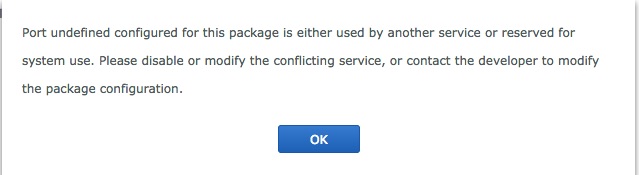
Any ideas?
 R1cco
on 27 Feb 2018
R1cco
on 27 Feb 2018
Seems something else is hugging the port. Restarting with other services disabled should work, or try to open the port Sonarr normally uses (8989) in the browser and see what service is using it.
Safihre
on 27 Feb 2018
On the commanline give the following command to see if a process is running that is using this port.
sudo servicetool --runtime-port-conflict-check --tcp 8989
If so kill this process with:
sudo kill -9 <processid>
Otherwise a package is not correctly removed and you could try this command.
sudo servicetool --remove-configure-file --package sonarr.sc
BenjV
on 27 Feb 2018
@Safihre what do we to test on nzbget-testing ? maybe I can help ?
Teryon
on 27 Feb 2018
@Teryon Just use it and see if it does what it should do 👍 But it's already used by many users (based on number of downloads) so just waiting for the final publishing..
Safihre
on 27 Feb 2018
I currently use to one posted before do I update ?
Teryon
on 27 Feb 2018
No that one almost the same, so it seems to be working.
Safihre
on 27 Feb 2018
I tried browsing to my NAS on port 8989 but get this message
This site can’t be reached
moss-rnas refused to connect.
Try:
Checking the connection
Checking the proxy and the firewall
ERR_CONNECTION_REFUSED
I ran the port check and got this
IsConflict: false Port: 8989 Pid: 0 State: stateless Protocol: tcp ProgramCommand: (null)
I ran the package uninstall command and got this
admin@Moss-RNAS:/$ sudo servicetool --remove-configure-file --package sonarr.sc
remove configure file fail! file=sonarr.sc error=
[0x0700 service_conf_remove.c:111]admin@Moss-RNAS:/$ ^C
R1cco
on 27 Feb 2018
In that case you should be able to install Sonarr.
BenjV
on 27 Feb 2018
Mylar can't update from the development branch via git:
27-Feb-2018 10:51:16 - INFO :: MAIN : Mylar is updating...
27-Feb-2018 10:51:17 - ERROR :: MAIN : Error: None
27-Feb-2018 10:51:17 - ERROR :: MAIN : Git returned bad info. Are you sure this is a git installation? [From https://github.com/evilhero/mylar
- branch development -> FETCH_HEAD
* Please tell me who you are.
Run
git config --global user.email "[email protected]"
git config --global user.name "Your Name"
to set your account's default identity.
Omit --global to set the identity only in this repository.
fatal: empty ident name (for <(null)>) not allowed
]
27-Feb-2018 10:51:17 - ERROR :: MAIN : Couldn't download latest version
27-Feb-2018 10:51:17 - INFO :: MAIN : Removing pidfile /volume1/@appstore/mylar/var/mylar.pid
27-Feb-2018 10:51:17 - INFO :: MAIN : Mylar is restarting...
27-Feb-2018 10:51:17 - INFO :: MAIN : Restarting Mylar with ['/volume1/@appstore/mylar/env/bin/python', '/volume1/@appstore/mylar/share/mylar/Mylar.py', '--daemon', '--pidfile', '/volume1/@appstore/mylar/var/mylar.pid', '--config', '/volume1/@appstore/mylar/var/config.ini', '--datadir', '/volume1/@appstore/mylar/var/']
 ForumFerret
on 27 Feb 2018
ForumFerret
on 27 Feb 2018
There is nothing we can do about that. You'll need to manually run those commands otherwise Github doesn't allow you to fetch anything.
But when you ssh into your device, instead of git you should write /usr/local/git/bin/git.
Safihre
on 27 Feb 2018
@BenjV I know, Right? Then why do I still keep getting this error? I get the same error trying to install SABNzbd and Transmission. The Python package worked fine though.
R1cco
on 27 Feb 2018
@R1cco it seems something is wrong with your NAS Config. As these packages are the ones that need open ports, while Python does not. Do you maybe have some firewall or other port forwarding/altering service active? Maybe check your network settings?
As this problem is unrelated to the packages I would suggest you maybe create a seperate issue and not here :)
Safihre
on 27 Feb 2018
@Safihre - Well since none of these packages have ever been installed natively, only within Docker, I went and uninstalled Docker.. I was immediately able to install Sonarr. Apparently having the containers shut down, and even having Docker 'stopped' wasn't sufficient.
R1cco
on 27 Feb 2018
Docker does not play nice.
My advise would always be stay away from such useless virtualization software.
Why create another layer of software which try to do the same thing as a package, namely isolating the user from the installation software.
BenjV
on 28 Feb 2018
Couchpotato stopped before 2 days and when i run the package it starts running for 10 seconds and stops. Im running DSM 6 since last September. Do you think this is related or can you provide help
 arabianhex
on 28 Feb 2018
arabianhex
on 28 Feb 2018
@arabianhex Just to double check: you use the version from this page? If not, first install this new DSM6 ready version.
If you do use this version already, please click Show Logging and tell us what it says there.
Safihre
on 28 Feb 2018
@Safihre Radarr and Sonarr published. But python is not yet... Still do not know how to proceed with all python related packages
ymartin59
on 28 Feb 2018
I wasnt using this version then i downloaded this version 20180226-7 still same issue.
Screenshot of log:https://imgur.com/a/yVeKW
arabianhex
on 28 Feb 2018
Please click again Run, then wait ~1 minute and click Refresh. Also try to just visit http://YOUR-NAS:5050.
If nothing, can you SSH into your device and then run:
sudo /volume1/@appstore/couchpotatoserver/env/bin/python /volume1/@appstore/couchpotatoserver/share/CouchPotatoServer/CouchPotato.py --daemon --pid_file /volume1/@appstore/couchpotatoserver/var/couchpotatoserver.pid --config_file /volume1/@appstore/couchpotatoserver/var/settings.conf
After running the pkg stops almost immediately thats why i cant even access the web interface.
Also i ran the above command then ran the couchpotato still same behaviour
arabianhex
on 28 Feb 2018
@arabianhex Seeing how it started before this update, I think your problems are really Couchpotato specific and not due to the package. So I would suggest to run the following commands:
cd /volume1/@appstore/couchpotatoserver/share/CouchPotatoServer
/usr/local/git/bin/git pull
Now you can inspect the log by then calling:
cat /volume1/@appstore/couchpotatoserver/var/logs/error.log
After that maybe:
cat /volume1/@appstore/couchpotatoserver/var/logs/CouchPotato.log
That last one can be really-really long, so you can also first delete it (sudo rm /volume1/@appstore/couchpotatoserver/var/logs/CouchPotato.log) and then start the package and after it fails to start, try to read it again. The error should be at the end.
Since this seems not to be related to these packages, please create a separate issue for that.
Safihre
on 28 Feb 2018
Thank you for your help i have created new issue and attached it. Pls if you have time have a look
arabianhex
on 28 Feb 2018
Hi, is there any progress on Deluge packages?
I upgraded from DS215+ to DS718+ last fall and have been running both machines since because of lack of support for Deluge on the new model 718+.
Or - is there any good alternatives you guys can recommend? I've just settled with Deluge because it works fine, but it might be other good Synopackages...
 zettayotta
on 1 Mar 2018
zettayotta
on 1 Mar 2018
It's right there in the list of test packages.... 🤓
Safihre
on 1 Mar 2018
Yeah I know... don't want to do the testing though. Eagerly waiting for it to be published on Synology.
zettayotta
on 1 Mar 2018
The package is a release-candidate and it's 99% sure that this will be the version that will get published. It has over 250 downloads and 0 complaints, After the official release the package will auto-update to the final version.
Safihre
on 1 Mar 2018
Ok, then I have to reconsider. Read through the instructions for installing the "hard way" and I wanted to avoid that procedure, but well, I'll check it out again. Thanks!
zettayotta
on 1 Mar 2018
Well for this package it's really simple: download, click Manual Upload and you're done 🤗
_(edit: deleted some comments from the start in effort to make issue shorter)_
Safihre
on 1 Mar 2018
With regard to Python...
I am being told that python is missing when I try to install plexivity from synocommunity on my 918+ apollo lake.
I have the version of python listed in this issue installed along with Mono/Jacket/Sonarr/Radarr/Transmission - which all seem to be working fine.
ghost
on 1 Mar 2018
What if you set in Settings to trust packages from Any Publisher?
Otherwise you'll have to wait until it comes for your arch from the official repo, unfortunately.
Safihre
on 1 Mar 2018
Already on any publisher...happy to wait just, reporting behaviour in case it is helpful.
ghost
on 1 Mar 2018
Good evening all together, I'm not a developer, nor am I well with linux. I have a DS918 + and I have been looking for an alternative for GNU Screen. I found what I was looking for with Tmux. But I can not find Tmux in the packages after adding the source. Is that due to DSM 6?
Is it somehow possible to install and test this package anyway?
 andiak1990
on 1 Mar 2018
andiak1990
on 1 Mar 2018
@ymartin59 Have Sonarr and Radarr been pulled again? I just checked but can't see them on my DS918+.
 Ceten
on 2 Mar 2018
Ceten
on 2 Mar 2018
@Safihre
Maybe I found a problem with your Python package.
The version number you put in the INFO file is "2.7.14-18"
According to the manual the package centre compares the values between the dots, so maybe the -18 is causing problems.
If a dependent package has the following line in the INFO file, thing are working fine:
install_dep_packages="python>=2.7"
But if it has"
install_dep_packages="python>=2.7.3"
I can imagine that comparing "3" with "14-18" does not give the correct result
BenjV
on 2 Mar 2018
@Ceten I have unpublished sonarr and radarr because of blocker issue #3185. Should come online with fixes soon
ymartin59
on 3 Mar 2018
I have just published again Radarr and Sonarr for both DSM 5.2 and DSM 6
ymartin59
on 4 Mar 2018
You said that the published binary would update the "beta" you made available here, but transmission did not ask for update ?!
PS : is FFmpg up to date on package center ?
Teryon
on 4 Mar 2018
So I am not sure if I missed something, but after installing deluge and python I get the following in the deluge.log:
[INFO    ] 17:05:30 configmanager:70 Setting config directory to: /volume2/@appstore/deluge/var/
[ERROR   ] 17:05:31 main:248 /var/packages/python/target/lib/python2.7/site-packages/cryptography/hazmat/bindings/_openssl.so: undefined symbol: pthread_atfork
Traceback (most recent call last):
  File "/volume2/@appstore/deluge/env/lib/python2.7/site-packages/deluge-1.3.15-py2.7.egg/deluge/main.py", line 240, in start_daemon
    from deluge.core.daemon import Daemon
  File "/volume2/@appstore/deluge/env/lib/python2.7/site-packages/deluge-1.3.15-py2.7.egg/deluge/core/daemon.py", line 47, in <module>
    from deluge.core.rpcserver import RPCServer, export
  File "/volume2/@appstore/deluge/env/lib/python2.7/site-packages/deluge-1.3.15-py2.7.egg/deluge/core/rpcserver.py", line 47, in <module>
    from twisted.internet import ssl, reactor, defer
  File "/var/packages/python/target/lib/python2.7/site-packages/twisted/internet/ssl.py", line 59, in <module>
    from OpenSSL import SSL
  File "/var/packages/python/target/lib/python2.7/site-packages/OpenSSL/__init__.py", line 8, in <module>
    from OpenSSL import crypto, SSL
  File "/var/packages/python/target/lib/python2.7/site-packages/OpenSSL/crypto.py", line 16, in <module>
    from OpenSSL._util import (
  File "/var/packages/python/target/lib/python2.7/site-packages/OpenSSL/_util.py", line 6, in <module>
    from cryptography.hazmat.bindings.openssl.binding import Binding
  File "/var/packages/python/target/lib/python2.7/site-packages/cryptography/hazmat/bindings/openssl/binding.py", line 13, in <module>
    from cryptography.hazmat.bindings._openssl import ffi, lib
ImportError: /var/packages/python/target/lib/python2.7/site-packages/cryptography/hazmat/bindings/_openssl.so: undefined symbol: pthread_atfork
Seems like an import issue with openssl?
 tonabnehmer
on 4 Mar 2018
tonabnehmer
on 4 Mar 2018
@tonabnehmer could you create a seperate issue for this and also tell us which python package version you use and which NAS?
@Teryon the version published here is the same that is now on the repo. If any new updates come you will get them.
Safihre
on 4 Mar 2018
@Safihre is FFmpg OK, on package center, or is it the old one ?
Teryon
on 4 Mar 2018
@Teryon ffmpeg is up-to-date in repository, so available in Package Center
ymartin59
on 4 Mar 2018
I'm getting some files downloaded with Nzbget with files added by Sonarr that the only users that have permission are nzbget and sc-nzbget. I have to manually edit permissions so Sonarr and Plex can read them. Other files downloaded the same way get nzbget, sc-nzbget, and Everyone users added and are able to be accessed fine. I'm not sure what's going on. I've never had these permission issues on my DS 412+ as I am with my DS 918+.
ghost
on 4 Mar 2018
@madxcream @Safihre I have the exact same problem.
I get files moved to a folder where "sc-download" and "sc-media" have full rights, I have my account that is part of those group, and only user "nzbget" and group "sc-nzbget" has read & write acces permission, "everyone" "sc-download" "sc-media" "my_account" only has read access right.
The problem seems to exist for folders and files inside them, inside the first folder moved by nzbget.
ex :
Nzbget create "MyMovie", inside the shared folder "Movies".
files in it gets full right for sc-download and sc-media, but if nzbget has created something like :
"MyMovie/MyMovie2" with or without files in it, thoses files and folders only gets nzbget and sc-nzbget full right, others only gets read access.
Hope this is as clear as possible.
Teryon
on 7 Mar 2018
Make sure that the DestDir where Nzbget downloads the files to are accessable for sc-media
During the move by the postprocessing of Nzbget only the toplevel of a folder will get the acessrights of the target folder.
So you have to make sure alle files and folder already have the correct privs when they get downloaded.
@Safihre
Does the NzbGet package provide a way to create the DestDir and set the privs on it via the wizard?
BenjV
on 7 Mar 2018
@BenjV yes. Only for new installations.
Upgrades we apply all the permissions recursively, but it just doesn't seem to hold. sc-download is given permissions everywhere we can find in the Config of the application. Read, write and propagation settings.
Safihre
on 7 Mar 2018
@Safihre @BenjV I've freshly installed the Sabnzbd package and been using that the last 3 days to download, and haven't ran across any permission issues like I was experiencing with nzbGet. Should I uninstall and re-install nzbGet to test if permission issues are fixed doing that?
ghost
on 7 Mar 2018
My installation is completly new installation, from DSM to nzbget.
I don't understand why if sc-download has full right to the DestDir recursively, it doesn't the same permission all everything we put in it.
I don't know if nzbget's is gonna unpack files with folders in it and if so it should have a reason to.
Teryon
on 7 Mar 2018
@Safihre
I installed Nzbget on my test Nas and the downloads folder does not get any permissions settings at all and is owned by root.
And I did not run nzbget at all, so the setup of nzbget does that if you say you create that folder.
Is the priv set in postinstall fase?
BenjV
on 7 Mar 2018
@BenjV You should use the package from this thread in the start-post, not the one on the repository. The update was not yet offically published. Users posting here will have used that package, not the repository packages.
@Teryon If sc-nzbget has access, then so has sc-download since it's part of that group.
Safihre
on 7 Mar 2018
Good to see that other people have problems with permissions as well, yet I got called an idiot for claiming things are not working like they should before 👅
Stanzilla
on 7 Mar 2018
Here is an example without any recursivity.
Nzbget download an NZB, post process it and move it to the DestDir (with categorie)
The result is one folder with two files inside.
Here is folder permission :
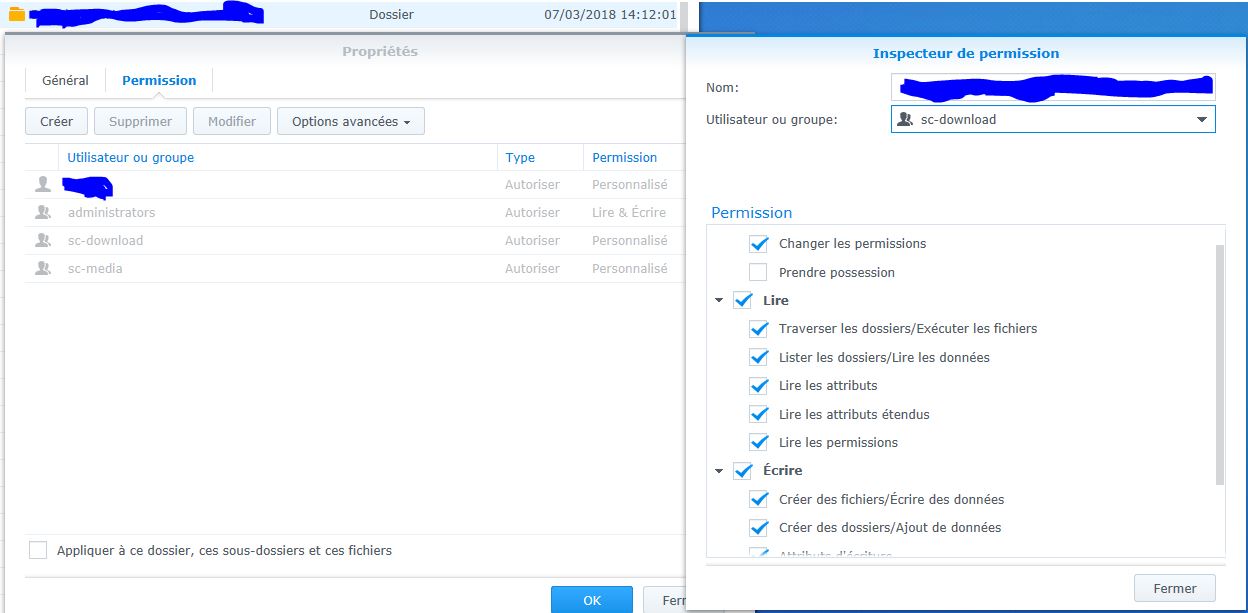
Here is file permission :
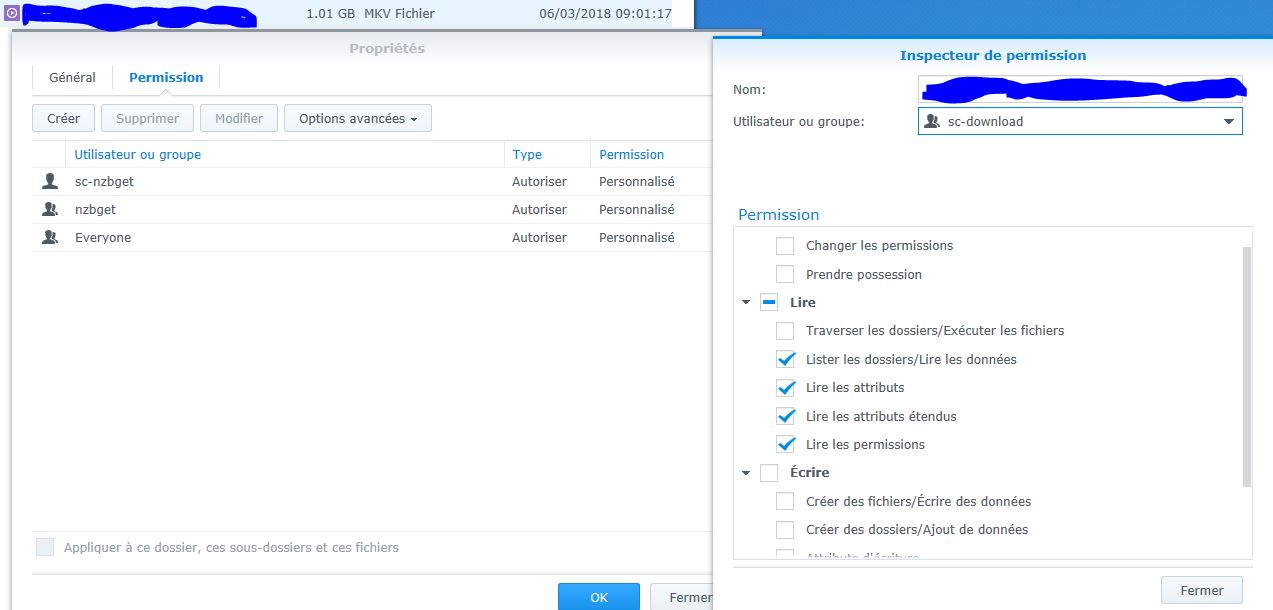
Teryon
on 7 Mar 2018
@Teryon What if you just download a regular file without any special categories or sorting and that only has 1 file inside? This could also simply be NZBGet specific. Because just getting read-permissions is just too weird of a bug.
So far permissions issues have all been either all or nothing, not just half.
Safihre
on 7 Mar 2018
@Safihre
I did use your version and not the one of the repository.
BenjV
on 7 Mar 2018
On a regular download, ex : sfv, sample, nfo have the good permissions, mkv movie doesn't, I canit know if it's has been post-process by nzbget.
Teryon
on 7 Mar 2018
Something weirder is before accessing to the file it show no write permission
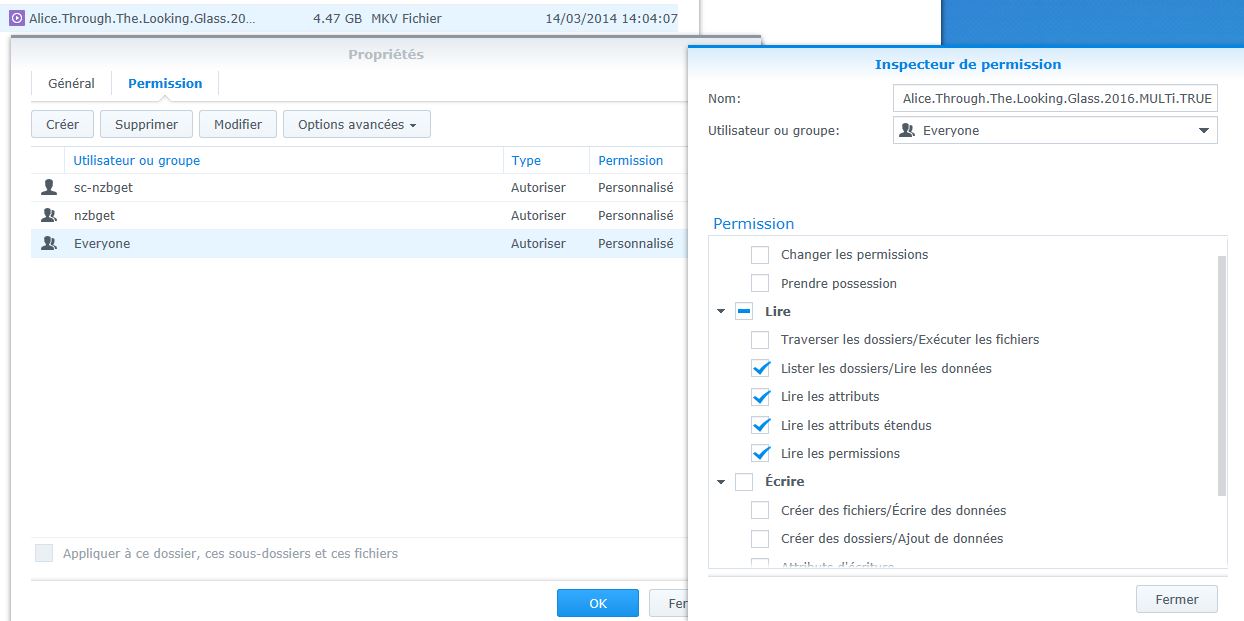
After accessing it, it show write permission enable ...
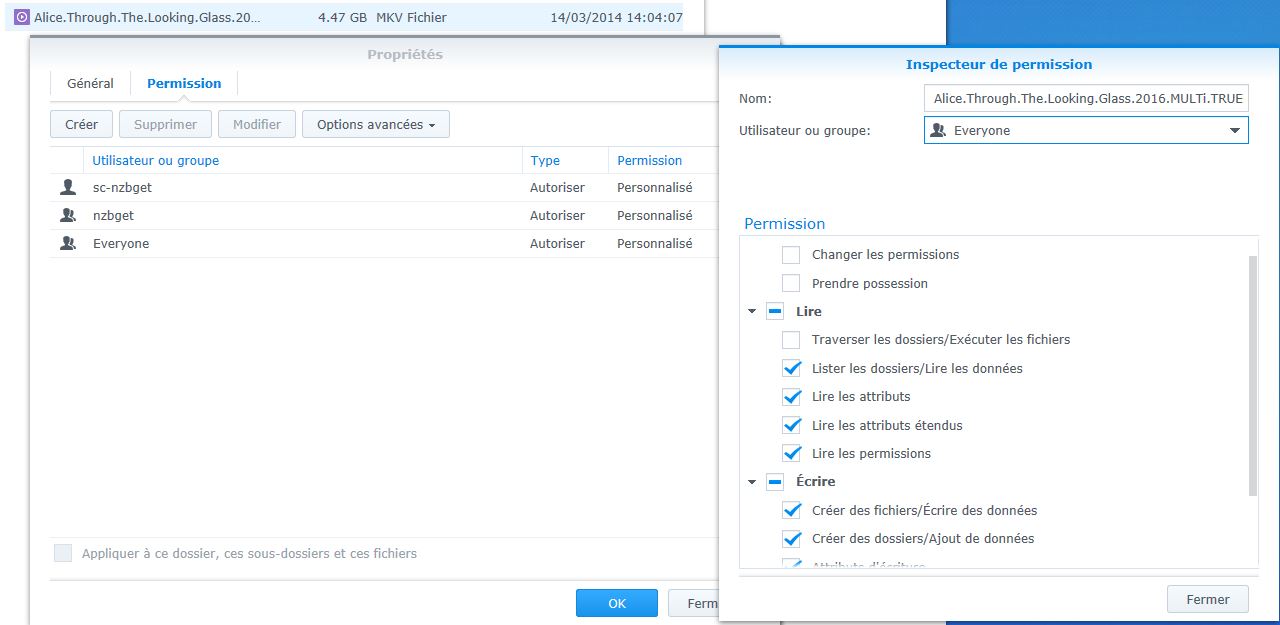
By Access, I mean I only have rename it, with a regular account.
Like it updated the permissions when I have renamed it.
If so, what I don't get is, why it doesn't work when the file is in a subdirectory with the same basic permissions ?!
Teryon
on 7 Mar 2018
@BenjV Yes, things are left to root:root since we just work with ACL permissions:
admin@DSM61:/$ sudo synoacltool -get "/volume1/new-folder/"
ACL version: 1
Archive: has_ACL,is_support_ACL
Owner: [root(user)]
---------------------
         [0] group:administrators:allow:rwxpdDaARWc--:fd--  (level:0)
         [1] group:sc-download:allow:rwxpdDaARWcC-:fd--  (level:0)

admin@DSM61:/$ ls -al /volume1/
drwxrwxrwx+  1 root  root    34 Mar  7 17:44 new-folder

admin@DSM61:/$ ls -al /volume1/new*
total 0
drwxrwxrwx+ 1 root      root    34 Mar  7 17:44 .
drwxr-xr-x  1 root      root   112 Mar  1 19:42 ..
drwxrwxrwx+ 1 root      root     8 Mar  7 17:44 @eaDir
drwxrwxrwx+ 1 sc-nzbget nzbget   0 Mar  7 17:44 nzb
drwxrwxrwx+ 1 sc-nzbget nzbget   0 Mar  7 17:44 queue
drwxrwxrwx+ 1 sc-nzbget nzbget   0 Mar  7 17:44 tmp
The reason for this is simply that we in general don't touch the Unix-permissions unless we have to, otherwise we break existing permissions.
Safihre
on 7 Mar 2018
PlexPy won't install for me. It's telling me:
**Failed to install "PlexPy Custom".
Incorrect Fork**
Package: plexpy-custom_noarch-all_20180228-1.spk
Virtual DSM (DS3615xs): DSM 6.1.3-15152 Update 7
The following have installed without issue, running, but haven't been configured yet:
python_x64-6.1_2.7.14-18.spk
nzbget_x64-6.1_20180223-23.spk
And latest Radarr and Sonarr from Synocommunity.
 luxferro
on 11 Mar 2018
luxferro
on 11 Mar 2018
As of today PlexPy version 2 is officially out of Beta and been renamed to Tautulli, so maybe that has something to do with the fork problem:
https://github.com/Tautulli/Tautulli
FWIW, I tried to update from within the container like I used to, and it seemed successful, but now it won't start back up. Within the Synology it just says Starting for a bit and then goes back to Stopped. View Log doesn't contain any information after the update finished 20+ mins ago, even though I've tried Starting the package several times.
 albino1
on 11 Mar 2018
albino1
on 11 Mar 2018
The package should use the new url automatically: https://github.com/SynoCommunity/spksrc/pull/3177/files#diff-986694cb29ceb3256d74ed9627d53560R20
Did you try to change it? It should work from fresh installs by just clicking Next everywhere.
Safihre
on 11 Mar 2018
I still couldn't get it to work, so I just gave up and uninstalled it and reinstalled from scratch. When prompted I used this for the git fork:
git://github.com/Tautulli/Tautulli.git
Still doesn't start, and the View Log is blank. Any ideas?
albino1
on 11 Mar 2018
why deluge and python packages for apollolake are missing ?
 qubabos
on 11 Mar 2018
qubabos
on 11 Mar 2018
@qubabos they are not missing, it says very clearly that many architectures are just X64 and that you can use that package.
@albino1 seems I have some testing to do!
Safihre
on 11 Mar 2018
@Safihre No worries, if you need me to try anything let me know, but use very specific instructions because my knowledge of how this all works on the backend is limited ;)
Also, in case it matters:
Synology 1815+
DSM 6.1.5-15254 Update 1
albino1
on 11 Mar 2018
@Safihre @ymartin59 something odd since 2/3days (I think).
Transmission is showing an update on the package center, saying I have 2.93-13, and update is 2.93-14.
I currently have yours (latest @Safihre made available), and update is impossible, it doesn't update anything.
I tried to uninstall mine and install from package center but it doesn't work at all.
Am I missing something ?
Teryon
on 12 Mar 2018
As mentioned by @oneirik, @Safihre the Python package does not work on the DS918+. I have installed it manually from the SynoCommunity at the top of this page and its a no go.
Any reason why the official Synology Python packages don't work?
remirr
on 14 Mar 2018
@remirr you just downloaded the wrong version. Try this one.
And then again, as mentioned many times: not all systems allow you to combine the test-Python with the official packages. You need to use only test-packages.
Safihre
on 14 Mar 2018
@Safihre permissions problems again, medusa snatched tv shows this night, but the file is locked because only user NZBGet has permission on it !
2018-03-14 11:20:37 WARNING POSTPROCESSOR :: [d6eb72d] Processing failed for /volume1/Media/Downloads/NZB-Series/XXXXXXXXX/XXXX.mkv: File is locked for reading
2018-03-14 11:20:37 WARNING POSTPROCESSOR :: [d6eb72d] /volume1/Media/Downloads/NZB-Series/XXXXXXXXX/XXXX.mkv: Processing failed: File is locked for reading
To be exact this file was added by an RSS feed to NZBGet.
But the file snatched for another show was locked to NZBGet user only, had to re apply permissions on parent folder recursively, to be able to access from kodi or my windows desktop.
Teryon
on 14 Mar 2018
Just wanted to chime in again as I am one that was having constant permission problems on things downloaded using NZBGet on my DS918+. Decided to install the SABnzbd to give it a shot. It's been about two weeks and I haven't had one single permission problem now (knock on wood). So perhaps it's something within NZBGet causing these issues?
ghost
on 14 Mar 2018
@madxcream How did you get the permissions on folders to work with SABnzbd? I just installed it and every time I try to set the completed and incomplete folder it says it doesnt have permission. I have already added the downloads folder to the sc-download, sc-media and administrators group.
remirr
on 15 Mar 2018
@remirr I'm using the same download folder I was using with NZBGet. If you goto your downloads folder, properties, permission, Advanced options, Permission Inspector do you see sc-sabnzbd listed as a user/group? Not sure if that has anything to do with this since I can't seem to find that user/group through the control panel, but it is there and has read/write permission.
ghost
on 15 Mar 2018
@Safihre I seem to have gotten PlexPy/Tautulli working again. I uninstalled it, performed a server reboot, then reinstalled it, and now it starts up. I've gone through the Wizard process and connected my Plex and it seems to be working fine.
It still shows Status: Stopped in the Package Center, but it's always said that even though the actual program is running.
albino1
on 15 Mar 2018
Reporting what I think is the same/similar issue as @albino1 when trying to install PlexPy Custom via package centre on my D918+
I saw the update for Python (2.7.14-18) which installed ok. However when I install either PlexPy Custom or Plexivity I can not get either to run, they just give up starting up after a few seconds. Nothing in the logs.
Can I assume I need to wait for the PlexPy custom package to be replaced by the new Tautulli version?
Thanks
ghost
on 16 Mar 2018
is there a working plexpy package available, since the plexpy-custom_noarch-all_20180228-1.spk doesn't install (incorrect fork error)?
luxferro
on 17 Mar 2018
Sorry, for some reason the wrong (old) PlexPy package was compiled. 😨
The new file (plexpy-custom_noarch-all_20180318-2.spk) is now listed above!
(@luxferro, @albino1, @hamishsw)
Safihre
on 18 Mar 2018
Thanks @Safihre, using that PlexPy spk I was able to install and seems to be properly operational. Although for other user's potential benefit it did seem to me like it was hanging during install for a couple of minutes however got there in the end...
Cheers
ghost
on 18 Mar 2018
Yes it has to do the git clone which (depending on hardware) can take a while.. Limiting using --depth would maybe not work correctly if the app expects a certain tag/branch.
Safihre
on 18 Mar 2018
@Safihre When will this be available inside the Community tab? (a dummy like me doesn't know how to fix it on my NAS).
 cani1989
on 19 Mar 2018
cani1989
on 19 Mar 2018
@Safihre nzbget has been published
ymartin59
on 19 Mar 2018
@ymartin59 Updating from NZBGet 20180223-23 to the latest version within DSM is giving me the error message "The package file is corrupt" on my DS216j (Armada 385). I've tried 3 times with same error so don't think it's my end.
 grerppy
on 20 Mar 2018
grerppy
on 20 Mar 2018
@ymartin59 when I try to update it's saying that the package is corrupted.
Teryon
on 20 Mar 2018
Now that NZBGet package is fixed, back to transmission one, always showing with an update available, but updating doesn't work, leaving it with cancel, and no progress of any sort.
Can you look at this ?
Edit : Trying to capture screen for you to look at, I've put language in english and it worked, seems a problem with french language, something to fix.
Teryon
on 23 Mar 2018
@m4tt075, I am currently running TVHeadEnd 4.2.5-12 on a DS418j (tvheadend_rtd1296-6.1_4.2.5-12.spk) on DSM 6.2-23648 (beta).
I currently use some IPTV channels and epg data for them, and it works beautifully! Thanks a lot for this!
What I've noticed is that it sometimes refuses to start after installation, and you have to try a couple of times before it does.
And if you stop the package manually, it will not start again until after a reboot of the NAS. Is there anything I can help with if you want to fix it?
 PolliSoft
on 23 Mar 2018
PolliSoft
on 23 Mar 2018
@PolliSoft Thanks for reporting and offering help. Haven't heard this before. Might be related to the DSM 6.2 (beta) but don't know. It would be great if you could ssh into your box after a couple of unsuccessful and finally successful launches, cd into /usr/local/tvheadend/var, upload your tvheadend.log file to pastebinit or something else and post the link here.
 m4tt075
on 23 Mar 2018
m4tt075
on 23 Mar 2018
Tvheadend testing package has been updated. The default recording path was pointing at system directories. The new version fixes that, recovers recordings from system paths and restores them in the proper place. Any issues, please report back...
m4tt075
on 24 Mar 2018
I tried the new mylar package and it can't seem to access any of the folders. Any tips?
hipstersmoothie
on 25 Mar 2018
To me it seems its running under the wrong permissions or user. it can't create folders. is this something i have to fix or is it something to due with the pacakge config:
step:
- install mylar
- don't config anything but comicvine api key
- try to add comic
- ERROR: [DIRECTORY-CHECK] Could not create directory: /volume1/Watchmen (1986)[[Errno 13] Permission denied: '/volume1/Watchmen (1986)']. Aborting.
hipstersmoothie
on 25 Mar 2018
Please review documentation/instructions from https://github.com/SynoCommunity/spksrc/wiki/Permission-Management (when published, wizard will contain link to it...)
ymartin59
on 25 Mar 2018
Hi, i hope this is the right place to ask for help.
I have a (weird) problem with nzbget in combination with sickrage.
I followed the instructions from the Permission Management link.
Nzbget downloads fine and nzbtomedia than try to move the file. At first that worked fine, but after some downloads it stops working with the Error "File is locked for reading/writing". After apply the permissions again and choose to post-process again the process works.
But after some time it stops working again and i have to reapply the permissions.
 Cy63rPunk
on 4 Apr 2018
Cy63rPunk
on 4 Apr 2018
A "File is locked for reading/wrinting" is not a permission issue, but most likely an Nzbget issue.
The file is still locked by a process and so it cannot be processed by nzbtomedia.
BenjV
on 4 Apr 2018
Are there any confirmed solutions for the permissions issue?
I updated to the latest nzbget, and now everything causes a "Permission denied" error. I've added sc-download and sc-nzbget to all the folders with read/write access that its complaining about, but the errors still occur.
Do I have to re-add nzbget to the sc-download group through a terminal or something?
 Snipe3000
on 4 Apr 2018
Snipe3000
on 4 Apr 2018
thx, for the quick reply, i thought it would be a permission issue, because logging into my NAS and reapply the permissions solves the problem for a while.
And in my google research i found several places, saying it is a permission issue.
Cy63rPunk
on 4 Apr 2018
@Cy63rPunk
Google is not the holy grail, you have to be selective what you believe and this is clearly a file locked problem and not a permission problem.
@Snipe3000
The permission denied issue can be caused by existing folder, subfolders and files are owned by a user that is not in the group sc-download.
So check who the owner is and add that owner to the group sc-download.
BenjV
on 4 Apr 2018
Thanks for the converted packages! I am still having an issue installing Subliminal (missing python) despite python_x64-6.1_2.7.14-18.spk being installed. I guess it the package has to be updated as well?
 regarde
on 7 Apr 2018
regarde
on 7 Apr 2018
New test-builds for Tvheadend 4.2.6 available. Link updated above.
m4tt075
on 14 Apr 2018
Awesome, solved my problem with Sickbeard-custom
Worked on a DS1513+ (Cedarview)
worked on an i5-520M based Xpenology running latest synology DSM
wouldn't work on an i3-2120 based Xpenology (SandyBridge gen)
Used both the
- python_x64-6.1_2.7.14-18.spk
- sickbeard-custom_noarch-all_20180228-5.spk
and it worked like a charm. You guys rock.
Thanks
 Anatharias
on 18 Apr 2018
Anatharias
on 18 Apr 2018
@Safihre I have just published sabnzbd 2.3.3-34, sorry for misunderstanding which lead to postponing it...
ymartin59
on 30 Apr 2018
@ymartin59 I couldn't update to sabnzbd 2.3.3-34 because package center complained about python not installed. But it installed fine downloading the package and installing it manually.
ghost
on 30 Apr 2018
@ymartin59 Thanks! Feel free to update the start-post if I maybe missed some packages that can be removed since they are published now 👍
Safihre
on 1 May 2018
--edit
Weird. I've changed the port from 8080 to 8081 and it works again. I'm available on all ports locally (including 8080) but externally 8080 doesn't connect anymore. Ah well... let's just change to 8081 then.
--
I updated to 2.3.3-34 and now I can't reach sabnzbd anymore. Shows as running in Package Center. Tried manual reinstall as well, no dice.
This site can’t be reached
http://[url_removed_for_privacy]:8080/ is unreachable.
ERR_ADDRESS_UNREACHABLE
 x5nder
on 1 May 2018
x5nder
on 1 May 2018
somehow the python package (2.7.14-18) is removed from the synocommunity. Now, updating sickrage gives a problem because of this. Where is it?
 exxie
on 1 May 2018
exxie
on 1 May 2018
@ymartin59 I am getting the same error on Synology 918+ - Error this package requires python. I already have python installed and the package is currently running.
remirr
on 2 May 2018
Hi
Exactly the same problem on DS418play
Thanks for the help
 tchirou
on 2 May 2018
tchirou
on 2 May 2018
Something weird happens.
I try to reboot Mesdusa (Sickbeard-custom), It shows Sickbeard as stopped in DSM but Medusa is accessible !
Is it a problem with Sickbeard-custom or Medusa ?
Teryon
on 2 May 2018
Most likely Medusa does not write a pidfile in the correct location, so the package centre concludes the package is not running.
Medusa writes a pidfile called "Medusa.pid"
The package centre expects a pidfile called sickrage-custom
It should be in:
/var/packages/sickbeard-custom/target/var
You could change this name in the file:
/var/packages/sickrage-custom/scripts/service-setup
@ymartin59
Maybe add an input field for the pidfile in the sickrage-custom package?
BenjV
on 3 May 2018
Shutdown from medusa made it possible to start the package from DSM, again ...
Teryon
on 3 May 2018
Sure, Medusa removes this pidfile if it is shutdown by itself.
If it is shutdown by the package centre is does not, because the package centre tries to remove sickbeard-custom.pid and not Medusa.pid
BenjV
on 3 May 2018
That is not the right place for such details / specific report. Please create an issue dedicated to sickrage-custom to track this Medusa PID improvement. Thank you in advance.
ymartin59
on 6 May 2018
@Safihre @m4tt075 Tvheadend just published
ymartin59
on 6 May 2018
Test packages for uMurmur have been added above. Happy testing!
m4tt075
on 10 May 2018
@ymartin59 General question to see which other packages might be worth conversions, can you somehow analyse which Synocommunity packages have actually been downloaded how many times? Might give us indications about actual demand.
And @ymartin59 @Safihre Anything I can help you with getting @Safihre 's pending PRs across the line?
m4tt075
on 11 May 2018
I think we should publish all these packages that depend on Python, even though we don't have the new Python package ready. These packages don't depend on the Python-version increase, findings like #3230 are just accidental and can't be due to the difference in 2.7.13 -> 2.7.15.
Now we have just a mess of old and new-style permission packages 😢
Just take a bit of a risk.. 🤡
Safihre
on 12 May 2018
I have published couchpotatoserver and couchpotatoserver-custom
ymartin59
on 13 May 2018
SyncThing Package does not appear to deploy correct permissions (no SC-Syncthing group is created) This is apollolake. It is also not in the community repo
 goofy7264
on 14 May 2018
goofy7264
on 14 May 2018
This item is for test packages and not for issues with SyncThing.
Please create a new item and state real problem.
What do you think the correct permissions should be?
There is not group sc-syncthing and there will no be one either.
BenjV
on 14 May 2018
I understand this is not for Syncthing, this is for the beta package for apolloloake arcitecture. It is not installing with the correct group being created as per the generic user. The reason I mention sc-syncthing is because the that's they way it installs on my DS411+II from the synocommunitry repo.
The issue is that the package does not appear to deploy the generic permissions
goofy7264
on 15 May 2018
Yea but this issue is for the beta test of the packages mentioned in the first post.
Not especially for the Appollolake architecture.
If you have an issue with syncting, create a new issue.
BenjV
on 15 May 2018
And have you installed the Python package from this thread?
Safihre
on 15 May 2018
Apologise for asking what must be two daft questions, but why is couchpotato now missing from the list at the top of this thread? This is where I have downloaded it from previously for my apollolake x64 hungry DS418Play, and I was hoping to do so again for the new update. Also, what is/was the difference with couchpotato-custom? I can see these packages being available within the DSM program manager and Synocommunity - but trying to update from there gets a "python" required message. Thanks for any help!
 antsgt
on 16 May 2018
antsgt
on 16 May 2018
@antsgt You have to install Python 2.7 from https://github.com/Safihre/spksrc/releases/tag/python-all and you can then install CouchPotato (and custom variant) published in package manager.
ymartin59
on 21 May 2018
Thanks, I am now running Python 2.7.14-18 (and rebooted just because), but when I try to update Couchpotato-custom I get a message that Python is missing from the package server. I have a DS418Play, any further suggestions? Thanks.
antsgt
on 21 May 2018
@ymartin59 would love a response to this too considering I cannot update SAB or Couchpotato due to the python error
remirr
on 22 May 2018
You need to install both Python and the requested package from the URLs at the start of this thread. Don't mix from official and testing packages.
@ymartin59 why not publish Python for the new archs? They have nothing now and those archs are working fine! (x86/x64/etc)
Safihre
on 22 May 2018
If I publish Python 2.7.14 for only "some archs", 2.7.13 will no longer be available to others like ARM monaco for which Deluge fails to start. I am working on updating and fixing Python "for everyone"...
As python applications are expected to run with any package version (and I confirmed with my system), I do not understand what is wrong for appololake users after installing python 2.7.14 manually...
ymartin59
on 22 May 2018
@ymartin59 Too bad it won't serve the older version, I assumed it did.
In this specific case it seems to be that it doesn't like mixing and matching of signed and non-signed packages. Since they are not from the same publisher I think.
Safihre
on 22 May 2018
@Safihre and @ymartin59
No, it must have something to do with the newer DS models of Synology de X18 series I think.
First of all they do no see the old python package in the repro which they should
And secondly if they install the python from your test package the package manager report 'missing pyhon'.
On my DS 116 I do not have such problems.
I installed your test package of python and I installing package from the repro that need python is no problem at all.
Here you can find a picture of a user with a DS 118 ( rtd1296) and he is missing a lot of packages including python which should be there.
https://www.synology-forum.nl/sickrage/sickrage-teleurstelling/msg250052/#msg250052
BenjV
on 22 May 2018
same for ds3617. couch potato custom update complains about missing python and python is not visible from the package center.
installing the spk manualy works without missing python message. but the package is only 20180218-7 instead of 20180513-7.
 justme-1968
on 22 May 2018
justme-1968
on 22 May 2018
@Safihre @ymartin59 I have a DS918+ and have both SAB and CouchPotato installed from your Beta Packages using the links above and I get the same Python message to update despite python being installed and both packages working.
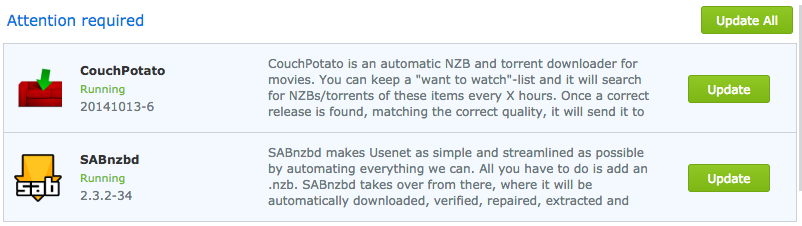
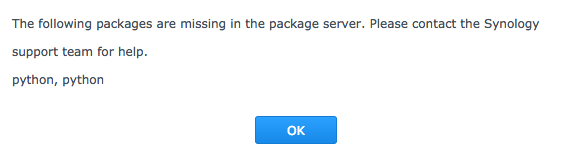
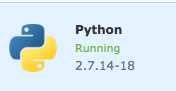
remirr
on 23 May 2018
It's not broken on our side, these packages haven't changed in months and played well together all that time.
Safihre
on 24 May 2018
I have had no problems in manually installing any of the packages from here... I have had to install from here as I can not install them through the community options in Package Manager due to the "Python required" error. What has stopped for me is the ability to install Couchpotato from here, as it has been taken away from the list!
antsgt
on 24 May 2018
Weird. Was Sabnzbd taken down from here for some reason? Package manager says there is an update available now, but I cannot update as I still get the python missing error.
 JorenRapini
on 24 May 2018
JorenRapini
on 24 May 2018
Hi, DSM 6.2 is officialy available, is there any problems updating, like new permissions problems ..... ?
Teryon
on 24 May 2018
I'm also getting python package missing when trying to update couchpotato from package center.
Also when trying to install htpc manager from package center.
Safihre do you maybe have a separate package for htpc manager that i could download and manually install?
 bchocotoff
on 25 May 2018
bchocotoff
on 25 May 2018
The Sickrage installation (20180517-5) from the synocommunity works fine after after installation of the python package downloaded here (python_x64-6.1_2.7.14-18.spk). Also, the couchpotatoserver-custom_noarch-all_20180228-5.spk package from here installed correctly. Now, the system shows that there is an update available for courpotatoserver. When trying to update the package the following error message is displayed: "The following packages are missing in the package server. Please contact the Synology support team for help. python". So @Safihre, I did exactly as you said and still this does not work. Do you need to update the couchpotatoserver package on your end to make this work?
exxie
on 25 May 2018
No, we need to publish Python for all archs via SynoCommunity. But we have been stuck on that for months due to come weird compilation problems..
Safihre
on 26 May 2018
Hi Guys
What do you think about updating to dsm 6.2 ? Should we refrain for now ?
Thanks
Le 26 mai 2018 à 13:45, Safihre notifications@github.com a écrit :
No, we need to publish Python for all archs via SynoCommunity. But we have
been stuck on that for months due to come weird compilation problems..
—
You are receiving this because you commented.
Reply to this email directly, view it on GitHub
https://github.com/SynoCommunity/spksrc/issues/3138#issuecomment-392256078,
or mute the thread
https://github.com/notifications/unsubscribe-auth/AGb87EI0zLu3l_HHt_NA7jc0lBgJL5osks5t2UBbgaJpZM4R6ptg
.
tchirou
on 26 May 2018
The wiser advice I can give is to refrain until tests can be run on xpenology DSM 6.2 virtual machines to check packages compatibility... or anyone with a brand new DSM 6.2 system he may accept to use a sandbox to check. Others may experiment if they do not fear to downgrade to DSM 6.1 if "important" packages for them may fail on DSM 6.2...
ymartin59
on 27 May 2018
About Python troubles with couchpotato or mylar, please follow #3310
ymartin59
on 27 May 2018
Thanks a lot
tchirou
on 27 May 2018
@Safihre According to my test, it is not related to a mixed signed/unsigned.
BUT it is worth for users with that trouble to test again after switching Package Center Settings "Trust Level" to "Any publisher".
ymartin59
on 27 May 2018
As I said before I think it is related to the architecture type.
Most likely only cenrtain new models are affected.
BenjV
on 28 May 2018
Published: python, headphones, headphones-custom
Next pending: deluge
ymartin59
on 28 May 2018
What was wrong again with Deluge? Only Python right?
Safihre
on 29 May 2018
@Safihre Nothing wrong with Deluge now. It has been published too.
ymartin59
on 30 May 2018
FYI. The python package required for e.g. Sickrage and couchpotato(-custom) is back on synocommunity and both work flawlessly on DS218+ (as well as DS213+) with this update.
exxie
on 30 May 2018
@ymartin59 I updated the list. We are almost done with them!
Can you please publish now the rest of them or let me know what needs to be fixed?
- [ ] Sickrage
- [ ] SickBeard Custom
- [x] PlexPy (PR Open #3177)
- [x] NZBHydra
- [x] NZBGet-Testing (PR Open #3180)
- [ ] uMurmur (by @m4tt075, PR Open #3132)
Safihre
on 30 May 2018
Is getting a package for NZBHydra2 out of the question? Sounds like no more work will be done with NZBHydra.
ghost
on 30 May 2018
@madxcream The PR is open: #3330, but since it is now java this complicates things for cross-arch compatibility.
Safihre
on 31 May 2018
@Safihre I want to discard Sickrage... as it is supposed to work properly in SickBeard Custom... and because of "fork war" seen here in many issues/comments/PRs. I propose to create a wiki page with list of forks and Git URI to use to get them run in SickBeard Custom.
ymartin59
on 31 May 2018
Good Idea and maybe add a link to that wiki page in the description of the SickBeard Custom package so people can easily find that page by just looking in their package centre.
BenjV
on 31 May 2018
Does Sickrage really work in Sickbeard custom (didn't test myself)? Seems the Sickbeard package won't process the requirements.txt of Sickrage (different folder).
I do agree that we don't want to get in the fork war 👍
Safihre
on 31 May 2018
I know that a sickbeard fork (https://github.com/SickRage/SickRage) doesn't work in the sickrage package (by changing the url in install), complaining cannot find sickbeard.py (or similar). I didn't test the opposite (echelon sickrage git url in sickbeard-custom package), but seeing the python entry point ( SickBeard.py vs SiCKRAGE.py) is named differently I'm not confident it's working
 fgibaux
on 31 May 2018
fgibaux
on 31 May 2018
The problem with https://github.com/SickRage/SickRage is in the pidfile.
The sIckbeard-custom packages expect a pidfile named "sickbeard-custom.pid" but the SickRage application creates a pidfile called "sickrage.pid".
So the package can be installed but the start-stop-status scrips never see the correct pidfile and the package will not keep running.
Maybe it is an idea to put a list of startup python filenames and pidfilenames for this package.
Maybe create a generic package for all python applications that can be downloaded from github.
BenjV
on 31 May 2018
I think this is not the place (issue) to have this discussion. We should make a separate issue for it and in the mean time publish the others in the list. This way we can close this mega-issue 💯
Safihre
on 31 May 2018
@Safihre I just SSH'd into my NAS to investigate an issue with my backup and noticed that my /var/log/Messages log is filled to the brim with error messages from Sickbeard - thousands a day. Any idea what this is?
2018-06-03T11:29:17-04:00 Diskstation synoscgi_SYNO.Core.DSMNotify_1_notify[27403]: JSConfigParser.cpp:461 webman/3rdparty/sickbeard-custom/config: * Line 4, Column 13
Bad escape sequence in string
See Line 4, Column 119 for detail.
2018-06-03T11:29:52-04:00 Diskstation synoscgi_SYNO.Core.DSMNotify_1_notify[27469]: JSConfigParser.cpp:461 webman/3rdparty/sickbeard-custom/config: * Line 4, Column 13
Bad escape sequence in string
See Line 4, Column 119 for detail.
2018-06-03T11:30:22-04:00 Diskstation synoscgi_SYNO.Core.DSMNotify_1_notify[27562]: JSConfigParser.cpp:461 webman/3rdparty/sickbeard-custom/config: * Line 4, Column 13
Bad escape sequence in string
See Line 4, Column 119 for detail.
2018-06-03T11:30:56-04:00 Diskstation synoscgi_SYNO.Core.DSMNotify_1_notify[27632]: JSConfigParser.cpp:461 webman/3rdparty/sickbeard-custom/config: * Line 4, Column 13
Bad escape sequence in string
See Line 4, Column 119 for detail.
2018-06-03T11:31:31-04:00 Diskstation synoscgi_SYNO.Core.DSMNotify_1_notify[27711]: JSConfigParser.cpp:461 webman/3rdparty/sickbeard-custom/config: * Line 4, Column 13
Bad escape sequence in string
See Line 4, Column 119 for detail.
2018-06-03T11:32:10-04:00 Diskstation synoscgi_SYNO.Core.DSMNotify_1_notify[27808]: JSConfigParser.cpp:461 webman/3rdparty/sickbeard-custom/config: * Line 4, Column 13
Bad escape sequence in string
remirr
on 3 Jun 2018
just noticed the same. looks like the \ in in front of the ' is wrong in sickbeard-custom and also in plexpy-custom app/config files. removing the \ will stop the messages.
justme-1968
on 4 Jun 2018
But isn't that generated by Sickbeard itself?
Safihre
on 4 Jun 2018
i don't think so. it looks like the file contains package related stuff like the description shown in the package manager. maybe it is automaticaly generated from the INFO file and the bug is in the generation.
justme-1968
on 4 Jun 2018
And you see this with my test-version or the now official package?
Safihre
on 4 Jun 2018
@Safihre I installed the package from this page about 3 months ago but I believe it auto-updated last week when there was the other issue where we could not update SAB and Couchpotato. I am not sure what you mean by the \ @justme-1968 - not that skilled to find or change that. I am running 2.7.14-19.
It looks like those errors have been going for a while and there are hundreds of thousands of them.
Thanks!!
remirr
on 4 Jun 2018
@remirr That is not the right place to track this specific trouble. Please create a dedicated issue. Thanks
ymartin59
on 4 Jun 2018
Anybody tried the packages on DSM 6.2 ?
Teryon
on 22 Jun 2018
@ymartin59 can you please publish the sickrage, sickbeard and umurmur packages? It's been half a year. How much patience do you want me to have?
Safihre
on 22 Jun 2018
@Safihre Hello. I decided no longer maintain sickrage... it should run in SickBeard from my point of view.
Concerning SickBeard, I have started a FAQ page to help user (starting by me first, as I am not a SickBeard user - yet) to select its fork: https://github.com/SynoCommunity/spksrc/wiki/FAQ-SickBeard-custom
I would appreciate if you may at least start to complete that SickBeard fork list that are expected to run in package sickbeard-custom
I have not found back issue concerning service start failure in sickbeard-custom, but according to my understanding, there is a pending trouble with some fork producing specific PID file name... My idea was to check with some forks to confirm and fix bug before publishing.
Concerning uMurmur, everything should be ok... but I personally suffer of "too many stacked unfinished tasks" syndrom, for which the only cure I found is no longer start yet-another-task.
ymartin59
on 23 Jun 2018
@ymartin59
The sickbeard-custom from @Safihre works fine.
The problem with the PID was my mistake.
I mixed the version from the repository (which has a pid problem) with the testversion of @Safihre.
I already closed that issue.
So go ahead and publish the sickrage-custom please.
These forks are working so maybe add them to a pulldown in the UI file?:
https://github.com/midgetspy/Sick-Beard
https://github.com/SickRage/SickRage
https://github.com/pymedusa/Medusa
https://github.com/SickGear/SickGear
BenjV
on 23 Jun 2018
The only one that doesn't work will be the https://sickrage.ca/ _echel0n_ version because it doesn't use SickBeard.py entry-point and requirements.
That version is exactly the one that is in the SickRage package.
Safihre
on 23 Jun 2018
Scratch that, it seems @echel0n created his own Package Center source 🤣
See https://packages.sickrage.ca/install.htm
In that case, let's remove it from the repo and be done with these last packages ASAP 👍
Safihre
on 23 Jun 2018
@Safihre @BenjV @ymartin59 Has the issue where millions of error messages being created by the Sickbeard package been fixed yet?
remirr
on 25 Jun 2018
Yes: #3339
Safihre
on 25 Jun 2018
@Safihre Awesome - so just reinstall the new package? as I don't see an update pending in DSM.
remirr
on 25 Jun 2018
@ymartin59 needs to push an update probably, for all packages affected.
Safihre
on 25 Jun 2018
@Safihre Sure. Another update is to support DSM 6.2... which is not happy with either our INFO file or (probably both) our spkrepo responses...
ymartin59
on 25 Jun 2018
@ymartin59
Maybe a littlebit more info about the DSM 6.2 problems, so we can help to solve problems.
Or maybe we can do some testing?
BenjV
on 25 Jun 2018
Sorry for the question, but I've been holding out on updating from DSM 5.2 until Sickrage support had been released for DSM 6. From what I'm reading, the sickbeard-custom package should work fine on any DSM version now but DSM 6.2, correct? Also will sickbeard-custom allow of all of the same options as the previous Sickrage package? I just want to confirm if it is ok to upgrade past 5.2. Thanks
 shiv81
on 27 Jun 2018
shiv81
on 27 Jun 2018
The DSM 6 capable version of SickRage is still not in the repro.
If you want a working version you should install SickRage-Custom from the first post of this topic.
BenjV
on 27 Jun 2018
@Safihre I have published SickBeard-custom. See #3337
I still have to fix description translations generation in INFO file - a stupid space still remaining - to publish uMurmur
I have documented my "publish receipts" at https://github.com/SynoCommunity/spksrc/wiki/Update-Policy
Please register yourself in repository: https://synocommunity.com/register
ymartin59
on 30 Jun 2018
@ymartin59 thanks!
I already registered with my [email protected] account a while back, but never got the confirmation email. Maybe you can activated it?
Safihre
on 30 Jun 2018
@Safihre Not sure about what has to be done... but there is chance your account in spkrepo is available. Please try to login
ymartin59
on 2 Jul 2018
Update for Sickbeard came through! Thanks a lot.
remirr
on 2 Jul 2018
@ymartin59 It worked, I'm in 👍
Safihre
on 3 Jul 2018
uMurmur has been published
ymartin59
on 5 Jul 2018
My Deluge randomly stops and I can only run it again by restarting my Synology (DS 1813+). It throws pid already running in some logs (see attachments in the end of this post) but thats not all.
Running versions :
DSM 6.2-23739 Update 1
Python 2.7.14-19
Deluge 1.3.15-9
I've seen that back in January a Python update broke start-stop-daemon and @Safihre closed such issue (#3108) in Feb, 26 and pointed to this page. Has the fix been pushed into Synocommunity repo or the correct procedure would be to remove everything and reinstall?
Or the error I'm having is unrelated to such issue?
I have only been updating the packages when updates are available.
EDIT:
Excerpt from "synopkg.log" (before restarting the nas and after clicking "run" in the package center):
2018/07/12 01:42:34 start deluge: begin to stop version 1.3.15-9
2018/07/12 01:42:35 start deluge 1.3.15-9 Begin start-stop-status stop
start-stop-daemon: warning: killing process 2694: No such process
start-stop-daemon: warning: killing process 2670: No such process
deluge is not running
2018/07/12 01:42:35 start deluge 1.3.15-9 End start-stop-status stop ret=[0]
2018/07/12 01:42:35 start deluge 1.3.15-9 Begin unload apparmor
2018/07/12 01:42:35 start deluge 1.3.15-9 End unload apparmor ret=[0]
2018/07/12 01:42:35 start deluge: stop version 1.3.15-9 successfully, result 0
2018/07/12 01:42:35 start deluge: begin to start version 1.3.15-9
2018/07/12 01:42:35 start deluge 1.3.15-9 Begin pre-load apparmor
2018/07/12 01:42:35 start deluge 1.3.15-9 End pre-load apparmor ret=[0]
2018/07/12 01:42:35 start deluge 1.3.15-9 Begin start-stop-status start
After restarting the Synology, Deluge starts but some "unhandled exceptions" are traced in the synopkg.log like this one:
Unhandled Error
Traceback (most recent call last):
File "/volume1/@appstore/deluge/env/lib/python2.7/site-packages/deluge-1.3.15-py2.7.egg/deluge/main.py", line 241, in start_daemon
Daemon(options, args)
Full log here:
synopkg.log
Other logs attached (these logs below are BEFORE restarting the NAS):
deluge.log
deluge-web.log
deluged.log
 djhifi
on 12 Jul 2018
djhifi
on 12 Jul 2018
I just installed deluge and tested if I could reproduce the problem but I cannot.
Most likely a pidfile is left behind from an earlier installation
Can you stop Deluge and when it is stopped look in the folder:
/volume1/@appstore/deluge/var
There should be no pidfile's in there.
If there is a pidfile, delete it and try to start deluge again
Most likely it is deluged.pid
@Safihre @ymartin59
I am not a deluge user but I dived into this issue and it seems that deluge also creates a process that writes its pid into a pidfile called deluged.pid.
It would be wise to add killing this process and removing this pid to add to the start-stop-status script.
So for this package there should be three pid files handled:
deluge.pid
deluged.pid
deluge-web.pid
BenjV
on 12 Jul 2018
@BenjV Thanks for the reply. I will try and reproduce that tomorrow. Editing this post with the feedback. I'm away from my home server but tell me something, "deluged.pid" is actually different from "deluge.pid" so none should be there once the package is stopped?
Cause I thought one was related to the UI (deluged, the client) and other the server/daemon itself (deluge). The web process id registers what?
Btw don't know if its related or not bu I have 2 admin accounts using thinclients on windows PCs btw. Despite the fact that admin or non admin doesnt matter for current deluge version :p
Ive read some kind of workaround for an inability to access deluged, I dont know if it's related or not but, as a debug I will also post it here:
"When attempting to access a daemon deluged on the same machine but running as a different user e.g. your login user is user and deluged is running as deluge, you may be unable access to deluged.
This is due to the client automatically authorising using the localhost line in the auth file, which is assumed to be at the same config location as deluged.
The workaround is to replace the localclient line in your user config auth file (~/.config/deluge/auth) with the localclient line from the deluged config auth file e.g. /var/lib/deluge/auth. "
djhifi
on 14 Jul 2018
Please create another issue for this, this is not the place.
Safihre
on 14 Jul 2018
Closing this issue now. All packages have been published!
The main work of DSM6 conversion is done, now we should work on a package-by-package basis again 👍
Thanks @ymartin59 and @BenjV to make it happen!
Safihre
on 14 Jul 2018
Related issues
 zhuchun
·
7Comments
JorenRapini
·
7Comments
zhuchun
·
7Comments
JorenRapini
·
7Comments
 R1skNt
·
6Comments
R1skNt
·
6Comments
 krazun
·
7Comments
ghost
·
4Comments
krazun
·
7Comments
ghost
·
4Comments
Most helpful comment
@ymartin59 I updated the list. We are almost done with them!
Can you please publish now the rest of them or let me know what needs to be fixed?