Spksrc: request to update ZNC to 1.7.0 -
request to update ZNC to 1.7.0
with the current version 1.60 all self signed certs must be manually approved - a setting was added "TrustAllCerts" to 1.7.0 which allows you to bypass this:
https://wiki.znc.in/ChangeLog/1.7.0
https://github.com/znc/znc/issues/866
https://github.com/znc/znc/pull/1277
 nopoz
nopoz
All 41 comments
The final version of znc 1.7.0 is out now.
 Zialus
on 7 May 2018
Zialus
on 7 May 2018
ZNC 1.7.1 is out now.
I'm able to compile it just fine by changing the download links from 1.6.0 to 1.7.1 in the Makefiles and digest.
All that's missing are changes to the permissions scripts, right?
Zialus
on 8 Aug 2018
@Zialus I don't think this needs changes to permission scripts. The package is pretty simple. Did you have issues with permissions with your self-compiled 1.7.1 package? If not, I'd assume everything is fine and encourage you to send a PR with your updates... :-)
 m4tt075
on 8 Aug 2018
m4tt075
on 8 Aug 2018
I'm encountering the ZNC won't start issue #2294 here on my DS216j DSM 6.2-23739 Update 2 with ZNC 1.6.0-11
No combination of manually starting from cli as user/su/root gets it running
/var/packages/znc/scripts/start-stop-status start
Starting ZNC ...
su: Permission denied
[Edit]
Adding manually a user znc results in the: /sbin/nologin no such file or driectory
Editing /etc/passwd to swap /sbin/nologin to /bin/sh for entry znc
$ sudo /var/packages/znc/scripts/start-stop-status start
Starting ZNC ...
[ .. ] Checking for list of available modules...
[ >> ] ok
[ .. ] Opening config [/usr/local/znc/var/configs/znc.conf]...
[ !! ] Can not open config file
[ ** ] Unrecoverable config error.
Probably a permissions issue, but at this point it's too much hacking and messing around with a package that should have all this in place from install.
...
And if current version (1.6.x) doesn't support newer/latest SSL as per #2911 then this package is a bit dead in the water for me really, especially now as some irc servers/channels now enforce SSL to join (as well they should!)
Happy to test new package versions and/or provide more info on request.
TIA
 acesabe
on 16 Aug 2018
acesabe
on 16 Aug 2018
I've updated the package to v1.7.1 and need testers. Please back up your old installation, download test packages from the below links, manually install them via the package manager and report back what you find:
- DSM 6.1 compiles on everything but
88f6281andnorthstarplus: Travis result, [Links removed, see below for new test builds] - DSM 5.2 only compiles on
armada38xandmonaco, but nothing else: Travis result, [Links removed, see below for new test builds]
Any feedback appreciated...
m4tt075
on 19 Sep 2018
Great news! Giving this a test right now!
 luckman212
on 19 Sep 2018
luckman212
on 19 Sep 2018
So far so good! I backed up just in case, but the install went smoothly, installed on top of 1.6.0-11 and seems to be running well. This is on a DS712+ (used x64 spk).
I'll keep testing (I have an avoton device I can try to install on as well) but thank you for putting this together! :innocent:
luckman212
on 20 Sep 2018
Great! Thanks for testing and reporting.
m4tt075
on 20 Sep 2018
Just FYI, I still had to manually update the libssl and libcrypto libraries to make it so ZNC could connect securely to irc.freenode.net. Without this, it refused to connect, just repeating "*status Disconnected from IRC (Invalid SSL certificate: unable to get local issuer certificate). Reconnecting..." over and over. see related note: https://github.com/SynoCommunity/spksrc/issues/2911
The way I fixed it:
mv /usr/local/znc/lib/libssl.so.1.0.0 /usr/local/znc/lib/libssl.so.1.0.0.old
cp /usr/lib/libssl.so.1.0.0 /usr/local/znc/lib/libssl.so.1.0.0
chmod 755 /usr/local/znc/lib/libssl.so.1.0.0

mv /usr/local/znc/lib/libcrypto.so.1.0.0 /usr/local/znc/lib/libcrypto.so.1.0.0.old
cp /usr/lib/libcrypto.so.1.0.0 /usr/local/znc/lib/libcrypto.so.1.0.0
chmod 755 /usr/local/znc/lib/libcrypto.so.1.0.0
@luckman212 I don't know how to reproduce. I've therefore compiled a package for you containing the alternative fix @meiser79 suggested in #2911. You will find it here:
https://www.dropbox.com/s/zv9uvw4j7lcv9nl/znc_x64-6.1_1.7.1-12.spk?dl=0
Could you please uninstall the current package with your fix, manually install the one I've built for you and let me know whether this solves the problem?
m4tt075
on 20 Sep 2018
Could you please uninstall the current package [..] install the one I've built for you and let me know whether this solves the problem?
Sure - trying that now
luckman212
on 20 Sep 2018
@m4tt075 That worked! The new package you built that correctly symlink'ed the certs directory fixes this problem. 🍻
luckman212
on 20 Sep 2018
New test packages for supported DSM 5.2, 6.1 and 6.2 platforms including the certificate fix:
Don't forget to back up existing installations. Otherwise, please keep testing and reporting...
m4tt075
on 20 Sep 2018
1.7.1-3 is working great for me! No extra steps needed.
luckman212
on 21 Sep 2018
I notice only one test build for DSM 6.2 (Broadwellnk) - aren't most people on DSM 6.2 yet?
Will the 6.1.x builds work on 6.2?
Running on Armada 38x here
acesabe
on 21 Sep 2018
I'm running the "6.1" package on DSM 6.2, yes it works.
luckman212
on 21 Sep 2018
Tested - installed over top of existing 1.6.x package, all appears to be working, SSL OK (although I didn't have any issue with this using my existing local LetsEncrypt certs).
Post upgrade I now see different entries in /etc/passwd and /etc/group for ZNC which I had previously had to hack/edit to get ZNC working, as the new entries appear to work I guess at this point no further details need posting.
If I get a chance I may do clean install of the new package but as config backup is a bit more cli I may not get round to it!! :D
acesabe
on 22 Sep 2018
One "problem" is that ZNC can't respond to identd (port 113) because it runs unprivileged. I think to bind to tcp/113 would require root privs.
So you always get a No Ident response error on the console during connection. It doesn't seem to affect anything though.
luckman212
on 22 Sep 2018
@acesabe Thanks for reporting!
You are probably left with the "proper" user ("sc-znc", assuming you are on DSM6 or later) and the old, "hacked" one. Non-standard ("hacked") users cannot be removed automatically during an upgrade process. A complete uninstall and clean install would not change that either. Therefore, if you want to get rid of it, you will have to do it manually.
@luckman212 I don't know enough about znc itself to know how to fix it. I also cannot judge whether that needs to be fixed in the spk package or actually just within the znc configuration. Are these errors "new" or did you get those with the old znc package as well?
Edit: And are you able to fix them manually? If so, how?
m4tt075
on 23 Sep 2018
Yep sc-znc is now the user and no, I am no longer left with any other znc user hacked or otherwise:
bash-4.3# cat /etc/passwd|grep znc
sc-znc:x:2****8:2****1::/var/packages/znc/target:/sbin/nologin
bash-4.3# cat /etc/group|grep znc
znc:x:2****1:
_(U/GIDs redacted)_
This is different from what I had previously hacked to get ZNC working so all now seems to be correct user:group wise
acesabe
on 23 Sep 2018
@m4tt075 The problem of not being able to bind to port 113 is not new, the old versions of the package had the same issue. I think this is more of an "upstream" problem. I will look for another solution, e.g.
https://github.com/cynix/znc-identd
luckman212
on 23 Sep 2018
@luckman212 OK, thanks, no regression then. The link you posted looks promising though. The znc packages I've created contain the znc-buildmod binary in /usr/local/znc/bin. You should be able to use it to build the identd module you have linked on your NAS yourself. If I read it correctly you have to reconfigure your router's port forwarding in addition to get it working at the end. Please report back if you figure out how it works.
m4tt075
on 23 Sep 2018
Sounds promising. Yes, the idea is identd on the NAS can run on an unprivileged port, and you just forward tcp/113 to it from your firewall. I'll give it a try later today and report back!
luckman212
on 23 Sep 2018
@luckman212 Tried to use znc-buildmod on my NAS and found that it does not work as toolchains are required. It seems any extra module needs to be built within the cross-compilation process. I've created another x64 test-build for you which includes the identd module you have linked. You can donwload it from here: https://www.dropbox.com/s/v319qem7ill7h25/znc_x64-6.1_1.7.1-12.spk?dl=0
It should run on port 9113. If you can get it to work, I'll update the package accordingly and include it as default. Otherwise, I'll keep it out, as is...
m4tt075
on 23 Sep 2018
@m4tt075 Thank you very much for your help and efforts. When I try to install this version of the package, I get the error below from DSM and can't continue. Not sure if this is the additional port 9113 you mentioned, or something else. I checked and made sure nothing else was using that port (netstat -an | grep 9113) and nothing was found. Not sure what else it could be.
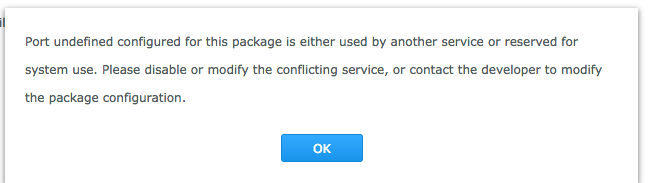
luckman212
on 24 Sep 2018
@luckman212 Please just reboot your NAS and try again.
m4tt075
on 24 Sep 2018
@m4tt075 Thanks again. Rebooting didn't help, but I figured out what the problem was (thanks to this post):
I had to edit the service config file at /usr/local/etc/services.d/znc.sc and change the port numbers there, because I run it on a different port. Once I did that, I was able to install your new package with no problem and the identd module loaded!
I edited /var/packages/znc/target/.oidentd.conf (it creates a blank one I guess) and put in the following, based on the docs:
user "sc-znc" {
   default {
       allow spoof
       allow spoof_all
   }
}
Then I configured the identfile module, again following the docs:
/msg *identfile setfile ~/.oidentd.conf
/msg *identfile setformat global { reply "%user%" }
Disconnected from IRC and reconnected and... voila
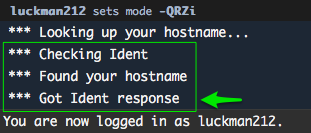
So it seems this is working great! 💥
luckman212
on 24 Sep 2018
@luckman212 Cool! 👍
I'll update my PR to include the identd module and see whether I can automatically create the .identd.conf file too. Should be possible. Would you be willing to create a Wiki entry describing the rest? Just post a proposal here and @ymartin59 should be able to include it in a ZNC Wiki entry, once the PR has been sufficiently tested and merged...
m4tt075
on 24 Sep 2018
Sure, I'd be honored to write it up. @ymartin59 should I just click _New Page_ on https://github.com/SynoCommunity/spksrc/wiki and start writing? Or, what is the process? thanks
luckman212
on 24 Sep 2018
@luckman212 I've updated the package, but would like to ask you to confirm it working again. Would you mind downloading the new x64 test build from...
https://www.dropbox.com/s/y5mizjxdrpdzvot/znc_x64-6.1_1.7.1-12.spk?dl=0
...and doing another clean install, please? This time the only thing you should be doing is configuring the identfile module. Having said that, I did not want to write the .oidentd.conf file into the target directory itself. I wrote it into the target/var directory instead, so that it survives upgrades, in case it is edited by the user. The identfile configuration you've posted might still work as target/var should actually be ZNC's home directory. However, if not, please try to include the /var piece in the identfile configuration as follows and see whether it works then:
/msg *identfile setfile ~/var/.oidentd.conf
/msg *identfile setformat global { reply "%user%" }
Many thanks for your continued support, also with the wiki. Much appreciated!
m4tt075
on 24 Sep 2018
This testing took a _while_, because I ran into an issue I was unaware of. Not an issue with ZNC, or your build—a firewall issue. Apparently ident is not a NAT-friendly protocol. After hours of troubleshooting, enabling adminlog/DEBUG mode, sudo -u sc-znc to run znc in foreground mode so I could see the logs (adminlog only logs to stdout apparently)...running tcpdump packet captures etc etc. I finally figured out what was wrong.
The clue was in the tcpdump capture I ran. The incoming tcp/113 ident packet contains an ephemeral port number (48900 in the below screenshot from Wireshark) which oidentd tries to match to an active IRC session:

Normally, a NAT router will rewrite this port as traffic leaves the LAN and set up a state to track the connection. This works fine for web traffic, but identd specifically looks for the session to match the port that the server sends in its discovery packet, whcih of course wasn't matching. It might be 48900 externally, but internally it's 23517 etc.
The fix in my case was to enable "static port outbound NAT" for port 7000 (the port I connect to freenode on via SSL). Not sure every router will have this issue, and for sure some might not allow this to be configured at all. But I wanted to post the detail for anyone interested.
_TL;DR— your package works fine!_ I did a clean install, completely blew out my config and installed from scratch. All I did was enable ident and indentfile and configure it. I used ~/var/.oidentd.conf as you suggested. It all works.
I noticed a 0-byte .oidentd file still gets created at /var/packages/znc/target but I deleted it after I saw it and it hasn't returned. The one at /var/packages/znc/target/var seems to be persistent and is the one in use.
luckman212
on 25 Sep 2018
@luckman212 Thanks a lot! I've been updating the package accordingly. I've just put the oidentd.conf file into the var/configs directory now and removed the leading dot, so that all configuration files are in the same place. It's clearer that way. Only implication is that the identfile configuration then has to read as follows:
/msg *identfile setfile ~/var/configs/oidentd.conf
/msg *identfile setformat global { reply "%user%" }
I'm rebuilding all packages now to allow some further and broader testing before we merge and re-publish. Will link the packages here again when I'm done.
m4tt075
on 28 Sep 2018
Sounds good. I'm ready to test! 🎉
luckman212
on 28 Sep 2018
@m4tt075 I see the new 1.7.1-4 build is up. But there's no x64 build?
luckman212
on 28 Sep 2018
@luckman212 You are quicker than the build system. Still building. Should come up soon. You can watch the progress here:
https://travis-ci.org/m4tt075/spksrc/builds/434771888
:-)
m4tt075
on 28 Sep 2018
Got it. Sorry, no rush! I love watching progress bars :neutral_face:
luckman212
on 28 Sep 2018
LOL Very good!
OK, new test builds done and available here:
https://github.com/m4tt075/spksrc/releases/tag/znc-1.7.1-4
Please keep on testing and reporting, folks...
m4tt075
on 28 Sep 2018
@m4tt075 New build installed & up and running! No issues.
As you mentioned, I set the oidentd config to point to the new location in ~/var/configs
These are the commands I used
/msg *identfile setfile ~/var/configs/oidentd.conf
/msg *identfile setformat global { reply "%nick%" }
@luckman212 Excellent. Thanks a lot for your continued support!
@ymartin59 Let's continue with the test builds until we have enough certainty this works for everybody. Will get back to you once I have a sufficient number of github downloads.
m4tt075
on 29 Sep 2018
Any updates?
Zialus
on 20 Nov 2018
Published. Please open new issue in case of troubles.
 ymartin59
on 2 Dec 2018
ymartin59
on 2 Dec 2018
Related issues
 ghost
·
4Comments
ghost
·
4Comments
 th0ma7
·
5Comments
th0ma7
·
5Comments
 R1skNt
·
6Comments
R1skNt
·
6Comments
 regblade85
·
8Comments
regblade85
·
8Comments
 BlueWhaleSEO
·
7Comments
BlueWhaleSEO
·
7Comments
Most helpful comment
@luckman212 Excellent. Thanks a lot for your continued support!
@ymartin59 Let's continue with the test builds until we have enough certainty this works for everybody. Will get back to you once I have a sufficient number of github downloads.