Spinalcordtoolbox: Qt platform plugin “xcb” in “” cannot be loaded on CentOS
Description
When Running
sct_label_utils -i t2.nii.gz -create-viewer 1,2,3,4,5,6,7 -o t2label
The following error appears,
qt.qpa.plugin: Could not load the Qt platform plugin “xcb” in “” even though it was found.

This application failed to start because no Qt platform plugin could be initialized. Reinstalling the application may fix this problem.

Available platform plugins are: eglfs, linuxfb, minimal, minimalegl, offscreen, vnc, wayland-egl, wayland, wayland-xcomposite-egl, wayland-xcomposite-glx, webgl, xcb.

Aborted
Steps to Reproduce
Install SCT following the instructions for CentOS shown here
Download any test data, in my case I ran
sct_download_data -d course_london19
- run,
cd sct_course_london/single_subject/data/t2
``

4. Finally execute,
```bash
sct_label_utils -i t2.nii.gz -create-viewer 1,2,3,4,5,6,7 -o t2label
Expected behavior:
The following image should appear:

Actual behavior:
I get the following output
qt.qpa.plugin: Could not load the Qt platform plugin “xcb” in “” even though it was found.

This application failed to start because no Qt platform plugin could be initialized. Reinstalling the application may fix this problem.

Available platform plugins are: eglfs, linuxfb, minimal, minimalegl, offscreen, vnc, wayland-egl, wayland, wayland-xcomposite-egl, wayland-xcomposite-glx, webgl, xcb.

Aborted
OS
Operating System: CentOS Linux 7 (Core)
CPE OS Name: cpe:/o:centos:centos:7
Kernel: Linux 3.10.0-957.1.3.el7.x86_64
Architecture: x86-64
Usefull resources
 gmotzespina
All 34 comments
Doing some further research some possible solutions would be doing the following.
Running: ldd /usr/lib/qt/plugins/platforms/libqxcb.so
if that doesn’t work, trying,
sudo ln -sf /usr/lib/x86_64-linux-gnu/qt5/plugins/platforms/ /usr/bin/
Resources
- https://forum.qt.io/topic/93247/qt-qpa-plugin-could-not-load-the-qt-platform-plugin-xcb-in-even-though-it-was-found/9
- https://stackoverflow.com/questions/17106315/failed-to-load-platform-plugin-xcb-while-launching-qt5-app-on-linux-without
- https://askubuntu.com/questions/308128/failed-to-load-platform-plugin-xcb-while-launching-qt5-app-on-linux-without
gmotzespina
on 12 Sep 2019
Until now I’ve accessed the docker image without being a root user by doing the following:
- Create docker file
- Adding the following:
##########################################
# Dockerfile to change from root to
# non-root privilege
###########################################
# Base image is CentOS
FROM centos:latest
# Add a new user "spinalcordtoolbox" with user id 8877
RUN yum -y install git bzip2 gcc wget which mesa-libGL unzip
RUN git clone https://github.com/neuropoly/spinalcordtoolbox.git sct
RUN cd sct && yes | ./install_sct
RUN echo $PATH
RUN export PATH="/sct/bin:${PATH}"
RUN wget https://www.neuro.polymtl.ca/_media/downloads/sct/20190121_sct_course-london19.zip
RUN unzip 20190121_sct_course-london19.zip
RUN useradd -u 8877 spinalcordtoolbox
# Change to non-root privilege
USER spinalcordtoolbox
- Run:
docker image build -t spinalcord .to build the image - Run:
docker run -it spinalcord:latestto access the image. - Run:
cd sct_course-london19/single_subject/data/t2
sct_label_utils -i t2.nii.gz -create-viewer 1,2,3,4,5,6,7 -o t2label
But now I get a permissions error:
Command-line usage error: Option -o no write permission for file t2label
Aborted...
If I run the command without -o , then I get the same error as when running the command being a root user:
[spinalcordtoolbox@4e6403b56129 t2]$ sct_label_utils -i t2.nii.gz -create-viewer 1,2,3,4,5,6,7
--
Spinal Cord Toolbox (git-master-22f44e7316e75517ac3f056147ceb9db58e0c331)
generated new fontManager
qt.qpa.plugin: Could not load the Qt platform plugin "xcb" in "" even though it was found.
This application failed to start because no Qt platform plugin could be initialized. Reinstalling the application may fix this problem.
Available platform plugins are: eglfs, linuxfb, minimal, minimalegl, offscreen, vnc, wayland-egl, wayland, wayland-xcomposite-egl, wayland-xcomposite-glx, webgl, xcb.
So until now I guess the error dosen’t depend on the user’s type since the same error happens weather the user has root access or not.
I’ll dig further into this.
gmotzespina
on 12 Sep 2019
@jcohenadad Digging further into this i think that Qt is not installed, I tried following these steps,
[Qt 5.3.2 설치]
yum install mesa*
yum install gstreamer*
yum install *gstreamer*
yum install *ffmpeg*
yum install sqlit*
yum install webkit*
yum install bison*
yum install flex*
yum install gperf*
yum install ruby*
yum install *ICU*
yum install *icu*
yum install libxcb libxcb-devel libXrender libXrender-devel xcb-util-wm xcb-util-wm-devel xcb-util xcb-util-devel xcb-util-image xcb-util-image-devel xcb-util-keysyms xcb-util-keysyms-devel
./configure --prefix=/home/cms/Qt/Qt5.3.2-64bit-src -debug-and-release -developer-build -qt-xcb -no-compile-examples -webkit -svg
make
make install
,but it didn't seem to help.
I've also tried installing the CentOS 7 system qt5 by doing
yum install qt5-qtbase-devel
Without any positive effect. Do you think I'm overseeing something?
Other resources
- How to Install Qt 5 and Qwt on CentOS 6: Qt
gmotzespina
on 12 Sep 2019
@gmotzespina do you have any update on this issue? @zougloub do you think you can help us there?
 jcohenadad
on 15 Sep 2019
jcohenadad
on 15 Sep 2019
No, until now I haven't had any progress on the matter. I'm gonna continue working on this today.
gmotzespina
on 16 Sep 2019
I haven't been able to do much progress on this. Do you think pairing on this would be helpful to find a solution @jcohenadad, @zougloub. In any case I'll continue working on this.
gmotzespina
on 17 Sep 2019
@gmotzespina have you tried installing libxkbcommon-x11? That's where I landed after a little search.
 agahkarakuzu
on 17 Sep 2019
agahkarakuzu
on 17 Sep 2019
@agahkarakuzu No I haven't tried it out, but I'll do it. Thanks ! I'll keep you updated.
gmotzespina
on 17 Sep 2019
Installing libxkbcommon-x11 doesn't work, keep getting the same output.
gmotzespina
on 17 Sep 2019
@gmotzespina sorry to hear that it did not work. Just out of curiosity, are you trying to achieve this in a container or on your commputer?
Because docker run -it spinalcord:latest call does not appear to do x11 forwarding, which prevents you from seeing GUI components.
agahkarakuzu
on 17 Sep 2019
Yeah Actually I'm trying just that:
# in Terminal
docker pull centos:latest
docker run -it centos:latest
# in docker container
yum -y install git bzip2 gcc wget which mesa-libGL
After having installed your favorite OS, run SCT installer:
git clone https://github.com/neuropoly/spinalcordtoolbox.git sct
cd sct
yes | ./install_sct
export PATH="/sct/bin:${PATH}"
sct_check_dependencies
sct_testing
Also I'm not sure if Qt is even supported on centos: https://doc.qt.io/qt-5/linux.html. I might be missing something though.
EDIT
Ignore
Also I'm not sure if Qt is even supported on centos: https://doc.qt.io/qt-5/linux.html. I might be missing something though.
gmotzespina
on 17 Sep 2019
As far as I am concerned, you should be OK with Qt on Centos. The problem appears to me that you are trying to access GUI components through a container without passing the commands to let Docker engine know where to look for that communication.
Can you try adding the following arguments to your docker run command?
--net=host --env="DISPLAY" --volume="$HOME/.Xauthority:/root/.Xauthority:rw"
If this one does not work, I can get my hands dirty and look deeper on my machine to inspect what's going on.
agahkarakuzu
on 17 Sep 2019
Also I'm not sure if Qt is even supported on centos: https://doc.qt.io/qt-5/linux.html. I might be missing something though.
@gmotzespina what let's you think that Qt is not supported on centos? the link you provided clearly lists centos as an OS
jcohenadad
on 17 Sep 2019
Also I'm not sure if Qt is even supported on centos: https://doc.qt.io/qt-5/linux.html. I might be missing something though.
@gmotzespina what let's you think that Qt is not supported on centos? the link you provided clearly lists centos as an OS
Ignore my comment, I've miss read the docs.
gmotzespina
on 17 Sep 2019
@agahkarakuzu I've tried following the same steps as shown above just instead of running docker run -it centos:latest I did it as you suggested: docker run -it --net=host --env="DISPLAY" --volume="$HOME/.Xauthority:/root/.Xauthority:rw" centos:latest.
It keeps failing the same way,
[root@docker-desktop t2]# yum install libxkbcommon-x11
Loaded plugins: fastestmirror, ovl
Loading mirror speeds from cached hostfile
* base: centos.mirror.lstn.net
* extras: mirrors.sonic.net
* updates: repos.dfw.quadranet.com
Resolving Dependencies
--> Running transaction check
---> Package libxkbcommon-x11.x86_64 0:0.7.1-3.el7 will be installed
--> Processing Dependency: libxkbcommon(x86-64) = 0.7.1-3.el7 for package: libxkbcommon-x11-0.7.1-3.el7.x86_64
--> Processing Dependency: libxkbcommon.so.0(V_0.5.0)(64bit) for package: libxkbcommon-x11-0.7.1-3.el7.x86_64
--> Processing Dependency: libxkbcommon.so.0()(64bit) for package: libxkbcommon-x11-0.7.1-3.el7.x86_64
--> Running transaction check
---> Package libxkbcommon.x86_64 0:0.7.1-3.el7 will be installed
--> Processing Dependency: xkeyboard-config for package: libxkbcommon-0.7.1-3.el7.x86_64
--> Running transaction check
---> Package xkeyboard-config.noarch 0:2.24-1.el7 will be installed
--> Finished Dependency Resolution
Dependencies Resolved
================================================================================================================================================================================================================
Package Arch Version Repository Size
================================================================================================================================================================================================================
Installing:
libxkbcommon-x11 x86_64 0.7.1-3.el7 base 19 k
Installing for dependencies:
libxkbcommon x86_64 0.7.1-3.el7 base 108 k
xkeyboard-config noarch 2.24-1.el7 base 834 k
Transaction Summary
================================================================================================================================================================================================================
Install 1 Package (+2 Dependent packages)
Total download size: 962 k
Installed size: 5.9 M
Is this ok [y/d/N]: y
Downloading packages:
(1/3): libxkbcommon-x11-0.7.1-3.el7.x86_64.rpm | 19 kB 00:00:00
(2/3): libxkbcommon-0.7.1-3.el7.x86_64.rpm | 108 kB 00:00:00
(3/3): xkeyboard-config-2.24-1.el7.noarch.rpm | 834 kB 00:00:00
----------------------------------------------------------------------------------------------------------------------------------------------------------------------------------------------------------------
Total 1.1 MB/s | 962 kB 00:00:00
Running transaction check
Running transaction test
Transaction test succeeded
Running transaction
Installing : xkeyboard-config-2.24-1.el7.noarch 1/3
Installing : libxkbcommon-0.7.1-3.el7.x86_64 2/3
Installing : libxkbcommon-x11-0.7.1-3.el7.x86_64 3/3
Verifying : xkeyboard-config-2.24-1.el7.noarch 1/3
Verifying : libxkbcommon-x11-0.7.1-3.el7.x86_64 2/3
Verifying : libxkbcommon-0.7.1-3.el7.x86_64 3/3
Installed:
libxkbcommon-x11.x86_64 0:0.7.1-3.el7
Dependency Installed:
libxkbcommon.x86_64 0:0.7.1-3.el7 xkeyboard-config.noarch 0:2.24-1.el7
Complete!
[root@docker-desktop t2]# sct_label_utils -i t2.nii.gz -create-viewer 1,2,3,4,5,6,7 -o t2label
--
Spinal Cord Toolbox (git-master-a03b1e65b2934abf33abbdb8e360d38f9c937712)
qt.qpa.plugin: Could not load the Qt platform plugin "xcb" in "" even though it was found.
This application failed to start because no Qt platform plugin could be initialized. Reinstalling the application may fix this problem.
Available platform plugins are: eglfs, linuxfb, minimal, minimalegl, offscreen, vnc, wayland-egl, wayland, wayland-xcomposite-egl, wayland-xcomposite-glx, webgl, xcb.
OK give me some time, will look into this and get back to you.
agahkarakuzu
on 17 Sep 2019
Nice, thanks a bunch, I'm case you want to pair let me know!
gmotzespina
on 17 Sep 2019
Here is a detailed debug report to begin with:
Spinal Cord Toolbox (git-master-a03b1e65b2934abf33abbdb8e360d38f9c937712)
QFactoryLoader::QFactoryLoader() checking directory path "/sct/python/envs/venv_sct/lib/python3.6/site-packages/PyQt5/Qt/plugins/platforms" ...
QFactoryLoader::QFactoryLoader() looking at "/sct/python/envs/venv_sct/lib/python3.6/site-packages/PyQt5/Qt/plugins/platforms/libqeglfs.so"
Found metadata in lib /sct/python/envs/venv_sct/lib/python3.6/site-packages/PyQt5/Qt/plugins/platforms/libqeglfs.so, metadata=
{
"IID": "org.qt-project.Qt.QPA.QPlatformIntegrationFactoryInterface.5.3",
"MetaData": {
"Keys": [
"eglfs"
]
},
"archreq": 0,
"className": "QEglFSIntegrationPlugin",
"debug": false,
"version": 331008
}
Got keys from plugin meta data ("eglfs")
QFactoryLoader::QFactoryLoader() looking at "/sct/python/envs/venv_sct/lib/python3.6/site-packages/PyQt5/Qt/plugins/platforms/libqlinuxfb.so"
Found metadata in lib /sct/python/envs/venv_sct/lib/python3.6/site-packages/PyQt5/Qt/plugins/platforms/libqlinuxfb.so, metadata=
{
"IID": "org.qt-project.Qt.QPA.QPlatformIntegrationFactoryInterface.5.3",
"MetaData": {
"Keys": [
"linuxfb"
]
},
"archreq": 0,
"className": "QLinuxFbIntegrationPlugin",
"debug": false,
"version": 331008
}
Got keys from plugin meta data ("linuxfb")
QFactoryLoader::QFactoryLoader() looking at "/sct/python/envs/venv_sct/lib/python3.6/site-packages/PyQt5/Qt/plugins/platforms/libqminimal.so"
Found metadata in lib /sct/python/envs/venv_sct/lib/python3.6/site-packages/PyQt5/Qt/plugins/platforms/libqminimal.so, metadata=
{
"IID": "org.qt-project.Qt.QPA.QPlatformIntegrationFactoryInterface.5.3",
"MetaData": {
"Keys": [
"minimal"
]
},
"archreq": 0,
"className": "QMinimalIntegrationPlugin",
"debug": false,
"version": 331008
}
Got keys from plugin meta data ("minimal")
QFactoryLoader::QFactoryLoader() looking at "/sct/python/envs/venv_sct/lib/python3.6/site-packages/PyQt5/Qt/plugins/platforms/libqminimalegl.so"
Found metadata in lib /sct/python/envs/venv_sct/lib/python3.6/site-packages/PyQt5/Qt/plugins/platforms/libqminimalegl.so, metadata=
{
"IID": "org.qt-project.Qt.QPA.QPlatformIntegrationFactoryInterface.5.3",
"MetaData": {
"Keys": [
"minimalegl"
]
},
"archreq": 0,
"className": "QMinimalEglIntegrationPlugin",
"debug": false,
"version": 331008
}
Got keys from plugin meta data ("minimalegl")
QFactoryLoader::QFactoryLoader() looking at "/sct/python/envs/venv_sct/lib/python3.6/site-packages/PyQt5/Qt/plugins/platforms/libqoffscreen.so"
Found metadata in lib /sct/python/envs/venv_sct/lib/python3.6/site-packages/PyQt5/Qt/plugins/platforms/libqoffscreen.so, metadata=
{
"IID": "org.qt-project.Qt.QPA.QPlatformIntegrationFactoryInterface.5.3",
"MetaData": {
"Keys": [
"offscreen"
]
},
"archreq": 0,
"className": "QOffscreenIntegrationPlugin",
"debug": false,
"version": 331008
}
Got keys from plugin meta data ("offscreen")
QFactoryLoader::QFactoryLoader() looking at "/sct/python/envs/venv_sct/lib/python3.6/site-packages/PyQt5/Qt/plugins/platforms/libqvnc.so"
Found metadata in lib /sct/python/envs/venv_sct/lib/python3.6/site-packages/PyQt5/Qt/plugins/platforms/libqvnc.so, metadata=
{
"IID": "org.qt-project.Qt.QPA.QPlatformIntegrationFactoryInterface.5.3",
"MetaData": {
"Keys": [
"vnc"
]
},
"archreq": 0,
"className": "QVncIntegrationPlugin",
"debug": false,
"version": 331008
}
Got keys from plugin meta data ("vnc")
QFactoryLoader::QFactoryLoader() looking at "/sct/python/envs/venv_sct/lib/python3.6/site-packages/PyQt5/Qt/plugins/platforms/libqwayland-egl.so"
Found metadata in lib /sct/python/envs/venv_sct/lib/python3.6/site-packages/PyQt5/Qt/plugins/platforms/libqwayland-egl.so, metadata=
{
"IID": "org.qt-project.Qt.QPA.QPlatformIntegrationFactoryInterface.5.3",
"MetaData": {
"Keys": [
"wayland-egl"
]
},
"archreq": 0,
"className": "QWaylandEglPlatformIntegrationPlugin",
"debug": false,
"version": 331008
}
Got keys from plugin meta data ("wayland-egl")
QFactoryLoader::QFactoryLoader() looking at "/sct/python/envs/venv_sct/lib/python3.6/site-packages/PyQt5/Qt/plugins/platforms/libqwayland-generic.so"
Found metadata in lib /sct/python/envs/venv_sct/lib/python3.6/site-packages/PyQt5/Qt/plugins/platforms/libqwayland-generic.so, metadata=
{
"IID": "org.qt-project.Qt.QPA.QPlatformIntegrationFactoryInterface.5.3",
"MetaData": {
"Keys": [
"wayland"
]
},
"archreq": 0,
"className": "QWaylandIntegrationPlugin",
"debug": false,
"version": 331008
}
Got keys from plugin meta data ("wayland")
QFactoryLoader::QFactoryLoader() looking at "/sct/python/envs/venv_sct/lib/python3.6/site-packages/PyQt5/Qt/plugins/platforms/libqwayland-xcomposite-egl.so"
Found metadata in lib /sct/python/envs/venv_sct/lib/python3.6/site-packages/PyQt5/Qt/plugins/platforms/libqwayland-xcomposite-egl.so, metadata=
{
"IID": "org.qt-project.Qt.QPA.QPlatformIntegrationFactoryInterface.5.3",
"MetaData": {
"Keys": [
"wayland-xcomposite-egl"
]
},
"archreq": 0,
"className": "QWaylandXCompositeEglPlatformIntegrationPlugin",
"debug": false,
"version": 331008
}
Got keys from plugin meta data ("wayland-xcomposite-egl")
QFactoryLoader::QFactoryLoader() looking at "/sct/python/envs/venv_sct/lib/python3.6/site-packages/PyQt5/Qt/plugins/platforms/libqwayland-xcomposite-glx.so"
Found metadata in lib /sct/python/envs/venv_sct/lib/python3.6/site-packages/PyQt5/Qt/plugins/platforms/libqwayland-xcomposite-glx.so, metadata=
{
"IID": "org.qt-project.Qt.QPA.QPlatformIntegrationFactoryInterface.5.3",
"MetaData": {
"Keys": [
"wayland-xcomposite-glx"
]
},
"archreq": 0,
"className": "QWaylandXCompositeGlxPlatformIntegrationPlugin",
"debug": false,
"version": 331008
}
Got keys from plugin meta data ("wayland-xcomposite-glx")
QFactoryLoader::QFactoryLoader() looking at "/sct/python/envs/venv_sct/lib/python3.6/site-packages/PyQt5/Qt/plugins/platforms/libqwebgl.so"
Found metadata in lib /sct/python/envs/venv_sct/lib/python3.6/site-packages/PyQt5/Qt/plugins/platforms/libqwebgl.so, metadata=
{
"IID": "org.qt-project.Qt.QPA.QPlatformIntegrationFactoryInterface.5.3",
"MetaData": {
"Keys": [
"webgl"
]
},
"archreq": 0,
"className": "QWebGLIntegrationPlugin",
"debug": false,
"version": 331008
}
Got keys from plugin meta data ("webgl")
QFactoryLoader::QFactoryLoader() looking at "/sct/python/envs/venv_sct/lib/python3.6/site-packages/PyQt5/Qt/plugins/platforms/libqxcb.so"
Found metadata in lib /sct/python/envs/venv_sct/lib/python3.6/site-packages/PyQt5/Qt/plugins/platforms/libqxcb.so, metadata=
{
"IID": "org.qt-project.Qt.QPA.QPlatformIntegrationFactoryInterface.5.3",
"MetaData": {
"Keys": [
"xcb"
]
},
"archreq": 0,
"className": "QXcbIntegrationPlugin",
"debug": false,
"version": 331008
}
Got keys from plugin meta data ("xcb")
QFactoryLoader::QFactoryLoader() checking directory path "/sct/python/envs/venv_sct/bin/platforms" ...
Cannot load library /sct/python/envs/venv_sct/lib/python3.6/site-packages/PyQt5/Qt/plugins/platforms/libqxcb.so: (libfontconfig.so.1: cannot open shared object file: No such file or directory)
QLibraryPrivate::loadPlugin failed on "/sct/python/envs/venv_sct/lib/python3.6/site-packages/PyQt5/Qt/plugins/platforms/libqxcb.so" : "Cannot load library /sct/python/envs/venv_sct/lib/python3.6/site-packages/PyQt5/Qt/plugins/platforms/libqxcb.so: (libfontconfig.so.1: cannot open shared object file: No such file or directory)"
qt.qpa.plugin: Could not load the Qt platform plugin "xcb" in "" even though it was found.
This application failed to start because no Qt platform plugin could be initialized. Reinstalling the application may fix this problem.
Available platform plugins are: eglfs, linuxfb, minimal, minimalegl, offscreen, vnc, wayland-egl, wayland, wayland-xcomposite-egl, wayland-xcomposite-glx, webgl, xcb.
Aborted
I kept track of missing dependencies using export QT_DEBUG_PLUGINS=1. Installed all of the missing deps that it was complaining in this dockerfile:
FROM centos:latest
# Add a new user "spinalcordtoolbox" with user id 8877
RUN yum -y install git bzip2 gcc wget which mesa-libGL unzip
RUN git clone https://github.com/neuropoly/spinalcordtoolbox.git sct
RUN cd sct; yes | ./install_sct

ENV PATH "/opt/Qt5.1.1/5.1.1/gcc_64/bin:/sct/bin:${PATH}"
#ENV QT_PLUGIN_PATH "/opt/Qt5.1.1/5.1.1/plugins"

RUN cd /tmp; wget https://www.neuro.polymtl.ca/_media/downloads/sct/20190121_sct_course-london19.zip; unzip 20190121_sct_course-london19.zip

RUN yum -y install fontconfig freetype freetype-devel fontconfig-devel libstdc++
RUN yum -y install libXrender libxkbcommon-x11
RUN useradd -u 8877 spinalcordtoolbox
# Change to non-root privilege
USER spinalcordtoolbox
After this installation, docker run -it sctagah` gices the following:

It is no longer complaining about missing dependencies, but asking for host to provide an xhost. i connected XQuartz on 127.0.0.1 on OSX (this is how it is done on osx ).
Good news, your xcb problem has been resolved. Bad news, you have a new exception:

This issue may be resolved after properly installing dbus library.
Gotta take of know, I hope this gives you a better head start to proceed.
agahkarakuzu
on 17 Sep 2019
@agahkarakuzu thank you so much for your help!!! 🙏
jcohenadad
on 18 Sep 2019
@agahkarakuzu Thanks a bunch! I'll keep on going with your progress.
gmotzespina
on 18 Sep 2019
@agahkarakuzu Sorry to bother you again.
I've tried your solution using this Dockerfile:
FROM centos:latest
# Add a new user "spinalcordtoolbox" with user id 8877
RUN yum -y install git bzip2 gcc wget which mesa-libGL unzip
RUN git clone https://github.com/neuropoly/spinalcordtoolbox.git sct
RUN cd sct; yes | ./install_sct
ENV PATH "/opt/Qt5.1.1/5.1.1/gcc_64/bin:/sct/bin:${PATH}"
#ENV QT_PLUGIN_PATH "/opt/Qt5.1.1/5.1.1/plugins"
RUN cd /tmp; wget https://www.neuro.polymtl.ca/_media/downloads/sct/20190121_sct_course-london19.zip; unzip 20190121_sct_course-london19.zip
RUN yum -y install fontconfig freetype freetype-devel fontconfig-devel libstdc++
RUN yum -y install libXrender libxkbcommon-x11
RUN useradd -u 8877 spinalcordtoolbox
# Change to non-root privilege
USER spinalcordtoolbox
First of all it didn't work because using a user without privileges throws the following error:
Command-line usage error: Option -o no write permission for file t2label
Aborted...
So I removed the generation of the non-root user and used this docker file:
FROM centos:latest
# Add a new user "spinalcordtoolbox" with user id 8877
RUN yum -y install git bzip2 gcc wget which mesa-libGL unzip
RUN git clone https://github.com/neuropoly/spinalcordtoolbox.git sct
RUN cd sct; yes | ./install_sct

ENV PATH "/opt/Qt5.1.1/5.1.1/gcc_64/bin:/sct/bin:${PATH}"
#ENV QT_PLUGIN_PATH "/opt/Qt5.1.1/5.1.1/plugins"

RUN cd /tmp; wget https://www.neuro.polymtl.ca/_media/downloads/sct/20190121_sct_course-london19.zip; unzip 20190121_sct_course-london19.zip

RUN yum -y install fontconfig freetype freetype-devel fontconfig-devel libstdc++
RUN yum -y install libXrender libxkbcommon-x11
Then I followed the following steps
- build the docker image
docker image build -t spinalcord . - Run
docker run -it spinalcord:latest. - Inside docker run
cd tmp/sct_course-london19/single_subject/data/t2export QT_DEBUG_PLUGINS=1sct_label_utils -i t2.nii.gz -create-viewer 1,2,3,4,5,6,7 -o t2label
After running the steps above I get the following;
[root@e879cf0a15e9 t2]# export QT_DEBUG_PLUGINS=1
[root@e879cf0a15e9 t2]# sct_label_utils -i t2.nii.gz -create-viewer 1,2,3,4,5,6,7 -o t2label

--
Spinal Cord Toolbox (git-master-22f44e7316e75517ac3f056147ceb9db58e0c331)

QFactoryLoader::QFactoryLoader() checking directory path "/sct/python/envs/venv_sct/lib/python3.6/site-packages/PyQt5/Qt/plugins/platforms" ...
QFactoryLoader::QFactoryLoader() looking at "/sct/python/envs/venv_sct/lib/python3.6/site-packages/PyQt5/Qt/plugins/platforms/libqeglfs.so"
Found metadata in lib /sct/python/envs/venv_sct/lib/python3.6/site-packages/PyQt5/Qt/plugins/platforms/libqeglfs.so, metadata=
{
    "IID": "org.qt-project.Qt.QPA.QPlatformIntegrationFactoryInterface.5.3",
    "MetaData": {
        "Keys": [
            "eglfs"
        ]
    },
    "archreq": 0,
    "className": "QEglFSIntegrationPlugin",
    "debug": false,
    "version": 331008
}


Got keys from plugin meta data ("eglfs")
QFactoryLoader::QFactoryLoader() looking at "/sct/python/envs/venv_sct/lib/python3.6/site-packages/PyQt5/Qt/plugins/platforms/libqlinuxfb.so"
Found metadata in lib /sct/python/envs/venv_sct/lib/python3.6/site-packages/PyQt5/Qt/plugins/platforms/libqlinuxfb.so, metadata=
{
    "IID": "org.qt-project.Qt.QPA.QPlatformIntegrationFactoryInterface.5.3",
    "MetaData": {
        "Keys": [
            "linuxfb"
        ]
    },
    "archreq": 0,
    "className": "QLinuxFbIntegrationPlugin",
    "debug": false,
    "version": 331008
}
.
.
.
I wasn't able to get to the point where you left not even by using the docker file you posted. Did I miss something?
gmotzespina
on 19 Sep 2019
Hey @gmotzespina, it is interesting that you are running into a different issue with the same Dockerfile. First off the command you use to run your container is not enough to bind your xhost with the container.
docker run -it spinalcord:latest is just to start container in interactive command-line mode. You need some additional steps depending on your own machine's OS. If it is OSX or Ubuntu, you can follow the steps I described for qMRLab's container, just by changing the image name from qmrlab:mcrgui to spinalcord:latest. Instructions are given in the section-2 here.
Another suggestion is that build your images using --rm argument, this will remove intermediate containers and save you some disk space. Especially useful if you are an osx user.
docker build --rm -t <your_tag_here> .
I am doing that painful docker cleaning on my macbook again, I will rebuild image with a cleaner version of the Dockerfile I gave you above. I removed extra layers and some redundant env vars to give it a better structure.
I could not test this yet, there may be syntax errors in it.
FROM centos:latest

RUN yum -y update \
    && yum -y install git bzip2 gcc wget which mesa-libGL unzip \
    && yum -y install fontconfig freetype freetype-devel fontconfig-devel libstdc++ \
    && yum -y install libXrender libxkbcommon-x11 \
    && yum clean all

# Fetch SCT from source and install (at root directory)
# Download sct London course dataset in tmp folder and unzip
RUN git clone https://github.com/neuropoly/spinalcordtoolbox.git sct; \
    cd sct; \
    yes | ./install_sct

# Add SCT executable to the system env
ENV PATH "/sct/bin:${PATH}"

RUN cd /tmp; \
    wget https://www.neuro.polymtl.ca/_media/downloads/sct/20190121_sct_course-london19.zip; \
    unzip 20190121_sct_course-london19.zip; \
    rm 20190121_sct_course-london19.zip;\
    chmod 1777 /tmp

#RUN useradd -u 8877 spinalcordtoolbox
#USER spinalcordtoolbox
Using the image built with the Dockerfile I give above, I was able to do:
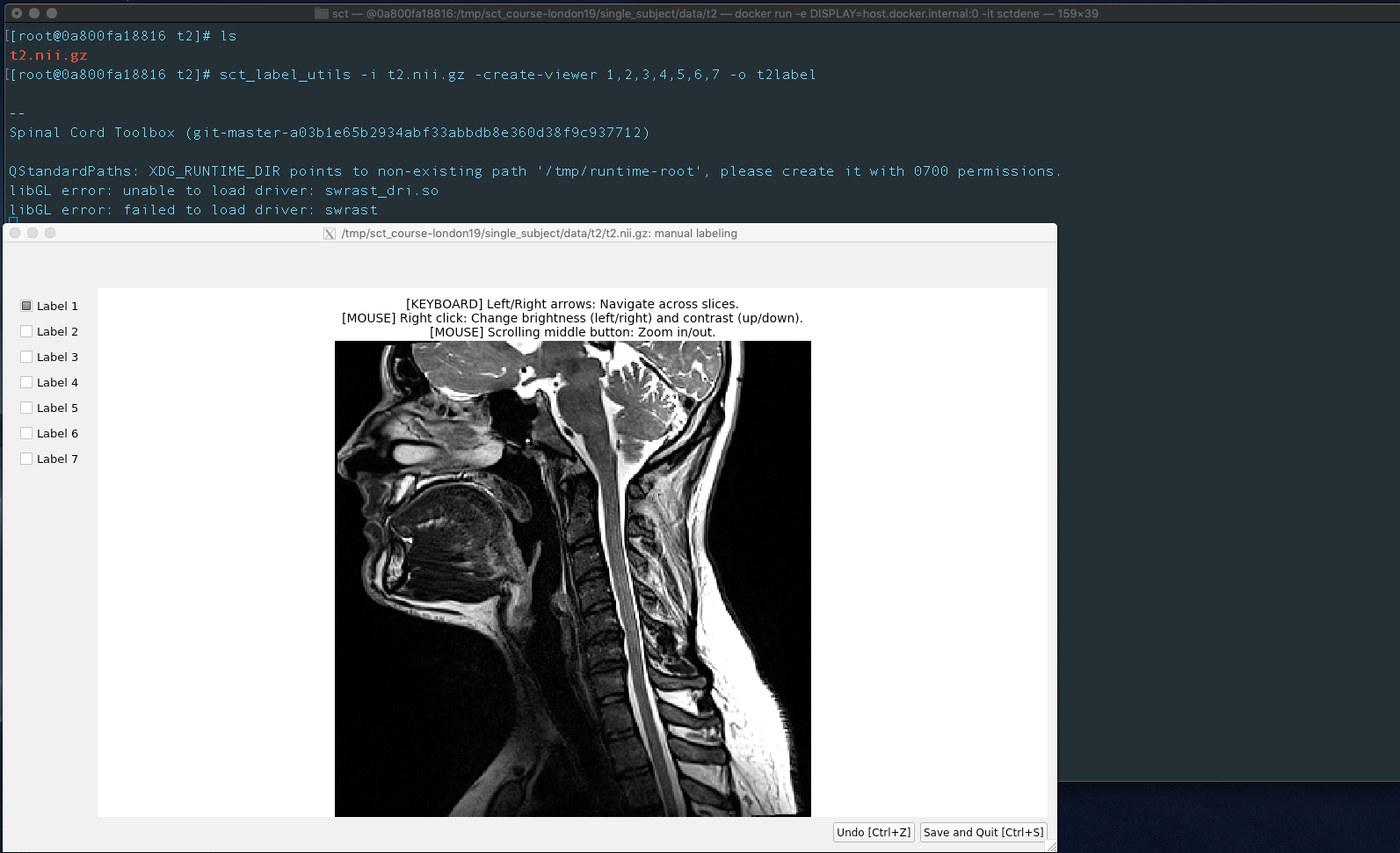
Functionality mentioned in the panel is there. I can navigate, zoom in out, change brightness, add labels etc. Note that I run it by passing -o option, I commented out non-root user steps at the end. If you enable them, you wont be even able to write to the /tmp. I am sure there are ways to have user non-privilaged and still enable writing to /tmp.
My steps to run this container:
docker build --rm -t sctdene .
- Install XQuartz X11 server.
- Check ‘Allow connections from network clientsoption inXQuartz` settings.
- Quit and restart XQuartz.
- In XQuartz window
xhost + 127.0.0.1 - In the default OSX terminal:
docker run -e DISPLAY=host.docker.internal:0 -it sctdene
Once again, these steps are going to work if you are using OSX.
If you are using Ubuntu, then you need to do something like:
docker run -ti --rm \
       -e DISPLAY=$DISPLAY \
       -v /tmp/.X11-unix:/tmp/.X11-unix \
       sctdene
Just one note, when I hit right arrow to move through slides, the app crashes when the requested slice number exceeds that of max available. If this is not on purpose, I can report it as a BUG?

agahkarakuzu
on 19 Sep 2019
Just one note, when I hit right arrow to move through slides, the app crashes when the requested slice number exceeds that of max available. If this is not on purpose, I can report it as a BUG?
@agahkarakuzu yes please! thank you so much for your help!
jcohenadad
on 19 Sep 2019
Not at all @jcohenadad, opening an issue for the bug.
agahkarakuzu
on 19 Sep 2019
@agahkarakuzu Thanks a bunch for your help, you've been really helpful. @jcohenadad I guess I
should update the wiki, and respond Yazhuo ?
http://forum.spinalcordmri.org/t/sct-label-utils-error/160/9
I'm not sure if there is a PR to raise, since it seems that just running it with the right configuration and steps mentioned by @agahkarakuzu should solve Yazhuo's problems right?
gmotzespina
on 19 Sep 2019
@gmotzespina yup, sounds good. However it would be good to check the environment upon installation and spit out relevant message
jcohenadad
on 19 Sep 2019
@jcohenadad I've updated the wiki https://github.com/neuropoly/spinalcordtoolbox/wiki/testing, let me know if you think I missed something, or if there are some typos. Will proceed with the environment checkup.
gmotzespina
on 19 Sep 2019
@jcohenadad I've updated the wiki https://github.com/neuropoly/spinalcordtoolbox/wiki/testing, let me know if you think I missed something, or if there are some typos. Will proceed with the environment checkup.
- this can be replaced by the command
touch Dockerfile - why are you installing this? it is only used for specific needs (e.g. this issue)
- typo here: chmod 777
- XQuartz install is likely not specific to centos Docker container, but also applies to the Ubuntu docker. Moreover, people don't necessarily need xdisplay (e.g. if they only run scripts without GUI, there is no need for all this). So i suggest to make a section "To use GUI"
jcohenadad
on 19 Sep 2019
@gmotzespina can you please let the user know how to solve the issue on the forum please (top priority), thanks
jcohenadad
on 19 Sep 2019
@jcohenadad Done, I've also fixed the wiki: https://github.com/neuropoly/spinalcordtoolbox/wiki/testing
gmotzespina
on 19 Sep 2019
There is no follow-up from the user about this issue so we can close
jcohenadad
on 27 Oct 2019
Related issues
 saulo-p
·
23Comments
jcohenadad
·
37Comments
saulo-p
·
23Comments
jcohenadad
·
37Comments
 zougloub
·
46Comments
jcohenadad
·
20Comments
zougloub
·
46Comments
jcohenadad
·
20Comments
 AdiVeeMiami
·
38Comments
AdiVeeMiami
·
38Comments
Most helpful comment
I kept track of missing dependencies using
export QT_DEBUG_PLUGINS=1. Installed all of the missing deps that it was complaining in this dockerfile:After this installation, docker run -it sctagah` gices the following:
It is no longer complaining about missing dependencies, but asking for host to provide an xhost. i connected
XQuartzon127.0.0.1on OSX (this is how it is done on osx ).Good news, your
xcbproblem has been resolved. Bad news, you have a new exception:This issue may be resolved after properly installing
dbuslibrary.Gotta take of know, I hope this gives you a better head start to proceed.