Sphinx: Support :emphasize-lines: in PDF output
- Bitbucket: https://bitbucket.org/birkenfeld/sphinx/issue/1238
- Originally reported by: Steve Piercy
- Originally created at: 2013-08-19T01:23:11.178
 shimizukawa
All 20 comments
_From Dietmar Winkler on 2014-04-20 22:21:37+00:00_
This is also an issue for https://github.com/xogeny/ModelicaBook/issues/19
shimizukawa
on 3 Jan 2015
_From Dietmar Winkler on 2014-04-23 14:20:15+00:00_
I think this is not of type proposal but more a bug since this functionality was added with the https://bitbucket.org/birkenfeld/sphinx/pull-request/4 also to the LaTeX processor but just doesn't seem to work.
shimizukawa
on 3 Jan 2015
This theme is already discussed on sphinx-dev group:
https://groups.google.com/forum/#!topic/sphinx-dev/GSLzhsYsdyU .
And it was filed as ticket of pygments:
https://bitbucket.org/birkenfeld/pygments-main/issues/1187/add-line-highlighting-to-latex-formatter
We will fix this after pygments would be fixed.
 tk0miya
on 14 Jan 2016
tk0miya
on 14 Jan 2016
Minted supports emphasize lines vía fvextra package for LaTeX highlightlines option (see PDF page 25). You can see the author's comment here:
As far as the LaTeX side is concerned, my fvextra package for LaTeX extends the fancyvrb package that is currently used for Pygments LaTeX output. fvextra adds highlightlines and highlightcolor options to the Verbatim environment.
 ricpelo
on 9 Dec 2017
ricpelo
on 9 Dec 2017
@ricpelo The blocker here is the LaTeXFormatter of Pygments. Edit: not true ... see next comment
It is blocking to Minted as well, and that's the meaning of the comment of its maintainer that you reproduce. (wrong, sorry)
Once the Pygments LaTeXFormatter is enhanced, Sphinx will implement the feature in its LaTeX writer and support style file. (edit this is not wrong, but Sphinx does not have to wait)
It is good that http://www.ctan.org/pkg/fvextra LaTeX package exists, as we can borrow some of its macros or, more probably, obtain the same effect with our owns, but it will certainly not be the case that this package will be added as dependency as it contains too much other macros, some of them probably modifying some fancyverb internals, which complicates our maintenance at Sphinx. Moreover it loads for example ifthen that we don't need and don't want to load. (among other things too LaTeX technical to mention here)
For reasons (briefly) discussed already some time ago it is not an option for Sphinx to use minted in its LaTeX writer. Edit: because the PDF builds will now require pdflatex to be run with -shell-escape option which is too much of a security risk, as it allows malicious LaTeX code to run whatever shell command. As moreover Sphinx users are not necessarily LaTeX experts, we can't introduce that weakness. If it were, I would never ever execute make latexpdf on a project I have git clone.
 jfbu
on 9 Dec 2017
jfbu
on 9 Dec 2017
Thank you very much for the explanation, @jfbu .
ricpelo
on 9 Dec 2017
@ricpelo Sorry, I made a mistake. I wrongly said Minted was also blocked by non-implementation on Pygments side of emphasize-lines option for its LaTeX formatter. Apologies, this was plain wrong. It does it all on LaTeX side, and did not wait for Pygments to add extra mark-up in its LateX output. The LaTeX contents of the environment is produced by Pygments but the minted user adds an option such as highlightlines=2-3 and minted does the extra needed LaTeX work. I knew that, but somehow got confused earlier today.
Sorry again. Definitely yes, Sphinx does not have to wait for Pygments's LaTeXFormatter to change. We have the 'highlight_args' from the Docutils node, and we could read the hl_lines from that and take appropriate mark-up in LaTeX output by adding suitable option to Verbatim (about exactly same strategy as minted does on LaTeX side). We know that Pygments LaTeXFormatter will ignore the hl_lines, but we can implement the feature ourself without any extra mark-up in the Pygmentize returned output. I will do it soon. There was some refactoring related to line numbers in code-blocks and literalinclude recently which perhaps I have to take into account.
I had plans to do that longtime ago, but I had forgotten, thanks for wake-up call ;-).
jfbu
on 9 Dec 2017
@jfbu Thank you very much again. I'd just started to write a book using Sphinx but I really need this feature, so now I need to decide if stay in Sphinx or jump to LaTeX to write it. Could you give me an estimation of when this feature will be implemented? (Just an estimation; I don't want to push you under pressure, sorry!). Thank you very much!
ricpelo
on 10 Dec 2017
@ricpelo I am doing it right now and it works fine but is not fully tested. I am preparing the PR for 1.7 release which is planned for early 2018. It could be added to 1.6.6 if this is considered a bugfix.
edit I did my PR #4285 on stable finally...
jfbu
on 10 Dec 2017
@jfbu Great! Thank you very much for your superb work!
ricpelo
on 10 Dec 2017
jfbu
on 11 Dec 2017
Wonferful work! Many thanks!
ricpelo
on 11 Dec 2017
I just tested it and unfortunately it does not quite work as expected. The highlighted line in the PDF is offset by -1 line.
Here an example from xogeny/ModelicaBook:
The line:
https://github.com/xogeny/ModelicaBook/blame/master/text/source/behavior/equations/first_order.rst#L209
gets rendered correctly in HTML as:

but in PDF like this:

 dietmarw
on 13 Dec 2017
dietmarw
on 13 Dec 2017
One more thing that just came apparent. The HTML version apparently starts the count 1 at line 1 of the included source code whilst the LaTeX formater starts count 1 at line one of the original source code.
dietmarw
on 13 Dec 2017
Thanks for testing!
Most of my testing was with option :linenos: to check, and then it is ok as examples such as those show (just documenting it here for the record with current stable tip)
With
.. literalinclude:: foo.py
   :linenos:
   :lines: 10-
   :emphasize-lines: 5-7
(edit sorry I got confused with screen shots which were for some other options than those initially in this message)
html looks like
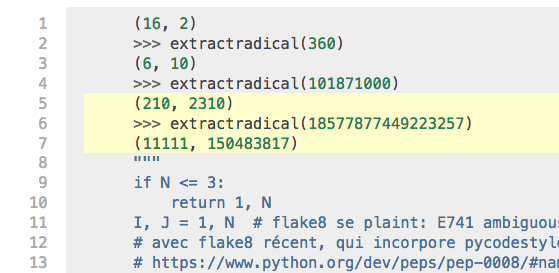
and pdf:
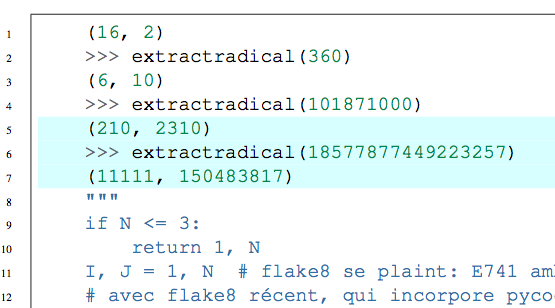
also with added :lineno-match:
html
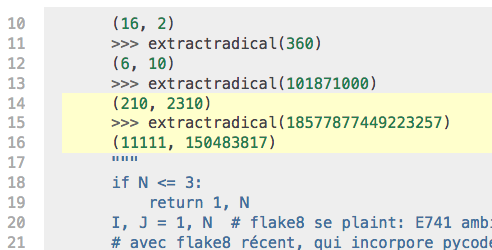
and pdf:
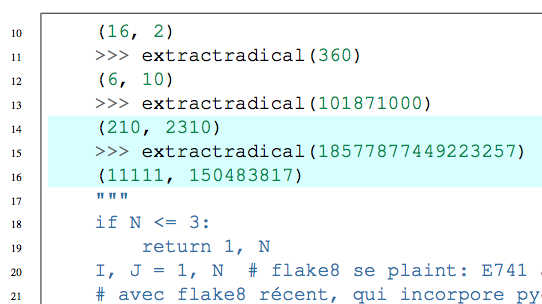
Tested with current stable.
It is documented that the line selection done by :emphasize-lines: applies to the lines which have been selected by other options such as :lines: and that the count starts at 1.
But indeed, there is currently an issue with PDF in absence of :linenos: option.
Thanks again, I will fix soon.
jfbu
on 13 Dec 2017
Fixed at 8de0abd1b. The 347f15ca2 way was complicated and failed in the absence of :linenos:. Sorry for inconvenience, thanks for reporting @dietmarw !
jfbu
on 13 Dec 2017
Thanks @jfbu for the (high)lightening fast reaction and fix. :-D I can confirm it now works as expected.
dietmarw
on 13 Dec 2017
@tk0miya do you feel like we can leave activated by default for 1.6.6 this highlighting ? or should I add some option, for example a 'sphinxsetup' option codehighlightingon which would be set false by default for 1.6.6 and true starting with 1.7 ?
With current pre-1.6.6 stable tip Sphinx user can set via 'sphinxsetup' VerbatimHighlightColor to {rgb}{1,1,1} (white) to (sort of) disable highlighting, or (better, in a way) add \renewcommand\sphinxFancyVerbFormatLine{\sphinxVerbatimFormatLine} to LaTeX preamble to really turn off the feature. My feeling is that it is not really needed to add an option doing this, because very few will not want highlighting to work in PDF, and they can apply the above if they really want to disable :emphasize-lines: to work in PDF.
edit: when the VerbatimColor (colour of code-block backgrounds) has been modified, setting VerbatimHighlightColor to white will not turn-off highlighting, it should be set to the same colour as VerbatimColor. Second method \renewcommand\sphinxFancyVerbFormatLine{\sphinxVerbatimFormatLine} works always.
jfbu
on 13 Dec 2017
It's tough question :-) It seems this is a bug fix as well as new feature.
But we determined this is a bug fix and push commits to stable branch (at least, I considered that on reviewing).
In addition, to provide compatibility option is very boring and not productive.
So I think no option is needed.
tk0miya
on 14 Dec 2017
@tk0miya this is also my preference, so we can leave things now as they are.
jfbu
on 16 Dec 2017
Related issues
 txomon
·
18Comments
txomon
·
18Comments
 Znni
·
25Comments
Znni
·
25Comments
 ratiotile
·
21Comments
ratiotile
·
21Comments
 webknjaz
·
38Comments
shimizukawa
·
28Comments
webknjaz
·
38Comments
shimizukawa
·
28Comments