Current "Next Third" solution creates vertical windows. But with vertical display orientation (portrait) it's almost useless. For portrait orientation horizontal third would be better. What do you say, is it worth it to implement?
 EvgeniiProkofevItomych
All 7 comments
Edit:
Looks like cycling through
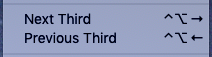
does the trick. First it positions thirds by width and then does thirds by height.
Came here looking for this feature as I usually have atleast one monitor set on portrait mode. Looks like a duplicate of Issue #465 where @eczarny commented on.
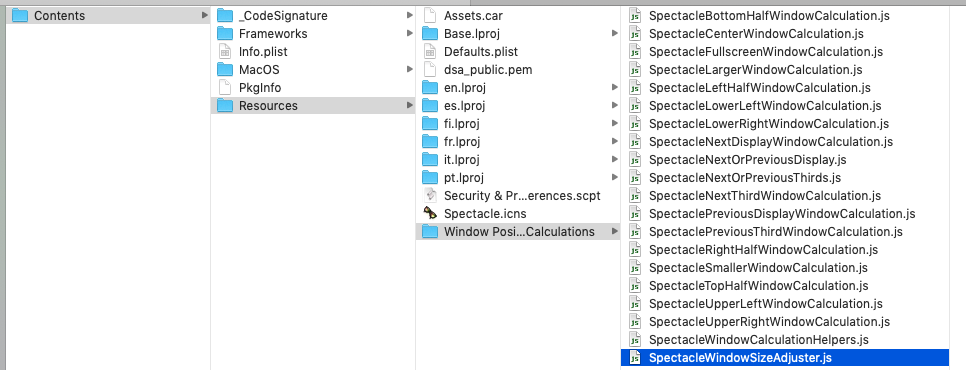
Looks like the best bet is creating and updating js file.
 rohit-nair
on 7 Apr 2019
rohit-nair
on 7 Apr 2019
I'm having a problem with he Horizontal 1/3 command where it does make the window 1/3 but doesn't cycly through to any other 1/3 windows. Anything I can do about that? I don't really know anything about coding.
I'm using Mac OS 10.13.3 on a Macbook Pro late 2011 13".
 HortBlam
on 10 Jun 2019
HortBlam
on 10 Jun 2019
I recently rewrote Spectacle in Swift as a new app called Rectangle, and this is one of the items that I fixed up.
Instead of "next, prev thirds", Rectangle handles thirds like Magnet where there are specific keyboard shortcuts for which third or two thirds you want.
The screen third that the window is snapped to is dependent on the orientation of the screen. For example, on landscape the first third is the left third, while on portrait the first third is the top third.
Feel free to try it out.
 rxhanson
on 4 Aug 2019
rxhanson
on 4 Aug 2019
I recently rewrote Spectacle in Swift as a new app called Rectangle, and this is one of the items that I fixed up.
Instead of "next, prev thirds", Rectangle handles thirds like Magnet where there are specific keyboard shortcuts for which third or two thirds you want.
The screen third that the window is snapped to is dependent on the orientation of the screen. For example, on landscape the first third is the left third, while on portrait the first third is the top third.
Feel free to try it out.
Hi rxhanson,
Thanks for the information and great work on the Rectangle!
I am looking for the move and resize keyboard shortcuts on Mac and find Spectacle and Rectangle.
I'm on macOS 10.14.4, Spectacle 1.2. The "next third" does cycle through all 6 positions both horizontally and vertically. I use this ALL the time and use the cycle way to move windows to desired position. In fact I disabled "previous third" shortcut. It is one less shortcut to remember and use cycle way is pretty fast.
It is not that easy to remember so many shortcut keys. I'm hoping there are another cycle shortcut key available to other type of move/resize. For example take Rectangle's shortcut key:
- left half, right half, top half, bottom half can use one shortcut key to cycle them.
- top left, top right, bottom left, bottom right can use one shortcut key to cycle them.
- first third, first two thirds, center third, last two thirds, last thirds (vertical+horizontal, 10 positions) can use one shortcut key to cycle them.
- maximize, restore can use one shortcut key to cycle them.
- next display, can cycle through all displays
- ....
With big/wide monitor, we can even have 1/6 cycle through all 6 positions.
This ways the number of shortcut keys are dramatically reduced, not only make it easy to remember not also reduce the chance of conflicting with other application shortcut keys.
What do you think? Is this possible?
Thanks!
 hfcheng66
on 20 May 2020
hfcheng66
on 20 May 2020
@hfcheng66, I don't have plans to add this into Rectangle, but would consider a pull request for it. Please file an issue on Rectangle's repo. It won't get tracked here.
rxhanson
on 20 May 2020
I recently rewrote Spectacle in Swift as a new app called Rectangle, and this is one of the items that I fixed up.
Instead of "next, prev thirds", Rectangle handles thirds like Magnet where there are specific keyboard shortcuts for which third or two thirds you want.
The screen third that the window is snapped to is dependent on the orientation of the screen. For example, on landscape the first third is the left third, while on portrait the first third is the top third.
Feel free to try it out.Hi rxhanson,
Thanks for the information and great work on the Rectangle!
I am looking for the move and resize keyboard shortcuts on Mac and find Spectacle and Rectangle.
I'm on macOS 10.14.4, Spectacle 1.2. The "next third" does cycle through all 6 positions both horizontally and vertically. I use this ALL the time and use the cycle way to move windows to desired position. In fact I disabled "previous third" shortcut. It is one less shortcut to remember and use cycle way is pretty fast.
It is not that easy to remember so many shortcut keys. I'm hoping there are another cycle shortcut key available to other type of move/resize. For example take Rectangle's shortcut key:
- left half, right half, top half, bottom half can use one shortcut key to cycle them.
- top left, top right, bottom left, bottom right can use one shortcut key to cycle them.
- first third, first two thirds, center third, last two thirds, last thirds (vertical+horizontal, 10 positions) can use one shortcut key to cycle them.
- maximize, restore can use one shortcut key to cycle them.
- next display, can cycle through all displays
- ....
With big/wide monitor, we can even have 1/6 cycle through all 6 positions.
This ways the number of shortcut keys are dramatically reduced, not only make it easy to remember not also reduce the chance of conflicting with other application shortcut keys.
What do you think? Is this possible?
Thanks!
Hey, @hfcheng66, here's my suggestion:
Use a set of intuitive shortcuts that aren't used anywhere else in the MacOS system.
This is what I use. Ctrl-Shift as modifier keys, then:
Arrows for top, bottom, left and right halfs of the screen.
F for full window (not screen).
C for center of screen.
1, 2, 3, 4 => for top and bottom left + top and bottom right, respectively.
5 6 7 for left, middle and right thirds.
8 and 9 for larger or smaller.
Set the shortcuts in a sequence that is intuitive for you, and you'll remember them before long.
Then set the arrow keys to allow for moving between displays (left and right), so if you have a window open on the right half of the screen and press ctrl-shift right-arrow, it'll shift to the next screen. Same for the left half and arrow, respectively.
HortBlam
on 22 May 2020
@HortBlam,
Thanks for the suggestion! I actually used similar strategy, for example, I am currently using these 8 keys uio jl m,. for common position, which is kind of "visual" as well, such as u for top left, o for top half, o for top right etc. I might need to adjust them as time goes to find the best suite for me, considering conflicts with other frequently used apps.
hfcheng66
on 22 May 2020
Related issues
 alvarosevilla95
·
7Comments
alvarosevilla95
·
7Comments
 ifigueroap
·
7Comments
ifigueroap
·
7Comments
 adamtwo
·
9Comments
adamtwo
·
9Comments
 eczarny
·
6Comments
eczarny
·
6Comments
 madskatie
·
5Comments
madskatie
·
5Comments
Most helpful comment
I recently rewrote Spectacle in Swift as a new app called Rectangle, and this is one of the items that I fixed up.
Instead of "next, prev thirds", Rectangle handles thirds like Magnet where there are specific keyboard shortcuts for which third or two thirds you want.
The screen third that the window is snapped to is dependent on the orientation of the screen. For example, on landscape the first third is the left third, while on portrait the first third is the top third.
Feel free to try it out.