Specflow: Could not find a reference to SpecFlow in project because of SpecFlowSingleFileGenerator
SpecFlow Version:
- [ ] 3.0
- [x] 2.4
- [ ] 2.3
- [ ] 2.2
- [ ] 2.1
- [ ] 2.0
- [ ] 1.9
Used Test Runner
- [ ] SpecFlow+Runner
- [ ] MSTest
- [x] NUnit
- [ ] Xunit
Version number:
3
Visual Studio Version
- [x] VS 2019
- [ ] VS 2017
- [ ] VS 2015
Are the latest Visual Studio updates installed?
- [x] Yes
- [ ] No
.NET Framework:
- [x] >= .NET 4.5
- [ ] before .NET 4.5
- [ ] .NET Core 2.0
- [ ] .NET Core 2.1
- [ ] .NET Core 2.2
- [ ] .NET Core 3.0
Test Execution Method:
- [x] Visual Studio Test Explorer
- [ ] TFS/VSTS/Azure DevOps – Task – PLEASE SPECIFY THE NAME OF THE TASK
- [ ] Command line – PLEASE SPECIFY THE FULL COMMAND LINE
<SpecFlow> Section in app.config or content of specflow.json
    <specFlow>
    </specFlow>
Issue Description
When I edit my scenarios, I'm getting errors like :
error Could not find a reference to SpecFlow in project 'projectname'.
error Please add the 'TechTalk.SpecFlow' package to the project and use MSBuild generation instead of using SpecFlowSingleFileGenerator.
error For more information see https://specflow.org/documentation/Generate-Tests-from-MsBuild/
My teammates have no problem with this. I have already recloned repo, reinstalled my VS and nothing helps...Did someone meet such issue?
 orestsyniavskyi
All 45 comments
Hello
We were facing the same problem while using Specflow for Visual Studio 2017 and 2019 with an older package reference. Due to internal pipelines we cannot fully migrate to newer versions of specflow yet. We were not able to generate any codebehind for specflow feature files after latest Specflow update. It seems that this happened due to an update yesterday May 8th.
A workaround we did in our dev team was:
- Uninstall latest version (i.e. 2019.0.28.48404) of Specflow for Visual Studio 2017
- Close Visual Studio
- If you use Visual Studio 2017 install https://github.com/techtalk/SpecFlow.VisualStudio/releases/download/v2017.2.7/TechTalk.SpecFlow.VsIntegration.2017-2017.2.7.vsix
- If you use Visual Studio 2019 install https://github.com/techtalk/SpecFlow.VisualStudio/releases/download/v2019.0.18/TechTalk.SpecFlow.VisualStudioIntegration.vsix
- Restart Visual Studio
- On Tools -> Extensions -> Specflow, disable extension auto update
Our application is a NET Core 2.0 with output type Console application.
Here is our App.config
<?xml version="1.0" encoding="utf-8"?>
<configuration>
  <configSections>
    <section name="specFlow" type="TechTalk.SpecFlow.Configuration.ConfigurationSectionHandler, TechTalk.SpecFlow" />
  </configSections>
  <specFlow>
    <!-- For additional details on SpecFlow configuration options see http://go.specflow.org/doc-config -->
    <unitTestProvider name="MsTest" />
  </specFlow>
</configuration>
and csproj sample
<Project Sdk="Microsoft.NET.Sdk">
  <PropertyGroup>
    <TargetFramework>netcoreapp2.0</TargetFramework>
  </PropertyGroup>

  <ItemGroup>
    <Content Include="App.config">
      <CopyToOutputDirectory>PreserveNewest</CopyToOutputDirectory>
    </Content>
    <None Update="Services\Cache\Features\SpecFlowFeature1.feature">
      <Generator>SpecFlowSingleFileGenerator</Generator>
      <LastGenOutput>SpecFlowFeature1.feature.cs</LastGenOutput>
    </None>

  <ItemGroup>
    <PackageReference Include="Microsoft.Extensions.Configuration" Version="2.2.0" />
    <PackageReference Include="Microsoft.Extensions.Configuration.EnvironmentVariables" Version="2.2.0" />
    <PackageReference Include="Microsoft.Extensions.Configuration.Json" Version="2.2.0" />
    <PackageReference Include="Microsoft.Extensions.Hosting" Version="2.2.0" />
    <PackageReference Include="Microsoft.NET.Test.Sdk" Version="15.9.0" />
    <PackageReference Include="MSTest.TestAdapter" Version="1.4.0" />
    <PackageReference Include="MSTest.TestFramework" Version="1.4.0" />
    <PackageReference Include="Newtonsoft.Json" Version="12.0.1" />
    <PackageReference Include="NUnit" Version="3.11.0" />
    <PackageReference Include="SpecFlow" Version="2.2.1" />
    <PackageReference Include="StackExchange.Redis" Version="1.2.6" />
    <PackageReference Include="System.Net.Http" Version="4.3.0" />
  </ItemGroup>
   ....
</Project>
@orestsyniavskyi Have a go to check if this could solve your problem
 juniormayhe
on 9 May 2019
juniormayhe
on 9 May 2019
Hi, I'm currently trying to reproduce your issue. I assume you are using the old project format. What way are you referencing SpecFlow - PackageReference or packages.config? I'd ask you to post the part of your .csproj where you are referencing SpecFlow (i.e. <Reference> tag or <PackageReference> tag). Thank you!
 david1995
on 9 May 2019
david1995
on 9 May 2019
@juniormayhe You are using .NET Core 2.0 with SpecFlow 2.2.1. That's so not supported by us. SpecFlow 3 is the first version with .NET Core support.
Additionally we stopped supporting SpecFlow <2.3.2 in the Visual Studio Extension (https://specflow.org/2018/vs-integration-breaking-changes-affects-all-users/).
 SabotageAndi
on 9 May 2019
SabotageAndi
on 9 May 2019
@orestsyniavskyi I did not succeed in reproducing your issue. Could you create and upload a project which reproduces this error?
david1995
on 9 May 2019
I have the same issue. Everything was working fine until today. We're using package references and net472;
<PackageReference Include="SpecFlow" Version="2.4.0" />
#error Could not find a reference to SpecFlow in project '[Name]'.
#error Please add the 'TechTalk.SpecFlow' package to the project and use MSBuild generation instead of using SpecFlowSingleFileGenerator.
#error For more information see https://specflow.org/documentation/Generate-Tests-from-MsBuild/
 katehmacdonald
on 9 May 2019
katehmacdonald
on 9 May 2019
@david1995 is on it, but wasn't yet able to reproduce the issue.
@katehmacdonald could you create a project where we can reproduce the issue?
SabotageAndi
on 9 May 2019
@SabotageAndi I'm afraid I'm now out of the office until next week. If this is still an issue when I'm back then I'll try to reproduce in a clean project and share with you.
katehmacdonald
on 9 May 2019
Thanks, @juniormayhe, it works now. Problem is with new version of specflow extension.
orestsyniavskyi
on 10 May 2019
This just broke for me today. Same error. It was working Wednesday 8th May for my show and tell on BDD.
Extension version is SpecFlow for Visual Studio 2017 version 2019.0.31.31805 and date installed 08/05/2019 which was Wednesday, though maybe updates when VS quits, my VM shuts down.
// csproj contents
<TargetFramework>netcoreapp2.1</TargetFramework>
...
<PackageReference Include="SpecFlow" Version="3.0.199" />
<PackageReference Include="SpecFlow.Tools.MsBuild.Generation" Version="3.0.199" />
<PackageReference Include="SpecFlow.xUnit" Version="3.0.199" />
<PackageReference Include="SpecRun.Runner" Version="3.0.337" />
I'll run updates, reboot and report back...
 lukepuplett
on 10 May 2019
lukepuplett
on 10 May 2019
Okay, interesting. I removed the VS extension and restarted and syntax highlighting in .feature files is still good but I get this error when I run tests.
Message: System.Reflection.ReflectionTypeLoadException : Unable to load one or more of the requested types.
Could not load file or assembly 'TechTalk.SpecRun, Version=3.0.0.0, Culture=neutral, PublicKeyToken=d0fc5cc18b3b389b'. The system cannot find the file specified.
Could not load file or assembly 'TechTalk.SpecRun.Common, Version=3.0.0.0, Culture=neutral, PublicKeyToken=d0fc5cc18b3b389b'. The system cannot find the file specified.
lukepuplett
on 10 May 2019
Okay so by deleting the .feature.cs files and a "folder" which may have been called SpecFlowSingleFileGenerator and rebuilding, its working. I think it might be that yesterday I worked from home and I checked in the .feature.cs files to Git, maybe something is different on my home machine.
I'll add the generated file to the ignore file and remove them from Git.
lukepuplett
on 10 May 2019
Same issue since yesterday on vs 2019. I have tried to update Specflow from 2.3.2 -> 2.4.1-> 3 but same issue.
`#error Could not find a reference to SpecFlow in project '[Name]'.
error Please add the 'TechTalk.SpecFlow' package to the project and use MSBuild generation instead of using SpecFlowSingleFileGenerator.
error For more information see https://specflow.org/documentation/Generate-Tests-from-MsBuild/`
 waqasali47
on 11 May 2019
waqasali47
on 11 May 2019
I Have same problem ...
I just add SpecFlow Extension , then I Add an MS Test (.Net Core ) project and add the package suggested in this page ....
https://specflow.org/getting-started/
I followed the instruction and this error was produced for me when I tried to add .feature file ....
error Could not find a reference to SpecFlow in project 'SpecFlowTest'.
error Please add the 'TechTalk.SpecFlow' package to the project and use MSBuild generation instead of using SpecFlowSingleFileGenerator.
error For more information see https://specflow.org/documentation/Generate-Tests-from-MsBuild/
 roubah
on 13 May 2019
roubah
on 13 May 2019
I have use the workaround from @juniormayhe and it works exactly one time and then the same error will shown.
So then I find out that the Specflow package was gone after the uninstall of the Specflow extension. No idea why :-(
 AndreasKarz
on 14 May 2019
AndreasKarz
on 14 May 2019
@david1995 and me would really like to fix this issue for all, but we can't reproduce it.
So if somebody who has this issue, could produce us a sample project, we could have a look at it. Until then, we can only watch.
SabotageAndi
on 14 May 2019
Hi I am having the same issue. Everything was working fine until I tried updating my packages to latest. We're using package reference:
<PackageReference Include="SpecFlow" Version="3.0.213" />
<PackageReference Include="SpecFlow.Autofac" Version="1.2.0" />
<PackageReference Include="SpecFlow.MsTest" Version="3.0.213" />
<PackageReference Include="SpecFlow.Tools.MsBuild.Generation" Version="3.0.213" />
Getting the following error:
error Could not find a reference to SpecFlow in project '[Name]'.
error Please add the 'TechTalk.SpecFlow' package to the project and use MSBuild generation instead of using SpecFlowSingleFileGenerator.
error For more information see https://specflow.org/documentation/Generate-Tests-from-MsBuild/
Also if I go back to previous version then I am able to build solution without any errors however when I try adding any new feature file then I get the same error again.
 csgithubb
on 14 May 2019
csgithubb
on 14 May 2019
Sorry for _this_ - _But flipping people can't understand. 2 individuals are asking for a sample project because they can't reproduce the issue. But we are so busy talking %&*&£!^$&_
I believe i was able to reproduce the issue.
Developers - I have attached the files for your reference - Thanks
I am not sure if the attachement would help. But if it didn't, my apologies.
 bee-s
on 16 May 2019
bee-s
on 16 May 2019
Thank you @bee-s!
I've had a look at your project, and it seems that it lacks a package reference to SpecFlow.
If you intend to use SpecFlow 2.4, you need to specify the unit test provider in the App.config file.
Alternatively, you can install the SpecFlow.NUnit package with the same version as the installed SpecFlow package.
Furthermore, we recommend to remove the SpecFlowSingleFileGenerator custom tool from feature files and use the SpecFlow.Tools.MsBuild.Generation package for code-behind generation because it works better with build servers and version control systems. If you want to use SpecFlow 3.0, you must use the SpecFlow.Tools.MsBuild.Generation package since SpecFlowSingeFileGenerator does not work with SpecFlow >= 3.0.
Hope this could help you.
--- UPDATE: corrected SpecFlow package name, which is SpecFlow and not TechTalk.SpecFlow
david1995
on 17 May 2019
I am having similar issue . I am using SpecFlow 3.0.213 and I have disabled SpecFlowSingleFileGenerator under tools-->options and I have installed SpecFlow.Nunit 3.0.213 , which is same version as SpecFlow as mentioned above. But I am still getting version conflict error .
SpecFlow designer codebehind generation is not compatible...
Do I need to change name="TechTalk.SpecFlow" and newVersion="3.0.0.0" too in app.config ?
 mygithub07
on 17 May 2019
mygithub07
on 17 May 2019
@mygithub07 - I am not a expert in this, but please refer the screenshot -
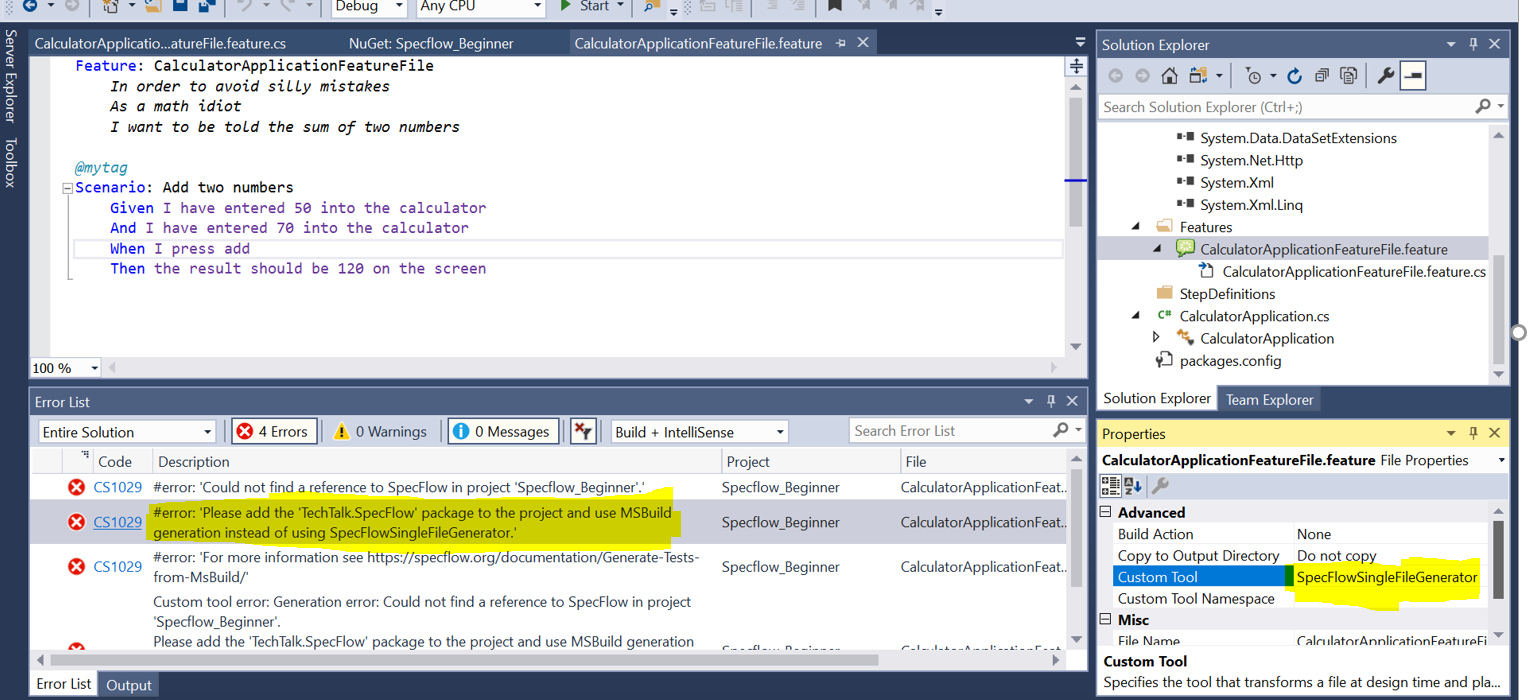
Refer highlighted area. I just changed that to SpecFlow.Tools.MsBuild.Generation from SpecflowSingleFileGenerator and the errors disappeared. Hope this helps.
Thanks
@david1995 - Thanks for your time and suggestion. But, others may completely have a different issue.
bee-s
on 17 May 2019
I had to remove highlighted reference SpecFlowSingleFileGenerator manually. The error was gone. Now it is building and rebuilding without any error. But I am not seeing test hierarchy in test explorer and also I am not seeing feature.cs file generated. My setup is
Microsoft.NET.Test.Sdk
Specflow 3.0.213
SpecFlow.Tools.MsBuild.Generation 3.0.213
SpecFlow.NUnit 3.0.213
NUnit3 Test Adapter
NUnit 3.11
Any idea what am I missing?
mygithub07
on 19 May 2019
Hi @mygithub07,
my first guess is that the project has not been built. But from the information given I am not very confident about that guess. Please submit a separate issue and make sure to fill out the Bug report issue template.
david1995
on 20 May 2019
I have opened #1579
Thanks
mygithub07
on 20 May 2019
Thanks, @juniormayhe, it works now. Problem is with new version of specflow extension.
I still can't get it to work. What version are you using?
 ralphherrera
on 20 May 2019
ralphherrera
on 20 May 2019
Well, I also faced with such issue.
:(
 PavelCodeStorage
on 9 Jun 2019
PavelCodeStorage
on 9 Jun 2019
If none of the steps above have helped, i.e. you have followed the steps in the documentatioon on editing your project, have checked that you don't have the Single File Generator enabled and entered in your feature files, and have the MSBuild generation package installed, please upload a repro project.
For those of you who are moving to SpecFlow 3 from SpecFlow 2, there's an article on what has changed here.
This message would indicate that you are still - in some way - attempting to use the old method of generating code-behind files.
 Stephen-Mc
on 11 Jun 2019
Stephen-Mc
on 11 Jun 2019
I was having the same problem when installed the latest visual studio extension for visual studio 2017 and 2019.
workaround that I did is uninstalled the latest extension and installed the older one (TechTack.SpeckFlow.VsIntegration.2017_13_.vsix) and working fine for 2017
 pramila-automation
on 12 Jul 2019
pramila-automation
on 12 Jul 2019
I repeat:
@david1995 and me would really like to fix this issue for all, but we can't reproduce it.
So if somebody who has this issue, could produce us a sample project, we could have a look at it. Until then, we can only watch.
Downgrade is not a solution. You will miss out features and Bugfixes, because you have to disable updates.
So please help us in fixing this issue. This will help all of us.
SabotageAndi
on 12 Jul 2019
"Downgrade"
Just wondering, do people genuinely use specflow for anything at all ? Or is it just few people / few businesses use specflow ?
bee-s
on 15 Jul 2019
@bee-s If you have nothing productive to add to an issue, please stop commenting. Thanks!
SabotageAndi
on 15 Jul 2019
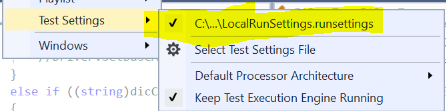
Hi, just in case anyone else is as slow as I am, I had this error, but it turned out to be unrelated. I, somehow, had the test setting in Visual Studio pointing to an old local .runsettings file after I got the latest from the server? Not sure how it happened, but turned out it was nothing to do with Specflow after all. Hope it may help others.
 toltec7
on 31 Jul 2019
toltec7
on 31 Jul 2019
Interessting that this triggers the error...
SabotageAndi
on 31 Jul 2019
Well, the error was there at the bottom. Not 100% it 'triggered' it? After searching that, I scrolled back up and noticed it mention in my errors something about the runsettings, so I went and looked, saw this had happened in my test settings, changed it, and it all worked. Something triggered it, but it could have been far down the chain ;) Although, only the runsettings issue and the specflow error were mentioned
toltec7
on 1 Aug 2019
I had the exact same error by following the getting started on:
https://specflow.org/getting-started/
The getting started also doesn't mention removing SpecFlowSingleFileGenerator, had to do this after:
https://specflow.org/documentation/Generate-Tests-from-MsBuild/
I used @juniormayhe his workaround.
Using VS2017.
 bvkeersop
on 5 Aug 2019
bvkeersop
on 5 Aug 2019
I use only Specflow 2.4.0 and that's work fine. I have make a learn solution Specflow-xUnit-Selenium (SxS) including Browserstack support and some fine extensions like a table comparer wich compares C# tables with Specflow tables, to make the work simpler.
AndreasKarz
on 20 Aug 2019
I had this same issue using specflow version 3.0.225. After following all the steps mentioned https://specflow.org/documentation/SpecFlow-and-.NET-Core/ and https://specflow.org/documentation/Generate-Tests-from-MsBuild/ and https://specflow.org/2018/specflow-3-public-preview-now-available/
I still had the issue, so thought, what happens if I restart visual studio. after the restart, everything started to work just as expected.
 dionysus55
on 22 Aug 2019
dionysus55
on 22 Aug 2019
Checkout my Workshop Solution with Specflow-xUnit-Selenium with some extensions. In the Doku you will find the critical steps with the Specflow Extension. You should NOT use the current version. Use the version in the solution and deactivate the automatic update.
AndreasKarz
on 28 Aug 2019
If somebody gives me a project where I can reproduce this error, I can probably fix it and publish a new version to the marketplace within a day.
The @AndreasKarz doesn't need to tell everybody to not use the latest version (which is stupid) and it is fixed for everybody.
Sorry @AndreasKarz for the side blow, but suggesting not to upgrade brings us nowhere. If you find bugs, please create issues and we have a look at it. Staying in the past was never a solution to anything.
SabotageAndi
on 28 Aug 2019
@SabotageAndi thats simple. Clone my solution, update the Specflow VS extension to the latest version, change something in a feature file and then rebuild the solution. Have fun.
In the worst case you have compile errors in the code behinde the feature file or nothing will change in the code behind when you have change the feature file.
AndreasKarz
on 28 Aug 2019
@AndreasKarz Which Visual Studio version are you using? I tried VS 2017 15.9.16 and VS 2019 16.2.2 with 2019.0.36.11860 SpecFlow Extension and I wasn't able to reproduce the issue. I took the master branch from your solution.
SabotageAndi
on 29 Aug 2019
I downloaded the solution posted by @AndreasKarz . If I just run the tests, they start fine. If I change the features, they run fine.
But if I set Enable SpecFlowSingleFileGenertor CustomTool to "True" under Tool | Options and make changes, I get the errors (presumably because then the code-behind files get re-generated). My guess is that Andreas has this set to "True" and Andi has it set to "False".
Adding the MSBuild package and removing the SpecFlowSingleFileGenerator from the feature files solves the issue, and setting Enable SpecFlowSingleFileGenertor CustomTool to "False" prevents SpecFlowSingleFileGenerator from being added to new feature files. These are the exact same steps as in the link in the error message.
Stephen-Mc
on 29 Aug 2019
I had it enabled, but it is good that you get the error. Then I can debug it on your machine on Monday.
SabotageAndi
on 29 Aug 2019
Hello
We were facing the same problem while using Specflow for Visual Studio 2017 and 2019 with an older package reference. Due to internal pipelines we cannot fully migrate to newer versions of specflow yet. We were not able to generate any codebehind for specflow feature files after latest Specflow update. It seems that this happened due to an update yesterday May 8th.
A workaround we did in our dev team was:
- Uninstall latest version (i.e. 2019.0.28.48404) of Specflow for Visual Studio 2017
- Close Visual Studio
- If you use Visual Studio 2017 install https://github.com/techtalk/SpecFlow.VisualStudio/releases/download/v2017.2.7/TechTalk.SpecFlow.VsIntegration.2017-2017.2.7.vsix
- If you use Visual Studio 2019 install https://github.com/techtalk/SpecFlow.VisualStudio/releases/download/v2019.0.18/TechTalk.SpecFlow.VisualStudioIntegration.vsix
- Restart Visual Studio
- On Tools -> Extensions -> Specflow, disable extension auto update
Our application is a NET Core 2.0 with output type Console application.
Here is our App.config
<?xml version="1.0" encoding="utf-8"?>
<configuration>
  <configSections>
    <section name="specFlow" type="TechTalk.SpecFlow.Configuration.ConfigurationSectionHandler, TechTalk.SpecFlow" />
  </configSections>
  <specFlow>
    <!-- For additional details on SpecFlow configuration options see http://go.specflow.org/doc-config -->
    <unitTestProvider name="MsTest" />
  </specFlow>
</configuration>
and csproj sample
<Project Sdk="Microsoft.NET.Sdk">
  <PropertyGroup>
    <TargetFramework>netcoreapp2.0</TargetFramework>
  </PropertyGroup>

  <ItemGroup>
    <Content Include="App.config">
      <CopyToOutputDirectory>PreserveNewest</CopyToOutputDirectory>
    </Content>
    <None Update="Services\Cache\Features\SpecFlowFeature1.feature">
      <Generator>SpecFlowSingleFileGenerator</Generator>
      <LastGenOutput>SpecFlowFeature1.feature.cs</LastGenOutput>
    </None>

  <ItemGroup>
    <PackageReference Include="Microsoft.Extensions.Configuration" Version="2.2.0" />
    <PackageReference Include="Microsoft.Extensions.Configuration.EnvironmentVariables" Version="2.2.0" />
    <PackageReference Include="Microsoft.Extensions.Configuration.Json" Version="2.2.0" />
    <PackageReference Include="Microsoft.Extensions.Hosting" Version="2.2.0" />
    <PackageReference Include="Microsoft.NET.Test.Sdk" Version="15.9.0" />
    <PackageReference Include="MSTest.TestAdapter" Version="1.4.0" />
    <PackageReference Include="MSTest.TestFramework" Version="1.4.0" />
    <PackageReference Include="Newtonsoft.Json" Version="12.0.1" />
    <PackageReference Include="NUnit" Version="3.11.0" />
    <PackageReference Include="SpecFlow" Version="2.2.1" />
    <PackageReference Include="StackExchange.Redis" Version="1.2.6" />
    <PackageReference Include="System.Net.Http" Version="4.3.0" />
  </ItemGroup>
   ....
</Project>
@orestsyniavskyi Have a go to check if this could solve your problem
Hi, thank you so much. It is solved for me.
 wmravel01
on 19 Feb 2020
wmravel01
on 19 Feb 2020
Closed because of inactivity
SabotageAndi
on 30 Oct 2020
This thread has been automatically locked since there has not been any recent activity after it was closed. Please open a new issue for related bugs.
![github-actions[bot] picture](https://avatars.githubusercontent.com/in/15368?v=4&s=40) github-actions[bot]
on 25 Jan 2021
github-actions[bot]
on 25 Jan 2021
Related issues
 xuanzhaopeng
·
7Comments
xuanzhaopeng
·
7Comments
 GoFightNguyen
·
4Comments
GoFightNguyen
·
4Comments
 omarpiani
·
7Comments
omarpiani
·
7Comments
 vgaltes
·
6Comments
vgaltes
·
6Comments
 gasparnagy
·
4Comments
gasparnagy
·
4Comments
Most helpful comment
Hello
We were facing the same problem while using Specflow for Visual Studio 2017 and 2019 with an older package reference. Due to internal pipelines we cannot fully migrate to newer versions of specflow yet. We were not able to generate any codebehind for specflow feature files after latest Specflow update. It seems that this happened due to an update yesterday May 8th.
A workaround we did in our dev team was:
Our application is a NET Core 2.0 with output type Console application.
Here is our App.config
and csproj sample
@orestsyniavskyi Have a go to check if this could solve your problem