Specflow: After upgrade of VS Specflow plugin to V3, Generation mode under code behind file generation missing AppDomain option
I'm using custom plugin to generate code behind files, currently that plugin only works if the generation mode is selected as AppDomain. After auto upgrade (which is annoying) I cannot see AppDomain option anymore
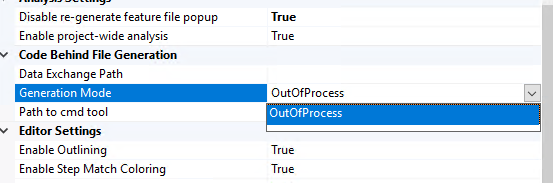
I also lost ability to right click to run the specflow feature file option 👎
SpecFlow Version:
- [x] 3.0
- [ ] 2.4
- [ ] 2.3
- [ ] 2.2
- [ ] 2.1
- [ ] 2.0
- [ ] 1.9
Used Test Runner
- [ ] SpecFlow+Runner
- [x] MSTest
- [ ] NUnit
- [ ] Xunit
Version number:
Visual Studio Version
- [ ] VS 2019
- [x] VS 2017
- [ ] VS 2015
- [ ] VS 2013
Are the latest Visual Studio updates installed?
- [x] Yes
- [ ] No
.NET Framework:
- [x] >= .NET 4.5
- [ ] before .NET 4.5
- [ ] .NET Core 2.0
- [ ] .NET Core 2.1
- [ ] .NET Core 2.2
- [ ] .NET Core 3.0
Test Execution Method:
- [x] Visual Studio Test Explorer
- [ ] TFS/VSTS/Azure DevOps – Task – PLEASE SPECIFY THE NAME OF THE TASK
- [ ] Command line – PLEASE SPECIFY THE FULL COMMAND LINE
<SpecFlow> Section in app.config or content of specflow.json
 ParagRaut
All 15 comments
Removing the AppDomain generation mode is one of the breaking changes we announced in Oktober 2018 (https://specflow.org/2018/vs-integration-breaking-changes-affects-all-users/).
You will need to manually install an older version of the extension from here. Make sure that you disable the option to automatically update extensions to prevent the extension from automatically updating again.
- Select Tools | Extensions and Updates from the menu in Visual Studio
- Locate the SpecFlow extension in the list using the search field, if necessary.
- Disable the Automatically update this extension option on the right.
- Don’t forget to enable this option again once you have upgraded to SpecFlow 2.3.2 or higher!
You might want to subscribe to the SpecFlow newsletter or follow us on Twitter, as we announced these breaking changes many months ago, and how to avoid them.
 SabotageAndi
on 2 Apr 2019
SabotageAndi
on 2 Apr 2019
Thanks for reply Andi, I am using Specflow 2.4 when the plugin got updated. After update I lost ability to also run/debug Specflow feature directly by right clicking file from solution explorer. That’s something many people use
ParagRaut
on 3 Apr 2019
@ParagRaut We had to remove these 2 context menu entries, because Microsoft removed APIs from Visual Studio 2019 that we used. See https://specflow.org/2019/changes-to-the-specflow-visual-studio-extension/
SpecFlow 2.4 should work with the OutOfProcess Generation. The extension supports SpecFlow >= 2.3.1.
But the best for you would be to switch to MSBuild integration to generate the code-behind files (https://specflow.org/2019/generating-code-behind-files-using-msbuild/).
SabotageAndi
on 3 Apr 2019
Hi Andi I tried generating code behind files by using MsBuild integration method and I see feature.cs is generated in file system on disk but it’s not visible/included in project as code behind linked to the feature. So ultimately the tests are not shown in MsTest window :(
I tried disabling Legacy single file generator and removing same from feature file property, in short I did exactly as mentioned but still problem persists
ParagRaut
on 3 Apr 2019
Did you add the Target at the end of the csproj?
SabotageAndi
on 3 Apr 2019
I think I did, I also looked at sample projects provided (Bowling ones) they don’t have it included in their csproj files, still they work. So I also removed them from my project.
Also one more thing I observed is when I try to use unitTestProvider tag in either app.config or specflow.json it throws error on compile times stating it cannot identify unitTestProvider and plugin tag. I have to remove it completely so that my project can build, do you know why this happens ?
ParagRaut
on 4 Apr 2019
@ParagRaut unitTestProvider is removed from the config (see https://specflow.org/2019/updating-to-specflow-3)
Which example has no Target? We wanted to update all examples to use MSBuild generation, like https://github.com/techtalk/SpecFlow-Examples/blob/master/BowlingKata/BowlingKata-MsTest/Bowling.SpecFlow/Bowling.SpecFlow.csproj#L125.
SabotageAndi
on 4 Apr 2019
Hi Andi, I saw it here
https://github.com/techtalk/SpecFlow-Examples/blob/master/SpecFlow.json/BowlingKata-SpecFlowJson-MsTest/Bowling.SpecFlowMsTest/Bowling.SpecFlowMsTest.csproj
Target is full framework 4.7 and no target like your example is mentioned
ParagRaut
on 4 Apr 2019
Oh sorry, I got confused. It’s traditional style project vs. sdk style project difference. I got it now
ParagRaut
on 4 Apr 2019
Closing this issue as we decided not to move to Specflow 3 as of now, there are many things that we use for instance custom plugin for generation, specflow autofac plug-in for dependency injection and lot more customization which is not available/mature at the moment
ParagRaut
on 7 Apr 2019
@ParagRaut Sad to here, but please make sure for every of your issues, there is already an issue here on GitHub. If not, we don't know your problems and can't work on them.
SabotageAndi
on 8 Apr 2019
Hi Andi, I will still try to move on to V3 in coming days. I Will check if all requirements meet and let you know if any issues occur.
ParagRaut
on 8 Apr 2019
@ParagRaut Sad to here, but please make sure for every of your issues, there is already an issue here on GitHub. If not, we don't know your problems and can't work on them.
Do we have documentation in place for custom plugin generation for Specflow v3 ? Last time I saw it was only meant for Specflow v2
ParagRaut
on 8 Apr 2019
@ParagRaut see https://github.com/techtalk/SpecFlow/issues/1479
SabotageAndi
on 8 Apr 2019
This thread has been automatically locked since there has not been any recent activity after it was closed. Please open a new issue for related bugs.
![lock[bot] picture](https://avatars.githubusercontent.com/in/6672?v=4&s=40) lock[bot]
on 8 Jul 2019
lock[bot]
on 8 Jul 2019
Related issues
 xDazedx
·
7Comments
xDazedx
·
7Comments
 zplan
·
4Comments
zplan
·
4Comments
 fasadin
·
5Comments
fasadin
·
5Comments
 Planche95
·
4Comments
Planche95
·
4Comments
 xuanzhaopeng
·
7Comments
xuanzhaopeng
·
7Comments