Specflow: Running specflow on docker
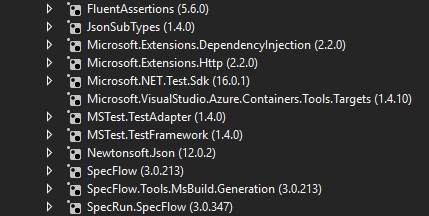
Project Format of the SpecFlow project
- [ ] Classic project format using
packages.config - [x] Classic project format using
<PackageReference>tags - [ ] Sdk-style project format
.feature.cs files are generated using
- [x]
SpecFlow.Tools.MsBuild.GenerationNuGet package - [ ]
SpecFlowSingleFileGeneratorcustom tool
Visual Studio Version
- [x] VS 2019
- [ ] VS 2017
- [ ] VS 2015
Enable SpecFlowSingleFileGenerator Custom Tool option in Visual Studio extension settings
- [x] Enabled
- [ ] Disabled
Are the latest Visual Studio updates installed?
- [x] Yes
- [ ] No, I use Visual Studio version
<Major>.<Minor>.<Patch>
.NET Framework:
- [ ] >= .NET 4.5
- [ ] before .NET 4.5
- [ ] .NET Core 2.0
- [ ] .NET Core 2.1
- [x] .NET Core 2.2
- [ ] .NET Core 3.0
Test Execution Method:
- [ ] Visual Studio Test Explorer
- [ ] TFS/VSTS/Azure DevOps – Task – PLEASE SPECIFY THE NAME OF THE TASK
- [ ] Command line – PLEASE SPECIFY THE FULL COMMAND LINE
- [x] Docker
FROM microsoft/dotnet:2.2-sdk
ARG source
WORKDIR /app
COPY ${source:-obj/Docker/publish} .
ENTRYPOINT ["dotnet", "vstest", "CM.Data.IntegrationTests.Specflow.dll", "--logger:console;verbosity=Detailed"] # https://github.com/Microsoft/vstest/issues/1580
<SpecFlow> Section in app.config or content of specflow.json
{
  "bindingCulture": {
    "language": "en-us"
  },
  "language": {
    "feature": "en-us"
  },
  "plugins": [],
  "generator": {
    "allowDebugGeneratedFiles": true
  },
  "stopAtFirstError": true
}
Repro Project
Sadly I don't have one. It's just simple specflow project that I would like to ran on docker
Issue Description
vstest with specflow on docker gives this error back
The active test run was aborted. Reason: Test host process crashed : Unhandled Exception: System.Net.Sockets.SocketException: Operation canceled
   at System.IO.Pipes.NamedPipeServerStream.<WaitForConnectionAsync>g__WaitForConnectionAsyncCore|23_0()
   at System.Threading.Tasks.TaskToApm.End(IAsyncResult asyncResult)
   at TechTalk.SpecFlow.Plus.RPC.Server.<>c__DisplayClass9_0.<StartInBackground>b__0(IAsyncResult ar)
   at System.Threading.Tasks.TaskToApm.<>c__DisplayClass3_0.<InvokeCallbackWhenTaskCompletes>b__0()
   at System.Threading.ExecutionContext.RunInternal(ExecutionContext executionContext, ContextCallback callback, Object state)
--- End of stack trace from previous location where exception was thrown ---
   at System.Threading.Tasks.AwaitTaskContinuation.RunCallback(ContextCallback callback, Object state, Task& currentTask)
--- End of stack trace from previous location where exception was thrown ---
   at System.Threading.ExecutionContext.RunInternal(ExecutionContext executionContext, ContextCallback callback, Object state)
--- End of stack trace from previous location where exception was thrown ---
   at System.Threading.ThreadPoolWorkQueue.Dispatch()

Test Run Aborted.

Total tests: Unknown
     Passed: 1
Everything is running on the same container and communication is within that container
 fasadin
All 5 comments
The only thing what comes to my mind (after many hours of checking what could be wrong) is that pipes between local processes somehow end-up not working in my setup. That's why locally (windows) it works fine and on kubernates it does not (linux)
fasadin
on 13 Aug 2019
duplicate of https://github.com/techtalk/SpecFlow/issues/1696
 SabotageAndi
on 19 Aug 2019
SabotageAndi
on 19 Aug 2019
@SabotageAndi I keep clicking on that duplicate, but it's some kind of recursion because I am ending up on your comment :D
This is first time I see that post is duplicate of itself :)
fasadin
on 21 Aug 2019
Ups
It should be https://github.com/techtalk/SpecFlow/issues/1662
SabotageAndi
on 21 Aug 2019
This thread has been automatically locked since there has not been any recent activity after it was closed. Please open a new issue for related bugs.
![lock[bot] picture](https://avatars.githubusercontent.com/in/6672?v=4&s=40) lock[bot]
on 20 Sep 2019
lock[bot]
on 20 Sep 2019
Related issues
 odeatomas
·
7Comments
odeatomas
·
7Comments
 TpRunWild
·
4Comments
TpRunWild
·
4Comments
 vkudley
·
4Comments
vkudley
·
4Comments
 xDazedx
·
7Comments
xDazedx
·
7Comments
 GoFightNguyen
·
4Comments
GoFightNguyen
·
4Comments
Most helpful comment
@SabotageAndi I keep clicking on that duplicate, but it's some kind of recursion because I am ending up on your comment :D
This is first time I see that post is duplicate of itself :)