Specflow: Open Test from Test Explorer Does Nothing
Visual Studio - Can no longer open test (F12) from Test Explorer, attempts do nothing
SpecFlow Version:
- [x] 3.0
- [ ] 2.4
- [ ] 2.3
- [ ] 2.2
- [ ] 2.1
- [ ] 2.0
- [ ] 1.9
Used Test Runner
- [ ] SpecFlow+Runner
- [ ] MSTest
- [x] NUnit
- [ ] Xunit
Version number:
Visual Studio Version
- [x] VS 2017
- [ ] VS 2015
- [ ] VS 2013
Are the latest Visual Studio updates installed?
- [x] Yes
- [ ] No
.NET Framework:
- [x] >= .NET 4.5
- [ ] before .NET 4.5
- [ ] .NET Core 2.0
- [ ] .NET Core 2.1
- [ ] .NET Core 2.2
- [ ] .NET Core 3.0
Test Execution Method:
- [x] Visual Studio Test Explorer
- [ ] TFS/VSTS/Azure DevOps – Task – PLEASE SPECIFY THE NAME OF THE TASK
- [ ] Command line – PLEASE SPECIFY THE FULL COMMAND LINE
<SpecFlow> Section in app.config
<specFlow>

    <stepAssemblies>
      <!-- This attribute is required in order to use StepArgument Transformation as described here;
    https://github.com/marcusoftnet/SpecFlow.Assist.Dynamic/wiki/Step-argument-transformations  -->
      <stepAssembly assembly="SpecFlow.Assist.Dynamic" />
    </stepAssemblies>
  </specFlow>
Repro Project
Issue Description
Steps to Reproduce
- Right-click a test in Test Explorer, choose "Open Test"
- Or - Select a test in Test Explorer and press F12
- Observe that nothing happens
Expected: The feature file will open and the selected test will be in focus, like it was in SpecFlow2.x
 dcdraper
All 47 comments
This is a productivity killer for sure, since we are working with numerous feature files and test order does not match since they get automatically sorted in Test Explorer. I had to revert to 2.x until this gets fixed :(
dcdraper
on 28 Mar 2019
I have upgrade today, same configuration as you and for me it works.
 nuzolx
on 28 Mar 2019
nuzolx
on 28 Mar 2019
@nuzolx good news for you :) I will try again another day, too much time spent on this for me.
dcdraper
on 28 Mar 2019
Have the same bug!
 ghost
on 1 Apr 2019
ghost
on 1 Apr 2019
Please provide an example to reproduce this issue.
 SabotageAndi
on 1 Apr 2019
SabotageAndi
on 1 Apr 2019
After update to newest speclfow my Test Explorer window in VS 2017 doesn't show any tests.
Vs 2017
The newest Specflow for VS 2017 extension
NUnit 3.11
NUnit.Console.Runner 3.10
NUnit3TestAdapter 3.13
Specflow 3.0.188
Specflow.Tools.MsBuild.Generation 3.0.188
Specflow.NUnit 3.0.188
I did no changes after update specflow except removed config about nunit runner from app.config.
My project is in .net framework 4.7.2
Problem fixed after move this lines at the bottom of csproj file:
    <Target Name="AfterUpdateFeatureFilesInProject">
    <!-- include any files that specflow generated into the compilation of the project, if it was not included yet -->
    <ItemGroup>
      <Compile Include="**\*.feature.cs" Exclude="@(Compile)" />
    </ItemGroup>
  </Target>
I experience this issue too. It seems to be caused by the new way in which the generated code is not longer included in the .csproj. If you click on the test, you will see 'Source: no source available'.
Previously, the generated code was part of the .csproj like this:
    <Compile Include="Test.feature.cs">
      <AutoGen>True</AutoGen>
      <DesignTime>True</DesignTime>
      <DependentUpon>Test.feature</DependentUpon>
    </Compile>
If you keep this code in the projectfile for your feature files after migrating, opening the test from the test explorer will still work. A source is then available too.
Another option is: simply include the generated file as part of your solution. However, this will bloat the view in the Solution Explorer by having both the .feature file and the .feature.cs at the main level (while the previously generated files were a level below the .feature file).
This solution looks like this in the .csproj:
<Compile Include="Test.feature.cs" />
<None Include="Test.feature" />
Both solutions require manual labour in the .csproj file, which is a step back from the previous versions of SpecFlow.
Note: when simply adding a .feature file and removing the SpecFlowSingleFileGenerator from the properties, the new test isn't even visible in the test explorer until doing either one of the aforementioned solutions, or unloading and reloading the project.
 rik-smeets
on 2 Apr 2019
rik-smeets
on 2 Apr 2019
I repeat, I need a project to reproduce this issue. Complete to clone from where, no step for step description.
Jumping from the test explorer to the feature file works in the SpecFlow solution. There we are using xUnit.
So please provide us one. Thanks!
SabotageAndi
on 2 Apr 2019
@SabotageAndi I will try to create a test project when I get a chance to do so :-( Sorry I cannot do that right now, since I really do not want to move away from SpecFlow.
I am using Nunit, as indicated in my initial report.
dcdraper
on 3 Apr 2019
@rik-smeets work around worked for me (using mstest.testframework). Some additional notes:
<Compile IncludeShould be in an unconditional<ItemGroup>under<Project>- I had to delete this section created following the "msbuild" instructions for upgrading to version 3:
  <Target Name="AfterUpdateFeatureFilesInProject">
    <ItemGroup>
      <Compile Include="**\*.feature.cs" Exclude="@(Compile)" />
    </ItemGroup>
  </Target>
- The final result looked like this:
<Project ToolsVersion...>
...
<ItemGroup>
  <None Include="Test.feature" >
  <Compile Include="Test.feature.cs">
    <AutoGen>True</AutoGen>
     <DesignTime>True</DesignTime>
     <DependentUpon>Test.feature</DependentUpon>
  </Compile>
  ...
</ItemGroup>
...
</Project>
- @rik-smeets second option did not work for me, but perhaps I misunderstood.
 marcel-landman
on 5 Apr 2019
marcel-landman
on 5 Apr 2019
And if I would get a project to reproduce it, I could fix it correctly for all ....
We could include the whole itemgroup->dependentupon stuff in the csproj in our msbuild files so there is no need to have this lines for every file in your project.
SabotageAndi
on 5 Apr 2019
@SabotageAndi I think I can get around to creating an example project for it this Sunday.
rik-smeets
on 5 Apr 2019
@SabotageAndi I created an example project for it over at https://github.com/rik-smeets/specflow-3-test-explorer. In the feature files is a description of the occurring issue and the possible workarounds as I described before. Let me know if you need any further information or help. Thanks!
rik-smeets
on 7 Apr 2019
@rik-smeets thanks for the repro project. I can reproduce the issue.
I think it's because it is a project in the old format.
For the new format we do this: https://github.com/techtalk/SpecFlow/blob/master/SpecFlow.Tools.MsBuild.Generation/build/SpecFlow.Tools.MsBuild.Generation.targets#L40
 <Compile Update="@(SpecFlowFeatureFiles->'%(CodeBehindFile)')"
             DependentUpon="%(Filename)"
             AutoGen="true"
             DesignTime="true"
             Visible="true"
             Condition="'$(EnableDefaultCompileItems)' == 'true'" />
But it looks like, this doesn't work with the old format.
SabotageAndi
on 8 Apr 2019
@SabotageAndi Thanks for your analysis. What do you mean with 'old format'? Do you mean compared to .NET Core projects?
The repro project is a new solution/project, created from scratch in Visual Studio 2019, targeting .NET Framework 4.7.2. I didn't change anything to the defaults.
rik-smeets
on 8 Apr 2019
old project format is the long one, where a lot of stuff is in the xml file.
The sdk- style format (the new one) is the one that was introduced in VS2017 and is mostly used for .NET Core. But you can also use it for .NET Full Framework.
SabotageAndi
on 8 Apr 2019
Alright, thank you. Do you think this issue can be resolved within the possible limitations of the old .csproj format?
rik-smeets
on 8 Apr 2019
I am not sure. I have to talk with a colleague who is a master of MSBuild.
SabotageAndi
on 8 Apr 2019
@SabotageAndi Hello there. Have you discovered any more information on this or perhaps have a workaround documented somewhere on how to handle/correct the old .csproj format?
Also, I may have time to create a test project that uses NUnit if it would still be helpful to get this worked out...
dcdraper
on 23 Apr 2019
@dcdraper Nothing new to report. As written I can reproduce it, but had no success with fixing it.
I would suggest to migrate to the new csproj format. If you aren't doing really strange things, it's quite easy to do.
SabotageAndi
on 23 Apr 2019
I had yesterday a talk with @DanielTheCoder about this issue.
What we are doing to link the generated files to the feature files (https://github.com/techtalk/SpecFlow/blob/master/SpecFlow.Tools.MsBuild.Generation/build/SpecFlow.Tools.MsBuild.Generation.targets#L40), doesn't work in the old csproj format, because it doesn't recognize the update of the ItemGroup.
There is nothing we can do about it automatically. :-/
SabotageAndi
on 26 Apr 2019
@SabotageAndi Thanks for your analysis.
I migrate projects to the new csproj format where possibly, but in some cases (like with non-Core ASP.NET applications), this isn't a possibility.
Perhaps there is a solution (sort of)... If the SpecFlow extension detects that the 'classic' .csproj format is used, then it should insert this in the .csproj (which I now do manually to make sure tests can be opened from test explorer, as I explained before):
    <Compile Include="[feature name].feature.cs">
      <AutoGen>True</AutoGen>
      <DesignTime>True</DesignTime>
      <DependentUpon>[feature name].feature</DependentUpon>
    </Compile>
Just like with SpecFlow <3, but of course still without the SpecFlowSingleFileGenerator.
What do you think about that?
rik-smeets
on 26 Apr 2019
Even though I appreciate all your attempts to help.... this is an unfortunate situation. I have tried three times to "update" to the new format and upgrade SpecFlow with nothing but frustrating build error after build error. I almost got there one but it didn't happen. All the other automation engineers keep updating Visual Studio or the nuget packages and I keep having to go fix them back to the old version.
Unless there is some clear and specific documentation from SpecFlow on how to overcome this issue, I must start looking at alternatives :( So much wasted time on this has left me disappointed and quite frustrated on how the new version was rolled out.
dcdraper
on 9 May 2019
@dcdraper Sorry to hear that. Could you say which error you are getting?
I upgraded all our examples (about 30 projects) 2 or 3 times and they were working. But they are really simple projects. So I think you have something special in your project, that we didn't thought of.
Documentation how to update to SpecFlow 3 is here: https://specflow.org/2019/updating-to-specflow-3/
SabotageAndi
on 10 May 2019
I resolved the problem in our solution, which is dependent on (non-Core) ASP.NET and therefore cannot be upgraded to an SDK-style project.
What you can do to resolve this issue:
- Make sure ALL of the projects in your solution use PackageReferences. See Migrate from packages.config to PackageReferenc over at Microsoft Docs.
Note: ASP.NET projects are not supported by the built in migrator, but you can use the Visual Studio 2017 extension NuGet PackageReference Upgrader to do it. Or you can do it manually. - Migrate your SpecFlow test project(s) to SDK-style. You can use CsprojToVs2017 for this, or you can do it manually.
- Make sure you delete all the
.feature.csfiles from your repository and ignore files with that extension in the.gitignore(they're being generated while building now, so they don't have to be in source control anymore - no more merge conflicts, hooray!). Also, remove any references to.feature.csfiles etc. in the new .csproj format.
It is possible to mix SDK-style and 'classic' .csproj file formats, as long as they all use PackageReference instead of packages.config.
If you want, you can migrate other projects to the SDK-style too (again, everything except the ASP.NET project, which is not supported). Be sure to test everything well of course.
Other than resolving this issue, the SDK-style project is very light-weight. PackageReferences provide some nice advantages too. So I'd recommend doing it anyway, if possible.
Good luck!
rik-smeets
on 11 May 2019
@rik-smeets works like a charm! Thank you!
 Rain9333
on 13 May 2019
Rain9333
on 13 May 2019
@SabotageAndi
The solution provided by @rik-smeets is just a workaround.
Do you see any real solution for this issue in the nearest future?
 LirazShay
on 15 May 2019
LirazShay
on 15 May 2019
I Added this in the csproj and it seems to work. It avoids to specify each feature.cs file individually :
<Compile Include="*\\*.feature.cs">
  <AutoGen>True</AutoGen>
  <DesignTime>True</DesignTime>
</Compile>
 sjeanren
on 22 May 2019
sjeanren
on 22 May 2019
I Added this in the csproj and it seems to work. It avoids to specify each feature.cs file individually :
<Compile Include="*\\*.feature.cs">
  <AutoGen>True</AutoGen>
  <DesignTime>True</DesignTime>
</Compile>
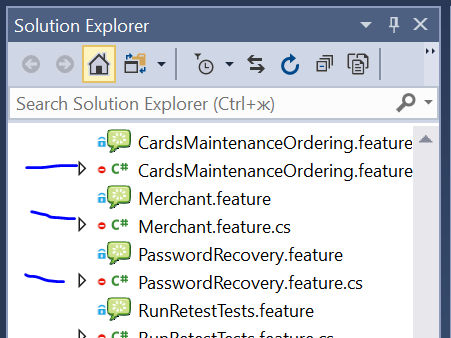
hi! I have applied your solution, but new probled appears:
*.feature.cs files is now visible in solution explorer. you have the same issue?
 nikitozeg
on 29 May 2019
nikitozeg
on 29 May 2019
The solution of @sjeanren has many problems.
It works for existing items.
When I add new feature, then the cs file is not added.
Only when restarting Visual studio and the project is loaded, then the new cs file is added
LirazShay
on 29 May 2019
In deed, it's just an improvement of the workaround, to avoid to add each feature one by one.
But, as explained by LirazShay, it has some problems.
sjeanren
on 29 May 2019
So to fix this issue we should convert our CSPROJ files to new format, e.g. like described here?
 varajan
on 24 Sep 2019
varajan
on 24 Sep 2019
@varajan Yes
SabotageAndi
on 24 Sep 2019
Hi @rik-smeets,
I am encountering the same issue. I've followed your steps exactly, but I am still not able to use the test explorer to navigate to my tests. It is still saying "source not available".
Vs2019
NUnit 3 Test Adapter extension 3.15.1.0
SpecFlow 3.1.67 (with all other stuff required).
DId anybody else experience the same problems? Am i missing something?
Thnx in advance.
 rloomans1980
on 5 Dec 2019
rloomans1980
on 5 Dec 2019
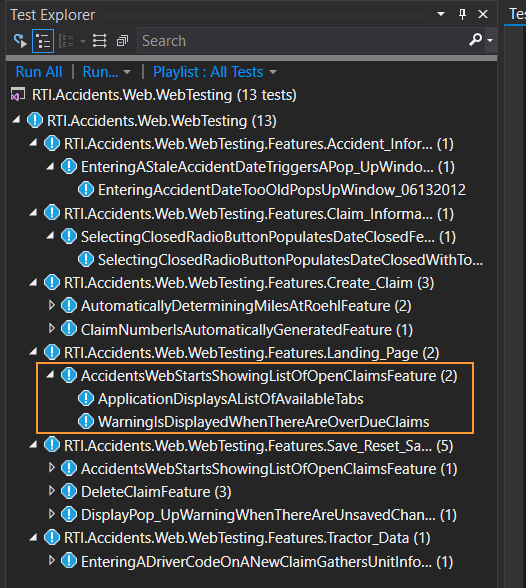
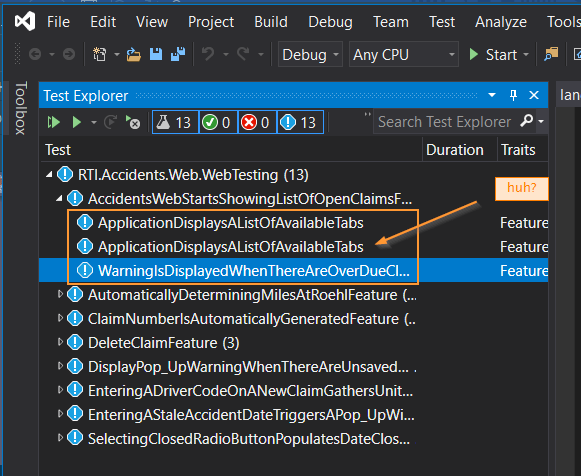
@rik-smeets I'm encountering the issue when running vs2019; "Go To Test" fails. I cannot go to a test from test explorer. But all appears fine when I regress back to vs2017.
VS2017 Test Explorer - ApplicationDisplaysListofAvailableTabs appears once (correct)
VS2019 Test Explorer - ApplicationDisplaysListofAvailableTabs appears twice (incorrect)
 donvnielsen
on 13 Dec 2019
donvnielsen
on 13 Dec 2019
Hi @rik-smeets,
I am encountering the same issue. I've followed your steps exactly, but I am still not able to use the test explorer to navigate to my tests. It is still saying "source not available".
Vs2019
NUnit 3 Test Adapter extension 3.15.1.0
SpecFlow 3.1.67 (with all other stuff required).DId anybody else experience the same problems? Am i missing something?
Thnx in advance.
I actually solved the issue by remove *.feature.cs from
 darrendeng777
on 3 Jun 2020
darrendeng777
on 3 Jun 2020
Hi
I am trying to create a test and run using Ms test, .net framework 472.
I can see the test,it builds alright and if it click on it it takes me to the feature file. However when I try to run or debug it does not run and appears under the not run tab.
Please can anybody advise?
Thanks
 jarjarbinks9999
on 15 Jun 2020
jarjarbinks9999
on 15 Jun 2020
@jarjarbinks9999
Are you sure you have installed both the MSTest.TestFramework and the MSTest.TestAdapter NuGet packages in your test project(s)?
rik-smeets
on 17 Jun 2020
Yes they were thank you .
Sent from my iPhone
On 17 Jun 2020, at 17:21, Rik Smeets notifications@github.com wrote:
@jarjarbinks9999
Are you sure you have installed both the MSTest.TestFramework and the MSTest.TestAdapter NuGet packages in your test project(s)?—
You are receiving this because you were mentioned.
Reply to this email directly, view it on GitHub, or unsubscribe.
jarjarbinks9999
on 18 Jun 2020
@SabotageAndi
Hi,
Any news about this issue?
Is it going to be fixed soon please?
LirazShay
on 1 Nov 2020
I recently migrated to Specflow 3.4.31 and I have the same issue in Visual Studio 2019. Test explorer shows "No source available" for my specflow tests, so double click will not end up going to the actual specflow test (feature file). Any updates regarding this? It would be a nightmare to migrate to the new csproj format in my case.
 larisa31grecu
on 11 Nov 2020
larisa31grecu
on 11 Nov 2020
Hello, has there been any progress regarding this issue? I recently started to get this and tried to apply @rik-smeets workaround but it does nothing for me.
 peraltakeit
on 26 Jan 2021
peraltakeit
on 26 Jan 2021
Hi, any update regarding this issue?
 michaelhuang1168
on 28 Jan 2021
michaelhuang1168
on 28 Jan 2021
@peraltakeit & @michaelhuang1168 Are you using the old csproj format or the SDK- csproj format?
SabotageAndi
on 28 Jan 2021
I converted it to 2019 format following @rik-smeets workaround (but I believe all the projects in my solution used to have the old csproj format), does that still count as the old csproj format? I am quite new to this so sorry if its a stupid question.
peraltakeit
on 28 Jan 2021
@SabotageAndi I just converted the csproj to the new format and it's working now.
This is the tool I used to convert my csproj file https://github.com/hvanbakel/CsprojToVs2017
michaelhuang1168
on 29 Jan 2021
that is the exact same tool i used. does it matter that i am using specflow+runner instead of nunit runner?
peraltakeit
on 29 Jan 2021
Related issues
 samholder
·
7Comments
samholder
·
7Comments
 timvandenhof
·
6Comments
timvandenhof
·
6Comments
 Planche95
·
4Comments
Planche95
·
4Comments
 NorekZ
·
4Comments
NorekZ
·
4Comments
 vgaltes
·
6Comments
vgaltes
·
6Comments
Most helpful comment
I am not sure. I have to talk with a colleague who is a master of MSBuild.