Specflow: [netcore] using specflow.json build error if net471 not installed
SpecFlow Version:
- [x] 3.0
- [ ] 2.4
- [ ] 2.3
- [ ] 2.2
- [ ] 2.1
- [ ] 2.0
- [ ] 1.9
Used Test Runner
- [ ] SpecFlow+Runner
- [ ] MSTest
- [ ] NUnit
- [x] Xunit
Version number: 2.4.1 (not applicable though)
Visual Studio Version
- [x] VS 2017
- [ ] VS 2015
- [ ] VS 2013
Are the latest Visual Studio updates installed?
- [x] Yes
- [ ] No
.NET Framework:
- [ ] >= .NET 4
- [ ] before .NET 4
- [ ] .NET Core 2.0
- [x] .NET Core 2.1
Test Execution Method:
- [x] Visual Studio Test Explorer
- [ ] TFS/VSTS/Azure DevOps – Task – PLEASE SPECIFY THE NAME OF THE TASK
- [ ] Command line – PLEASE SPECIFY THE FULL COMMAND LINE
<SpecFlow> Section in app.config
not applicable; using  `specflow.json`  with contents:
{
    "language": {
        "feature": "nl-NL"
    }
}
Repro Project
```
```
Issue Description
using specflow.json results in build errors related to netStandard json parser. It seems the package SpecFlow.Tools.MsBuild.Generation 3.0.132-beta tries to use netStandard2.0 json parser?
Steps to Reproduce
- specflow for VS 2017 v2018.1.15.7173
- netcore 2.1 specflow test project
- SpecFlow.Tools.MsBuild.Generation 3.0.132-beta
- specflow xunit and runner (not applicable)
Full error:
Error: [SpecFlow] System.Exception: Error when reading project file. ---> System.IO.FileNotFoundException: Could not load file or assembly 'netstandard, Version=2.0.0.0, Culture=neutral, PublicKeyToken=cc7b13ffcd2ddd51' or one of its dependencies. The system cannot find the file specified.
at IJsonFormatterUtf8Json.JsonFormatterResolverExtensions.GetFormatterWithVerify (IJsonFormatterResolver resolver)
at T Utf8Json.JsonSerializer.Deserialize(byte[] bytes, int offset, IJsonFormatterResolver resolver)
at SpecFlowConfiguration TechTalk.SpecFlow.Configuration.JsonConfig.JsonConfigurationLoader.LoadJson(SpecFlowConfiguration specFlowConfiguration, string jsonContent)
at SpecFlowConfiguration TechTalk.SpecFlow.Configuration.ConfigurationLoader.Load(SpecFlowConfiguration specFlowConfiguration, ISpecFlowConfigurationHolder specFlowConfigurationHolder)
at SpecFlowConfiguration TechTalk.SpecFlow.Generator.Configuration.GeneratorConfigurationProvider.LoadConfiguration(SpecFlowConfiguration specFlowConfiguration, SpecFlowConfigurationHolder specFlowConfigurationHolder)
at SpecFlowProjectConfiguration TechTalk.SpecFlow.Generator.Configuration.GeneratorConfigurationProviderExtensions.LoadConfiguration(IGeneratorConfigurationProvider configurationProvider, SpecFlowConfigurationHolder configurationHolder)
at SpecFlowProject TechTalk.SpecFlow.Generator.Project.ProjectReader.ReadSpecFlowProject(string projectFilePath, string rootNamespace)
--- End of inner exception stack trace ---
at SpecFlowProject TechTalk.SpecFlow.Generator.Project.ProjectReader.ReadSpecFlowProject(string projectFilePath, string rootNamespace)
at SpecFlowProject TechTalk.SpecFlow.Generator.Project.MsBuildProjectReader.LoadSpecFlowProjectFromMsBuild(string projectFilePath, string rootNamespace)
at void SpecFlow.Tools.MsBuild.Generation.FeatureCodeBehindGenerator.InitializeProject(string projectPath, string rootNamespace, IEnumerablegeneratorPlugins)
at IEnumerableSpecFlow.Tools.MsBuild.Generation.FeatureFileCodeBehindGenerator.GenerateFilesForProject(string projectPath, string rootNamespace, List featureFiles, List generatorPlugins, string projectFolder, string outputPath)+MoveNext()
at bool SpecFlow.Tools.MsBuild.Generation.GenerateFeatureFileCodeBehindTask.Execute() (1, 1)
 SamJongenelen
All 19 comments
That's really strange, because we have tests for this. And they are green.
 SabotageAndi
on 13 Nov 2018
SabotageAndi
on 13 Nov 2018
Perhaps this has something to do with the fact that .net standard 2.1 is out?
Im using Microsoft .Net Core SDK 2.1.403 x64
SamJongenelen
on 13 Nov 2018
.NET Standard 2.1 is not out, it is .NET Core 2.1 that it's out.
@SamJongenelen Could you share the whole project that has this error?
SabotageAndi
on 13 Nov 2018
Oops you're absolutely right. Net standard 2.1 is only announced.
Will post csproj contents later (not at work).
There are no netstandard projects in our solution FWIW
SamJongenelen
on 13 Nov 2018
Come to think of it, I don't think my dev machine has netstandard installed
SamJongenelen
on 13 Nov 2018
@SabotageAndi
<Project Sdk="Microsoft.NET.Sdk">

  <Import Project="$(ProjectDir)..\..\Common\Configs\copysettings.targets" Condition="Exists('$(ProjectDir)..\..\Common\Configs\copysettings.targets')" />

  <PropertyGroup Label="Globals">
    <SccProjectName>SAK</SccProjectName>
    <SccProvider>SAK</SccProvider>
    <SccAuxPath>SAK</SccAuxPath>
    <SccLocalPath>SAK</SccLocalPath>
  </PropertyGroup>

  <PropertyGroup>
    <TargetFramework>netcoreapp2.1</TargetFramework>
    <IsPackable>false</IsPackable>
  </PropertyGroup>

  <ItemGroup>
    <PackageReference Include="Microsoft.AspNetCore.Mvc.Testing" Version="2.1.3" />
    <PackageReference Include="Microsoft.NET.Test.Sdk" Version="15.8.0" />
    <PackageReference Include="Serilog.Sinks.XUnit" Version="1.0.6" />
    <PackageReference Include="SpecFlow" Version="3.0.132-beta" />
    <PackageReference Include="SpecFlow.Tools.MsBuild.Generation" Version="3.0.132-beta" />
    <PackageReference Include="SpecFlow.xUnit" Version="3.0.132-beta" />
    <PackageReference Include="xunit" Version="2.4.1" />
    <PackageReference Include="xunit.runner.visualstudio" Version="2.4.1">
      <PrivateAssets>all</PrivateAssets>
      <IncludeAssets>runtime; build; native; contentfiles; analyzers</IncludeAssets>
    </PackageReference>
  </ItemGroup>

  <ItemGroup>
    <ProjectReference Include="x.Service.csproj" />
    <ProjectReference Include="x.TestUtils.Service.csproj" />
    <ProjectReference Include="x.TestUtils.csproj" />
    <ProjectReference Include="x.Entity.csproj" />
    <ProjectReference Include="x.Service.csproj" />
  </ItemGroup>

</Project>
Still nothing unusual.
We have an example for .NET Core and with specflow.json here: https://github.com/techtalk/SpecFlow-Examples/tree/master/NETCore%20Examples/BowlingKata-SpecFlowJson-xUnit
Could you try it out, if this is working for you?
SabotageAndi
on 14 Nov 2018
Well yes I followed the examples to come to our current .csproj layout.
The main difference is, that the project under test (Bowling.csproj) is a NetStandard project - and in my case it is a NetCoreApp
edit: downloading repo now and running the examples
SamJongenelen
on 14 Nov 2018
Interesting, that this is making a difference.
@david1995 can you check if we have a tests for this combination.
SabotageAndi
on 14 Nov 2018
Ok. new update: I've downloaded the examples, and Bowling.SpecFlowXUnit.csproj also does not build!
for reference, the error is:
    Error: [SpecFlow] System.Exception: Error when reading project file. ---> System.IO.FileNotFoundException: Could not load file or assembly 'netstandard, Version=2.0.0.0, Culture=neutral, PublicKeyToken=cc7b13ffcd2ddd51' or one of its dependencies. The system cannot find the file specified.
   at Utf8Json.JsonFormatterResolverExtensions.GetFormatterWithVerify[T](IJsonFormatterResolver resolver)
   at Utf8Json.JsonSerializer.Deserialize[T](Byte[] bytes, Int32 offset, IJsonFormatterResolver resolver)
   at TechTalk.SpecFlow.Configuration.JsonConfig.JsonConfigurationLoader.LoadJson(SpecFlowConfiguration specFlowConfiguration, String jsonContent)
   at TechTalk.SpecFlow.Configuration.ConfigurationLoader.Load(SpecFlowConfiguration specFlowConfiguration, ISpecFlowConfigurationHolder specFlowConfigurationHolder)
   at TechTalk.SpecFlow.Generator.Configuration.GeneratorConfigurationProvider.LoadConfiguration(SpecFlowConfiguration specFlowConfiguration, SpecFlowConfigurationHolder specFlowConfigurationHolder)
   at TechTalk.SpecFlow.Generator.Configuration.GeneratorConfigurationProviderExtensions.LoadConfiguration(IGeneratorConfigurationProvider configurationProvider, SpecFlowConfigurationHolder configurationHolder)
   at TechTalk.SpecFlow.Generator.Project.ProjectReader.ReadSpecFlowProject(String projectFilePath, String rootNamespace)
   --- End of inner exception stack trace ---
   at TechTalk.SpecFlow.Generator.Project.ProjectReader.ReadSpecFlowProject(String projectFilePath, String rootNamespace)
   at TechTalk.SpecFlow.Generator.Project.MsBuildProjectReader.LoadSpecFlowProjectFromMsBuild(String projectFilePath, String rootNamespace)
   at SpecFlow.Tools.MsBuild.Generation.FeatureCodeBehindGenerator.InitializeProject(String projectPath, String rootNamespace, IEnumerable`1 generatorPlugins)
   at SpecFlow.Tools.MsBuild.Generation.FeatureFileCodeBehindGenerator.<GenerateFilesForProject>d__2.MoveNext()
   at SpecFlow.Tools.MsBuild.Generation.GenerateFeatureFileCodeBehindTask.Execute() (1, 1)
ok, than perhaps something is missing on your machine. I upgraded the examples for the public preview and tried everyone out. They were working.
SabotageAndi
on 14 Nov 2018
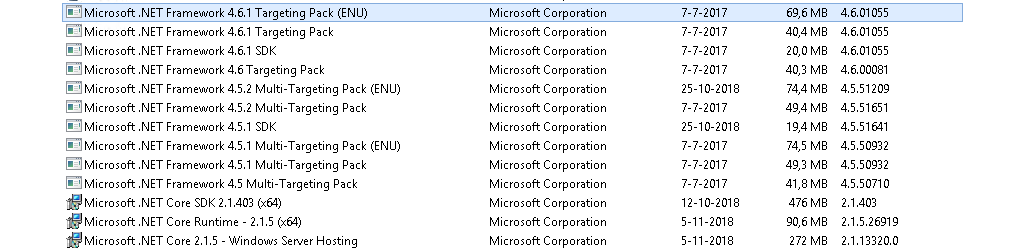
relevant appwiz.cpl piece:
SamJongenelen
on 14 Nov 2018
The MSBuild task uses .NET 4.7.1. Could you try to install the SDK and targeting pack for it?
SabotageAndi
on 14 Nov 2018
Confirmed; installing NET 4.7.1 SDK and targetting pack solves the build error
SamJongenelen
on 14 Nov 2018
Good that we found the issue.
@Stephen-Mc: please add a note to the public preview blog post about the dependency on .NET 4.7.1.
SabotageAndi
on 14 Nov 2018
Is there any chance to completely remove the dependency on NetStandard ? Or use a PackageReference for netstandard library?
SamJongenelen
on 14 Nov 2018
In this case not. The error you got is in the MSBuild Task. We would have to ship the netstandard assembly within the package. That's nothing I would like to do.
SabotageAndi
on 14 Nov 2018
@Stephen-Mc: please add a note to the public preview blog post about the dependency on .NET 4.7.1.
Done
 Stephen-Mc
on 15 Nov 2018
Stephen-Mc
on 15 Nov 2018
This thread has been automatically locked since there has not been any recent activity after it was closed. Please open a new issue for related bugs.
![lock[bot] picture](https://avatars.githubusercontent.com/in/6672?v=4&s=40) lock[bot]
on 8 Jul 2019
lock[bot]
on 8 Jul 2019
Related issues
 fasadin
·
5Comments
fasadin
·
5Comments
 adiljs
·
5Comments
adiljs
·
5Comments
 amarzi
·
5Comments
amarzi
·
5Comments
 sanalkr
·
7Comments
sanalkr
·
7Comments
 TpRunWild
·
4Comments
TpRunWild
·
4Comments
Most helpful comment
The MSBuild task uses .NET 4.7.1. Could you try to install the SDK and targeting pack for it?