Specflow: Using Specflow SpecRunner v3 Beta - System.BadImageFormatException
Dotnet Core v2.1 System.BadImageFormatException
SpecFlow Version:
- [X ] 3.0
- [ ] 2.4
- [ ] 2.3
- [ ] 2.2
- [ ] 2.1
- [ ] 2.0
- [ ] 1.9
Used Test Runner
- [X ] SpecFlow+Runner
- [ ] MSTest
- [ ] NUnit
- [ ] Xunit
Version number:
3.0.21-beta
Visual Studio Version
- [ X] VS 2017
- [ ] VS 2015
- [ ] VS 2013
Are the latest Visual Studio updates installed?
- [X ] Yes
- [ ] No
.NET Framework:
- [ ] >= .NET 4
- [ ] before .NET 4
- [ ] .NET Core 2.0
- [ X] .NET Core 2.1
Test Execution Method:
- [ ] Visual Studio Test Explorer
- [ ] TFS/VSTS/Azure DevOps – Task – PLEASE SPECIFY THE NAME OF THE TASK
- [ ] Command line – PLEASE SPECIFY THE FULL COMMAND LINE
- [ X] N/A - no tests run
<SpecFlow> Section in app.config
{
    "bindingCulture":
    {
        "language" :"en-us"
    },
    "language":
    {
        "feature": "en-us"
    },
    "plugins": []
}
Repro Project
Issue Description
Here is the Error listed in the code behind file:
We could not find a data exchange file at the path Unhandled Exception: System.BadImageFormatException: The module was expected to contain an assembly manifest. (Exception from HRESULT: 0x80131018)
Please open an issue at https://github.com/techtalk/SpecFlow/issues/
Complete output:
Unhandled Exception: System.BadImageFormatException: The module was expected to contain an assembly manifest. (Exception from HRESULT: 0x80131018)
at System.Reflection.RuntimeAssembly.nLoadFile(String path, Evidence evidence)
at System.Reflection.Assembly.LoadFile(String path)
at TechTalk.SpecFlow.VisualStudio.CodeBehindGenerator.CommandLineHandling.PreLoadAssemblies()
at TechTalk.SpecFlow.VisualStudio.CodeBehindGenerator.CommandLineHandling.PreLoadAssemblies()
at TechTalk.SpecFlow.VisualStudio.CodeBehindGenerator.Program.Main(String[] args)
Command: ...\microsoft\visualstudio\15.0_17432321\extensions\ijtk2ihv.pze\TechTalk.SpecFlow.VisualStudio.CodeBehindGenerator.exe
Parameters: GenerateTestFile --featurefile ...\tmp803C.tmp --outputdirectory
(Full file paths removed)
Also - as a side effect I also get a time out error before the vs extension crashes:
'The module was expected to contain an assembly manifest. (Exception from HRESULT: 0x80131018)'
from the VS debugger
Working Directory:
Steps to Reproduce
Create New xUnit Test project
Install SpecFlow
Install SpecFlow.Tools.MsBuild.Generation
Install SpecRun.SpecFlow-3.0.0
Add Feature File
I have had this error occur in VS 2017 Community and Professional with xUnit Testing projects. The plugin crashes before I generate or run any tests.
 gbaril60
All 29 comments
@gbaril60 Did you removed all the stuff VS added, when you add the feature file?
They are described in https://specflow.org/2018/specflow-3-public-preview-now-available/ - Generating Code-behind Files
You can't generate the code-behind files via saving with .NET Core.
This has to be done via SpecFlow.Tools.MsBuild.Generation.
 SabotageAndi
on 13 Nov 2018
SabotageAndi
on 13 Nov 2018
I ďid. The error was generated after I created the feature file. The spec flow plug in was also crashing as soon as I started visual studio. When I chose to debug them plug in it would give me the same assembly manifest missing error. The code behind files were generated automatically as soon as I created the feature file.
gbaril60
on 14 Nov 2018
I've gotten SpecFlow to work using DotnetCore 2.1. The issue seems to be surrounding the SpecFlow for Visual Studio 2017 extension. I was able to get SpecFlow to run on DotNet Core using the standard plugin (not upgrading to the Preview 3 version). When I went back and upgraded the plugin to Version 3, I would start getting the error stating the plugin stopped working.
gbaril60
on 14 Nov 2018
I've gotten SpecFlow to work using DotnetCore 2.1. The issue seems to be surrounding the SpecFlow for Visual Studio 2017 extension. I was able to get SpecFlow to run on DotNet Core using the standard plugin (not upgrading to the Preview 3 version). When I went back and upgraded the plugin to Version 3, I would start getting the error stating the plugin stopped working.
I went through the same problem as you. I was able to solve installing the plugins as well as this site: https://github.com/stajs/SpecFlow.NetCore
 rafael-meneses
on 14 Nov 2018
rafael-meneses
on 14 Nov 2018
@gbaril60 you get the error with the BadImageException, when VS wants to create via CustomTool the code-behind file. You have to disable this via changing the csproj file as described in the blog post. You have to do this for every new feature file, as VS is adding the changes every time. :-(
@rafael-meneses Using SpecFlow.NetCore is not needed anymore. If you have problems, please file a bug here and we look to get it fixed.
SabotageAndi
on 28 Nov 2018
I followed the blog step by step and still get the same error. The Specflow VS Plugin crashes as soon as I create a feature file, I don't even get a chance to delete the code in the .csproj file. I tried to emulate the same set up as in the sample projects - a few things I noticed: 1. The sample project is targeting NetCore2.0, not 2.1, 2. the .csproj does not include the Step Definition folder. Everything I tried when I try to create the project on my own, I keep ending up with the same System.BadImageFormatException error.
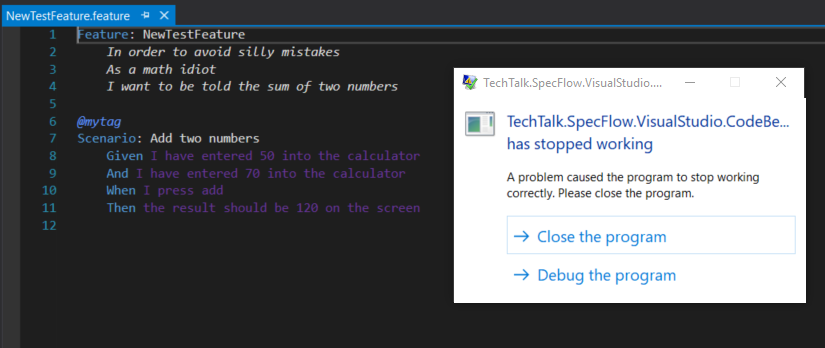
It seems to run okay if I revert back to the older plugin, which leads me to think that the new plugin is causing the issue.
gbaril60
on 3 Dec 2018
Having same issue here, below packages in my project
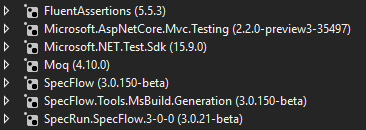
 renanpc
on 4 Dec 2018
renanpc
on 4 Dec 2018
I have the same problem.
 dstroem
on 12 Dec 2018
dstroem
on 12 Dec 2018
Editing the .csproj didn't work for me. I still got the BadImageFormatException
However removing the Custom Tool from the feature properties and saving got things working
 carlbray
on 18 Dec 2018
carlbray
on 18 Dec 2018
I have build action "None" and "Custom Tool" blank but still get the BadImageFormatException
dstroem
on 18 Dec 2018
@dstroem Are all references to your feature files gone from the csproj?
SabotageAndi
on 18 Dec 2018
Yes. I have removed alle references to the feature files in the csproj.
As soon as I touch a feature file and save I get a message "TechTalk.SpecFlow.VisualStudio.CodeBehindGenerator has stopped working"
dstroem
on 19 Dec 2018
Exact same issue as @gbaril60 @dstroem - cannot add or modify existing feature files. Same versions referenced too.
Not working on Visual Studio 15.9.4. I recently switched to a new machine. Same version was working on the old machine that had VS maybe 15.9.2 or below. Unfortunately can't access it anymore to confirm.
 timje
on 21 Dec 2018
timje
on 21 Dec 2018
I have no idea what is happening here. I can't reproduce this error.
Could somebody that has this issue try to debug this?
The VS Extension sources are here: https://github.com/techtalk/SpecFlow.visualStudio/
Clone it, open the SpecFlow.VisualStudio.2017.sln solution and with F5 an experimental instance of VS2017 should start.
Then please open your project where you get the error.
SabotageAndi
on 21 Dec 2018
Hi @SabotageAndi I can't compile that TechTalk.Specflow.VsIntegration project. Get this:
Problem occurred while extracting the vsix to the experimental extensions path. The specified path, file name, or both are too long. The fully qualified file name must be less than 260 characters, and the directory name must be less than 248 characters. TechTalk.SpecFlow.VsIntegration
I even tried to clone at root of drive, so doesn't seem to be due to length of path where it is building. Hit this one before?
timje
on 21 Dec 2018
Never got this @timje. Do you get this also with a brand new VS Extension project?
SabotageAndi
on 21 Dec 2018
@SabotageAndi
I shortened the DisplayName in VsIntegration/15.0.source.extension.vsixmanifest and it compiled
From: "SpecFlow for Visual Studio 2017"
To "Specflow"
With this locally compiled extension Specflow works again! The generated files are working (once I remove the stuff from csproj).
timje
on 21 Dec 2018
@timje Before you compiled it yourself, did you use the VS Extension from the Marketplace or from the MyGet VS Gallery?
SabotageAndi
on 21 Dec 2018
From myget as per instructions here
https://specflow.org/2018/specflow-3-public-preview-now-available/
On Fri, 21 Dec 2018, 12:52 Andreas Willich, notifications@github.com
wrote:
@timje https://github.com/timje Before you compiled it yourself, did
you use the VS Extension from the Marketplace or from the MyGet VS Gallery?—
You are receiving this because you were mentioned.
Reply to this email directly, view it on GitHub
https://github.com/techtalk/SpecFlow/issues/1336#issuecomment-449380915,
or mute the thread
https://github.com/notifications/unsubscribe-auth/ABHiEXKm-ifbRLm4rD6Xg6vAdp2L6Hm0ks5u7NmNgaJpZM4Yaqgm
.
timje
on 21 Dec 2018
Ok, now I am really out of ideas. Time for vacation...
SabotageAndi
on 21 Dec 2018
The problem is here:
TechTalk.SpecFlow.VisualStudio.CodeBehindGenerator.PreLoadAssemblies
var assemblies = Directory.GetFiles(Environment.CurrentDirectory, "*.dll"); <- Environment.CurrentDirectory points to C:\Windows\System32 in my case
This works:
var location = Path.GetDirectoryName(Assembly.GetExecutingAssembly().Location);
var assemblies = Directory.GetFiles(location, "*.dll");
 godandag
on 28 Dec 2018
godandag
on 28 Dec 2018
I have the same issue with .net core 2.2. Instead of TechTalk.SpecFlow.VisualStudio.CodeBehindGenerator.exe generating the code for the Feature file, it prints this System.BadImageFormatException.
But when I tried to add a new Feature file through the experimental instance of VS2017, it was creating the autogenerated code successfully.
 mstypsan
on 3 Jan 2019
mstypsan
on 3 Jan 2019
@mstypsan You have to remove the SpecFlowSingleFileGenerator from you feature files. It can't handle .NET Core assemblies.
See https://specflow.org/2018/specflow-3-public-preview-now-available/ - Generating Code-behind Files
SabotageAndi
on 7 Jan 2019
@SabotageAndi So let me explain a bit more what I discovered so far. I followed the instructions here https://specflow.org/2018/specflow-3-public-preview-now-available/.
When I use my VS2017 and I create a new feature file, the autogenerated code has this Unhandled Exception: System.BadImageFormatException, the issue refers to.
Then I go and remove SpecFlowSingleFileGenerator from you feature files and I also remove the exception message from the autogenerated code. I compile and it works as it should.
When I use the experimental instance of VS2017, I don't get the exception at all in the autogenerated code.
I managed to fix the issue in my case by clearing the exception message, but the first time I create a new feature file, I always get the exception.
mstypsan
on 7 Jan 2019
@mstypsan As long as the SpecFlowSingleFileGenerator is there, you get this error. When you add a new file, it is also executed and so you end with the exception in the newly added file.
When you say experimental instance of VS2017 do you mean starting devenv.exe with /Root Exp or using the SpecFlow Extension from the MyGet feed?
SabotageAndi
on 7 Jan 2019
@SabotageAndi. I think we're agreeing here. So when I use the Specflow Extension from the myget feed, I get the exception only on the newly created file.
When I run the project here https://github.com/techtalk/SpecFlow.visualStudio/ with /RootSuffix Exp, and then open my local Specflow project from the experimental instance of VS2017, I don't see the exception.
mstypsan
on 7 Jan 2019
@mstypsan Ok, you don't get the exception in the experimental instance probably, because the extension is not installed. The extensions are not shared between instances.
SabotageAndi
on 7 Jan 2019
Because of inactivity, I am closing this issue.
SabotageAndi
on 29 Jan 2019
This thread has been automatically locked since there has not been any recent activity after it was closed. Please open a new issue for related bugs.
![lock[bot] picture](https://avatars.githubusercontent.com/in/6672?v=4&s=40) lock[bot]
on 8 Jul 2019
lock[bot]
on 8 Jul 2019
Related issues
 zplan
·
4Comments
zplan
·
4Comments
 vkudley
·
4Comments
vkudley
·
4Comments
 gasparnagy
·
4Comments
gasparnagy
·
4Comments
 vgaltes
·
6Comments
vgaltes
·
6Comments
 xuanzhaopeng
·
7Comments
xuanzhaopeng
·
7Comments