Specflow: Missing [assembly:GeneratorPlugin] attribute error with SpecFlow 3.0
First of all, I'm very much aware of the fact that Specflow 3.0 isn't released yet, I just wanted to give the beta packages from the MyGet feed a try to see how far I could get with these on .NET Core now that #649 has been merged. Unfortunately I didn't get very far just yet because I'm getting this error:
  Restore completed in 31.85 ms for /Users/jmezach/Projects/demos/SpecflowDotNetCore/SpecflowDotNetCore.csproj./usr/local/share/dotnet/sdk/2.2.100-preview3-009430/Sdks/Microsoft.NET.Sdk/targets/Microsoft.NET.RuntimeIdentifierInference.targets(143,5): message NETSDK1057: You are using a preview version of .NET Core. See: https://aka.ms/dotnet-core-preview [/Users/jmezach/Projects/demos/SpecflowDotNetCore/SpecflowDotNetCore.csproj]
  SpecFlowFeatureFiles: Features/MyFirstFeature.feature/Users/jmezach/.nuget/packages/specflow.tools.msbuild.generation/3.0.125-beta/build/SpecFlow.Tools.MsBuild.Generation.targets(73,5): error : [SpecFlow] TechTalk.SpecFlow.S
pecFlowException: Missing [assembly:GeneratorPlugin] attribute in /Users/jmezach/.nuget/packages/specflow.mstest/3.0.125-beta/build/netstandard2.0/TechTalk.SpecFlow.MSTest
.Generator.SpecFlowPlugin.dll [/Users/jmezach/Projects/demos/SpecflowDotNetCore/SpecflowDotNetCore.csproj]
/Users/jmezach/.nuget/packages/specflow.tools.msbuild.generation/3.0.125-beta/build/SpecFlow.Tools.MsBuild.Generation.targets(73,5): error :    at IGeneratorPlugin TechTal
k.SpecFlow.Generator.Plugins.GeneratorPluginLoader.LoadPlugin(PluginDescriptor pluginDescriptor) [/Users/jmezach/Projects/demos/SpecflowDotNetCore/SpecflowDotNetCore.cspro
j]
/Users/jmezach/.nuget/packages/specflow.tools.msbuild.generation/3.0.125-beta/build/SpecFlow.Tools.MsBuild.Generation.targets(73,5): error :    at void TechTalk.SpecFlow.G
enerator.GeneratorContainerBuilder.LoadPlugin(PluginDescriptor pluginDescriptor, IGeneratorPluginLoader pluginLoader, GeneratorPluginEvents generatorPluginEvents, UnitTest
ProviderConfiguration unitTestProviderConfigration) [/Users/jmezach/Projects/demos/SpecflowDotNetCore/SpecflowDotNetCore.csproj]
/Users/jmezach/.nuget/packages/specflow.tools.msbuild.generation/3.0.125-beta/build/SpecFlow.Tools.MsBuild.Generation.targets(73,5): error :    at void TechTalk.SpecFlow.G
enerator.GeneratorContainerBuilder.LoadPlugins(ObjectContainer container, IGeneratorConfigurationProvider configurationProvider, SpecFlowConfigurationHolder configurationH
older, GeneratorPluginEvents generatorPluginEvents, SpecFlowProjectConfiguration specFlowConfiguration, UnitTestProviderConfiguration unitTestProviderConfigration, IEnumerable<string> generatorPlugins) [/Users/jmezach/Projects/demos/SpecflowDotNetCore/SpecflowDotNetCore.csproj]
/Users/jmezach/.nuget/packages/specflow.tools.msbuild.generation/3.0.125-beta/build/SpecFlow.Tools.MsBuild.Generation.targets(73,5): error :    at IObjectContainer TechTalk.SpecFlow.Generator.GeneratorContainerBuilder.CreateContainer(SpecFlowConfigurationHolder configurationHolder, ProjectSettings projectSettings, IEnumerable<string> generatorPlugins) [/Users/jmezach/Projects/demos/SpecflowDotNetCore/SpecflowDotNetCore.csproj]
/Users/jmezach/.nuget/packages/specflow.tools.msbuild.generation/3.0.125-beta/build/SpecFlow.Tools.MsBuild.Generation.targets(73,5): error :    at ITestGenerator TechTalk.SpecFlow.Generator.TestGeneratorFactory.CreateGenerator(ProjectSettings projectSettings, IEnumerable<string> generatorPlugins) [/Users/jmezach/Projects/demos/SpecflowDotNetCore/SpecflowDotNetCore.csproj]
/Users/jmezach/.nuget/packages/specflow.tools.msbuild.generation/3.0.125-beta/build/SpecFlow.Tools.MsBuild.Generation.targets(73,5): error :    at void SpecFlow.Tools.MsBuild.Generation.FeatureCodeBehindGenerator.InitializeProject(string projectPath, string rootNamespace, IEnumerable<string> generatorPlugins) [/Users/jmezach/Projects/demos/SpecflowDotNetCore/SpecflowDotNetCore.csproj]
/Users/jmezach/.nuget/packages/specflow.tools.msbuild.generation/3.0.125-beta/build/SpecFlow.Tools.MsBuild.Generation.targets(73,5): error :    at IEnumerable<string> SpecFlow.Tools.MsBuild.Generation.FeatureFileCodeBehindGenerator.GenerateFilesForProject(string projectPath, string rootNamespace, List<string> featureFiles, List<string> generatorPlugins, string projectFolder, string outputPath)+MoveNext() [/Users/jmezach/Projects/demos/SpecflowDotNetCore/SpecflowDotNetCore.csproj]
/Users/jmezach/.nuget/packages/specflow.tools.msbuild.generation/3.0.125-beta/build/SpecFlow.Tools.MsBuild.Generation.targets(73,5): error :    at bool SpecFlow.Tools.MsBuild.Generation.GenerateFeatureFileCodeBehindTask.Execute() [/Users/jmezach/Projects/demos/SpecflowDotNetCore/SpecflowDotNetCore.csproj]

Build FAILED.
I have seen a couple of other issues related to this error message, such as #1247 and #1149, but they seem to be caused by an incorrect combination of Specflow packages and the Visual Studio integration. They all suggest moving to the MSBuild integrated way of generating the code behind, which is what I'm doing in my project. I have the following package references:
  <ItemGroup>
    <PackageReference Include="Microsoft.NET.Test.Sdk" Version="15.9.0" />
    <PackageReference Include="MSTest.TestAdapter" Version="1.3.2" />
    <PackageReference Include="MSTest.TestFramework" Version="1.3.2" />
    <PackageReference Include="Specflow" Version="3.0.125-beta" />
    <PackageReference Include="SpecFlow.MsTest" Version="3.0.125-beta" />
    <PackageReference Include="SpecFlow.Tools.MsBuild.Generation" Version="3.0.125-beta" />
  </ItemGroup>
I've tried to look into what's going wrong here by having a look at the assemblies I'm using with ILSpy. So far I couldn't find anything wrong with it. The assembly containing the generator plugin actually has an assembly level attribute. The only thing I can think of is that there are actually two definitions of the same attribute somehow.
 jmezach
All 64 comments
@jmezach Could you share the project? I would like to have a look at it.
We don't get this error in our integration tests, so I am little bit irritated, why it is happening for you.
 SabotageAndi
on 24 Oct 2018
SabotageAndi
on 24 Oct 2018
@SabotageAndi Sure thing, I've uploaded my code to my GitHub at https://github.com/jmezach/SpecflowDotNetCore
To be clear, I really appreciate the hard work you and others have put into making this happen and I don't want to sound harsh. I just want to help you out to make sure that Specflow on .NET Core is going to a great experience.
jmezach
on 24 Oct 2018
@jmezach Nothing sounded harsh.
Could you try to use netcoreapp2.0 as TFM and see if that works?
SabotageAndi
on 24 Oct 2018
And how do you build it? With dotnet build, dotnet msbuild or msbuild?
SabotageAndi
on 24 Oct 2018
I switched to netcoreapp2.0, but that doesn't seem to matter. Still getting the same error. I'm using dotnet build right now. dotnet msbuild gives me the same error. Running msbuild is working fine so far, which is rather interesting. Unfortunately then using dotnet test still results in the same error, possibly because it is rebuilding the project using dotnet build under the hood.
Any reason why dotnet build doesn't work but msbuild does? I would expect them to behave the same.
jmezach
on 24 Oct 2018
msbuild is running under the full framework. dotnet build is running in .NET Core.
So it looks like there is a problem with the MSBuild task to generate the code-behind files when executed in .NET Core. :-(
SabotageAndi
on 24 Oct 2018
Looking at the tests being run in Azure DevOps it looks like there are tests for the generator that are run on both full framework and .NET Core. But I don't see any tests for the plugin mechanism. Perhaps we should add a couple of those to figure out what's going wrong?
jmezach
on 24 Oct 2018
Yeah, this isn't that easy to test, because you need real assemblies. But I have open ears for ideas.
SabotageAndi
on 24 Oct 2018
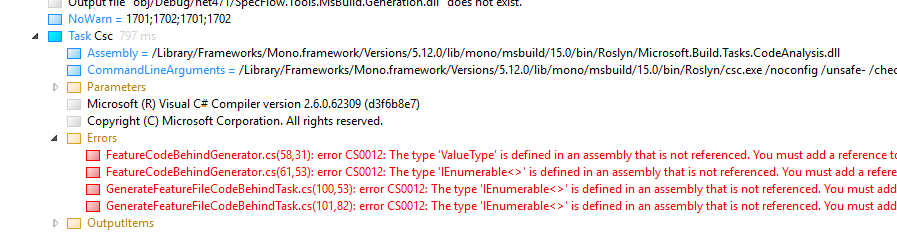
So I tried to compile Specflow on my Mac using the build.ps1 script in the root of repo, but I'm getting a lot of these errors:
FeatureCodeBehindGenerator.cs(58,31): error CS0012: The type 'ValueType' is defined in an assembly that is not referenced. You must add a reference to assembly 'netstandard, Version=2.0.0.0, Culture=neutral, PublicKeyToken=cc7b13ffcd2ddd51'. [/Users/jmezach/Projects/open-source/SpecFlow/SpecFlow.Tools.MsBuild.Generation/SpecFlow.Tools.MsBuild.Generation.csproj]
This looks like the build isn't referencing the correctly compiled versions of the projects for the correct targetframework or something. Not sure how exactly, but that might be related to this issue.
jmezach
on 24 Oct 2018
Building the TechTalk.SpecFlow.sln solution using dotnet build on my Windows machines nets me the same assembly attribute errors, so that definitely should be added to the CI.
@jmezach Can you share an msbuild binary log for that? I'm wondering if the issue is that it's trying to build for netfx on MacOS without the reference assemblies.
 johnduhart
on 24 Oct 2018
johnduhart
on 24 Oct 2018
I've uploaded a binlog to my Dropbox. You should be able to download it from: https://www.dropbox.com/s/62huu8pmz3iu5u9/msbuild.Debug.binlog?dl=0
jmezach
on 24 Oct 2018
@jmezach Thanks for that, it looks like you're building with xbuild. I'd try using dotnet build to see if you have more luck.
johnduhart
on 24 Oct 2018
@jmezach Building the SpecFlow solution on anything other than Windows, doesn't currently work. It has something todo with our compiling the projects for .NET 4.5. I spend already a day on it and didn't found out why.
The issue for it is still open: https://github.com/techtalk/SpecFlow/issues/1039 ;-)
SabotageAndi
on 25 Oct 2018
I will have a look at this on Monday (tomorrow is public holiday in Austria ;-) ).
So the preview (probably 3.0-beta-132) that will go live in some hours has no fix for this.
SabotageAndi
on 25 Oct 2018
@johnduhart Tried running dotnet build from the root of the repo that has the solution file, but I'm getting many of the same errors.
jmezach
on 26 Oct 2018
I see a same error on my Mac, .NET SDK 2.1.300.
I'm using the xUnit plugin and my project targets netcoreapp2.1.
<PackageReference Include="SpecFlow" Version="3.0.132-beta" />
<PackageReference Include="SpecFlow.xUnit" Version="3.0.132-beta" />
<PackageReference Include="SpecFlow.Tools.MsBuild.Generation" Version="3.0.132-beta" />
Both dotnet build and dotnet msbuild failed with the same error.
 jijiechen
on 27 Oct 2018
jijiechen
on 27 Oct 2018
Well I tried building the project and using built assemblies in msbuild. After several debug sessions, I have seen null results were returned when trying to get GeneratePluginAttribute assembly attribute from given generator assembly, in my case TechTalk.SpecFlow.xUnit.Generator.SpecFlowPlugin.dll.
Related code is at https://github.com/techtalk/SpecFlow/blob/652ed713862ba943ac3bb8cf4141ac1b66322c96/TechTalk.SpecFlow.Generator/Plugins/GeneratorPluginLoader.cs#L36
I haven't got luck to fix it, I got no idea why the attribute was not loadable: The GeneratorPluginAttribute type in target assembly (Type B) is not equal to the runtime type GeneratorPluginAttribute (Type A). I tried an equality assert and failed. So null results were returned when trying to fetch that custom attribute of Type A from target assembly.
Deeper dive into code after I gave up my experiment, I found a load assembly and reflection call block at a previous position in the call stack at GenerateFeatureFileCodeBehindTask.GenerateFilesForProject. There is a conditional compile block over constant NETCOREAPP. I've confirmed the assembly from nuget is correctly compiled with this constant provided.
I don't know if this loading block is the root cause of the type mismatch issue mentioned above. In current implementation, you loaded all assembly from path if possible. Maybe it's worth trying load them from runtime-already-loaded modules first and then from disk.
Hope this helps and look forward to your solution.
Thanks for your hard work.
jijiechen
on 28 Oct 2018
I just tried this updated implementation of CustomAssemblyLoader and it succeeded to load the generator plugin, although still failed to generate csharp .feature.cs. The new error was from compiling generated csharp files.
private class CustomAssemblyLoader : AssemblyLoadContext
{
    protected virtual string ManagedDllDirectory => Path.GetDirectoryName(new Uri(this.GetType().GetTypeInfo().Assembly.CodeBase).LocalPath);

    protected override Assembly Load(AssemblyName assemblyName)
    {
        if (IsInRuntimeLibraries(assemblyName))
        {
            return Default.LoadFromAssemblyName(assemblyName);
        }

        string assemblyPath = Path.Combine(this.ManagedDllDirectory, assemblyName.Name) + ".dll";
        if (File.Exists(assemblyPath))
        {
            return LoadFromAssemblyPath(assemblyPath);
        }

        return null;
    }

    private static DependencyContext _defaultDependencyContext;
    bool IsInRuntimeLibraries(AssemblyName assemblyName)
    {
        if (_defaultDependencyContext == null)
        {
            var assembly = this.GetType().GetTypeInfo().Assembly;
            _defaultDependencyContext = DependencyContextLoader.Default.Load(assembly);
        }

        return _defaultDependencyContext.CompileLibraries.Any(
                   library => string.Equals(library.Name, assemblyName.Name, StringComparison.OrdinalIgnoreCase))
               || _defaultDependencyContext.RuntimeLibraries.Any(
                   library => string.Equals(library.Name, assemblyName.Name, StringComparison.OrdinalIgnoreCase));
    }
}
Here are content generated into .feature.cs files:
#error Generation error: Message: Could not load file or assembly 'Newtonsoft.Json, Version=10.0.0.0, Culture=neutral, PublicKeyToken=30ad4fe6b2a6aeed'. Could not find or load a specific file. (Exception from HRESULT: 0x80131621)

AppDomain Information:
    Name: MSBuild
    BaseDirectory: /usr/local/share/dotnet/sdk/2.1.300/

Loaded Assemblies:
Fullname | Location | Codebase
Ben.Demystifier, Version=0.1.0.0, Culture=neutral, PublicKeyToken=a6d206e05440431a | /Users/username/.nuget/packages/specflow.tools.msbuild.generation/3.0.132-beta/build/../tasks/netcoreapp2.0/Ben.Demystifier.dll | file:///Users/username/.nuget/packages/specflow.tools.msbuild.generation/3.0.132-beta/build/../tasks/netcoreapp2.0/Ben.Demystifier.dll
BoDi, Version=1.4.0.0, Culture=neutral, PublicKeyToken=ff7cd5ea2744b496 | /Users/username/.nuget/packages/specflow.tools.msbuild.generation/3.0.132-beta/build/../tasks/netcoreapp2.0/BoDi.dll | file:///Users/username/.nuget/packages/specflow.tools.msbuild.generation/3.0.132-beta/build/../tasks/netcoreapp2.0/BoDi.dll
dotnet, Version=2.1.300.0, Culture=neutral, PublicKeyToken=adb9793829ddae60 | /usr/local/share/dotnet/sdk/2.1.300/dotnet.dll | file:///usr/local/share/dotnet/sdk/2.1.300/dotnet.dll
Gherkin, Version=5.0.0.0, Culture=neutral, PublicKeyToken=86496cfa5b4a5851 | /Users/username/.nuget/packages/specflow.tools.msbuild.generation/3.0.132-beta/build/../tasks/netcoreapp2.0/Gherkin.dll | file:///Users/username/.nuget/packages/specflow.tools.msbuild.generation/3.0.132-beta/build/../tasks/netcoreapp2.0/Gherkin.dll

... (Omitted by Jijie Chen)

TechTalk.SpecFlow, Version=3.0.0.0, Culture=neutral, PublicKeyToken=null | /Users/username/.nuget/packages/specflow.tools.msbuild.generation/3.0.132-beta/build/../tasks/netcoreapp2.0/TechTalk.SpecFlow.dll | file:///Users/username/.nuget/packages/specflow.tools.msbuild.generation/3.0.132-beta/build/../tasks/netcoreapp2.0/TechTalk.SpecFlow.dll
TechTalk.SpecFlow.Generator, Version=3.0.0.0, Culture=neutral, PublicKeyToken=null | /Users/username/.nuget/packages/specflow.tools.msbuild.generation/3.0.132-beta/build/../tasks/netcoreapp2.0/TechTalk.SpecFlow.Generator.dll | file:///Users/username/.nuget/packages/specflow.tools.msbuild.generation/3.0.132-beta/build/../tasks/netcoreapp2.0/TechTalk.SpecFlow.Generator.dll
TechTalk.SpecFlow.Parser, Version=3.0.0.0, Culture=neutral, PublicKeyToken=null | /Users/username/.nuget/packages/specflow.tools.msbuild.generation/3.0.132-beta/build/../tasks/netcoreapp2.0/TechTalk.SpecFlow.Parser.dll | file:///Users/username/.nuget/packages/specflow.tools.msbuild.generation/3.0.132-beta/build/../tasks/netcoreapp2.0/TechTalk.SpecFlow.Parser.dll
TechTalk.SpecFlow.Utils, Version=3.0.0.0, Culture=neutral, PublicKeyToken=null | /Users/username/.nuget/packages/specflow.tools.msbuild.generation/3.0.132-beta/build/../tasks/netcoreapp2.0/TechTalk.SpecFlow.Utils.dll | file:///Users/username/.nuget/packages/specflow.tools.msbuild.generation/3.0.132-beta/build/../tasks/netcoreapp2.0/TechTalk.SpecFlow.Utils.dll
TechTalk.SpecFlow.xUnit.Generator.SpecFlowPlugin, Version=3.0.0.0, Culture=neutral, PublicKeyToken=null | /Users/username/.nuget/packages/specflow.xunit/3.0.132-beta/build/netstandard2.0/TechTalk.SpecFlow.xUnit.Generator.SpecFlowPlugin.dll | file:///Users/username/.nuget/packages/specflow.xunit/3.0.132-beta/build/netstandard2.0/TechTalk.SpecFlow.xUnit.Generator.SpecFlowPlugin.dll

System.IO.FileLoadException: Could not load file or assembly 'Newtonsoft.Json, Version=10.0.0.0, Culture=neutral, PublicKeyToken=30ad4fe6b2a6aeed'. Could not find or load a specific file. (Exception from HRESULT: 0x80131621)
File name: 'Newtonsoft.Json, Version=10.0.0.0, Culture=neutral, PublicKeyToken=30ad4fe6b2a6aeed'
   at Gherkin.GherkinDialectProvider.ParseJsonContent(String languagesFileContent)
   at Gherkin.GherkinDialectProvider.TryGetDialect(String language, Location location, GherkinDialect& dialect)
   at Gherkin.GherkinDialectProvider.GetDialect(String language, Location location)
   at TechTalk.SpecFlow.Parser.SpecFlowGherkinDialectProvider.GetDialect(String language, Location location) in /Users/username/Projects/Temp/SpecFlow/TechTalk.SpecFlow/Parser/SpecFlowGherkinDialectProvider.cs:line 18
   at System.Lazy`1.ViaFactory(LazyThreadSafetyMode mode)
   at System.Lazy`1.ExecutionAndPublication(LazyHelper executionAndPublication, Boolean useDefaultConstructor)
   at System.Lazy`1.CreateValue()
   at Gherkin.TokenMatcher.Reset()
   at Gherkin.Parser`1.Parse(ITokenScanner tokenScanner, ITokenMatcher tokenMatcher)
   at TechTalk.SpecFlow.Parser.SpecFlowGherkinParser.Parse(TextReader featureFileReader, String sourceFilePath)
   at TechTalk.SpecFlow.Generator.TestGenerator.ParseContent(IGherkinParser parser, TextReader contentReader, String sourceFilePath) in /Users/username/Projects/Temp/SpecFlow/TechTalk.SpecFlow.Generator/TestGenerator.cs:line 132
   at TechTalk.SpecFlow.Generator.TestGenerator.GenerateTestFileCode(FeatureFileInput featureFileInput) in /Users/username/Projects/Temp/SpecFlow/TechTalk.SpecFlow.Generator/TestGenerator.cs:line 121
   at TechTalk.SpecFlow.Generator.TestGenerator.GetGeneratedTestCode(FeatureFileInput featureFileInput) in /Users/username/Projects/Temp/SpecFlow/TechTalk.SpecFlow.Generator/TestGenerator.cs:line 90
   at TechTalk.SpecFlow.Generator.TestGenerator.GenerateTestFileWithExceptions(FeatureFileInput featureFileInput, GenerationSettings settings) in /Users/username/Projects/Temp/SpecFlow/TechTalk.SpecFlow.Generator/TestGenerator.cs:line 68
   at TechTalk.SpecFlow.Generator.ErrorHandlingTestGenerator.GenerateTestFile(FeatureFileInput featureFileInput, GenerationSettings settings) in /Users/username/Projects/Temp/SpecFlow/TechTalk.SpecFlow.Generator/ErrorHandlingTestGenerator.cs:line 19
I understand this is an expected message in my experiment environment.
If you agree, I can sent you a PR later to fix the discussed issue in this thread. You may also have an eye on the new errors I ran into.
jijiechen
on 28 Oct 2018
I am working on a fix for this here: https://github.com/techtalk/SpecFlow/tree/Fix1305
Currently I was able to produce some tests that are failing. But I have not yet an idea how to fix this issue.
SabotageAndi
on 29 Oct 2018
@SabotageAndi Could you share the reasons for the failing tests? I tried building and running the tests locally with your branch, but obviously that still fails since it won't build on macOS currently. I'll see if I can get something working on Windows though.
Perhaps the build issues could be fixed when dotnet/designs#33 gets done. I believe there is a MyGet feed for those NuGet packages somewhere, but I couldn't find it so I placed a comment there to see what the plan is.
jmezach
on 30 Oct 2018
@jmezach The error is the same you get, that it can't find the plugin.
The reason for this is the AssemblyLoadContext we need to use, because of different versions of Newtonsoft.Json. MSBuild uses 9, the Gherkin parser uses 10. If we don't use the AssemblyLoadContext, we get the error @jijiechen has after his changes.
I am currently playing with the idea to remove the dependency of the Gherkin parser on Newtonsoft.Json.
SabotageAndi
on 30 Oct 2018
Interesting. What is the reason for the Gherkin parser to use Newtonsoft.Json in the first place?
jmezach
on 30 Oct 2018
@jmezach The language data is stored in a json: https://github.com/cucumber/cucumber/blob/master/gherkin/gherkin-languages.json
With older versions, we were using some .NET Buildin json deserializer, which wasn't availabe in .NET Standard. So we used Json.NET as exchange.
SabotageAndi
on 30 Oct 2018
@SabotageAndi Could we perhaps lower the requirement for the Gherkin parser to 9 so it's compatible with MSBuild? That wouldn't be a long term solution obviously, but could get us moving for now. Or are there specific features of 10 that we're using in the Gherkin parser?
Additionally, given the recent aspnet/announcements#325 we might get an in box JSON parser. If that's all we need, we might be able to use that instead (or hopefully MSBuild will use it so it doesn't conflict with anything).
jmezach
on 30 Oct 2018
So can you confirm the assembly loading issue is solved?
jijiechen
on 30 Oct 2018
@jmezach Version 9 has no netstandard version included. I am currently trying to get the Gherkin parser to work with Utf8Json. Looks good so far.
About the new json parser: yes, I hope they use it then everywhere also, but no idea when they will publish this. Probably not next week. ;-)
@jijiechen No, I have still problems with assembly loading. Currently with System.CodeDom.dll (no idea why).
SabotageAndi
on 30 Oct 2018
@SabotageAndi No, I don't think that will be ready next week ;). It will be interesting to see that evolve though.
I had a go at compiling and running tests on Windows today though. Compilation works just fine, but running the tests takes a long time and quite a lot of them are failing. Is that supposed to happen?
jmezach
on 30 Oct 2018
@jmezach It's definite interesting.
Tests should be all green. See https://dev.azure.com/specflow/SpecFlow/_releaseProgress?_a=release-pipeline-progress&releaseId=52&view=mine
If you have red ones, please open a new issue for it. No idea why they are failing for you.
SabotageAndi
on 31 Oct 2018
Okay, I've switched to the master branch and the tests are running just fine there. Interestingly they do take a long time to run: almost six hours. According to that link they should finish in about a minute, so now idea what's happening there. Should I file a separate issue for that?
jmezach
on 6 Nov 2018
@SabotageAndi After looking into this a bit more I think the real issue here is that the TechTalk.SpecFlow assembly is being multi-targeted to both .NET Framework and .NET Core, meaning there are actually two different versions of this assembly. That also means that there are two different versions of the GeneratorPluginAttribute which do not unify, thus causing this error because the logic responsible for loading is using a different version of the attribute than the one that the plugin itself is compiled against.
So I think that either TechTalk.SpecFlow has to target .NET Standard exclusively, or perhaps the Infrastructure namespace should be extracted into its own library that targets .NET Standard exclusively since those seem to be the bits that are shared between the runtime and compile time components of SpecFlow.
jmezach
on 6 Nov 2018
@jmezach We multitarget everything. The .NET Core MSBuild task and the GeneratorPlugins should be build against the .NET Standard TechTalk.SpecFlow assembly.
My assumtion is currently, that because of the AssemblyLoadContext we compare types of different loaded assemblies. I am trying to remove the AssemblyLoadContext from the MSBuild task, but for that I have to remove the dependency on Json.NET in Gherkin.
SabotageAndi
on 6 Nov 2018
@SabotageAndi I see. Is there a specific reason though that you were using LoadFromAssemblyPath here instead of LoadFromAssemblyName? I just tried that in the test and that seems to fix the issue when running on .NET Core.
jmezach
on 6 Nov 2018
I have the same issue when trying to run the test with docker, I am getting this error:
/root/.nuget/packages/specflow.tools.msbuild.generation/3.0.132-beta/build/SpecFlow.Tools.MsBuild.Generation.targets(73,5): error : [SpecFlow] TechTalk.SpecFlow.SpecFlowException: Missing [assembly:GeneratorPlugin] attribute in /root/.nuget/packages/specflow.xunit/3.0.132-beta/build/netstandard2.0/TechTalk.SpecFlow.xUnit.Generator.SpecFlowPlugin.dll
 SDETRK
on 6 Nov 2018
SDETRK
on 6 Nov 2018
For reference, this are the issues in the Gherkin parser I am currently working on:
https://github.com/cucumber/cucumber/issues/527
https://github.com/cucumber/cucumber/issues/528
SabotageAndi
on 8 Nov 2018
Hi @SabotageAndi , should we open a new issue? Or is it related to the current one?
Same error, but using docker error : [SpecFlow] TechTalk.SpecFlow.SpecFlowException: Missing [assembly:GeneratorPlugin]
 rudym
on 9 Nov 2018
rudym
on 9 Nov 2018
@rudym if you get it when you are using dotnet build it's the same issue.
SabotageAndi
on 9 Nov 2018
@SabotageAndi yes, that is exactly when it happens.
Thank you for your work, we will wait until it would be resolved then.
rudym
on 11 Nov 2018
@SabotageAndi any update regarding this. I tried with Specflow 3 and it does not debug specflows on my environment (VS 2017, .net core 2.1) and also gives same error in docker. Do you have any workaround as of now?
 bhushansona
on 14 Nov 2018
bhushansona
on 14 Nov 2018
I made the needed changes to the gherkin parser (they still need to be merged & released).
With a private build of it, I made some progress on this issue. The dotnet build test is now green, but other tests are failing. I hadn't yet time to check why they are failing now.
As I am the next days on a training, I will continue working on it on Monday.
My changes are in this branch: https://github.com/techtalk/SpecFlow/tree/Fix1305
SabotageAndi
on 14 Nov 2018
So are there any workarounds until a fix is released?
 putnap
on 20 Nov 2018
putnap
on 20 Nov 2018
@putnap use msbuild and not dotnet build
SabotageAndi
on 20 Nov 2018
@SabotageAndi unfortunately that doesn't work for me since I need to publish the project as self-contained and I was unable to find a way to do that using msbuild. Please guide me to solution if it's possible.
putnap
on 20 Nov 2018
@putnap dotnet build and msbuild have the same functionallity. You only need to know the right parameters.
What is the command line you are using for publishing with dotnet build?
SabotageAndi
on 20 Nov 2018
@SabotageAndi I figured it should be similar, but I couldn't find the params I needed. Basically I need to do this:
dotnet publish --configuration $(BuildConfiguration) --output $(build.artifactstagingdirectory) --self-contained -r win81-x64
putnap
on 20 Nov 2018
msbuild -t:Publish -p:Configuration=$(BuildConfiguration) -property:OutputPath=$(build.artifactstagingdirectory) -p:SelfContained=True -p:RuntimeIdentifier=win81-x64
You can find the mapping of the parameter to MSBuild property in the sources. Here is it for --output: https://github.com/dotnet/cli/blob/master/src/dotnet/commands/dotnet-build/BuildCommandParser.cs#L27
SabotageAndi
on 20 Nov 2018
@SabotageAndi unfortunately, there's no way to use msbuild on the Linux. I'm highly interesting in Specflow with .NET Core on our Ubuntu build server, but this issue blocks it.
 diolive
on 20 Nov 2018
diolive
on 20 Nov 2018
@diolive yeah, on Linux there isn't currently a work around. I hope to get the needed Gherkin changes merged until Thursday and make a release of the gherkin parser.
If everything is going well, at the end of the week, there should be a new version that fixes this issue.
SabotageAndi
on 20 Nov 2018
@SabotageAndi thank you, crossing my fingers)
diolive
on 20 Nov 2018
@SabotageAndi I think that msbuild -p:SelfContained=True doesn't work. I couldn't find any documentation reference to that, but basically the output of the build doesn't include the runtime files that are usually there... I also think my issue is going off-topic now...
putnap
on 20 Nov 2018
@putnap strange, it should work: https://github.com/dotnet/cli/blob/master/src/dotnet/commands/dotnet-publish/PublishCommandParser.cs#L50
SabotageAndi
on 20 Nov 2018
@SabotageAndi sorry, I take that back, you are correct, just msbuild did it differently for publishing.
2018-11-20T10:02:04.9083179Z PrepareForPublish:
2018-11-20T10:02:04.9083310Z Creating directory "D:\APP\Agents\Y00480.7\_work\1723\a\temp\AcceptanceTestspublish\".
putnap
on 20 Nov 2018
Ok, so after burning half a day on this, I've concluded that msbuild is not going to work. Something is being done differently and dotnet vstest command doesn't run the tests in my published dll. I don't have any more time to spend on this so I'm hoping you going to have a fix very soon.
putnap
on 20 Nov 2018
@SabotageAndi It seems like additional row <add key="LocalNuGetFeed" value=".\LocalNuGetFeed" /> caused to Azure DevOps task failure: The nuget command failed with exit code(1) and error(The local source 'D:\a\r1\a\Nuget\LocalNuGetFeed' doesn't exist.).
 d-vereskun
on 22 Nov 2018
d-vereskun
on 22 Nov 2018
@d-vereskun yeah, vsts doesn't like local feeds ...
But it's not more needed. The fixes for Gherkin are merged and I uploaded a preview to nuget.org.
SabotageAndi
on 22 Nov 2018
@SabotageAndi I've directly added package Gherkin v6.0.0-beta1 in my test project (to force the usage of this version as dependency, instead of stable one), but there's no effect unfortunately. Error Missing [assembly:GeneratorPlugin] attribute hasn't gone.
diolive
on 22 Nov 2018
@diolive The reason is, the error is in the MSBuild task and this needs changes. Simple dependency updating isn't enough, because the dependencies for the MSBuild task are all shipped in the nuget package.
All changes are here: https://github.com/techtalk/SpecFlow/pull/1346
I only wait for the CI build to merge the PR and then push a new review to nuget.org.
SabotageAndi
on 22 Nov 2018
PR is merged and build is green. The NuGet packages are currently uploaded to NuGet.org. They have the version 3.0.150-beta.
Additionally to the automatic tests, we did manual testing of dotnet build and dotnet test with XUnit on Windows. They were working.
Please try out the new version, so that we know this bug is really fixed. Thanks!
SabotageAndi
on 23 Nov 2018
@SabotageAndi I can confirm that this works with MSTest on macOS using dotnet build and dotnet test. Awesome work. I'll try to have a look to see if it works with XUnit as well.
jmezach
on 23 Nov 2018
@SabotageAndi Works brilliant in Ubuntu with XUnit. Thank you very much!
diolive
on 23 Nov 2018
Now all we need is some integration into VS Code. @SabotageAndi Are there any plans for that? I have some ideas which could benefit the greater SbE/BDD community ;).
jmezach
on 23 Nov 2018
@jmezach We will write some documentation what currently is already possible with SpecFlow & VS Code in the next weeks.
SabotageAndi
on 23 Nov 2018
@SabotageAndi great work !! Its executing great (MsTest as testrunner) on Windows and Linux containers in Docker. However, I want to know, whether we need to regenerate code behind files to debug in VS 2017? Any extension update? Also, can you provide sample of specflow.json settings with minimum required fields to execute via MsTest?
bhushansona
on 23 Nov 2018
@bhushansona Please open for your questions a separate issue, so we can stay on topic in this issue.
SabotageAndi
on 23 Nov 2018
This thread has been automatically locked since there has not been any recent activity after it was closed. Please open a new issue for related bugs.
![lock[bot] picture](https://avatars.githubusercontent.com/in/6672?v=4&s=40) lock[bot]
on 8 Jul 2019
lock[bot]
on 8 Jul 2019
Related issues
 PriyaSolanke286
·
5Comments
PriyaSolanke286
·
5Comments
 zplan
·
4Comments
zplan
·
4Comments
 vgaltes
·
6Comments
vgaltes
·
6Comments
 samholder
·
7Comments
samholder
·
7Comments
 xDazedx
·
7Comments
xDazedx
·
7Comments
Most helpful comment
I made the needed changes to the gherkin parser (they still need to be merged & released).
With a private build of it, I made some progress on this issue. The
dotnet buildtest is now green, but other tests are failing. I hadn't yet time to check why they are failing now.As I am the next days on a training, I will continue working on it on Monday.
My changes are in this branch: https://github.com/techtalk/SpecFlow/tree/Fix1305