Specflow: Specflow 2.2 forces Json upgrade
SpecFlow Version:
- [X] 2.2
- [ ] 2.1
- [ ] 2.0
- [ ] 1.9
Used Test Runner
- [ ] SpecFlow+Runner
- [ ] MSTest
- [X] NUnit
- [ ] Xunit
Version number: 3.7/3.8
Visual Studio Version
- [X] VS 2017
- [ ] VS 2015
- [ ] VS 2013
Are the latest Visual Studio updates installed?
- [X] Yes
- [ ] No
.NET Framework:
- [X] >= .NET 4
- [ ] before .NET 4
Test Execution Method:
- [X] Visual Studio Test Explorer
- [ ] TFS/VSTS – Task – PLEASE SPECIFY THE NAME OF THE TASK
- [ ] Command line – PLEASE SPECIFY THE FULL COMMAND LINE
<SpecFlow> Section in app.config
Repro Project
Issue Description
Specflow 2.1 will not work with nunit 3.8 due to nunit removing obsolete attributes.
However, specflow 2.2 has introduced a dependency on newtonsoft Json 9.
A repo I am working with is limited to newtonsoft Json 7.
It's seems crazy that a test framework should force an upgrade which will effect production code.
Steps to Reproduce
Use Json 7.
Use specflow 2.2
These are not compatible...
 BlythMeister
All 26 comments
Could you explain us, why you are limited to 7.0.1 from Json.net? This version is more than 2 years old.
 SabotageAndi
on 5 Sep 2017
SabotageAndi
on 5 Sep 2017
The upgrade path involves some pretty major breaking changes which would involve serious cost to our business.
If there were features required, we would obviously take this cost, but for the purpose of testing, it is not justifiable.
Whilst I understand that this is an old version, to flip your question back, is there a reason specflow requires such a recent version as a minimum?
Is there features of 9 being used which are not available in 7.
Typically, a nuget package would state the minimum viable version in its nuget dependency and then someone can use newer with a binding redirect.
BlythMeister
on 5 Sep 2017
We will think about this issue.
FYI - we also got the request, to update to Newtonsoft.Json 10.x - https://github.com/techtalk/SpecFlow/issues/890
SabotageAndi
on 5 Sep 2017
I guess, I would just like this set 7 to latest 😁
BlythMeister
on 5 Sep 2017
@gasparnagy FYI, the Gherkin parser currently also use Json.Net 9. (https://github.com/cucumber/gherkin-dotnet/blob/master/Gherkin/Gherkin.csproj#L28)
SabotageAndi
on 11 Sep 2017
@SabotageAndi As discussed in gitter, perhaps using System.Runtime.Serialization.Json would be sufficient for the needs of SpecFlow so we could remove the dependency on Newtonsoft.Json entirely. We could even make it look like Newtonsoft.Json :)
public class JsonConvert
{
    public static string SerializeObject<T>(T value)
    {
        var serializer = new DataContractJsonSerializer(typeof(T));

        using (var stream = new MemoryStream())
        {
            serializer.WriteObject(stream, value);
            return Encoding.UTF8.GetString(stream.ToArray());
        }
    }

    public static T DeserializeObject<T>(String value)
    {
        var serializer = new DataContractJsonSerializer(typeof(T));

        using (var stream = new MemoryStream(Encoding.UTF8.GetBytes(value)))
        {
            return (T)serializer.ReadObject(stream);
        }
    }
}
 ChristopherHaws
on 12 Sep 2017
ChristopherHaws
on 12 Sep 2017
@ChristopherHaws yes, but we would do it also for the Gherkin parser as well, as pointed out by @SabotageAndi. (The Gherkin parser will be a runtime dependency for the .net core version.)
 gasparnagy
on 12 Sep 2017
gasparnagy
on 12 Sep 2017
@gasparnagy Looks like xunit solved this problem by writing their own json parser O_O
https://github.com/xunit/xunit/blob/3fc07b2bd9eb624f7baaa65d1be63ae574b737a1/src/common/Json.cs
ChristopherHaws
on 13 Sep 2017
@ChristopherHaws i think xunit were smoking something that day!
I like the idea of not taking a dependency on Newtonsoft.Json at all...that being said, the way nuget should work is you specify the lowest possible version you can use.
If all Specflow uses is SerializeObject
Therefore, if the Specflow nuget package stated for example "Newtonsoft.Json >= 6.0.1"
You could quite happily work with ANY version of json higher than 6.
it seems like the request in https://github.com/techtalk/SpecFlow/issues/890 to bump to version 10 doesn't quite understand how nuget works and how assembly binding redirects should work to allow you to redirect the reference of Specflow from 6.0.1 up to 10.x.
As soon as the nuget packages states 9 (or 10 for that matter) it sets the lowest possible version you can use a binding redirect at that level...and that level isn't actually needed for the application itself.
It's the same as the why does specflow not state it needs nunit 3.8?
The answer being it will work with any version from 3.0 to 3.8. ;)
BlythMeister
on 20 Sep 2017
@BlythMeister You are absolutely correct when speaking of just .NET Framework. The problem is that if SpecFlow takes a dependency on a version of Newtonsoft.Json that is less than v9.0.1 then it can't be .NET Standard compliant, which means that it wouldn't work for .NET Core. The only other alternative I see is targeting multiple frameworks...
<PropertyGroup>
    <TargetFrameworks>netstandard2.0;net45</TargetFrameworks>
</PropertyGroup>

<ItemGroup Condition=" '$(TargetFramework)' == 'netstandard2.0' ">
    <PackageReference Include="Newtonsoft.Json" Version="9.0.1" />
</ItemGroup>

<ItemGroup Condition=" '$(TargetFramework)' == 'net45' ">
    <PackageReference Include="Newtonsoft.Json" Version="1.0.0" />
</ItemGroup>
@gasparnagy @SabotageAndi
BTW, just found this, which might be useful: https://blog.nuget.org/20170316/NuGet-now-fully-integrated-into-MSBuild.html
Perhaps this could be applied to the SpecFlow nuget package. This would make it so nuget allows any version of newtonsoft between v1.0.0 and v9.0.1 (not sure what the lowest version that should be supported would be)
<PackageReference Include="Newtonsoft.Json" version="[1.0.0,9.0.1)" />
The package that specflow publishes needs to be updated though.
All the time the specflow package is requesting 9 or higher, setting lower will not work.
BlythMeister
on 12 Oct 2017
@BlythMeister Correct. In my comment I was referring to SpecFlow's version of Newtonsoft.Json. I didn't make that very clear. I just edited my post. :)
ChristopherHaws
on 12 Oct 2017
Oh right sorry.
Personally, I prefer your original idea whereby you specify a different version per framework.
I've seen a lot of nuget packages require different versions of things like Json between framework and standard.
BlythMeister
on 12 Oct 2017
@ChristopherHaws @gasparnagy @SabotageAndi Is there any way to get some traction on this (even if i need to help with raising a PR) as this is starting to become more critical for me.
I am more than happy to help code a solution to my issues if required :)
BlythMeister
on 26 Oct 2017
@BlythMeister A PR would be great. We could change the Newtonsoft.Json dependency to a lower version (like 7). On the other hand, as this will be an ongoing issue, we should make at least one Scenario Outline in the SpecFlow specs, that tries to access the config with different Newtonsoft.Json dependencies (from 7 to 10). These tests generate a project file in the temp folder and build them with mstest, so generating projects with different dependencies might not be such a big effort.
You can start the PR and we will help if you get stuck.
gasparnagy
on 27 Oct 2017
I do not see the need to support such old versions of JSON.NET. If there is really an important legacy code that is not meant to be updated (that is: because it gets replaced soon), it's better to preserve an old Visual Studio version (ie. on an virtual machine) instead.
 MovGP0
on 16 Nov 2017
MovGP0
on 16 Nov 2017
A fundamental part of the nuget ecosystem is you state a MINIMUM and MAXIMUM (optional) required version.
The minimum version required to do the operation specflow is doing is very very low.
and the maximum is any version of Json.Net
Because this is a MINIMUM a consumer can choose to use a higher version of Json as long as it's under the MAXIMUM.
HOWEVER, if you set the MINUMUM high, then a consumer is FORCED to use at least that version.
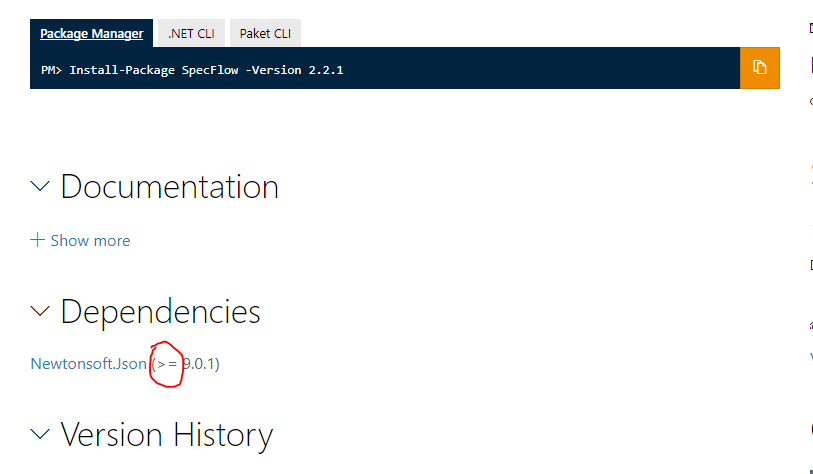
As you can see....there is no reason you can't use version 10 of json.
But you cannot use version 8.
10 >= 9
8 is not >= 9 ;)
BlythMeister
on 16 Nov 2017
i am clearly aware of this. setting the minium version too low also causes compatibility issues, since every time a major version changes, something breaks. referencing Newtonsoft.Json version 9.0 causes potential problems with all libraries that are currently in development and therefore target Newtonsoft.Json 10.0.
Legacy projects that are not further developed should just stick with an old version of SpecFlow, which also uses an old version of Newtonsoft.Json.
MovGP0
on 16 Nov 2017
Are you telling me there is a breaking change between version say 7 and 10 in the functions used by specflow....
There is no reason why when consuming specflow you can't also consume version 10 of JSON.
An assembly binding redirect will sort you right out and tooling like paket will even put it in for you automatically.
Setting as 9 (and not 7) means someone on 7 has no choice but to update.
I feel we have kinda gone off topic here anyway and are going round in circles which is a bit of a waste of time.
BlythMeister
on 16 Nov 2017
@BlythMeister when you still develop old legacy code, you should constantly port it to newer libraries instead of letting your code rot to death.
Letting your code rot means that you are missing the macro economy of programming and will find yourself in a position where you will be unable to develop any code because of too many incompatibilities.
So yes, you should update instead of forcing others to solve your project management issues.
MovGP0
on 16 Nov 2017
To "fix" this issue finally, I will try to downgrade to Json.Net 6 for SpecFlow 2.3. Shouldn't be a problem, because it is only used for the json configuration and this is a simple Json.
But for SpecFlow 3.* I will upgrade the package to the latest version (10.0.3). This is because of .Net Standard and packaging.
SabotageAndi
on 16 Nov 2017
@MovGP0 i should be able to use any version of json.net that specflow will work against with no breaking changes. Json.Net 6 is a good starting point.
If Specflow wants to bump that, fair enough, but that's major change not a minor one as it has impact on consumers and could be seen as a breaking change.
as @SabotageAndi has said, Specflow 3 can take a newer version.
At no point have i ever said that i am maintaing legacy code, i am just using a version of Json which works for the rest of my system with the correct format of parsing etc.
BlythMeister
on 16 Nov 2017
As an aside, this is now pretty irrelevant to me as i have spend the last month or so upgrading json and ensuring that all of our systems work with it....so realistically...it's not an issue for me anymore
But may be for others.
BlythMeister
on 16 Nov 2017
Downgrade to Json.Net 6.0.1 happend - https://github.com/techtalk/SpecFlow/pull/985
Closing this issue.
SabotageAndi
on 12 Dec 2017
This thread has been automatically locked since there has not been any recent activity after it was closed. Please open a new issue for related bugs.
![lock[bot] picture](https://avatars.githubusercontent.com/in/6672?v=4&s=40) lock[bot]
on 9 Jul 2019
lock[bot]
on 9 Jul 2019
Related issues
 vgaltes
·
6Comments
vgaltes
·
6Comments
 omarpiani
·
7Comments
omarpiani
·
7Comments
 adiljs
·
5Comments
adiljs
·
5Comments
 xDazedx
·
7Comments
xDazedx
·
7Comments
 gittadesushil
·
3Comments
gittadesushil
·
3Comments
Most helpful comment
To "fix" this issue finally, I will try to downgrade to Json.Net 6 for SpecFlow 2.3. Shouldn't be a problem, because it is only used for the json configuration and this is a simple Json.
But for SpecFlow 3.* I will upgrade the package to the latest version (10.0.3). This is because of .Net Standard and packaging.