Specflow: Visual Studio 2017 Generation error: Could not load file or assembly 'Microsoft.Build.Framework, Version=15.1.0.0
After upgrading from Visual Studio 2015 to Visual Studio 2017 Professional we are getting this error in the code behind #error Generation error: Could not load file or assembly 'Microsoft.Build.Framework, Version=15.1.0.0, Culture=neutral, PublicKeyToken=b03f5f7f11d50a3a' or one of its dependencies. The system cannot find the file specified.
I am on Visual Studio Professional 2017 15.1 (26403.7) with the following latest stable versions of Specflow with .Net Framework V4.5.1
Is there a new release candidate available to fix this?
 teknlgyuser
All 168 comments
@teknlgyuser Could you enable fusion logs and post the results from the devenv.exe process and the Microsoft.Build.Framework assembly?
 SabotageAndi
on 23 May 2017
SabotageAndi
on 23 May 2017
@teknlgyuser I had the same issue in my solution. I realized that it had to be something with the project or solution file, because a completely new project in a new solution worked for me. After much digging I found this bit in the broken solution that wasn't in the working solution:
    GlobalSection(ExtensibilityGlobals) = postSolution
        dtLauncher_EnableVSTestHost = 0
    EndGlobalSection
Removing that fixed it for me, maybe try that.
 rocknet
on 23 May 2017
rocknet
on 23 May 2017
@SabotageAndi
Attached is the fuslogvw for devenv.exe for Microsoft.Build.Framework, Version 15.1.0.0 and devenv.exe for TechTalk.SpecFlow.Generator, Version 1.9.0.77
I checked and i do not have what @rocknet described.
devenv_exe_techTalk_specFlow_generator_4.txt
devenv_exe_microsoft_build_framework_15_1_0_0_4.txt
teknlgyuser
on 25 May 2017
I've encountered the same problem as @teknlgyuser, and the logs are pretty similar.
Although, the problem goes away if I shelve my changes in VS and rebuild with VS2015.
 felpel
on 8 Jun 2017
felpel
on 8 Jun 2017
Same bug here.
To resolve it I must return to VS2015, clear scenarios in my feature file, build and set back my scenarios.
 chamamo
on 9 Jun 2017
chamamo
on 9 Jun 2017
Hi, I don't know if it can help anybody here, but I solved my issue by deleting the generated file
I had the same issue on VS2017 15.2 (so no the same version as @teknlgyuser ) and Specflow 2.1.
 mikap83
on 12 Jun 2017
mikap83
on 12 Jun 2017
I still see this issue. Tried deleting .feature.cs files and regenerating. Still same issue. Switched back to VS2015
 hanzra
on 14 Jun 2017
hanzra
on 14 Jun 2017
Because of some strange reason, the assembly resolution happens in the wrong path (somewhere in the VS installation folder and not in the package folder).
Can somebody with the error try to create a project for reproduction. On all my machines I do not have this issues.
SabotageAndi
on 14 Jun 2017
Hi @hanzra, I had again the issue today.
What @SabotageAndi said helped me finding a workaround: just searched on the disk for TechTalk.SpecFlow.Generator.dll and found some that were some files at the version 1.9.0.77... Just deleted those as I need SpecFlow Generator Version 2.0.0.0 and now VS2017 seems to be behaving :)
mikap83
on 15 Jun 2017
Hi!
I have checked on my PC (with only VS2017 installed) and the old version of the TechTalk.SpecFlow.Generator.dll (1.9.0.77) is only on Extension Directory (C:\Users[user]\AppData\Local\Microsoft\VisualStudio\15.0_ec7d7fbd\Extensions\ln5zapk1.fxe).
This can not be deleted or substituted (obviously).
The "strange" thing is that I do not always have the problem.... and then it happens the solution is:
1) roll back the feature file (and connected .cs)
2) close VS
3) open again
4) try to make the same modification
99% it works... if it is not functioning a do it again and works.
Hope it helps.
 nazarenomanco
on 18 Jun 2017
nazarenomanco
on 18 Jun 2017
I am seeing the same error
error Generation error: Could not load file or assembly 'Microsoft.Build.Framework, Version=15.1.0.0, Culture=neutral, PublicKeyToken=b03f5f7f11d50a3a' or one of its dependencies. The system cannot find the file specified.
Only seems to happen when I add a new feature file, current feature files are modified correctly when adding new scenarios.
Anything I can do as rolling back to 2015 is not the best option.
 brianjmitchell
on 21 Jun 2017
brianjmitchell
on 21 Jun 2017
Could you attach your fusion logs for the assembly?
Workaround would be to use the MSBuild integration, so that the code behind is created at compile time.
See: http://specflow.org/documentation/Generate-Tests-from-MsBuild/
SabotageAndi
on 21 Jun 2017
Apologies, I wrote this comment a little early. After a windows restart I was able to add a file successfully.
I did find it was breaking previous feature files if any changes were made.
After a restart I made a small changed and the auto generated cs file was created.
brianjmitchell
on 21 Jun 2017
If anyone has a repro that you can provide, it will help Andi troubleshoot. I tried to reduce my solution to something more manageable so I could send it to him, but as I removed projects, it started working. It seems as if it's an issue related to either project types being loaded, or the total number (perhaps long load time).
As I mentioned earlier, for me it was removing some unknown section in the solution file related to the VSTestHost. Who knows, maybe removing that changed the load time just enough to make it reliable for me. Even when I added that back in, if I removed other projects, it would also work. We can see this because a new project in a new empty solution in VS2017 works just fine.
It's all just theory until he can reproduce it.
rocknet
on 22 Jun 2017
Same problem... complex project and small ones are working...
As written before in my situation a rollback, close and reopen of Visual Studio usually solve the problem.
If we agree a good time, I can share my VS with any SpecFlow dev if it can help.
nazarenomanco
on 22 Jun 2017
For me the only thing that seems to work is just to go back to 1.9. Only that version works normal for me.
Have been getting this issues since release of 2017. Need to have a fix/solution now.
 chrisism
on 26 Jun 2017
chrisism
on 26 Jun 2017
@chrisism Can you provide us a project to reproduce it?
As long we haven't one, we can not have a look at it.
I tested it on 4 different machines of me and it is working on everyone of them.
SabotageAndi
on 26 Jun 2017
Its closed source so I cannot just send the whole solution. Is only specflow test project enough?
One thing I just noticed, after reinstalling specflow extension. After opening the solution fresh and Saving a feature that didnt have the .cs file anymore because of the error, it generated the class correctly with:
// This code was generated by SpecFlow (http://www.specflow.org/).
// SpecFlow Version:2.1.0.0
// SpecFlow Generator Version:2.0.0.0
Then I did a build all and I get errors again. Also guess what I get when I save a feature again (or from the build):
// This code was generated by SpecFlow (http://www.specflow.org/).
// SpecFlow Version:1.9.0.77
// SpecFlow Generator Version:1.9.0.0
// Runtime Version:4.0.30319.42000
chrisism
on 26 Jun 2017
Okay.. I also found this.
In the extension folder: C:\Users\
I find the specflow extension with in the manifest:
Looking good except for the fact that 'TechTalk.SpecFlow.Generator.dll' in this folder is the 1.9 version. Not 2 or 2.1. All the specflow extension dlls are the 1.9 version here.
So after uninstalling and reinstalling the extension, this is like the last remaining 1.9 version of the DLL
chrisism
on 26 Jun 2017
The Visual Studio Extension uses internal SpecFlow 1.9. So that you find the 1.9er dll there is fine.
The extension loads the used SpecFlow version of your project and uses it to generate the code behind file.
SabotageAndi
on 26 Jun 2017
Okay, but that was the only 1.9 version I still had except for some old project dirs with the old version in packages folder.
I've been overwriting the 1.9 files in the extension folder with 2.1 version, causing errors in VS, so I moved it back again. Restarted Visual Studio. Guess what, now its generating the classes correctly again.
Weird stuff. At the moment the only 1.9 dll left on my machine is the one in the extension folder. So I hope I will only get the // SpecFlow Generator Version:2.0.0.0 comments in my feature cs files from now on.
chrisism
on 26 Jun 2017
Same here!
Usually, a roll back of the modification, restart of VS and making the same changes to the source code. At the moment this is the correct workaround, but it is annoying.
At your disposal for any test.
nazarenomanco
on 26 Jun 2017
This gitter convo seems potentially relevant. msbuild and antlr exerienced the issue with firing up another app domain. It appears Specflow does the same thing when I looked at the specflow trace.
That conversation spawned this bug.
I happened to search on this error again because I'm experiencing the issue again. :-(
rocknet
on 26 Jun 2017
I just released SpecFlow 2.2. This version does not depend anymore on MSBuild.
If somebody with this issue could try it out and give us feedback of the result?
SabotageAndi
on 28 Jun 2017
I'll test in one hour.
nazarenomanco
on 28 Jun 2017
@SabotageAndi how I can install it?
nazarenomanco
on 28 Jun 2017
@nazarenomanco The packages are uploaded to NuGet.org
SabotageAndi
on 28 Jun 2017
@SabotageAndi it seems working.
I had also to update the NUnit Package (from 2.6.4 to 3.7.1) I imagine for the targetFramework aligned to SpecFlow.
I'll keep you updated.
Thanks!
nazarenomanco
on 28 Jun 2017
@SabotageAndi, it has not fixed the issue for me. I'm on gitter now if you want to chat.
rocknet
on 28 Jun 2017
Apparently the issue is solved with the update to the version 2.2 :) Thanks!
mikap83
on 30 Jun 2017
SpecFlow 2.2 fixed the issue, but the developer that tested it now has a new issue. The "Test Explorer" is displaying duplicate names when set to "Group By Traits" and they are all the same specflow tests under each trait name. We are going to see if another developer has the same issue. We will test it within the next week. Thanks for your help so far.
teknlgyuser
on 5 Jul 2017
@teknlgyuser Please open than a new issue for it.
SabotageAndi
on 5 Jul 2017
I have SpecFlow 2.2 installed and I am still getting the Could not load file or assembly 'Microsoft.Build.Framework, Version=15.1.0.0 error...
 csmac3144
on 13 Jul 2017
csmac3144
on 13 Jul 2017
I'm having the same issue. In Visual Studio 2017 I updated to SpecFlow 2.2 and still get the Microsoft.Build.Framework errors.
 mriely
on 14 Jul 2017
mriely
on 14 Jul 2017
Have exactly the same issue after upgrading to VS 2017 and already spent a lot of time to play around it.
One interesting thing I’ve noticed: I have ReSharper and NCrunch VS tools installed.
If I disable both – all is working correctly.
If I enable any – “Could not load file or assembly 'Microsoft.Build.Framework, Version=15.1.0.0, Culture=neutral, PublicKeyToken=b03f5f7f11d50a3a'”
Hope it could point to right direction to troubleshoot.
 AndrewWinDev
on 20 Jul 2017
AndrewWinDev
on 20 Jul 2017
@AndrewWinDev that's an interesting new information.
I am using R#, but I don't have this issue.
Does it work when you only disable NCrunch?
SabotageAndi
on 20 Jul 2017
I have only R# and I have the problem (with the version 2.1)
nazarenomanco
on 20 Jul 2017
Does it work when you only disable NCrunch?
If I keep ReSharper enabled nope.
So, any of this components prevent (conflicts?) of loading 'Microsoft.Build.Framework' assembly
AndrewWinDev
on 20 Jul 2017
@nazarenomanco @AndrewWinDev which version of R# are you using? the latest?
SabotageAndi
on 20 Jul 2017
which version of R# are you using? the latest?
2017.1.3
AndrewWinDev
on 20 Jul 2017
Same: 2017.1.3
nazarenomanco
on 20 Jul 2017
Well, after a lot of enable/disable this 2 tools, and a lot of VS restarts - now it's work with enabled NCrunch, but not with R#.
So, with R# it's not working in any case, but with NCrunch - sometimes.
AndrewWinDev
on 20 Jul 2017
😞
SabotageAndi
on 20 Jul 2017
A friend with 2017.1.2 does not have this problem.
We both do not have NCrunch
nazarenomanco
on 20 Jul 2017
Hi guys, I would exclude that the issue is provoked by ReSharper as a colleague of mine has the same issue, but neither Resharper. nor NCrunch installed.
mikap83
on 20 Jul 2017
Just created a small test project - no issues. :(
(with enabled NCrunch and R#)
Will try to play a bit around and attach projects one by one, add packages and so on.
AndrewWinDev
on 20 Jul 2017
In my experience sometimes I have the problem, sometimes not.
If the problem arises I have to undo pending changes on that feature (and connected cs file), close VS and restart. 80% of the times it works, 20% I have to these operations twice to make it works.
It seems that sometimes it "points" to a wrong library.
nazarenomanco
on 20 Jul 2017
Something is definitely screwing up the assembly loading within Visual Studio :-/
SabotageAndi
on 20 Jul 2017
Another interesting observation:
Once I've added Wix 3.5 setup project, looks like SpecFlow starts using version 1.9
headers from generated files:
Without Wix setup project:
//      SpecFlow Version:2.2.0.0
//      SpecFlow Generator Version:2.2.0.0
With Wix setup project:
//      This code was generated by SpecFlow (http://www.specflow.org/).
//      SpecFlow Version:1.9.0.77
//      SpecFlow Generator Version:1.9.0.0
PS. after removing Wix setup project - things doesn't change untill VS restarts.
Ony Close/Open solution won't help.
=================
PPS: Validated on the main monster-solution. It also contains setup project.
Once removed it and restarted VS specflow starts working with enabled NCrunch and R#.
So, looks like it was indirect effect from this tools.
AndrewWinDev
on 20 Jul 2017
Looks like nothing new about this issue :-(
Can some one else confirm correlation with Wix Setup project in the solution?
(in my case it's Wix 3.5)
PS you need to build wix proj first, after that try to generate *.feature.cs
AndrewWinDev
on 2 Aug 2017
Regenerate worked in my case
On 2 Aug 2017 1:50 p.m., "Andrew" notifications@github.com wrote:
Looks like nothing new about this issue :-(
Can some one else confirm correlation with Wix Setup project in the
solution?
(in my case it's Wix 3.5)—
You are receiving this because you are subscribed to this thread.
Reply to this email directly, view it on GitHub
https://github.com/techtalk/SpecFlow/issues/857#issuecomment-319638193,
or mute the thread
https://github.com/notifications/unsubscribe-auth/AHbkI1Ay8MC8xw-ECZCcffxiLWYVKn4xks5sUFRogaJpZM4Ng8Y5
.
 godrose
on 2 Aug 2017
godrose
on 2 Aug 2017
I'm experiencing this problem too. Updating to 2.2. didn't fix it but disabling NCrunch and R# did. I also have WiX projects in my solution. Would be good to get to the bottom of this one.
 wilhen01
on 3 Aug 2017
wilhen01
on 3 Aug 2017
I also have this issue when there are wix projects in the solution, unloading them fixed the generation - however that's not an option for me.
@SabotageAndi Is anything being looked at regarding this? Or should we start removing WiX packages for now
 PhilipGullick
on 8 Aug 2017
PhilipGullick
on 8 Aug 2017
I was seeing this same issue too and I simply unloaded all the wix projects and restarted VS and it works. Happy to provide problem solution if one hasn't been provided yet.
 hegsie
on 8 Aug 2017
hegsie
on 8 Aug 2017
@hegsie Could you provide us your solution? We didn't get any yet to reproduce the issue.
SabotageAndi
on 9 Aug 2017
I've also noticed that after doing the above actions, and then reloading all the wix projects the generator seems to be fine, I'm using wix 3.11. I'll prep a copy of the solution for u and share it directly with you.
hegsie
on 9 Aug 2017
Thanks! You can send it to [email protected] if you don't want to post it public.
SabotageAndi
on 9 Aug 2017
I've just sent the email, can you confirm you recieved. B
hegsie
on 9 Aug 2017
I got it. Thanks!
SabotageAndi
on 9 Aug 2017
Hey guys,
I'm also encountering this issue with specflow 2.2 and VS 2017. Everything works fine in VS 2015
 alexmaie
on 17 Aug 2017
alexmaie
on 17 Aug 2017
+1, same issue with VS2017 and SpecFlow.MsTest v2.2.0
 jamescarter-le
on 19 Aug 2017
jamescarter-le
on 19 Aug 2017
Only way I've gotten SpecFlow generation to work with the VS 2017 plugin is by manually registering Microsoft.Build.Framework 15.1.0.0 in the GAC, however this causes other problems so it is not a good solution.
But since you are unable to reproduce this problem, maybe you have it registered in your GAC?
 DavidZidar
on 21 Aug 2017
DavidZidar
on 21 Aug 2017
I am able to replicate this in my open source repo at github.com/warewolf-esb/warewolf.
Just open Dev\AcceptanceTesting.sln in Visual Studio 2017 (With update 3 and SpecFlow 2017 extension installed) and then open any file ending in .feature and save it.
I am yet to find a configuration that matches that description but does not replicate this exact issue consistently.
 SalamiArmy
on 21 Aug 2017
SalamiArmy
on 21 Aug 2017
@hegsie & @DavidZidar: thanks for the projects, but I wasn't able to reproduce the issue.
What I did is, that I added additional logging and improvments for the error output to the Visual Studio Extension.
I published a new version of it on our MyGet VSIX Gallery. Uri: https://www.myget.org/F/specflow-vsix/vsix/ VersionNumber: 2017.1.8.
Somebody with this issue: please install this version and retry it.
You should see more in the generated code behind and there should be more output in the SpecFlow- Output- Window (how to enable it: http://specflow.org/documentation/Troubleshooting-Visual-Studio-Integration/).
Please post the output it in this issue.
SabotageAndi
on 1 Sep 2017
I'll give it a whirl. We've had multiple developers reporting this issue; our work around has been to register msbuild in the GAC.
In our case, we've had reports with the following setups.
- Win7, VS2017 15.2
- Win7, VS2017 15.3
- Win10, VS2017 15.3.3
All setups we've tried with/without Resharper. I have a strong feeling; the issue relates to how devenv.exe loads the generator; sometimes it references the ..\packages.. version; and other-times it references the \program files..\extentions version.
 gengle
on 1 Sep 2017
gengle
on 1 Sep 2017
@gengle On my machine it works without registering something in the GAC and there is also nothing registered.
It has definitive something to do with a configuration of the machine/ Visual Studio.
Suggested work around from us is still to use the MSBuild integration: http://specflow.org/documentation/Generate-Tests-from-MsBuild/
SabotageAndi
on 1 Sep 2017
Appreciate the info on MSBuild integration; we do have some workflows where feature files are sourced outside in JIRA/XRay and I think such approach may simplify integration with specflow.
I'll send an update in a couple hours on my progress with the special build.
gengle
on 1 Sep 2017
@SabotageAndi I was not able to reproduce the MSBuild 15.1 error.
specflowLog1.txt
specflowLog2.txt
specflowLog3.txt
These 3; everything worked fine. Generated file header.
// ------------------------------------------------------------------------------
//  <auto-generated>
//      This code was generated by SpecFlow (http://www.specflow.org/).
//      SpecFlow Version:2.1.0.0
//      SpecFlow Generator Version:2.0.0.0
...
I also upgraded the nuget, and added a new feature.
// ------------------------------------------------------------------------------
//  <auto-generated>
//      This code was generated by SpecFlow (http://www.specflow.org/).
//      SpecFlow Version:2.2.0.0
//      SpecFlow Generator Version:2.2.0.0
...
specflowLog4.txt
With this one, I removed the packages folder forcing Visual Studio to do a nuget restore. Immediately when opening Visual Studio I changed a feature file.
// ------------------------------------------------------------------------------
//  <auto-generated>
//      This code was generated by SpecFlow (http://www.specflow.org/).
//      SpecFlow Version:1.9.0.77
//      SpecFlow Generator Version:1.9.0.0
//      Runtime Version:4.0.30319.42000
...
I then added a new feature file using [Add]->[New Item]->[Feature]; and the correct generator was used
// ------------------------------------------------------------------------------
//  <auto-generated>
//      This code was generated by SpecFlow (http://www.specflow.org/).
//      SpecFlow Version:2.1.0.0
//      SpecFlow Generator Version:2.0.0.0
...
I'll recruit a few other developers over the next week and see what feedback they have.
gengle
on 1 Sep 2017
Hi, i just did the following.
- Installed TechTalk.SpecFlow.Vs2017Integration-2017.1.8.vsix
- Started VS 2017.3.3
- Enabled SpecFlow tracing
- Created a new blank library project (.NET Framework)
- Added a .feature-file, the generated file looks fine but it is using SpecFlow 1.9
- Made a change to the feature file, all is well
- Installed NuGet package SpecFlow v2.2.0
- Made a change to the feature file again, this time the generated file is broken
These are the entire contents of the generated file:
#error Generation error: Could not load file or assembly 'Microsoft.Build.Framework, Version=15.1.0.0, Culture=neutral, PublicKeyToken=b03f5f7f11d50a3a' or one of its dependencies. The system cannot find the file specified.
Here is the log from the output window:
[12:58:47.2528442] VsProjectScope: Initializing...
[12:58:47.2538746] FileChangeEventsListener: Start listening to file: C:\code\test\SpecFlowTrace\SpecFlowFeature1.feature
[12:58:47.2543755] VsProjectScope: Initialized
[12:58:47.2543755] VsProjectScope: Starting analysis services...
[12:58:47.2548749] FileChangeEventsListener: Start listening to file: C:\code\test\SpecFlowTrace\Properties\AssemblyInfo.cs
[12:58:47.2553737] GherkinProcessingScheduler: Analyzing request 'Initialize BindingFilesTracker' queued on thread: 1
[12:58:47.2553737] GherkinProcessingScheduler: Analyzing request 'Initialize ProjectFeatureFilesTracker' queued on thread: 1
[12:58:47.2553737] GherkinProcessingScheduler: Analyzing request 'Analyze all starting (BindingFilesTracker)' queued on thread: 1
[12:58:47.2553737] GherkinProcessingScheduler: Analyzing request 'Analyze all starting (ProjectFeatureFilesTracker)' queued on thread: 1
[12:58:47.2553737] VsProjectScope: Analysis services started
[12:58:47.2553737] GherkinLanguageService: Language service created
[12:58:47.2553737] GherkinProcessingScheduler: Applying task 'Parse Gherkin: EntireFile' on thread: 5
[12:58:47.2563731] EditorParser: Start full parsing
[12:58:47.2923780] VsGeneratorServices: Discover project settings
[12:58:47.2923780] VsGeneratorInfoProvider: Discovering generator information...
[12:58:47.2923780] VsGeneratorInfoProvider: Unable to detect generator path
[12:58:47.2923780] RemoteGeneratorServices: Unable to detect generator location: the generator bound to the IDE is used
[12:58:47.2923780] VsGeneratorServices: Discover project settings
[12:58:47.2983960] EditorParser: Finished full parsing in 41 ms, 0 errors
[12:58:47.3393814] VsProjectFileTracker: Item Added: SpecFlowFeature1.feature.cs
[12:58:47.3393814] FileChangeEventsListener: Start listening to file: C:\code\test\SpecFlowTrace\SpecFlowFeature1.feature.cs
[12:58:47.3393814] VsProjectFileTracker: Item Added: SpecFlowFeature1.feature.cs
[12:58:47.3393814] VsProjectFileTracker: Item Added: SpecFlowFeature1.feature.cs
[12:58:47.7557331] GherkinProcessingScheduler: Applying task 'Initialize BindingFilesTracker' on thread: 21
[12:58:47.8037189] BindingFilesTracker: Initialized
[12:58:47.8037189] GherkinProcessingScheduler: Applying task 'Initialize ProjectFeatureFilesTracker' on thread: 21
[12:58:47.8277165] ProjectFeatureFilesTracker: Initialized
[12:58:47.8277165] GherkinProcessingScheduler: Applying task 'Analyze all starting (BindingFilesTracker)' on thread: 21
[12:58:47.8277165] GherkinProcessingScheduler: Analyzing request 'Analyze Properties\AssemblyInfo.cs (BindingFilesTracker)' queued on thread: 21
[12:58:47.8277165] GherkinProcessingScheduler: Analyzing request 'Analyze SpecFlowFeature1.feature.cs (BindingFilesTracker)' queued on thread: 21
[12:58:47.8277165] GherkinProcessingScheduler: Analyzing request 'Analyze all finishing (BindingFilesTracker)' queued on thread: 21
[12:58:48.3278067] GherkinProcessingScheduler: Applying task 'Analyze all starting (ProjectFeatureFilesTracker)' on thread: 21
[12:58:48.3278067] GherkinProcessingScheduler: Analyzing request 'Analyze SpecFlowFeature1.feature (ProjectFeatureFilesTracker)' queued on thread: 21
[12:58:48.3278067] GherkinProcessingScheduler: Analyzing request 'Analyze all finishing (ProjectFeatureFilesTracker)' queued on thread: 21
[12:58:48.8283655] GherkinProcessingScheduler: Applying task 'Analyze Properties\AssemblyInfo.cs (BindingFilesTracker)' on thread: 21
[12:58:48.8313959] BindingFilesTracker: Analyzing binding file: Properties\AssemblyInfo.cs
[12:58:48.8834769] GherkinProcessingScheduler: Applying task 'Analyze SpecFlowFeature1.feature.cs (BindingFilesTracker)' on thread: 21
[12:58:48.8834769] BindingFilesTracker: Analyzing binding file: SpecFlowFeature1.feature.cs
[12:58:48.9384446] GherkinProcessingScheduler: Applying task 'Analyze all finishing (BindingFilesTracker)' on thread: 21
[12:58:48.9384446] ProjectStepSuggestionProvider: Suggestions from bindings ready
[12:58:48.9384446] GherkinProcessingScheduler: Applying task 'Analyze SpecFlowFeature1.feature (ProjectFeatureFilesTracker)' on thread: 21
[12:58:48.9394470] ProjectFeatureFilesTracker: Analyzing feature file: SpecFlowFeature1.feature
[12:58:48.9414454] VsGeneratorServices: Discover project settings
[12:58:48.9579661] GherkinProcessingScheduler: Applying task 'Analyze all finishing (ProjectFeatureFilesTracker)' on thread: 21
[12:58:48.9579661] VsGeneratorInfoProvider: Discovering generator information...
[12:58:48.9723860] VsGeneratorInfoProvider: Unable to detect generator path
[12:58:48.9723860] RemoteGeneratorServices: Unable to detect generator location: the generator bound to the IDE is used
[12:58:48.9733850] ProjectStepSuggestionProvider: Suggestions from feature files ready
[12:58:49.0153904] StepMap: StepMap with 1 feature files and 0 step definitions saved
[12:58:49.0153904] GherkinProcessingScheduler: Applying task 'Parse Gherkin: EntireFile' on thread: 5
[12:58:49.0153904] EditorParser: Start full parsing
[12:58:49.0163895] EditorParser: Finished full parsing in 0 ms, 0 errors
[12:58:50.9426891] GherkinProcessingScheduler: Applying task 'Parse Gherkin: MultiLine' on thread: 5
[12:58:50.9426891] EditorParser: Start incremental parsing
[12:58:50.9461990] EditorParser: Finished incremental parsing in 2 ms, 0 errors
[12:58:51.9944760] GherkinProcessingScheduler: Applying task 'Parse Gherkin: SingleLine' on thread: 5
[12:58:51.9944760] EditorParser: Start incremental parsing
[12:58:51.9954786] EditorParser: Finished incremental parsing in 0 ms, 0 errors
[12:58:52.2757567] VsProjectFilesTracker: File change on disk handling queued: C:\code\test\SpecFlowTrace\SpecFlowFeature1.feature
[12:58:52.2767547] VsGeneratorServices: Discover project settings
[12:58:52.2767547] VsGeneratorInfoProvider: Discovering generator information...
[12:58:52.2767547] VsGeneratorInfoProvider: Unable to detect generator path
[12:58:52.2767547] RemoteGeneratorServices: Unable to detect generator location: the generator bound to the IDE is used
[12:58:52.2767547] VsGeneratorServices: Discover project settings
[12:58:52.2897511] VsProjectFilesTracker: Document Saved: C:\code\test\SpecFlowTrace\SpecFlowFeature1.feature
[12:58:52.2907540] GherkinProcessingScheduler: Analyzing request 'Analyze SpecFlowFeature1.feature (ProjectFeatureFilesTracker)' queued on thread: 1
[12:58:52.2927548] VsProjectFilesTracker: File change on disk handling queued: C:\code\test\SpecFlowTrace\SpecFlowFeature1.feature.cs
[12:58:52.2947548] VsProjectFilesTracker: File change on disk handling queued: C:\code\test\SpecFlowTrace\SpecFlowFeature1.feature.cs
[12:58:52.7915219] GherkinProcessingScheduler: Applying task 'Analyze SpecFlowFeature1.feature (ProjectFeatureFilesTracker)' on thread: 21
[12:58:52.8025201] ProjectFeatureFilesTracker: Analyzing feature file: SpecFlowFeature1.feature
[12:58:54.3113165] VsProjectFilesTracker: File changed outside of Visual Studio: C:\code\test\SpecFlowTrace\SpecFlowFeature1.feature.cs
[12:58:54.3253188] GherkinProcessingScheduler: Analyzing request 'Analyze SpecFlowFeature1.feature.cs (BindingFilesTracker)' queued on thread: 61
[12:58:54.8262063] GherkinProcessingScheduler: Applying task 'Analyze SpecFlowFeature1.feature.cs (BindingFilesTracker)' on thread: 21
[12:58:54.8291555] BindingFilesTracker: Analyzing binding file: SpecFlowFeature1.feature.cs
[12:59:17.8013805] VsProjectReferencesTracker: Reference added: Newtonsoft.Json
[12:59:17.8023788] FileChangeEventsListener: Start listening to file: C:\code\test\SpecFlowTrace\packages\Newtonsoft.Json.9.0.1\lib\net45\Newtonsoft.Json.dll
[12:59:17.8814379] VsProjectReferencesTracker: Reference changed: Newtonsoft.Json
[12:59:17.8844590] VsProjectReferencesTracker: Reference changed: Newtonsoft.Json
[12:59:17.9319639] VsProjectFileTracker: Item Added: packages.config
[12:59:17.9330052] FileChangeEventsListener: Start listening to file: C:\code\test\SpecFlowTrace\packages.config
[12:59:17.9330052] VsProjectFileTracker: Item Added: packages.config
[12:59:17.9330052] VsProjectFileTracker: Item Added: packages.config
[12:59:19.8969334] VsProjectReferencesTracker: Processing reference changed: Newtonsoft.Json
[12:59:20.3817480] VsProjectReferencesTracker: Reference added: TechTalk.SpecFlow
[12:59:20.3817480] FileChangeEventsListener: Start listening to file: C:\code\test\SpecFlowTrace\packages\SpecFlow.2.2.0\lib\net45\TechTalk.SpecFlow.dll
[12:59:20.4207977] VsProjectReferencesTracker: Reference changed: TechTalk.SpecFlow
[12:59:20.4207977] VsProjectReferencesTracker: Reference changed: TechTalk.SpecFlow
[12:59:20.4533019] VsProjectFileTracker: Item Added: App.config
[12:59:20.4533019] VsProjectFileTracker: File Changed: App.config
[12:59:20.4543315] VsProjectScope: SpecFlow configuration changed
[12:59:20.4543315] FileChangeEventsListener: Start listening to file: C:\code\test\SpecFlowTrace\App.config
[12:59:20.4543315] VsProjectFileTracker: Item Added: App.config
[12:59:20.4543315] VsProjectFileTracker: Item Added: App.config
[12:59:20.4743330] VsProjectFileTracker: File change on disk handling queued: C:\code\test\SpecFlowTrace\App.config
[12:59:20.4753030] VsProjectFileTracker: File change on disk handling queued: C:\code\test\SpecFlowTrace\App.config
[12:59:22.4374381] VsProjectReferencesTracker: Processing reference changed: TechTalk.SpecFlow
[12:59:22.4829735] VsProjectFileTracker: File changed outside of Visual Studio: C:\code\test\SpecFlowTrace\App.config
[12:59:22.4929779] VsProjectFileTracker: File Changed: App.config
[12:59:22.4959784] VsProjectScope: SpecFlow configuration changed
[12:59:25.4210922] GherkinProcessingScheduler: Applying task 'Parse Gherkin: MultiLine' on thread: 5
[12:59:25.4210922] EditorParser: Start incremental parsing
[12:59:25.4210922] EditorParser: Finished incremental parsing in 0 ms, 0 errors
[12:59:26.5663076] GherkinProcessingScheduler: Applying task 'Parse Gherkin: MultiLine' on thread: 5
[12:59:26.5663076] EditorParser: Start full parsing
[12:59:26.5668135] EditorParser: Finished full parsing in 0 ms, 0 errors
[12:59:27.7875674] GherkinProcessingScheduler: Applying task 'Parse Gherkin: SingleLine' on thread: 5
[12:59:27.7875674] EditorParser: Start incremental parsing
[12:59:27.7875674] EditorParser: Finished incremental parsing in 0 ms, 0 errors
[12:59:28.1042088] VsProjectFilesTracker: File change on disk handling queued: C:\code\test\SpecFlowTrace\SpecFlowFeature1.feature
[12:59:28.1052106] VsGeneratorServices: Discover project settings
[12:59:28.1052106] VsGeneratorInfoProvider: Discovering generator information...
[12:59:28.1062088] VsGeneratorInfoProvider: Runtime found at C:\code\test\SpecFlowTrace\packages\SpecFlow.2.2.0\lib\net45
[12:59:28.1062088] VsGeneratorInfoProvider: Generator found at C:\code\test\SpecFlowTrace\packages\SpecFlow.2.2.0\tools\TechTalk.SpecFlow.Generator.dll
[12:59:28.1072281] RemoteGeneratorServices: Creating remote wrapper for the project's generator (2.2.0 at C:\code\test\SpecFlowTrace\packages\SpecFlow.2.2.0\tools)
[12:59:28.1072281] RemoteAppDomainTestGeneratorFactory: AppDomainSetup - ApplicationBase: C:\code\test\SpecFlowTrace\packages\SpecFlow.2.2.0\tools; ConfigFile: C:\code\test\SpecFlowTrace\packages\SpecFlow.2.2.0\tools\plugincompability.config
[12:59:28.1432087] RemoteAppDomainTestGeneratorFactory: TestGeneratorFactory: TechTalk.SpecFlow.Generator.TestGeneratorFactory
[12:59:28.1432087] RemoteAppDomainTestGeneratorFactory: AssemblyResolve Event added
[12:59:28.3287967] RemoteAppDomainTestGeneratorFactory: AppDomain for generator created
[12:59:28.3287967] VsGeneratorServices: Discover project settings
[12:59:28.4623858] VsProjectFilesTracker: Document Saved: C:\code\test\SpecFlowTrace\SpecFlowFeature1.feature
[12:59:28.4623858] GherkinProcessingScheduler: Analyzing request 'Analyze SpecFlowFeature1.feature (ProjectFeatureFilesTracker)' queued on thread: 1
[12:59:28.4633866] VsProjectFilesTracker: File change on disk handling queued: C:\code\test\SpecFlowTrace\SpecFlowFeature1.feature.cs
[12:59:28.4684355] VsProjectFilesTracker: File change on disk handling queued: C:\code\test\SpecFlowTrace\SpecFlowFeature1.feature.cs
[12:59:28.9624959] GherkinProcessingScheduler: Applying task 'Analyze SpecFlowFeature1.feature (ProjectFeatureFilesTracker)' on thread: 21
[12:59:28.9655067] ProjectFeatureFilesTracker: Analyzing feature file: SpecFlowFeature1.feature
[12:59:30.4950227] VsProjectFilesTracker: File changed outside of Visual Studio: C:\code\test\SpecFlowTrace\SpecFlowFeature1.feature.cs
[12:59:30.5010434] GherkinProcessingScheduler: Analyzing request 'Analyze SpecFlowFeature1.feature.cs (BindingFilesTracker)' queued on thread: 6
[12:59:31.0025142] GherkinProcessingScheduler: Applying task 'Analyze SpecFlowFeature1.feature.cs (BindingFilesTracker)' on thread: 21
[12:59:31.0045244] BindingFilesTracker: Analyzing binding file: SpecFlowFeature1.feature.cs
[12:59:34.1026224] RemoteAppDomainTestGeneratorFactory: GeneratorAssemlbyResolveEvent: Name: NuGet.Console, Version=0.0.0.0, Culture=neutral, PublicKeyToken=b03f5f7f11d50a3a;
[12:59:34.1026224] RemoteAppDomainTestGeneratorFactory: GeneratorAssemlbyResolveEvent: RequestingAssemlby.Fullname:
[12:59:34.1026224] RemoteAppDomainTestGeneratorFactory: GeneratorAssemlbyResolveEvent: RequestingAssemlby.Location:
[12:59:34.1036226] RemoteAppDomainTestGeneratorFactory: GeneratorAssemlbyResolveEvent: Name: NuGet.Console, Version=0.0.0.0, Culture=neutral, PublicKeyToken=b03f5f7f11d50a3a;
[12:59:34.1036226] RemoteAppDomainTestGeneratorFactory: GeneratorAssemlbyResolveEvent: RequestingAssemlby.Fullname:
[12:59:34.1036226] RemoteAppDomainTestGeneratorFactory: GeneratorAssemlbyResolveEvent: RequestingAssemlby.Location:
[12:59:34.1206213] RemoteAppDomainTestGeneratorFactory: GeneratorAssemlbyResolveEvent: Name: NuGet.PackageManagement.UI, Version=0.0.0.0, Culture=neutral, PublicKeyToken=31bf3856ad364e35;
[12:59:34.1206213] RemoteAppDomainTestGeneratorFactory: GeneratorAssemlbyResolveEvent: RequestingAssemlby.Fullname:
[12:59:34.1206213] RemoteAppDomainTestGeneratorFactory: GeneratorAssemlbyResolveEvent: RequestingAssemlby.Location:
[12:59:34.1236315] RemoteAppDomainTestGeneratorFactory: GeneratorAssemlbyResolveEvent: Name: NuGet.PackageManagement.UI, Version=0.0.0.0, Culture=neutral, PublicKeyToken=31bf3856ad364e35;
[12:59:34.1236315] RemoteAppDomainTestGeneratorFactory: GeneratorAssemlbyResolveEvent: RequestingAssemlby.Fullname:
[12:59:34.1236315] RemoteAppDomainTestGeneratorFactory: GeneratorAssemlbyResolveEvent: RequestingAssemlby.Location:
[12:59:34.1266226] RemoteAppDomainTestGeneratorFactory: GeneratorAssemlbyResolveEvent: Name: NuGet.PackageManagement.UI, Version=0.0.0.0, Culture=neutral, PublicKeyToken=31bf3856ad364e35;
[12:59:34.1266226] RemoteAppDomainTestGeneratorFactory: GeneratorAssemlbyResolveEvent: RequestingAssemlby.Fullname:
[12:59:34.1266226] RemoteAppDomainTestGeneratorFactory: GeneratorAssemlbyResolveEvent: RequestingAssemlby.Location:
[12:59:38.4684528] RemoteAppDomainTestGeneratorFactory: AssemblyResolve Event removed
[12:59:38.4843928] RemoteAppDomainTestGeneratorFactory: AppDomain for generator disposed
We also recently experiencing this problem (feature.cs code being generated using with SpecFlow Version:1.9.0.77 rather than 2.2.0.0). I think the mix of 1.9.0.77 and 2.2.0.0 feature files is causing tests to fail with the error: "SpecFlowException: The FeatureContext.Current static accessor cannot be used in multi-threaded execution."
We are using:
- Visual Studio 2013
- MsTest
The only thing we changed recently was moving the location of the nuget.config file. I think this was the cause. But I'm unable to put the nuget configuration back the way it was to get this working with 2.2.
 CharlieMott
on 5 Sep 2017
CharlieMott
on 5 Sep 2017
When I saved an edited feature file the specflow output window contains...
[12:14:15.7461998] RemoteAppDomainTestGeneratorFactory: AssemblyResolve Event removed
[12:14:15.7941999] RemoteAppDomainTestGeneratorFactory: AppDomain for generator disposed
[12:14:19.0748288] GherkinProcessingScheduler: Applying task 'Parse Gherkin: SingleLine' on thread: 43
[12:14:19.0753260] EditorParser: Start full parsing
[12:14:19.0908272] EditorParser: Finished full parsing in 15 ms, 0 errors
[12:14:19.6296848] GherkinProcessingScheduler: Applying task 'Parse Gherkin: SingleLine' on thread: 43
[12:14:19.6296848] EditorParser: Start full parsing
[12:14:19.6441792] EditorParser: Finished full parsing in 14 ms, 0 errors
[12:14:20.0832109] VsProjectFilesTracker: File change on disk handling queued: C:\Source\git\StoragePortal\Source\Test.Acceptance\Features\EmailMultipleMessages\Integration\EmailMultipleMessages_Buys.feature
[12:14:20.0897107] VsGeneratorServices: Discover project settings
[12:14:20.0927114] VsGeneratorInfoProvider: Discovering generator information...
[12:14:20.0957125] VsGeneratorInfoProvider: Runtime found at C:\Source\git\StoragePortal\Sourcepackages\SpecFlow.2.1.0\lib\net45
[12:14:20.0957125] VsGeneratorInfoProvider: Generator found at C:\Source\git\StoragePortal\Sourcepackages\SpecFlow.2.1.0\tools\TechTalk.SpecFlow.Generator.dll
[12:14:20.0962108] RemoteGeneratorServices: Creating remote wrapper for the project's generator (2.1.0 at C:\Source\git\StoragePortal\Sourcepackages\SpecFlow.2.1.0\tools)
[12:14:20.0962108] RemoteAppDomainTestGeneratorFactory: AppDomainSetup - ApplicationBase: C:\Source\git\StoragePortal\Sourcepackages\SpecFlow.2.1.0\tools; ConfigFile: C:\Source\git\StoragePortal\Sourcepackages\SpecFlow.2.1.0\tools\plugincompability.config
[12:14:20.1617102] RemoteAppDomainTestGeneratorFactory: TestGeneratorFactory: TechTalk.SpecFlow.Generator.TestGeneratorFactory
[12:14:20.1617102] RemoteAppDomainTestGeneratorFactory: AssemblyResolve Event added
[12:14:20.3282104] RemoteAppDomainTestGeneratorFactory: AppDomain for generator created
[12:14:20.3282104] VsGeneratorServices: Discover project settings
[12:14:20.4497087] VsProjectFilesTracker: Document Saved: C:\Source\git\StoragePortal\Source\Test.Acceptance\Features\EmailMultipleMessages\Integration\EmailMultipleMessages_Buys.feature
[12:14:20.4497087] GherkinProcessingScheduler: Analyzing request 'Analyze Features\EmailMultipleMessages\Integration\EmailMultipleMessages_Buys.feature (ProjectFeatureFilesTracker)' queued on thread: 1
[12:14:20.4767079] VsProjectFilesTracker: File change on disk handling queued: C:\Source\git\StoragePortal\Source\Test.Acceptance\Features\EmailMultipleMessages\Integration\EmailMultipleMessages_Buys.feature.cs
[12:14:20.5087095] VsProjectFilesTracker: File change on disk handling queued: C:\Source\git\StoragePortal\Source\Test.Acceptance\Features\EmailMultipleMessages\Integration\EmailMultipleMessages_Buys.feature.cs
[12:14:24.7384105] VsProjectFilesTracker: File changed outside of Visual Studio: C:\Source\git\StoragePortal\Source\Test.Acceptance\Features\EmailMultipleMessages\Integration\EmailMultipleMessages_Buys.feature.cs
[12:14:24.7604108] GherkinProcessingScheduler: Analyzing request 'Analyze Features\EmailMultipleMessages\Integration\EmailMultipleMessages_Buys.feature.cs (BindingFilesTracker)' queued on thread: 46
[12:14:30.4042451] RemoteAppDomainTestGeneratorFactory: AssemblyResolve Event removed
[12:14:30.4677432] RemoteAppDomainTestGeneratorFactory: AppDomain for generator disposed
hegsie
on 12 Sep 2017
I was having the problem for quite a while now, the fix for me which has fixed in on 2/2 of the affected machines I have tried was to delete the 3 following nuget packages from all projects in the solution. I would then delete the packages folder, restart VS and restore.
Microsoft.Net.Http
Microsoft.Bcl.Build
Microsoft.Bcl
For now it seems to be consistently generating the .cs file with SpecFlow Generator Version:2.2.0.0 instead of randomly using 1.9 which would seem to cause me problems.
Hopefully this will help others.
 4imble
on 22 Sep 2017
4imble
on 22 Sep 2017
I am facing same issue:
What i did:
- Added new feature in my feature file.
What i get:
1.Relevant feature file's auto generated .cs file content got deleted and got error message.
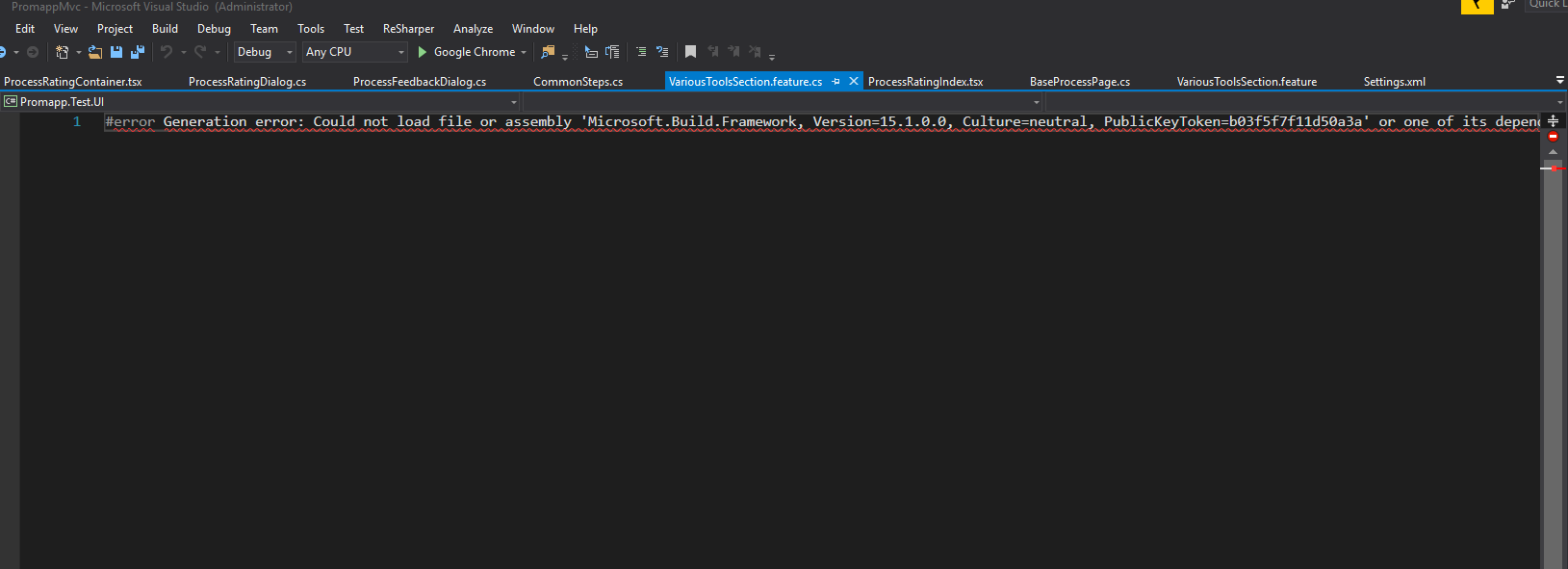
- Discarded the change(removed content) from source tree.
- Auto generation does not work for any newly added features.
Tried @4imble suggestion which did not help me.
Help would be appreciated.
Thank you in advance @SabotageAndi
 shanmugamganesan
on 28 Sep 2017
shanmugamganesan
on 28 Sep 2017
- Remove an existing .feature file
- Create a new one and copy the content from deleted .feature file
 testfirstcoder
on 3 Oct 2017
testfirstcoder
on 3 Oct 2017
- Turn it off.
- Turn it on again.
SalamiArmy
on 4 Oct 2017
The solution in this link fixed it for me: http://specflow.org/documentation/Generate-Tests-from-MsBuild/
 jvelazqu22
on 6 Oct 2017
jvelazqu22
on 6 Oct 2017
Yes, this is the best way to work-around it. And you other benefits from it, like you don't need to checkin the code-behind files anymore.
SabotageAndi
on 6 Oct 2017
I had same problem
I solve with this way after 8 hour search ! : . I uninstall Specflow extention from visual studio and close visual studio then download extention from marketplace in following url and install outside visual studio and finally it works fine !
https://marketplace.visualstudio.com/items?itemName=TechTalkSpecFlowTeam.SpecFlowforVisualStudio2017
 sbabaei
on 11 Oct 2017
sbabaei
on 11 Oct 2017
@sbabaei Interesting.
Because of removing and reinstalling the extension, it is registered in Visual Studio again.
Not sure why this should change something, but I am glad that it is now working for you.
Can somebody with the problem reproduce this fix?
SabotageAndi
on 11 Oct 2017
I can confirm that code generation now works on my machine after installing the extension from outside Visual Studio. Very interesting.
DavidZidar
on 12 Oct 2017
I've just tried removing the extension, downloading and reinstalling outside of VS2017 and still appear to have the issue. The problem appears to be that the SingleFileGenerator is always using the older 1.9.0.77 version of TechTalk.SpecFlow.Generator and accompanying assemblies from the extensions directory rather than the one which ships with the nuget package (2.2.0.0) which works.
As a workaround for now we have a build script which executes the following:
".\srcpackages\SpecFlow.2.2.0\tools\specflow.exe" generateall "[path to test project]"
This works consistently, painful to run that after every feature file edit though.
 AdamWilks
on 12 Oct 2017
AdamWilks
on 12 Oct 2017
@AdamWilks Why do you not use the MSBuild integration? http://specflow.org/documentation/Generate-Tests-from-MsBuild/
So the files are generated when you compile your project?
SabotageAndi
on 12 Oct 2017
@SabotageAndi Thanks for the link. I've applied the changes as per the documentation and am just trialing it on a branch. Seems to resolve our issue as far as I can see, the only pain is re-configuring all of the existing feature files and making sure people remember to remove the custom tool property from new feature files in the future.
AdamWilks
on 12 Oct 2017
@AdamWilks See https://github.com/techtalk/SpecFlow/issues/927
We know, but haven't yet an idea how we could solve this.
SabotageAndi
on 12 Oct 2017
@SabotageAndi Thanks again for the information. We are still a little puzzled as to why this issue seems to have suddenly surfaced for us. We have been using the 2.2.0 version of the nuget package and 2017.1.6 of the extension for a little while now without any issues initially, but obviously something has changed which caused the problem to manifest and it would be good to understand the root cause.
Is there a plan to update the version of the assemblies used by the Visual Studio extension, or perhaps have it recognize which nuget package is in the project and have it locate the tools directory?
AdamWilks
on 13 Oct 2017
@AdamWilks The Visual Studio integration only uses the included SpecFlow version for code-behind file generation, if it can not find any that is added to the project.
See https://github.com/techtalk/SpecFlow.VisualStudio/blob/master/VsIntegration/Generator/VsGeneratorInfoProvider.cs#L50
This is done since years, because you would have to update everytime the VS Integration when a new release of SpecFlow is done.
The problem here is, that something changes the way assemblies are resolved within Visual Studio. That's why the MSBuild integration always works.
SabotageAndi
on 13 Oct 2017
had the same problem just now but luckily it already worked on another project on VS2017.
my solution was to downgrade Nunit to 3.6.0.0 for that project
it appears that NUnit.Framework.TestFixtureAttribute is something that is not present in Nunit 3.8.1.0
it now works for me without issues
 olegkov
on 14 Oct 2017
olegkov
on 14 Oct 2017
for me, I just had to delete the designer files completely, and then re-save the feature files (or right click -> run custom tool) to regenerate them
 kriscoleman
on 4 Nov 2017
kriscoleman
on 4 Nov 2017
I have the same issue in Specflow v2.2.1 had to generate all using @AdamWilks suggestion above.
As a workaround for now we have a build script which executes the following:
".\srcpackages\SpecFlow.2.2.0\tools\specflow.exe" generateall "[path to test project]"
I hope this is resolved soon
 asrafiq
on 29 Nov 2017
asrafiq
on 29 Nov 2017
Is someone able to give me a hand with this fix as I can't get it working - http://specflow.org/documentation/Generate-Tests-from-MsBuild/
I unloaded my project containing the features and added the following to the bottom of the csproj file...
<Import Project="$(MSBuildBinPath)\Microsoft.CSharp.targets" />
  <Import Project="..\..\..\packages\SpecFlow.2.2.1\tools\TechTalk.SpecFlow.targets" Condition="Exists('..\..\..\packages\SpecFlow.2.2.1\tools\TechTalk.SpecFlow.targets')" />
</Project>
I changed the relative path slightly from the example to match up with the other packages from the project, and changed the specflow reference to 2.2.1, as SpecFlow.2.2.1 is in my packages folder
For good measure I cleared down my %TEMP% folder and restarted Visual Studio 2017.
I then removed the SpecFlowSingleFileGenerator from each feature file (which appears to remove the code behind file) and built my project.
Unfortunately after a successful build I'm not getting any tests displayed in the Test Explorer window.
This is log file from the SpecFlow output window after enabling tracing (I also tried downgrading SpecFlow to 2.2.0 which is referenced in this log) - https://gist.github.com/Konnor5092/c1577a858077bf1d55e2211705e59bb3
I also then tried running the generateall suggestion above, first browsing into my SpecFlow.2.2.0\tools folder and running the following command
specflow.exe generateall "C:\TFS\Smart End Point Assessment\Main\SmartEndPointAssessment\SA.SEPA.Web.UI.Selenium\SA.SEPA.Web.UI.Selenium.csproj"
I instantaneously only got the following back - -> Using app.config
Rebuilt my project, still nothing. No tests displayed in the Test Explorer window.
For reference these are the SpecFlow packages I currently have installed in my project:
- SpecFlow v2.2.0 (As mentioned, also tried v2.2.1)
- SpecFlow.Assist.Dynamic
- SpecRun.Runner 1.6.3
- SpecRun.SpecFlow.2-2-0
I'm wishing to use the SpecRun test runner.
If I revert back to setting SpecFlowSingleFileGenerator on each feature file, my tests do appear in the Test Explorer window, however running them results in a Skipped error below...
#20: [Apprentice Management] Add Personal details to new apprentice - Target:Chrome/TestAssembly:SA.SEPA.Web.UI.Selenium/Feature:ApprenticeFeatures/Scenario:%5bApprentice+Management%5d+Add+Personal+details+to+new+apprentice
End: Test Suite Dump
framework error: System.ArgumentNullException: Value cannot be null.
Parameter name: type
at System.Activator.CreateInstance(Type type, Boolean nonPublic)
at System.Activator.CreateInstance(Type type)
at TechTalk.SpecRun.Framework.DeploymentSteps.CustomDeploymentStep.EnsureCustomDeploymentStep(DeploymentContext deploymentContext)
at TechTalk.SpecRun.Framework.DeploymentSteps.CustomDeploymentStep.Apply(DeploymentContext deploymentContext)
at TechTalk.SpecRun.Framework.DeploymentSteps.DeploymentContext.Apply(DeploymentTransformationSteps steps, ITestRunTracerBroker tracerBroker)
at TechTalk.SpecRun.Framework.TestSuiteRunner.ApplyDeploymentTransformations()
at TechTalk.SpecRun.Framework.TestSuiteRunner.Run()
Currently completed impeded by this so any help would be much appreciated. Would be happy to pay for some paid consultancy to investigate this. Thanks,
 Konnor5092
on 5 Dec 2017
Konnor5092
on 5 Dec 2017
@Konnor5092 Sorry, we are currently rewriting the documentation for the MSBuild integration and there is some information missing at the moment.
If you remove the SpecFlowSingleFileGenerator from your feature files, the generated- cs- files are not added to the project and so not compiled in the assembly. So the test explorer can not find any tests.
You have to add following to your csproj at the end:
<Target Name="AfterUpdateFeatureFilesInProject">
    <!-- include any files that specflow generated into the compilation of the project -->
    <ItemGroup>
        <Compile Include="@(SpecFlowGeneratedFiles)" />
    </ItemGroup>
</Target>
It is from an old version of the documentation: https://github.com/techtalk/SpecFlow/wiki/Generate-Tests-from-MsBuild/01d0446435490a56c99f11f7defb18c0679e29a2#including-feature-files-dynamically
This adds the generated files to your assembly for compiling.
About the error when you are running the tests. Please open a separate issue for it. This has nothing todo with the generation, but with the DeploymentSteps you have configured in your *.srProfile.
Please attach it to the new issue.
SabotageAndi
on 5 Dec 2017
@SabotageAndi Many thanks. My tests are back.
Your mention of deployment steps led me to double check my .srprofile file and I had by accident had an invalid reference in a global step. Correcting that sorted the framework error issue
Konnor5092
on 5 Dec 2017
I've updated the documentation to include the code section needed to compile the missing files.
 Stephen-Mc
on 7 Dec 2017
Stephen-Mc
on 7 Dec 2017
This issue seems to happen more/again when updating visual studio 2017 to version 15.5.0 or higher
 peltco
on 18 Dec 2017
peltco
on 18 Dec 2017
Sorry, I missed this bugreport.
 ghost
on 19 Dec 2017
ghost
on 19 Dec 2017
For me the fix was to disable NCrunch, regenerate Feature files, reenable NCrunch.
I didn't uninstall or install anything.
Visual Studio Professional 15.5.1.
 richerm
on 19 Dec 2017
richerm
on 19 Dec 2017
Hopefully I won't add noise to this issue, but I have this exact issue on VS 15.5.2, with both SpecFlow 2.2.0 and 2.2.1. I have ReSharper (suspending it didn't fix the issue), and I don't have NCrunch installed nor VS 2015. The projects are all using .NET 4.6.1.
 christianrondeau
on 19 Dec 2017
christianrondeau
on 19 Dec 2017
I followed the suggestion from sbabaei and it worked. His suggestion below.
I uninstall Specflow extention from visual studio and close visual studio then download extention from marketplace in following url and install outside visual studio and finally it works fine !
https://marketplace.visualstudio.com/items?itemName=TechTalkSpecFlowTeam.SpecFlowforVisualStudio2017
 SajiAzureDeveloper
on 20 Dec 2017
SajiAzureDeveloper
on 20 Dec 2017
I followed sbabaei's suggstion and it did not work for me unfortunately. 15.5.2.
Edit: actually I have a different error now. One step closer.
Edit2: Painful at the moment. Somehow I got them to generate, however now I'm getting "SpecFlow Version:1.9.0.77" and an error in the trace:
[02:08:31.9502687] RemoteAppDomainTestGeneratorFactory: AssemblyResolve Event added
[02:08:32.1296224] RemoteGeneratorServices: System.IO.FileNotFoundException: Could not load file or assembly 'Microsoft.Build.Framework, Version=15.1.0.0, Culture=neutral, PublicKeyToken=b03f5f7f11d50a3a' or one of its dependencies. The system cannot find the file specified.
File name: 'Microsoft.Build.Framework, Version=15.1.0.0, Culture=neutral, PublicKeyToken=b03f5f7f11d50a3a'
   at System.RuntimeTypeHandle.CreateInstance(RuntimeType type, Boolean publicOnly, Boolean noCheck, Boolean& canBeCached, RuntimeMethodHandleInternal& ctor, Boolean& bNeedSecurityCheck)
   at System.RuntimeType.CreateInstanceSlow(Boolean publicOnly, Boolean skipCheckThis, Boolean fillCache, StackCrawlMark& stackMark)
   at System.RuntimeType.CreateInstanceDefaultCtor(Boolean publicOnly, Boolean skipCheckThis, Boolean fillCache, StackCrawlMark& stackMark)
   at System.Activator.CreateInstance(Type type, Boolean nonPublic)
   at System.RuntimeType.CreateInstanceImpl(BindingFlags bindingAttr, Binder binder, Object[] args, CultureInfo culture, Object[] activationAttributes, StackCrawlMark& stackMark)
   at System.Activator.CreateInstance(Type type, BindingFlags bindingAttr, Binder binder, Object[] args, CultureInfo culture, Object[] activationAttributes)
   at System.Activator.CreateInstance(String assemblyString, String typeName, Boolean ignoreCase, BindingFlags bindingAttr, Binder binder, Object[] args, CultureInfo culture, Object[] activationAttributes, Evidence securityInfo, StackCrawlMark& stackMark)
   at System.Activator.CreateInstance(String assemblyName, String typeName)
   at System.AppDomain.CreateInstance(String assemblyName, String typeName)
   at System.AppDomain.CreateInstanceAndUnwrap(String assemblyName, String typeName)
   at System.AppDomain.CreateInstanceAndUnwrap(String assemblyName, String typeName)
   at TechTalk.SpecFlow.IdeIntegration.Generator.RemoteAppDomainTestGeneratorFactory.Initialize()
   at TechTalk.SpecFlow.IdeIntegration.Generator.RemoteAppDomainTestGeneratorFactory.EnsureInitialized()
   at TechTalk.SpecFlow.IdeIntegration.Generator.RemoteGeneratorServices.GetTestGeneratorFactoryForCreate()
I run "msbuild /version" and it returns:
Microsoft (R) Build Engine version 15.5.180.51428 for .NET Framework
Copyright (C) Microsoft Corporation. All rights reserved.

15.5.180.51428
So, yes, I guess I don't have 15.1.x.x installed. What should I do?
 xclayl
on 20 Dec 2017
xclayl
on 20 Dec 2017
I think this solved it for me (I've done so much, it's hard to say):
http://specflow.org/documentation/Troubleshooting-Visual-Studio-Integration/
in the section called "Unable to find plugin in the plugin search path: SpecRun` when saving / generating feature files"
xclayl
on 21 Dec 2017
I was able to fix this issue: Visual Studio 2017 Generation error: Could not load file or assembly 'Microsoft.Build.Framework, Version=15.1.0.0
but now my 141 acceptance tests do not all run locally. 34 ran and then the process just stops. any idea what causes the tests to just stop? I'm right clicking on the traits in test explorer and run selected tests....
Here are steps to resolve the Generation error:
updated Visual Studio 2017 to version 15.5.2
I had to uninstall all previous versions of github specflow and specrunner from the project
I removed the visual studio extension "Specflow for Visual Studio 2017"
Closed Visual Studio 2017
located %temp% directory (C:\Users[user]\AppData\Local\Temp) and deleted folder VisualStudioTestExplorerExtensions and file(s) starting with "specflow-stepmap-...."
rebooted
re-installed visual studio extension "Specflow for Visual Studio 2017"
re-installed the latest nuget packages:
I think this is the biggest thing....
Locate this file "[drive]:\Program Files (x86)\Microsoft Visual Studio\2017\Professional\Common7\IDE\devenv.exe.config and make a backup file.
rename all
from:
to:
I also had to change the default.srprofile After all this, I was able to regenerate feature files (right click on Acceptance tests project..." regenerate feature files") and each of my feature.cs files now has this // ------------------------------------------------------------------------------ Should i open a new ticket for the acceptance tests stopping without running all 141 acceptance tests ?
example:
//
// This code was generated by SpecFlow (http://www.specflow.org/).
// SpecFlow Version:2.2.0.0
// SpecFlow Generator Version:2.2.0.0
//
// Changes to this file may cause incorrect behavior and will be lost if
// the code is regenerated.
//
teknlgyuser
on 21 Dec 2017
The solution of @sbabaei worked for me. But, I have to uninstall the extension from VS and undo any changes that I did. Thank you!
 lucasnobredev
on 26 Dec 2017
lucasnobredev
on 26 Dec 2017
@DanielTheCoder was looking into this before Christmas, and it looks like, the problem is, that when the code-behind file is generated, a new AppDomain with an ApplicationBase path set to the package folder (https://github.com/techtalk/SpecFlow.VisualStudio/blob/master/IdeIntegration/Generator/RemoteAppDomainTestGeneratorFactory.cs#L89).
It looks like with a changed behaviour of VS 2017, this doesn't always work (see also https://stackoverflow.com/questions/43330915/could-not-load-file-or-assembly-microsoft-build-frameworkvs-2017/44723132#44723132).
I am trying to change the implementation so that we don't need to change the applicationbase folder. It's not that easy to change this, but let's hope it helps.
SabotageAndi
on 27 Dec 2017
On VS2017 with SpecFlow 2.2.1 I was not able to add a new scenario to an existing .feature file but I was able to create a new .feature file with a new scenario.
 ryn0
on 28 Dec 2017
ryn0
on 28 Dec 2017
I got the same issue after updating vs 2017 to 15.4 (enterprise)
I had to follow sbabaei's steps AND run a update-package -reinstall.
 AndreCastilhoFilho
on 2 Jan 2018
AndreCastilhoFilho
on 2 Jan 2018
Update VS to 15.5.3 fixed the issue for me
 Zyronath
on 12 Jan 2018
Zyronath
on 12 Jan 2018
@Zyronath luck for you. In the release notes is nothing stated that could have something todo with this.
SabotageAndi
on 12 Jan 2018
@zyronath @sabotageandi i agree it doesn't make sense but somehow either Christmas or the latest update seemed to have helped here too.
peltco
on 12 Jan 2018
15.5.3 - the issue is still there. For me the fix was to delete all bin/obj from projects and all NuGet packages and download them again.
 pvones
on 15 Jan 2018
pvones
on 15 Jan 2018
VS 2017 15.5.3 issue still persists
 MaxGolub
on 16 Jan 2018
MaxGolub
on 16 Jan 2018
VS 2017 15.4.4 and Specflow 2.1.0 @nazarenomanco your solution worked. Delete *.feature.cs and restart VS for the win!
 raghav710
on 17 Jan 2018
raghav710
on 17 Jan 2018
For me I found that disabling the Azure Functions and Web Job Tools extension resolved the issue. As soon as I enable this extension then it stops working again...
 yorkshirefellman
on 17 Jan 2018
yorkshirefellman
on 17 Jan 2018
Hey Guys,
So I've noticed on one of our machine that disabling the WiX VS extension fixes the issue, is it possible for one of the specflow developers to arrange a webex where we can debug this with them on our machine to root out the problem?
Regards
Ben
hegsie
on 17 Jan 2018
Our current theory about the reason of this error is, that we change the applicationbase folder to the nuget package folder (https://github.com/techtalk/SpecFlow.VisualStudio/blob/master/IdeIntegration/Generator/RemoteAppDomainTestGeneratorFactory.cs#L89).
So the new AppDomain can not find the MSBuild.Build.Framework dll anymore, because we are looking into a completely different folder with different binding redirects.
I am currently working on a PR, that changes this behaviour, so that we don't change the application base folder. It is here: https://github.com/techtalk/SpecFlow.VisualStudio/pull/26
But it is not yet working, as we get a different error message now (https://github.com/techtalk/SpecFlow.VisualStudio/pull/26#issuecomment-357280257).
@hegsie Thanks for the offer to debug it on your machine. I have since Christmas "access" via a friend to a machine where this error occurs and he tries out new versions.
If somebody wants also have a look at this issue, check out the Visual Studio Integration and take the branch RemoteAppDomainWithoutBasefolder.
SabotageAndi
on 17 Jan 2018
So i have something that works for me
Which works reliably for me.
Unistall Specflow plugin/extension
close Visual studio
Clear %USERPROFILE%\AppData\Local\Microsoft\VisualStudio\15.0\ComponentModelCache
Correction
C:\Users\PeterS\AppData\Local\Microsoft\VisualStudio\15.0_3abb0819\ComponentModelCache
Reinstall specflow plugin/Extension
 p6345uk
on 19 Jan 2018
p6345uk
on 19 Jan 2018
In VS 2017 I downgraded to SpecFlow 2.2.0 from 2.2.1 and was able to regenerate the feature.cs files
 11PJ11
on 23 Jan 2018
11PJ11
on 23 Jan 2018
In VS 2017 I downgraded to SpecFlow 1.9.0 from 2.2.1 and was able to regenerate the feature.cs files.
2.2.0 didn't work for me.
 tombrereton
on 24 Jan 2018
tombrereton
on 24 Jan 2018
@Parajao & @tombrereton:
I think the downgrade will not help you in the long run, as I am pretty sure that this issue is not in the NuGet package but in the Visual Studio extension. And with a downgrade to 1.9, you get other issues.
I would all of you, who have this issue, recommend to use the MSBuild integration.
We release yesterday a pre-release for SpecFlow 2.3 (https://www.nuget.org/packages/SpecFlow/2.3.0-preview20180119).
Part of this release is a new NuGet package that enables the code- behind file generation at compile time: https://www.nuget.org/packages/SpecFlow.Tools.MsBuild.Generation/2.3.0-preview20180119
So if you upgrade to 2.3, it is only adding one NuGet package to get the compile time generation. No more manual editing of the csproj files.
If you find any problems with the new NuGet package, please file a new issue for it. Documentation will be updated when we are doing the real release of 2.3.
SabotageAndi
on 24 Jan 2018
@SabotageAndi I have installed the preview for MSBuild generation, however when I build I still get:
error Generation error: Could not load file or assembly 'Microsoft.Build.Framework, Version=15.1.0.0, Culture=neutral, PublicKeyToken=b03f5f7f11d50a3a' or one of its dependencies. The system cannot find the file specified.
My csProj config is as follows (after added the nuGet package):
    <Error Condition="!Exists('..\..\packages\SpecFlow.2.3.0-preview20180119\build\SpecFlow.targets')" Text="$([System.String]::Format('$(ErrorText)', '..\..\packages\SpecFlow.2.3.0-preview20180119\build\SpecFlow.targets'))" />
    <Error Condition="!Exists('..\..\packages\SpecFlow.Tools.MsBuild.Generation.2.3.0-preview20180119\build\SpecFlow.Tools.MsBuild.Generation.props')" Text="$([System.String]::Format('$(ErrorText)', '..\..\packages\SpecFlow.Tools.MsBuild.Generation.2.3.0-preview20180119\build\SpecFlow.Tools.MsBuild.Generation.props'))" />
    <Error Condition="!Exists('..\..\packages\SpecFlow.Tools.MsBuild.Generation.2.3.0-preview20180119\build\SpecFlow.Tools.MsBuild.Generation.targets')" Text="$([System.String]::Format('$(ErrorText)', '..\..\packages\SpecFlow.Tools.MsBuild.Generation.2.3.0-preview20180119\build\SpecFlow.Tools.MsBuild.Generation.targets'))" />
  </Target>
  <Import Project="..\..\packages\SpecFlow.2.3.0-preview20180119\build\SpecFlow.targets" Condition="Exists('..\..\packages\SpecFlow.2.3.0-preview20180119\build\SpecFlow.targets')" />
  <Import Project="..\..\packages\SpecFlow.Tools.MsBuild.Generation.2.3.0-preview20180119\build\SpecFlow.Tools.MsBuild.Generation.targets" Condition="Exists('..\..\packages\SpecFlow.Tools.MsBuild.Generation.2.3.0-preview20180119\build\SpecFlow.Tools.MsBuild.Generation.targets')" />
I have also installed "Loading generator assembly without changing ApplicationBase folder #26" VSIX FYI
PhilipGullick
on 24 Jan 2018
Following the below workaround from
https://groups.google.com/forum/#!msg/specflow/ZC-B4YWkv8Y/Jkj9fmJwBgAJ
Because the
This seems to have stopped the problem re-occurring on my visual studio completely.
yorkshirefellman
on 24 Jan 2018
For me solution was different ,
I had multiple projects in same solution with different target framework (Project->Properties->Application->Target framework),
once I made all projects to the same framework (say latest 4.6.1) SpecFlow started working without issues.
Not sure if this will help someone. (I am using VS 2017 community edition)
 ats-tute
on 24 Jan 2018
ats-tute
on 24 Jan 2018
@yorkshirefellman
Didn't work for me. I'm using VS 2017 Professional
MaxGolub
on 25 Jan 2018
can you please just try reinstalling specflow addin. i used specflownunit
addin.
On 25 Jan 2018 1:54 pm, "Maksym Holub" notifications@github.com wrote:
@yorkshirefellman https://github.com/yorkshirefellman
Didn't work for me. I'm using VS 2017 Professional—
You are receiving this because you commented.
Reply to this email directly, view it on GitHub
https://github.com/techtalk/SpecFlow/issues/857#issuecomment-360472580,
or mute the thread
https://github.com/notifications/unsubscribe-auth/Ah-hcAb0vNAUiIbctQ0ro4jCs2v4rAtwks5tOId7gaJpZM4Ng8Y5
.
ats-tute
on 25 Jan 2018
yorkshirefellman worked for me to remove that MSBUILD error. Copy of his solution:
"On my computer I replaced all "....\MSBuild\15.0\Bin" by "C:\Program Files (x86)\Microsoft Visual Studio\2017\Enterprise\MSBuild\15.0\Bin" in devenv.exe.config and the problem was solved."
 joer33304
on 25 Jan 2018
joer33304
on 25 Jan 2018
Update to 15.5.5 resolved it for me (VS 2017 Pro)
pvones
on 26 Jan 2018
@ats-tute did help either.
Also didn't help:
- Reinstalling extension
- Reinstalling nuget package
- Installing preview nuget package
- Putting non-relative path to denvexe.config
- Cleaning bin folders
- Updating to 15.5.5
MaxGolub
on 26 Jan 2018
Hello All,
Thanks a lot ,
Yes update to 15.5.5 for VS 2017 community also resolved the issue.
So issue was with VS patch rather than SpecFlow dlls (:))
From: Petr Vones [mailto:[email protected]]
Sent: 25 January 2018 23:58
To: techtalk/SpecFlow
Cc: ats-tute; Comment
Subject: Re: [techtalk/SpecFlow] Visual Studio 2017 Generation error: Could not load file or assembly 'Microsoft.Build.Framework, Version=15.1.0.0 (#857)
Update to 15.5.5 resolved it for me (VS 2017 Pro)
—
You are receiving this because you commented.
Reply to this email directly, view it on GitHub https://github.com/techtalk/SpecFlow/issues/857#issuecomment-360640764 , or mute the thread https://github.com/notifications/unsubscribe-auth/Ah-hcM2P9cIqLEIOpdRiH9RdDjhEbx74ks5tORT9gaJpZM4Ng8Y5 . https://github.com/notifications/beacon/Ah-hcNAfGlfc3mZCjNBQkH9GVmVZu5eBks5tORT9gaJpZM4Ng8Y5.gif
ats-tute
on 28 Jan 2018
Just upgraded to 15.5.5 (VS 2017 Pro), problem still persists.
wilhen01
on 29 Jan 2018
@SabotageAndi What is the upgrade path to SpecFlow 2.3 (https://www.nuget.org/packages/SpecFlow/2.3.0-preview20180119)
I already have the following installed?
<package id="SpecFlow" version="2.1.0-preview20160412-16" targetFramework="net451" />
<package id="SpecRun.Runner" version="1.4.0-rc010" targetFramework="net451" />
<package id="SpecRun.SpecFlow" version="1.4.0-rc010" targetFramework="net451" />
Do I need to upgrade all 3 packages or just Specflow?
I'm going to work on this in the morning with VS2017 v15.5.5
teknlgyuser
on 29 Jan 2018
I tried installing the 2.3 version in VS 15.5.6 and it didn't seem to help with the issue, I'm still getting...
error Generation error: Could not load file or assembly 'Microsoft.Build.Framework, Version=15.1.0.0, Culture=neutral, PublicKeyToken=b03f5f7f11d50a3a' or one of its dependencies. The system cannot find the file specified.
hegsie
on 30 Jan 2018
@wilhen01 Maybe it also depends on .NET Framework version installed.
pvones
on 30 Jan 2018
@SabotageAndi Is there a build related to #1015 that I could try and see if it helps?
 Gonnagle
on 31 Jan 2018
Gonnagle
on 31 Jan 2018
@Gonnagle There should be one in the CI- NuGet Feed.
SabotageAndi
on 31 Jan 2018
I got my hands on a project, where I could reproduce this issue and debug it.
With using the SpecFlow VS Extension from https://github.com/techtalk/SpecFlow.VisualStudio/pull/26 and a new SpecFlow version this error is gone.
VS Extension: TechTalk.SpecFlow.VsIntegration.2017-Fix857.vsix.zip
New SpecFlow version: https://www.nuget.org/packages/SpecFlow/2.3.0-preview20180201
As this issue is machine/project dependent, could some of you test the new extension and the new SpecFlow version if the issue is also gone for you?
SabotageAndi
on 1 Feb 2018
@teknlgyuser
You have also to use the SpecFlow+Runner in version 1.7 to get support for SpecFlow 2.3. The 1.4 only support up to SpecFlow 2.1.
SpecFlow+Runner packages that should be installed after updating
- SpecRun.Runner
- SpecRun.SpecFlow.2-3-0
Also thanks for the ticket and the attached repro project. As with other repro project I got, I couldn't reproduce the issue with it. But please upgrade the SpecFlow version and the VS Extension to see if the issue is now gone.
SabotageAndi
on 1 Feb 2018
@SabotageAndi Just tested with one of my projects, looks good!
For info, I'm using VS2017 15.5.5, the project I tested is a .Net Framework 4.6 Test project using Specflow against NUnit 3.4.1. I've succeeded in regenerating feature files within Visual Studio consistently (no errors) and running the tests via Resharper (latest version 2017.3.2). Huge thanks for this 👍
Any idea when non-preview builds of the extension and package will be available?
wilhen01
on 1 Feb 2018
@SabotageAndi
Installed the VSIX you provided
Updated SpecFlow to 2.3.0-preview20180201
Updated SpecRunner to latest stable 1.6.3
Seems to be running good so far.
Will report if smth changes.
MaxGolub
on 1 Feb 2018
@MaxGolub Good to hear, but you should need SpecFlow+Runner/SpecRun/SpecRunner 1.7-rc002 to be able to run SpecFlow 2.3 tests.
SabotageAndi
on 1 Feb 2018
@SabotageAndi
I am getting a different error on my reproduced project and in the original when trying to regenerate the files with the updates:
It appears to be having issues finding SpecRun
Severity Code Description Project File Line Suppression State
Error Custom tool error: Generation error: Unable to find plugin in the plugin search path: SpecRun. Please check http://go.specflow.org/doc-plugins for details.
here is the app.config entry
<specFlow>
    <unitTestProvider name="SpecRun" />
    <plugins>
      <add name="SpecRun" />
    </plugins>
  </specFlow>
here is the error in the feature.cs file
`#error TechTalk.SpecFlow.Generator.Interfaces.TestGenerationError
error TechTalk.SpecFlow.Generator
error Server stack trace:
error at TechTalk.SpecFlow.Generator.Plugins.GeneratorPluginLoader.LoadPlugin(PluginDescriptor pluginDescriptor)
error at TechTalk.SpecFlow.Generator.GeneratorContainerBuilder.LoadPlugin(PluginDescriptor pluginDescriptor, IGeneratorPluginLoader pluginLoader, GeneratorPluginEvents generatorPluginEvents)
error at TechTalk.SpecFlow.Generator.GeneratorContainerBuilder.LoadPlugins(ObjectContainer container, IGeneratorConfigurationProvider configurationProvider, SpecFlowConfigurationHolder configurationHolder, GeneratorPluginEvents generatorPluginEvents, SpecFlowProjectConfiguration specFlowConfiguration)
error at TechTalk.SpecFlow.Generator.GeneratorContainerBuilder.CreateContainer(SpecFlowConfigurationHolder configurationHolder, ProjectSettings projectSettings)
error at TechTalk.SpecFlow.Generator.TestGeneratorFactory.CreateGenerator(ProjectSettings projectSettings)
error at System.Runtime.Remoting.Messaging.StackBuilderSink._PrivateProcessMessage(IntPtr md, Object[] args, Object server, Object[]& outArgs)
error at System.Runtime.Remoting.Messaging.StackBuilderSink.SyncProcessMessage(IMessage msg)
error Exception rethrown at [0]:
error at System.Runtime.Remoting.Proxies.RealProxy.HandleReturnMessage(IMessage reqMsg, IMessage retMsg)
error at System.Runtime.Remoting.Proxies.RealProxy.PrivateInvoke(MessageData& msgData, Int32 type)
error at TechTalk.SpecFlow.Generator.Interfaces.ITestGeneratorFactory.CreateGenerator(ProjectSettings projectSettings)
error at TechTalk.SpecFlow.IdeIntegration.Generator.RemoteAppDomainTestGeneratorFactory.CreateGenerator(ProjectSettings projectSettings)
error at TechTalk.SpecFlow.IdeIntegration.Generator.GeneratorServices.CreateTestGenerator()
error at TechTalk.SpecFlow.IdeIntegration.Generator.IdeSingleFileGenerator.GenerateCode(String inputFilePath, String inputFileContent, GeneratorServices generatorServices, ProjectSettings projectSettings)
error at TechTalk.SpecFlow.IdeIntegration.Generator.IdeSingleFileGenerator.Generate(String inputFilePath, String inputFileContent, GeneratorServices generatorServices, CodeDomHelper codeDomHelper, ProjectSettings projectSettings)`
I installed the VS Extension: TechTalk.SpecFlow.VsIntegration.2017-Fix857.vsix.zip
I update the packages to SpecFlow 2.3.0-preview20180201
here is what my packages are now:
<package id="SpecFlow" version="2.3.0-preview20180201" targetFramework="net451" />
  <package id="SpecRun.Runner" version="1.7.0-rc002" targetFramework="net451" />
  <package id="System.ValueTuple" version="4.3.0-preview1-24530-04" targetFramework="net451" />
If there is a better way for us to debug this issue, let me know.
teknlgyuser
on 1 Feb 2018
@teknlgyuser Do you have also the SpecRun.SpecFlow.2-3-0 package installed?
SabotageAndi
on 2 Feb 2018
Edit: Hurray! Seems to work. I just installed 2.3.0-preview20180201 installed from SpecFlow and SpecFlow.NUnit + the updated VS integration and was finally able to regenerate the feature files.
Without the updated VS integration (by updating only the nugets) I still got:
#error Generation error: Could not load file or assembly 'Microsoft.Build.Framework, Version=15.1.0.0, Culture=neutral, PublicKeyToken=b03f5f7f11d50a3a' or one of its dependencies. The system cannot find the file specified.
@SabotageAndi
That fixed it. I didn't have SpecRun.SpecFlow.2-3-0 installed, so i just installed it, cleared %temp% and restarted VS2017, opened the repo project and was able to regenerate all files in the repo project and in the original project.
here are my packages that helped fix it.
<?xml version="1.0" encoding="utf-8"?>
<packages>
  <package id="Newtonsoft.Json" version="9.0.1" targetFramework="net451" />
  <package id="SpecFlow" version="2.3.0-preview20180201" targetFramework="net451" />
  <package id="SpecRun.Runner" version="1.7.0-rc002" targetFramework="net451" />
  <package id="SpecRun.SpecFlow.2-3-0" version="1.7.0-rc002" targetFramework="net451" />
  <package id="System.ValueTuple" version="4.3.0-preview1-24530-04" targetFramework="net451" />
</packages>
When executing the tests, i get a license error.
Invalid license: License is not valid for this version.
I'll contact Specflow+ support for info on the license issue.
teknlgyuser
on 2 Feb 2018
Thanks for the positiv feedback. If other people could also test the new versions and post their results, it would me decide if it is worth the risk to publish final new versions to Nuget.org and VS Gallery.
SabotageAndi
on 2 Feb 2018
I have this same error, but ONLY when I run Visual Studio in admin-mode. The preview 2.3 version does not solve anything.
Btw: instead of trying to interface with VS, why not support regenerating cs-files using a cli? That would work fine for .NET core as well. The current experience is just terrible (applies to all VS-addins, since eventually the all break, is my personal experience).
 kwaazaar
on 5 Feb 2018
kwaazaar
on 5 Feb 2018
@SabotageAndi works for me - thanks
PhilipGullick
on 6 Feb 2018
@kwaazaar: Did you also install the preview version of the extension? Without it, you will get the issue, regardless the SpecFlow version. You simple need both, not only one of it.
About cli:
There is already the specflow.exe with the generateall command (http://specflow.org/documentation/Tools/) and a MSBuild integration (http://specflow.org/documentation/Generate-Tests-from-MsBuild/).
We are thinking about another ways to generate the code behind files, but this means a lot of work and time,
SabotageAndi
on 6 Feb 2018
After upgrading to 2.3.0. I had to delete my feature file and add it again before the error was resolved. I am not sure if there is an easier way to regenerate the code behind file and not actually deleting it?
 FlippieCoetser
on 10 Feb 2018
FlippieCoetser
on 10 Feb 2018
I had the same problem with VS2017 and solved it by upgrading to 2.3 and installing the updated extension.
 andersthorsen
on 12 Feb 2018
andersthorsen
on 12 Feb 2018
@SabotageAndi looks good on our side
- the new visual studio extension solved the msbuild problem
- the new specflow pre-release version solved the grant set error
note: we are using msbuild to generate code behind files
 DanielTheCoder
on 12 Feb 2018
DanielTheCoder
on 12 Feb 2018
Hi! There is any estimated date to a stable release launch based on this prerelease 2.3? Thanks in advance!
 jorgemiguelreis
on 12 Feb 2018
jorgemiguelreis
on 12 Feb 2018
@jorgemiguelreis should happen in the next 2 weeks.
SabotageAndi
on 12 Feb 2018
Thanks so much @SabotageAndi Legend
shanmugamganesan
on 12 Feb 2018
@SabotageAndi I can further confirm the combination of the vsix and 2.3.0 pre-release fixed three machines that were having the issue here. I used to work around this by unloading our WIX project, but I no longer have to do that.
rocknet
on 13 Feb 2018
Hallo, I have following problem with my project in visual studio 2017, installed on my D drive also with MySql connector, MySQL for Visual studio, MySQL Connector NET and created DB on localhost MySQL server.

This file is impossible to run, but i can edit this file with notepad++
Can someone help me to resolve this issue please?
 skazo
on 13 Feb 2018
skazo
on 13 Feb 2018
Gladly skazo.
Go find a more relevant thread?
Sorry.
SalamiArmy
on 14 Feb 2018
I managed to reproduce the error in a fresh new project. All it took was to install the SpecFlow nuget package version 2.1.0. Also from ProcMon, it seems to really be searching for files with b03f5f7f11d50a3a in their name it fails to find them.
If I use the 2.2.1 version of the nuget package, it works fine.
Edit:
I found the problem, from https://stackoverflow.com/a/44723132/492336
The root cause of this problem comes from relative paths in the "devenv.exe.config" file to Microsoft.Build.Framework.dll (see xml tags).
Some Visual Studio Extensions are changing the current directory and makes relative paths invalid.
To fix it, open this file in the C:\Program Files (x86)\Microsoft Visual Studio\2017\Enterprise\Common7\IDE\ directory. and replace all ....\MSBuild\15.0\Bin\ by C:\Program Files (x86)\Microsoft Visual Studio\2017\Enterprise\MSBuild\15.0\Bin.
Putting absolute paths there fixed the issue for me.
So it seems that SpecFlow 2.1.0 was changing the current directory, while 2.2.1 wasn't doing that anymore.
 sashoalm
on 16 Feb 2018
sashoalm
on 16 Feb 2018
SpecFlow 2.3 is released.
VS Integration build is running and when finished we upload the new version to the Visual Studio Marketplace.
When it is done, I will post a new comment here.
SabotageAndi
on 16 Feb 2018
Visual Studio Integration is uploaded to the VS Gallery/Marketplace. It will take a while until you get the update in Visual Studio.
SabotageAndi
on 23 Feb 2018

why it happens?
 nikitozeg
on 28 Feb 2018
SabotageAndi
on 28 Feb 2018
nikitozeg
on 28 Feb 2018
SabotageAndi
on 28 Feb 2018
My feature file steps are not highlighted now, and hot key for CTRL ALT S are not working.

- screenshot that i provided in my last comment.
Why it's happens ? i did't update any nuget packages and extensions in my VusialStudio 2017
nikitozeg
on 28 Feb 2018
VS 2017 updates extensions automatically and we released a new one on Friday.
Have a look if the extension is disabled.
If you can't solve it, please open a new issue. This has nothing to do with this issue.
SabotageAndi
on 28 Feb 2018
I solved my problem with extension downgrading to v2017.1.10
https://github.com/techtalk/SpecFlow.VisualStudio/releases
nikitozeg
on 28 Feb 2018
I had the same issue today of spec flow not enabling the feature file to bind with step definitions. I had to uninstall and then re install VS 2017 to resolve the issue. But the new issue I have is this message in the package manager console: "Could not load file or assembly 'Microsoft.Build.Framework, Version=15.1.0.0, Culture=neutral, PublicKeyToken=b03f5f7f11d50a3a' or one of its dependencies. The system cannot find the file specified."
 vaddimadhavi
on 2 Mar 2018
vaddimadhavi
on 2 Mar 2018
just switch nuget specflow version to 2.3.0
nikitozeg
on 2 Mar 2018
I have faced this problem. I did what is said above but it didn't make any sense. Then I added the assembly to the references. Rebuild the project. Closed the Visual Studio. Then reopen the screen and the designer appeared as normal.
Regards,
 fatih-ucar
on 29 Mar 2018
fatih-ucar
on 29 Mar 2018
I'm experiencing this issue as well, and I'm using the latest of everything as of 20-AUG-2018.
I believe in my case it is due to my temp folder having a backslash at the end of it. Here is the code-behind file contents:
We could not find a data exchange file at the path System.ArgumentNullException: Value cannot be null.

Please open an issue at https://github.com/techtalk/SpecFlow/issues/
Complete output:
System.ArgumentNullException: Value cannot be null.
Parameter name: path
   at System.IO.File.ReadAllText(String path)
   at TechTalk.SpecFlow.VisualStudio.CodeBehindGenerator.Actions.GenerateTestFileAction.DeserializeProjectSettings(String projectSettingsFile)
   at TechTalk.SpecFlow.VisualStudio.CodeBehindGenerator.Actions.GenerateTestFileAction.GenerateTestFile(GenerateTestFileParameters opts)


Command: C:\Users\Jim Hume\AppData\Local\Microsoft\VisualStudio\15.0_6d9d1c62\Extensions\v1yhwqkw.21a\TechTalk.SpecFlow.VisualStudio.CodeBehindGenerator.exe
Parameters: GenerateTestFile --featurefile "C:\Users\Jim Hume\AppData\Local\Temp\tmp6064.tmp" --outputdirectory "C:\Users\Jim Hume\AppData\Local\Temp\" --projectsettingsfile "C:\Users\Jim Hume\AppData\Local\Temp\tmp6063.tmp"
Working Directory: C:\Users\Jim Hume\source\repos\connector3\packages\SpecFlow.2.4.0\tools
When looking at the way the output directory is quoted, it's actually not closing the quotes properly:
"C:\Users\Jim Hume\AppData\Local\Temp\" <-- the last backslash doesn't close the string as anticipated, but is instead a quote character in the string. This means that anything following the output directory parameter is still within the outputdirectory value.
Here it is again:
--outputdirectory "C:\Users\Jim Hume\AppData\Local\Temp\" --projectsettingsfile "C:\Users\Jim Hume\AppData\Local\Temp\tmp6063.tmp"
My assumption may be incorrect, but I'm basing it on the fact that the exception in the code behind file references the project settings file, and a null value for its path.
Also: my apologies if this isn't the same issue as originally described. I'm seeing similar behaviour as described in the first post so I believed it relevant to this discussion.
 JimHume
on 20 Aug 2018
JimHume
on 20 Aug 2018
This thread has been automatically locked since there has not been any recent activity after it was closed. Please open a new issue for related bugs.
![lock[bot] picture](https://avatars.githubusercontent.com/in/6672?v=4&s=40) lock[bot]
on 9 Jul 2019
lock[bot]
on 9 Jul 2019
Related issues
 vkudley
·
4Comments
vkudley
·
4Comments
 zplan
·
4Comments
zplan
·
4Comments
 fasadin
·
5Comments
fasadin
·
5Comments
 gasparnagy
·
4Comments
gasparnagy
·
4Comments
 PriyaSolanke286
·
5Comments
PriyaSolanke286
·
5Comments
Most helpful comment
@DanielTheCoder was looking into this before Christmas, and it looks like, the problem is, that when the code-behind file is generated, a new AppDomain with an ApplicationBase path set to the package folder (https://github.com/techtalk/SpecFlow.VisualStudio/blob/master/IdeIntegration/Generator/RemoteAppDomainTestGeneratorFactory.cs#L89).
It looks like with a changed behaviour of VS 2017, this doesn't always work (see also https://stackoverflow.com/questions/43330915/could-not-load-file-or-assembly-microsoft-build-frameworkvs-2017/44723132#44723132).
I am trying to change the implementation so that we don't need to change the applicationbase folder. It's not that easy to change this, but let's hope it helps.