SpecFlow scenarios do not execute from the feature editor
A number of devs at my company are having issues running Scenarios in VS 2015 with ReSharper 9.2 installed.
Here is the support ticket with JetBrains: http://resharper-support.jetbrains.com/hc/en-us/requests/22333
Since the last post on the support ticket, 2 devs who did not install any of the R# 9.2 EAP builds have experienced the problem.
What we have found is that if we execute the unit tests directly from the .cs behind the feature, they run successfully. Using the context menus from the feature editor or solution explorer does not work.
https://groups.google.com/forum/#!topic/specflow/fqAEJsntc4k
 gavinlees
All 47 comments
@gavinlees Do you know where I can find what Resharper changed in those builds? Obviously if it suddenly breaks, they've changed how they read/surface those debug/run test commands.
Previously it was an easy fix because they had simply changed the debug/run command names, this time the command name looks correct, but something's going wrong when the command is run. I tried debugging the Visual Studio extension but didn't get far in figuring out what was causing the problem.
Previous issue which was resolved by adding version handling to change the command used :
https://github.com/techtalk/SpecFlow.VisualStudio/pull/4
 lindavz28
on 21 Sep 2015
lindavz28
on 21 Sep 2015
@lindavz28 The issue showed up in when Jetbrains fixed this bug in R# 9.3 EAP build #3:
https://youtrack.jetbrains.com/issue/RSRP-446021
gavinlees
on 21 Sep 2015
On investigation, it appears if you run the command "ReSharper.ReSharper_UnitTestDebugContext" from the Command Window, while the feature file is open, the tests do run. Confirmed this with Specflow + NUnit and Resharper 2015.2 Build 103
However right clicking and selecting Run/Debug Unit Tests results in a "Operation could not be completed" and Specflow trace output:
[08:21:44.6959104] ReSharper6TestRunnerGateway: test tool error: System.Runtime.InteropServices.COMException (0x80004005): Command "ReSharper.ReSharper_UnitTestRunContext" is not available.
at EnvDTE._DTE.ExecuteCommand(String CommandName, String CommandArgs)
at TechTalk.SpecFlow.VsIntegration.TestRunner.CommandBasedTestRunnerGateway.RunInCurrentContext(Boolean debug)
[08:21:44.8079216] ReSharper6TestRunnerGateway: test tool error: System.Runtime.InteropServices.COMException (0x80004005): Command "ReSharper.ReSharper_UnitTestRunContext" is not available.
at EnvDTE._DTE.ExecuteCommand(String CommandName, String CommandArgs)
at TechTalk.SpecFlow.VsIntegration.TestRunner.CommandBasedTestRunnerGateway.RunInCurrentContext(Boolean debug)
Right clicking and selecting Debug/run Specflow Scenarios results in no error dialog but the same Specflow trace error log.
While debugging the extension I couldn't see any issue with the actual command being sent, so it's something more underlying that I unfortunately won't be able to look into.
lindavz28
on 21 Sep 2015
Thanks @lindavz28. That's a work-around we can live with for now. Hopefully it will be addressed in a future release, either by JetBrains or SpecFlow.
gavinlees
on 22 Sep 2015
@gavinlees The other work around is to run the test(s) from the Resharper Unit Testing window. You can filter by partial name to hunt down the feature file you want to run. Hope that helps and that the Specflow team can look into this soon too!
lindavz28
on 22 Sep 2015
Hopefully!
 darrencauthon
on 22 Sep 2015
darrencauthon
on 22 Sep 2015
We have had to revert to Resharper 9.1.3
 dorothyvaliga
on 29 Jan 2016
dorothyvaliga
on 29 Jan 2016
I waited for a long time to upgrade to Resharper 10 because of this issue. But our team is now on Resharper 10 and this issue still occurs.
The Resharper Unit Test Session is empty at first, I thought I'd document the workaround a bit in more detail -
- Right click on the solution or project and start running all tests
- They now appear in the Resharper unit test session window
- Stop all tests from executing.
- Run or debug the one you want from the 'Resharper Unit Test Window' - this works.
 ehuna
on 3 Mar 2016
ehuna
on 3 Mar 2016
Any news on this one? Even while there is a workaround this is really slowing me down when developing new tests.
 lazytesting
on 12 Mar 2016
lazytesting
on 12 Mar 2016
Agree with @lazytesting, is this issue still on the radar?
 DavidWarmerdam
on 17 Mar 2016
DavidWarmerdam
on 17 Mar 2016
Starting with a new project, and I want to use Specflow again. Because it's awesome. But debugging with the visual studio test explorer is not workable. So unfortunately I am forced to make a solution that doesn't depend on Specflow. Unless there is a indication when this can be solved. Can you give me that?
Thanks in advanced!
 jeroentuitjer
on 17 Mar 2016
jeroentuitjer
on 17 Mar 2016
:+1: This is causing us grief as well. Options are:
1) Downgrade to Resharper 9.1.3
2) Run tests using Resharper Unit Test Explorer or from the feature.cs file
I'm sure it shouldn't be too hard to pinpoint what's going wrong, it happened after a very specific build in Resharper was released. My investigations went to a certain point and I couldn't see anything we're doing wrong in calling the actual Debug/Run test command in Specflow. So possibly a lower level issue than I could see, or a Resharper integration issue??
@gasparnagy @gavinlees
lindavz28
on 18 Mar 2016
Today I looked into the issue and found another workaroud to run SpecFlow scenarios with Resharper 10 (10.0.2)
If you use the R# Keyboard Shortcuts for Run (Ctrl+U, Ctrl+R) or Debug (Ctrl+U, D) of the tests, the tests gets executed/debugged by R#.
Move your cursor to the scenario to run and press the keyboard combination.
 SabotageAndi
on 24 Mar 2016
SabotageAndi
on 24 Mar 2016
Thanks @SabotageAndi - this seems to work and is the best workaround yet. It seems to have a bit of hit-and-miss to it, I find it better than the alternatives. This longstanding incompatibility is rather frustrating.
 ghost
on 6 May 2016
ghost
on 6 May 2016
Any updates? does not work for me with VS2015, Resharper 2016.2.2 and "specflow for visual studio 2015"
 folke123
on 29 Sep 2016
folke123
on 29 Sep 2016
@folke123 No.
SabotageAndi
on 29 Sep 2016
So the solution now is only to run it from resharpers test window? I cant right click the file and choose "Run Specflow Scenarios" either (Nothing happens) is that the same error?
They keyboard shortcut does not work for me either, I get the same error message as right clicking
folke123
on 29 Sep 2016
Interessting. Every action on our side is executing the same command for the test run.
This is the same command, which is called by the Keyboard shortcut in normal Unit Tests.
Without help from JetBrains we will probably never fix this issue.
SabotageAndi
on 29 Sep 2016
I am running the "Resharper.Resharper_UnitTestRunFromContext" command
Is that the correct one?
folke123
on 29 Sep 2016
Here is the code: https://github.com/techtalk/SpecFlow.VisualStudio/blob/master/VsIntegration/TestRunner/ReSharper6TestRunnerGateway.cs
Search for the command names in the keymapping of Visual Studio.
SabotageAndi
on 29 Sep 2016
When does that command run? because that is not the same as the right click "run unit tests" or the shortcut command.
Is there a better place to have this chat?
folke123
on 29 Sep 2016
 samholder
on 29 Sep 2016
samholder
on 29 Sep 2016
Hey guys, any outcome? This is really annoying :)
 SamJongenelen
on 7 Mar 2017
SamJongenelen
on 7 Mar 2017
Sadly not. I think the conclusion was that we would need a Resharper Extension to solve this.
SabotageAndi
on 8 Mar 2017
I would be willing to report this to the R# team. However, I'm unsure what to specify. Could somebody elaborate?
SamJongenelen
on 8 Mar 2017
@SamJongenelen maybe you could just point them in the direction of this thread. @citizenmatt is a resharper evangelist and did have a look at this issue previously I think, but I don't think anything came of it.
samholder
on 10 Mar 2017
OK, thank you
SamJongenelen
on 11 Mar 2017
Guys this hit me today, have a number of developers blocked at work. I will get a pull request together to resolve this (at least for the latest resharper).
 davetheninja
on 25 Jul 2017
davetheninja
on 25 Jul 2017
looks good!
SamJongenelen
on 25 Jul 2017
Current status: Getting dev environment setup (aka MSDN downloads of 2013/2015/2017 VS and doing the installation dance)
davetheninja
on 25 Jul 2017
@SamJongenelen - Damn! @SabotageAndi and @JMontagu already got the fix in as I was building the VM!
Brilliant! Saves me time!
davetheninja
on 25 Jul 2017
A new VSIX package with this change is on our MyGet feed available: https://www.myget.org/F/specflow-vsix/vsix/
Could somebody with the problems try it out and give feedback?
SabotageAndi
on 25 Jul 2017
Will do as soon a i get to work in the morning
davetheninja
on 25 Jul 2017
Just tried it on a clean project. Ctrl+T Ctrl+R resulted in usual error. After build Ctrl+T Ctrl+R ran the spec.
davetheninja
on 25 Jul 2017
Can confirm Debug test works on the empty shell project also.
davetheninja
on 25 Jul 2017
Hmm I just tried without luck, although the key combo definitely helps
What happens (in Gherkin because why not):
background:
- the Vsix
- Vs2015.3
- Resharper 2017.1.3
- SpecFlow 2.2.0
- SpecFlow configured for 'Resharper' in _options_
given I the cursor is on a variable on a _scenario step_
when I press CTRL+U, CTRL+R
then the test is ran!
given I rightclick a scenario in a feature file
when I click 'Run SpecFlow scenarios' or 'Debug SpecFlow scenarios':
then visual studio registers something, something happens to the IDE but no tests are ran
given I rightclick a scenario in a feature file
when I click the Resharper option 'Run Unit Test' (this should be the same as a CTRL+U,CTRL+R)
then I get the messagebox 'The operation could not be completed'
update: ive edited the post on a new find
SamJongenelen
on 25 Jul 2017
Try building first. That worked for me
On Wed, 26 Jul 2017 at 3:39 AM, Sam Jongenelen notifications@github.com
wrote:
Hmm I just tried without luck/
What happens (in Gherkin because why not):
background:
- the Vsix
- Vs2015
- Resharper 2017.1.3
- SpecFlow 2.2.0
- SpecFlow configured for 'Resharper' in options
given I rightclick a scenario in a feature file
when I click 'Run SpecFlow scenarios' or 'Debug SpecFlow scenarios':
then visual studio registers something, something happens to the IDE but
no tests are rangiven I rightclick a scenario in a feature file
when I click the Resharper option 'Run Unit Test'
then I get the messagebox 'The operation could not be completed'—
You are receiving this because you commented.
Reply to this email directly, view it on GitHub
https://github.com/techtalk/SpecFlow/issues/477#issuecomment-317849344,
or mute the thread
https://github.com/notifications/unsubscribe-auth/AAHKSwMPqPFanrY0RtjmMQkp22Ww415yks5sRkSLgaJpZM4FxYej
.
davetheninja
on 26 Jul 2017
Haha, yes well I did, ofcourse :) I even made sure all the _.feature.cs_ files were generated with 2.2.0
CTRL+U,CTRL+R is build + test
@davetheninja are you saying all of my scenarios result in working tests on your end ?
SamJongenelen
on 26 Jul 2017
We released today a new version of the VS integration with a small fix for this (https://github.com/techtalk/SpecFlow.VisualStudio/pull/19)
SabotageAndi
on 12 Dec 2017
@SabotageAndi the bug references vs2017.1 and does not seem to impact VS2015 (browsing the files changed)
Can anyone confirm this issue is fixed in VS2017?
SamJongenelen
on 4 Jan 2018
@SamJongenelen I don't understand.
The code of the extension is for all Visual Studio versions the same.
SabotageAndi
on 8 Jan 2018
Because of VS2019 we had to remove this feature. The APIs for the VS Test Explorer, we were using, are removed with VS2019 (https://github.com/Microsoft/vstest/issues/1830).
SabotageAndi
on 25 Mar 2019
So, is it my understanding that if we are running VS2019 we cannot run tests from neither the source window nor the TestExplorer window? If we want to run tests, we have to do it from the command line?
 Myvryn
on 29 May 2019
Myvryn
on 29 May 2019
@Myvryn No, you are wrong. You can still execute the scenarios from TestExplorer. This is done from the various test adapters.
We had to remove the functionality to run the scenarios from the editor
SabotageAndi
on 29 May 2019
Then I am back to trying to figure out why my tests, using MSTest are not showing up in my test explorer. I've made sure the code behind section is the last item on my csproj file. The code behind files are being generated correctly, etc.
Get Outlook for Androidhttps://aka.ms/ghei36
From: Andreas Willich notifications@github.com
Sent: Wednesday, May 29, 2019 2:19:55 AM
To: techtalk/SpecFlow
Cc: Eddy Jones; Mention
Subject: Re: [techtalk/SpecFlow] SpecFlow scenarios do not execute from the feature editor (#477)
@Myvrynhttps://nam04.safelinks.protection.outlook.com/?url=https%3A%2F%2Fgithub.com%2FMyvryn&data=02%7C01%7C%7C52a57ca49c7b404ec86008d6e416d85f%7C84df9e7fe9f640afb435aaaaaaaaaaaa%7C1%7C0%7C636947184099667157&sdata=6RW75lIEczU4%2B7Q3ao1VVtXoBEkzBFu%2FzfiSsm51QkU%3D&reserved=0 No, you are wrong. You can still execute the scenarios from TestExplorer. This is done from the various test adapters.
We had to remove the functionality to run the scenarios from the editor
—
You are receiving this because you were mentioned.
Reply to this email directly, view it on GitHubhttps://nam04.safelinks.protection.outlook.com/?url=https%3A%2F%2Fgithub.com%2Ftechtalk%2FSpecFlow%2Fissues%2F477%3Femail_source%3Dnotifications%26email_token%3DAAIJRPU3ULRNTOTY3PQNVJTPXZDDXA5CNFSM4BOFQ6R2YY3PNVWWK3TUL52HS4DFVREXG43VMVBW63LNMVXHJKTDN5WW2ZLOORPWSZGODWOW35I%23issuecomment-496856565&data=02%7C01%7C%7C52a57ca49c7b404ec86008d6e416d85f%7C84df9e7fe9f640afb435aaaaaaaaaaaa%7C1%7C0%7C636947184099677168&sdata=633xbcLNObuHmIkj5zdGcfsDV0wyNsF8pXxHzuR%2FW0I%3D&reserved=0, or mute the threadhttps://nam04.safelinks.protection.outlook.com/?url=https%3A%2F%2Fgithub.com%2Fnotifications%2Funsubscribe-auth%2FAAIJRPVW44LCQUYFVQAUQCTPXZDDXANCNFSM4BOFQ6RQ&data=02%7C01%7C%7C52a57ca49c7b404ec86008d6e416d85f%7C84df9e7fe9f640afb435aaaaaaaaaaaa%7C1%7C0%7C636947184099687179&sdata=4sGI01y6iGHrP4LnQGtIyXp0bMLIqHXHACL%2FGRWyFzQ%3D&reserved=0.
Myvryn
on 29 May 2019
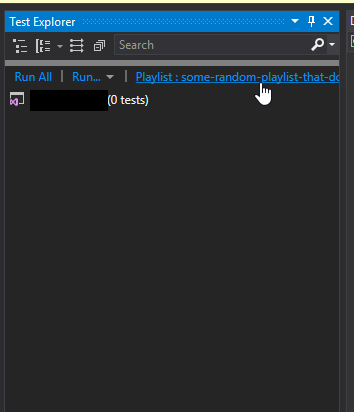
What got me the first time was that I had turned on filtering to show a specific playlist of tests that did not contain any tests at all, rather than showing all of the tests in the solution.
Not super easy to notice that I had done this.
 ReinisV
on 30 May 2019
ReinisV
on 30 May 2019
This thread has been automatically locked since there has not been any recent activity after it was closed. Please open a new issue for related bugs.
![lock[bot] picture](https://avatars.githubusercontent.com/in/6672?v=4&s=40) lock[bot]
on 8 Jul 2019
lock[bot]
on 8 Jul 2019
Related issues
 amarzi
·
5Comments
amarzi
·
5Comments
 fasadin
·
5Comments
fasadin
·
5Comments
 NorekZ
·
4Comments
NorekZ
·
4Comments
 gasparnagy
·
4Comments
gasparnagy
·
4Comments
 timvandenhof
·
6Comments
timvandenhof
·
6Comments
Most helpful comment
Today I looked into the issue and found another workaroud to run SpecFlow scenarios with Resharper 10 (10.0.2)
If you use the R# Keyboard Shortcuts for Run (Ctrl+U, Ctrl+R) or Debug (Ctrl+U, D) of the tests, the tests gets executed/debugged by R#.
Move your cursor to the scenario to run and press the keyboard combination.