Spark-nlp: UniversalSentenceEncoder java.lang.IllegalStateException: Table not initialized.
After execution of pipeline.fit(df), the error is occured: java.lang.IllegalStateException: Table not initialized.
Description
I'm trying to apply ClassifierDL, going through the examples provided in the Multi-class Text Classification training - workshop.
After setting the pipeline, trying to fit, using: pipelineModel = pipeline.fit(trainDataset)
The following error occurs: org.apache.spark.SparkException: Job aborted due to stage failure: Task 2 in stage 3.0 failed 4 times... and after all: java.lang.IllegalStateException: Table not initialized.
[[{{node module_apply_default/string_to_index_Lookup/hash_table_Lookup}}]]
at org.tensorflow.Session.run(Native Method)
at org.tensorflow.Session.access$100(Session.java:48)
at org.tensorflow.Session$Runner.runHelper(Session.java:326)
at org.tensorflow.Session$Runner.run(Session.java:276)
at com.johnsnowlabs.ml.tensorflow.TensorflowUSE.calculateEmbeddings(TensorflowUSE.scala:32)
at com.johnsnowlabs.nlp.embeddings.UniversalSentenceEncoder.annotate(UniversalSentenceEncoder.scala:75)
at com.johnsnowlabs.nlp.AnnotatorModel$$anonfun$dfAnnotate$1.apply(AnnotatorModel.scala:35)
at com.johnsnowlabs.nlp.AnnotatorModel$$anonfun$dfAnnotate$1.apply(AnnotatorModel.scala:34)
... 30 more
Expected Behavior
Training started - total epochs: 5 - learning rate: 0.005 - batch size: 64 - training examples: 120000
Epoch 1/5 - 22.82s - loss: 1620.9778 - accuracy: 0.87975 - batches: 1875
Epoch 2/5 - 22.28s - loss: 1588.1973 - accuracy: 0.89213336 - batches: 1875
Epoch 3/5 - 22.04s - loss: 1579.2833 - accuracy: 0.8971583 - batches: 1875
Epoch 4/5 - 21.90s - loss: 1574.8602 - accuracy: 0.9012167 - batches: 1875
Epoch 5/5 - 22.33s - loss: 1571.6877 - accuracy: 0.90480834 - batches: 1875
Current Behavior
org.apache.spark.SparkException: Job aborted due to stage failure
Possible Solution
Steps to Reproduce
Context
Your Environment
- Spark NLP version: 2.4.5.
- Databricks Runtime 6.4 ML
 IgorDimovski
All 16 comments
Hi @IgorDimovski
I suspect there is something inside Databricks runtimes that come with ML that conflicts with our TensorFlow. Could you please try using 6.4 or any version without ML for testing?
 maziyarpanahi
on 10 Apr 2020
maziyarpanahi
on 10 Apr 2020
Hi @maziyarpanahi
We tried the same approach, changing to regular 6.4 runtime (no ML).
The result is the same.
IgorDimovski
on 11 Apr 2020
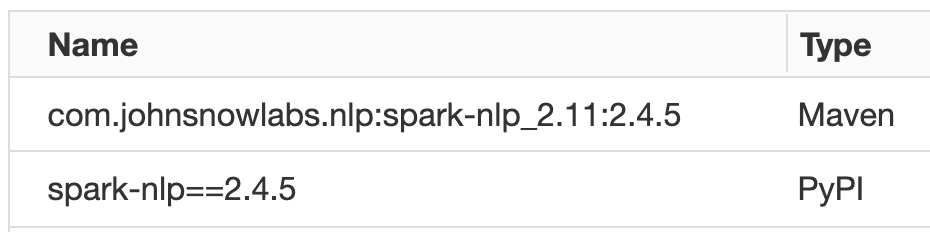
Thanks for the update. Could you please tell me how did you install Spark NLP on your Databricks cluster?
maziyarpanahi
on 11 Apr 2020
Create Library -> Maven -> Coordinates ...
IgorDimovski
on 11 Apr 2020
But you are using the Python example in Python, right? Didn't you also install the spark-nlp PyPI package as well? (if you are using Python the PyPI/Conda package is mandatory in addition to the JAR or package form Maven/Spark Packages)
maziyarpanahi
on 11 Apr 2020
Yes, we did.
IgorDimovski
on 11 Apr 2020
Great, I am gonna test this now on our Databricks in Python. (It is compatible in Scala: https://johnsnowlabs.github.io/spark-nlp-workshop/databricks/index.html#training/3-%20Train%20Multi-Class%20Text%20Classification%20on%20News%20Articles.html)
maziyarpanahi
on 11 Apr 2020
This seems to be a bug in UniversalSentenceEncoder that is not working in a cluster, I missed it since it worked on a single machine. I'll try to fix it and include the fix into the next release.
maziyarpanahi
on 11 Apr 2020
Thanks
IgorDimovski
on 11 Apr 2020
Hi @IgorDimovski
After 2 days of testing, I found out what was the issue. I have updated the instructions for Databricks, could you please try step 2 and test it on your cluster again?
https://github.com/JohnSnowLabs/spark-nlp#databricks-cluster
PS: Adding these two Spark config solves the issue since the Databricks by default either is not using this serialization or it has a very very low default size:
spark.kryoserializer.buffer.max 1000M
spark.serializer org.apache.spark.serializer.KryoSerializer
Hi @maziyarpanahi
Seems like kryoserializer configuration solved the problem with 'Table not initialized' issue. Thank you very much.
However, I'm still not in a position to execute the command pipeline.fit(df). The error occurred: Py4JJavaError: An error occurred while calling o419.fit.
IgorDimovski
on 16 Apr 2020
@IgorDimovski
You need to remove this part from ClassifierDLApproach:
.setEnableOutputLogs(True)
For some reason, this is not compatible with DBFS. It will be fixed in the next release.
maziyarpanahi
on 16 Apr 2020
Hi @maziyarpanahi
That worked. Finally I succeeded to run all commands from the workshop notebook without any error. Thank you very much.
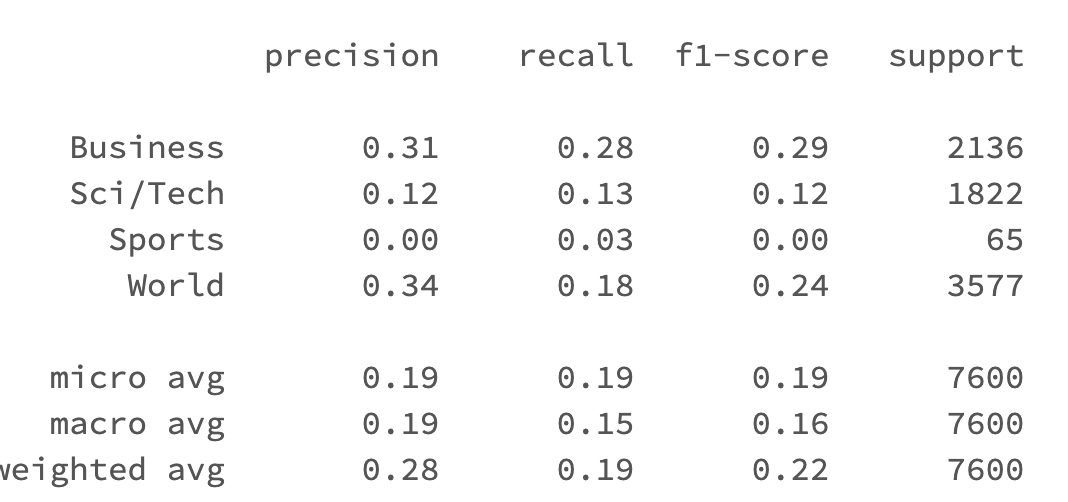
Sorry for bothering, but again something weird is happening. After fitting the model, predictions are very poor. On my local machine I've obtained very similar precision, recall and f1-score results as yours. But on Databricks, after all, there is result:
IgorDimovski
on 17 Apr 2020
Let me look into as why that could happen
maziyarpanahi
on 17 Apr 2020
@IgorDimovski There seems to be a problem serializing already trained ClassifierModel into Databricks cluster.
I'll create another issue for it, as a workaround you can persist on disk then load it again:
pipelineModel.stages[-1].write().overwrite().save('dbfs:/tmp_classifierDL_model')

# In a new pipeline you can load it for prediction
document = DocumentAssembler()\
    .setInputCol("description")\
    .setOutputCol("document")

use = UniversalSentenceEncoder.pretrained() \
 .setInputCols(["document"])\
 .setOutputCol("sentence_embeddings")

classsifierdl = ClassifierDLModel.load("dbfs:/tmp_classifierDL_model") \
  .setInputCols(["sentence_embeddings"])\
  .setOutputCol("class")

pipeline = Pipeline(
    stages = [
        document,
        use,
        classsifierdl
    ])

preds = pipeline.fit(testDataset).transform(testDataset)
preds.select('category','description',"class.result").show(50, truncate=50)


preds_df = preds.select('category','description',"class.result").toPandas()
preds_df['result'] = preds_df['result'].apply(lambda x : x[0])
print (classification_report(preds_df['result'], preds_df['category']))
Hi @maziyarpanahi Thanks for the debugging help here, I was running into the same issues with running the example code on Databricks using SparkNLP. With the help of the steps above, I was able to run all the sample code, but still getting the low numbers for precision and recall similar to the ones mentioned above. And your recommendation for the fix by persisting the pipeline model is not working for me, I get the following error with that. I am wondering if this serialization issue has been solved for the Databricks version?
--
Py4JJavaError Traceback (most recent call last)
22
23 preds = pipeline.fit(df_train).transform(df_test)
---> 24 preds.select('category','description',"class.result").show(50, truncate=50)
25
26 from sklearn.metrics import classification_report, accuracy_score
/databricks/spark/python/pyspark/sql/dataframe.py in show(self, n, truncate, vertical)
385 print(self._jdf.showString(n, 20, vertical))
386 else:
--> 387 print(self._jdf.showString(n, int(truncate), vertical))
388
389 def __repr__(self):
/databricks/spark/python/lib/py4j-0.10.7-src.zip/py4j/java_gateway.py in __call__(self, *args)
1255 answer = self.gateway_client.send_command(command)
1256 return_value = get_return_value(
-> 1257 answer, self.gateway_client, self.target_id, self.name)
1258
1259 for temp_arg in temp_args:
/databricks/spark/python/pyspark/sql/utils.py in deco(a, *kw)
61 def deco(a, *kw):
62 try:
---> 63 return f(a, *kw)
64 except py4j.protocol.Py4JJavaError as e:
65 s = e.java_exception.toString()
/databricks/spark/python/lib/py4j-0.10.7-src.zip/py4j/protocol.py in get_return_value(answer, gateway_client, target_id, name)
326 raise Py4JJavaError(
327 "An error occurred while calling {0}{1}{2}.\n".
--> 328 format(target_id, ".", name), value)
329 else:
330 raise Py4JError(
Py4JJavaError: An error occurred while calling o3129.showString.
 cmethani
on 20 Aug 2020
cmethani
on 20 Aug 2020
Related issues
 SankethBK
·
3Comments
SankethBK
·
3Comments
 simon-oz
·
5Comments
maziyarpanahi
·
3Comments
simon-oz
·
5Comments
maziyarpanahi
·
3Comments
 ashok12
·
6Comments
ashok12
·
6Comments
 fzr72725
·
3Comments
fzr72725
·
3Comments