Spacevim: Errors Regarding Last Merge
Line 116 in file autoload/SpaceVim/layers/core/tabline.vim in this merge, uses the tabpagenr('#') code which is erroneous. As the documentation, tagpagenr takes '$' as optional parameter.
Each time I open the init.toml I get the following error:
Error detected while processing function SpaceVim#layers#core#tabline#get:
line 7
E15: Invalid expression: #
 AminFadaee
All 12 comments
I confirmed that i have the same issue
 SamuelDSR
on 5 Aug 2020
SamuelDSR
on 5 Aug 2020
Thanks, I will look into it. It seems a bug of tabline plugin. I will fix it.
 wsdjeg
on 6 Aug 2020
wsdjeg
on 6 Aug 2020
This is because only neovim support tabpagenr('#') now. This is missing feature in vim. we need to find another way to get the previous tabpagenr.
wsdjeg
on 8 Aug 2020
This is because only neovim support
tabpagenr('#')now. This is missing feature in vim. we need to find another way to get the previous tabpagenr.
I have tried neovim, but the problem still exists, and I cannot find 'tabpagenr('#')' in the document of neovim
 Sillyringo
on 8 Aug 2020
Sillyringo
on 8 Aug 2020
This feature has been merged into neovim in https://github.com/neovim/neovim/commit/cbc8d72fde4b19176028490934ff7a447afe523c
wsdjeg
on 8 Aug 2020
This is because only neovim support
tabpagenr('#')now. This is missing feature in vim. we need to find another way to get the previous tabpagenr.I have tried neovim, but the problem still exists, and I cannot find 'tabpagenr('#')' in the document of neovim
Just to confirm that I am experiencing this error in neovim (0.4.3) as detailed in #3689.
If this fix can be prioritised, it would be very helpful. Thanks.
 patzhang
on 13 Aug 2020
patzhang
on 13 Aug 2020
Same here.
VIM - Vi IMproved 8.1 (2018 May 18, compiled Jun 15 2019 16:41:15)
Included patches: 1-875, 878, 884, 948, 1046, 1365-1368, 1382, 1401

 NightH4nter
on 16 Aug 2020
NightH4nter
on 16 Aug 2020
Same here. Uninstalled spacevim, all spacevim configs, uninstalled neovim, removed all neovim configs, reinstalled neovim, reinstalled spacevim. Still the same issue whenever I try :tabe.
Really annoying, then I noticed this:
curl -sLf https://spacevim.org/install.sh | bash -s -- -h

SpaceVim install script : V 1.6.0-dev
Is there a reason why this installs a dev version by default? #3694 🤷♂️
So I ran the install script, then did
cd ~/.SpaceVim
git checkout v1.5.0
Ran neovim again, and that solved it for me.
 MikeSmithEU
on 16 Aug 2020
MikeSmithEU
on 16 Aug 2020
Well, pending a fix for regular vim.
NightH4nter
on 17 Aug 2020
Looks like the tabpagenr('#') Neovim's feature was only merged into the master branch and is only available in Neovim 0.5 nightlies.
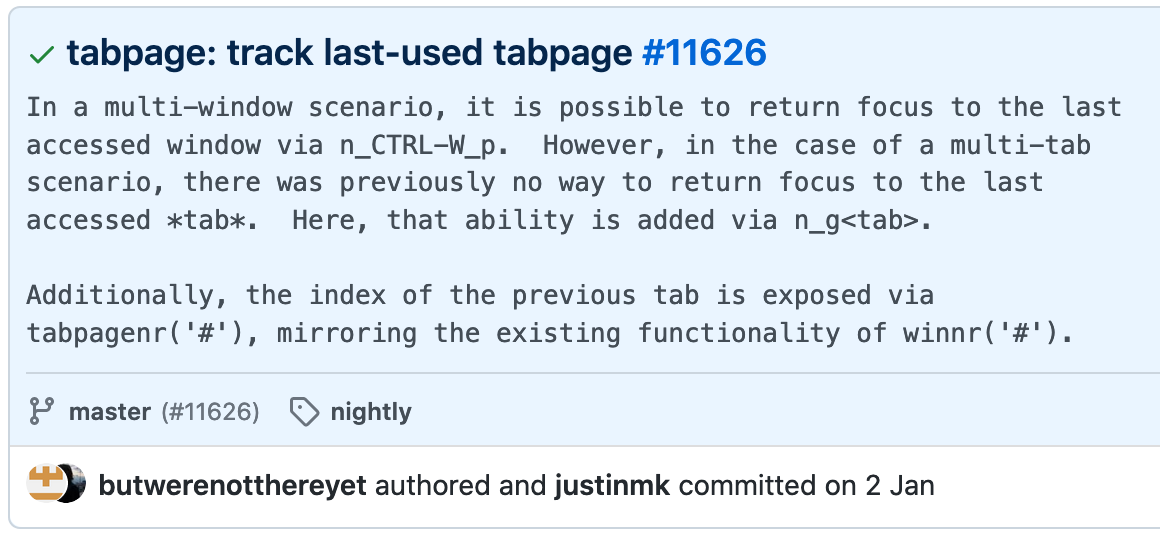
Neovim 0.4.x (stable branch as of now) does not support it
https://github.com/neovim/neovim/blob/v0.4.4/runtime/doc/eval.txt#L8535-L8540
 GreyTeardrop
on 17 Aug 2020
GreyTeardrop
on 17 Aug 2020
For neovim, I solved in Ubuntu 20.04 by using the snap beta channel instead of installing with apt: sudo snap install --beta nvim --classic
 bkonkle
on 21 Aug 2020
bkonkle
on 21 Aug 2020
Hello everyone, I have fixed this bug, please update spacevim.
wsdjeg
on 25 Aug 2020
Related issues
 everettjf
·
5Comments
everettjf
·
5Comments
 rivalak
·
3Comments
rivalak
·
3Comments
 onerciller
·
5Comments
onerciller
·
5Comments
 well1791
·
4Comments
wsdjeg
·
3Comments
well1791
·
4Comments
wsdjeg
·
3Comments
Most helpful comment
Looks like the

tabpagenr('#')Neovim's feature was only merged into the master branch and is only available in Neovim 0.5 nightlies.Neovim 0.4.x (stable branch as of now) does not support it
https://github.com/neovim/neovim/blob/v0.4.4/runtime/doc/eval.txt#L8535-L8540