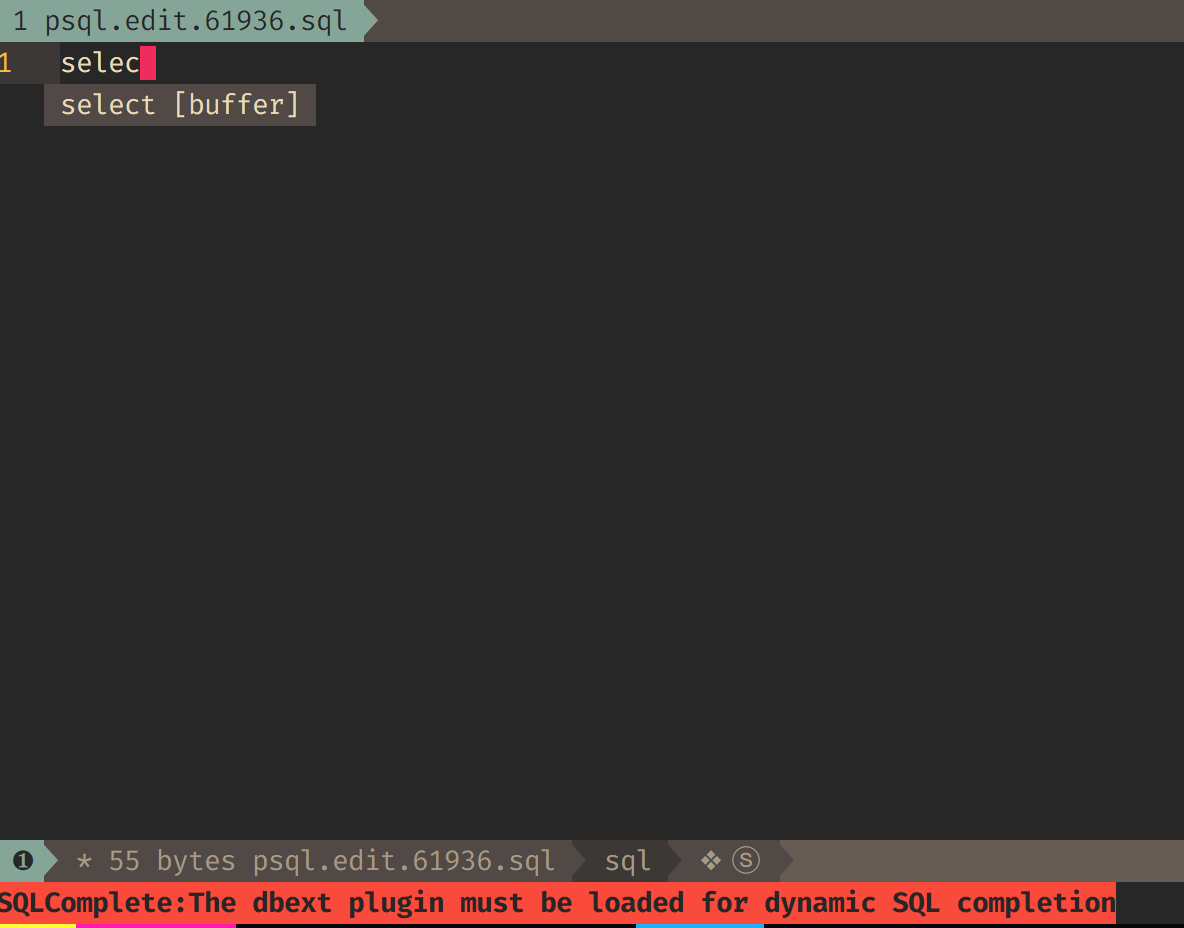
Spacevim: Error - SQLComplete: The debxt plugin must be loaded for dynamic SQL completion
Expected behavior, english is required
- it shouldn't freeze every time I write something
- or, there should be some guide for this kind of issues
- or, there should be some cheatsheet to disable things on runtime
The reproduce ways from Vim starting (Required!)
- open a sql session
psql <database-name> - enter
\e(depending on your configs it will open vim or not) - start writing
select * from ..
Environment Information
- OS: OSX
- vim version: 8.0.1650
- neovim version: -
- SpaceVim version: 0.8.0-dev
- SpaceVim status:
On branch master
Your branch is up-to-date with 'origin/master'.
nothing to commit, working tree clean
Output of the :SPDebugInfo!
SpaceVim Options :
g:spacevim_altmoveignoreft = ['Tagbar', 'vimfiler']
g:spacevim_api_json_true = v:null
g:spacevim_auto_disable_touchpad = 1
g:spacevim_autocomplete_method = 'asyncomplete'
g:spacevim_background = 'dark'
g:spacevim_buffer_index_type = 4
g:spacevim_checkinstall = 1
g:spacevim_colorscheme = 'gruvbox'
g:spacevim_colorscheme_bg = 'dark'
g:spacevim_colorscheme_default = 'desert'
g:spacevim_custom_color_palette = []
g:spacevim_custom_plugins = []
g:spacevim_debug_level = 1
g:spacevim_default_indent = 2
g:spacevim_dein_installed = 1
g:spacevim_denite_leader = '\f'
g:spacevim_disabled_plugins = []
g:spacevim_enable_ale = 0
g:spacevim_enable_cursorcolumn = 0
g:spacevim_enable_cursorline = 1
g:spacevim_enable_debug = 0
g:spacevim_enable_googlesuggest = 0
g:spacevim_enable_guicolors = 1
g:spacevim_enable_insert_leader = 1
g:spacevim_enable_javacomplete2_py = 0
g:spacevim_enable_key_frequency = 0
g:spacevim_enable_language_specific_leader = 1
g:spacevim_enable_neocomplcache = 0
g:spacevim_enable_neomake = 1
g:spacevim_enable_os_fileformat_icon = 0
g:spacevim_enable_powerline_fonts = 1
g:spacevim_enable_statusline_display_mode = 0
g:spacevim_enable_tabline_filetype_icon = 0
g:spacevim_enable_vimfiler_filetypeicon = 0
g:spacevim_enable_vimfiler_gitstatus = 0
g:spacevim_enable_vimfiler_welcome = 1
g:spacevim_enable_ycm = 0
g:spacevim_error_symbol = '✖'
g:spacevim_expand_tab = 1
g:spacevim_filemanager = 'vimfiler'
g:spacevim_filetype_icon = 1
g:spacevim_filetype_icons = {}
g:spacevim_force_global_config = 0
g:spacevim_gitcommit_issue_icon = ''
g:spacevim_gitcommit_pr_icon = ''
g:spacevim_github_username = ''
g:spacevim_guicolors = 1
g:spacevim_guifont = ''
g:spacevim_hiddenfileinfo = 1
g:spacevim_hosts_url = 'https://raw.githubusercontent.com/racaljk/hosts/master/hosts'
g:spacevim_info_symbol = 'ⓘ'
g:spacevim_keep_server_alive = 1
g:spacevim_language = ''
g:spacevim_leader_guide_default_group_name = ''
g:spacevim_leader_guide_flatten = 1
g:spacevim_leader_guide_hspace = 5
g:spacevim_leader_guide_max_size = 0
g:spacevim_leader_guide_position = 'botright'
g:spacevim_leader_guide_run_map_on_popup = 1
g:spacevim_leader_guide_sort_horizontal = 0
g:spacevim_leader_guide_submode_mappings = {'<C-C>': 'win_close'}
g:spacevim_leader_guide_vertical = 0
g:spacevim_lint_on_save = 1
g:spacevim_lint_on_the_fly = 0
g:spacevim_max_column = 120
g:spacevim_neobundle_installed = 0
g:spacevim_plugin_bundle_dir = '/Users/wmendoza/.cache/vimfiles/'
g:spacevim_plugin_manager = 'dein'
g:spacevim_plugin_manager_max_processes = 16
g:spacevim_plugin_name = 'vim-grepper'
g:spacevim_project_rooter_automatically = 1
g:spacevim_project_rooter_patterns = ['.git/', '_darcs/', '.hg/', '.bzr/', '.svn/']
g:spacevim_realtime_leader_guide = 1
g:spacevim_relativenumber = 1
g:spacevim_search_tools = ['rg', 'ag', 'pt', 'ack', 'grep']
g:spacevim_sidebar_width = 30
g:spacevim_simple_mode = 0
g:spacevim_smartcloseignoreft = ['tagbar', 'vimfiler', 'SpaceVimRunner', 'SpaceVimREPL', 'SpaceVimQuickFix', 'HelpDescribe', 'VebuggerShell', 'VebuggerTerminal']
g:spacevim_smartcloseignorewin = ['__Tagbar__', 'vimfiler:default']
g:spacevim_snippet_engine = 'neosnippet'
g:spacevim_src_root = 'E:\sources\'
g:spacevim_statusline_display_mode = 0
g:spacevim_statusline_inactive_separator = 'arrow'
g:spacevim_statusline_left_sections = ['winnr', 'filename', 'major mode', 'syntax checking', 'minor mode lighters']
g:spacevim_statusline_right_sections = ['fileformat', 'cursorpos', 'percentage']
g:spacevim_statusline_separator = 'arrow'
g:spacevim_statusline_unicode_symbols = 1
g:spacevim_terminal_cursor_shape = 2
g:spacevim_unite_leader = '\f'
g:spacevim_version = '0.8.0-dev'
g:spacevim_vim_help_language = 'en'
g:spacevim_vim_plug_installed = 0
g:spacevim_vimcompatible = 0
g:spacevim_warning_symbol = '⚠'
g:spacevim_wildignore = '*/tmp/*,*.so,*.swp,*.zip,*.class,tags,*.jpg,*.ttf,*.TTF,*.png,*/target/*,.git,.svn,.hg,.DS_Store,*.svg'
g:spacevim_windows_index_type = 0
g:spacevim_windows_leader = 's'
g:spacevim_windows_smartclose = 'q'
SpaceVim Health checking :
SpaceVim clipboard support check report:
Checking +clipboard:
SUCCEED!
SpaceVim environment check report:
Current progpath: vim(vim)
version: 800
OS: OSX
SpaceVim lua support check report:
Checking +lua:
Failed : to support +lua, you need recompile your vim with +lua support.
SpaceVim python support check report:
Checking +python3:
SUCCEED!
Checking +python:
Failed : to support +python, Please install vim-gik, or build from sources.
SpaceVim runtime log :
[ SpaceVim ] : logger file  does not exists, only log for current process will be shown!
[ SpaceVim ] [10:35:13] [ Info ] Can not find project local config, start to loadding global config
Screenshots
 well1791
All 4 comments
This is issue with vim/neovim itself. in vim/neovim runtime file, we should not call function from extra plugins which maybe not installed. I think you can also reproduce this issue with vim -u NONE. so I can do nothing in SpaceVim.
but I think maybe you can install the plugin, if you are using toml as SpaceVim config, just add:
[[custom_plugins]]
neme = "vim-scripts/dbext.vim"
merged = 0
 wsdjeg
on 13 May 2018
wsdjeg
on 13 May 2018
I don't use SpaceVim but I was experiencing the same problem. I found the suggestion at https://stackoverflow.com/a/24931292/1410035 helped solve my problem. Specifically setting the following in your .vimrc:
let g:omni_sql_no_default_maps = 1
This kills the keymap for ft-sql so the
 tomsaleeba
on 6 Sep 2018
tomsaleeba
on 6 Sep 2018
Thanks for you info. and I am working on a new lang#sql layer, and I will use this plugin maybe.
wsdjeg
on 6 Sep 2018
You might also try changing the default completion mode from table (which requires the dbext plugin) to syntax (which does not):
" Default to static completion for SQL
let g:omni_sql_default_compl_type = 'syntax'
 pgavlin
on 28 Dec 2020
pgavlin
on 28 Dec 2020
Related issues
 shabegom
·
3Comments
shabegom
·
3Comments
 gennad
·
4Comments
gennad
·
4Comments
 Lobosque
·
3Comments
wsdjeg
·
3Comments
Lobosque
·
3Comments
wsdjeg
·
3Comments
 dzintars
·
3Comments
dzintars
·
3Comments
Most helpful comment
I don't use SpaceVim but I was experiencing the same problem. I found the suggestion at https://stackoverflow.com/a/24931292/1410035 helped solve my problem. Specifically setting the following in your
.vimrc:This kills the keymap for ft-sql so the combo isn't overloaded and for me, I was getting the same error when I moved the cursor left/right while autocomplete suggestions were showing.