Spaceship-prompt: Rprompt shown after ctrl+c even though config empty
Current behavior
Whenever I exit out of a command that runs, for example a webpack node app or gradle build, the rprompt looks for items but nothing is there. It looks like this $(spaceship_rprompt) and the left prompt is not shown. It takes about 8 ctrl+c to see the left prompt normally.
Expected behavior
The next line should show up with the left prompt normally and nothing on rprompt
Relevant Zsh configuration (.zshrc)
export ZSH="/Users/andrew.gingrich/.oh-my-zsh"

ZSH_THEME="spaceship-prompt/spaceship"
SPACESHIP_PROMPT_ADD_NEWLINE=false
SPACESHIP_PROMPT_SEPARATE_LINE=false

# for nvm general
source ~/.nvm/nvm.sh

# nvm
cd () { builtin cd "$@" && chNodeVersion; }
pushd () { builtin pushd "$@" && chNodeVersion; }
popd () { builtin popd "$@" && chNodeVersion; }

chNodeVersion() {
# if there's a file named ".nvmrc"...
if [ -f ".nvmrc" ] ; then
# use it
nvm use;
fi
}
chNodeVersion;

# for automatic node version switching based on .nvmrc
# to be finished

# open bitbucket branch
openbitbucket () { REPO=$(grep url .git/config | grep -o ':.*\.' | tr -d :. ); BRANCH=$(git rev-parse --abbrev-ref HEAD); open "https://bitbucket.org/$REPO/branch/$BRANCH" &>/dev/null;  }

# open jira ticket
openjira () { TICKET=$(tail -c 5 .git/HEAD); open "https://trendkite.atlassian.net/browse/TA-$TICKET" &>/dev/null; }

# open github branch
opengithub () { REPO=$(grep url .git/config | grep -o ':.*\.' | tr -d :. ); BRANCH=$(git rev-parse --abbrev-ref HEAD); open "https://github.com/$REPO/tree/$BRANCH";  }

# npm aliases
alias npmd="npm run dev"
alias npmsrv="npm run serve"
alias npml="npm list --depth=0"
alias npmb="npm run build"
alias npmsw="rm ~/.npmrc && cp ~/.npmrc_work ~/.npmrc"
alias npmsp="rm ~/.npmrc && cp ~/.npmrc_personal ~/.npmrc"
alias npmt="npm run test"
alias tkswitchlocal="sudo rm /etc/trendkite/trendkite-config.groovy && sudo cp /etc/trendkite/trendkite-config-original.groovy /etc/trendkite/trendkite-config.groovy"
alias tkswitchdev="sudo rm /etc/trendkite/trendkite-config.groovy && sudo cp /etc/trendkite/trendkite-config-dev.groovy /etc/trendkite/trendkite-config.groovy"
alias npmtu="npm run test-update"
alias npmtw="npm run test-watch"
alias npmtc="npm run test-coverage"
alias npms="npm run start"

# general aliases
alias blog="cd ~/storage/projects/blog-private"
alias tkgrails="cd ~/storage/projects/trendkite-grails3"
alias tkfe="cd ~/storage/projects/trendkite-front-end"
alias proj="cd ~/storage/projects"
alias pgn="cd ~/storage/projects/react-pgn-viewer"
alias board="cd ~/storage/projects/reactjs-chessboard"
alias blogt="cd ~/storage/projects/blog-test"
alias hack="cd ~/storage/projects/hackerrank-algorithms"
alias dragon="cd ~/storage/projects/react-dragon-curve"
alias andrew="cd ~/storage/projects/andrewgingrich.com"
alias eh="cd ~/storage/projects/everest-housing"

HYPHEN_INSENSITIVE="true"

plugins=(
  git
)

source $ZSH/oh-my-zsh.sh

#THIS MUST BE AT THE END OF THE FILE FOR SDKMAN TO WORK!!!
export SDKMAN_DIR="/Users/andrew.gingrich/.sdkman"
[[ -s "/Users/andrew.gingrich/.sdkman/bin/sdkman-init.sh" ]] && source "/Users/andrew.gingrich/.sdkman/bin/sdkman-init.sh"
Environment
Spaceship version: 3.11
Zsh version: 5.3
Zsh framework: oh-my-zsh
Zsh plugin manager: None
Terminal emulator: iTerm
Operating system: macOS
Screenshot
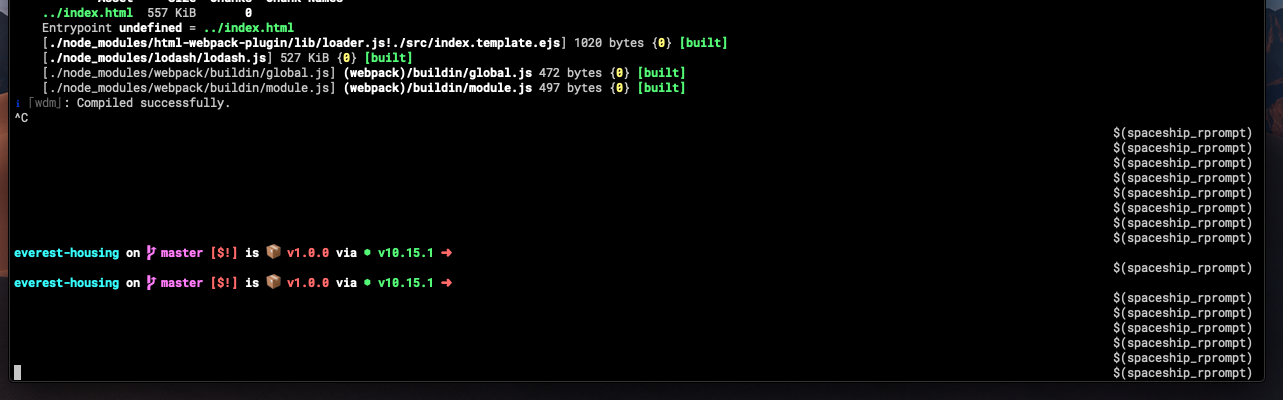
 ajGingrich
All 13 comments
Hey, did you found any workaround?
 ph-marcAndre
on 10 Apr 2019
ph-marcAndre
on 10 Apr 2019
I have not. still with same error.
ajGingrich
on 12 Apr 2019
I see $(spaceship_rprompt) as well, like you do.
 natterstefan
on 29 Apr 2019
natterstefan
on 29 Apr 2019
Same issue here, it's a rather frustrating issue
 abuob
on 7 May 2019
abuob
on 7 May 2019
Same error here
 capyvara
on 5 Jun 2019
capyvara
on 5 Jun 2019
Hello everybody, any news or updates regarding this issue?
natterstefan
on 4 Jul 2019
same here
 pedroorellana
on 4 Jul 2019
pedroorellana
on 4 Jul 2019
I looked into this a little bit this morning. I couldn't even get the rprompt to work at all now. I might spend more time on it in the future and create a PR.
For now though, you can eliminate $(spaceship_rprompt) by going to your local repo that is being used. In my case it's /Users/my.name/.oh-my-zsh/themes/spaceship-prompt and commenting out line 208 in spaceship.zsh which is RPS1='$(spaceship_rprompt)'
There is still a delay before the left prompt comes up (seems like a performance issue) but can hit ctrl+c many times and will only be blank lines.
ajGingrich
on 6 Jul 2019
I'm also having this issue
 gabrielpra1
on 29 Jan 2020
gabrielpra1
on 29 Jan 2020
the problem still exists in 2020
 pshergie
on 14 Feb 2020
pshergie
on 14 Feb 2020
This is caused by process substitution in PS1 and RPS1. All prompts with $(...) in them suffer from this problem. It's fixable but the fix is not trivial.
 romkatv
on 14 Feb 2020
romkatv
on 14 Feb 2020
Same here.. Is there any workaround for this? I'm using WSL2 and it works if i press CTRL + C a few times, but is a little annoying.
 canove
on 22 Jul 2020
canove
on 22 Jul 2020
Same here.. Is there any workaround for this? I'm using WSL2 and it works if i press CTRL + C a few times, but is a little annoying.
Not really. You can use another theme or patch spaceship-prompts but these options don't qualify as workarounds.
romkatv
on 22 Jul 2020
Related issues
 conradwt
·
3Comments
conradwt
·
3Comments
 tbekaert
·
3Comments
tbekaert
·
3Comments
 JounQin
·
3Comments
JounQin
·
3Comments
 xhaythemx
·
3Comments
xhaythemx
·
3Comments
 AlecRust
·
3Comments
AlecRust
·
3Comments
Most helpful comment
I looked into this a little bit this morning. I couldn't even get the
rpromptto work at all now. I might spend more time on it in the future and create a PR.For now though, you can eliminate
$(spaceship_rprompt)by going to your local repo that is being used. In my case it's/Users/my.name/.oh-my-zsh/themes/spaceship-promptand commenting out line 208 inspaceship.zshwhich isRPS1='$(spaceship_rprompt)'There is still a delay before the left prompt comes up (seems like a performance issue) but can hit ctrl+c many times and will only be blank lines.