Spaceship-prompt: Prompt arrow disappears when activating conda env
Current behavior
After activating a conda environment, the arrow in the next line indicating the prompt disappears.
Expected behavior
After activating a conda environment, it's name should be displayed next to the working directory. In the next line, an arrow should indicate the prompt.
Relevant Zsh configuration (.zshrc)
# All default settings
ZSH_THEME="spaceship"
Environment
Spaceship version: 3.5.0
Zsh version: 5.3
Zsh framework: oh-my-zsh
Zsh plugin manager: None
Terminal emulator: cygwin
Operating system: Windows 10
Screenshot
Provide a screenshot that shows your issue.

Possible solution
I guess some characters when determining the conda prefix are not escaped correctly. In particular \r could cause such problems.
 sbmueller
All 21 comments
Looks like conda is rendering it's own prompt segment before spaceship. Please try setting conda config --set changeps1 False to disabled that. I'll try to reproduce this in the meantime.
 salmanulfarzy
on 10 Sep 2018
salmanulfarzy
on 10 Sep 2018
@salmanulfarzy hey, same behaviour with the changed conda config you mention
Edit: just noticed the (base) output at the end of each command disappeared. However, the arrow is still missing as well.
sbmueller
on 10 Sep 2018
Sorry @sbmueller, I'm unable to reproduce this under the following setup. Will try with look into reproducing.
spaceship 3.5.0 / Zsh 5.3.1 / No framework / Kitty / Linux
salmanulfarzy
on 11 Sep 2018
@salmanulfarzy I guess this is directly connected to Windows. I had a similar problem with powerlevel9k (https://github.com/bhilburn/powerlevel9k/issues/747).
sbmueller
on 11 Sep 2018
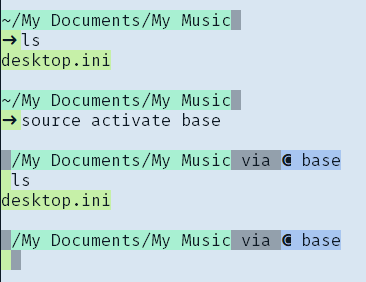
Quick update: the first character of each line seems to be messed up after activating conda env. I have selected all the text in this screenshot to make clear the characters are odd:
sbmueller
on 11 Sep 2018
first character of each line seems to be messed up after activating conda env
That's weird :confused: So to confirm from the screenshot, after activating conda environment, arrows and tilde have disappeared from prompt. What happens when the first segment on line starts with letter and not symbol ? I don't use Windows as of now. Will try to setup similar environment for testing this issue.
I had a similar problem with powerlevel9k
About the p9k issue, What happened with https://github.com/bhilburn/powerlevel9k/pull/810, Did it help ?
salmanulfarzy
on 11 Sep 2018
@salmanulfarzy Any first characters have disappeared after activating conda env, also letters.
In the p9k issue, I could fix this by removing any escape symbols from the conda prefix (${CONDA_ENV_PATH//[$'\t\r\n']}${CONDA_PREFIX//[$'\t\r\n']})
sbmueller
on 12 Sep 2018
Quick update: When I use ${CONDA_DEFAULT_ENV//[$'\t\r\n']} in l. 31 of sections/conda.zsh at least in the first line, the first character is displayed correctly. However, second line is still missing the arrow.
sbmueller
on 12 Sep 2018
And it gets even more weird: As soon as I start a command in background ($ command &) the arrow reappears in the shell.
sbmueller
on 20 Sep 2018
I think this is specifically related to Cygwin unicode handling. Does this happens for you with spaceship-prompt on other terminal emulators under Windows ?
salmanulfarzy
on 20 Sep 2018
@salmanulfarzy I'm afraid I'm not able to try other emulators due to company restrictions. Feel free to close the issue if tracking down the problem is not possible in that case.
sbmueller
on 21 Sep 2018
@sbmueller - Can you try the next branch and let us know if anything is different?
 bhilburn
on 8 Oct 2018
bhilburn
on 8 Oct 2018
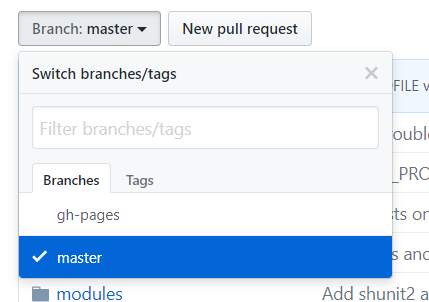
@bhilburn Is there a next branch? It doesn't seem to be pushed to this repo.
sbmueller
on 9 Oct 2018
He was mentioning about bhilburn/powerlevel9k@next.
salmanulfarzy
on 9 Oct 2018
Hah! Indeed - I actually didn't even realize this wasn't the p9k repo when I commented, lol.
bhilburn
on 9 Oct 2018
Kudos on yesterdays triaging sprint with P9K :+1:
salmanulfarzy
on 9 Oct 2018
Hah! Indeed - I actually didn't even realize this wasn't the p9k repo when I commented, lol.
Haha, now everything makes sense 😄
@salmanulfarzy how are you feeling about closing this? I cannot be of much help resolving and if someone else experiences this issue as well, reopen is always possible.
(I have kind of a solution for myself: I use P9K at work and Spaceship Prompt privately on macOS at home.)
sbmueller
on 9 Oct 2018
We had multiple issues with Windows machines (some of them are still open), It would be great if someone is willing to improve code base to better suite Windows without breaking prompt for existing Unix machines.
salmanulfarzy
on 17 Oct 2018
So... I'm actually experiencing an approximation of this on both MacOS and Arch Linux. I've read through the thread, but am unsure how to translate to *nix systems.
Looks like
condais rendering it's own prompt segment beforespaceship. Please try settingconda config --set changeps1 Falseto disabled that. I'll try to reproduce this in the meantime.
The conda command here has no effect.
Some of the info that seems pertinent to helping. 😅
spaceship=3.10.0zsh=5.6.2-1antibody=4.0.2conda=4.6.1MacOS / TerminalArch Linux / ssh connection(typically throughMacOS Terminal)
/cc @salmanulfarzy @sbmueller
 ionlights
on 26 Jan 2019
ionlights
on 26 Jan 2019
@ionlights Excuse us for missing this.
This issue related to windows. Please open new issue with screenshot and information provided here if you still have trouble with our theme on unix machine.
salmanulfarzy
on 24 May 2019
@salmanulfarzy all right, will do. 👍
ionlights
on 24 May 2019
Related issues
 olets
·
3Comments
olets
·
3Comments
 conradwt
·
3Comments
conradwt
·
3Comments
 MatthiasJ
·
4Comments
MatthiasJ
·
4Comments
 vburojevic
·
3Comments
vburojevic
·
3Comments
 maccius
·
3Comments
maccius
·
3Comments