Spaceship-prompt: Better Windows / MSYS2 support
Current behavior
There were so many headaches getting this working on Windows. Probably mostly with MSYS2 which doesn't seem to like symlinks.
- The NPM
postinstallscript doesn't work on windows./ - Couldn't find the
spaceship.zsheven after I managed to get symlinks working node.zshdoes anode_version=$(nvm current 2>/dev/null)ifnvmexists but on Windows that command (nvm current) doesn't exist.nvmdid exist.dir.zshis somehow trimming the first character of the dir when in a git directory.
Expected behavior
Less headaches
Relevant Zsh configuration (.zshrc)
ZSH_THEME="spaceship"
Environment
Spaceship version: 3.4.1
Zsh version: 5.5.1
Zsh framework: oh-my-zsh
Zsh plugin manager: oh-my-zsh
Terminal emulator: Hyper w/ MSYS2 x64
Operating system: Windows 10
Possible solution
Steps I used to get it working:
- Cloned using
git clone https://github.com/denysdovhan/spaceship-prompt.git "$ZSH_CUSTOM/themes/spaceship-prompt" - Renamed
spaceship.zsh-themeto `spaceship.zsh-theme.old - Renamed
spaceship.zshtospaceship.zsh-theme - Used
ZSH_THEME="spaceship-prompt/spaceshipinstead of `ZSH_THEME="spaceship" (Similar to how powerlevel9k works - Modified
node.zshto not usenvm currentfor the check. - Modified
dir.zshto use" $dir" \instead of"$dir" \. (NOTE: this does actually shift the prompt)
 stramel
All 2 comments
We don't actually support Windows. Most of our Windows users just take their own responsibility for their setup and fixing possible issues related to the Windows platform.
However, we can keep this open for other people who struggle with Windows. Maybe together we can improve Windows support and make it easier to set up.
 denysdovhan
on 27 Oct 2018
denysdovhan
on 27 Oct 2018
Since this issue is quite generic on its title, I'd like to ask for a minor correction that would allow me to use the theme properly.
Currently I'm using ZSH / OMZ inside Cmder which runs a cygwin-mintty profile. All's been good except that I had to use Nvm for Windows instead of zsh-nvm which gave me this for the Node version:
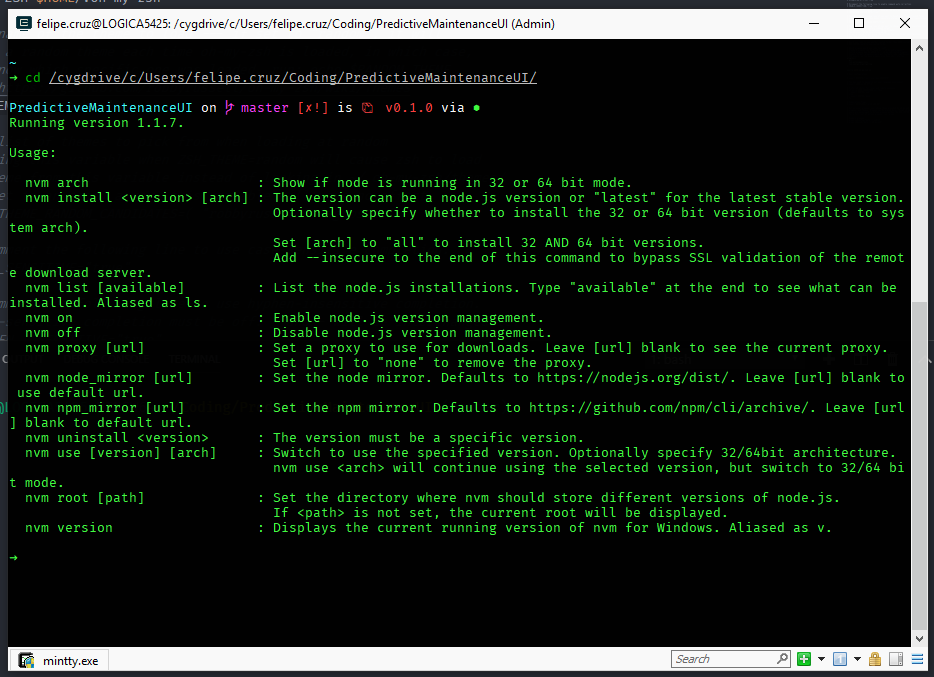
Instead of the simple version number. If I use zsh-nvm it shows properly but there are other issues with that.
I believe this should not be too difficult to fix? This is currently the only issue preventing me from using the theme on my Win setup.
Thanks in advance,
 fmaiabatista
on 14 Jun 2019
fmaiabatista
on 14 Jun 2019
Related issues
 salmanulfarzy
·
3Comments
salmanulfarzy
·
3Comments
 vburojevic
·
3Comments
vburojevic
·
3Comments
 AlecRust
·
3Comments
AlecRust
·
3Comments
 JounQin
·
3Comments
JounQin
·
3Comments
 nfischer
·
3Comments
nfischer
·
3Comments
Most helpful comment
We don't actually support Windows. Most of our Windows users just take their own responsibility for their setup and fixing possible issues related to the Windows platform.
However, we can keep this open for other people who struggle with Windows. Maybe together we can improve Windows support and make it easier to set up.