Spaceship-prompt: Tilde (~) is now username
Issue
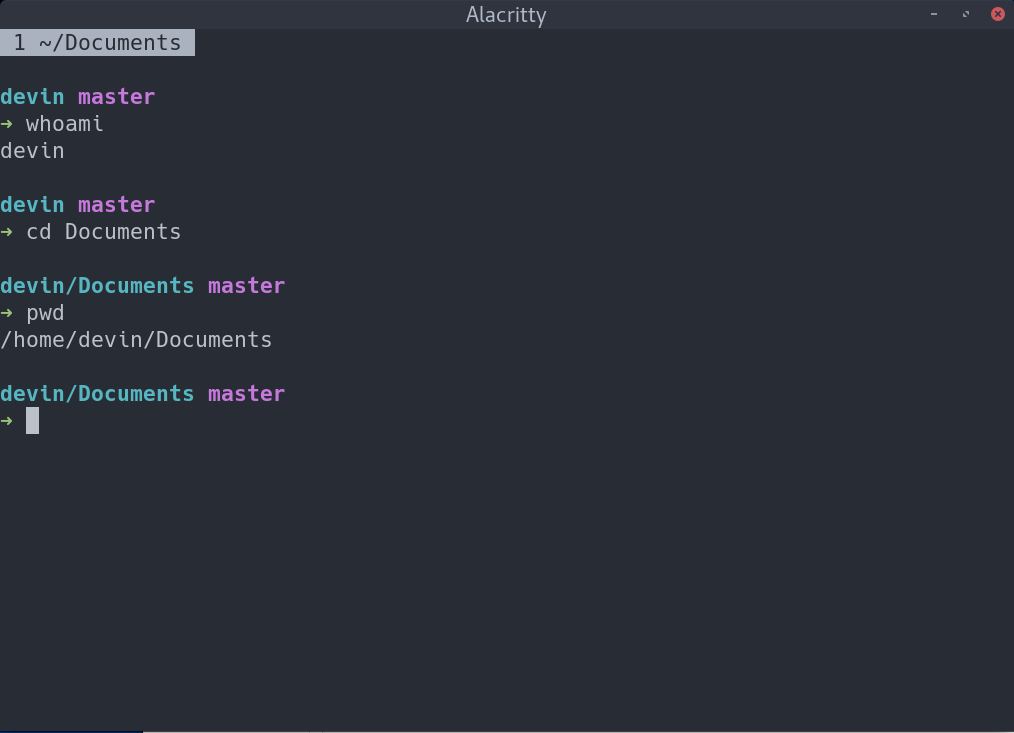
With spaceship zsh, my directory prompt used to be '~' when I'm in $HOME. However, after updating yesterday, that tilde became devin, as $HOME in my system is /home/devin. I don't know if this is intended, but I'm looking for a way to make it back to tilde, thank you.
Screenshot
Environment
Spaceship version: 3.0.1
Zsh version: 5.4.2
Zsh framework: oh-my-zsh
Zsh plugin manager: antigen
Terminal emulator: Alacritty
Operating system: Linux
Relevant .zshrc
# antigen
[ -f $ANTIGEN/antigen.zsh ] && source $ANTIGEN/antigen.zsh

antigen use oh-my-zsh
antigen bundle tarruda/zsh-autosuggestions
antigen theme denysdovhan/spaceship-zsh-theme spaceship
antigen apply

# spaceship
export SPACESHIP_PROMPT_PREFIXES_SHOW=false
export SPACESHIP_DIR_TRUNC=0
export SPACESHIP_GIT_SYMBOL='\0'
export SPACESHIP_GIT_STATUS_PREFIX=' '
export SPACESHIP_GIT_STATUS_SUFFIX='\0'
question
 devinalvaro
👍1
All 2 comments
Looks like your home directory is version controlled with git. dir section truncates section for git till repository root. That's why you are seeing name of home directory.
You can disable that with SPACESHIP_DIR_TRUNC_REPO=false.
 salmanulfarzy
on 19 Jan 2018
salmanulfarzy
on 19 Jan 2018
👍3
@salmanulfarzy Thanks dude, that works!
devinalvaro
on 19 Jan 2018
Was this page helpful?
0 / 5 - 0 ratings
Related issues
 martincartledge
·
4Comments
martincartledge
·
4Comments
 JounQin
·
3Comments
JounQin
·
3Comments
 tbekaert
·
3Comments
tbekaert
·
3Comments
 MatthiasJ
·
4Comments
MatthiasJ
·
4Comments
 conradwt
·
3Comments
conradwt
·
3Comments
Most helpful comment
Looks like your home directory is version controlled with
git.dirsection truncates section forgittill repository root. That's why you are seeing name of home directory.https://github.com/denysdovhan/spaceship-prompt/blob/ecccd112f7847e9c8bf1979b0b32188a19845e1d/sections/dir.zsh#L27-L32
You can disable that with
SPACESHIP_DIR_TRUNC_REPO=false.