Spaceship-prompt: Not all icons are displayed in terminal correctly
Issue
Not all icons are displayed in terminal correctly
Screenshot


Environment
Operating system: Arch Linux
Terminal emulator: Termite
ZSH version: 5.3.1
Relevant .zshrc
export ZSH=/home/illia/.oh-my-zsh
ZSH_THEME="spaceship"
plugins=(git)
source $ZSH/oh-my-zsh.sh
export VISUAL="vim"
export TERMINAL="termite"
 illia-sernikov
All 11 comments
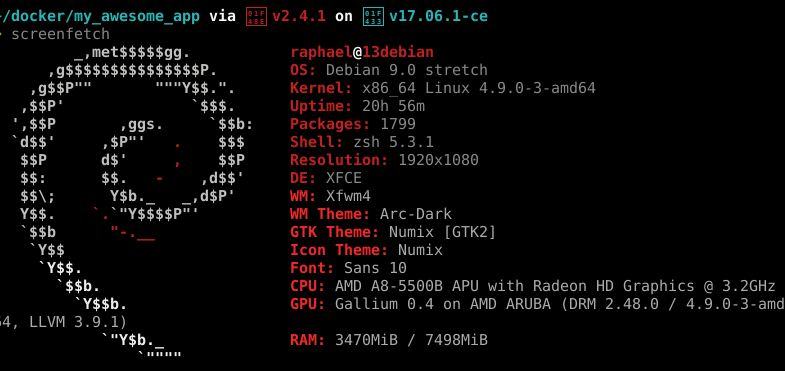
Same problem here.
 raphaelmro
on 1 Sep 2017
raphaelmro
on 1 Sep 2017
oooh, @salmanulfarzy we should pay more of users attention to this
@raphaelmro @illia-sernikov guys, you have problems not with Spaceship itself, but with the font which is used in your terminal. Please, use powerline font if you want to have all of these icons displayed properly. Check out related issues #179, #151 and more.
Anyway, thanks for reporting! Feel free to reopen if you have any questions.
 denysdovhan
on 5 Sep 2017
denysdovhan
on 5 Sep 2017
I also have this issue, and I am definitely using a Powerline font (already was before installing the theme).
Most of the glyphs used for languages/external tools (ex: 🐦, 🐳, etc) are not included in patched Powerline fonts. Other glyphs which are included (ex: the "branch" symbol) do work fine.
I'm guessing it works for you because you're using iTerm and it's doing some magic to pull those glyphs from another font installed on the system, but I can't get them to work on Linux/Windows with any of the font/terminal combination I've used.
 FredDeschenes
on 8 Sep 2017
FredDeschenes
on 8 Sep 2017
@FredDeschenes we use emojis as section symbols. And yes, if you're on old Windows or Linux, these icons might look not as mine. The appearance of these symbols depends on the system. However, if it's really bad for you, try to chage this symbol to another using option.
denysdovhan
on 8 Sep 2017
I hadn't realized that the system this was running on would give such different results, I see completely different glyphs at home (Windows 10) than at work (Windows 8.1, yeah I know...). Btw even on an completely up-to-date Arch Linux with gnome-terminal, none of the emojis show up though. I've looked around a bit and it seems (although it's unclear) that VTE (which backs a lot of Linux terminal applications) doesn't support emojis, so this probably won't work for most Linux users.
Should there be a note on this in the readme to prevent more issues about this being entered?
FredDeschenes
on 8 Sep 2017
even on an completely up-to-date Arch Linux with gnome-terminal, none of the emojis show up though
I don't think any Linux distros come with Emoji installed. This AMA question is the best guide I know of for emoji on Linux. I use Noto emoji for Chrome on Ubuntu, but someone claims to have emoji installed in their terminal using a patched cairo on Arch.
Hope this helps!
 nfischer
on 9 Sep 2017
nfischer
on 9 Sep 2017
@nfischer : Thanks for the link, installing the Noto font did indeed fix the issue on my Linux machines (for people from Google : the Noto emoji font is available in the extra repository on Arch or directly from Google).
FredDeschenes
on 11 Sep 2017
Huh, I'm surprised you got Noto in your terminal. Good to know in case I switch to arch!
nfischer
on 12 Sep 2017
Can confirm this is still an issue, and using noto emoji does fix the issue. Thanks to @FredDeschenes! I do however remember that everything worked fine when I was still using ubuntu, now in arch based distro the icons no longer displayed correctly with powerline fonts.
 mlippens
on 5 Jun 2019
mlippens
on 5 Jun 2019
Recent versions of Ubuntu have emoji preinstalled (and it even works in the terminal) :tada:
nfischer
on 6 Jun 2019
I experienced similar issues as in the initial issue. Some special glyphs are shown some not. I'm running the fish port of this prompt on rxvt-unicode on Arch linux.
The reason in my case was that the terminal did not show the symbol when there is not enough horizontal space, see [powerline issue 176]. Increasing letter spacing in .Xresource fixed it:
URxvt.letterSpace: 1
 gschenk
on 31 Jan 2020
gschenk
on 31 Jan 2020
Related issues
 maccius
·
3Comments
maccius
·
3Comments
 ChadTaljaardt
·
4Comments
ChadTaljaardt
·
4Comments
 martincartledge
·
4Comments
martincartledge
·
4Comments
 salmanulfarzy
·
3Comments
salmanulfarzy
·
3Comments
 gillesdemey
·
3Comments
gillesdemey
·
3Comments
Most helpful comment
@nfischer : Thanks for the link, installing the Noto font did indeed fix the issue on my Linux machines (for people from Google : the Noto emoji font is available in the
extrarepository on Arch or directly from Google).