Spaceship-prompt: Random Git Status icons
Issue
Random Git Status icons are displayed after running a command inside a Git folder, even without doing anything at all to the files inside.
Had to disable Git Status icons from the theme. Having this issue makes them very misleading.
Screenshot

Environment
Operating system: Windows (using WSL)
Terminal emulator: Hyper
ZSH version: zsh 5.1.1 (x86_64-ubuntu-linux-gnu)
 AramC92
All 13 comments
That's unfortunate. Currently we're depending on OMZ for git status indicators. But that shouldn't be causing this. Let us take a look into this.
BTW awesome symbol selection 👍
 salmanulfarzy
on 21 Aug 2017
salmanulfarzy
on 21 Aug 2017
BTW awesome symbol selection 👍
Yeah, we should consider adding them to the theme.
 denysdovhan
on 21 Aug 2017
denysdovhan
on 21 Aug 2017
I can't reproduce this with zsh 5.1.1 (x86_64-ubuntu-linux-gnu). Could you share the output produced by setopt xtrace verbose, preferably for more than one prompt redraws ?
If I'm not wrong, those characters are part of [nerd-fonts], Care to share your configuration in [presets] @AramC92 ?
salmanulfarzy
on 22 Aug 2017
The Octocat symbol is indeed from nerd-fonts. The rest however, I patched the font I use (Knack NF) to have a few extra symbols.
I still get this problem with other fonts though, just tried others to be sure.
AramC92
on 23 Aug 2017
Same issue.
Windows 10 Bash, Hyper terminal, ZSH 5.1.1
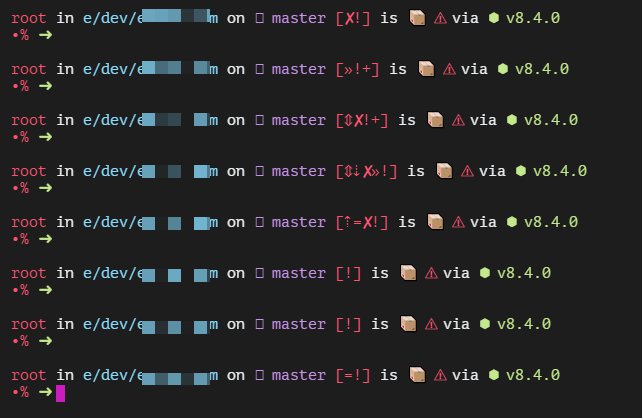
 ilyador
on 11 Sep 2017
ilyador
on 11 Sep 2017
same as above, fonts installed on both windows and WSL
 Aetherall
on 8 Dec 2017
Aetherall
on 8 Dec 2017
This issue never happened to me. @salmanulfarzy how is your investigation on this going?
denysdovhan
on 12 Jan 2018
Unable to reproduce after multiple attempts.
salmanulfarzy
on 12 Jan 2018
Wow, that is an interesting bug. Just curious, among those who can reproduce, has anyone tried 3.0 branch which doesn't depend on OMZ for git status anymore?
 maximbaz
on 12 Jan 2018
maximbaz
on 12 Jan 2018
@AramC92 @Aetherall @ilyador could you guys please try 3.0 ?
salmanulfarzy
on 22 Jan 2018
@chaoky There are no git indicators in the screenshot. Are you referring to the git branch symbol ?
salmanulfarzy
on 22 Feb 2018
yes
 chaoky
on 23 Feb 2018
chaoky
on 23 Feb 2018
I have this problem too with the latest version, zsh 5.4.2, using WSL on windows 10.
Heres a link to gists that contain some relevant output after running setopt xtrace verbose
Maybe I'm reading it wrong but it seems that the status tests are randomly passing even when the pattern fails?
Is there anything else I can do that would help?
 dsafa
on 28 Oct 2018
dsafa
on 28 Oct 2018
Related issues
 jwhipp
·
3Comments
salmanulfarzy
·
3Comments
jwhipp
·
3Comments
salmanulfarzy
·
3Comments
 oldchevy
·
3Comments
oldchevy
·
3Comments
 doole
·
4Comments
doole
·
4Comments
 gabrielpedepera
·
3Comments
gabrielpedepera
·
3Comments
Most helpful comment
Same issue.
Windows 10 Bash, Hyper terminal, ZSH 5.1.1