Spaceship-prompt: Incorrect display after upgrade to v2
I have an extra word green} before ➜
vagrant at vm in ~ via ⬢  v7.8.0 on 🐳  v1.13.1
green}➜
~/.zshrc:
# Path to your oh-my-zsh configuration.
ZSH=$HOME/.oh-my-zsh

# Set name of the theme to load.
# Look in ~/.oh-my-zsh/themes/
# Optionally, if you set this to "random", it'll load a random theme each
# time that oh-my-zsh is loaded.
#ZSH_THEME="robbyrussell"
#ZSH_THEME="juanghurtado"
ZSH_THEME="spaceship"

# Example aliases
# alias zshconfig="mate ~/.zshrc"
# alias ohmyzsh="mate ~/.oh-my-zsh"

if [ -f ~/.zsh_aliases ]; then
    . ~/.zsh_aliases
fi

# Set to this to use case-sensitive completion
# CASE_SENSITIVE="true"

# Uncomment this to disable bi-weekly auto-update checks
# DISABLE_AUTO_UPDATE="true"

# Uncomment to change how often before auto-updates occur? (in days)
# export UPDATE_ZSH_DAYS=13

# Uncomment following line if you want to disable colors in ls
# DISABLE_LS_COLORS="true"

# Uncomment following line if you want to disable autosetting terminal title.
# DISABLE_AUTO_TITLE="true"

# Uncomment following line if you want to disable command autocorrection
# DISABLE_CORRECTION="true"
# Uncomment following line if you want red dots to be displayed while waiting for completion
# COMPLETION_WAITING_DOTS="true"

# Uncomment following line if you want to disable marking untracked files under
# VCS as dirty. This makes repository status check for large repositories much,
# much faster.
# DISABLE_UNTRACKED_FILES_DIRTY="true"

# Uncomment following line if you want to  shown in the command execution time stamp
# in the history command output. The optional three formats: "mm/dd/yyyy"|"dd.mm.yyyy"|
# yyyy-mm-dd
# HIST_STAMPS="mm/dd/yyyy"

# Which plugins would you like to load? (plugins can be found in ~/.oh-my-zsh/plugins/*)
# Custom plugins may be added to ~/.oh-my-zsh/custom/plugins/
# Example format: plugins=(rails git textmate ruby lighthouse)
plugins=(git cp docker docker-compose vagrant command-not-found fish-init debian pip ssh-agent autojump nvm fabric)

source $ZSH/oh-my-zsh.sh
# conflict with silversearcher-ag
unalias ag
[[ -n "${key[Up]}"      ]] && bindkey  "${key[Up]}"      history-search-backward
[[ -n "${key[Down]}"    ]] && bindkey  "${key[Down]}"    history-search-forward
if type fish-init > /dev/null; then
    alias finit=fish-init
fi

# User configuration

#export PATH=$HOME/bin:/usr/local/bin:/usr/local/go/bin:$PATH
# export MANPATH="/usr/local/man:$MANPATH"
# http proxy
#dpkg-query -W squid3 2>&1 1>/dev/null && export http_proxy=http://127.0.0.1:3128
# DISPLAY
remote_ip=`env | awk '$0 ~ /^SSH_CLIENT=/ {print substr($1, index($1, "=") + 1)}'`
if [ ! -z "$remote_ip" ] ; then
    export DISPLAY=$remote_ip:0
    echo DISPLAY=$DISPLAY
fi
# pythonbrew
[[ -s "$HOME/.pythonbrew/etc/bashrc" ]] && source "$HOME/.pythonbrew/etc/bashrc"
# git completion
#[ -f ~/.git-bash-completion.sh ] && . ~/.git-bash-completion.sh
#complete -W "$(echo $(grep '^ssh ' ~/.bash_history | sort -u | sed 's/^ssh //'))" ssh
# ssh loop
function sshl()
{
    timeout=10
    while [ 1 ] ; do
        ssh "$@"
        read "Press any key to re-connect... or wait $timeout seconds to restart" -t $timeout foobar
    done
}
function git-export-diff() {
    if [ $# -ne 1 ] ; then
        echo "git-export-diff <version number>"
        return
    fi
    for i in `git diff-tree -r --no-commit-id --name-only --diff-filter=ACMRT $1`
    do
        mkdir -p `dirname "$1/$i"`
        echo "$1/$i"
        git show $1:$i > $1/$i
    done
}
function man () {
    /usr/bin/man $@ || (help $@ 2> /dev/null && help $@ | less)
}
# history
export HISTCONTROL=erasedups
export HISTTIMEFORMAT='%F %T '

function tl()
{
    tree -C $* | less -R
}

# Compilation flags
# export ARCHFLAGS="-arch x86_64"

# ssh
# export SSH_KEY_PATH="~/.ssh/dsa_id"

## pyenv
#[[ -r "/usr/local/bin/virtualenvwrapper_lazy.sh" ]] && source "/usr/local/bin/virtualenvwrapper_lazy.sh"
#[ -n "$VIRTUAL_ENV" ] && source "$VIRTUAL_ENV/bin/activate"
#if type pyenv 2>&1 >/dev/null; then
#    eval "$(pyenv init -)"
#    export PATH="$HOME/.pyenv/bin:$PATH"
#fi


function exists { which $1 &> /dev/null }

if exists percol; then
    function percol_select_history() {
        local tac
        exists gtac && tac="gtac" || { exists tac && tac="tac" || { tac="tail -r" } }
        BUFFER=$(fc -l -n 1 | eval $tac | percol --query "$LBUFFER")
        CURSOR=$#BUFFER         # move cursor
        zle -R -c               # refresh
    }

    zle -N percol_select_history
    bindkey '^R' percol_select_history
fi

function ppgrep() {
    if [[ $1 == "" ]]; then
        PERCOL=percol
    else
        PERCOL="percol --query $1"
    fi
    ps aux | eval $PERCOL | awk '{ print $2 }'
}

function ppkill() {
    if [[ $1 =~ "^-" ]]; then
        QUERY=""            # options only
    else
        QUERY=$1            # with a query
        [[ $# > 0 ]] && shift
    fi
    ppgrep $QUERY | xargs kill $*
}
#source ~/.fzf.zsh

#bindkey "^J" backward-char
#bindkey "^H" backward-word #Notice!
#bindkey "^K" forward-char
#bindkey "^L" forward-word
if [ -n "$VIRTUAL_ENV" ]; then
    if [ -z "$OLD_RPS1" ]; then
        OLD_RPS1=$RPS1
    fi
    RPS1="$(basename ${VIRTUAL_ENV} 2>/dev/null) $OLD_RPS1"
    export PATH="$VIRTUAL_ENV/bin:$PATH"
fi

if netstat -ntul | grep -q :3128; then
    export HTTP_PROXY=http://127.0.0.1:3128
    export http_proxy=$HTTP_PROXY
fi

function json() {
    # python -mjson.tool
    jq .
}

function xml() {
    xmllint --format -
}

mykill () {
    # ps h -o pid,command | grep "$@" | grep -v grep | sed 's/^ \+//' | cut -d ' ' -f 1 | xargs -n 1 kill -9
    ps h -o pid,command | grep "$@" | grep -v grep | sed 's/^ \+//' | cut -d ' ' -f 1
}


# Instantly jump to your ag matches. https://github.com/aykamko/tag
if (( $+commands[tag] )); then
    tag() { command tag "$@"; source ${TAG_ALIAS_FILE:-/tmp/tag_aliases} 2>/dev/null }
    alias ag=tag
fi

export QIP=127.0.0.1
export QPORT=9000

# Keypad
# 0 . Enter
bindkey -s "^[Op" "0"
bindkey -s "^[Ol" "."
bindkey -s "^[OM" "^M"
# 1 2 3
bindkey -s "^[Oq" "1"
bindkey -s "^[Or" "2"
bindkey -s "^[Os" "3"
# 4 5 6
bindkey -s "^[Ot" "4"
bindkey -s "^[Ou" "5"
bindkey -s "^[Ov" "6"
# 7 8 9
bindkey -s "^[Ow" "7"
bindkey -s "^[Ox" "8"
bindkey -s "^[Oy" "9"
# + -  * /
bindkey -s "^[Ok" "+"
bindkey -s "^[Om" "-"
bindkey -s "^[Oj" "*"
bindkey -s "^[Oo" "/"


# workaround for Home/End key from Xshell or Putty
bindkey "\033[1~" beginning-of-line
bindkey "\033[4~" end-of-line

# Go environment
# export GOROOT=$HOME/go
export GOROOT=/usr/local/go
export GOPATH=$HOME/workspace
export GOBIN=$GOPATH/bin
export PATH=$PATH:$GOROOT/bin:$GOBIN


. /usr/share/autojump/autojump.sh

export NVM_DIR="$HOME/.nvm"
[ -s "$NVM_DIR/nvm.sh" ] && \. "$NVM_DIR/nvm.sh"  # This loads nvm

# https://github.com/denysdovhan/spaceship-zsh-theme
# SPACESHIP_DOCKER_SHOW=false
# SPACESHIP_NVM_SHOW_ON_PROJECT_ONLY=true
# SPACESHIP_PROMPT_TRUNC=7

# hh
export HISTFILE=~/.zsh_history  # ensure history file visibility
export HH_CONFIG=hicolor        # get more colors
bindkey -s "\C-r" "\eqhh\n"     # bind hh to Ctrl-r (for Vi mode check doc)
 linlinlinlin
All 45 comments
Please provide more information and also relevant .zshrc if you have any specific configuration.
 salmanulfarzy
on 9 May 2017
salmanulfarzy
on 9 May 2017
updated
linlinlinlin
on 9 May 2017
I don't see anything suspicious here. Can you also provide the relevant output of setopt xtrace that are below spaceship_prompt.
salmanulfarzy
on 9 May 2017
+omz_termsupport_precmd:1> emulate -L zsh
+omz_termsupport_precmd:3> [[ '' == true ]]
+omz_termsupport_precmd:7> title '%15<..<%~%<<' '%n@%m: %~'
+title:1> emulate -L zsh
+title:2> setopt prompt_subst
+title:4> [[ '' == *term* ]]
+title:8> : '%n@%m: %~'
+title:10> case xterm (cygwin|xterm*|putty*|rxvt*|ansi)
+title:12> print -Pn '\e]2;%n@%m:\ %~\a'
+title:13> print -Pn '\e]1;%15\<..\<%~%\<\<\a'
+-zsh:5> spaceship_prompt
+spaceship_prompt:5> setopt EXTENDED_GLOB LOCAL_OPTIONS
+spaceship_prompt:8> [[ true == true ]]
+spaceship_prompt:8> echo -n '
'
+spaceship_prompt:11> section=time
+spaceship_prompt:12> spaceship_time
+spaceship_time:1> [[ false == false ]]
+spaceship_time:1> return
+spaceship_prompt:11> section=user
+spaceship_prompt:12> spaceship_user
+spaceship_user:1> [[ true == false ]]
+spaceship_user:3> [[ vagrant != vagrant ]]
+spaceship_user:3> [[ vagrant == root ]]
+spaceship_user:3> [[ -n '10.0.2.2 58236 10.0.2.15 22' ]]
+spaceship_user:4> local user_color
+spaceship_user:6> [[ vagrant == root ]]
+spaceship_user:9> user_color=yellow
+spaceship_user:12> _prompt_section yellow 'with ' %n ' '
+_prompt_section:1> local color prefix content suffix
+_prompt_section:2> [[ -n yellow ]]
+_prompt_section:2> color='%F{yellow}'
+_prompt_section:3> [[ -n 'with ' ]]
+_prompt_section:3> prefix='with '
+_prompt_section:4> [[ -n %n ]]
+_prompt_section:4> content=%n
+_prompt_section:5> [[ -n ' ' ]]
+_prompt_section:5> suffix=' '
+_prompt_section:7> [[ -z %n ]]
+_prompt_section:9> echo -n '%{%B%}'
+_prompt_section:10> [[ false == true ]]
+_prompt_section:13> SPACESHIP_OPENED=true
+_prompt_section:14> echo -n '%{%b%}'
+_prompt_section:16> echo -n '%{%B%F{yellow}%}'
+_prompt_section:17> echo -n %n
+_prompt_section:18> echo -n '%{%b%f%}'
+_prompt_section:20> echo -n '%{%B%}'
+_prompt_section:21> [[ true == true ]]
+_prompt_section:22> echo -n ' '
+_prompt_section:24> echo -n '%{%b%}'
+spaceship_prompt:11> section=host
+spaceship_prompt:12> spaceship_host
+spaceship_host:1> [[ true == false ]]
+spaceship_host:3> [[ -n '10.0.2.2 58236 10.0.2.15 22' ]]
+spaceship_host:5> _prompt_section green 'at ' %m ' '
+_prompt_section:1> local color prefix content suffix
+_prompt_section:2> [[ -n green ]]
+_prompt_section:2> color='%F{green}'
+_prompt_section:3> [[ -n 'at ' ]]
+_prompt_section:3> prefix='at '
+_prompt_section:4> [[ -n %m ]]
+_prompt_section:4> content=%m
+_prompt_section:5> [[ -n ' ' ]]
+_prompt_section:5> suffix=' '
+_prompt_section:7> [[ -z %m ]]
+_prompt_section:9> echo -n '%{%B%}'
+_prompt_section:10> [[ true == true ]]
+_prompt_section:10> [[ true == true ]]
+_prompt_section:11> echo -n 'at '
+_prompt_section:13> SPACESHIP_OPENED=true
+_prompt_section:14> echo -n '%{%b%}'
+_prompt_section:16> echo -n '%{%B%F{green}%}'
+_prompt_section:17> echo -n %m
+_prompt_section:18> echo -n '%{%b%f%}'
+_prompt_section:20> echo -n '%{%B%}'
+_prompt_section:21> [[ true == true ]]
+_prompt_section:22> echo -n ' '
+_prompt_section:24> echo -n '%{%b%}'
+spaceship_prompt:11> section=dir
+spaceship_prompt:12> spaceship_dir
+spaceship_dir:1> [[ true == false ]]
+spaceship_dir:3> _prompt_section cyan 'in ' '%3~' ' '
+_prompt_section:1> local color prefix content suffix
+_prompt_section:2> [[ -n cyan ]]
+_prompt_section:2> color='%F{cyan}'
+_prompt_section:3> [[ -n 'in ' ]]
+_prompt_section:3> prefix='in '
+_prompt_section:4> [[ -n '%3~' ]]
+_prompt_section:4> content='%3~'
+_prompt_section:5> [[ -n ' ' ]]
+_prompt_section:5> suffix=' '
+_prompt_section:7> [[ -z '%3~' ]]
+_prompt_section:9> echo -n '%{%B%}'
+_prompt_section:10> [[ true == true ]]
+_prompt_section:10> [[ true == true ]]
+_prompt_section:11> echo -n 'in '
+_prompt_section:13> SPACESHIP_OPENED=true
+_prompt_section:14> echo -n '%{%b%}'
+_prompt_section:16> echo -n '%{%B%F{cyan}%}'
+_prompt_section:17> echo -n '%3~'
+_prompt_section:18> echo -n '%{%b%f%}'
+_prompt_section:20> echo -n '%{%B%}'
+_prompt_section:21> [[ true == true ]]
+_prompt_section:22> echo -n ' '
+_prompt_section:24> echo -n '%{%b%}'
+spaceship_prompt:11> section=git
+spaceship_prompt:12> spaceship_git
+spaceship_git:1> [[ true == false ]]
+spaceship_git:3> spaceship_git_branch
+spaceship_git_branch:1> [[ '' == false ]]
+spaceship_git_branch:3> _is_git
+_is_git:1> git rev-parse --is-inside-work-tree
+spaceship_git_branch:3> return
+spaceship_git:3> spaceship_git_status
+spaceship_git_status:1> [[ true == false ]]
+spaceship_git_status:3> _is_git
+_is_git:1> git rev-parse --is-inside-work-tree
+spaceship_git_status:3> return
+spaceship_git:3> local 'git_branch=' 'git_status='
+spaceship_git:5> [[ -z '' ]]
+spaceship_git:5> return
+spaceship_prompt:11> section=node
+spaceship_prompt:12> spaceship_node
+spaceship_node:1> [[ true == false ]]
+spaceship_node:4> [[ -f package.json || -d node_modules || -n '*.js(#qN)' ]]
+spaceship_node:6> local node_version
+spaceship_node:8> _exists nvm
+_exists:1> command -v nvm
+spaceship_node:9> node_version=+spaceship_node:9> nvm current
+spaceship_node:9> node_version=v7.8.0
+spaceship_node:10> [[ v7.8.0 == system || v7.8.0 == node ]]
+spaceship_node:18> _prompt_section green 'via ' '⬢  v7.8.0' ' '
+_prompt_section:1> local color prefix content suffix
+_prompt_section:2> [[ -n green ]]
+_prompt_section:2> color='%F{green}'
+_prompt_section:3> [[ -n 'via ' ]]
+_prompt_section:3> prefix='via '
+_prompt_section:4> [[ -n '⬢  v7.8.0' ]]
+_prompt_section:4> content='⬢  v7.8.0'
+_prompt_section:5> [[ -n ' ' ]]
+_prompt_section:5> suffix=' '
+_prompt_section:7> [[ -z '⬢  v7.8.0' ]]
+_prompt_section:9> echo -n '%{%B%}'
+_prompt_section:10> [[ true == true ]]
+_prompt_section:10> [[ true == true ]]
+_prompt_section:11> echo -n 'via '
+_prompt_section:13> SPACESHIP_OPENED=true
+_prompt_section:14> echo -n '%{%b%}'
+_prompt_section:16> echo -n '%{%B%F{green}%}'
+_prompt_section:17> echo -n '⬢  v7.8.0'
+_prompt_section:18> echo -n '%{%b%f%}'
+_prompt_section:20> echo -n '%{%B%}'
+_prompt_section:21> [[ true == true ]]
+_prompt_section:22> echo -n ' '
+_prompt_section:24> echo -n '%{%b%}'
+spaceship_prompt:11> section=ruby
+spaceship_prompt:12> spaceship_ruby
+spaceship_ruby:1> [[ true == false ]]
+spaceship_ruby:4> [[ -f Gemfile || -f Rakefile || -n '*.rb(#qN)' ]]
+spaceship_ruby:6> local ruby_version
+spaceship_ruby:8> _exists rvm-prompt
+_exists:1> command -v rvm-prompt
+spaceship_ruby:10> _exists chruby
+_exists:1> command -v chruby
+spaceship_ruby:12> _exists rbenv
+_exists:1> command -v rbenv
+spaceship_ruby:15> return
+spaceship_prompt:11> section=xcode
+spaceship_prompt:12> spaceship_xcode
+spaceship_xcode:1> _exists xcenv
+_exists:1> command -v xcenv
+spaceship_xcode:1> return
+spaceship_prompt:11> section=swift
+spaceship_prompt:12> spaceship_swift
+spaceship_swift:1> _exists swiftenv
+_exists:1> command -v swiftenv
+spaceship_swift:1> return
+spaceship_prompt:11> section=golang
+spaceship_prompt:12> spaceship_golang
+spaceship_golang:1> [[ true == false ]]
+spaceship_golang:4> [[ -d Godeps || -f glide.yaml || -n '*.go(#qN)' ]]
+spaceship_golang:6> _exists go
+_exists:1> command -v go
+spaceship_golang:6> return
+spaceship_prompt:11> section=docker
+spaceship_prompt:12> spaceship_docker
+spaceship_docker:1> [[ true == false ]]
+spaceship_docker:3> _exists docker
+_exists:1> command -v docker
+spaceship_docker:5> docker info
+spaceship_docker:5> grep '--color=auto' '--exclude-dir=.bzr' '--exclude-dir=CVS' '--exclude-dir=.git' '--exclude-dir=.hg' '--exclude-dir=.svn' -q 'Cannot connect'
+spaceship_docker:7> docker version -f '{{.Server.Version}}'
+spaceship_docker:7> local 'docker_version=1.13.1'
+spaceship_docker:9> [[ -n '' ]]
+spaceship_docker:13> _prompt_section cyan 'on ' '🐳  v1.13.1' ' '
+_prompt_section:1> local color prefix content suffix
+_prompt_section:2> [[ -n cyan ]]
+_prompt_section:2> color='%F{cyan}'
+_prompt_section:3> [[ -n 'on ' ]]
+_prompt_section:3> prefix='on '
+_prompt_section:4> [[ -n '🐳  v1.13.1' ]]
+_prompt_section:4> content='🐳  v1.13.1'
+_prompt_section:5> [[ -n ' ' ]]
+_prompt_section:5> suffix=' '
+_prompt_section:7> [[ -z '🐳  v1.13.1' ]]
+_prompt_section:9> echo -n '%{%B%}'
+_prompt_section:10> [[ true == true ]]
+_prompt_section:10> [[ true == true ]]
+_prompt_section:11> echo -n 'on '
+_prompt_section:13> SPACESHIP_OPENED=true
+_prompt_section:14> echo -n '%{%b%}'
+_prompt_section:16> echo -n '%{%B%F{cyan}%}'
+_prompt_section:17> echo -n '🐳  v1.13.1'
+_prompt_section:18> echo -n '%{%b%f%}'
+_prompt_section:20> echo -n '%{%B%}'
+_prompt_section:21> [[ true == true ]]
+_prompt_section:22> echo -n ' '
+_prompt_section:24> echo -n '%{%b%}'
+spaceship_prompt:11> section=venv
+spaceship_prompt:12> spaceship_venv
+spaceship_venv:1> [[ true == false ]]
+spaceship_venv:4> [ -n '' ']'
+spaceship_venv:4> return
+spaceship_prompt:11> section=pyenv
+spaceship_prompt:12> spaceship_pyenv
+spaceship_pyenv:1> [[ true == false ]]
+spaceship_pyenv:4> [[ -f requirements.txt ]]
+spaceship_pyenv:4> [[ -n '*.py(#qN)' ]]
+spaceship_pyenv:6> _exists pyenv
+_exists:1> command -v pyenv
+spaceship_pyenv:6> return
+spaceship_prompt:11> section=line_sep
+spaceship_prompt:12> spaceship_line_sep
+spaceship_line_sep:1> [[ true == true ]]
+spaceship_line_sep:1> echo -n '
'
+spaceship_prompt:11> section=vi_mode
+spaceship_prompt:12> spaceship_vi_mode
+spaceship_vi_mode:1> [[ true == true ]]
+spaceship_vi_mode:3> bindkey
+spaceship_vi_mode:3> grep '--color=auto' '--exclude-dir=.bzr' '--exclude-dir=CVS' '--exclude-dir=.git' '--exclude-dir=.hg' '--exclude-dir=.svn' vi-quoted-insert
+spaceship_prompt:11> section=char
+spaceship_prompt:12> spaceship_char
+spaceship_char:1> _prompt_section '%(?.green.red)' '➜ '
+_prompt_section:1> local color prefix content suffix
+_prompt_section:2> [[ -n '%(?.green.red)' ]]
+_prompt_section:2> color='%F{%(?.green.red)}'
+_prompt_section:3> [[ -n '➜ ' ]]
+_prompt_section:3> prefix='➜ '
+_prompt_section:4> [[ -n '' ]]
+_prompt_section:4> content=''
+_prompt_section:5> [[ -n '' ]]
+_prompt_section:5> suffix=''
+_prompt_section:7> [[ -z '' && -z '' ]]
+_prompt_section:7> content='➜ ' prefix=''
+_prompt_section:9> echo -n '%{%B%}'
+_prompt_section:10> [[ true == true ]]
+_prompt_section:10> [[ true == true ]]
+_prompt_section:11> echo -n ''
+_prompt_section:13> SPACESHIP_OPENED=true
+_prompt_section:14> echo -n '%{%b%}'
+_prompt_section:16> echo -n '%{%B%F{%(?.green.red)}%}'
+_prompt_section:17> echo -n '➜ '
+_prompt_section:18> echo -n '%{%b%f%}'
+_prompt_section:20> echo -n '%{%B%}'
+_prompt_section:21> [[ true == true ]]
+_prompt_section:22> echo -n ''
+_prompt_section:24> echo -n '%{%b%}'
linlinlinlin
on 9 May 2017
That can be caused if the prompt is drawn without a preceding color specifier (%F). But, the provided xtrace looks fine. Sorry, Currently I don't see any other cause to issue.
_prompt_section:14> echo -n '%{%b%}'
+ _prompt_section:16> echo -n '%{%B%F{%(?.green.red)}%}'
- _prompt_section:16> echo -n '%{%B%{%(?.green.red)}%}'
_prompt_section:17> echo -n '➜ '
_prompt_section:18> echo -n '%{%b%f%}'
_prompt_section:20> echo -n '%{%B%}'
You can also verify this by executing following commands in zsh,
print -P '%{%B%F{%(?.green.red)}%}'➜ '%{%b%f%}'
against
print -P '%{%B%{%(?.green.red)}%}'➜ '%{%b%f%}'
Any other information I can provide for you?
linlinlinlin
on 11 May 2017
I believe the prompt char is not colored, Correct me If I'm wrong. Could you provide a screen shot for reference?
salmanulfarzy
on 11 May 2017

BTW, I am using Xshell 5 under Windows. Don't know how to setup for powerfonts to display correct symbol before node and docker version.
linlinlinlin
on 11 May 2017
Well, From the Git symbol it looks like you're already on powerline patched font. Incorrect symbol rendering must be because of XShell. We'll look into it.
salmanulfarzy
on 11 May 2017
From their [faq] XShell has problem rendering non-ascii characters. Is your terminal configured UTF-8 encoding?
If I'm not mistaken you have already reported this at XShell [forum]. Does this also happen with other terminal emulators? This is likely terminal related and not spaceship.
salmanulfarzy
on 11 May 2017
Terminal already configured as UTF-8 before.
Yes, that's me. I forgot to follow that ticket. Thanks for your kind reminder.
linlinlinlin
on 11 May 2017
I don't have access to windows now. So I can't reproduce this. Does this also happen with other terminal emulators in windows?
salmanulfarzy
on 11 May 2017
I just install another terminal emulator: MobaXterm_Portable, getting worse :(

Or maybe my windows missing some characters. Because the text from previous comment I cannot see the symbol correctly from web also.

You can just focus on the original problem of this stream. I will try to fix my symbols issue.
linlinlinlin
on 11 May 2017
@linlinlinlin what version of Windows do you use? Try to use other symbols.
 denysdovhan
on 11 May 2017
denysdovhan
on 11 May 2017
Windows 7 64bits
linlinlinlin
on 12 May 2017
Does Win7 support emojis? As I know it doesn't.
denysdovhan
on 12 May 2017
REALLY?! I don't know about it. It force me to re-install my PC to Windows 10.
linlinlinlin
on 13 May 2017
I'm having the same issue, running Windows 10 (including latest Creators update) with Ubuntu for Windows. I tried Hyper, Cmder and Windows` default "Conhost" terminal emulators, and all have this issue.
As a workaround I tried to fiddle around with spaceship_char() in my local spaceship.zsh-theme:
I replaced
_prompt_section "%(?.green.red)" "${SPACESHIP_PROMPT_SYMBOL} "
with
_prompt_section "${SPACESHIP_PROMPT_SYMBOL} "
but the curly brace just won't go away:

I'm a bit lost with whats going on here and my zsh/bash scripting knowledge is very limited. Please let me know if there is anything I could try to further investigate this problem.
And thanks a lot for this theme! So far I really like it.
Edit: Actually even if I hardcode the prompt symbol to something, the curly brace still shows up, e.g: _prompt_section ": "
 simonvizzini
on 16 May 2017
simonvizzini
on 16 May 2017
I got this solved! My Ubuntu for Windows version was 14.04, which ships zsh 5.0.2 (quite an old version as I learned today).
I upgraded to Ubuntu 16.04 by following the instructions here. This comes with zsh 5.1.1 which fixes this issue for me.
simonvizzini
on 16 May 2017
@simonvizzini Glad the issue has been resolved for you. If I understand correctly from their [release notes], Behavior of prompt conditionals %(X.true-text.false-text) have been changed from zsh 5.0.6. This might be cause for issue.
@linlinlinlin Are you using the latest version of zsh ?
salmanulfarzy
on 16 May 2017
The zsh in my Ubuntu 14.04 is 5.0.2.
https://launchpad.net/ubuntu/trusty/+package/zsh
But there is not existing any backport source of zsh latest version.
linlinlinlin
on 17 May 2017
Can you try with the latest available backport of zsh for trusty. I believe it's 5.0.5
salmanulfarzy
on 17 May 2017
@sfarzy Thanks. It works after upgrade to 5.0.5 .

I have an suggestion, is it possible add version number inside spaceship.zsh or add an PROMPT. In this way I can check the result of upgrade spaceship.zsh.
And for the symbols I cannot display in my terminal, I provide more images as following:
From Chrome browser (cannot see Node symbol, but Docker is fine )

From terminal: (cannot see both Node and Docker symbols )

If from terminal can see Docker symbols maybe it's Windows 7's issue. But I am not sure why the result is not matched. If there is any update I will let you know.
linlinlinlin
on 17 May 2017
@linlinlinlin: you could try to install the powerline fonts from here
Using this test script I get the following result using DejaVu Sans Mono for Powerline
hyper:

Cmder:

Hope this helps
simonvizzini
on 17 May 2017
@simonvizzini Thanks for your information. Maybe my problem is under Windows 7. Only some symbols cannot display.

linlinlinlin
on 17 May 2017
@linlinlinlin I see, in that case I can't help you, sorry (though I'm wondering if this is really a Win7 issue, because I don't see why there would be a difference in rendering the exact same font).
simonvizzini
on 17 May 2017
For what it's worth, I have the same problem using iTerm2 on Mac and zsh 5.2. Upgraded to 5.3.1 and still the same. Terminal is set to UTF-8 and powerline font is installed.
Really important to find out the version that is running, not the version that is in the path first. I was actually running 4.3.17. For the users above it might be worth checking
echo $ZSH_VERSION
 dylancarruthers
on 22 May 2017
dylancarruthers
on 22 May 2017
@denysdovhan
You mention maybe Win7 doesn't support emojis before.
I upgrade my Windows to 10.
The Docker symbol can display right not but nodejs still doesn't work.

linlinlinlin
on 3 Jun 2017
On macOS I've got this kinda output:

No spaces, no Git symbols. Any ideas how to adjust/fix?
 cd-rum
on 6 Jun 2017
cd-rum
on 6 Jun 2017
@cd-rum It's more likely related to the font being used in terminal. What's your current font and terminal ?
salmanulfarzy
on 6 Jun 2017
@sfarzy Monaco 10pt, Terminal in macOS. Is there a recommended font to use? That might be good info at install.
cd-rum
on 6 Jun 2017
Is there a recommended font to use? That might be good info at install.
It's specified on the README to use a powerline patched font for git symbol. To see more options take a look at screenshots or presets wiki.
salmanulfarzy
on 6 Jun 2017
@sfarzy How embarrassing for me, ha. Thanks!
cd-rum
on 6 Jun 2017
Hi, I am having the same issue on CentOS with zsh 5.0.2:
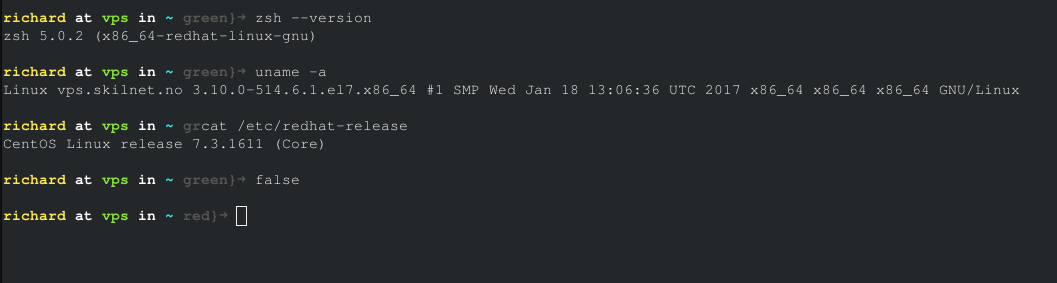
 Richard87
on 8 Jun 2017
Richard87
on 8 Jun 2017
@Richard87 Please try with a latest ZSH version. See comments https://github.com/denysdovhan/spaceship-zsh-theme/issues/93#issuecomment-301806636 and https://github.com/denysdovhan/spaceship-zsh-theme/issues/93#issuecomment-301817139
salmanulfarzy
on 10 Jun 2017
Hi, I just updated zsh to version 5.3.1 (compiled myself), and I still have the same problem :/
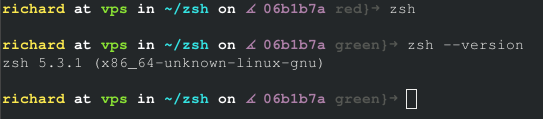
Richard87
on 3 Jul 2017
Well, that's a surprise. Can you provide more information about the setup ?
salmanulfarzy
on 3 Jul 2017
This is the steps I took:
- cloned git clone git://git.code.sf.net/p/zsh/code
- git checkout tags/zsh-5.3.1
- yum install ncurses-devel
- ./Util/precofig
- ./configure
- make
- sudo make install
uname -a:
Linux vps.domain.com 3.10.0-514.6.1.el7.x86_64 #1 SMP Wed Jan 18 13:06:36 UTC 2017 x86_64 x86_64 x86_64 GNU/Linux
Not sure what other information that is useful for you?
Richard
Richard87
on 3 Jul 2017
@Richard87 Sorry, I'm unable to reproduce the issue with similar setup. Would be great if someone could help resolve this.
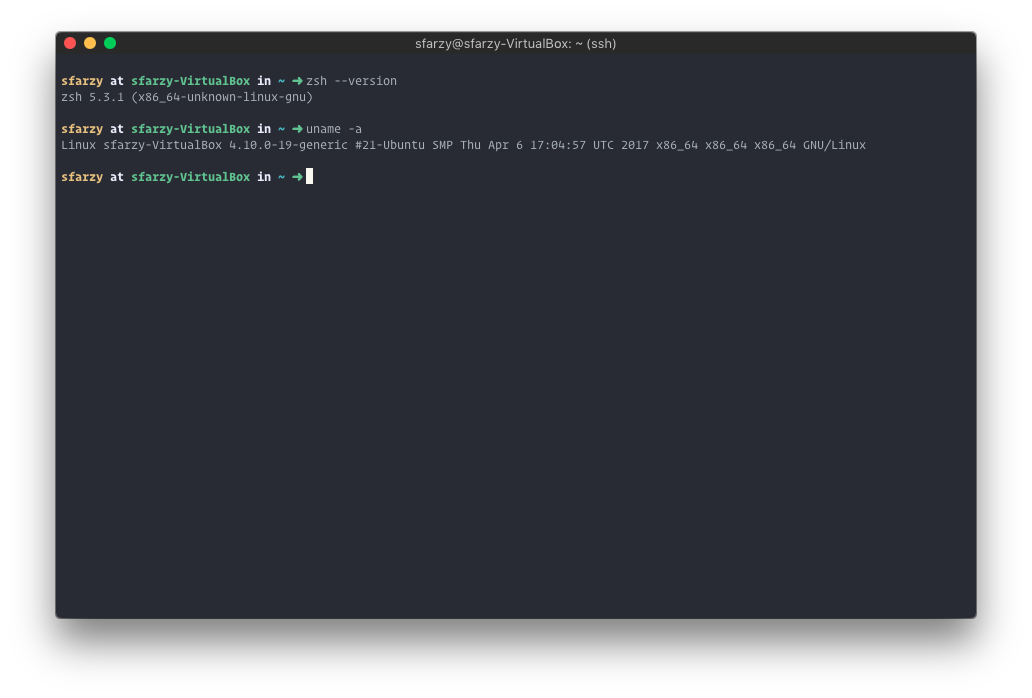
salmanulfarzy
on 3 Jul 2017
Strange! Maybe the issue is in some library?
man. 3. jul. 2017 kl. 16:11 skrev Salmanul Farzy notifications@github.com:
@Richard87 https://github.com/richard87 Sorry, I'm unable to reproduce
the issue with similar setup.[image: image]
https://user-images.githubusercontent.com/10276208/27796373-6db95018-6027-11e7-940d-103e7244e1e4.png—
You are receiving this because you were mentioned.
Reply to this email directly, view it on GitHub
https://github.com/denysdovhan/spaceship-zsh-theme/issues/93#issuecomment-312655935,
or mute the thread
https://github.com/notifications/unsubscribe-auth/AFe7026m_5ecw63me6jfxyio4SJKgX2vks5sKPaagaJpZM4NU2Gi
.
Richard87
on 3 Jul 2017
Maybe the issue is in some library
If you are mentioning external libraries in theme, We are only using git library from oh-my-zsh. I don't think that could do this.
salmanulfarzy
on 3 Jul 2017
I'm using these plugins: plugins=(git sudo dnf ng npm ssh-agent)
I was thinking if zsh used some underlying libraries that have not been updated :/
Richard87
on 3 Jul 2017
Hi, I think a problem is locally at my computer :/
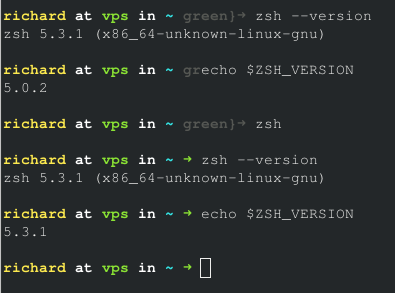
But I don't understand why it loads the wrong version of zsh :(
Richard87
on 3 Jul 2017
alright, it works, I have too many copies of zsh on mmy system :/
Richard87
on 3 Jul 2017
Glad it was resolved. I'm closing this issue now.
salmanulfarzy
on 3 Jul 2017
Related issues
 AlecRust
·
3Comments
AlecRust
·
3Comments
 gillesdemey
·
3Comments
salmanulfarzy
·
3Comments
gillesdemey
·
3Comments
salmanulfarzy
·
3Comments
 vburojevic
·
3Comments
vburojevic
·
3Comments
 jwhipp
·
3Comments
jwhipp
·
3Comments