Sp-starter-kit: Changing Font and Fontsize in React Application Alerts?
Category
- [x] Question
Question
Hi Folks,
Am getting to grips with using React Application Alerts and wondered if its possible to modify the font and fontsize of the banner that appears at the top?
Looking at the code I've noticed the CreateElement function - is it possible to modify this to include a font size change? Am pretty new to React inline styling and not sure how to proceed :/
var AlertNotifications = (function (_super) {
__extends(AlertNotifications, _super);
function AlertNotifications() {
return _super !== null && _super.apply(this, arguments) || this;
}
AlertNotifications.prototype.render = function () {
return (React.createElement("div", null, this.props.alerts.map(function (alert) { return React.createElement(MessageBar, { messageBarType: alert.type === AlertType.Urgent ? MessageBarType.severeWarning : MessageBarType.warning, isMultiline: false },
alert.message,
alert.moreInformationUrl ? React.createElement("a", { href: alert.moreInformationUrl }, strings.MoreInformation) : ''); })));
};
return AlertNotifications;
}(React.Component));
export { AlertNotifications };
Am guessing the font classname could be injected in the return (React.createElement("div", [fontsize font here],.....)
Any ideas here, am a little stuck :(
Many thanks in advance
G
 GeoffE1e6
All 5 comments
Thank you for reporting this issue. We will be triaging your incoming issue as soon as possible.
![msftbot[bot] picture](https://avatars.githubusercontent.com/in/26612?v=4&s=40) msftbot[bot]
on 4 May 2021
msftbot[bot]
on 4 May 2021
Hi. You absolutely can the font size for your application customizer, however you wouldn't do it in the way you are trying to. The HTML is contained in the component (AlertNotification.tsx) This is the location where you would apply the styles.
Here is a sample of react inline styles https://zhenyong.github.io/react/tips/inline-styles.html
However, you wouldn't be doing it in the render like this example, you'd create your style variable in the tsx file, and reference it in your html. e.g.
 public render(): React.ReactElement<IAlertNotificationsProps> {
    var divStyle = {
      color: 'red'
    };

    return (
      <div style={divStyle}>
        {this.props.alerts.map(alert => <MessageBar
          messageBarType={alert.type === AlertType.Urgent ? MessageBarType.severeWarning : MessageBarType.warning}
          isMultiline={false}
        >
          {alert.message}
          {alert.moreInformationUrl ? <a href={alert.moreInformationUrl}>{strings.MoreInformation}</a> : ''}
        </MessageBar>)}
      </div>
    );
  }
 bcameron1231
on 4 May 2021
bcameron1231
on 4 May 2021
Hi there,
Many thanks for getting back :)
I've applied the modification you suggested using fontSize:16 instead of color: 'red' so it looks like this:
export class AlertNotifications extends React.Component
var divStyle = {
fontSize:16
};
return (
  **<div style= {divStyle}>**
    {this.props.alerts.map(alert => <MessageBar
      messageBarType={alert.type === AlertType.Urgent ? MessageBarType.severeWarning : MessageBarType.warning}
      isMultiline={false}
    >
      {alert.message}
      {alert.moreInformationUrl ? <a href={alert.moreInformationUrl}>{strings.MoreInformation}</a> : ''}
    </MessageBar>)}
  </div>
);
}
}
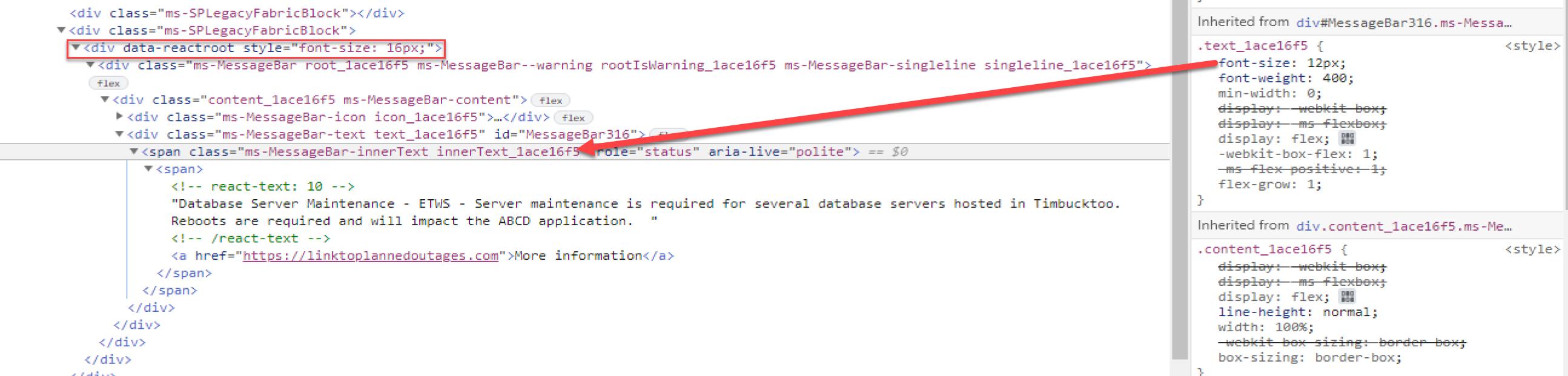
Redeployed, and checked out console F12 view to see if it took hold and noticed the DIV tag div data-reactroot style="font-size 16px" is there. However, nothing has changed ref the status message - shows same font size as before (12px). Noticed that within the block the font size is being overridden by .text_lace16F5 in the span-class block that holds the message - any ideas how to force that to 16px?
GeoffE1e6
on 5 May 2021
Hi, ah, yes. Sorry I was just answering your question on how to inject css into react controls. This component is using an old version of the UIFabric MessageBar, as a result there isn't a way we can pass style properties to it. However, you could override the styles globally within the component (not great, but kind of your only option here)
Create a new scss file for your solution called AlertNotification.module.scss
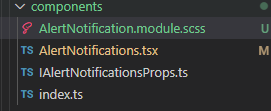
Paste this text into it
.MessageBarAlert{
    :global{
        //outer container
        .ms-MessageBar{
              //inner container
            .ms-MessageBar-content{
                //messagebar text
                .ms-MessageBar-innerText{
                    color:red;
                    font-size:16px;
                }
            }
        }
    }
}
Then update your TSX file
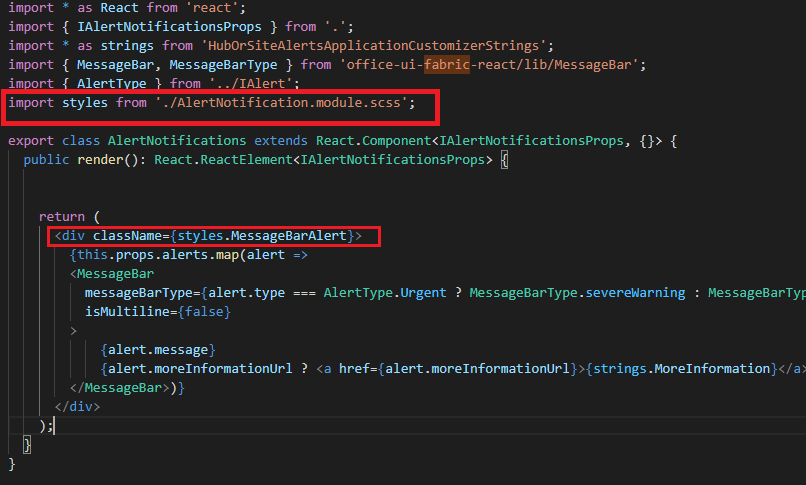
It's kind of hacky, we are just overriding the default styles of the class names provided by the UI Fabric control.
bcameron1231
on 7 May 2021
Hi,
Many thanks - that worked a treat! And certainly learned something there!
Very Best Regards, and ace app!
Geoff
GeoffE1e6
on 7 May 2021
Related issues
 pdemro
·
6Comments
pdemro
·
6Comments
 alimughalx
·
10Comments
alimughalx
·
10Comments
 quantrpeter
·
5Comments
quantrpeter
·
5Comments
 bergersj
·
8Comments
bergersj
·
8Comments
 VesaJuvonen
·
5Comments
VesaJuvonen
·
5Comments