Sp-starter-kit: New install all webparts not working manifest not found
Thank you for reporting an issue or suggesting an enhancement. We appreciate your feedback - to help the team to understand your needs, please complete the below template to ensure we have the necessary details to assist you.
_(DELETE THIS PARAGRAPH AFTER READING)_
Category
- [ ] Question
- [x ] Bug
- [ ] Enhancement
Expected or Desired Behavior
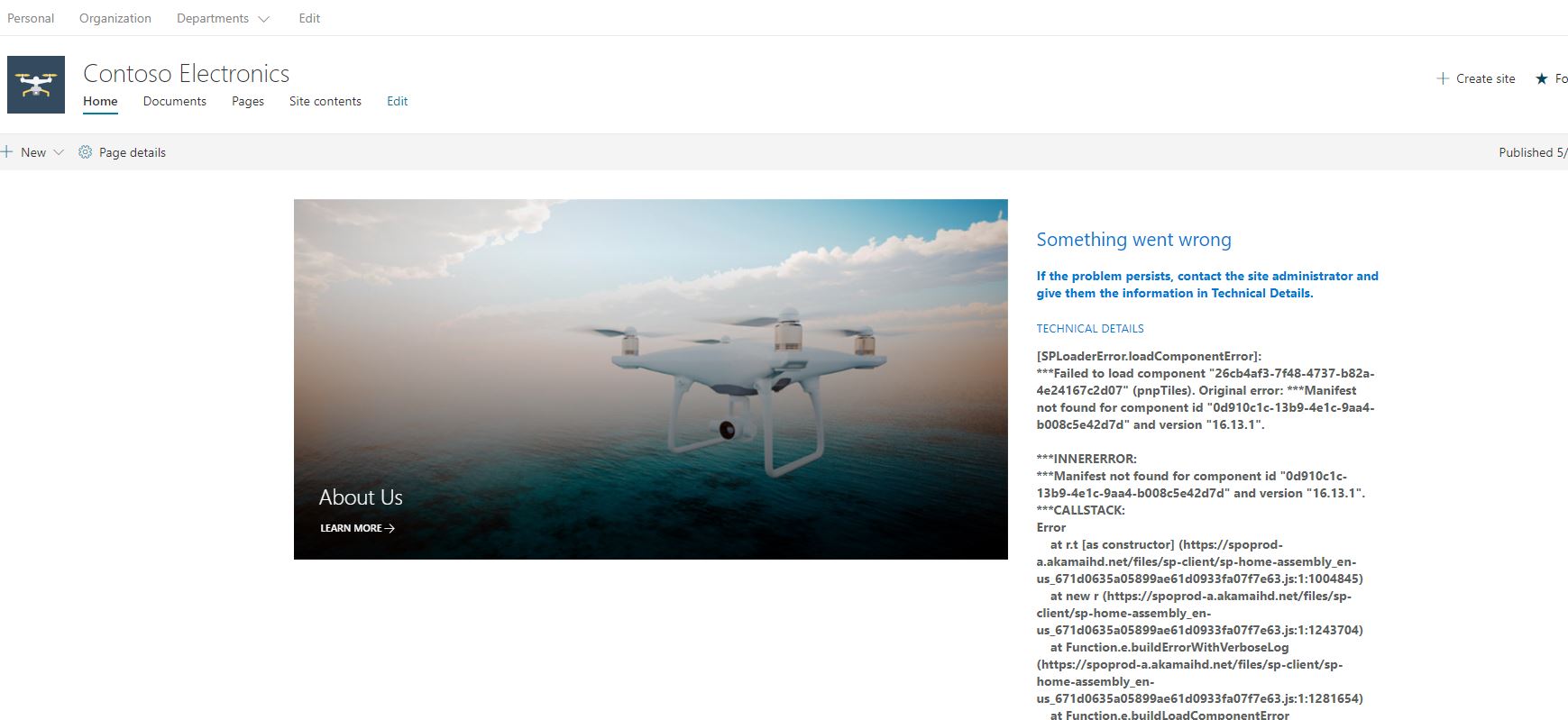
Deployed the template as per the instructions and get the following error for all added webparts:
INNERERROR:
*Manifest not found for component id "0d910c1c-13b9-4e1c-9aa4-b008c5e42d7d" and version "16.13.1".
**CALLSTACK:
Error
at r.t [as constructor] (https://spoprod-a.akamaihd.net/files/sp-client/sp-home-assembly_en-us_671d0635a05899ae61d0933fa07f7e63.js:1:1004845)
at new r (https://spoprod-a.akamaihd.net/files/sp-client/sp-home-assembly_en-us_671d0635a05899ae61d0933fa07f7e63.js:1:1243704)
at Function.e.buildErrorWithVerboseLog (https://spoprod-a.akamaihd.net/files/sp-client/sp-home-assembly_en-us_671d0635a05899ae61d0933fa07f7e63.js:1:1281654)
at Function.e.buildLoadComponentError (https://spoprod-a.akamaihd.net/files/sp-client/sp-home-assembly_en-us_671d0635a05899ae61d0933fa07f7e63.js:1:1277685)
at https://spoprod-a.akamaihd.net/files/sp-client/sp-home-assembly_en-us_671d0635a05899ae61d0933fa07f7e63.js:1:1271311
Steps to Reproduce
Deployed starter kit in microsoft dev environemnt
Thanks for your contribution! Sharing is caring.
 schoydog
All 14 comments
Thank you for reporting this issue. We will be triaging your incoming issue as soon as possible.
![msftbot[bot] picture](https://avatars.githubusercontent.com/in/26612?v=4&s=40) msftbot[bot]
on 13 May 2020
msftbot[bot]
on 13 May 2020
i have tried to disable public cdn setting also
schoydog
on 13 May 2020
Hello I'm having this exact issue on Sharepoint Onlne
Any ETA on the solution? this has affected pretty much all my sites on production
Thanks!
 ICiscoStu
on 13 May 2020
ICiscoStu
on 13 May 2020
This is for brand new installs from a recently pulled solution / sppkg deployment?
 eoverfield
on 13 May 2020
eoverfield
on 13 May 2020
In my case the kit was installed on 06/15/2019, once it started failing we redeployed the latest version thinking that was the reason, as a matter of fact, it was not.
currently deployed version: 1.5.4.0
for extra context, the solution was working correctly as of yesterday 5/13/2020
Thanks!
ICiscoStu
on 13 May 2020
Thank you for the additional info. The solution has been working fine for near 11 months, it started to fail with the error above, so you then downloaded the latest project solution, re-provisioned the new sppkg, and you see the same error?
eoverfield
on 13 May 2020
Thank you for the additional info. The solution has been working fine for near 11 months, it started to fail with the error above, so you then downloaded the latest project solution, re-provisioned the new sppkg, and you see the same error?
correct
ICiscoStu
on 13 May 2020
any Idea what could be the Issue
ICiscoStu
on 13 May 2020
My best guess is a combination of spfx 1.9.1 and 1.10.0. Im in the process of upgrading the sppkg to 1.10.0, and cleaning up other misalignment of package versions. Tests out well, im bundling the new pnp file, will test that, and once it looks good will push the commit. Ill drop a note here as well once ready.
You will want to take the updated sppkg from the packages folder, once available, and simply re-deploy to your app catalog. I am seeing off app catalog deployment delays today as well. Maybe a platform glitch?
eoverfield
on 13 May 2020
@ICiscoStu please either pull the latest master branch or what you really need is the updated sppkg found in the latest commit's package folder.
https://github.com/pnp/sp-starter-kit/tree/master/package
The updated package has also been updated in the pnp provisioning file, thus you could run a completely new provisioning, though that should not be needed to address this issue.
After you upload and replace the sppgk in your tenant app catalog, give it a few minutes to rest as I found the cdn took time to update. I noticed errors around the language files were not found, yet after a few minutes, the urls started to work.
eoverfield
on 13 May 2020
This is for brand new installs from a recently pulled solution / sppkg deployment?
Yes only installed couple of days ago
schoydog
on 14 May 2020
@schoydog please try uploading the new sppkg found in the packages folder that was committed today into your tenant app catalog. This should correct your issues. You can also pull the entire master branch and re-provision the entire kit, although that should not be necessary.
eoverfield
on 14 May 2020
@schoydog please try uploading the new sppkg found in the packages folder that was committed today into your tenant app catalog. This should correct your issues. You can also pull the entire master branch and re-provision the entire kit, although that should not be necessary.
Yes this worked perfectly all fixed for me. Thank so much for your quick response.
schoydog
on 14 May 2020
Hi @eoverfield
Update working as expected, thank you!
ICiscoStu
on 14 May 2020
Related issues
 VesaJuvonen
·
5Comments
VesaJuvonen
·
5Comments
 jonasbjor
·
8Comments
jonasbjor
·
8Comments
 lancebitner
·
5Comments
lancebitner
·
5Comments
 karigeir
·
5Comments
karigeir
·
5Comments
 88naveen
·
8Comments
88naveen
·
8Comments