Sp-starter-kit: SharePoint Starter Kit deployment "Resource Not Found Error"
Category
- [ X] Question
- [X ] Bug
- [ ] Enhancement
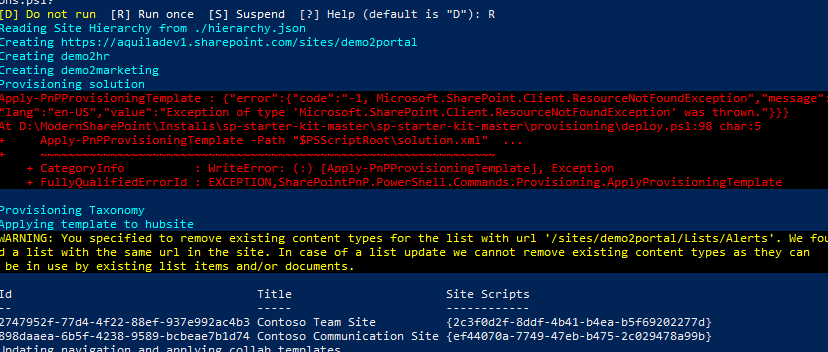
I am trying to deploy the SharePoint starter kit. All the prerequisites are met. But getting errors "ResoourceNotFoundException" during "Provisioning solution" stage in the deployment script".
Expected or Desired Behavior
After the deployment all the client side webparts should be available on the page. There should not be any errors while running the deploy.ps1 script.
Observed Behavior
Hub site and team sites are provisioned correctly, can access the sites, branding applied but webparts, extensions etc are not deployed. Can't see Tiles, Footer etc in the Hub site. Provisioning solution step throws as an error "ResoourceNotFoundException". Please find the screenshot below:
Please help!
 NagJoshi
All 12 comments
So there seem to be something not 100% right with the sharepoint-starter-kit.sppkg currently available in the master branch of the repository.
I have a fork of this repository, and I did this in a few steps:
Made sure my repository was up to date. You could either pull from upstream, or just clone this respository.
Checkout out the DEV branch
With Node console "CD" into the "Solution" and run
npm installIn the Node console I ran these commands one by one:
-gulp -f "gulpfile.js" clean
- gulp -f "gulpfile.js" build
- gulp -f "gulpfile.js" bundle --ship
- gulp -f "gulpfile.js" package-solution --ship
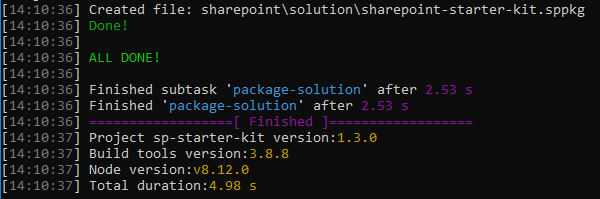
Now I uploaded the new
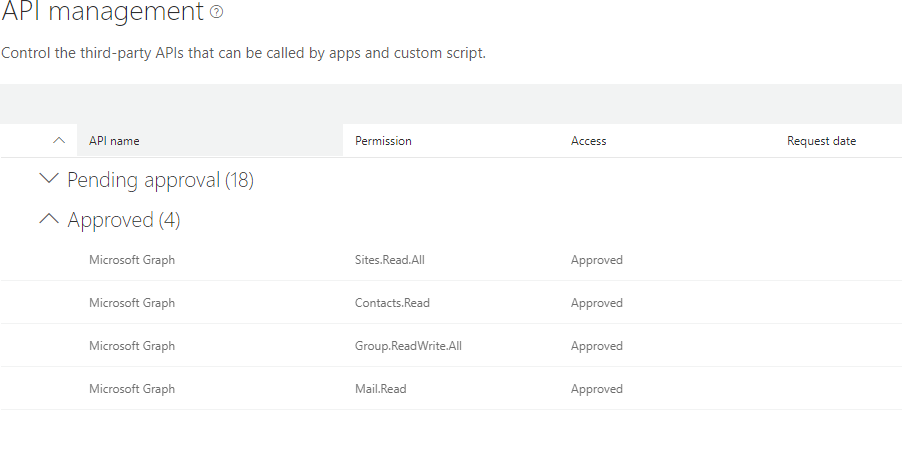
sharepoint-starter-kit.sppkgfrom "/solution/sharepoint/solution/sharepoint-starter-kit.sppkg"
 simonagren
on 25 Sep 2018
simonagren
on 25 Sep 2018
Hej Simon.
Thank you for taking the time for the detailed investigation and solution. Really huge help!
Best,
Thomas
 thomasberman
on 25 Sep 2018
thomasberman
on 25 Sep 2018
@thomasberman No probs man! Hope it helps :)
Let me know!
simonagren
on 25 Sep 2018
We had a package built from an earlier starter kit download (downloaded in July) and it had the following snippet in the package-solution.json:
"$schema": "https://dev.office.com/json-schemas/spfx-build/package-solution.schema.json",
We have been successfully deploying this package to various test tenants, but this morning we were deploying this package to a test tenant and came across the same error, we updated the schema to:
"$schema": "https://developer.microsoft.com/json-schemas/spfx-build/package-solution.schema.json",
And it worked from then on.
Not sure if this is in release notes somewhere (not had a chance to check yet).
If you check your tenant app catalog site you'll "probably" see the package has been uploaded but it's in a broken state (some of the columns are not populated).
 colinrippeyfinarne
on 25 Sep 2018
colinrippeyfinarne
on 25 Sep 2018
We had a package built from an earlier starter kit download (downloaded in July) and it had the following snippet in the package-solution.json:
"$schema": "https://dev.office.com/json-schemas/spfx-build/package-solution.schema.json",We have been successfully deploying this package to various test tenants, but this morning we were deploying this package to a test tenant and came across the same error, we updated the schema to:
"$schema": "https://developer.microsoft.com/json-schemas/spfx-build/package-solution.schema.json",And it worked from then on.
Not sure if this is in release notes somewhere (not had a chance to check yet).
If you check your tenant app catalog site you'll "probably" see the package has been uploaded but it's in a broken state (some of the columns are not populated).
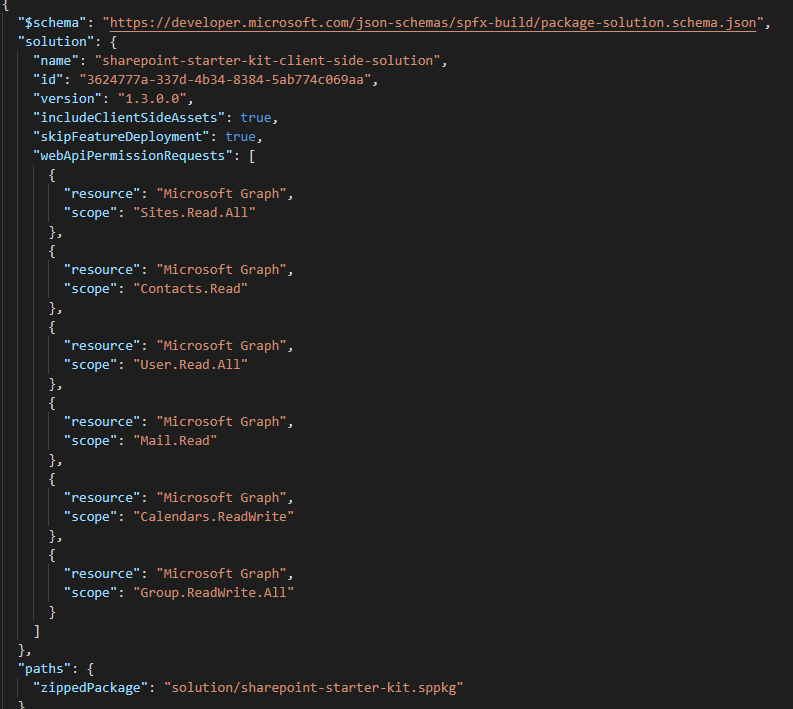
@colinrippeyfinarne you could be onto something.
At least in the dev branch this is already changed, as you can see in the image below.
simonagren
on 25 Sep 2018
@simonagren @colinrippeyfinarne
It looks like there's more to it than just the schema in package-solution.json. I updated that in Master then packaged it and I got exactly the same behavior as the original issue. When I packaged Dev like Simon recommended, it worked just fine.
Maybe @VesaJuvonen can have a look at this and update Master.
thomasberman
on 25 Sep 2018
@thomasberman I'm not sure at all on this, but glad it worked!
There are quite some differences in the "package.json" file aswell.
SPFx versions etc.
And I'm sure they will merge from dev quite soon, but it will be after Ignite at least.
simonagren
on 25 Sep 2018
Hi All, I can provide some context circa late Sept 2018. @erwinvanhunen and @waldekmastykarz in particular have been making updates to the dev branch to update the SPFx solution to v1.6 as well as add a new hierarchy provisioning component which was announced on a PnP Community call and I believe you can review here: https://youtu.be/Jjm52Pgxhjs?t=22m12s.
The dev branch has quite a few new changes, I would not suggest for your more production tenants, or rather use with caution as more is expected to change. I have not heard a timeline when the dev branch will be merged with the master branch.
Unfortunately I have not seen the issue you are reporting here. You could try taking the master branch and updating only the package-solution.json and rebuilding the SPFx solution.
 eoverfield
on 25 Sep 2018
eoverfield
on 25 Sep 2018
Hi Simon,
Thanks a lot for your reply, much appreciated. As suggested, I have tested with the Dev branch code package. Package file deployed fine, API page empty issue is resolved, approved Microsoft Graph. Web Parts, Extensions etc deployed fine and Resource Not Found error disappeared from the deploy script but this time it created some other error messages in the Apply Template step which worked fine with the Master branch code. Because of this error the template didn't get applied. It seems there are some issues with both the current Dev and Master branch code though the errors are different. Thanks once again!
NagJoshi
on 25 Sep 2018
Hi Eric, Thank you very much for the update.
NagJoshi
on 25 Sep 2018
I posted a related update: https://github.com/SharePoint/sp-starter-kit/issues/168#issuecomment-427535039
eoverfield
on 6 Oct 2018
Closing issue as "answered". If you encounter similar issue(s), please open up a NEW issue. Thank you.
![msftbot[bot] picture](https://avatars.githubusercontent.com/in/26612?v=4&s=40) msftbot[bot]
on 30 Apr 2020
msftbot[bot]
on 30 Apr 2020
Related issues
 diver7
·
7Comments
diver7
·
7Comments
 karigeir
·
5Comments
karigeir
·
5Comments
 bergersj
·
8Comments
bergersj
·
8Comments
 KaushalKhamar
·
6Comments
KaushalKhamar
·
6Comments
 ShowMeTheGita
·
7Comments
ShowMeTheGita
·
7Comments
Most helpful comment
So there seem to be something not 100% right with the
sharepoint-starter-kit.sppkgcurrently available in the master branch of the repository.I have a fork of this repository, and I did this in a few steps:
Made sure my repository was up to date. You could either pull from upstream, or just clone this respository.
Checkout out the DEV branch
With Node console "CD" into the "Solution" and run
npm installIn the Node console I ran these commands one by one:
Now I uploaded the new
sharepoint-starter-kit.sppkgfrom "/solution/sharepoint/solution/sharepoint-starter-kit.sppkg"