Sp-starter-kit: Apply-PnPProvisioningTemplate Not Running
Category
- [ ] Question
- [x] Bug
- [ ] Enhancement
Expected or Desired Behavior
After running .\deploy.ps1 -TenantUrl https://mtcdev0.sharepoint.com -WeatherCity "San Francisco" in PowerShell the demo portal sites should be deployed along with webparts & extensions.
Observed Behavior
Deployment runs successfully up to "Provisioning Solution" at which point the following error is received:
Apply-PnPProvisioningTemplate : Object reference not set to an instance of an object.
At C:\Users\sbglr\Local Documents\sp-starter-kit\provisioning\deploy.ps1:96 char:5
+     Apply-PnPProvisioningTemplate -Path "$PSScriptRoot\solution.xml"  ...
+     ~~~~~~~~~~~~~~~~~~~~~~~~~~~~~~~~~~~~~~~~~~~~~~~~~~~~~~~~~~~~~~~~~
    + CategoryInfo          : WriteError: (:) [Apply-PnPProvisioningTemplate], NullReferenceException
    + FullyQualifiedErrorId : EXCEPTION,SharePointPnP.PowerShell.Commands.Provisioning.ApplyProvisioningTemplate
The process continues and a new error pops up shortly after under "Applying template to portal":
Apply-PnPProvisioningTemplate : Guid should contain 32 digits with 4 dashes (xxxxxxxx-xxxx-xxxx-xxxx-xxxxxxxxxxxx).
At C:\Users\sbglr\Local Documents\sp-starter-kit\provisioning\deploy.ps1:124 char:1
+ Apply-PnPProvisioningTemplate -Path "$PSScriptRoot\portal.xml" -Param ...
+ ~~~~~~~~~~~~~~~~~~~~~~~~~~~~~~~~~~~~~~~~~~~~~~~~~~~~~~~~~~~~~~~~~~~~~
    + CategoryInfo          : WriteError: (:) [Apply-PnPProvisioningTemplate], FormatException
    + FullyQualifiedErrorId : EXCEPTION,SharePointPnP.PowerShell.Commands.Provisioning.ApplyProvisioningTemplate
Sites are successfully created however none of the webparts or extensions seem to be deploying and the site design remains in default configuration.
I've attached the output in the attached file "deploy output.txt". I've done my best to make sure pnp is updated, etc but I apologize in advance if I'm missing something silly. Very new to powershell.
Steps to Reproduce
Run .\deploy.ps1 -TenantUrl https://mtcdev0.sharepoint.com -WeatherCity "San Francisco" in PowerShell as admin.
 sbglr
sbglr
All 26 comments
I have the same problem as @sbglr
 ytterstrom
on 23 May 2018
ytterstrom
on 23 May 2018
I'm getting the same. I was getting
Apply-PnPProvisioningTemplate
The requested operation is part of an experimental feature that is not supported in
the current environment.
before getting the latest code. So it might be relying on a Feature that isn't activated in our Tenants yet.
 taylora3
on 23 May 2018
taylora3
on 23 May 2018
I have the same issue - running the deploy PowerShell script results in an object reference error on line 5 of solution.xml which is where it is working with the app package.
I do also see other spurious errors when running deploy.ps1 - the resulted site that is provisioned contains none of the custom Web Parts and no customisable footer.
 alexc-MSFT
on 23 May 2018
alexc-MSFT
on 23 May 2018
Following up: Additional setup instructions were added this morning because a certain someone is superhuman and updates documentation mid-conference, (thanks Vesa!)
Unfortunately the same errors currently result as mentioned in my initial post above. If there's additional context or information I can provide let me know!
sbglr
on 24 May 2018
I have the same problem as @sbglr
Apply-PnPProvisioningTemplate : Object reference not set to an instance of an object.
At C:\Users\sbglr\Local Documents\sp-starter-kit\provisioning\deploy.ps1:96 char:5
Detailed error description here:
at OfficeDevPnP.Core.Framework.Provisioning.ObjectHandlers.ObjectTenant.GetFileBytes(ProvisioningTemplate template, String fileName)
   at OfficeDevPnP.Core.Framework.Provisioning.ObjectHandlers.ObjectTenant.ProcessApps(Web web, ProvisioningTemplate template, TokenParser parser, PnPMonitoredScope scope)
   at OfficeDevPnP.Core.Framework.Provisioning.ObjectHandlers.ObjectTenant.ProvisionObjects(Web web, ProvisioningTemplate template, TokenParser parser, ProvisioningTemplateApplyingInformation applyingInformation)
   at OfficeDevPnP.Core.Framework.Provisioning.ObjectHandlers.SiteToTemplateConversion.ApplyRemoteTemplate(Web web, ProvisioningTemplate template, ProvisioningTemplateApplyingInformation provisioningInfo)
   at SharePointPnP.PowerShell.Commands.Provisioning.ApplyProvisioningTemplate.ExecuteCmdlet()
   at SharePointPnP.PowerShell.Commands.PnPCmdlet.ProcessRecord()
As I saw problem is in solution.xml file with file path to ".sppkg" file on line 6.
When I replace it with this below all goes great:
<pnp:Package Src="..\package\sharepoint-portal-showcase.sppkg" Action="UploadAndPublish" SkipFeatureDeployment="true" Overwrite="true" />
But this is temp solution. The real problem is that deploy.ps1 script don't create sppkg file if not exist.
 RaspeR87
on 24 May 2018
RaspeR87
on 24 May 2018
@RaspeR87 's solution allowed everything to run with no errors on one of my tenants. (I should note the site home pages remained in their default configuration even after a full run)
However on second tenant I ended up with the following error:
Apply-PnPProvisioningTemplate : {"error":{"code":"-1,
Microsoft.SharePoint.Client.ResourceNotFoundException","message":{"lang":"en-US","value":"Exception of type
'Microsoft.SharePoint.Client.ResourceNotFoundException' was thrown."}}}
At C:\Users\sbglr\Local Documents\sp-starter-kit\provisioning\deploy.ps1:96 char:5
+     Apply-PnPProvisioningTemplate -Path "$PSScriptRoot\solution.xml"  ...
+     ~~~~~~~~~~~~~~~~~~~~~~~~~~~~~~~~~~~~~~~~~~~~~~~~~~~~~~~~~~~~~~~~~
    + CategoryInfo          : WriteError: (:) [Apply-PnPProvisioningTemplate], Exception
    + FullyQualifiedErrorId : EXCEPTION,SharePointPnP.PowerShell.Commands.Provisioning.ApplyProvisioningTemplate
Let me know if there's additional details I can provide that might help!
sbglr
on 24 May 2018
I had this same issue, lots of errors when running deploy.sp1, although I thought I had the latest version of PnP PowerShell installed, I actually didn't.
Running Update-Module SharePointPnPPowerShell* in an admin PowerShell window downloaded the latest version and when running deploy.ps1 for second time, everything went well and I have a provisioned Starter Kit in my tenant.
Note: If you run the Update-Module command in a non admin PS window it doesn't update anything but also doesn't throw any errors or warnings either.
Check your module version using the below command
Get-Module SharePointPnPPowerShell* -ListAvailable | Select-Object Name,Version | Sort-Object Version -Descending

@taylora3 I didn't see that message in my successful run, but it could be down to your tenant release settings, initially I had this issue #6 which was resolved by changing my target release settings to everyone which enabled the API Management section in the SharePoint admin portal which this solution relies upon.
 garrytrinder
on 24 May 2018
garrytrinder
on 24 May 2018
I got it working eventually.
Had to put my tenant in to the First Release. I think this is for the API Management piece in the Admin Centre.
I then had to run the below while in the solution folder:
npm i
gulp bundle –ship
gulp package-solution –ship
(Note I got some errors and had to run: npm rebuild node-sass)
Once this was done I ran the script and it worked as expected.
This site was useful: https://beaucameron.net/2018/05/22/pnp-sp-starter-kit-hints-and-tips/?utm_source=collab365&utm_medium=collab365today&utm_campaign=daily_digest
taylora3
on 25 May 2018
Got a few problems trying to make this sample work...
```Reading Site Hierarchy from ./hierarchy.json
Creating https://cafdoc03.sharepoint.com/sites/testportal
Creating testhr
Creating testmarketing
Provisioning solution
Applying template to portal
WARNING: You specified to remove existing content types for the list with url '/sites/testportal/Lists/Alerts'. We
found a list with the same url in the site. In case of a list update we cannot remove existing content types as they
can be in use by existing list items and/or documents.
Apply-PnPProvisioningTemplate : Accès refusé. Vous n’êtes pas autorisé à effectuer cette action ou à accéder à cette
ressource.
At E:\sp-starter-kit-master\provisioningdeploy.ps1:124 char:1
- Apply-PnPProvisioningTemplate -Path "$PSScriptRoot\portal.xml" -Param ...
~~~~~~~~~~~~~~~~~
- CategoryInfo : WriteError: (:) [Apply-PnPProvisioningTemplate], ServerUnauthorizedAccessException
- FullyQualifiedErrorId : EXCEPTION,SharePointPnP.PowerShell.Commands.Provisioning.ApplyProvisioningTemplate
Set-PnPSiteDesign : Cannot bind argument to parameter 'Identity' because it is null.
At E:\sp-starter-kit-master\provisioningdeploy.ps1:129 char:29
- Set-PnPSiteDesign -Identity $teamsitedesign -WebTemplate TeamSite
~~~
- CategoryInfo : InvalidData: (:) [Set-PnPSiteDesign], ParameterBindingValidationException
- FullyQualifiedErrorId : ParameterArgumentValidationErrorNullNotAllowed,SharePointPnP.PowerShell.Commands.SetSite
Design
Set-PnPSiteDesign : Cannot bind argument to parameter 'Identity' because it is null.
At E:\sp-starter-kit-master\provisioningdeploy.ps1:131 char:29
- Set-PnPSiteDesign -Identity $communicationsitedesign -WebTemplate Com ...
~~~~~~~~
- CategoryInfo : InvalidData: (:) [Set-PnPSiteDesign], ParameterBindingValidationException
- FullyQualifiedErrorId : ParameterArgumentValidationErrorNullNotAllowed,SharePointPnP.PowerShell.Commands.SetSite
Design
Updating navigation and applying collab templates
Get-PnPProperty : Cannot bind argument to parameter 'ClientObject' because it is null.
At E:\sp-starter-kit-master\provisioningdeploy.ps1:135 char:43
- $children = Get-PnPProperty -ClientObject $departmentNode -Property C ...
~~~
- CategoryInfo : InvalidData: (:) [Get-PnPProperty], ParameterBindingValidationException
- FullyQualifiedErrorId : ParameterArgumentValidationErrorNullNotAllowed,SharePointPnP.PowerShell.Commands.Base.En
sureProperty
Cannot index into a null array.
At E:\sp-starter-kit-master\provisioningdeploy.ps1:139 char:9
- $node = Add-PnPNavigationNode -Location TopNavigationBar -Par ...
~~~~~~~~~~~~~
- CategoryInfo : InvalidOperation: (:) [], RuntimeException
- FullyQualifiedErrorId : NullArray
```
I tried quite a few things....
I modified the path in the solution.xml file, did the npm i and uploaded the sppkg into my appcatalog before running the script, but it stil doesn't work...
By the way, do you plan to document every webpart and extension independently so we can easily use them on their own or not?
Thanks in advance
 BraunJonathan
on 25 May 2018
BraunJonathan
on 25 May 2018
I have the same issue as @BraunJonathan
 MRuimerman
on 29 May 2018
MRuimerman
on 29 May 2018
I have the same issue. What I tried so far
- as @taylora3 suggested , put my tenant in to the First Release. created new package and deployed. Now the package is not throwing an error. But i still getting an error running deploy.sp1,
- I tried solution provided by @garrytrinder still same error.
Is there any other tenant configuration that i need to check?
Thanks,
 sreejithe
on 1 Jun 2018
sreejithe
on 1 Jun 2018
Make sure you add yourself as a Term Store Administrator in the SharePoint Admin Center, this is why you get the "Access Denied" error. Also ensure you are running First Release and then approved the requested API permissions (in the new SharePoint admin centre).
Once I'd done that my deployment ran without errors. :0)
 jstrugnell
on 6 Jun 2018
jstrugnell
on 6 Jun 2018
Does anybody have an Idea why I can't approve the API changes?
I am stuck at the point where I have to approve the API Changes in the API Management, but when I try to approve them it tells me:
***The ***AppCatalog doesn"t currently exist. Please click ***here to create an App Catalog site collection.
But obvioulsy it exists, as I had to upload the package to the appcatalog to get the requested changes. And when I click on the "**here" Button it even redirects me to the appcatalog.
 PhilippZumdohme
on 7 Jun 2018
PhilippZumdohme
on 7 Jun 2018
I have this same issue, but only with the SPFx-LOB* items. I've ignored it and most things seem to work anyway. Having said that I'm not sure what functionality the LOB permissions are supposed to support...
jstrugnell
on 7 Jun 2018
@jstrugnell . I'm also having the "" error while trying to approve API changes.
Its interesting the error changed to "The *AppCatalog doesn"t currently exist. Please click **here to create an App Catalog site collection." when i tried this morning (I didn't deploy any new packages)
Still can't run deploy.ps1 :(
getting the error :
Apply-PnPProvisioningTemplate : Object reference not set to an instance of an object.
sreejithe
on 7 Jun 2018
@sreejithe
By any chance, what is the URL of you AppCatalog?
PhilippZumdohme
on 8 Jun 2018
I had most of the same errors @sbglr, and seemed to have fixed them with a combination of the suggestions in this post...
- As @garrytrinder said, make sure you update all of your SharePointPNPPowerShell modules by running
Update-Module SharePointPnPPowerShell*in an admin PowerShell window. - As @taylora3 said, make sure your tenant is set to Targeted Release for Everyone (then wait until API Management shows up in the new SharePoint Admin Portal). Then you can build and upload the .sppkg file to your AppCatalog (create an App Catalog if you don't have one)
- As @jstrugnell said, make sure you are a Term Store Global Administrator
From there hopefully you can use deploy.ps1 without error. I'll be trying again on another O365 Dev Tenant later to see if any other issues arrive trying again from scratch.
 WayneJSawyer
on 11 Jun 2018
WayneJSawyer
on 11 Jun 2018
Update : I got one the starter kit working (just following the instrcutions) on one of my Tenant (yay). but still getting the error (below) on my second Tenant while approving request (Microsoft Graph API) on API management screen
The *AppCatalog doesn"t currently exist. Please click **here to create an App Catalog site collection.
Looks like the issue is related to the Tenant and not with the Starter Kit package.
sreejithe
on 11 Jun 2018
I have the same issue like @BraunJonathan has described and tried everything that has been mentioned before:
- New E3 tenant
- Switched to target release for all
- Created app catalog
- Waited for API Section to be available
- Added tenant admin as TermStore admin
Updated PNP PowerShell module to version 2.27.1806.0

Executed the deploy.ps1 with following error messages:
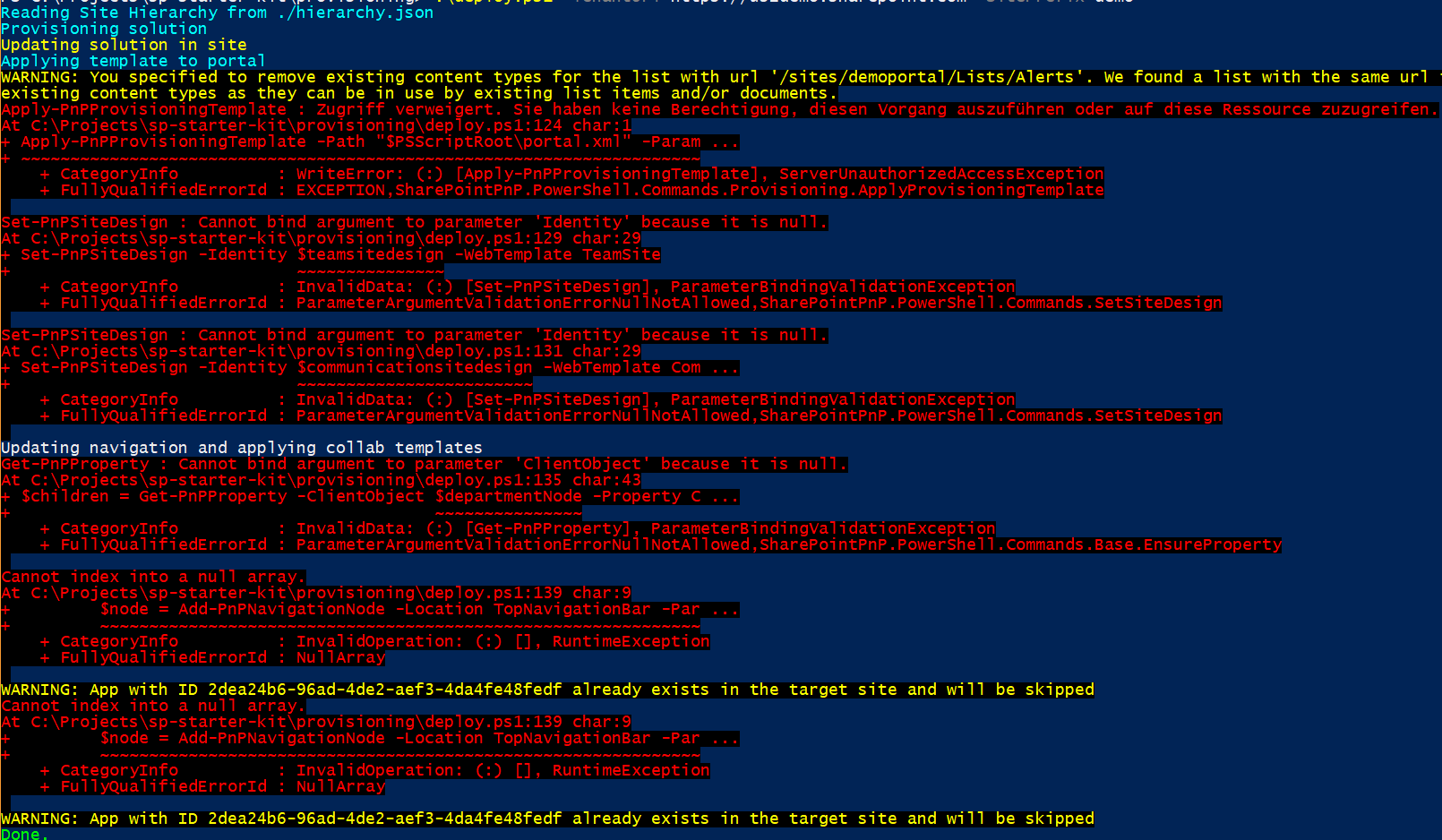
- Two days ago I had the same error message within API-Section that "AppCatalog does not exists". Today I got an error like "Serviceprincipal was not found…"

Could language of tenant (german) be a problem?
 hohenp
on 12 Jun 2018
hohenp
on 12 Jun 2018
@hohenp yes #17 states that any other default language than german will cause issues. Although your issue seems to be related to access issues.
I've setup a new tenant to test sp-starter-kit for now using https://demos.microsoft.com which allows you (not sure which licenses are required) to create new english tenants.
 andreasblueher
on 14 Jun 2018
andreasblueher
on 14 Jun 2018
Hi, I've tried installing starter kit twice now, and have done all the following -
- Updated SharePointPnPPowershell to 2.27.1806.1
- Added myself(Tenant Global Admin) as Taxonomy Admin.
- I already had set it to Targeted Release for everyone under Org Profile.
- Uploaded sharepoint-starter-kit.sppkg to App Catalog.
Any resolution for this ?
Also when running Deploy.ps1, I kept getting prompted for username and password 2-3 times.
At the end I saw the 3 site collections created, with DemoPortal designated as hub, and HR and Marketing as connected site collections. They all had the default theme and template and not the custom Site Design.
I also don't see any of the custom webparts, I checked in the Apps section and I could not see the "Started Kit" App available for deployment to the site, so all the custom webparts were not there.
Reading Site Hierarchy from ./hierarchy.json
Creating https://xxxxxx.sharepoint.com/sites/demoportal
Creating demohr
Creating demomarketing
Provisioning solution
Apply-PnPProvisioningTemplate : {"error":{"code":"-1,
Microsoft.SharePoint.Client.ResourceNotFoundException","message":{"lang":"en-US","value":"Exception of type
'Microsoft.SharePoint.Client.ResourceNotFoundException' was thrown."}}}
At C:\sharepoint\sp-starter-kit-master\sp-starter-kit-master\provisioningdeploy.ps1:95 char:5
- Apply-PnPProvisioningTemplate -Path "$PSScriptRoot\solution.xml" -Connection ...
~~~~~~~~~~~~~~~~
- CategoryInfo : WriteError: (:) [Apply-PnPProvisioningTemplate], Exception
- FullyQualifiedErrorId : EXCEPTION,SharePointPnP.PowerShell.Commands.Provisioning.ApplyProvisioningTemplate
Update-AppIfPresent : Cannot process argument transformation on parameter 'Connection'. Cannot convert the
 hsamdani12
on 17 Jun 2018
hsamdani12
on 17 Jun 2018
Just an update, the sppkg was not deployed and was getting errors so deployed again and it did get me through the errors. The new web parts show up. Now only thing I saw missing was it didn't apply the custom theme, and the Company Theme is not there. I will need to do it manually.
hsamdani12
on 17 Jun 2018
So i'm having the same issue as i'm quite new to this.
Apparently access denied on PnPprovisioning.
I'm tenant administrator
administrator in the term somebody get me on the right track?
I think my tenant is in English, but I can't seem to get this info..
In the API management i see a lot of API names pending for approval which i can't approve for several reasons.. Can somen
Apply-PnPProvisioningTemplate : Toegang geweigerd. U bent niet gemachtigd om deze bewerking uit te voeren of deze bron
te openen.
At C:\Users\LindavanBakkum\sp-starter-kit-master\provisioningdeploy.ps1:123 char:1
- Apply-PnPProvisioningTemplate -Path "$PSScriptRoot\portal.xml" -Param ...
~~~~~~~~~~~~~~~~~
- CategoryInfo : WriteError: (:) [Apply-PnPProvisioningTemplate], ServerUnauthorizedAccessException
- FullyQualifiedErrorId : EXCEPTION,SharePointPnP.PowerShell.Commands.Provisioning.ApplyProvisioningTemplate
Set-PnPSiteDesign : Cannot bind argument to parameter 'Identity' because it is null.
At C:\Users\LindavanBakkum\sp-starter-kit-master\provisioningdeploy.ps1:128 char:29
- Set-PnPSiteDesign -Identity $teamsitedesign -WebTemplate TeamSite
~~~
- CategoryInfo : InvalidData: (:) [Set-PnPSiteDesign], ParameterBindingValidationException
- FullyQualifiedErrorId : ParameterArgumentValidationErrorNullNotAllowed,SharePointPnP.PowerShell.Commands.SetSite
Design
Set-PnPSiteDesign : Cannot bind argument to parameter 'Identity' because it is null.
At C:\Users\LindavanBakkum\sp-starter-kit-master\provisioningdeploy.ps1:130 char:29
- Set-PnPSiteDesign -Identity $communicationsitedesign -WebTemplate Com ...
~~~~~~~~
- CategoryInfo : InvalidData: (:) [Set-PnPSiteDesign], ParameterBindingValidationException
- FullyQualifiedErrorId : ParameterArgumentValidationErrorNullNotAllowed,SharePointPnP.PowerShell.Commands.SetSite
Design
Updating navigation and applying collab templates
Get-PnPProperty : Cannot bind argument to parameter 'ClientObject' because it is null.
At C:\Users\LindavanBakkum\sp-starter-kit-master\provisioningdeploy.ps1:134 char:43
- $children = Get-PnPProperty -ClientObject $departmentNode -Property C ...
~~~
- CategoryInfo : InvalidData: (:) [Get-PnPProperty], ParameterBindingValidationException
 lbakkum
on 19 Jun 2018
lbakkum
on 19 Jun 2018
Hi. If someone get an error of access denied during the execution of the template with Portal.xml like the following message:
Apply-PnPProvisioningTemplate : Access Denied....
At line:1 char:1
- Apply-PnPProvisioningTemplate -Path .\portal.xml -Parameters @{"Weath ...
~~~~~~~~~~~~~~~~~
- CategoryInfo : WriteError: (:) [Apply-PnPProvisioningTemplate], ServerUnauthorizedAccessException
- FullyQualifiedErrorId : EXCEPTION,SharePointPnP.PowerShell.Commands.Provisioning.ApplyProvisioningTemplate
you should enable the custom code execution on your tenant
Set-SPOsite
Official documentation: https://support.office.com/en-us/article/allow-or-prevent-custom-script-1f2c515f-5d7e-448a-9fd7-835da935584f
I found the issue with the trace enabled while applying the template (Set-PnPTraceLog -On -Level Debug)
powershell.exe Warning: 0 : 2018-06-28 12:25:28.9539 [List instances] [14] [Information] Skip adding/upda
ting custom actions because the site has "noscript" enabled. 6569ms 12e06483-d730-41a9-b091-dccb00d7e90a
The issue is raised when trying to create the PPTX file on Site Assests.
Well, hope this finding is usefull for someone.
Grettings!
 Javapower77
on 28 Jun 2018
Javapower77
on 28 Jun 2018
Here is a summary of working steps:
1- Ensure that you meet the requirements for SharePoint Framework development and are using the latest version of PnP PowerShell
2- Prepare your tenant, by accomplishing the tasks highlighted in document Preparing your tenant for the PnP SharePoint Starter Kit.
3- Upload and deploy the sharepoint-starter-kit.sppkg from the /package folder to your app catalog.
This.will produce error "Error in the Application" when you upload package to app catalog but that is ok some how.

- Make your account term store administrator.
5- Set your tenant to First Release
 dougraheem
on 30 Jun 2018
dougraheem
on 30 Jun 2018
This is an issue that has been addressed via updated documentation as well as an updated provisioning process. Closing.
 eoverfield
on 29 Nov 2019
eoverfield
on 29 Nov 2019
Related issues
 ShowMeTheGita
·
7Comments
ShowMeTheGita
·
7Comments
 bergersj
·
8Comments
bergersj
·
8Comments
 KaushalKhamar
·
6Comments
KaushalKhamar
·
6Comments
 diver7
·
7Comments
diver7
·
7Comments
 tchagan
·
4Comments
tchagan
·
4Comments
Most helpful comment
I have the same issue as @BraunJonathan