Sp-dev-fx-webparts: react-my-personal-apps links not saving
Thank you for reporting a bug! Use the sections below to submit a bug ONLY if it's related to samples in this repo. If you have an issue or question about the SharePoint Framework or its documentation, please submit it at https://aka.ms/spdev-issues
Sample (which sample are you having trouble with)
react-my-personal-apps
https://github.com/pnp/sp-dev-fx-webparts/tree/master/samples/react-my-personal-apps
Authors
João Mendes
Expected or Desired Behavior
https://github.com/pnp/sp-dev-fx-webparts/tree/master/samples/react-my-personal-apps
Using the above links and instructions installed the package .
Using this users want to save their personal links
Observed Behavior
When saving the links it does not save .
Steps to Reproduce
https://github.com/pnp/sp-dev-fx-webparts/tree/master/samples/react-my-personal-apps
Use the instructions as per the package link,
Steps to reproduce the behavior:
- Go to 'Edit Modern page add spfx webpart “My Personal Apps and link” '
- Click on ' Add link with information'
- Click Save button , but links not saved.
- See error
Environment Details (Development & Target environment)
- OS: [e.g. Windows 10
- Target Environment: [ SharePoint Online]
- Framework: []
- Browser(s): [Chrome v79 ]
- Tooling:
- Additional details: The more context you can provide, the easier it is (and therefore quicker) to help.
Additional context

 Masoodsa
All 6 comments
Thank you for reporting this issue. We will be triaging your incoming issue as soon as possible.
![msftbot[bot] picture](https://avatars2.githubusercontent.com/in/26612?v=4&s=40) msftbot[bot]
on 1 Dec 2020
msftbot[bot]
on 1 Dec 2020
Hello @hugoabernier
Can I work on this?
 SmitaNachan
on 1 Dec 2020
SmitaNachan
on 1 Dec 2020
@SmitaNachan by all means, be my guest! I've assigned this to you. Thanks for taking the lead on this!
 hugoabernier
on 1 Dec 2020
hugoabernier
on 1 Dec 2020
Hi @Masoodsa
The personal app links are getting saved.
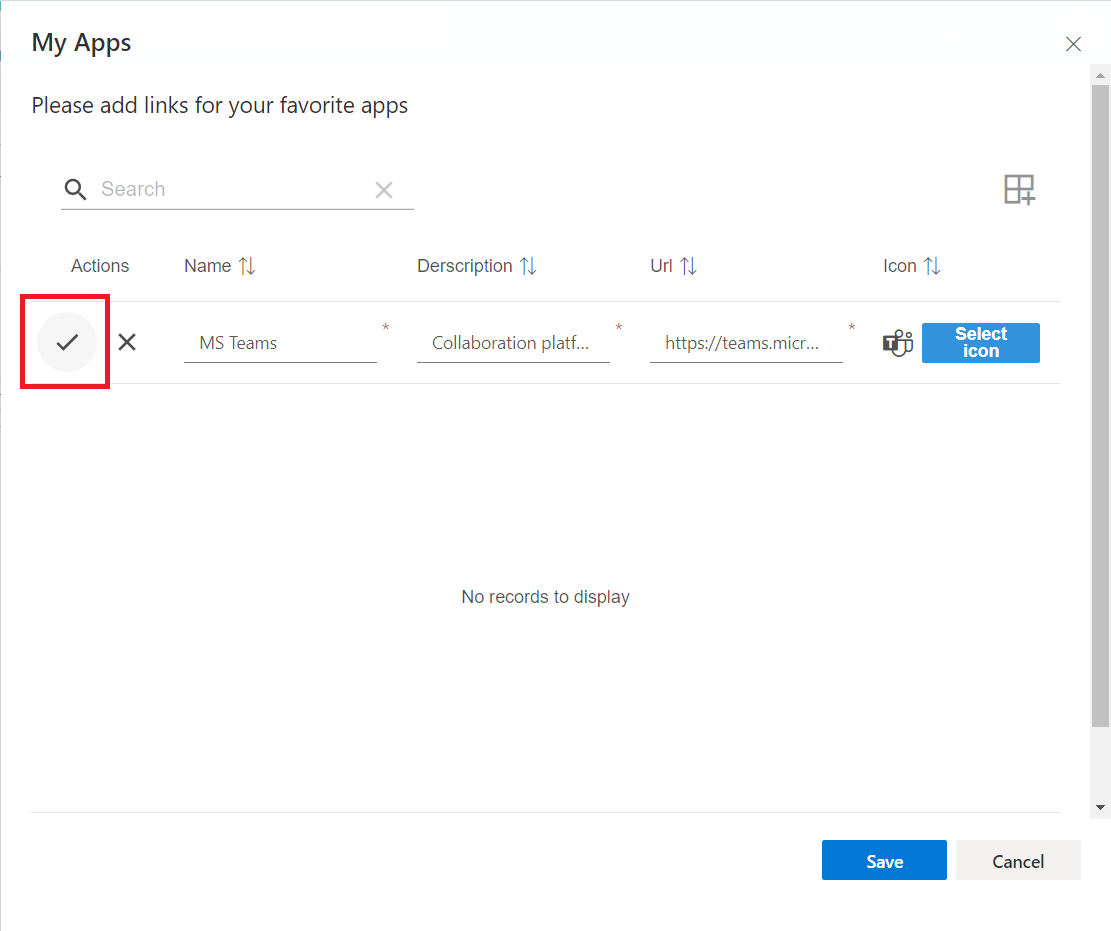
Looking at the Steps to produce provided by you, looks you are missing a step to click the tick (as highlighted in below image) before clicking Save.
SmitaNachan
on 3 Dec 2020
Hi Smita,
Thanks for your great support and excellent diagnose skill.
Again Thanks a lot.
Regards
Shah
Masoodsa
on 3 Dec 2020
@Masoodsa I'm going to go ahead and close this issue.
If you're running into more issues, don't hesitate to reach out.
Thanks @SmitaNachan for your help with this one.
hugoabernier
on 3 Dec 2020
Related issues
 sivanu137
·
4Comments
sivanu137
·
4Comments
 albegut
·
4Comments
albegut
·
4Comments
 eldoro80
·
4Comments
eldoro80
·
4Comments
 Brentless
·
5Comments
Brentless
·
5Comments
 parmira5
·
4Comments
parmira5
·
4Comments