Sp-dev-fx-webparts: React-pages-hierarchy - Orientation of icons in breadcrum in mobile view
@bogeorge
Hi there, I've used your webpart in an demo for a collegue. She is very happy with the breadcrum :-) So thanks again. Gonna us it for an implementation.
The thing that we noticed however when viewing the page on a mobile phone, is the orientation of the icons in the breadcrum. They point down. See screen:
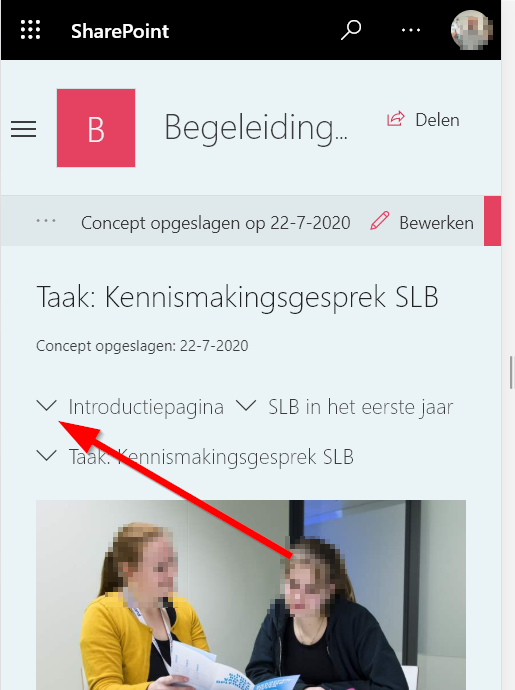
Any ideas how to fix this problem?
 eldoro80
All 4 comments
Thank you for reporting this issue. We will be triaging your incoming issue as soon as possible.
![msftbot[bot] picture](https://avatars2.githubusercontent.com/in/26612?v=4&s=40) msftbot[bot]
on 22 Jul 2020
msftbot[bot]
on 22 Jul 2020
@eldoro80, so the down arrow was me trying to get fancy when the web part was in a narrow zone. If you want to change it Line 48 in the BreadcrumbLayout.tsx is where I swap the icon. You should just be able to replace ChevronDown with ChevronRight and rebuild and deploy.
<Icon iconName="ChevronDown" className={styles.breadcrumbLayoutVerticalIcon} />
 bogeorge
on 22 Jul 2020
bogeorge
on 22 Jul 2020
@bogeorge thanks! It's very fancy indeed (-: Maybe a bit to fancy (-;
eldoro80
on 22 Jul 2020
@eldoro80 I hope that @bogeorge 's answer works for you. I'll go ahead and close this issue for now. Thank you @bogeorge for your help!
 hugoabernier
on 22 Jul 2020
hugoabernier
on 22 Jul 2020
Related issues
 joshburns49
·
3Comments
joshburns49
·
3Comments
 albegut
·
4Comments
albegut
·
4Comments
 floriemoulin
·
4Comments
floriemoulin
·
4Comments
 acsaba31
·
4Comments
acsaba31
·
4Comments
 russgove
·
4Comments
russgove
·
4Comments
Most helpful comment
@eldoro80, so the down arrow was me trying to get fancy when the web part was in a narrow zone. If you want to change it Line 48 in the BreadcrumbLayout.tsx is where I swap the icon. You should just be able to replace ChevronDown with ChevronRight and rebuild and deploy.