Sp-dev-fx-webparts: react-page-navigator HTML formatting bug
Sample (which sample are you having trouble with)
react-page-navigator
Authors
@aakashbhardwaj619
Expected or Desired Behavior
The text shouldn't have additional HTML codes such as < br > and < span >. This usually appears before or after the headers.
Observed Behavior
The headers have additional formatting text, which changes when the page is publish. Each time the page is published, the text changes. Below are screenshots of the same webpart but the page has been published twice.
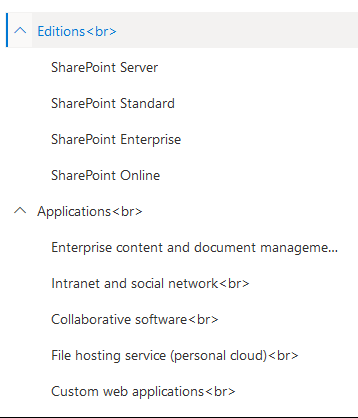
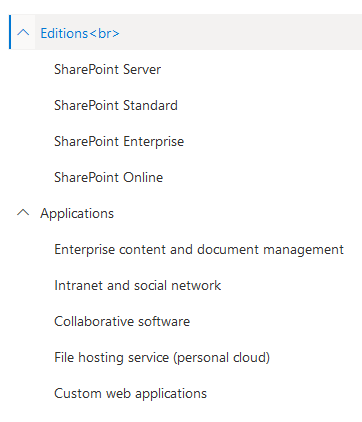
As you can see, the < br > appears a number of times on the first image and only once in the second image
Steps to Reproduce
- Insert text on the page using the text webpart
- Select text as Header 1, Header 2, etc.
- Insert Page Navigator on right-hand vertical sections
- Publish or Republish page.
Environment Details (Development & Target environment)
- OS: Windows 10
- Target Environment: SharePoint Online
- Framework: Node.js v8.15.0
- Browser(s): Chrome 84, FireFox 79
- Tooling: VS Code
 JaggB
JaggB
All 7 comments
Thank you for reporting this issue. We will be triaging your incoming issue as soon as possible.
![msftbot[bot] picture](https://avatars2.githubusercontent.com/in/26612?v=4&s=40) msftbot[bot]
on 7 Aug 2020
msftbot[bot]
on 7 Aug 2020
Hi @hugoabernier
Can I take this up?
 nanddeepn
on 12 Aug 2020
nanddeepn
on 12 Aug 2020
Thanks @nanddeepn, the issue is now assigned to you.
 hugoabernier
on 12 Aug 2020
hugoabernier
on 12 Aug 2020
Hi @nanddeepn , I fixed this and a related issue with broken anchor tags in our tenant as described here: https://github.com/pnp/sp-dev-fx-webparts/issues/1037#issuecomment-672881064
So far, the fix works quite well. Just to let you know. :-)
 pchaotic
on 12 Aug 2020
pchaotic
on 12 Aug 2020
@nanddeepn please make sure to mention both this issue and #1037 when you submit your PR so we can mark them both as resolved.
Thanks again for taking this one on!
hugoabernier
on 12 Aug 2020
Hi @nanddeepn , I fixed this and a related issue with broken anchor tags in our tenant as described here: #1037 (comment)
So far, the fix works quite well. Just to let you know. :-)
Thanks @pchaotic and @hugoabernier
nanddeepn
on 12 Aug 2020
Hi @hugoabernier
Submitted PR for this. Please review.
nanddeepn
on 13 Aug 2020
Related issues
 Abiman194
·
4Comments
Abiman194
·
4Comments
 joshburns49
·
3Comments
joshburns49
·
3Comments
 ChristianSaldivar
·
3Comments
ChristianSaldivar
·
3Comments
 shrirampophali
·
4Comments
shrirampophali
·
4Comments
 acsaba31
·
4Comments
acsaba31
·
4Comments
Most helpful comment
Hi @nanddeepn , I fixed this and a related issue with broken anchor tags in our tenant as described here: https://github.com/pnp/sp-dev-fx-webparts/issues/1037#issuecomment-672881064
So far, the fix works quite well. Just to let you know. :-)