Sp-dev-fx-controls-react: Rich Text editor Control
[x ] Enhancement
A rich text editor that lets users 'enhanced' rich text inline, like in classic pages.
 russgove
All 44 comments
Could that be a great starting point? https://github.com/SharePoint/sp-dev-fx-webparts/tree/master/samples/react-textboxio. Franck Cornu did a great job there... Could be interesting to wrap that as a reusable control!
 sebastienlevert
on 4 Jan 2018
sebastienlevert
on 4 Jan 2018
@russgove and @sebastienlevert this is indeed a good starting point. We are looking into using the code of the first party control, but this might take some time. So, we could start by using this one in combination with the third party library dependency. In the future, we might deprecate it, and replace it with the one coming from SharePoint itself.
 estruyf
on 10 Jan 2018
estruyf
on 10 Jan 2018
I am crating one for my current project, but it uses CKEditor. I would be glad to contribute if thats OK.
russgove
on 10 Jan 2018
@russgove that would be great!
estruyf
on 10 Jan 2018
Just to be clear though, the 'toolbar' only works if your in classic pages.
This is fine for spfx webparts being used as listforms because you cannot
use spfx webparts on listforms in modern pages. Not a big deal.
On Wed, Jan 10, 2018 at 1:37 PM, Elio Struyf notifications@github.com
wrote:
@russgove https://github.com/russgove that would be great!
—
You are receiving this because you were mentioned.
Reply to this email directly, view it on GitHub
https://github.com/SharePoint/sp-dev-fx-controls-react/issues/20#issuecomment-356695472,
or mute the thread
https://github.com/notifications/unsubscribe-auth/ACTRnGTBgEFRmtXuAhY8nxFApGqWDJmjks5tJQN8gaJpZM4RGXxZ
.
russgove
on 10 Jan 2018
ok, I moved my code into my local branch at https://github.com/russgove/sp-dev-fx-controls-react/tree/rte.
Can you check it out there and give me some feedback, or should I do a commit?
russgove
on 11 Jan 2018
btw, we really should identifiy all the sharepoint FIELD controls we think we will need (Date, RTE, taxonomy, DateTimePicker, etc...) and come up with some kind of common/reccommended interface to use for FIELD controls before we start creating them all. first step would be to identify the controls we think we need. I'm talking about controls to edit list fields here. Perhaps ListFieldCOntrols should have a particular naming convention as well so users know what its meant for?
The TextFieldWithEdit in my repo is meant to be a 'generic' control. I use it on a page with some text where i want to let the user change some text and call a function when he clicks save, It uses the The RichTextEditor control.
The RichTextEditor control is suuitable for use on a new/editform. It has getValue method you would call when you want to save your changes.
russgove
on 11 Jan 2018
hey, i did a commit on the rich text editor. did u get it
russgove
on 2 Feb 2018
@russgove I have seen it and tested it out. Behaviour still feels the same as before. This is one of the hardest controls to get right, but I feel if we release this, it needs to be providing additional value. ATM the control does not give you any controls to manage text like heading, italic, font weight, ...
estruyf
on 2 Feb 2018
hey, i'm not sure what you mean by 'behavior still feels the same as before'... this is. a new control.
yo can adjust fonts using the controls menu. are you not seeing that after installing?
Sent from my iPad
On Feb 2, 2018, at 7:33 AM, Elio Struyf notifications@github.com wrote:
@russgove I have seen it and tested it out. Behaviour still feels the same as before. This is one of the hardest controls to get right, but I feel if we release this, it needs to be providing additional value. ATM the control does not give you any controls to manage text like heading, italic, font weight, ...
—
You are receiving this because you were mentioned.
Reply to this email directly, view it on GitHub, or mute the thread.
russgove
on 3 Feb 2018
This is the experience I have when using your branch.
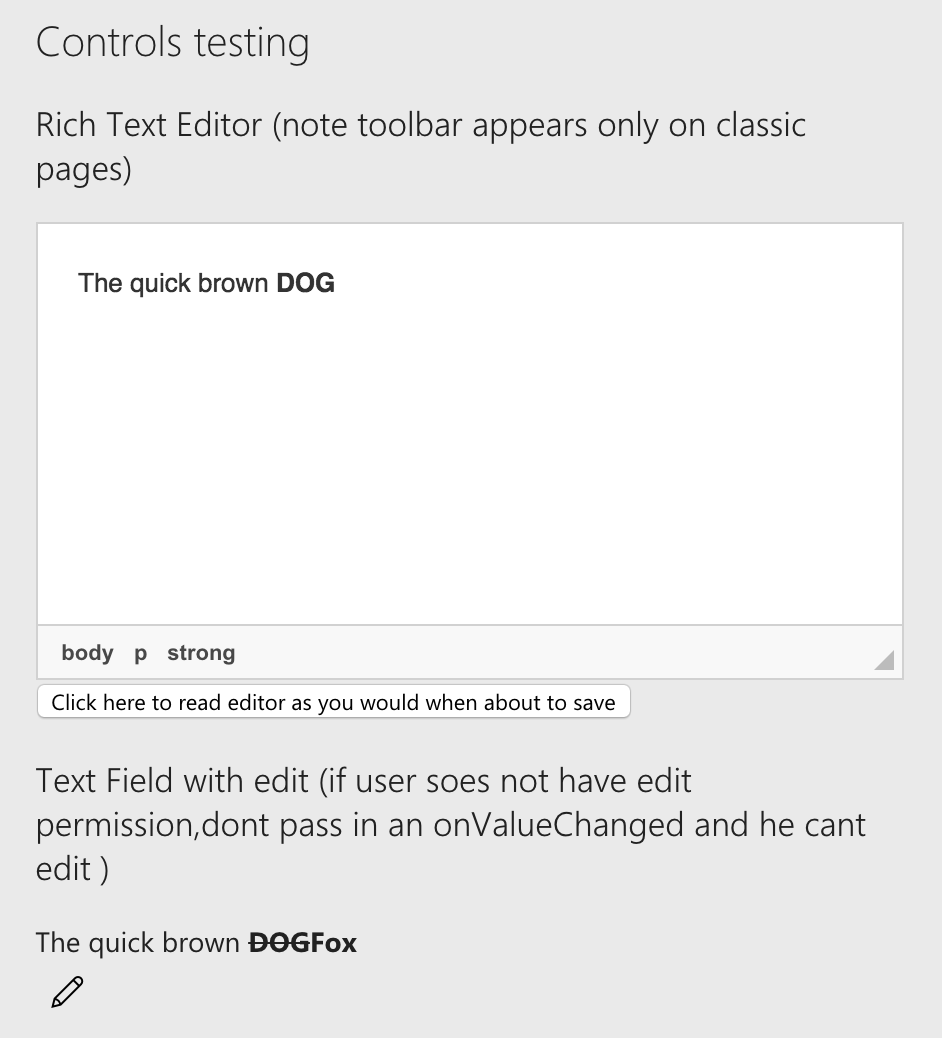
I don't have any controls for changing the text.
estruyf
on 5 Feb 2018
yeah, thats what I mentioned earlier... Just to be clear though, the 'toolbar' only works if you're in classic pages.
I was just looking at tinymce editor. The api is almost identical. When I get sone time i'll switch to tinymce and see if that works better.
russgove
on 6 Feb 2018
Don't invest to much time, because at some point we might be able to switch to the one from SharePoint.
estruyf
on 6 Feb 2018
I duplicated the one from SharePoint for my projects, using textbox.io. I'd be happy to share what I've done.

Let me how I can contribute!
 hbgeorgian
on 8 Mar 2018
hbgeorgian
on 8 Mar 2018
That one looks great!
estruyf
on 12 Mar 2018
@hbgeorgian any change of sharing the code?
 ErnstWolthaus
on 18 Jul 2018
ErnstWolthaus
on 18 Jul 2018
Hey Elio, did this control get merged?
@hbgeorgian - any chance of submitting this control?
 NigelWit
on 26 Sep 2018
NigelWit
on 26 Sep 2018
@hbgeorgian, you should submit a pull request (PR) as described here: https://help.github.com/articles/creating-a-pull-request/
 msgx
on 3 Dec 2018
msgx
on 3 Dec 2018
The problem of this would be the license of textbox.io, check this issue: https://github.com/SharePoint/sp-dev-fx-webparts/issues/410 - So we cannot get this included in the library.
estruyf
on 3 Dec 2018
Would the same control, but created using Quill work? I'd be happy to take this one on.
 hugoabernier
on 4 Dec 2018
hugoabernier
on 4 Dec 2018
I submitted a PR for a richtext control a month ago.
Here is what it looks like:

It uses Quill (which is open source) and shouldn't have the same licensing issues as CKE.
Let me know if there is anything I'm missing? (I did submit the changes unsolicited) Not sure if I followed the right process.
hugoabernier
on 31 Jan 2019
That's an amazing implementation! We'll done! Borderline confusing with the OOTB Text webpart haha!
sebastienlevert
on 2 Feb 2019
@hugoabernier that looks good! Is there any way to extend to use tables and embed video/image?
 jonathanhotono
on 4 Feb 2019
jonathanhotono
on 4 Feb 2019
Thanks! Quill.js (which I use for this implementation) doesn't support tables without additional plug-ins. I didn't want to go through the effort unless there was demand for it.
As for embedding images/videos, I considered it, but wanted to stay as close as possible to the out-of-the-box RTE. Again, if there is demand, I'd be happy to add it.
Let's wait and see if this pull request gets approved first?
hugoabernier
on 4 Feb 2019
Cool. Let's see whether overtime tables and embeds required for editors as we can direct them to use normal OOTB modern webparts to achieve it.
Could be tricky to implement images as we will need the file explorer component (which microsoft does not share) so user can easily find their images compared to passing normal url.
jonathanhotono
on 4 Feb 2019
@jonathanhotono I just submitted a PR for a sample in the sp-dev-fx-webparts repo that implements a custom file picker.

Right now, I only tested it for images, but I wrote it with the intent to support other file types.
Maybe we could extract the picker code out of the sample and make it a PnP property control?
hugoabernier
on 4 Feb 2019
That's an amazing implementation! We'll done! Borderline confusing with the OOTB Text webpart haha!
@sebastienlevert Thanks! I'm not happy with the implementation of the pop-up panel (I wanted it to behave exactly like the oob RTE web part), but I couldn't figure out a way to do it for a control.
My panel floats above the page, while the oob RTE web part property pane shifts the content of the page.
If anyone has an idea how to do it, please let me know.
hugoabernier
on 4 Feb 2019
@hugoabernier will try to process it later this week, but just found out the MS has its own rich-text editor called Rooster: https://github.com/Microsoft/roosterjs - They also provide a React version: https://github.com/Microsoft/roosterjs-react
Might be better to test this one out first and maybe see if this could replace Quil.js
estruyf
on 4 Feb 2019
@estruyf Thanks for finding roosterjs!
Let's hold off on processing the PR then, and let me see what I can do about roosterjs and amend/resubmit PR.
hugoabernier
on 4 Feb 2019
@estruyf Good news/bad news.
Good news
- I can definitely change the RTE to use Rooster and make it look/behave exactly like the OOB RTE
- Rooster adds support for tables and media (@jonathanhotono will be pleased!)
- Rooster is much lighter in footprint.
Bad news
- As soon as I add any references to Rooster or Rooster-react, it starts outputting tons of warnings. It still works, but the terminal lights up like a christmas tree. Warnings such as (multiply by 100x):
...
(Emitted value instead of an instance of Error) Cannot find source file '../../../../packages/roosterjs-editor-dom/lib/inlineElements/getInlineElementBeforeAfter.ts': Error: Can't resolve '../../../../packages/roosterjs-editor-dom/lib/inlineElements/getInlineElementBeforeAfter.ts' in 'c:\users\hugoa\onedrive\SPFx\Rooster\node_modules\roosterjs-editor-dom\lib\inlineElements'
NonErrorEmittedError: (Emitted value instead of an instance of Error) Cannot find source file
../../../../packages/roosterjs-editor-dom/lib/inlineElements/getInlineElementBeforeAfter.ts': Error: Can't resolve '../../../../packages/roosterjs-editor-dom/lib/inlineElements/getInlineElementBeforeAfter.ts' in 'c:\users\hugoa\onedrive\SPFx\Rooster\node_modules\roosterjs-editor-dom\lib\inlineElements'
    at emitWarning (c:\users\hugoa\onedrive\SPFx\Rooster\node_modules\webpack\lib\NormalModule.js:117:16)
    at c:\users\hugoa\onedrive\SPFx\Rooster\node_modules\source-map-loader\index.js:80:7
    at onError (c:\users\hugoa\onedrive\SPFx\Rooster\node_modules\enhanced-resolve\lib\Resolver.js:65:10)
    at loggingCallbackWrapper (c:\users\hugoa\onedrive\SPFx\Rooster\node_modules\enhanced-resolve\lib\createInnerCallback.js:31:19)
    at runAfter (c:\users\hugoa\onedrive\SPFx\Rooster\node_modules\enhanced-resolve\lib\Resolver.js:158:4)
    at innerCallback (c:\users\hugoa\onedrive\SPFx\Rooster\node_modules\enhanced-resolve\lib\Resolver.js:146:3)
    at loggingCallbackWrapper (c:\users\hugoa\onedrive\SPFx\Rooster\node_modules\enhanced-resolve\lib\createInnerCallback.js:31:19)
    at next (c:\users\hugoa\onedrive\SPFx\Rooster\node_modules\tapable\lib\Tapable.js:252:11)
    at c:\users\hugoa\onedrive\SPFx\Rooster\node_modules\enhanced-resolve\lib\UnsafeCachePlugin.js:40:4
    at loggingCallbackWrapper (c:\users\hugoa\onedrive\SPFx\Rooster\node_modules\enhanced-resolve\lib\createInnerCallback.js:31:19)
Unfortunately, I'm still new to React and Node.js, webpack, etc.
I suspect it is related to sourcemaps, but I can't seem to turn the warnings off. I'm sure that if anyone added the PnP controls and suddenly started getting tons of warnings, they wouldn't be happy.
If someone can help me find a way to resolve the warnings, I'd be happy to rework my richtext editor to use Rooster instead.

hugoabernier
on 4 Feb 2019
@hugoabernier I'll try to figure out how we can solve this. Thank you for testing it out!
estruyf
on 7 Feb 2019
If you don't really care about the warning, I was able to get around the warnings by adding a suppression to gulpfile.js
let regex = new RegExp("^(\\(Emitted value instead of an instance of Error\\))*");
build.addSuppression(regex);
 araver
on 8 Feb 2019
araver
on 8 Feb 2019
Just created my own POC for the roosterjs, seems that they didn't include their source files to which the sourcemaps are pointing to. That is why you see all these warnings pop-up.
Like @araver mentioned, we could suppress these warnings for now.
estruyf
on 22 Feb 2019
Created a new branch with the POC for the RichtTextEditor control: https://github.com/SharePoint/sp-dev-fx-controls-react/tree/rooster-poc
estruyf
on 22 Feb 2019
Any update on this guys? @hugoabernier the screenshot above looks incredible and would be great to have that added to the library. It's exactly what we need!
Out of interest @estruyf if MS use Quil.js for the OOB text editor - even though they have Rooster - then why wouldn't you use that?
 glyn-clough-wm-reply
on 21 Mar 2019
glyn-clough-wm-reply
on 21 Mar 2019
@glyn-clough-WM-reply I believe the current pr is on hold because I'm rewriting the control to use Rooster.
Rooster is an awesome rte but it definitely has its challenges. I hope to submit a new pr in the next few days.
hugoabernier
on 21 Mar 2019
The PR for this has been merged and control will be available in 1.13.0. If you already want to test out the control, you can do that by installing the beta version: https://sharepoint.github.io/sp-dev-fx-controls-react/beta/
estruyf
on 28 Mar 2019
The PR for this has been merged and control will be available in 1.13.0. If you already want to test out the control, you can do that by installing the beta version: https://sharepoint.github.io/sp-dev-fx-controls-react/beta/
Thanks @estruyf it'll give me time to reach out to the rooster team and see if we can solve some issues with the custom toolbar support. I haven't given up yet!
hugoabernier
on 28 Mar 2019
Hi @estruyf ,
could you please let us know that when RTE control will be available to use in SPFx using react?
 vermaraj83
on 19 Apr 2019
vermaraj83
on 19 Apr 2019
The new version is now building and will be released in a couple of minutes.
estruyf
on 24 Apr 2019
I have created a RichText control to use in List Form customization using custom spfx webpart. It is working fine to save rich text value while creating a new item but when trying to open existing list item then all other fields are loaded properly in the web part but rich text value is showing blank. I am trying to load the values from componetdidmount using the below code
sp.web.lists.getByTitle("list title").items.getById(
this.setState({Title: item["Title"]});
this.setState({Date: new Date(parseInt(item["Date"].split("T")[0].split("-")[0]),parseInt(item["Date"].split("T")[0].split("-")[1])-1,parseInt(item["Date"].split("T")[0].split("-")[2]))});
this.setState({Month: {key:item["Month"]}});
this.setState({Year: {key:item["Year"]}});
this.setState({DocumentType: {key:item["Document_x0020_Type"]}});
this.setState({BA: {key:item["BA"]}});
this.setState({Division: {key:item["DIV"]}});
this.setState({ValueAmount: item["Value"]});
this.setState({Currency: {key:item["Currency"]}});
this.setState({DocID: item["Document_x0020_ID"]});
this.setState({Description: item["Description"]});
});
Here is the rich text control
Please suggest.
 subhasishmukhopadhyay
on 28 Jul 2019
subhasishmukhopadhyay
on 28 Jul 2019
HI Team,
I am also facing the above issue and struggling alot from few days...please update about the issue
@VesaJuvonen @siddharth-vaghasia : Please help....
 sunnysinha05
on 17 Jun 2020
sunnysinha05
on 17 Jun 2020
@sunnysinha05 .... looks like a long, old and closed thread... it would be better if you open a new issue, which will get require attention and being specific what issue are you facing with a screenshot would help.
 siddharth-vaghasia
on 17 Jun 2020
siddharth-vaghasia
on 17 Jun 2020
@siddharth-vaghasia @VesaJuvonen
Already raised this issue with all info and screenshot, but not getting any updates on it :(
https://github.com/pnp/sp-dev-fx-controls-react/issues/588
sunnysinha05
on 17 Jun 2020
Related issues
 christopher-walker
·
7Comments
christopher-walker
·
7Comments
 joelfmrodrigues
·
4Comments
joelfmrodrigues
·
4Comments
 AdiuTankT72
·
4Comments
AdiuTankT72
·
4Comments
 thespooler
·
6Comments
thespooler
·
6Comments
 shrikantmane
·
3Comments
shrikantmane
·
3Comments
Most helpful comment
I duplicated the one from SharePoint for my projects, using textbox.io. I'd be happy to share what I've done.

Let me how I can contribute!