Sormas-project: Information about user types when creating new user
I recently started supporting the imis project and while going through the SORMAS project together last week, we noticed a few areas for improvement.
Feature Description
When creating a new user, a variety of user types are shown from which you can choose.
Problem Description
The variety of user types can be confusing. The differences between the types and their permissions are not clear.
Proposed Change
The page for creating a new user should provide information about the different user types and their permissions, either directly on the page or by a link to the manual.
 ctiona
All 9 comments
This would be very helpful, yes please! @bernardsilenou - should we consider including/linking to this in the Glossary, or should we keep them separate?
 Candice-Louw
on 27 Oct 2020
Candice-Louw
on 27 Oct 2020
@ctiona thanks for contributing! :)
I think there are two separate issues: The first is concerned with the user when he is already interacting with the permission checkboxes. Adding a link to a manual like we do in the export/import menu would help in case of questions.
Regarding the second, I totally agree @Candice-Louw that this should be also included in a more general reference.
There is already a document in the wiki of this project, though. Don't know what the best way is to organize all the documentation in general.
 JonasCir
on 27 Oct 2020
JonasCir
on 27 Oct 2020
@ctiona @Candice-Louw
The main sormas wiki page https://github.com/hzi-braunschweig/SORMAS-Project/wiki/User-Access-Document is mainly for developers while the glossary is for user https://github.com/hzi-braunschweig/SORMAS-Glossary/wiki
My suggestion is to add the link to the glossary on the user management page.
For all the menu items, we would need a wiki page in the sormas glossary. @JonasCir is working on setting up how we would add and manage the documents
@ctiona I did not understand your first point. However, when a user is creating an account, the user must have read the user right document and also know what they are doing.
 bernardsilenou
on 27 Oct 2020
bernardsilenou
on 27 Oct 2020
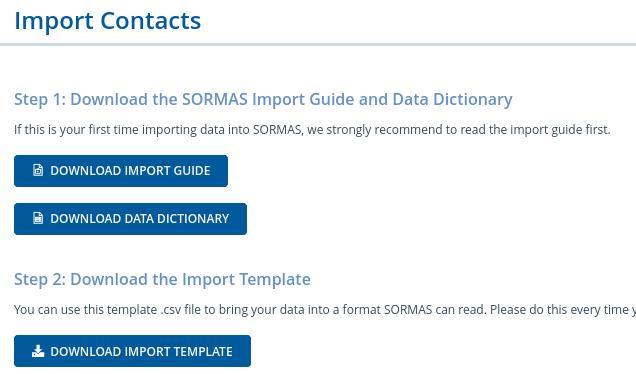
@bernardsilenou The idea is that there is a button where they can download the manual/description right besides the check boxes as a cheat sheet. This is conceptually similar to what we do in import/export see
JonasCir
on 27 Oct 2020
Alternatively we could use tool tips if you hover with your cursors over the check boxes
JonasCir
on 27 Oct 2020
I also agree that this would really help the users. It could look something like this.

We could then at least provide the user rights document that already exists. This can also then be updated in case there will ever be changes regarding user roles and rights.
 kwa20
on 27 Oct 2020
kwa20
on 27 Oct 2020
@ctiona We have a complete refactoring of the user roles on the horizon that will make them completely configurable per server. Because of that, this feature would quickly become obsolete, so I don't think it's something we should do now.
 MateStrysewske
on 28 Oct 2020
MateStrysewske
on 28 Oct 2020
@MateStrysewske If this feature would basically allow to deposit a document, couldn't we use that to deposit the user rights document initially and then later provide a guide on how to configure the user rights after the complete configurability has been added?
I guess this assumes that the admin will be able to make such configurations which I guess they'll be able to (USER_RIGHT_MANAGE)?
Depending on how far in you already are in developing the complete configurability, this issue might serve as a second step.
kwa20
on 2 Nov 2020
@kwa20 We haven't started with the development yet, but we've already put quite some time into the design thinking. We're not exactly sure how we'll handle saving the user right configurations right now.
MateStrysewske
on 3 Nov 2020
Related issues
bernardsilenou
·
5Comments
 raghupola-vg
·
5Comments
raghupola-vg
·
5Comments
 markusmann-vg
·
6Comments
markusmann-vg
·
6Comments
 shawnsarwar
·
6Comments
kwa20
·
3Comments
shawnsarwar
·
6Comments
kwa20
·
3Comments
Most helpful comment
I also agree that this would really help the users. It could look something like this.

We could then at least provide the user rights document that already exists. This can also then be updated in case there will ever be changes regarding user roles and rights.