Sormas-project: Prompt to save/discard unsaved changes opens up when leaving person form in read-only mode
Bug Description
When entering the person form in read-only mode, the prompt to save/discard unsaved changes open upon leaving the form. This probably also happens when not in read-only mode. The proposed fix should be to make sure that all code that changes the value of fields should be executed before the listeners that are responsible for the prompt to open are added.
 MateStrysewske
All 29 comments
@MateStrysewske I can confirm that this sometimes also happens to users that could edit the form but haven't made any changes before navigating somewhere else. (test1401)
 kwa20
on 29 Sep 2020
kwa20
on 29 Sep 2020
When navigating out of event participants, prompt is not triggered when changes have been made.
kwa20
on 30 Sep 2020
Moved the issue with the event participants to #3042
MateStrysewske
on 1 Oct 2020
I can't reproduce this on my local system. We'll put this issue on Waiting until the next release. Maybe there's some kind of side effects that have resolved the issue in the meantime.
MateStrysewske
on 2 Oct 2020
@MateStrysewske I could reproduce it on sormas.symeda, 1,49,1.
When a pages eg case form is open, no information is edited on the form, when you try to navigate to another from, the pop up message for unsaved changes appear. I suggest we should only show this message of the user changed a filed on the form and do not save
 bernardsilenou
on 4 Oct 2020
bernardsilenou
on 4 Oct 2020
Can you please tell me the UUID of the case where you've encountered this?
MateStrysewske
on 5 Oct 2020
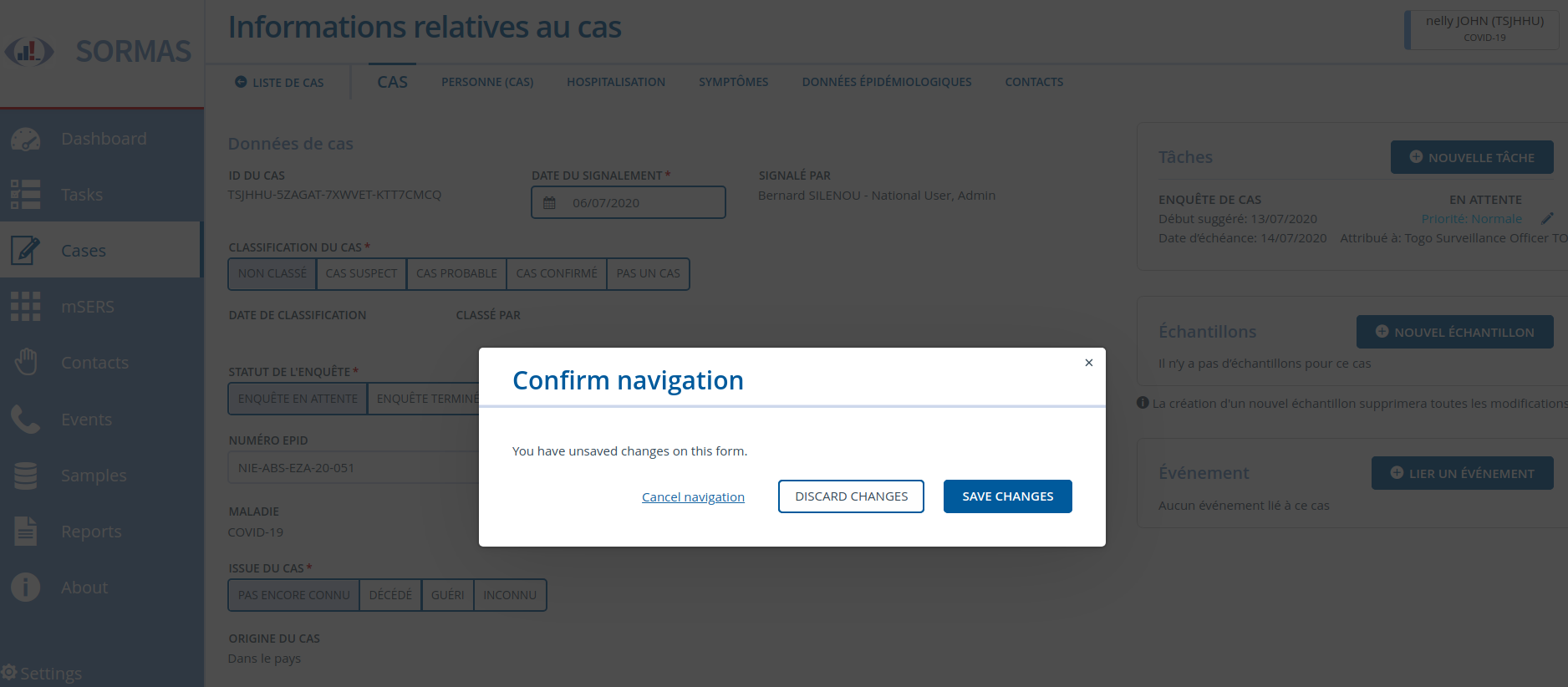
@MateStrysewske I am on sormas.symeda with version 1,49,1. I experienced this issue when leaving the case tab only. Other tabs are ok.
Case is: TSJHHU-5ZAGAT-7XWVET-KTT7CMCQ
bernardsilenou
on 6 Oct 2020
@MateStrysewske https://test1401.sormas-oegd.de/sormas-ui/ is also on 1.49,1 but all works fine. Maybe the symeda server is pulling old files from 1,49,0?
bernardsilenou
on 6 Oct 2020
@bernardsilenou Which user are you using on the symeda system?
MateStrysewske
on 7 Oct 2020
@bernardsilenou Reminder :)
MateStrysewske
on 12 Oct 2020
@MateStrysewske sorry i have a pile of unread emails. I used this user name: Silenou. Sever is down so i cannot tell you more about the user account now. I will validate and add more information when server is back up
bernardsilenou
on 13 Oct 2020
@kwa20 @bernardsilenou Does this still happen on your test systems? Since the symeda demo server has been shut down, we can't use that anymore to reproduce the problem.
MateStrysewske
on 4 Nov 2020
@MateStrysewske I suggest we close the ticket, it does not happen on my local system and also on test1401.
bernardsilenou
on 4 Nov 2020
@MateStrysewske @bernardsilenou It is still happening. It just happened to me again on the test1401 while navigating away from the case information form. I compared two cases where it was only happening for one of them every single time and never for the second one. As soon as I added report GPS coordinates, the problem started to appear for the second case. This was true as a national user and admin.
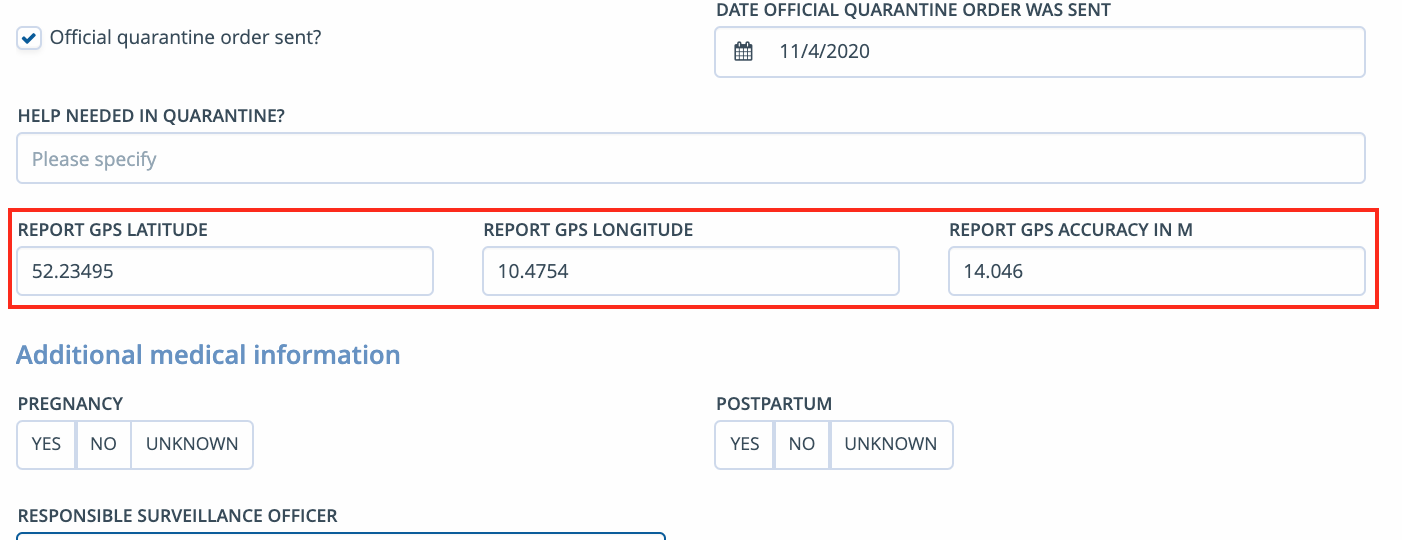
Funnily enough however, I could not reproduce it on another computer while navigating out of the same cases. Even after I've changed the GPS coordinates of a third case where this problem didn't occur using that computer, the issue only appeared on the first computer. (first computer: Windows 10; second computer: macOS)
kwa20
on 4 Nov 2020
@kwa20 Maté and I also realized this strange behavior today on the French test server.
bernardsilenou
on 4 Nov 2020
This has been newly reported after implementing the GIS servers and geo button in Switzerland, 2 or 3 days ago -
"Since the update to version 1.51.1, the prompt "Confirm changes" appears if you have not changed anything or directly after saving manually, if you want to exit the 'Case> Person case' tab and GPS coordinates are stored.
The same happens when you exit 'Contact> Contact person' (if GPS coordinates are stored).
Desired: the message should only appear if something has really been changed."
 Candice-Louw
on 26 Nov 2020
Candice-Louw
on 26 Nov 2020
@Candice-Louw I can confirm this for german serves as well (test1401.sormas-oegd.de).
kwa20
on 26 Nov 2020
@MateStrysewske The comments mentioned by @Candice-Louw is similar to what Carolin suspected.
I had a look in her test system and realized that her input from ui only takes comma (10,85), on her system while on my system it only takes point (.). Comma is converted to point.
We also had a look on another non docker French test instance that uses comma and could not reproduce the bug.
In the sormas.properties file, the back-end uses point rather than comma.
I suspect that certain server language configurations is association with certain back-end language configurations may cause be causing this error.
Another possible cause may be the browser language of the user. I opened the same case on test.1401 added coordinates (my system takes only point) and all was fine. She cleared cash, opened the same case later and added the same coordinate (her system takes only comma) and warning message appeared. She could reproduce the error on any case by just adding coordinate.
bernardsilenou
on 4 Dec 2020
The problem occurs under exactly the following circumstances:
- Server locale is set to English (or probably any other language that uses "." as decimal separator)
- The language of the user's browser is set to German, French or any other language that uses "," as decimal separator
- The user enters a case, person or any other form that contains filled in GPS coordinates
The reason is that there is a converter who automatically converts the GPS coordinates to the format used by the user's locale, i.e. for the scenario described above, the coordinates "57.3425" are converted to "57,3425". This triggers a value change which then in turn flags the whole form as "dirty" (= edited) which then brings up the "Discard unsaved changes" popup when the user tries to leave the form.
Unfortunately, this is not easy to fix because we can't just add the code that detects the value changes at a later point. We'll need to try to find a way to change the behaviour of the converter, but that's not possible for the next release anymore.
Possible workarounds (not regarding whether they're realistic or adequate):
- Set the server locale to the locale that most users are using and restart the server (e.g. in France, set the server locale to French)
- Set the users' browser language to the locale of the server (e.g. to English when the server is using an English locale); if they're only using the browser to access SORMAS, this might be an appropriate solution
We will try to come up with a fix for this bug in the next version. Sorry for the inconvenience!
MateStrysewske
on 16 Dec 2020
@MateStrysewske Are you sure that this depends on the server locale and not on the programming language? I tested this on a german configured server and after changing my browser language to english, the prompt did not occur anymore during navigation without changes. It however still appeared when the browser language was set to german.
kwa20
on 16 Dec 2020
Pretty sure, yes. German server and English language is fine, but the other way around doesn't work. German server and German browser language always works fine for me, no problems whatsoever. It also adds up to the report scenarios that we've received so far.
MateStrysewske
on 17 Dec 2020
@MateStrysewske I got a message from the French dev team that seam as the settings of the docker version can also contribute to this. I quote after google translating.
_I have just checked, and the configuration entered in the “sormas.properties” file in the Test docker at home is “country.locale = fr-FR”. This parameter is taken from the “LOCALE = fr-FR” parameter found in the “.env” file linked to the Docker deployment.
The reflection around the bug seems consistent (change from. To,), but this has no connection with the "country.locale" parameter, or else not the one I know. Or it indicates that this parameter is not taken into account and that the service is based on the locales specific to the docker instance (LANG = en_US.UTF-8 in this case_).
bernardsilenou
on 17 Dec 2020
@MateStrysewske It shows that the docker container does not respect the rules as in my last comment.
Should I contact the docker team to have a look at this? or just wait?
Thanks
bernardsilenou
on 6 Jan 2021
@bernardsilenou The problem is not primarily caused by Docker, I can also reproduce it on my dev system. The machine's locale also has prevalence over the locale that is specified in the properties on a SORMAS instancen that is not dockerised.
MateStrysewske
on 6 Jan 2021
@MateStrysewske OK, I got it now.
@carolinverset @ftavin This means you would have to inform the server providers to use the right configuration for now
bernardsilenou
on 6 Jan 2021
@olivierleuci
Possible for you to check with Gwenaël on the test environment?
sormas.test.esante-bfc.fr
It would be really great if we could find a solution to this problem!
 carolinverset
on 6 Jan 2021
carolinverset
on 6 Jan 2021
@olivierleuci @carolinverset quick summary : the locale should be changed not only in the sormas.properties but also in the docker image configuration
 ftavin
on 8 Jan 2021
ftavin
on 8 Jan 2021
@Candice-Louw @kwa20 Should then set the locale for the German servers by Netzlink for all instances generally to avoid popping up this dialog?
 Marko-ilmkreis
on 8 Jan 2021
Marko-ilmkreis
on 8 Jan 2021
That would work as a temporary workaround, yes. We'll try to find a solution for this problem that will work independent of the server/docker locale.
MateStrysewske
on 8 Jan 2021
Related issues
 markusmann-vg
·
6Comments
Candice-Louw
·
6Comments
markusmann-vg
·
6Comments
Candice-Louw
·
6Comments
 faatihi
·
8Comments
faatihi
·
8Comments
 shawnsarwar
·
6Comments
kwa20
·
3Comments
shawnsarwar
·
6Comments
kwa20
·
3Comments