Snipe-it: LDAP doesn't look to be syncing
Please confirm you have done the following before posting your bug report:
- [ x] I have enabled debug mode
- [x ] I have read checked the Common Issues page
Describe the bug
A clear and concise description of what the bug is.
Site comes up with a blank page a minute or so after clicking Synchronize
To Reproduce
Steps to reproduce the behavior:
- Go to '...' /users/ldap
- Click on '....' Synchronize
- Scroll down to '....'
- See error blank page
Expected behavior
A clear and concise description of what you expected to happen.
To see a page that shows LDAP was synchronized properly
Screenshots
If applicable, add screenshots to help explain your problem.
Server (please complete the following information):
- Snipe-IT Version 5
- OS: [e.g. Ubuntu, CentOS] Win Server 2019
- Web Server: [e.g. Apache, IIS] IIS
- PHP Version 7.4.11
Desktop (please complete the following information):
- OS: [e.g. iOS] Windows 10
- Browser [e.g. chrome, safari] edge & firefox
- Version [e.g. 22]42
Smartphone (please complete the following information):
- Device: [e.g. iPhone6]
- OS: [e.g. iOS8.1]
- Browser [e.g. stock browser, safari]
- Version [e.g. 22]
Error Messages
- WITH DEBUG TURNED ON, if you're getting an error in your browser, include that error
- If a stacktrace is provided in the error, include that too.
- Any errors that appear in your browser's error console.
- Confirm whether the error is reproducible on the demo: https://snipeitapp.com/demo.
- Include any additional information you can find in
storage/logsand your webserver's logs.
Additional context
- Is this a fresh install or an upgrade? upgrade
- What OS and web server you're running Snipe-IT on see above
- What method you used to install Snipe-IT (install.sh, manual installation, docker, etc) git
- Include what you've done so far in the installation, and if you got any error messages along the way.
- Indicate whether or not you've manually edited any data directly in the database no
Add any other context about the problem here.
Please do not post an issue without answering the related questions above. If you have opened a different issue and already answered these questions, answer them again, once for every ticket. It will be next to impossible for us to help you.
 WELLBOREIS
All 83 comments
[2020-10-21 08:17:40] production.ERROR: Trying to access array offset on value of type null {"userId":141,"exception":"[object] (ErrorException(code: 0): Trying to access array offset on value of type null at C:\inetpub\wwwroot\Snipe-IT\app\Console\Commands\LdapSync.php:337)#23 C:inetpubwwwrootSnipe-ITvendorlaravelframeworksrcIlluminateRoutingRoute.php(176): IlluminateRoutingRoute->runController()
#24 C:inetpubwwwrootSnipe-ITvendorlaravelframeworksrcIlluminateRoutingRouter.php(681): IlluminateRoutingRoute->run()
#25 C:inetpubwwwrootSnipe-ITvendorlaravelframeworksrcIlluminatePipelinePipeline.php(130): IlluminateRoutingRouter->IlluminateRouting{closure}()
#26 C:inetpubwwwrootSnipe-ITvendorlaravelframeworksrcIlluminateAuthMiddlewareAuthenticate.php(43): IlluminatePipelinePipeline->IlluminatePipeline{closure}()
#27 C:inetpubwwwrootSnipe-ITvendorlaravelframeworksrcIlluminatePipelinePipeline.php(171): IlluminateAuthMiddlewareAuthenticate->handle()
#28 C:inetpubwwwrootSnipe-ITvendorlaravelpassportsrcHttpMiddlewareCreateFreshApiToken.php(50): IlluminatePipelinePipeline->IlluminatePipeline{closure}()
#29 C:inetpubwwwrootSnipe-ITvendorlaravelframeworksrcIlluminatePipelinePipeline.php(171): LaravelPassportHttpMiddlewareCreateFreshApiToken->handle()
#30 C:inetpubwwwrootSnipe-ITappHttpMiddlewareCheckForTwoFactor.php(53): IlluminatePipelinePipeline->IlluminatePipeline{closure}()
#31 C:inetpubwwwrootSnipe-ITvendorlaravelframeworksrcIlluminatePipelinePipeline.php(171): AppHttpMiddlewareCheckForTwoFactor->handle()
#32 C:inetpubwwwrootSnipe-ITappHttpMiddlewareCheckLocale.php(37): IlluminatePipelinePipeline->IlluminatePipeline{closure}()
#33 C:inetpubwwwrootSnipe-ITvendorlaravelframeworksrcIlluminatePipelinePipeline.php(171): AppHttpMiddlewareCheckLocale->handle()
#34 C:inetpubwwwrootSnipe-ITvendorlaravelframeworksrcIlluminateFoundationHttpMiddlewareVerifyCsrfToken.php(76): IlluminatePipelinePipeline->IlluminatePipeline{closure}()
#35 C:inetpubwwwrootSnipe-ITvendorlaravelframeworksrcIlluminatePipelinePipeline.php(171): IlluminateFoundationHttpMiddlewareVerifyCsrfToken->handle()
#36 C:inetpubwwwrootSnipe-ITvendorlaravelframeworksrcIlluminateCookieMiddlewareAddQueuedCookiesToResponse.php(37): IlluminatePipelinePipeline->IlluminatePipeline{closure}()
#37 C:inetpubwwwrootSnipe-ITvendorlaravelframeworksrcIlluminatePipelinePipeline.php(171): IlluminateCookieMiddlewareAddQueuedCookiesToResponse->handle()
#38 C:inetpubwwwrootSnipe-ITvendorlaravelframeworksrcIlluminateCookieMiddlewareEncryptCookies.php(66): IlluminatePipelinePipeline->IlluminatePipeline{closure}()
#39 C:inetpubwwwrootSnipe-ITvendorlaravelframeworksrcIlluminatePipelinePipeline.php(171): IlluminateCookieMiddlewareEncryptCookies->handle()
#40 C:inetpubwwwrootSnipe-ITvendorlaravelframeworksrcIlluminatePipelinePipeline.php(105): IlluminatePipelinePipeline->IlluminatePipeline{closure}()
#41 C:inetpubwwwrootSnipe-ITvendorlaravelframeworksrcIlluminateRoutingRouter.php(683): IlluminatePipelinePipeline->then()
#42 C:inetpubwwwrootSnipe-ITvendorlaravelframeworksrcIlluminateRoutingRouter.php(658): IlluminateRoutingRouter->runRouteWithinStack()
#43 C:inetpubwwwrootSnipe-ITvendorlaravelframeworksrcIlluminateRoutingRouter.php(624): IlluminateRoutingRouter->runRoute()
#44 C:inetpubwwwrootSnipe-ITvendorlaravelframeworksrcIlluminateRoutingRouter.php(613): IlluminateRoutingRouter->dispatchToRoute()
#45 C:inetpubwwwrootSnipe-ITvendorlaravelframeworksrcIlluminateFoundationHttpKernel.php(170): IlluminateRoutingRouter->dispatch()
#46 C:inetpubwwwrootSnipe-ITvendorlaravelframeworksrcIlluminatePipelinePipeline.php(130): IlluminateFoundationHttpKernel->IlluminateFoundationHttp{closure}()
#47 C:inetpubwwwrootSnipe-ITvendorbarryvdhlaravel-debugbarsrcMiddlewareInjectDebugbar.php(58): IlluminatePipelinePipeline->IlluminatePipeline{closure}()
#48 C:inetpubwwwrootSnipe-ITvendorlaravelframeworksrcIlluminatePipelinePipeline.php(171): BarryvdhDebugbarMiddlewareInjectDebugbar->handle()
#49 C:inetpubwwwrootSnipe-ITappHttpMiddlewareSecurityHeaders.php(26): IlluminatePipelinePipeline->IlluminatePipeline{closure}()
#50 C:inetpubwwwrootSnipe-ITvendorlaravelframeworksrcIlluminatePipelinePipeline.php(171): AppHttpMiddlewareSecurityHeaders->handle()
#51 C:inetpubwwwrootSnipe-ITvendorlaravelframeworksrcIlluminateFoundationHttpMiddlewareTransformsRequest.php(21): IlluminatePipelinePipeline->IlluminatePipeline{closure}()
#52 C:inetpubwwwrootSnipe-ITvendorlaravelframeworksrcIlluminatePipelinePipeline.php(171): IlluminateFoundationHttpMiddlewareTransformsRequest->handle()
#53 C:inetpubwwwrootSnipe-ITappHttpMiddlewareCheckForDebug.php(25): IlluminatePipelinePipeline->IlluminatePipeline{closure}()
#54 C:inetpubwwwrootSnipe-ITvendorlaravelframeworksrcIlluminatePipelinePipeline.php(171): AppHttpMiddlewareCheckForDebug->handle()
#55 C:inetpubwwwrootSnipe-ITappHttpMiddlewareCheckForSetup.php(26): IlluminatePipelinePipeline->IlluminatePipeline{closure}()
#56 C:inetpubwwwrootSnipe-ITvendorlaravelframeworksrcIlluminatePipelinePipeline.php(171): AppHttpMiddlewareCheckForSetup->handle()
#57 C:inetpubwwwrootSnipe-ITvendorfideloperproxysrcTrustProxies.php(57): IlluminatePipelinePipeline->IlluminatePipeline{closure}()
#58 C:inetpubwwwrootSnipe-ITvendorlaravelframeworksrcIlluminatePipelinePipeline.php(171): FideloperProxyTrustProxies->handle()
#59 C:inetpubwwwrootSnipe-ITvendorlaravelframeworksrcIlluminateViewMiddlewareShareErrorsFromSession.php(49): IlluminatePipelinePipeline->IlluminatePipeline{closure}()
#60 C:inetpubwwwrootSnipe-ITvendorlaravelframeworksrcIlluminatePipelinePipeline.php(171): IlluminateViewMiddlewareShareErrorsFromSession->handle()
#61 C:inetpubwwwrootSnipe-ITvendorlaravelframeworksrcIlluminateSessionMiddlewareStartSession.php(56): IlluminatePipelinePipeline->IlluminatePipeline{closure}()
#62 C:inetpubwwwrootSnipe-ITvendorlaravelframeworksrcIlluminatePipelinePipeline.php(171): IlluminateSessionMiddlewareStartSession->handle()
#63 C:inetpubwwwrootSnipe-ITvendorlaravelframeworksrcIlluminateFoundationHttpMiddlewareCheckForMaintenanceMode.php(63): IlluminatePipelinePipeline->IlluminatePipeline{closure}()
#64 C:inetpubwwwrootSnipe-ITvendorlaravelframeworksrcIlluminatePipelinePipeline.php(171): IlluminateFoundationHttpMiddlewareCheckForMaintenanceMode->handle()
#65 C:inetpubwwwrootSnipe-ITvendorbarryvdhlaravel-corssrcHandlePreflight.php(29): IlluminatePipelinePipeline->IlluminatePipeline{closure}()
#66 C:inetpubwwwrootSnipe-ITvendorlaravelframeworksrcIlluminatePipelinePipeline.php(171): BarryvdhCorsHandlePreflight->handle()
#67 C:inetpubwwwrootSnipe-ITvendorlaravelframeworksrcIlluminatePipelinePipeline.php(105): IlluminatePipelinePipeline->IlluminatePipeline{closure}()
#68 C:inetpubwwwrootSnipe-ITvendorlaravelframeworksrcIlluminateFoundationHttpKernel.php(145): IlluminatePipelinePipeline->then()
#69 C:inetpubwwwrootSnipe-ITvendorlaravelframeworksrcIlluminateFoundationHttpKernel.php(110): IlluminateFoundationHttpKernel->sendRequestThroughRouter()
#70 C:inetpubwwwrootSnipe-ITpublicindex.php(58): IlluminateFoundationHttpKernel->handle()
#71 {main}
WELLBOREIS
on 21 Oct 2020


WELLBOREIS
on 21 Oct 2020
@uberbrady can you take a look? I know you've been the one working on LDAP most often.
 snipe
on 21 Oct 2020
snipe
on 21 Oct 2020
Can you get me a screenshot or a text copy of your LDAP/AD settings? You can redact out anything that's sensitive.
That particular line where the error is happening is where the system tries to see what your LDAP settings are supposed to be. It can hitch up in very early bootstrapping of a snipe-it system - before migrations have run - but we've mostly worked around that. And if your system is otherwise working fine it must mean you have your settings table and other basic stuff already handled.
 uberbrady
on 21 Oct 2020
uberbrady
on 21 Oct 2020
Having the same issue with the similar setup, but using Windows Server 2016 and PHP 7.3.12. I upgraded using git as well. Can login fine though using LDAP.
I increased the available memory of PHP to 2048 and LdapSync.php to 4096, but it doesn't seem to help much. I assumed it was running out of memory or something.
I've noticed some newer users can get created once in a while, but only in like batches of 10 or so. So it seems to be working periodically, but timing out and giving a '500 - Internal server error' page every time. Trying to synchronize again and I can't get anymore new users, but there should be some.
Also, using the LDAP command line gives a "Unable to connect to LDAP directory! " error, but I don't think this has worked for the past couple of versions either. Something to do with Guard.php line 107. I've had to manually sync LDAP instead of using the task I setup when we first started using Snipe-IT. php -m command shows ldap installed. Testing LDAP in settings shows no errors.
Hope this helps.
 Kagemusha-SA
on 21 Oct 2020
Kagemusha-SA
on 21 Oct 2020
@Kagemusha-SA how many users do you have in your directory? I think you might have the right idea that we could be dealing with some kind of memory issue. But you'd have to have a pretty decent number of users to trip that.
uberbrady
on 21 Oct 2020
@uberbrady Almost 1900 currently but I filter out some so probably closer to 1600. I am showing 2500 users in Snipe-IT, probably due to terms.
I did notice increasing the memory made it last longer before going to the 500 page, but the usage never really went above 5##MB.

Kagemusha-SA
on 21 Oct 2020
Can you try syncing using the CLI tool? E.g. php artisan snipeit:ldap-sync - I suspect the problem is actually the JSON result set we're spitting back out, not the LDAP search/pagination/processing itself, but I'm not certain and my test directory isn't big enough.
uberbrady
on 21 Oct 2020
LDAP command line just gives a "Unable to connect to LDAP directory! " error.
Here is the info from the laravel.log...
[2020-10-21 10:09:42] production.ERROR: Exception: Can't contact LDAP server in C:inetpubwwwrootsnipe-itvendoradldap2adldap2srcAuthGuard.php:102
Stack trace:
0 C:inetpubwwwrootsnipe-itvendoradldap2adldap2srcAuthGuard.php(119): AdldapAuthGuard->bind()
1 C:inetpubwwwrootsnipe-itvendoradldap2adldap2srcConnectionsProvider.php(261): AdldapAuthGuard->bindAsAdministrator()
2 C:inetpubwwwrootsnipe-itvendoradldap2adldap2srcAdldap.php(147): AdldapConnectionsProvider->connect()
3 C:inetpubwwwrootsnipe-itappServicesLdapAd.php(419): AdldapAdldap->connect()
4 C:inetpubwwwrootsnipe-itappConsoleCommandsLdapSync.php(355): AppServicesLdapAd->testLdapAdUserConnection()
5 C:inetpubwwwrootsnipe-itappConsoleCommandsLdapSync.php(120): AppConsoleCommandsLdapSync->checkLdapConnetion()
6 [internal function]: AppConsoleCommandsLdapSync->handle()
7 C:inetpubwwwrootsnipe-itvendorlaravelframeworksrcIlluminateContainerBoundMethod.php(32): call_user_func_array()
8 C:inetpubwwwrootsnipe-itvendorlaravelframeworksrcIlluminateContainerUtil.php(36): IlluminateContainerBoundMethod::IlluminateContainer{closure}()
9 C:inetpubwwwrootsnipe-itvendorlaravelframeworksrcIlluminateContainerBoundMethod.php(90): IlluminateContainerUtil::unwrapIfClosure()
10 C:inetpubwwwrootsnipe-itvendorlaravelframeworksrcIlluminateContainerBoundMethod.php(34): IlluminateContainerBoundMethod::callBoundMethod()
11 C:inetpubwwwrootsnipe-itvendorlaravelframeworksrcIlluminateContainerContainer.php(590): IlluminateContainerBoundMethod::call()
12 C:inetpubwwwrootsnipe-itvendorlaravelframeworksrcIlluminateConsoleCommand.php(134): IlluminateContainerContainer->call()
13 C:inetpubwwwrootsnipe-itvendorsymfonyconsoleCommandCommand.php(255): IlluminateConsoleCommand->execute()
14 C:inetpubwwwrootsnipe-itvendorlaravelframeworksrcIlluminateConsoleCommand.php(121): SymfonyComponentConsoleCommandCommand->run()
15 C:inetpubwwwrootsnipe-itvendorsymfonyconsoleApplication.php(1001): IlluminateConsoleCommand->run()
16 C:inetpubwwwrootsnipe-itvendorsymfonyconsoleApplication.php(271): SymfonyComponentConsoleApplication->doRunCommand()
17 C:inetpubwwwrootsnipe-itvendorsymfonyconsoleApplication.php(147): SymfonyComponentConsoleApplication->doRun()
18 C:inetpubwwwrootsnipe-itvendorlaravelframeworksrcIlluminateConsoleApplication.php(93): SymfonyComponentConsoleApplication->run()
19 C:inetpubwwwrootsnipe-itvendorlaravelframeworksrcIlluminateFoundationConsoleKernel.php(131): IlluminateConsoleApplication->run()
20 C:inetpubwwwrootsnipe-itartisan(35): IlluminateFoundationConsoleKernel->handle()
21 {main}
Next AdldapAuthBindException: Can't contact LDAP server in C:inetpubwwwrootsnipe-itvendoradldap2adldap2srcAuthGuard.php:107
Stack trace:
0 C:inetpubwwwrootsnipe-itvendoradldap2adldap2srcAuthGuard.php(119): AdldapAuthGuard->bind()
1 C:inetpubwwwrootsnipe-itvendoradldap2adldap2srcConnectionsProvider.php(261): AdldapAuthGuard->bindAsAdministrator()
2 C:inetpubwwwrootsnipe-itvendoradldap2adldap2srcAdldap.php(147): AdldapConnectionsProvider->connect()
3 C:inetpubwwwrootsnipe-itappServicesLdapAd.php(419): AdldapAdldap->connect()
4 C:inetpubwwwrootsnipe-itappConsoleCommandsLdapSync.php(355): AppServicesLdapAd->testLdapAdUserConnection()
5 C:inetpubwwwrootsnipe-itappConsoleCommandsLdapSync.php(120): AppConsoleCommandsLdapSync->checkLdapConnetion()
6 [internal function]: AppConsoleCommandsLdapSync->handle()
7 C:inetpubwwwrootsnipe-itvendorlaravelframeworksrcIlluminateContainerBoundMethod.php(32): call_user_func_array()
8 C:inetpubwwwrootsnipe-itvendorlaravelframeworksrcIlluminateContainerUtil.php(36): IlluminateContainerBoundMethod::IlluminateContainer{closure}()
9 C:inetpubwwwrootsnipe-itvendorlaravelframeworksrcIlluminateContainerBoundMethod.php(90): IlluminateContainerUtil::unwrapIfClosure()
10 C:inetpubwwwrootsnipe-itvendorlaravelframeworksrcIlluminateContainerBoundMethod.php(34): IlluminateContainerBoundMethod::callBoundMethod()
11 C:inetpubwwwrootsnipe-itvendorlaravelframeworksrcIlluminateContainerContainer.php(590): IlluminateContainerBoundMethod::call()
12 C:inetpubwwwrootsnipe-itvendorlaravelframeworksrcIlluminateConsoleCommand.php(134): IlluminateContainerContainer->call()
13 C:inetpubwwwrootsnipe-itvendorsymfonyconsoleCommandCommand.php(255): IlluminateConsoleCommand->execute()
14 C:inetpubwwwrootsnipe-itvendorlaravelframeworksrcIlluminateConsoleCommand.php(121): SymfonyComponentConsoleCommandCommand->run()
15 C:inetpubwwwrootsnipe-itvendorsymfonyconsoleApplication.php(1001): IlluminateConsoleCommand->run()
16 C:inetpubwwwrootsnipe-itvendorsymfonyconsoleApplication.php(271): SymfonyComponentConsoleApplication->doRunCommand()
17 C:inetpubwwwrootsnipe-itvendorsymfonyconsoleApplication.php(147): SymfonyComponentConsoleApplication->doRun()
18 C:inetpubwwwrootsnipe-itvendorlaravelframeworksrcIlluminateConsoleApplication.php(93): SymfonyComponentConsoleApplication->run()
19 C:inetpubwwwrootsnipe-itvendorlaravelframeworksrcIlluminateFoundationConsoleKernel.php(131): IlluminateConsoleApplication->run()
20 C:inetpubwwwrootsnipe-itartisan(35): IlluminateFoundationConsoleKernel->handle()
21 {main}
Kagemusha-SA
on 21 Oct 2020
Thanks for the log excerpt. That is definitely weird; the two tools internally call the exact same routines, so it's definitely bizarre that one kinda-sorta works (or would work) and one definitively doesn't at all.
uberbrady
on 21 Oct 2020
@uberbrady Does this mean no errors if nothing outputs after it runs? It took like 5 minutes.
PS C:inetpubwwwrootsnipe-it> php artisan snipeit:ldap-sync
PS C:inetpubwwwrootsnipe-it> php artisan snipeit:ldap-sync --summary
WELLBOREIS
on 21 Oct 2020
@WELLBOREIS Hm, if you are using the --summary flag, you should see a summary of what happened. Do you see anything in your storage/logs/laravel.log?
snipe
on 21 Oct 2020
Think I forgot this part of the log...
[2020-10-21 10:09:42] production.ERROR: Exception: Unable to connect to LDAP directory! in C:inetpubwwwrootsnipe-itappServicesLdapAd.php:422
Stack trace:
0 C:inetpubwwwrootsnipe-itappConsoleCommandsLdapSync.php(355): AppServicesLdapAd->testLdapAdUserConnection()
1 C:inetpubwwwrootsnipe-itappConsoleCommandsLdapSync.php(120): AppConsoleCommandsLdapSync->checkLdapConnetion()
2 [internal function]: AppConsoleCommandsLdapSync->handle()
3 C:inetpubwwwrootsnipe-itvendorlaravelframeworksrcIlluminateContainerBoundMethod.php(32): call_user_func_array()
4 C:inetpubwwwrootsnipe-itvendorlaravelframeworksrcIlluminateContainerUtil.php(36): IlluminateContainerBoundMethod::IlluminateContainer{closure}()
5 C:inetpubwwwrootsnipe-itvendorlaravelframeworksrcIlluminateContainerBoundMethod.php(90): IlluminateContainerUtil::unwrapIfClosure()
6 C:inetpubwwwrootsnipe-itvendorlaravelframeworksrcIlluminateContainerBoundMethod.php(34): IlluminateContainerBoundMethod::callBoundMethod()
7 C:inetpubwwwrootsnipe-itvendorlaravelframeworksrcIlluminateContainerContainer.php(590): IlluminateContainerBoundMethod::call()
8 C:inetpubwwwrootsnipe-itvendorlaravelframeworksrcIlluminateConsoleCommand.php(134): IlluminateContainerContainer->call()
9 C:inetpubwwwrootsnipe-itvendorsymfonyconsoleCommandCommand.php(255): IlluminateConsoleCommand->execute()
10 C:inetpubwwwrootsnipe-itvendorlaravelframeworksrcIlluminateConsoleCommand.php(121): SymfonyComponentConsoleCommandCommand->run()
11 C:inetpubwwwrootsnipe-itvendorsymfonyconsoleApplication.php(1001): IlluminateConsoleCommand->run()
12 C:inetpubwwwrootsnipe-itvendorsymfonyconsoleApplication.php(271): SymfonyComponentConsoleApplication->doRunCommand()
13 C:inetpubwwwrootsnipe-itvendorsymfonyconsoleApplication.php(147): SymfonyComponentConsoleApplication->doRun()
14 C:inetpubwwwrootsnipe-itvendorlaravelframeworksrcIlluminateConsoleApplication.php(93): SymfonyComponentConsoleApplication->run()
15 C:inetpubwwwrootsnipe-itvendorlaravelframeworksrcIlluminateFoundationConsoleKernel.php(131): IlluminateConsoleApplication->run()
16 C:inetpubwwwrootsnipe-itartisan(35): IlluminateFoundationConsoleKernel->handle()
17 {main}
Kagemusha-SA
on 21 Oct 2020
WELLBOREIS
on 22 Oct 2020
WELLBOREIS
on 22 Oct 2020
@uberbrady Does this mean no errors if nothing outputs after it runs? It took like 5 minutes.
PS C:inetpubwwwrootsnipe-it> php artisan snipeit:ldap-sync
PS C:inetpubwwwrootsnipe-it> php artisan snipeit:ldap-sync --summary
Yeah, it's silent by default. I think the non-JSON summary is broken, and I think the JSON summary is incorrectly appending non-changed users and causing JSON bloat, and memory exhaustion.
Later runs of the CLI sync _should_ be faster, since all your users are already imported.
uberbrady
on 22 Oct 2020
@uberbrady I saw some funkiness in the laravel log. I attached the log file above.
WELLBOREIS
on 22 Oct 2020
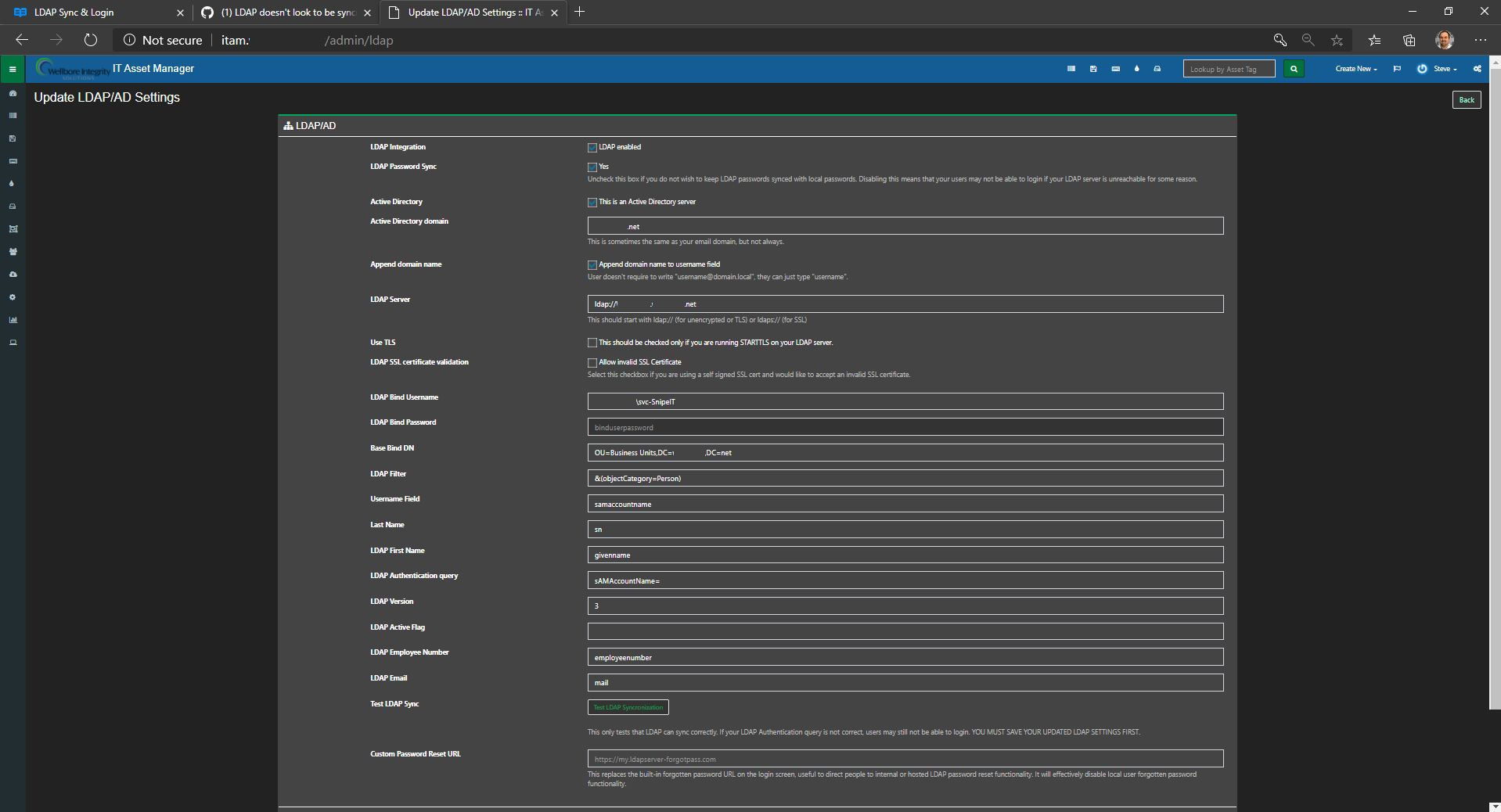
Yeah, that does look funky. Do you have a pretty normal-looking LDAP server?
e.g. something like ldap://blah.blah.blah - no extra slashes or anything weird. (or ldaps://)
uberbrady
on 22 Oct 2020
I think the most important part is here:
[2020-10-06 08:59:26] production.ERROR: Swift_TransportException: Connection could not be established with host USHO1-AT01.xxxx.net :stream_socket_client(): unable to connect to none://USHO1-AT01.xxxx.net:587 (Unable to find the socket transport "none" - did you forget to enable it when you configured PHP?) in C:\inetpub\wwwroot\Snipe-IT\vendor\swiftmailer\swiftmailer\lib\classes\Swift\Transport\StreamBuffer.php:269
snipe
on 22 Oct 2020
@uberbrady, which is interesting as when I run the test, it passes and comes back with the 10 test users.
WELLBOREIS
on 22 Oct 2020
@uberbrady And that's just the SMTP relay server. I just tested and it's working fine.
WELLBOREIS
on 22 Oct 2020
I should've caught that; port 587 is the SMTP submit port.
uberbrady
on 22 Oct 2020
Ok, I have a PR up that might fix the JSON summary part - e.g. when you can sync OK via CLI, but can't with the GUI button. If anyone can check that out it would be a big help!
uberbrady
on 22 Oct 2020
Ok, I have a PR up that might fix the JSON summary part - e.g. when you can sync OK via CLI, but can't with the GUI button. If anyone can check that out it would be a big help!
Checking now
WELLBOREIS
on 22 Oct 2020
Ok, I have a PR up that might fix the JSON summary part - e.g. when you can sync OK via CLI, but can't with the GUI button. If anyone can check that out it would be a big help!
I ran and did not get any summary, however I saw no new output in the laravel log.
WELLBOREIS
on 22 Oct 2020
Can you try with --json_summary? That should give you at least some output.
uberbrady
on 22 Oct 2020
I have same error when I tried to sync AD users.
[2020-10-22 14:14:37] production.ERROR: SymfonyComponentDebugExceptionFatalErrorException: Allowed memory size of 524288000 bytes exhausted (tried to allocate 4096 bytes) in C:AppServwwwitamvendoradldap2adldap2srcConnectionsLdap.php:143
Stack trace:
0 {main}
[2020-10-22 14:14:37] production.ERROR: Allowed memory size of 524288000 bytes exhausted (tried to allocate 4096 bytes) {"userId":1,"exception":"[object] (Symfony\Component\Debug\Exception\FatalErrorException(code: 1): Allowed memory size of 524288000 bytes exhausted (tried to allocate 4096 bytes) at C:\AppServ\www\itam\vendor\adldap2\adldap2\src\Connections\Ldap.php:143)
[stacktrace]
0 {main}
"}
 conan522
on 22 Oct 2020
conan522
on 22 Oct 2020
same issue:
php artisan snipeit:ldap-sync --summary
PHP Fatal error: Allowed memory size of 1073741824 bytes exhausted (tried to allocate 4096 bytes) in /var/www/html/snipeit/vendor/adldap2/adldap2/src/Connections/Ldap.php on line 143
PHP Fatal error: Allowed memory size of 1073741824 bytes exhausted (tried to allocate 65536 bytes) in /var/www/html/snipeit/vendor/monolog/monolog/src/Monolog/Logger.php on line 95
 maodahua
on 22 Oct 2020
maodahua
on 22 Oct 2020
Next AdldapAuthBindException: Can't contact LDAP server in C:inetpubwwwrootsnipe-itvendoradldap2adldap2srcAuthGuard.php:107
Stack trace:0 C:inetpubwwwrootsnipe-itvendoradldap2adldap2srcAuthGuard.php(119): AdldapAuthGuard->bind()
Hi,
Try to re-submit your BIND password. It helped me.
 telesoftas-github
on 22 Oct 2020
telesoftas-github
on 22 Oct 2020
@telesoftas-github Actually tried that earlier and then after seeing your post, but it still gives me the "Unable to connect to LDAP directory!" error. On a side note, I recall looking at an debug log and the AD user and password were showing up for the UI sync.
@uberbrady Tried that dirtiness check fix and it didn't seem to change. I did get about four new people this morning though on the first try, but there should be more, and any syncs afterwards haven't yielded any more yet.
Edit: I increased the memory used in LdapSync.php to 2048MB and I noticed the ram usage went over 1GB this time, in stead of hovering in the 500MB area. Still 500ed though.
Kagemusha-SA
on 22 Oct 2020
I have also a lot of issues with this, though I cannot say exactly the issue, because I had to change the bind user password and in laravel.log I can see the old password being always passed. I've tried to change it to the new one but no luck.
 PauloFreire70
on 22 Oct 2020
PauloFreire70
on 22 Oct 2020
@telesoftas-github Actually tried that earlier and then after seeing your post, but it still gives me the "Unable to connect to LDAP directory!" error. On a side note, I recall looking at an debug log and the AD user and password were showing up for the UI sync.
@uberbrady Tried that dirtiness check fix and it didn't seem to change. I did get about four new people this morning though on the first try, but there should be more, and any syncs afterwards haven't yielded any more yet.
Edit: I increased the memory used in LdapSync.php to 2048MB and I noticed the ram usage went over 1GB this time, in stead of hovering in the 500MB area. Still 500ed though.
Sync or login is not working? I noticed that if I remove active flag parameter - login is working, but sync is failing. If I add it, sync is working, but login is failing :))
telesoftas-github
on 22 Oct 2020
Login is working fine, but sync is only semi-working. As in, it will try to sync and then fail after about 6 minutes. I do get some new users created once in awhile though.
Kagemusha-SA
on 22 Oct 2020
I'm also being able to login again, but I always get "ERROR: No users found!" with the same exact query that worked before.
PauloFreire70
on 22 Oct 2020
We are having similar issues with the sync. The login seems to work for users that have already been synched, but I am not really getting new users unless I drill down to an OU with less than 500 users. As long as the OU is less than 500, the sync works and the status page shows up. More than 500, fails everytime.
 Yooled
on 22 Oct 2020
Yooled
on 22 Oct 2020
We are having the same issue. LDAP login and the test sync work fine. Syncing through the GUI results in a 504 timeout and syncing through the command line throws the error below. The ldapsearch query should be pulling about 550 users.
$php artisan snipeit:ldap-sync --location_id=1 --summary
PHP Fatal error:  Allowed memory size of 524288000 bytes exhausted (tried to allocate 20480 bytes) in /usr/share/nginx/html/snipeit/vendor/laravel/framework/src/Illuminate/Support/Arr.php on line 255
PHP Fatal error:  Allowed memory size of 524288000 bytes exhausted (tried to allocate 20480 bytes) in /usr/share/nginx/html/snipeit/vendor/laravel/framework/src/Illuminate/Foundation/Bootstrap/HandleExceptions.php on line 133
 crussell395
on 22 Oct 2020
crussell395
on 22 Oct 2020
@uberbrady I migrated over to CentOS today and still have the same issue with LDAP. I can bind, but get the PHP memory exhaustion error when trying to sync.
WELLBOREIS
on 23 Oct 2020
I wish I had a way to add a bunch of users automatically to my test AD box; then I could replicate this and be able to fix it.
Still, it does sound like the issue is 'too many users' - let me see if I can see anywhere obvious in the sync code where it's doing something stupid that exhausts memory.
uberbrady
on 23 Oct 2020
What happens when you folks try and run the artisan command with --dryrun?
If it doesn't blow up when you do that, that might at least point me in the right direction.
uberbrady
on 23 Oct 2020
Another idea - if you edit PAGE_SIZE in app/Services/LdapAd.php (around line 34) - if you knock that down from 500 to, say, 100 - what happens then? I suspect it won't make a difference, but I am definitely curious.
uberbrady
on 23 Oct 2020
Here's another one - what if you change:
https://github.com/snipe/snipe-it/blob/6c285b02732b0471da6f6c2607123d94b6afd816/app/Console/Commands/LdapSync.php#L112
from '500M' to something bigger?
uberbrady
on 23 Oct 2020
Here's a potential fix - https://github.com/snipe/snipe-it/pull/8594 - I'm not necessarily sure it's going to solve the problem, though.
If anyone who is affected could test that PR for me, it'd be greatly appreciated! I'd love to get this solved for everyone.
uberbrady
on 23 Oct 2020
Here's another one - what if you change:
from '500M' to something bigger?
Oh, @Kagemusha-SA already tried that :(
uberbrady
on 23 Oct 2020
I wish I had a way to add a bunch of users automatically to my test AD box; then I could replicate this and be able to fix it.
Still, it does sound like the issue is 'too many users' - let me see if I can see anywhere obvious in the sync code where it's doing something stupid that exhausts memory.
What's crazy is it was never an issue until v5.
WELLBOREIS
on 23 Oct 2020
@WELLBOREIS Not really particularly crazy - we rewrote all of the LDAP functionality in v5
snipe
on 23 Oct 2020
What happens when you folks try and run the artisan command with
--dryrun?If it doesn't blow up when you do that, that might at least point me in the right direction.
[root@USHO1-AM01 snipe]# php artisan snipeit:ldap-sync --dryrun
PHP Fatal error: Allowed memory size of 524288000 bytes exhausted (tried to allocate 20480 bytes) in /var/www/html/snipe/vendor/adldap2/adldap2/src/Models/Concerns/HasAttributes.php on line 199
PHP Fatal error: Allowed memory size of 524288000 bytes exhausted (tried to allocate 32768 bytes) in /var/www/html/snipe/vendor/symfony/debug/Exception/FatalErrorException.php on line 1
[root@USHO1-AM01 snipe]#
WELLBOREIS
on 23 Oct 2020
Another idea - if you edit
PAGE_SIZEinapp/Services/LdapAd.php(around line 34) - if you knock that down from 500 to, say, 100 - what happens then? I suspect it won't make a difference, but I am definitely curious.
Same thing.
WELLBOREIS
on 23 Oct 2020
Another idea - if you edit
PAGE_SIZEinapp/Services/LdapAd.php(around line 34) - if you knock that down from 500 to, say, 100 - what happens then? I suspect it won't make a difference, but I am definitely curious.
This increased memory use much quicker up to 2700MB. Still got a 500 page and no new users. Going to revert and try your other ideas.
Kagemusha-SA
on 23 Oct 2020
Here's another one - what if you change:
https://github.com/snipe/snipe-it/blob/6c285b02732b0471da6f6c2607123d94b6afd816/app/Console/Commands/LdapSync.php#L112from '500M' to something bigger?
Oh, @Kagemusha-SA already tried that :(
I just tried it as well and it just keeps running and running :'(
WELLBOREIS
on 23 Oct 2020
Here's a potential fix - #8594 - I'm not necessarily sure it's going to solve the problem, though.
If anyone who is affected could test that PR for me, it'd be greatly appreciated! I'd love to get this solved for everyone.
I made the change and it didn't seem to help. BUT!
If I run the 'composer clear-compiled' command it gives me a 'not defined' error, as has been recently, so I deleted all the files manually in bootstrap/cache for the first time. I then ran the other clean up commands you are supposed to do and tested again.
THIS TIME, the memory use didn't go above 50MB or so, but it still gives me a 500 page and no new users.
I'm still on 5.0.0. Thinking to upgrade to the newest version and try some fixes again if it doesn't work, but what will happen if the 'composer clear-compiled' command doesn't work during the upgrade? I use git.
Edit: Upgraded and did the 'unset $ldapUsers to avoid OOM'ing' fix, but still the same. Doesn't go over 50MB memory usage as well. php artisan snipeit:ldap-sync --summary doesn't work still. "Unable to connect to LDAP directory!" error.
Kagemusha-SA
on 23 Oct 2020
Thanks for testing! It looks like we have progress but don't have it nailed yet.
I'm still on 5.0.0. Thinking to upgrade to the newest version and try some fixes again if it doesn't work, but what will happen if the 'composer clear-compiled' command doesn't work during the upgrade? I use git.
You can always blow away the vendors/ directory and do a fresh composer install.
uberbrady
on 23 Oct 2020
For that PR, I'd also be curious to see if the Artisan command - with and without the --json_summary option - ends up getting anyone anywhere?
Either way it seems to at least help with the memory exhaustion, so that's something. I'll probably get it merged since it doesn't seem to hurt us; only help.
uberbrady
on 23 Oct 2020
If you get the "Unable to connect to LDAP directory!" error you might want to try re-inputting your password? I've seen a small scattering of reports that that has helped some users.
uberbrady
on 23 Oct 2020
@uberbrady - I just tried the PR on my instance after first trying to bump up the memory limit to 1G then 2G with no love. It hit its 600 second limit before it finished though.
I did have to manually edit app/Console/Commands/LdapSync.php line 112 rather than being able to set the ENV variable of LDAP_MEM_LIM in .env
 USSChris
on 23 Oct 2020
USSChris
on 23 Oct 2020
@uberbrady - I just tried the PR on my instance after first trying to bump up the memory limit to 1G then 2G with no love. It hit its 600 second limit before it finished though.
I did have to manually edit app/Console/Commands/LdapSync.php line 112 rather than being able to set the ENV variable of LDAP_MEM_LIM in .env
Yes, you'd have to hand-edit the value in line 112; we don't support .env for that constant.
But the point of the PR was supposed to be that the memory usage doesn't balloon out like that any more. We got at least one report that the memory usage is much better now (under the PR) but it doesn't quite solve the problem.
If you're hitting the 600 second limit (10 minutes!!), you can certainly try editing _that_ constant as well - here: https://github.com/snipe/snipe-it/blob/d74df93c48efaaf7fbd81704a50eb1aefb321557/app/Console/Commands/LdapSync.php#L111
If that did help, we still have a performance problem that we need to address, of course, but this just gives us more information to work with.
Did any users get added?
uberbrady
on 23 Oct 2020
Alright; I think there were two bugs here - one is the memory one, which I think the PR fixed. The other may have been related to something that @snipe was working on. I'm hoping with both of those in-place, then maybe we get somewhere? So @snipe made a new release with both fixes:
https://github.com/snipe/snipe-it/releases/tag/v5.0.3
Check this one out and let us know if you have any better luck! In the meanwhile, I'm looking into improving the logging so we can better catch where things are going wrong for this issue and in the future.
GitHub
New in v5.0.3 If your minimum password setting in Admin > Settings was previously less than 8, you should change this to 8 or greater before upgrading. Failure to update this may cause other settin...
uberbrady
on 23 Oct 2020
@uberbrady Why am I getting this error when trying to upgrade?
[root@USHO1-AM01 snipe]# php upgrade.php
ERROR: This script should not be run as root/admin. Exiting.
I've been able to use root in the past.
WELLBOREIS
on 24 Oct 2020
@WELLBOREIS We changed that in v5, because folks shouldn't be running it as root. It can cause problems that we end up having to support when people run it as root.
snipe
on 24 Oct 2020
This is what I'm getting using user that's not root/admin:
[sudo] password for SnipeIT:
ERROR: This script should not be run as root/admin. Exiting.
[SnipeIT@USHO1-AM01 snipe]$
WELLBOREIS
on 24 Oct 2020
If you're seeing a sudo prompt, you're running it as a sudo user, which is basically the same as root tho.
snipe
on 24 Oct 2020
If I run without sudo, I get this:
[SnipeIT@USHO1-AM01 snipe]$ php upgrade.php
Welcome to the Snipe-IT upgrader.
Please note that this script will not download the latest Snipe-IT
files for you unless you have git installed.
It simply runs the standard composer and artisan
commands needed to finalize the upgrade after.
!!!!!!!!!!!!!!!!!!!!!!!!!!!!!!! WARNING !!!!!!!!!!!!!!!!!!!!!!!!!!!!!!
!! If you have any encrypted custom fields, BE SURE TO run the recrypter if upgrading from v3 to v4.
!! See the Snipe-IT documentation for help:
!! https://snipe-it.readme.io/docs/upgrading-to-v4
!!!!!!!!!!!!!!!!!!!!!!!!!!!!!!! WARNING !!!!!!!!!!!!!!!!!!!!!!!!!!!!!!
STEP 1: Checking PHP requirements:
Current PHP version: 7.4.11
PHP version: 7.4.11 is at least 7.1.3 - continuing...
STEP 2: Backing up database:
-- Starting backup...
Backup failed because: mkdir(): Permission denied.
STEP 3: Putting application into maintenance mode:
-- Failed to enter maintenance mode.
file_put_contents(/var/www/html/snipe/storage/framework/down): failed to open stream: Permission denied
STEP 4: Pulling latest from Git (master branch):
Git is installed.
error: cannot open .git/FETCH_HEAD: Permission denied
fatal: Unable to create '/var/www/html/snipe/.git/index.lock': Permission denied
fatal: Unable to create '/var/www/html/snipe/.git/index.lock': Permission denied
Cannot save the current index state
error: cannot open .git/FETCH_HEAD: Permission denied
Step 5: Cleaning up old cached files:
-- No bootstrap/cache/compiled.php, so nothing to delete.
-- Deleting bootstrap/cache/services.php. It it no longer used.
-- No bootstrap/cache/config.php, so nothing to delete.
-- Configuration cache cleared!
-- Application cache cleared!
-- Route cache cleared!
-- Compiled views cleared!
Step 6: Updating composer dependencies:
(This may take an moment.)
-- We couldn't find a local composer.phar - trying globally.
Deprecation Notice: Class ParsedownTest located in ./vendor/erusev/parsedown/test/ParsedownTest.php does not comply with psr-0 autoloading standard. It will not autoload anymore in Composer v2.0. in phar:///usr/local/bin/composer/src/Composer/Autoload/ClassMapGenerator.php:201
[ErrorException]
file_put_contents(/var/www/html/snipe/vendor/composer/autoload_psr4.php): f
ailed to open stream: Permission denied
dump-autoload [--no-scripts] [-o|--optimize] [-a|--classmap-authoritative] [--apcu] [--no-dev]
Loading composer repositories with package information
Installing dependencies from lock file
Nothing to install or update
Generating optimized autoload files
Deprecation Notice: Class ParsedownTest located in ./vendor/erusev/parsedown/test/ParsedownTest.php does not comply with psr-0 autoloading standard. It will not autoload anymore in Composer v2.0. in phar:///usr/local/bin/composer/src/Composer/Autoload/ClassMapGenerator.php:201
[ErrorException]
file_put_contents(/var/www/html/snipe/vendor/composer/autoload_psr4.php): f
ailed to open stream: Permission denied
install [--prefer-source] [--prefer-dist] [--dry-run] [--dev] [--no-dev] [--no-custom-installers] [--no-autoloader] [--no-scripts] [--no-progress] [--no-suggest] [-v|vv|vvv|--verbose] [-o|--optimize-autoloader] [-a|--classmap-authoritative] [--apcu-autoloader] [--ignore-platform-reqs] [--] [
Generating optimized autoload files
Step 7: Migrating database:
-- Nothing to migrate.
Step 8: Checking for OAuth keys:
- OAuth keys detected. Skipping passport install.
Step 9: Caching routes and config:
-- Configuration cache cleared!
In StreamHandler.php line 110:
The stream or file "/var/www/html/snipe/storage/logs/laravel.log" could not
be opened: failed to open stream: Permission denied
-- Route cache cleared!
In StreamHandler.php line 110:
The stream or file "/var/www/html/snipe/storage/logs/laravel.log" could not
be opened: failed to open stream: Permission denied
Step 10: Taking application out of maintenance mode:
-- Application is already up.
FINISHED! Clear your browser cookies and re-login to use :
your upgraded Snipe-IT.
Snipe-IT DocumentationSnipe-IT v4 includes a ton of new features and bug fixes, and all users are strongly encouraged to upgrade. For a full list of what's new in V4, click here. Please note that Snipe-IT v4 does require PHP >= 5.6.4. Please see the list of requirements before upgrading.Updating Snipe-IT should normal...
WELLBOREIS
on 24 Oct 2020
I got same error using a regular user with no sudo permissions where access is denied.
WELLBOREIS
on 24 Oct 2020
Nevermind. Sorry I'm a novice on linux. I researched giving access to snipe-it folder recursively. Now I can run upgrade.
WELLBOREIS
on 24 Oct 2020
Still no-go on LDAP sync :( I cleared the cache and config and re-updated the LDAP account password. It just runs with no conclusion.
WELLBOREIS
on 24 Oct 2020
Nice work figuring out your permissions! One less thing...
You can definitely try setting the timeout to be longer (an hour?) and see if it eventually gets to the end.
On the database side I don't see much more we can optimize here - it does a lookup for the user, if they exist then it does stuff, but it will only save if the user is 'dirty' (e.g. something changed). It's not going to get much faster than that.
And I don't think I can load up 1000, 1500, or more users all into RAM and then do everything from there; I think that will probably bloat the sync script out like it did before :/
We'll keep working on it and figure it out.
I'll probably add some Debug flags later, and have one of you folks try and test with those new flags so we can see how far we're getting through the process. I suspect "not very far" if no users are being created, or if we are having authentication issues.
If anyone has per-OU settings via Locations, I can help give you some workarounds in the interim. Just let me know.
uberbrady
on 24 Oct 2020
Sounds good. Thank you!
WELLBOREIS
on 24 Oct 2020
emmmmm.....In V5.0.3, I still can not sync ldap and no errors found.
maodahua
on 26 Oct 2020
same, still no fix in v5.0.3
conan522
on 26 Oct 2020
Same here :( I’m sure we will figure it out soon, though!
WELLBOREIS
on 26 Oct 2020
Not working for me for v5.0.3 either. Tired to increase the timeout to 1800, but it 500ed at just over 6 minutes. Let me know if you want me to try anymore fixes.
Kagemusha-SA
on 26 Oct 2020
Not working for me for v5.0.3 either. Tired to increase the timeout to 1800, but it 500ed at just over 6 minutes. Let me know if you want me to try anymore fixes.
Do you get the same result via the Artisan command? Sometimes, depending on your webserver setup, you might have different components that force-close the connection. But via Artisan your commands can run as long as the max_execution_time permits.
Still, even if that is the case, we should be completing faster than this. I can run a couple thousand SQL queries in a minute or so, usually. So something is bogging us down. I'll get to the bottom of it.
uberbrady
on 26 Oct 2020
Thanks everyone for the feedback and testing! I'm going to dig into this more today. I'm probably going to do a combination of:
- Adding some kind of
verboseflags to get additional logs, either on-screen or in the logfile - Figuring out some Powershell magic to add a bunch of users (a thousand or so) to my own AD setup, so I can replicate the problem.
I'll report back when I've got something. 🤞
uberbrady
on 26 Oct 2020
Do you get the same result via the Artisan command? Sometimes, depending on your webserver setup, you might have different components that force-close the connection. But via Artisan your commands can run as long as the
max_execution_timepermits.
I can't seem to get it to work with the command line. Just gives me an "Unable to connect to LDAP directory!" error. I tried resaving the password, changing the type of username, etc., but nothing fixed it.
Kagemusha-SA
on 26 Oct 2020
@Kagemusha-SA that's weird. Are you sure you're running it from your snipe-it directory; e.g. the place where your .env lives? The APP_KEY in particular is very necessary - as the LDAP password is encrypted with it. Of course, the database user/pass is also pretty critical.
Though I suppose if you can run other Artisan commands, then the snipeit:ldap-sync shouldn't be any different.
uberbrady
on 26 Oct 2020
Okay, good news! I figured out the PowerShell thing, and added a thousand users to my directory, and I'm getting the same results that you folks are. I suspect there's a bug in the paging algorithm. If you don't hit pagination (at 500), you wouldn't see it.
I should have a fix out today.
uberbrady
on 26 Oct 2020
Yay!
WELLBOREIS
on 26 Oct 2020
Okay, this at least fixed it for _me_ - https://github.com/snipe/snipe-it/pull/8619
Can you folks check this out? If it helps enough people we can probably see about cutting another release, barring any other small fixes we need to try and sneak in.
uberbrady
on 26 Oct 2020
@uberbrady Yes, this worked for me and it synced in less than a minute. So I think you got it. :)
Kagemusha-SA
on 26 Oct 2020
@uberbrady That did the trick for us as well. Thank you for your help!
 Frizzanko
on 26 Oct 2020
Frizzanko
on 26 Oct 2020
@uberbrady You did it! Congratulations and thank you so much!
WELLBOREIS
on 26 Oct 2020
Excellent - thanks so much for your patience and willingness to help us test quickly. I'm merging that PR now and will have a tagged release out shortly.
snipe
on 26 Oct 2020
@uberbrady I can sync now, But It's strange that so many new user cannot login system. as a old user I can login...we both sync by ldap and managed password by ldap.
maodahua
on 27 Oct 2020
I am still getting the "500 Server Error. Please check your server logs for more information." error on mine with version 5.0.4. when Testing the LDAP. I have updated the LDAP Bind Password.
I am able to get a successful test if I narrow the "Base Bind DN" down to one user.
If there a large number of users then it will just say "500 Server Error. Please check your server logs for more information." when testing the LDAP.
I've logged onto the cli and run the following in /var/www/snipeit
php artisan snipeit:ldap-sync --summary
After 10 minutes I get the following error.
PHP Fatal error: Maximum execution time of 600 seconds exceeded in /var/www/snipeit/vendor/laravel/framework/src/Illuminate/Hashing/BcryptHasher.php on line 48
In BcryptHasher.php line 48:
Maximum execution time of 600 seconds exceeded
UPDATE: It seems that it has actually synced. Despite the timeout. I don't think it was able to sync every user in the org though.
I have since narrowed the filter down to a smaller group of people and am able to run the cli sync without an error.
 djlongy
on 29 Oct 2020
djlongy
on 29 Oct 2020
Related issues
 Supsuop
·
4Comments
Supsuop
·
4Comments
 anilp78
·
4Comments
anilp78
·
4Comments
 Neor5804
·
3Comments
Neor5804
·
3Comments
 comisso
·
4Comments
comisso
·
4Comments
 alextheberge
·
4Comments
alextheberge
·
4Comments