Snipe-it: Custom Fields after CSV Import empty
I have created and assigned custom fields to my assets, such as second MAC address, second, HDD, and so on.
In my import CSV file all these data are present and I also map them to the correct field. But these custom fields are empty after the import - only one field is filled.
What can be the reason for this?
 mexx3001
All 19 comments
Contrary to what the documentation says, I have found that you need to name the column the exact same as the field name, not the red database name next to the field name.
Also finding out columns that don't auto populate to the correct field in Snipe-IT will not import correctly.
Just keep messing with the column headers in your CSV file until the importer recognizes all columns correctly on its own.
 petersont4
on 20 Oct 2020
petersont4
on 20 Oct 2020
The database field name is (in red) meant for API access, not CSV imports. You should use the Custom Field Name for custom fields in a CSV import.
 snipe
on 20 Oct 2020
snipe
on 20 Oct 2020
Aaaahhh. That would explain why it never worked for me. I am re-reading the documentation now and have no idea why I thought to use the red one. I ran into this same issue last week and forgot to open a ticket about it since I figured it out. Thanks @snipe
petersont4
on 20 Oct 2020
Looks like the import still doesn't work if you have to change any of the fields on the importer. Aka it appears the dropdown boxes don't actual affect anything if you change them. Should a separate issue be opened for that?
petersont4
on 20 Oct 2020
I'm not sure what you mean by "it doesn't work"? Can you give me more info there? Are you seeing errors on the screen, anything in the app logs, etc?
snipe
on 20 Oct 2020
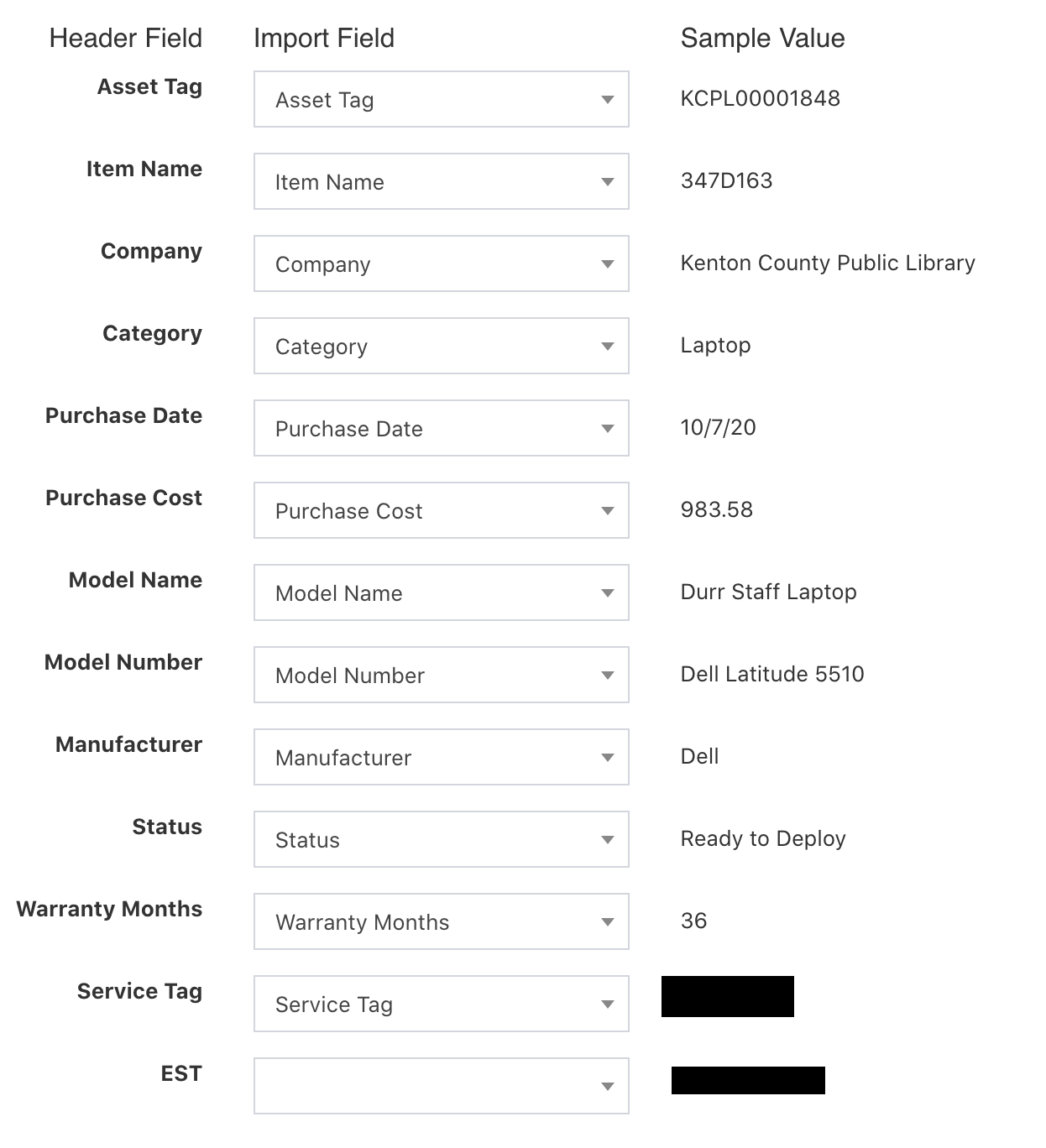
No errors on the screen. The Assets import, but it does not import information from columns that it did not match on its own.
For example, in this screenshot, the column EST will not import even if I set a column with the drop down because the importer did not match the column automatically.
petersont4
on 20 Oct 2020
We'll look into this - thank you for the extra info
snipe
on 20 Oct 2020
@petersont4 one quick question - do the models you're importing the custom fields on actually have the custom field fieldsets assigned?
snipe
on 20 Oct 2020
Yes. And as soon as I change the column title in the CSV to Express Service Tag instead of EST, the importer matches it on its own and imports that piece of data.
If I had to guess, it looks like there is an issue with the dropdown box not actually doing anything when you change it.
petersont4
on 20 Oct 2020
I don't mean to sound like I'm doubting you - I'm not - I just know custom fields can be a little confusing, so if you could help with a few screenshots, I'd be really grateful.
Fields can belong to any number of field sets. Models are allowed one fieldset. If a custom field isn't in a fieldset that is assigned to a particular model, that data will (probably) be imported, but not visible on the asset.
Apologies if you already know this, but it's a little confusing and we run into a lot of questions about this. We need to do a better job of surfacing some of this during an import.
snipe
on 20 Oct 2020
Not at all!
Attaching 2 separate zip files to show you the two separate scenarios. I have attached a CSV with the EST column header that I am trying to import. I only have 1 asset so I am not screwing up my instance, but it does this with a long list of assets as well. I don't have access to a test instance at the moment.
The first screenshot is what the screen looks like when I first click on process then select asset.
The second screenshot is what it looks like after I pick Express Service Tag to match EST.
The third screenshot is the asset page directly after import. You can see express service tag field is there, but no data.
Incorrect Header.zip
If I have the column name in the CSV match Snipe-IT fields, I get the following:
Screenshot 4 is what happens directly after processing import and selecting asset from the dropdown. All fields match on their own, no need to manual match fields.
Screenshot 5 is the asset page directly after import. Express service tag imported correctly.
Correct headers.zip
petersont4
on 20 Oct 2020
Thanks so much for this - we'll test this and figure out what's happening here.
@bzeus - can you help test this please?
snipe
on 20 Oct 2020
@mexx3001 Just going to gather a little more info for @bzeus.
What version of Snipe-IT are you currently running?
and can you verify that the custom field is in a custom fieldset that has been applied to the asset models in your .csv file?
 viclou
on 20 Oct 2020
viclou
on 20 Oct 2020
I use version v4.9.5 - build 4482 (master)
After I renamed the headings in the original import file exactly the same way as the custom field names, the import now works.
The only problem I have now is that the status "Pending" is set to "Ready to Deploy". In addition the asset should say "That asset status is not deployable. This asset cannot be checked out."
I'm trying to replace an existing homemade asset database and there are more than 4000 records to import and changing all of them manually is quite an effort.
mexx3001
on 21 Oct 2020
Did you include a status in your import?
snipe
on 21 Oct 2020
Yes I have now added a status and it works now.
Does the CSV import only support "," as separator? As soon as ";" is available as separator in a CSV, the importer does not recognize the formatting.
mexx3001
on 22 Oct 2020
I believe the CSV importer does expect commas only
snipe
on 22 Oct 2020
(We do provide a sample CSV template in the docs, if that's helpful)
snipe
on 22 Oct 2020
Thanks a lot, in the meantime I have adapted my import file correctly.
mexx3001
on 23 Oct 2020
Related issues
 bricelabelle
·
3Comments
snipe
·
5Comments
bricelabelle
·
3Comments
snipe
·
5Comments
 laTruffe79
·
4Comments
laTruffe79
·
4Comments
 tbradsha
·
4Comments
tbradsha
·
4Comments
 anilp78
·
4Comments
anilp78
·
4Comments