Snipe-it: QR Code Generation [port number in APP_URL not followed in image URL]
Please confirm you have done the following before posting your bug report:
- [X] I have enabled debug mode
- [X] I have read checked the Common Issues page
Describe the bug
A clear and concise description of what the bug is.
I'm sorry to have deleted most of the template, but this I think I've got the problem narrowed down pretty well.
So I read a lot of the other "QR Code not generating" posts, and checked my APP_URL in the .env file and it was obviously wrong as well..
The problem I have now, however, is that the URL in the Asset page, for example, isn't including the port number which I specified in the APP_URL variable. My APP_URL='http://192.168.1.240:8001' and the URL when I inspect the page is simply http://192.168.1.240/hardware/9/qr_code.
If I visit that URL in the browser and manually add :8001 the QR Code loads perfectly.
For comparison - the images load with the port number in the URL perfectly as well. See page source:
<img src="http://192.168.1.240:8001/uploads/models/1-hppavilionpng.png" class="assetimg img-responsive">
<img src="http://192.168.1.240/hardware/9/qr_code" class="img-thumbnail pull-right" style="height: 100px; width: 100px; margin-right: 10px;">
Am I possibly just formatting the APP_URL string wrong? Does it maybe not support port numbers?
EDIT: When generating the label sheet with the qr-codes on them, they also point to http://192.168.1.240:8001/hardware/xx - so even there the port is included and correct. Only on the asset page itself, where the asset image and qr code are shown, the port does not seem to be included. Very strange..
Want to back this issue? Post a bounty on it! We accept bounties via Bountysource.
 ndom91
All 8 comments
So I've cleared my caches with the commands mentioned in the 'common issues' page of the snipe-it docs:
composer dump-autoload
composer clear-compiled
php artisan config:clear
php artisan view:clear
php artisan cache:clear
php artisan route:clear
However, I CANNOT for the life of me get snipe to accept my addition of the port to my .env file.
I also grepped a bit and found in resources/views/hardware/view.blade.php the code for generating the qr code line in the asset view page:
@if  ($snipeSettings->qr_code=='1')
  <img src="{{ config('app.url') }}/hardware/{{ $asset->id }}/qr_code" class="img-thumbnail pull-right" style="height: 100px; width: 100px; margin-right: 10px;">
@endif
And I noticed the lines above it, for example where it pulls the image of the device (which works 100% in my case) is created via a
<img src="{{ url('/') }}/uploads/models/{{{ $asset->model->image }}}" class="assetimg img-responsive">
So I tried using the {{ url('/') }} in place of the {{ config('app.url') }} but that change wasn't applied either. Even after clearing my cache/configs/everythign with the commands above..
I also tried to just manually add :8001 [ so that it looked like <img src="{{ config('app.url') }}:8001/hardware/... ] to the original qr code URL generating code in view.blade.php, but that wasn't applied either.
Its like no matter what changes I make - nothing is getting through.
Am I missing something here?!
ndom91
on 11 Jul 2018
Well, so here's the weird thing....
The asset image uses code like this:
<img src="{{ url('/') }}/uploads/models/{{{ $asset->model->image }}}" class="assetimg img-responsive">
(using the url() helper.)
The QR code uses code like this:
<img src="{{ config('app.url') }}/hardware/{{ $asset->id }}/qr_code" class="img-thumbnail pull-right" style="height: 100px; width: 100px; margin-right: 10px;">
which pulls right from the .env file.
I don't know of any reason for this difference in behavior. If anything, I'd expect more issues with url() than with config(), since the url() helper is a little more "magical", and the the config() helper should just be outputting the config value.
Two things:
First - try changing the code in resources/views/hardware/view.blade.php from:
<img src="{{ config('app.url') }}/hardware/{{ $asset->id }}/qr_code" class="img-thumbnail pull-right" style="height: 100px; width: 100px; margin-right: 10px;">
to:
<img src="{{ url('/') }}/hardware/{{ $asset->id }}/qr_code" class="img-thumbnail pull-right" style="height: 100px; width: 100px; margin-right: 10px;">
and see if that works.
Second, from the command line, type:
php artisan tinker
echo config('app.url');
and tell me what you see.
 snipe
on 13 Jul 2018
snipe
on 13 Jul 2018
Ah, balls, sorry - I just caught that part in your original message. You tried that.
That honestly doesn't make any sense at all. Can you add some dummy text to that blade and see if that shows up? If it doesn't, you have a much weirder problem, in that changes to your files aren't reflecting.
snipe
on 13 Jul 2018
@snipe
Of course it ended up being a silly error on my part, got it working :)
I had snipe cloned into /opt/snipe and /var/www/html/snipe and I kept making changes to the .env file that wasn't the "live" version of snipe :laughing:
EDIT: I know this is not the right place to ask, but I'll pop the question in here anyway since I have your attention :) - is there anyway to make a custom tab on the asset view page. I have about 15 custom fields that I would like to hide in a different tab, say between 'Details' and 'Licences'. Thanks!
EDIT2:
Didnt't find any official way to do it, so after digging around and lots of grepping - I think I figured it out :)
Check it out:
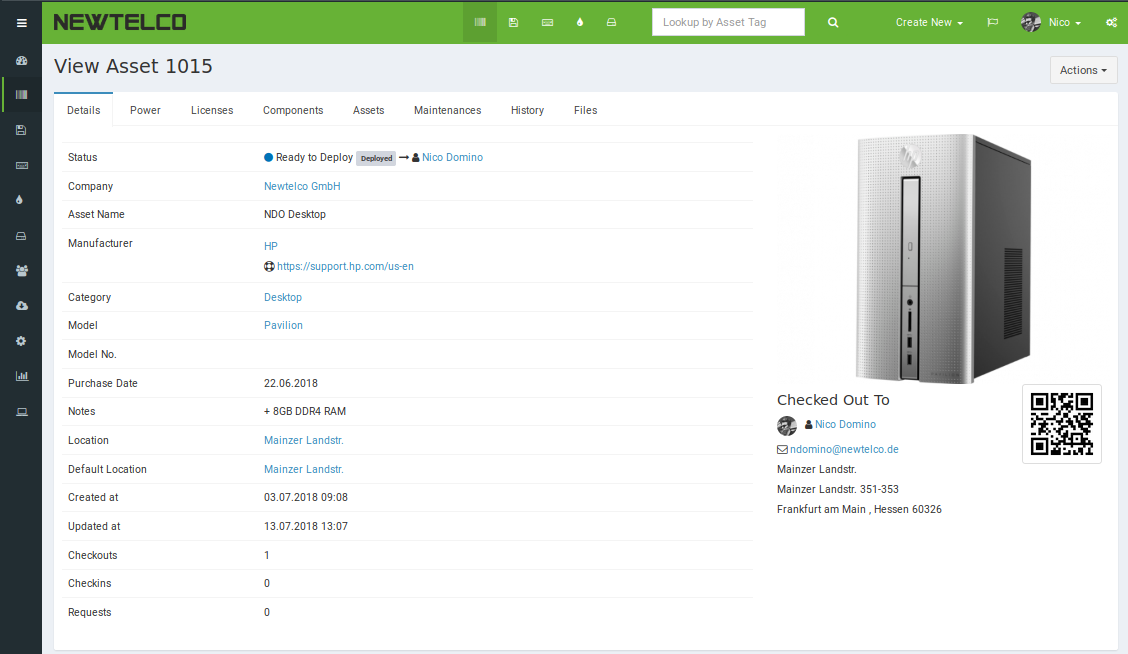
The custom fields are hidden on the main "details" page:
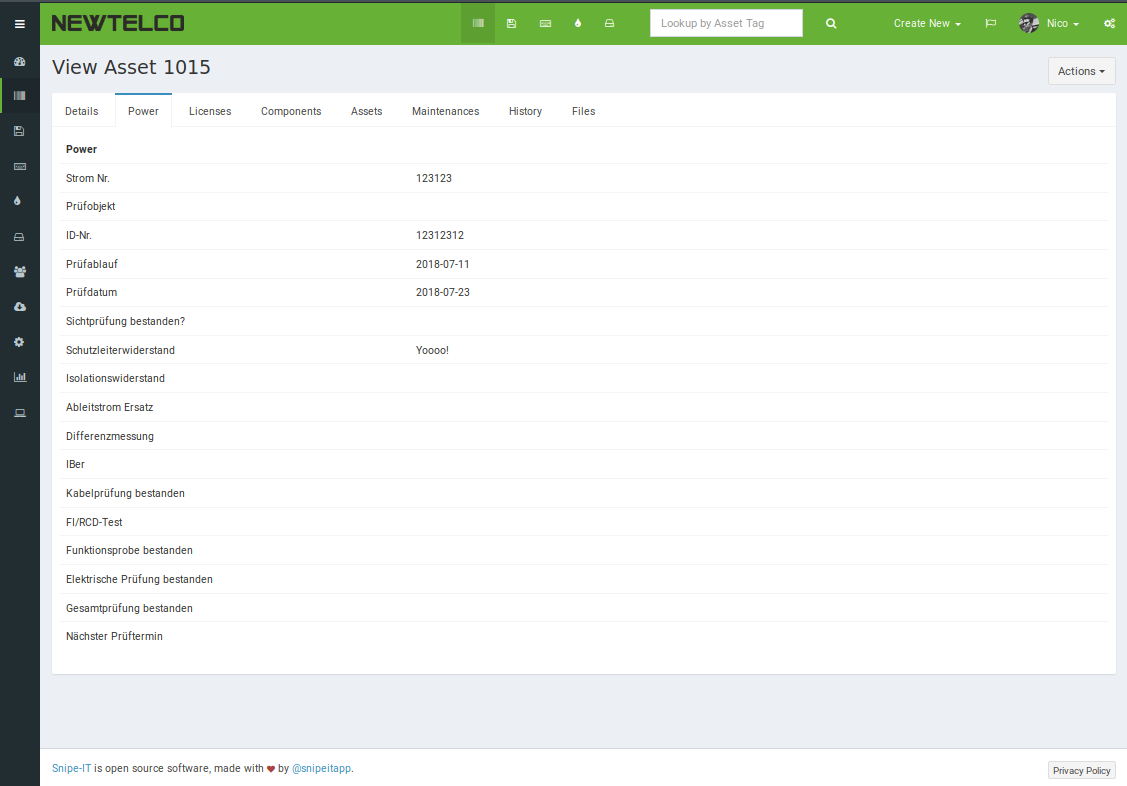
But are visible from their own tab:
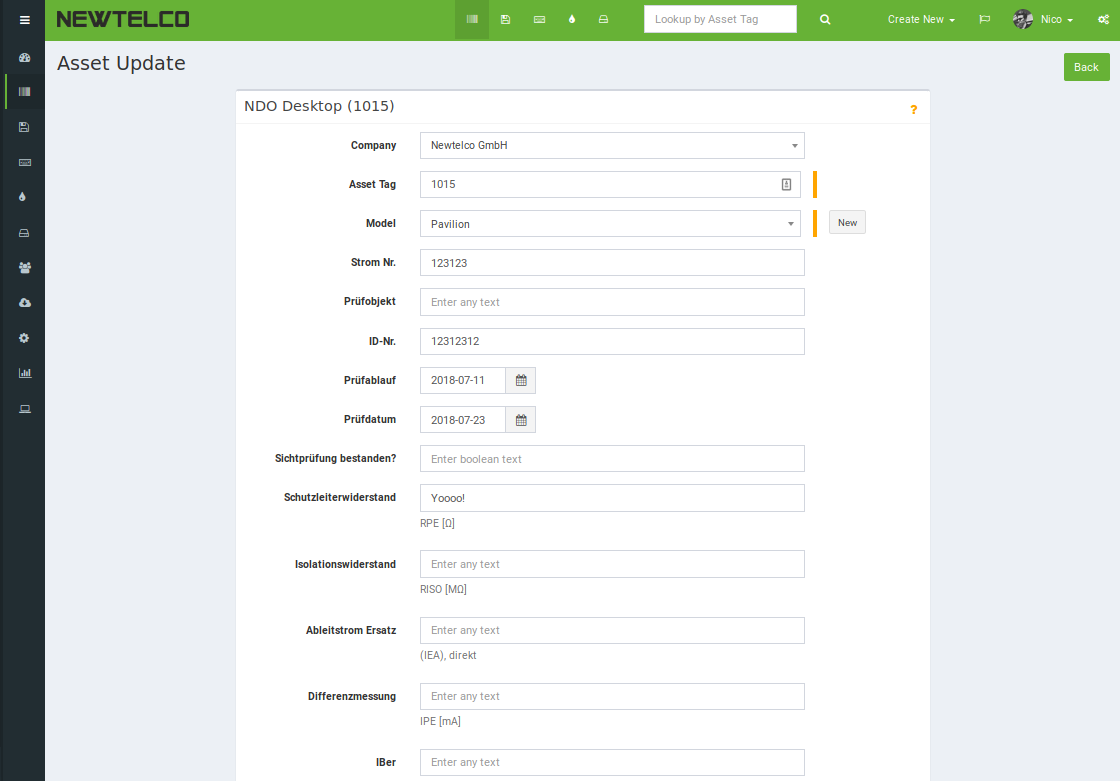
Andddddd the power values are still editable correctly via the normal "edit asset" page:
@snipe - should I make a pull request out of any of this? Its all a pretty custom hack job (although I do have the DE, EN, and RU translations for the tab header included ;) ), I dont know how many others it could help - but if anyone wants to do anythign similar feel free to point them in my direction, I'd be happy to help :)
ndom91
on 13 Jul 2018
Is this still relevant? We haven't heard from anyone in a bit. If so, please comment with any updates or additional detail.
This issue has been automatically marked as stale because it has not had recent activity. It will be closed if no further activity occurs. Don't take it personally, we just need to keep a handle on things. Thank you for your contributions!
![stale[bot] picture](https://avatars3.githubusercontent.com/in/1724?v=4&s=40) stale[bot]
on 11 Sep 2018
stale[bot]
on 11 Sep 2018
No further response - issue is closed then.
If anyone comes across this and is also interested in setting up a custom tab in the asset view, you can get a hold of me on here and on twitter [at]ndom91.
ndom91
on 11 Sep 2018
@ndom91 Can you kindly navigate the process of customization of your asset page and the QR Code?
 yk48
on 29 Jul 2019
yk48
on 29 Jul 2019
@yk48 sorry I dont work at the company where I was running this anymore.
ndom91
on 30 Jul 2019
Related issues
 MattMencel
·
56Comments
MattMencel
·
56Comments
 ss-dsheets
·
91Comments
ss-dsheets
·
91Comments
 WELLBOREIS
·
83Comments
snipe
·
60Comments
WELLBOREIS
·
83Comments
snipe
·
60Comments
 peelman
·
62Comments
peelman
·
62Comments
Most helpful comment
@snipe
Of course it ended up being a silly error on my part, got it working :)
I had snipe cloned into /opt/snipe and /var/www/html/snipe and I kept making changes to the .env file that wasn't the "live" version of snipe :laughing:
EDIT: I know this is not the right place to ask, but I'll pop the question in here anyway since I have your attention :) - is there anyway to make a custom tab on the asset view page. I have about 15 custom fields that I would like to hide in a different tab, say between 'Details' and 'Licences'. Thanks!
EDIT2:
Didnt't find any official way to do it, so after digging around and lots of grepping - I think I figured it out :)
Check it out:
The custom fields are hidden on the main "details" page:

But are visible from their own tab:

Andddddd the power values are still editable correctly via the normal "edit asset" page:

@snipe - should I make a pull request out of any of this? Its all a pretty custom hack job (although I do have the DE, EN, and RU translations for the tab header included ;) ), I dont know how many others it could help - but if anyone wants to do anythign similar feel free to point them in my direction, I'd be happy to help :)