Please confirm you have done the following before posting your bug report:
- [x ] I have enabled debug mode
- [x ] I have read checked the Common Issues page
Describe the bug
After upgrading to the current version, we are unable to synchronize AD users after performing an LDAP sync either through the application or through the command line. We have also verified that we could connect and authenticate to LDAP on multiple DCs.

To Reproduce
Steps to reproduce the behavior:
- Go to '...'
- Click on '....'
- Scroll down to '....'
- See error
Expected behavior
When performing an LDAP Sync, synchronize new/old accounts into the User database.
Screenshots
If applicable, add screenshots to help explain your problem.
Server (please complete the following information):
- Snipe-IT Version 4.4.1
- OS: [e.g. Ubuntu, CentOS] Windows 2016
- Web Server: [e.g. Apache, IIS] IIS
- PHP Version 5.6.31
Desktop (please complete the following information):
- OS: [e.g. iOS] Win 10
- Browser [e.g. chrome, safari] Chrome
- Version [e.g. 22]
Smartphone (please complete the following information):
- Device: [e.g. iPhone6]
- OS: [e.g. iOS8.1]
- Browser [e.g. stock browser, safari]
- Version [e.g. 22]
Error Messages (N/A)
- WITH DEBUG TURNED ON, if you're getting an error in your browser, include that error
- If a stacktrace is provided in the error, include that too.
- Any errors that appear in your browser's error console.
- Confirm whether the error is reproducible on the demo: https://snipeitapp.com/demo. NA
- Include any additional information you can find in
storage/logsand your webserver's logs.
Additional context
- Is this a fresh install or an upgrade? Upgrade
- What OS and web server you're running Snipe-IT on - Windows 2016 IIS
- What method you used to install Snipe-IT (install.sh, manual installation, docker, etc) manual
- Include what you've done so far in the installation, and if you got any error messages along the way.
- Indicate whether or not you've manually edited any data directly in the database - no manual updating
Add any other context about the problem here.
Please do not post an issue without answering the related questions above. If you have opened a different issue and already answered these questions, answer them again, once for every ticket. It will be next to impossible for us to help you.
Want to back this issue? Post a bounty on it! We accept bounties via Bountysource.
 lockbucket
All 9 comments
I have updated my PHP to 7.2.2 and I am still receiving the error. I have verified that the php_ldap.dll is enabled and I have been able to authenticate without issue.
lockbucket
on 21 Jun 2018
Please provide answers to more of the questions in the original issue template.
What's in your error logs? What happens when you try to synchronize? (Does nothing sync, do you get an error, etc?)
After upgrading to the current version, we are unable to synchronize AD users after performing an LDAP sync either through the application or through the command line. We have also verified that we could connect and authenticate to LDAP on multiple DCs.
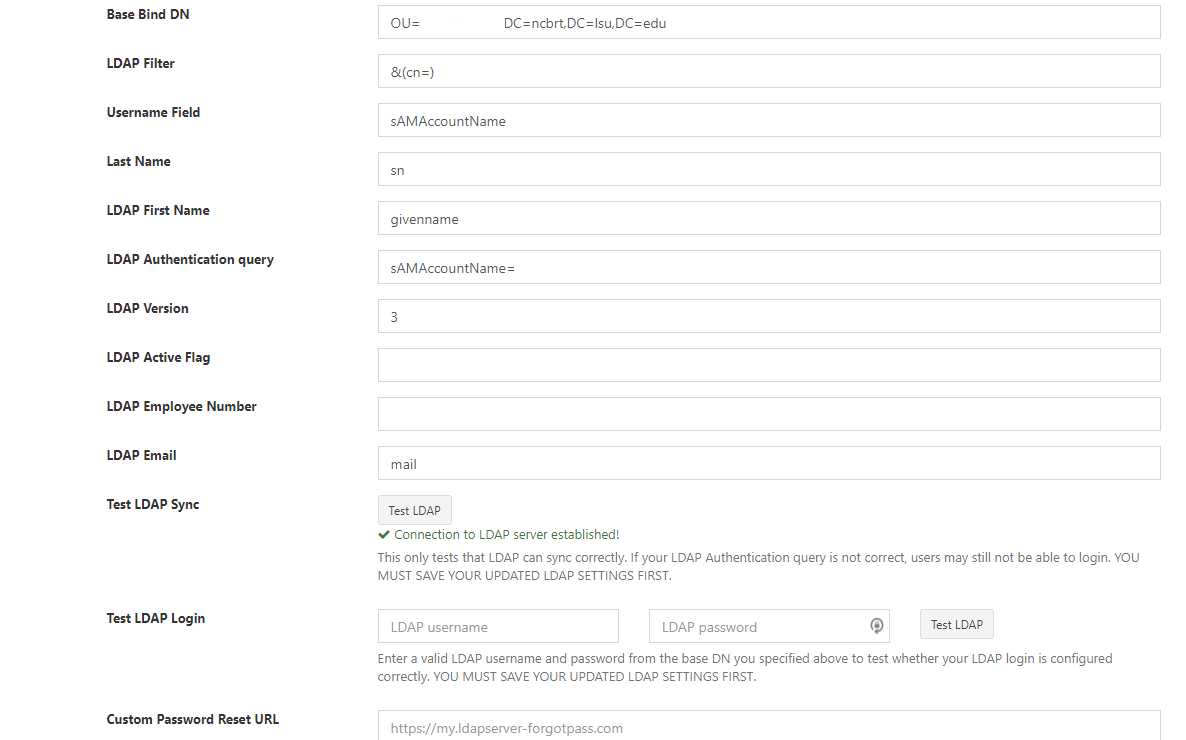
Providing your LDAP settings would probably help here too.
 snipe
on 21 Jun 2018
snipe
on 21 Jun 2018
I have enabled debug mode, and no errors are being written to the logs. As far as when I synchronize, I have provided a screenshot in my initial question as it reports "LDAP sync successful". I have tried clearing the cache and verifying that we are running the latest version of snipe-it.
lockbucket
on 21 Jun 2018
What about when you do Test LDAP login?
 MSTigers
on 29 Jun 2018
MSTigers
on 29 Jun 2018
I'd speculate that your LDAP filter being &(cn=) could be a problem. May need to put it to &(cn=*)
MSTigers
on 29 Jun 2018
I was able to successfully login through LDAP and I have changed to &(cn=*) with still no luck.
lockbucket
on 29 Jun 2018
I have the same problem. Here some details:
- Snipe-IT Version v4.4.2 - build 3666 (master)
- OS: Ubuntu 16.04.4 LTS
- Web Server: Apache/2.4.18
- PHP Version 7.0.30
I didn't get any error message (with APP_DEBUG=true ).
In browser, after sync - it return "Success: LDAP Import successful. ", but I didn't see new users. I see some old users that are updated (or at least this is written in column "Notes").
This is not fresh install - this is an update from 4.1.3 to lastest version.
 nmilanov
on 4 Jul 2018
nmilanov
on 4 Jul 2018
Yep, I have even tried a different account, migrating the database, and still no luck.
lockbucket
on 9 Jul 2018
I found the issue, with previous versions, we could use sAMAccountName for the username when trying to sync LDAP. With the new version, I modified it to all lowercase samaccountname and it synced correctly.
lockbucket
on 9 Jul 2018
Related issues
 LecrisUT
·
71Comments
LecrisUT
·
71Comments
 dwestonjr
·
65Comments
snipe
·
60Comments
dwestonjr
·
65Comments
snipe
·
60Comments
 WELLBOREIS
·
83Comments
MSTigers
·
54Comments
WELLBOREIS
·
83Comments
MSTigers
·
54Comments