Hi,
I have configured snipe-it to point to our AD server. "Test LDAP" button from settings page works. I can also synchronize users and they appear under People with the note "Imported from LDAP".
If I try login using my account using my LDAP password, I get the error "Error: The username or password is incorrect. "
The log files says: [2017-01-25 12:58:29] production.ERROR: There was an error authenticating the LDAP user: Could not find user in LDAP directory
Version v3.6.3 build 15 (g1bf34d7)
Ubuntu 14.04.4 LTS
I also tried to set a local password by deselecting the "LDAP Password Sync" checkbox in settings, it does not allow me to set a password for any LDAP user, password field still says "(Managed via LDAP)"? Or is it not possible to set local password for LDAP accounts?
Ideally I'd like to auth directly from LDAP. Any ideas?
Thanks,
Marc

 marcpeiser
All 12 comments
I whould check that
- the Account I try isn't disabled
- the Account isn't excluded by the LDAP filter and not listed as a User in the people area
- that you use the SamAccoutName to login and not the E-Mailaddress - for example
rgds
Sebastian
 Guenny0488
on 25 Jan 2017
Guenny0488
on 25 Jan 2017
I would try
"samaccountname="
in the LDAP Authentication query field of the LDAP settings. That is how I have mine configured and it is operational in a production enviroment.
 VanillaNinjaD
on 25 Jan 2017
VanillaNinjaD
on 25 Jan 2017
@VanillaNinjaD
What is the difference between:
`"samaccountname="
and
uid=samaccountname ?
I have also the issue that a user will be imported via LDAP but the logon is not possible.
The Log says: [2017-01-26 08:41:39] production.ERROR: There was an error authenticating the LDAP user: Could not find user in LDAP directory
But the User is there, valid and cachted via my LDAP Filter
Guenny0488
on 26 Jan 2017
Hello!
I have exacly the same issue and after several days of trying different ways, we couldnt fix it.
Users are being imported perfectly, but when trying to log in, get the same error: Username or password is wrong and in logs the same that Couldn't find user in LDAP directory.
We really need this thing resolved, otherwize we have to think about some other solutions for our asset management.
 mlehtmets
on 26 Jan 2017
mlehtmets
on 26 Jan 2017
@mlehtmets this is always an issue of getting your settings right in the Admin. If you could provide some information (any information at all) about your settings, we can try to help you, but we have no way of knowing what you need to change if we don't know what you have in your settings, what your logs say, or even what version you're using. We have tons of people successfully using LDAP login, so it's just a matter of getting the settings right for your specific setup.
 snipe
on 26 Jan 2017
snipe
on 26 Jan 2017
uid= is an openLDAP query, not an Active Directory query
samaccountname= is the proper Active Directory syntax
uid=samaccountname Is nothing that I'm aware of
Without the correct Authentication Query you will get exactly what you are experiencing. The base DN is correct and the LDAP filter is correct so you can import users, however the authentication query is incorrect so they will never be able to log in.
Here is the Snipe-IT documentation detailing the proper setup for Active Directory as well as generic LDAP
VanillaNinjaD
on 26 Jan 2017
Got it working! :)
It was confusing for me that tick in fornt of "This is an AD server". But this resolved my problem.
mlehtmets
on 26 Jan 2017
Hello @marcpeiser , I'm not sure if you were able to get LDAP authentication to work or not; however, if you didn't, here are a couple of tweaks you can make to "app/Models/Ldap.php" to get it to work:
Find this section:
        $filterQuery = $settings->ldap_auth_filter_query . $username;
        if (!$ldapbind = @ldap_bind($connection, $userDn, $password)) {
            return false;
        }
        if (!$results = ldap_search($connection, $baseDn, $filterQuery)) {
            throw new Exception('Could not search LDAP: ');
        }
        if (!$entry = ldap_first_entry($connection, $results)) {
            return false;
        }
        if (!$user =  array_change_key_case(ldap_get_attributes($connection, $entry), CASE_LOWER)) {
            return false;
        }
        return $user;
and change it to:
        $filterQuery = $settings->ldap_auth_filter_query . $username;
        $ldaprdn  = $settings->ldap_uname;
        $ldappass = \Crypt::decrypt(Setting::getSettings()->ldap_pword);

        $ldapbind = ldap_bind($connection, $ldaprdn, $ldappass);

        if (!$results = ldap_search($connection, $baseDn, $filterQuery)) {
            throw new Exception('Could not search LDAP: ');
        }
       if (!$entry = ldap_first_entry($connection, $results)) {
            return false;
        }
        if( !$userDn = @ldap_get_dn($connection, $entry) ) {
                return false;
        }
        if( !$isbound = ldap_bind($connection, $userDn, $password) ) {
                return false;
        }
        if( !$user = array_change_key_case(ldap_get_attributes( $connection, $entry), CASE_LOWER) ) {
                return false;
        }

        return $user;
You will notice that the suggested code is almost identical to the first one. The main difference that we must connect to LDAP using the bind user (from the config file) $ldapbind = ldap_bind($connection, $ldaprdn, $ldappass); in order to then try to authenticate the user (last if block).
Honestly, I'm not sure how people can successfully authenticate a user without first connecting with the Bind user.
Anyway, I hope this helps.
 aalaily
on 2 Feb 2017
aalaily
on 2 Feb 2017
Judging from the behavior, I'd say that Snipe-It is using the Snipe-It user's credentials to bind, rather than using the bind credentials. This is causing some weird problems, further described in issue #3313.
 shoutinblues
on 17 Feb 2017
shoutinblues
on 17 Feb 2017
@shoutinblues that's exactly what's going on. If you replace the block of code that I detailed above, you will be able to authenticate against LDAP.
aalaily
on 19 Feb 2017
I tried replacing the code as @aalaily mentioned above but that didn't work for me. Turns out, changing the LDAP Authentication query field to "sAMAccountName=" solved my issue. Can login using LDAP creds just fine.
Thanks for everyones help!
marcpeiser
on 24 Feb 2017
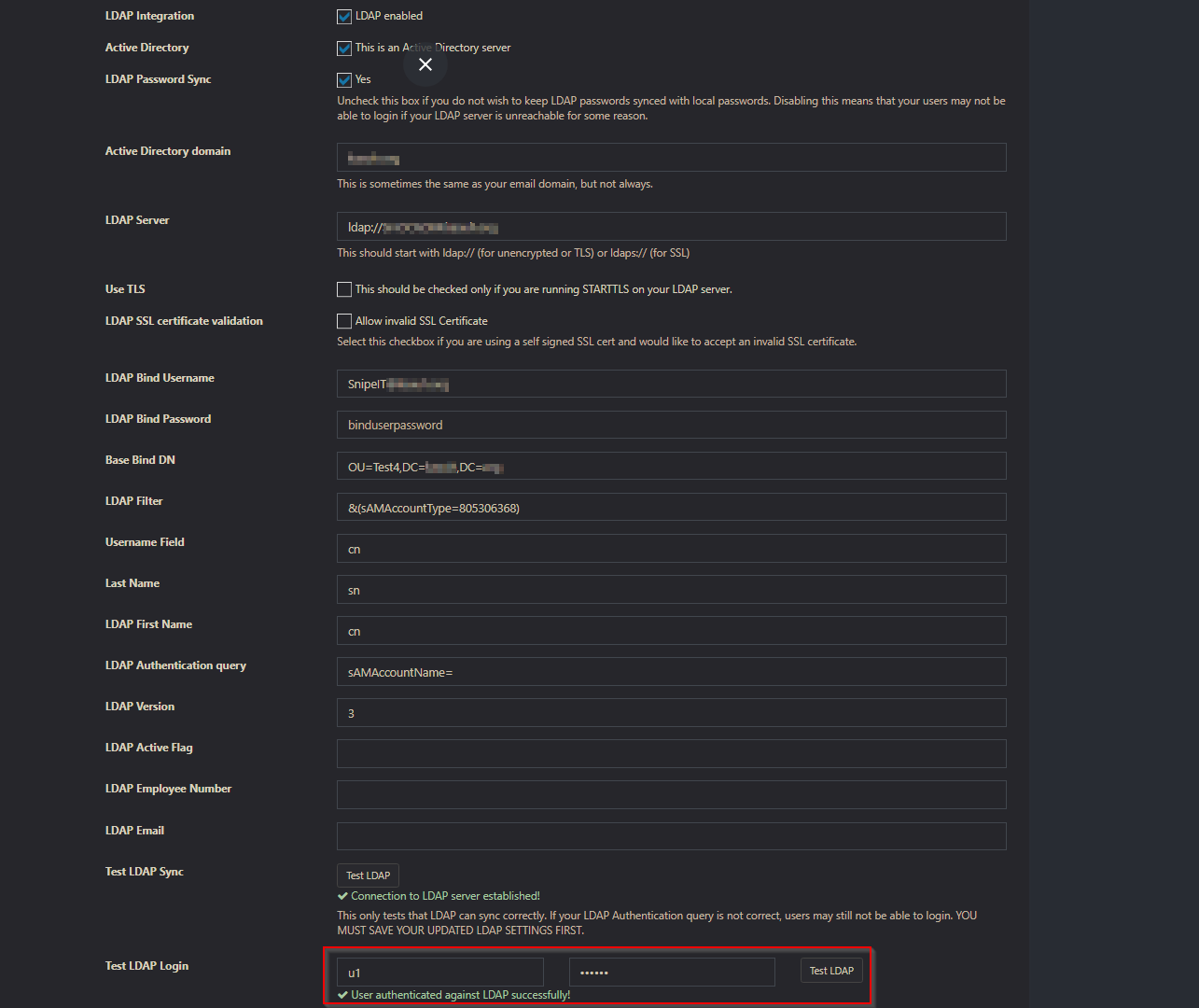
Fixed it .I faced this issue binding with Microsoft Active directory on Windows server 2016
Runing SnipeIT Version v4.6.4 - build 3885 on Debian 9
It worked for me when
1-I gave the bind account permission to read all user information on the OU that i
need
to pull and bind the users from Active Directory by Delegate control in Active Directory
Users and Computers.
2-Test the user login syntax as showing in the screenshot
Hope it helps someone
 kzizo123
on 12 Sep 2018
kzizo123
on 12 Sep 2018
Related issues
 alden-david
·
58Comments
alden-david
·
58Comments
 PixelDJ
·
94Comments
PixelDJ
·
94Comments
 Jason-Weber-UC
·
75Comments
Jason-Weber-UC
·
75Comments
 Puddl36lum
·
67Comments
Puddl36lum
·
67Comments
 peelman
·
62Comments
peelman
·
62Comments
Most helpful comment
Hello @marcpeiser , I'm not sure if you were able to get LDAP authentication to work or not; however, if you didn't, here are a couple of tweaks you can make to "app/Models/Ldap.php" to get it to work:
Find this section:
and change it to:
You will notice that the suggested code is almost identical to the first one. The main difference that we must connect to LDAP using the bind user (from the config file)
$ldapbind = ldap_bind($connection, $ldaprdn, $ldappass);in order to then try to authenticate the user (lastifblock).Honestly, I'm not sure how people can successfully authenticate a user without first connecting with the Bind user.
Anyway, I hope this helps.