Hey all, I was prompted to allow link previews but accidentally declined. How can I re-enable them?
 logankilpatrick
All 26 comments
Thanks for opening this issue! If you would like to help implement an improvement, read more about contributing and consider submitting a pull request.
![welcome[bot] picture](https://avatars.githubusercontent.com/in/4141?v=4&s=40) welcome[bot]
on 21 Feb 2020
welcome[bot]
on 21 Feb 2020
You should be able to modify your settings with /github settings. Give that a try and see if it’s what you need.
 tebriel
on 21 Feb 2020
tebriel
on 21 Feb 2020
@tebriel it only shows the repos I have enabled but not the one I disabled.
logankilpatrick
on 21 Feb 2020
Hmm, maybe /github signout and then signin? If that doesn’t do it I’ll have to go spelunking in the code.
tebriel
on 21 Feb 2020
The issue is still persisting @tebriel
logankilpatrick
on 21 Feb 2020
Okay. Sorry about that. I’m sure there’s a way to fix it but I’ll have to dig through the code path and see.
tebriel
on 21 Feb 2020
Thank you! I looked all over but I could not find it.
logankilpatrick
on 21 Feb 2020
I am in the same situation, @logankilpatrick. I declined the initial prompt, and despite much digging through Slack preferences, haven't found a way to either reset my prompts or enable Github previews now. Hope a solution surfaces 🤞
 sbone
on 3 Mar 2020
sbone
on 3 Mar 2020
I can get the prompt to re-appear by doing /github signout.
But even once the prompt re-appears, if I click the "Show rich preview", it prompts me to sign in (which I do) and then fails with a "Could not find resource: ..." private message to me.
If I do /github signin first, then the prompt to do rich previews never appears.
 shea-parkes
on 10 Mar 2020
shea-parkes
on 10 Mar 2020
On a semi-related note, should we be petitioning the Slack dev team to take over ownership of this repo? It seems like development died a year ago. I'm assuming Mircrosoft pulled the dev resources to work on Teams integrations intead.
We're paying both Slack and Microsoft/Github, so I'm hoping we have some influence for someone to help.
shea-parkes
on 10 Mar 2020
I figured out a workaround. The issue seems to be that the Slack bot is never actually registering as a GitHub application. To force that, you just need to (temporarily) subscribe to your organization's notifications.
So in Slack, to get rich notifications for myorg/myrepo:
- Type the following in slack:
/github subscribe myorg
- If you haven't done
/github signinyou will be prompted to link your Slack identity with a GitHub account
- If you haven't done
- Follow the prompts to grant Slack access to your
myorgGitHub organization - Try and share a link again in a Slack channel (e.g.
https://github.com/myorg/myrepo/issues/1) - This time when the "Show rich preview" button appears, you should be able to click it and enable rich previews for that repository (for you)
- You can then
/github unsubscribe myorgbecause you likely don't want all those notifications, and the GitHub integration will presist beyond your unsubscribe. - Each user will need to click "Show rich preview" for each of your github repositories the first time they try to share a link, but the GitHub org level Slack app integration should hopefully persist.
I hope I got the above correct, and I didn't make a new org to double check. So best of luck to anyone that tries it.
shea-parkes
on 10 Mar 2020
Those steps did not work for me. Same issue as before the repo I silenced in the past will still not function.
 tschroeder-zendesk
on 10 Mar 2020
tschroeder-zendesk
on 10 Mar 2020
One visible confirmation that the steps above did for me was to ensure the "Slack" app was installed into my organization:
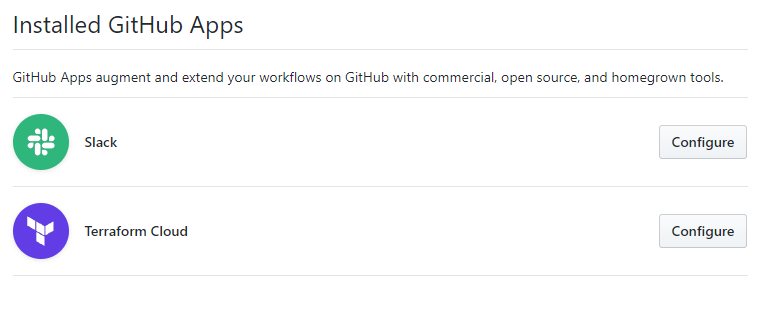
I suppose I subscribed to a specific repo first (e.g. /github subscribe myorg/myrepo) if that mattered (and then subscribed to /github subscribe myorg).
shea-parkes
on 10 Mar 2020
@shea-parkes Our team within GitHub is still working on the Slack Integration, but we have limited resources. The Microsoft acquisition did not affect the staffing of the slack integration! In fact our acquisition of pull panda redoubled our commitment to the Slack integration, with Scheduled Reminders in beta and graduating soon.
We do have limited resources on our team though, and our current focus has been to move the hosting of the slack app to a more scalable infrastructure. I know it seems like there's not a lot of action on this repo, but I do want to highlight all the work that went into folding Scheduled Reminders into the slack application, a lot of work removing a number of bugs and exceptions that were happening for many users, and also scalability issues (where we just couldn't respond to requests). The app is more stable and doing better now, but we still have a ways to go. I'm sorry we haven't been able to solve your issue with the unfurl dismissal, but it is on my radar.
tebriel
on 10 Mar 2020
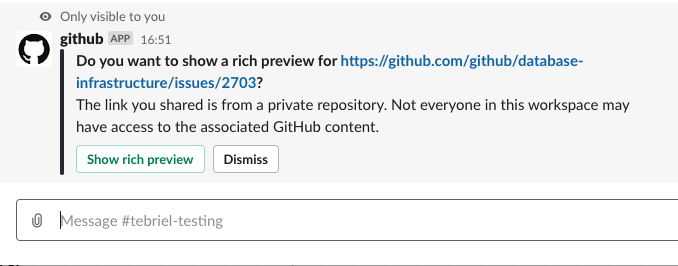
@logankilpatrick is this the prompt you declined? If I click dismiss, then share another link, it re-prompts me. If I'm signed out, it asks me to sign in if it's a link to a private repository. Can you give me some more insight into what links you're trying to unfurl?
tebriel
on 10 Mar 2020
@sbone and @tschroeder-zendesk same question for you ☝️
tebriel
on 10 Mar 2020
@tebriel In my experience with issue, I have never seen that prompt after my initial Dismissal of it. I paste private repo links in my company's Slack channels throughout the day and I never get prompted.
sbone
on 10 Mar 2020
@sbone I copied your user settings {"unfurlPrivateResources":{},"muteUnfurlPromptsUntil":null,"muteUnfurlPromptsIndefinitely":true,"unfurlPromptsDismissCount":5} from the database into my profile, now if I do /github settings I see this prompt:
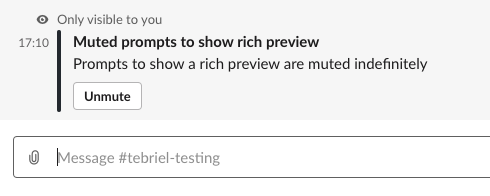
Can you confirm that you don't see that? Do you see anything when you issue a /github settings? Are you issuing the slash command in a dm? private channel? public channel?
tebriel
on 10 Mar 2020
@tebriel Wooaaah that did it! /github settings and unmuting that.
I've been on-and-off trying to debug this for way too long. Thank you!!!
sbone
on 10 Mar 2020
yay! I'm glad that it worked! I didn't modify your settings. Sorry it took so long to get you to a resolution!
tebriel
on 10 Mar 2020
I'm going to close this issue, others on this issue: please re-open if the above workflow doesn't solve it for you and tag me. Any additional information you can provide would be helpful!
tebriel
on 10 Mar 2020
/github settings doesn't display the muted ones for me still. This was the issue I reported that created this ticket.
tschroeder-zendesk
on 10 Mar 2020
@tschroeder-zendesk can you show me a screenshot of what /GitHub settings shows you?
tebriel
on 11 Mar 2020
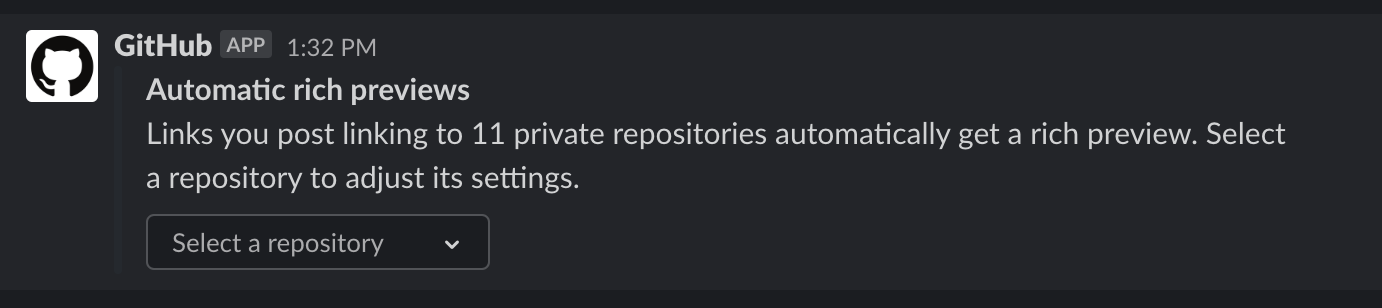
This is what I see. It lists 11 repos in the drop down if I select any of them it gives me the option to disable rich previews, but the repo that I am not seeing isn't in the list at all.
tschroeder-zendesk
on 11 Mar 2020
@tschroeder-zendesk according to your settings in the database, no unfurls are muted. Can you give me some more insight into what isn't happening that you expect to happen?
tebriel
on 12 Mar 2020
In the past I had a popup for zendesk/kennel a private repo we have. I accidentally clicked don't display and I haven't seen the popup for it come back since, or anyway to unmute it. When I paste links now nothing happens for that repo.
tschroeder-zendesk
on 13 Mar 2020
Related issues
 lbussy
·
4Comments
lbussy
·
4Comments
 chaim1221
·
4Comments
chaim1221
·
4Comments
 axos88
·
5Comments
axos88
·
5Comments
 xt0rted
·
4Comments
xt0rted
·
4Comments
 smoke
·
5Comments
smoke
·
5Comments
Most helpful comment
@sbone I copied your user settings
{"unfurlPrivateResources":{},"muteUnfurlPromptsUntil":null,"muteUnfurlPromptsIndefinitely":true,"unfurlPromptsDismissCount":5}from the database into my profile, now if I do/github settingsI see this prompt:Can you confirm that you don't see that? Do you see anything when you issue a
/github settings? Are you issuing the slash command in a dm? private channel? public channel?