Slack: Rich preview for private repos doesn't work
Hi! For some reason, GitHub app doesn't expand previews for private repos link while public repos work fine.
From the readme, it seems that I should do /GitHub signin which I've done, and the app shows me that my slack user connected with my GitHub account.
Also, I have access to the private repo, and I am a member of an organization which owns the repo.
What step did I miss? Maybe, an organization owner should install the app to the repo and sign in within the Slack? From the readme, it doesn't look like that.
 valignatev
All 19 comments
Thanks for opening this issue! The team at GitHub is not actively working on new features for the GitHub + Slack integration. We will still be deploying security/bug fixes and reviewing community contributions. If you would like to help implement an improvement, read more about contributing and consider submitting a pull request.
![welcome[bot] picture](https://avatars.githubusercontent.com/in/4141?v=4&s=40) welcome[bot]
on 14 Sep 2018
welcome[bot]
on 14 Sep 2018
@valignatev is the GitHub application in the channel you want to see the rich previews? If not, use /invite @github
If that's not the problem, can you provide a link and/or screenshot to see what type of URL you are trying to preview? Thanks,
 gimenete
on 1 Oct 2018
gimenete
on 1 Oct 2018
It's definitely invited. I type something like https://github.com/company/repo/blob/master/src/package/anotherdir/views.py#L283-L337
Basically, the link I copied from browser's url field.
I also tried to test it in the private chat with the GitHub bot, and it also doesn't show private repo links, although it works with the opensource projects.
valignatev
on 1 Oct 2018
Ok, can you double check that everything in this list is ok? https://github.com/integrations/slack#link-previews
gimenete
on 1 Oct 2018
Sure, double checked:
link previews for github.com have been disabled for your workspace - not disabled, OSS links work
the same link was already shared in the last 30 minutes in the same channel - nope, it wasn't
3 or more links are shared in the same chat message - nope, tested with only one link
The repository is private and the user that shared the link:
has not signed in to their GitHub account - signed in (proof below, I resigned again just in case)
asked not to show a preview when prompted - there was no prompt
the GitHub app is not in the channel, which you can remedy with /invite @github - invited, proof below

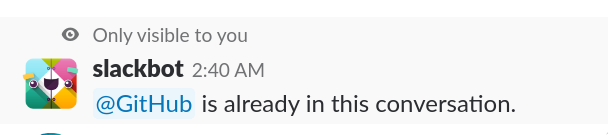
Is there anything else I can try/check?
valignatev
on 3 Oct 2018
Ok, it seems that besides all the things mentioned in the readme, there's also some kind of an approval needed from the repo owner. After this approval, all started to work. I think it worths to update the readme then
valignatev
on 20 Nov 2018
@valignatev can you share how to do that approval you mentioned? I am having exactly the same issue. 😕
 mcaballeropinto
on 9 Feb 2019
mcaballeropinto
on 9 Feb 2019
Hey @mcaballeropinto, organization/repo owner should be pinged by the integration for approval, and the owner should confirm. Just having push access to the repo is not enough.
valignatev
on 10 Feb 2019
We don't recall any notification about this specifically. We will dig in the settings to see if there is something being turned off.
The weird thing is that it was working until 2 weeks ago, then it just stopped showing previews for private repos anymore.
mcaballeropinto
on 12 Feb 2019
We're being affected by this over at @hashicorp as well, though I think that rich previews very suddenly stopped working when we switched to Slack Enterprise Grids.
@valignatev where does that ping for integration approval actually happen? Is that a ping in Slack, or somewhere on GitHub?
 davidcelis
on 26 Mar 2019
davidcelis
on 26 Mar 2019
@davidcelis Should be on github if I got it correctly. I personally haven't received it, the owner of the repo I'm working on got it, so I don't know where exactly this ping should happen.
valignatev
on 26 Mar 2019
@valignatev Thanks. I thought that might be the case, so I found the authorization page for the "Slack" GitHub App and asked our organization admins to re-authorize it against every repository. They claim to have done that but rich previews still don't work, unfortunately 😞
davidcelis
on 26 Mar 2019
For me it started working again when the organization admin logged out and in again of GitHub in Slack. Did you tried that?
mcaballeropinto
on 26 Mar 2019
Unfortunately that didn't work either (I had someone who is both a Slack admin and an owner of our GitHub org do a /github signout and /github signin in slack)
davidcelis
on 27 Mar 2019
I opened a new issue after realizing that we can't even show rich previews/unfurls for _public_ issues or PRs. Seems like a different problem.
davidcelis
on 28 Mar 2019
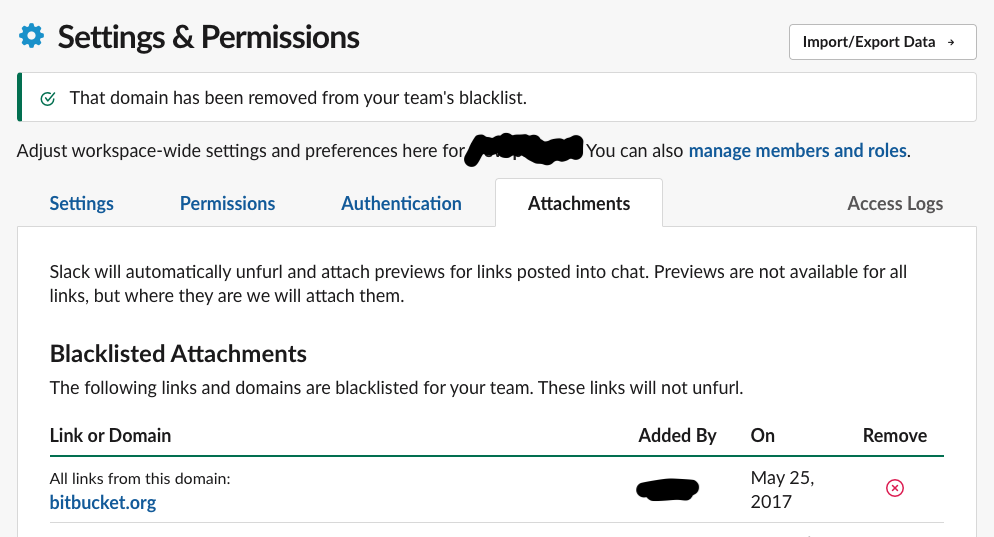
It is also worth to check if github.com has not been blacklisted on Slack for previews.
Looks like this -
 kesor
on 28 Apr 2019
kesor
on 28 Apr 2019
Try this slash command /github subscribe org/repo. It should take you to a page on GitHub where you can pick the organization or repo that you want to authorize.
Private repo unfurls were not working for me until I did that.
 michaelstanton
on 2 Jun 2019
michaelstanton
on 2 Jun 2019
Is this still relevant? If so, just comment with any updates and we'll leave it open. Otherwise, if there is no further activity, it will be closed.
![stale[bot] picture](https://avatars.githubusercontent.com/in/1724?v=4&s=40) stale[bot]
on 2 Jun 2020
stale[bot]
on 2 Jun 2020
I had it working a long time ago, so closing it. I think other people can create a new issue if a similar thing happens to them
valignatev
on 2 Jun 2020
Related issues
 axos88
·
5Comments
axos88
·
5Comments
 wallet721
·
4Comments
wallet721
·
4Comments
 EyeCandyEyewear
·
5Comments
EyeCandyEyewear
·
5Comments
 atopiler
·
3Comments
atopiler
·
3Comments
 dgellow
·
4Comments
dgellow
·
4Comments
Most helpful comment
Try this slash command
/github subscribe org/repo. It should take you to a page on GitHub where you can pick the organization or repo that you want to authorize.Private repo unfurls were not working for me until I did that.