Hi there,
A few days ago I enabled GitHub previews for pull requests I linked into slack. I now find that the preview feature is adding more noise than anything else, but I don't see how to disable them.
 dgellow
All 4 comments
👋 @dgellow
You can disable automatic previews in /github settings
Also curious about the noise -- that's something we think about a lot. Were there any unfurls that you thought were particularly noisy? Anything you think can be done to reduce the noisiness?
Thanks for the feedback!
 wilhelmklopp
on 23 May 2018
wilhelmklopp
on 23 May 2018
Hey @wilhelmklopp,
Thank you, I was able to disable previews with your command :)
I checked commands available with /github before opening this issue, but somehow missed it.
If I may, I would suggest to show settings in the Slack tooltip, which currently look like this:
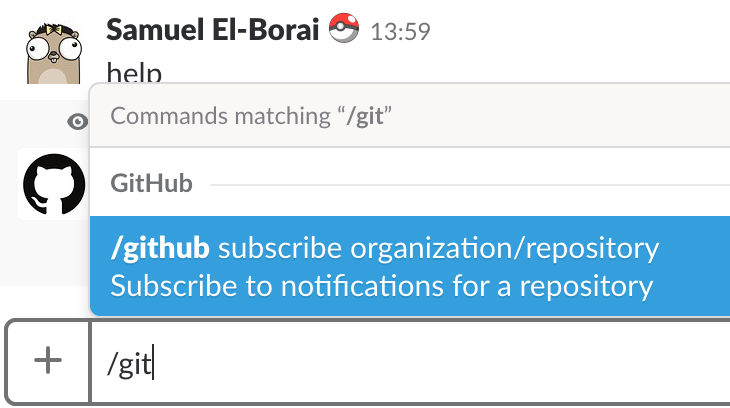
To respond to your question:
Also curious about the noise -- that's something we think about a lot. Were there any unfurls that you thought were particularly noisy? Anything you think can be done to reduce the noisiness?
First time I encounter the word "unfurl", I'm that happy I don't have to guess how to pronounce it 🙃.
Ok, so a bit more context and details. I mostly share links to pull requests with my engineers coworkers to make them aware that something is up for reviews, or that I'm done with a review and the pull request is ready to be merged. My coworkers are in general aware of the tasks I'm working on, and I'm aware of theirs. In this context, the description of a pull request is in general for documentation purpose, to give an overview of the work done, and ease the review process of the diff of the code by giving a general overview.
Some actual examples:
< pictures redacted following complaints >
As you can see, it's mostly about pointing someone to the place where they have the full context of the changes (description, list of commits, diff). If I consider that some context is necessary when sharing the link, for example if I don't expect them to know what I was working on, it's quick to add something short and to the point.
With automatic previews, the result I got is this one. I'm sharing a screenshot of my entire screen here so you can see how much screen space is allocated to github previews:
< pictures redacted following complaints >
And that's cases with very short description, it could be even worse.
In a way, the current previews are too noisy if the goal is to give some context, and not noisy enough if the goal is to let others do some work without switching context (i.e: switch from slack to github everytime) given that they will have to open the pull request to see the diff and list of commits (which is really the things that matters IMHO, even if the description is important).
Conclusion: Interesting idea, but I'm happier now that they are disabled :)
dgellow
on 23 May 2018
You can disable automatic previews in /github settings
Thank you, I was able to disable previews with your command :)
@dgellow @wilhelmklopp
How? I just see You do not have any settings configured.
Edit: nevermind https://github.com/integrations/slack/issues/487#issuecomment-598238044
 thisismydesign
on 12 Mar 2020
thisismydesign
on 12 Mar 2020
I also only see
You do not have any settings configured.
The steps in https://github.com/integrations/slack/issues/487#issuecomment-598238044 do not bring up a prompt to disable either.
 pthieu
on 11 Jun 2020
pthieu
on 11 Jun 2020
Related issues
 bkeepers
·
5Comments
bkeepers
·
5Comments
 flybd5
·
5Comments
flybd5
·
5Comments
 mbbroberg
·
5Comments
mbbroberg
·
5Comments
 xt0rted
·
4Comments
xt0rted
·
4Comments
 derwasp
·
4Comments
derwasp
·
4Comments
Most helpful comment
@dgellow @wilhelmklopp
How? I just see
You do not have any settings configured.Edit: nevermind https://github.com/integrations/slack/issues/487#issuecomment-598238044