Slack: Private Unfurl Feedback issue
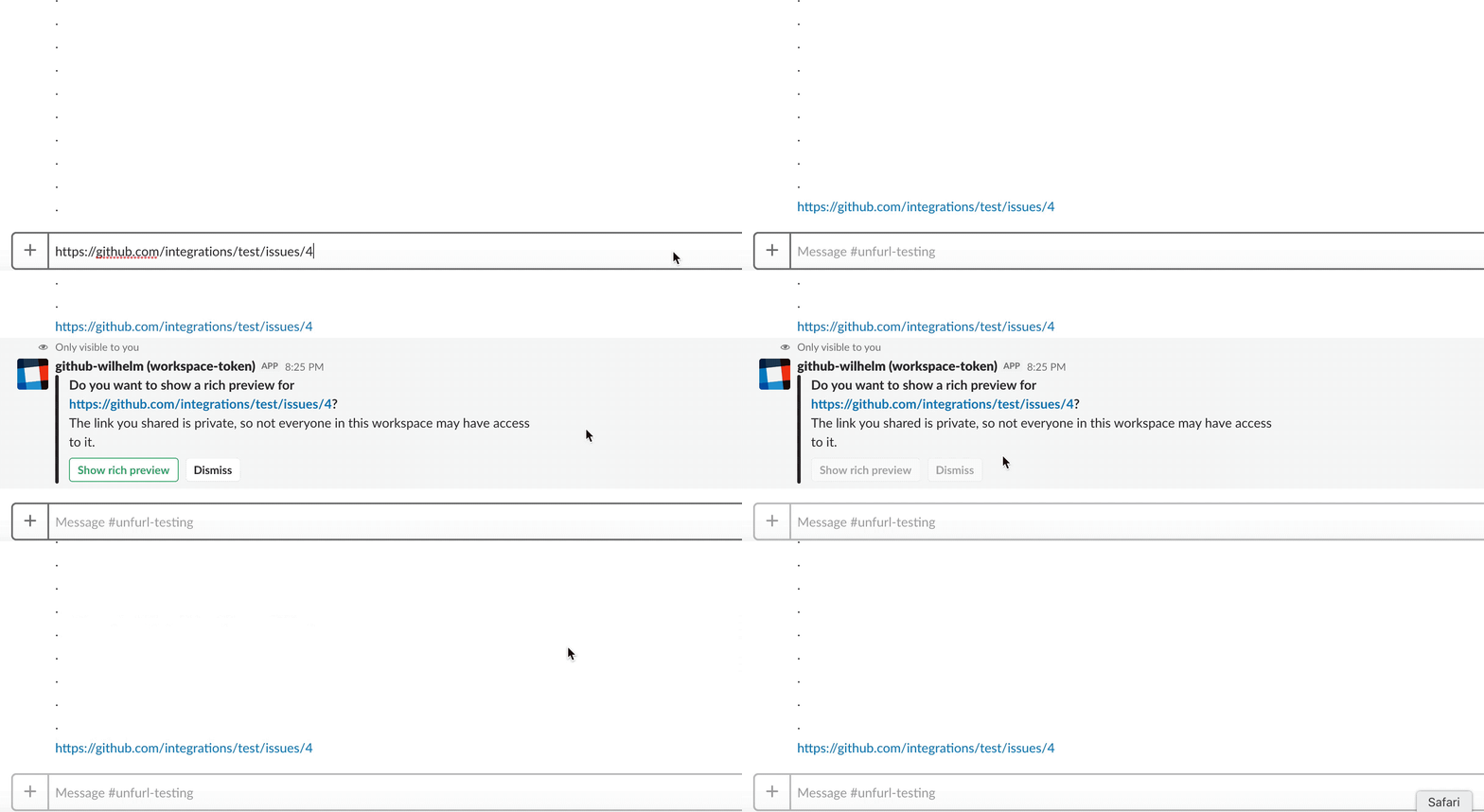
Today we early-access shipped private unfurls. It's limited to only a select group of channels because the current implementation requires you to click a button every time you share a link, so it's quite annoying.
The current implementation is captured by the two gifs below:
Rich preview demo:

Dismiss demo:
What's next for private unfurls?
- [x] A proper flow for when you don't yet have your GitHub account linked
- [x] Settings
- [x] To indicate that you always want to automatically show rich previews for this repo in this workspace
- [x] To indicate that you always want to automatically show rich previews for all repos in this workspace?
- [x] To say you never want to get prompted about private resources
- [x] /github settings to change settings
Please put feedback in this issue
If you're part of a channel where private unfurls are currently enabled, please put all relevant feedback in this issue. If you're sharing screenshots please make sure to obscure any information you don't want to be publicly visible.
 wilhelmklopp
All 18 comments
Might have been a fluke, but saw this:

The message unfurled (which you can see in the top of the screenshot, but the prompt was never dismissed, and slack showed a Timeout error.
 bkeepers
on 3 Apr 2018
bkeepers
on 3 Apr 2018
I know many people like this, but don't want any unfurls at all. They take up far too many pixels. Can this be disabled entirely?
 13rac1
on 26 Apr 2018
13rac1
on 26 Apr 2018
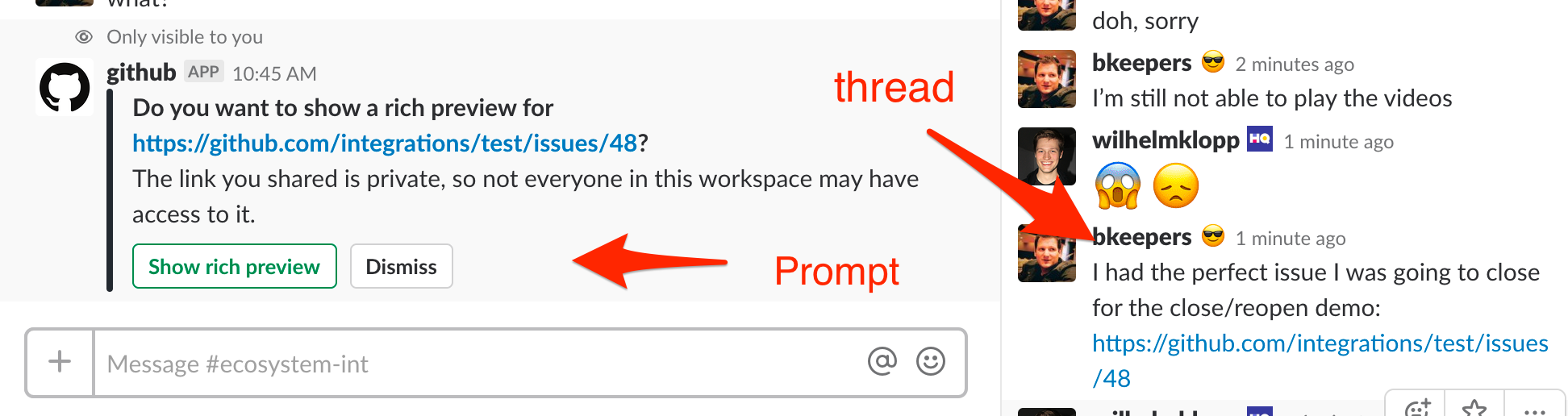
The prompt for unfurling a private link appears in the main channel when the link is shared in a thread.
bkeepers
on 26 Apr 2018
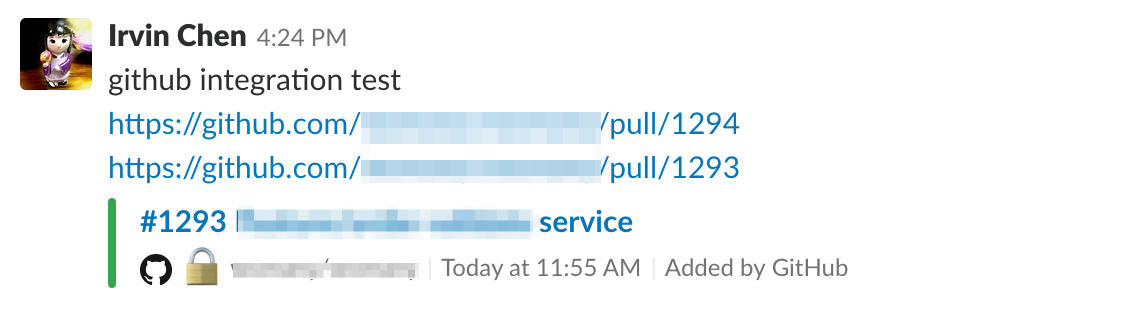
should be bug - if we include 2 private links in one slack message, it will only unfurl the first one
 irvin
on 11 May 2018
irvin
on 11 May 2018
@irvin thanks for the bug report! Did you also only see one unfurl prompt for both links?
wilhelmklopp
on 11 May 2018
@wilhelmklopp no I didn’t see any unfurl prompt at this time. Maybe I had ready authorized before?
irvin
on 11 May 2018
@irvin I just tried to reproduce this and I don't seem to be able to. Is it possible that pull 1294 was already unfurled in the channel in the previous 30 minutes? In that case it would not have been unfurled again
wilhelmklopp
on 14 May 2018
@wilhelmklopp yap, I couldn't reproduce now either.
(But I was able to on 3 days ago, verified with some really old PR links that time...)
Maybe it's some random internet issues ;P
irvin
on 14 May 2018
This is a Private unfurl of a markdown document. If the link contains a # parameter to a sub-section of the document, I'm seeing this error:

Public unfurls work, but just unfurl from the top of the README.md file, not the section that's being referenced. Private unfurls work if you just post the url without any hash parameters.
 tcbyrd
on 21 May 2018
tcbyrd
on 21 May 2018

I get the prompt when attempting to share this link: https://github.com/topics/probot-plugin which is to a GitHub topics page.
https://github.com/topics/anything probably needs to be excluded.
 hiimbex
on 8 Jun 2018
hiimbex
on 8 Jun 2018
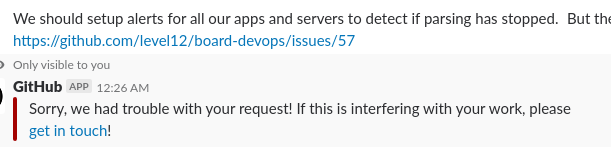
It just doesn't work for me:
But the bigger issue is that I can't turn off the prompt. That's what I would like to do as I don't really want this feature and don't want the distraction of having it always ask me whenever I post a link to a private repo (which you can imagine happens quite often).
Thanks. :)
 rsyring
on 13 Jun 2018
rsyring
on 13 Jun 2018
@rsyring you may have github unfurls disabled on your workspace, and that's why you're seeing the error. More information here.
Better error message for that is coming soon: https://github.com/integrations/slack/pull/617
In terms of disabling private unfurls, you will get a message with an option to do that after you've dismissed the prompt 5 times.
wilhelmklopp
on 14 Jun 2018
@wilhelmklopp you are correct, I have unfurls disabled.
In terms of disabling private unfurls, you will get a message with an option to do that after you've dismissed the prompt 5 times.
Would love to see that prompt be an option on the first "ask". It's not intuitive at all that ignoring five times would eventually get the prompt to ignore. This is honestly been a very frustrating experience for me, to the point that I was considering removing the GH bot from our Slack (mostly because I thought the prompts were never going to go away).
rsyring
on 14 Jun 2018
@rsyring thanks for the feedback! I like the idea of adding a "Don't prompt me again" option in the initial prompt. Would you mind opening a separate issue for that on this repo? Thanks!
wilhelmklopp
on 14 Jun 2018
@wilhelmklopp sure, here you go: https://github.com/integrations/slack/issues/620
rsyring
on 14 Jun 2018
I suggest to add a button that offers users to mute rich preview suggestions for the repository.
My employer has a some private repos and I don’t want to grant access to those to the Slack integration.
GitHub on Slack asks me if I want to add a rich preview when posting links for those. I dismiss those each time.
Currently my only option to mute the rich preview suggestions for those private repos is the global mute option.

I wish there was an option for me as an individual user for individual repos to be excluded.
 jaller94
on 21 Jun 2018
jaller94
on 21 Jun 2018
@jaller94 thanks for the feedback! ✨
Would you mind opening this as a new issue on this repo, so that we can keep track separately?
wilhelmklopp
on 21 Jun 2018
Closing this generic feedback issue that was intended only for the early-access period of private unfurls which concluded several weeks ago.
Please post any feedback for private unfurls (or any other part of the slack integration) in a new issue on this repo. Thanks ❤️
wilhelmklopp
on 21 Jun 2018
Related issues
 derwasp
·
4Comments
derwasp
·
4Comments
 ronjouch
·
4Comments
ronjouch
·
4Comments
 wallet721
·
4Comments
wallet721
·
4Comments
 xt0rted
·
4Comments
xt0rted
·
4Comments
 axos88
·
5Comments
axos88
·
5Comments
Most helpful comment
I get the prompt when attempting to share this link: https://github.com/topics/probot-plugin which is to a GitHub topics page.
https://github.com/topics/anythingprobably needs to be excluded.