Slack: operation_timeout, but appears to work?
We're getting timeouts when running the migration command, but the command does appear to be working:
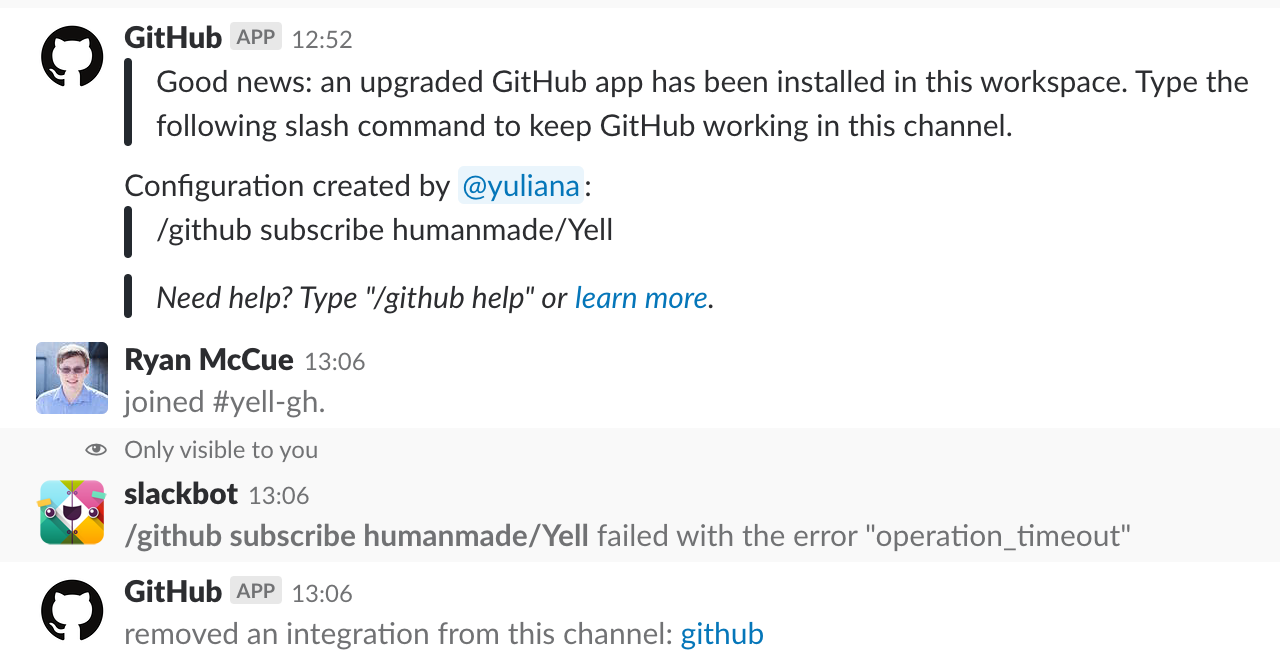
The old integration is removed, and the subscription appears in /github subscribe list, so it seems like it is actually working?
 rmccue
All 23 comments
Thanks for the report. Slack gives you 3 seconds to respond to a command before it thinks you failed. I think we'll just need send the response and then perform the migration in the background.
 bkeepers
on 23 Feb 2018
bkeepers
on 23 Feb 2018
We're testing a fix for this now in production, so let us know if you see any more issues.
bkeepers
on 26 Feb 2018
I keep getting an "operation_timeout" error from slackbot when I use Working On.
I type
/on [some text]
and get "failed with the error "operation_timeout"
then it displays my Working On text 3 seconds later.
meanwhile the text is still in the input box.
I've gotten duplicate entries because I've hit enter after seeing the error.
 lschoales
on 1 Jun 2018
lschoales
on 1 Jun 2018
am also facing the same issue. any update on this?
 rohitsai26
on 17 Oct 2019
rohitsai26
on 17 Oct 2019
this still failing
 erperejildo
on 22 Oct 2019
erperejildo
on 22 Oct 2019
Same issue here
I keep getting an "operation_timeout" error from slackbot when I use Working On.
I type
/on [some text]
and get "failed with the error "operation_timeout"
then it displays my Working On text 3 seconds later.
meanwhile the text is still in the input box.
I've gotten duplicate entries because I've hit enter after seeing the error.
 thibaultdst
on 14 Nov 2019
thibaultdst
on 14 Nov 2019
The issue is still happening.
 gsgou
on 18 Mar 2020
gsgou
on 18 Mar 2020
I am also seeing this issue. I get the time out error message but the command goes through the the operation completes as expected.
 edopalmieri
on 18 Mar 2020
edopalmieri
on 18 Mar 2020
Im experiencing the same issue. Is there a way to increase the timeout?
 yiannissakk
on 9 Apr 2020
yiannissakk
on 9 Apr 2020
there's no way to increase the timeout but what you need to do is immediately respond something to your command then perform your time taking operation on the backend. this way you'll not get operation_timeout error
rohitsai26
on 9 Apr 2020
I'm just returning the following message with success which I measure as taking 13.63ms.
{
    "text": "Slack slash command is successful!"
}
I'm returning response 200 and from my side everything looks OK.
I can't write a more simple program to test the API but I am still getting...
"failed with the error "operation_timeout"
 stuartcw
on 13 Apr 2020
stuartcw
on 13 Apr 2020
@stuartcw any slack slash command has a timeout of 3secs post that it throws operation_timeout error. so as you mentioned your API task is taking 13 secs so you have to first return a response with something. post that you can continue to perform the time taking task.
async function getData(req, res){

var args = req.body.text

//immediate response
res.json({
        "response_type": "in_channel",
        "text": "Getting data ..."
        });

// now perform any time taking task here and the return back  the data to the slack command
// by posting it via req.body.response_url

}
@rohitsai26 you misread my message. Not 13 seconds but 13 milliseconds. As I mentioned, I'm not doing anything but returning a success message...
stuartcw
on 13 Apr 2020
@stuartcw oops!! sorry about that. in that case, need to check the implementation of your code
rohitsai26
on 13 Apr 2020
I'm too getting the same error message even though my cloud function completes the task and returns a successful response in "duration": 2637ms.
Slack is showing "failed with the error "operation_timeout",
If I try it again, it will display the response.
 playground
on 15 Apr 2020
playground
on 15 Apr 2020
@rohitsai26 I found out what is my issue was. Even though the code returns quickly with a fast response the total round trip via ngrok is longer than 3 seconds.
To test this I did a request from outside of Slack using wget and it shows you how long it takes in total. I later found that accessing my script via wget to localhost was just as slow but via 127.0.0.1 was instantaneous suggesting a DNS problem. ngrok uses localhost.
Finally, I found that the problem was related to my Mac's handling of /etc/hosts. Someone on a blog noted that on OSX multiple hostnames are not allowed (anymore?) on a single line so after rewriting my /etc/hosts to:
127.0.0.1   localhost
127.0.0.1   Stuart-Woodward.local
255.255.255.255 broadcasthost
::1             localhost
I was able to access my script via localhost and also via ngrok within the specified time constraint of 3 seconds.
stuartcw
on 15 Apr 2020
I'm too getting the same error message even though my cloud function completes the task and returns a successful response in "duration": 2637ms.
Slack is showing "failed with the error "operation_timeout",
If I try it again, it will display the response.
You probably need to rewrite your function to return immediately and then send the results later using the response_url provided in the request.
stuartcw
on 15 Apr 2020
Hey everyone,
Ran into this issue today, I'm using AWS lambda functions with AWS API gateway. Even though I'm sending back a response to the _response_url_ before the 3 seconds timeout, my program is supposed to complete in a minute or so.
So, the solution which comes to my mind is to keep sending back some response after every 3 seconds? (which isn't feasible). Also, I'm not using NodeJS and am using python with the lambda function so can't continue asynchronously since I've to return 200 status code to prevent this error.
If I do return that, my program flow will terminate after returning. Is there any better way to do this or any solution?
Error:

 Anon-Exploiter
on 5 Aug 2020
Anon-Exploiter
on 5 Aug 2020
any news?
 uLucasFraga
on 24 Aug 2020
uLucasFraga
on 24 Aug 2020
Hey all, I see there is a lot of trouble with this issue. I want my code to reply with 200 immediately and then continue running performing other tasks. Anyone know if this is possible, in AWS Lambda?
 tinoargentino
on 27 Oct 2020
tinoargentino
on 27 Oct 2020
I just optimized my code to respond as soon as possible by shifting the files being processed on S3. Previously, it was on another host, and creating cross-requests was taking more than 3 seconds.
Anon-Exploiter
on 28 Oct 2020
I'm sending it within 3 seconds. Everything works but i still get a timeout message. any workaround here?
If i use res.send(), it ends the execution and I'm not able to send a delayed response.
Thanks for your help.
 eric38383
on 21 Jan 2021
eric38383
on 21 Jan 2021
I'm facing the same situation. If I use res.send() or res.sendStatus(200), then the entire excution ends.
If anyone knows how to use res.send without ending the execution, that would be very helpful.
 kareemi
on 29 Jan 2021
kareemi
on 29 Jan 2021
Related issues
 davidpaulsson
·
3Comments
davidpaulsson
·
3Comments
 EyeCandyEyewear
·
5Comments
bkeepers
·
5Comments
EyeCandyEyewear
·
5Comments
bkeepers
·
5Comments
 dgellow
·
4Comments
dgellow
·
4Comments
 axos88
·
5Comments
axos88
·
5Comments
Most helpful comment
Thanks for the report. Slack gives you 3 seconds to respond to a command before it thinks you failed. I think we'll just need send the response and then perform the migration in the background.