Skywalking: Stop working after a while. error : IDs can't be null
Please answer these questions before submitting your issue.
- Why do you submit this issue?
- [x] Question or discussion
- [x] Bug
- [ ] Requirement
- [x] Feature or performance improvement
Bug
Which version of SkyWalking, OS and JRE?
skywalking 6.1
jdk 1.8.0_144-b01
storage elasticsearch 6.3.2Which company or project?
production 3 service 3instanceWhat happen?
skywalking 6.1 running for a period of time will stop working.
If I restart skywalking, the data will continue to be updated.
I check the skywalking-oap-server.log has error:
2019-05-17 16:32:46,684 - org.apache.skywalking.oap.server.library.client.elasticsearch.ElasticSearchClient - 264 [I/O dispatcher 3] INFO [] - Bulk [15759] completed in 99 milliseconds
2019-05-17 16:32:46,902 - org.apache.skywalking.oap.server.library.client.elasticsearch.ElasticSearchClient - 264 [I/O dispatcher 2] INFO [] - Bulk [15760] completed in 205 milliseconds
2019-05-17 16:33:35,319 - org.apache.skywalking.oap.server.core.storage.ttl.DataTTLKeeperTimer - 76 [pool-13-thread-1] INFO [] - Beginning to remove expired metrics from the storage.
2019-05-17 16:33:35,319 - org.apache.skywalking.oap.server.core.storage.ttl.DataTTLKeeperTimer - 77 [pool-13-thread-1] INFO [] - Metrics in minute dimension before 201905171503, are going to be removed.
2019-05-17 16:33:35,319 - org.apache.skywalking.oap.server.core.storage.ttl.DataTTLKeeperTimer - 78 [pool-13-thread-1] INFO [] - Metrics in hour dimension before 2019051604, are going to be removed.
2019-05-17 16:33:35,319 - org.apache.skywalking.oap.server.core.storage.ttl.DataTTLKeeperTimer - 79 [pool-13-thread-1] INFO [] - Metrics in day dimension before 20190402, are going to be removed.
2019-05-17 16:33:35,319 - org.apache.skywalking.oap.server.core.storage.ttl.DataTTLKeeperTimer - 80 [pool-13-thread-1] INFO [] - Metrics in month dimension before 201711, are going to be removed.
2019-05-17 16:34:16,891 - graphql.execution.SimpleDataFetcherExceptionHandler - 23 [qtp557197074-87] WARN [] - Exception while fetching data (/cpm) : IDs can't be null
java.lang.RuntimeException: IDs can't be null
at org.apache.skywalking.oap.server.core.query.MetricQueryService.getValues(MetricQueryService.java:61) ~[server-core-6.1.0.jar:6.1.0]
at org.apache.skywalking.oap.query.graphql.resolver.MetricQuery.getValues(MetricQuery.java:53) ~[query-graphql-plugin-6.1.0.jar:6.1.0]
at org.apache.skywalking.oap.query.graphql.resolver.MetricQueryMethodAccess.invoke(Unknown Source) ~[reflectasm-1.11.7.jar:6.1.0]
at com.coxautodev.graphql.tools.MethodFieldResolverDataFetcher.get(MethodFieldResolver.kt:147) ~[graphql-java-tools-5.2.3.jar:?]
at graphql.execution.ExecutionStrategy.fetchField(ExecutionStrategy.java:227) [graphql-java-8.0.jar:?]
at graphql.execution.ExecutionStrategy.resolveField(ExecutionStrategy.java:170) [graphql-java-8.0.jar:?]
at graphql.execution.AsyncExecutionStrategy.execute(AsyncExecutionStrategy.java:59) [graphql-java-8.0.jar:?]
at graphql.execution.Execution.executeOperation(Execution.java:158) [graphql-java-8.0.jar:?]
at graphql.execution.Execution.execute(Execution.java:100) [graphql-java-8.0.jar:?]
at graphql.GraphQL.execute(GraphQL.java:558) [graphql-java-8.0.jar:?]
at graphql.GraphQL.parseValidateAndExecute(GraphQL.java:500) [graphql-java-8.0.jar:?]
at graphql.GraphQL.executeAsync(GraphQL.java:470) [graphql-java-8.0.jar:?]
at graphql.GraphQL.execute(GraphQL.java:401) [graphql-java-8.0.jar:?]
at org.apache.skywalking.oap.query.graphql.GraphQLQueryHandler.execute(GraphQLQueryHandler.java:87) [query-graphql-plugin-6.1.0.jar:6.1.0]
at org.apache.skywalking.oap.query.graphql.GraphQLQueryHandler.doPost(GraphQLQueryHandler.java:81) [query-graphql-plugin-6.1.0.jar:6.1.0]
at org.apache.skywalking.oap.server.library.server.jetty.JettyJsonHandler.doPost(JettyJsonHandler.java:54) [library-server-6.1.0.jar:6.1.0]
at javax.servlet.http.HttpServlet.service(HttpServlet.java:707) [javax.servlet-api-3.1.0.jar:3.1.0]
at org.apache.skywalking.oap.server.library.server.jetty.JettyJsonHandler.service(JettyJsonHandler.java:101) [library-server-6.1.0.jar:6.1.0]
at javax.servlet.http.HttpServlet.service(HttpServlet.java:790) [javax.servlet-api-3.1.0.jar:3.1.0]
at org.apache.skywalking.oap.server.library.server.jetty.JettyJsonHandler.service(JettyJsonHandler.java:105) [library-server-6.1.0.jar:6.1.0]
at org.eclipse.jetty.servlet.ServletHolder.handle(ServletHolder.java:841) [jetty-servlet-9.4.2.v20170220.jar:9.4.2.v20170220]
at org.eclipse.jetty.servlet.ServletHandler.doHandle(ServletHandler.java:543) [jetty-servlet-9.4.2.v20170220.jar:9.4.2.v20170220]
at org.eclipse.jetty.server.handler.ScopedHandler.nextHandle(ScopedHandler.java:188) [jetty-server-9.4.2.v20170220.jar:9.4.2.v20170220]
at org.eclipse.jetty.server.handler.ContextHandler.doHandle(ContextHandler.java:1239) [jetty-server-9.4.2.v20170220.jar:9.4.2.v20170220]
at org.eclipse.jetty.server.handler.ScopedHandler.nextScope(ScopedHandler.java:168) [jetty-server-9.4.2.v20170220.jar:9.4.2.v20170220]
at org.eclipse.jetty.servlet.ServletHandler.doScope(ServletHandler.java:481) [jetty-servlet-9.4.2.v20170220.jar:9.4.2.v20170220]
at org.eclipse.jetty.server.handler.ScopedHandler.nextScope(ScopedHandler.java:166) [jetty-server-9.4.2.v20170220.jar:9.4.2.v20170220]
at org.eclipse.jetty.server.handler.ContextHandler.doScope(ContextHandler.java:1141) [jetty-server-9.4.2.v20170220.jar:9.4.2.v20170220]
at org.eclipse.jetty.server.handler.ScopedHandler.handle(ScopedHandler.java:141) [jetty-server-9.4.2.v20170220.jar:9.4.2.v20170220]
at org.eclipse.jetty.server.handler.HandlerWrapper.handle(HandlerWrapper.java:132) [jetty-server-9.4.2.v20170220.jar:9.4.2.v20170220]
at org.eclipse.jetty.server.Server.handle(Server.java:564) [jetty-server-9.4.2.v20170220.jar:9.4.2.v20170220]
at org.eclipse.jetty.server.HttpChannel.handle(HttpChannel.java:320) [jetty-server-9.4.2.v20170220.jar:9.4.2.v20170220]
at org.eclipse.jetty.server.HttpConnection.onFillable(HttpConnection.java:251) [jetty-server-9.4.2.v20170220.jar:9.4.2.v20170220]
at org.eclipse.jetty.io.AbstractConnection$ReadCallback.succeeded(AbstractConnection.java:279) [jetty-io-9.4.2.v20170220.jar:9.4.2.v20170220]
at org.eclipse.jetty.io.FillInterest.fillable(FillInterest.java:110) [jetty-io-9.4.2.v20170220.jar:9.4.2.v20170220]
at org.eclipse.jetty.io.ChannelEndPoint$2.run(ChannelEndPoint.java:124) [jetty-io-9.4.2.v20170220.jar:9.4.2.v20170220]
at org.eclipse.jetty.util.thread.QueuedThreadPool.runJob(QueuedThreadPool.java:672) [jetty-util-9.4.2.v20170220.jar:9.4.2.v20170220]
at org.eclipse.jetty.util.thread.QueuedThreadPool$2.run(QueuedThreadPool.java:590) [jetty-util-9.4.2.v20170220.jar:9.4.2.v20170220]
Requirement or improvement
- Please describe about your requirements or improvement suggestions.
 yufan022
All 21 comments
This could be caused by some UI bugs. Nothing related to backend. I thin.
 wu-sheng
on 17 May 2019
wu-sheng
on 17 May 2019
This could be caused by some UI bugs. Nothing related to backend. I thin.
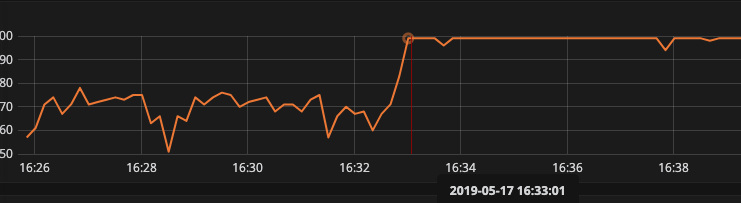
i think it's not ui bug, beacuse when print this exception , my elasticsearch cpu idle will up.
yufan022
on 17 May 2019
Then you need to fix your ElasticSearch issue first. I am saying this is UI related bug, because no matter in which case, UI should not query backend without IDs(your log says).
wu-sheng
on 17 May 2019
This could be caused by some UI bugs. Nothing related to backend. I thin.
用中文描述一下问题吧,我在使用skywalking收集多个项目数据时,过一段时间会出现异常。
此时es机器cpu负载会下降。而只使用skywalking收集一个项目数据时则不会有此问题。
出现问题时我重启skywalking服务,数据会恢复正常,期间未对elasticsearch进行过任何操作。
yufan022
on 17 May 2019
I think English is only preferred here. ASF project needs to be global. In my guess, your ElasticSearch doesn't work well when data grows bigger.
wu-sheng
on 17 May 2019
I think English is only preferred here. ASF project needs to be global. In my guess, your ElasticSearch doesn't work well when data grows bigger.
i got it . when skywalking-oap-server.log print:
`
Beginning to remove expired metrics from the storage.
Metrics in minute dimension before 201905171606, are going to be removed.
Metrics in hour dimension before 2019051605, are going to be removed.
Metrics in day dimension before 20190402, are going to be removed.
Metrics in month dimension before 201711, are going to be removed.
Bulk [16438] completed in 47 milliseconds
`
after a while, my skywalking server data it's not updated, have to restart skywalking can continue.
it is my ElasticSearch has error?
yufan022
on 17 May 2019
Delete burns more cpu and memory. We are trying to solve this in 6.2
wu-sheng
on 17 May 2019
@wu-sheng
We encountered the same problem with Skywalking 6.1.0.
We run elasticsearch and Skywalking oap collector separately. And the skywalking agent run in container in k8s. we can get the point data while no service data.
The issues in the below urls still exist for us.
https://github.com/apache/skywalking/issues/2475
https://github.com/apache/skywalking/issues/2704
https://github.com/apache/skywalking/issues/2476
https://github.com/apache/skywalking/issues/2224
No one delete the data of elasticsearch manually.
 bladethirst
on 22 May 2019
bladethirst
on 22 May 2019
All issues you list except for this, have been explained. Including time zone and data delete issue. They are very clear if you have read the codes.
wu-sheng
on 22 May 2019
I had met the same issue
Actually the Root Cause is the lack of services info. UI don't identify any services
Like me I found the reason is that the UI uses UTC+8 while the datetime of oap machine uses UTC, therefore you CAN NOT find any service from ui
and when you try to find get info by ui, ui brings no any service Id and oap reports IDs cant be null
 evanxuhe
on 24 May 2019
evanxuhe
on 24 May 2019
FYI @TinyAllen
wu-sheng
on 24 May 2019
@evanxuhe For me I set the ui and oap uses both UTC+8 timezone but still have this issue.
I deployed them in the docker.
 siegrainwong
on 24 May 2019
siegrainwong
on 24 May 2019
This error is very frequent. At present, I am refusing to restart OAPServerStartUp every 5 minutes, but it is not robust for the monitoring system used in the online environment. How can this problem be solved? The environment information and error are as shown above. @wu-sheng
 lclin412
on 27 May 2019
lclin412
on 27 May 2019
@lclin412 Please read my reply again, this error java.lang.RuntimeException: IDs can't be null is nothing serious, just UI still query when parameter doesn't exist. Nothing harmful to OAP server.
Restart right now, I only know reason related is ElasticSearch too slow for your env. I don't know how you are using it, but in most cases and my case, it could support billions of tps in prod.
wu-sheng
on 27 May 2019
@evanxuhe For me I set the ui and oap uses both UTC+8 timezone but still have this issue.
I deployed them in the docker.
I think the root cause is the lack of service instance info for UI
which may be caused by one of components agent->oap->ui
You can locate the problem as following:
UI:F12 in chrome to see if services received in ui homepage, what the results show?
OAP:If there are services appear in the oap log like "instance register id=XXX" to ensure the oap has info
AGENT:check agent log to see if it transfers the metric and trace normally to the oap
evanxuhe
on 28 May 2019
I think the root cause is the lack of service instance info for UI
which may be caused by one of components agent->oap->ui
You can locate the problem as following:
UI:F12 in chrome to see if services received in ui homepage, what the results show?
OAP:If there are services appear in the oap log like "instance register id=XXX" to ensure the oap has info
AGENT:check agent log to see if it transfers the metric and trace normally to the oap
evanxuhe
on 28 May 2019
I had the same .
When oap encountered this. it will cause es to not receive oap data, such as service, endpoint, etc.
But when I restart oap, es can receive the data again.
 innerpeacez
on 4 Jun 2019
innerpeacez
on 4 Jun 2019
Same here. When I restart OAP, OAP log indicates it is sending data to ElasticSearch again, but UI is unable to show new data.
 louzadod
on 5 Jun 2019
louzadod
on 5 Jun 2019
mark ,I have a same issue.
 zhousiliang163
on 19 Jun 2019
zhousiliang163
on 19 Jun 2019
Same here. When I restart OAP, OAP log indicates it is sending data to ElasticSearch again, but UI is unable to show new data.
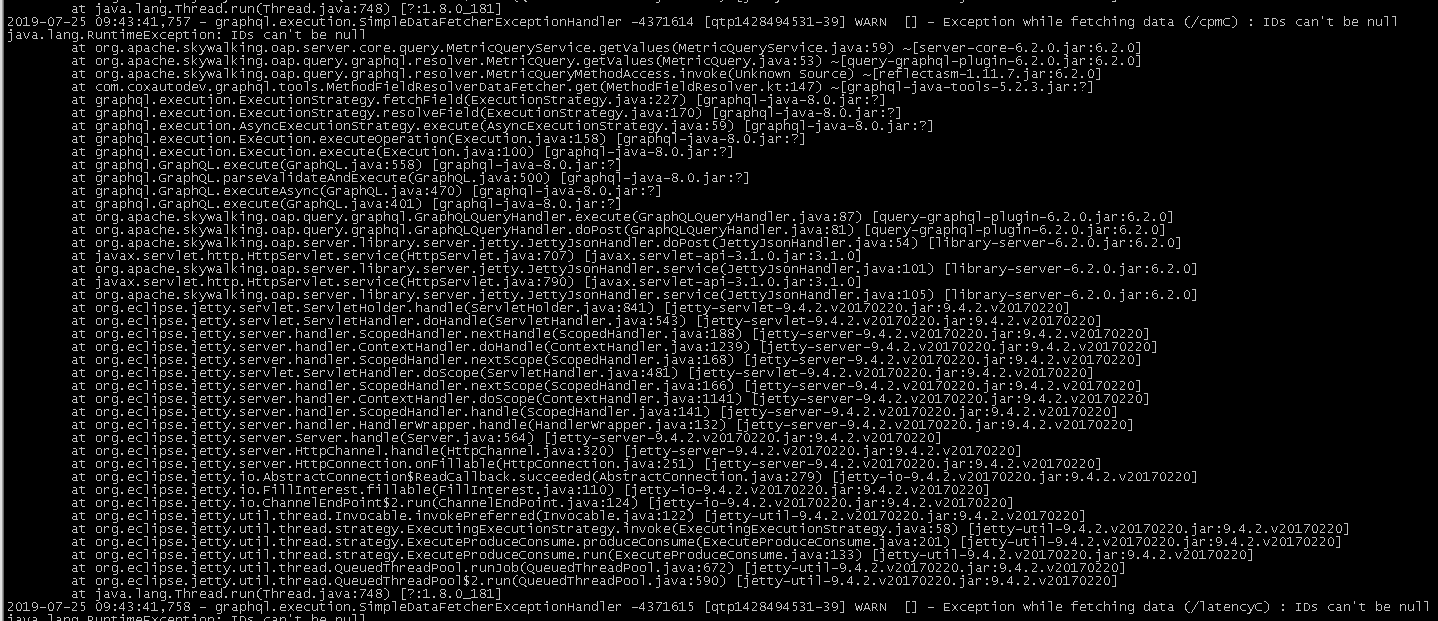
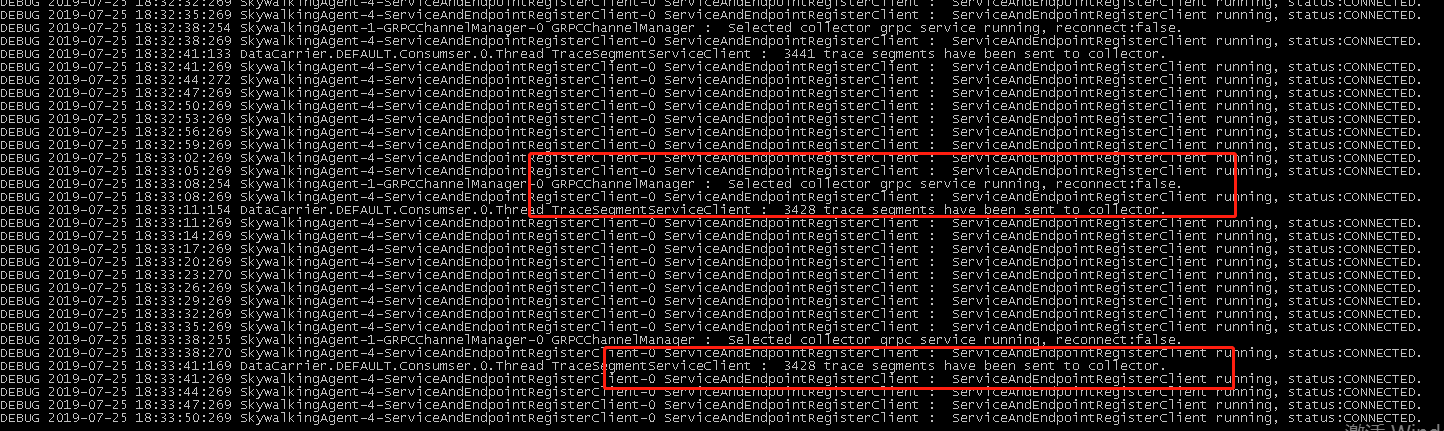
mark, I met the same problem, is this solved? I used skywalking version 6.2.0 either.
this is oap exception:
app&skywalking-agent in k8s works well:
 hepyu
on 25 Jul 2019
hepyu
on 25 Jul 2019
I am locking this issue. This error means nothing. I have removed this log.
wu-sheng
on 25 Jul 2019
Related issues
 wikix
·
5Comments
wikix
·
5Comments
 EvanLjp
·
5Comments
EvanLjp
·
5Comments
 vanlin
·
6Comments
wu-sheng
·
5Comments
vanlin
·
6Comments
wu-sheng
·
5Comments
 cookiejoo
·
4Comments
cookiejoo
·
4Comments
Most helpful comment
Same here. When I restart OAP, OAP log indicates it is sending data to ElasticSearch again, but UI is unable to show new data.