Skiasharp: [BUG] wrong Width value while measuring Arabic Text
Description
Skia sharp measures wrong Width value while measuring Arabic Text (RTL issues).
Code
namespace portable_console
{
class Program
{
    static void Main(string[] args)
    {
        string text = "Welcome to programming world";
        float fontsize = 12f;

        float SystemDrawing = GDIMeasureString(text, fontsize);
        float Skia = SkiaMeasurements(text, fontsize);
        Console.WriteLine(Skia + " Skia sharp");
        Console.WriteLine(SystemDrawing + " GDI");
        Console.ReadLine();
    }
    /// <summary>
    /// Retrun skia measured width value
    /// </summary>
    /// <param name="text"></param>
    /// <param name="fontsize"></param>
    /// <returns></returns>
    private static float SkiaMeasurements(string text, float fontsize)
    {
        SKImageInfo info = new SKImageInfo(120, 120);
        float skiaMeasurement = 0;
        using (SKSurface surface = SKSurface.Create(info))
        {
            SKCanvas canvas = surface.Canvas;
            canvas.Clear(SKColors.White);
            using (SKPaint paint = new SKPaint())
            {
                paint.Typeface = SKTypeface.FromFile(@"D:\font\traditional_arabic.ttf");
                paint.Color = SKColors.Black;
                paint.IsAntialias = true;
                paint.TextSize = fontsize;
                paint.SubpixelText = true;
                paint.TextAlign = SKTextAlign.Left;
                paint.TextEncoding = SKTextEncoding.Utf8;
                SKRect rect = new SKRect();
                skiaMeasurement = paint.MeasureText(text, ref rect);
            }
        }
        return skiaMeasurement;
    }
    /// <summary>
    /// Returns system.Drawing (GDI) measured width value.
    /// </summary>
    /// <param name="text"></param>
    /// <param name="fontsize"></param>
    /// <returns></returns>
    private static float GDIMeasureString(string text, float fontsize)
    {
        Bitmap bitmap = new Bitmap(540, 720);
        Graphics graphics = Graphics.FromImage(bitmap);
        // Create string to draw.
        String drawString = text;
        graphics.FillRectangle(Brushes.White, new System.Drawing.Rectangle(0, 0, (int)540, (int)720));
        // Create font and brush.
        Font drawFont = new Font("Traditional Arabic", fontsize, FontStyle.Regular, GraphicsUnit.Point);
        SolidBrush drawBrush = new SolidBrush(Color.Black);
        StringFormat drawFormat = new StringFormat(StringFormat.GenericTypographic);
        //remove the linelimit flag from create stringformat object.
        //The behavior of the linelimit flag is “only entire lines are laid out in the formatting rectangle”,
        //By default layout continues until the end of the text, or until no more lines are visible as a result of clipping”.
        drawFormat.FormatFlags &= ~StringFormatFlags.LineLimit;
        drawFormat.FormatFlags |= StringFormatFlags.MeasureTrailingSpaces;
        drawFormat.FormatFlags |= StringFormatFlags.NoClip;
        graphics.PageUnit = GraphicsUnit.Point;

        drawFormat.Trimming = StringTrimming.Word;
        // Set format of string.
        float width = graphics.MeasureString(drawString, drawFont, new PointF(0, 0), drawFormat).Width;

        return width;
    }
}
}
Expected Behavior
For English text eg: "Hello world" measures 93.57 point in both skia sharp and GDI,
For Arabic text eg: "مرحبا بكم في التزامن " width should be 66.21 points.
Actual Behavior
Actual measurement was for "مرحبا بكم في التزامن " is 95.61 points, so there is 29.4 points, i have referred using harfbuzz but i cannot use third party module, please let me know if there is any way to achieve this in skia sharp in 1.59.3 version itself, or please confirm me whether it's a bug.
Basic Information
- Version with issue: 1.59.3
- IDE: Visual studio 2017
- Platform Target Frameworks: .Net core 2.1
 Jack-Paul
All 33 comments
Simple answer it is not possible to solve without HarfBuzz
 Gillibald
on 14 Jan 2020
Gillibald
on 14 Jan 2020
@Gillibald ,
I tried to use HarfBuzz to measure the string, but i still get some variation in calculating the width of the arabic text comparing to GDI.
SKImageInfo info = new SKImageInfo(120, 120);
float skiaMeasurement = 0;
using (SKSurface surface = SKSurface.Create(info))
{
SKCanvas canvas = surface.Canvas;
canvas.Clear(SKColors.White);
using (SKPaint paint = new SKPaint())
{
paint.Typeface = SKTypeface.FromFile(@"D:\font\traditional_arabic.ttf");
paint.Color = SKColors.Black;
paint.IsAntialias = true;
paint.TextSize = fontsize;
paint.SubpixelText = true;
paint.TextAlign = SKTextAlign.Left;
paint.TextEncoding = SKTextEncoding.Utf16;
SKRect rect = new SKRect();
//SKshaper is used to shape the arabic text
var shaper = new SKShaper(paint.Typeface);
var shapedText = shaper.Shape(text, paint);
skiaMeasurement = shapedText.Points[shapedText.Points.Length-1].X;
}
}
please confirm me is this the right way to calculate the width of the text or is there some other way to calculate it correctly.
Jack-Paul
on 17 Jan 2020
Add your text to a buffer then use the overload that takes a buffer. Sum the glyphPosition.XAdvance from the buffer after shaping.
Gillibald
on 17 Jan 2020
@Gillibald ,
As you said i have passed my text as buffer but the glyphPosition.XAdvance values are so high, if i have to sum them, that would be huge value, i am not sure is that a valid solution.
SKCanvas canvas = surface.Canvas;
canvas.Clear(SKColors.White);
using (SKPaint paint = new SKPaint())
{
paint.Typeface = SKTypeface.FromFile(@"D:\font\traditional_arabic.ttf");
paint.Color = SKColors.Black;
paint.IsAntialias = true;
paint.TextSize = fontsize;
paint.SubpixelText = true;
paint.TextAlign = SKTextAlign.Left;
paint.TextEncoding = SKTextEncoding.Utf16;
SKRect rect = new SKRect();
//SKshaper is used to shape the arabic text
var shaper = new SKShaper(paint.Typeface);
HarfBuzzSharp.Buffer buffer = new HarfBuzzSharp.Buffer();
buffer.AddUtf32(text);
buffer.Direction = HarfBuzzSharp.Direction.RightToLeft;
var shapedText = shaper.Shape(buffer, paint);
//shaped text provides points for each char contains x and y position, so to calculate the shaped text we need to
skiaMeasurement = shapedText.Points[shapedText.Points.Length-1].X;
}
this is how i have passed it as buffer, i am not sure why do you suggest to sum the glyphPosition.XAdvance, because each value is >100 where my original size itself is 69 points only.
Jack-Paul
on 17 Jan 2020
var scale = FontSize / 512 multiply all advances by that
Gillibald
on 17 Jan 2020
You can also use paint.MeasureText and pass shapedText.Codepoints to it. Make sure to set TextEncoding to GlyphId. You can use the fixed statement to get an IntPtr for the Codepoints array.
Gillibald
on 17 Jan 2020
@Gillibald ,
Scaling the value still gives me wrong values, i also tried by passing shapedText.codepoints to measureText, but i did not find MeasureText() has any overload for intptr array, but the codePoints are uint array, how can array be converted to intptr not as intptr[]. or do i missing something else?
Jack-Paul
on 17 Jan 2020
fixed(uint* ptr = shapedText.Codepoints)
{
    var width = paint.MeasureText((IntPtr)ptr,....);
length is in bytes
Gillibald
on 17 Jan 2020
@Gillibald ,
i am not sure i'm getting it properly, do you saying to pass the length as byte size of the string?
correct me if i am wrong.
Jack-Paul
on 17 Jan 2020
Okay my bad GlyphId is two bytes.
var glyphs = new ushort[shapedText.Codepoints.Length];
then copy all values of shapedText.Codepoints into that array.
After that you can call paint.MeasureText with var byteLength = glyphs.Length * 2
Gillibald
on 17 Jan 2020
Hi @Gillibald ,
I tried as you said, but still my results are wrong, this are my code changes, please let me know why it doesn't work?
SKCanvas canvas = surface.Canvas;
canvas.Clear(SKColors.White);
using (SKPaint paint = new SKPaint())
{
paint.Typeface = SKTypeface.FromFile(@"D:\font\traditional_arabic.ttf");
paint.Color = SKColors.Black;
paint.IsAntialias = true;
paint.TextSize = fontsize;
paint.SubpixelText = true;
paint.TextAlign = SKTextAlign.Left;
paint.TextEncoding = SKTextEncoding.GlyphId;
//SKshaper is used to shape the arabic text
var shaper = new SKShaper(paint.Typeface);
HarfBuzzSharp.Buffer buffer = new HarfBuzzSharp.Buffer();
buffer.AddUtf16(text);
buffer.Direction = HarfBuzzSharp.Direction.RightToLeft;
var shapedText = shaper.Shape(buffer, paint);
var glyphs = new ushort[shapedText.Codepoints.Length];
for(int i =0; i
glyphs[i] =(ushort) shapedText.Codepoints[i];
}
var byteLength = glyphs.Length * 2;
unsafe
{
fixed (ushort* ptr = glyphs)
{
skiaMeasurement = paint.MeasureText((IntPtr)ptr, byteLength);
}
}
}
Jack-Paul
on 20 Jan 2020
Hi,
Any updates to resolve my issue, it would be so much appreciable.
Jack-Paul
on 28 Jan 2020
What is the exact difference between those two measurements?
Gillibald
on 28 Jan 2020
Pls compare the rendering of both and if you can attach a screenshot to this thread.
Gillibald
on 28 Jan 2020
Hi @Gillibald ,
The text given as input is ""ہم آہنگی سافٹ ویئر میں خوش آمدید""
font size = 12f;
if i give the Text encoding as UTF16 and pass the text as string and calculate the width using shapedText.Points[shapedText.Points.Length - 1].X means i am getting results little similar to GDI
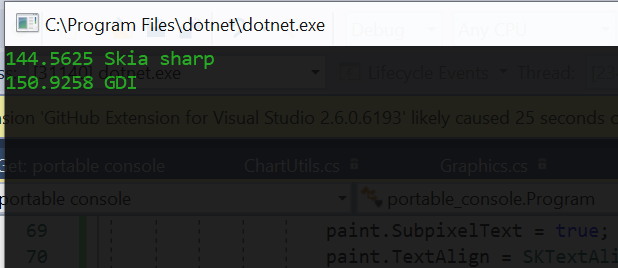
But if i give the Text encoding as SKTextEncoding.GlyphId and pass the text as Buffer and calculate the width as per your previous suggestion means i am getting huge difference in value
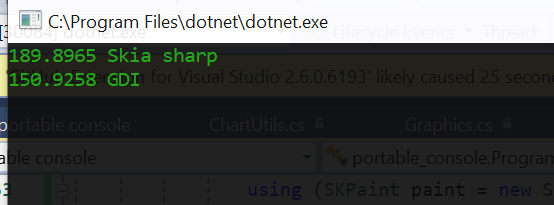
Note - All the measurements are in points.
I wonder why the values differ so much, i just need a way to correctly calculate the width using Harfbuzz.
The font i used here is Traditional Arabic.
Kindly let me know if you want any more details, to give better suggestion to implement it correctly.
Thanks,
Jackson Paul T
Jack-Paul
on 29 Jan 2020
@Gillibald - Could you please provide update on this ? Whether it is possible to consider this issue as a defect of SkiaSharp?
 VijayRM
on 3 Feb 2020
VijayRM
on 3 Feb 2020
This is what I get:


Gillibald
on 3 Feb 2020
Please have a look at the docs: https://docs.microsoft.com/en-us/dotnet/api/system.drawing.graphics.measurestring?view=netframework-4.8
The MeasureString method is designed for use with individual strings and includes a small amount of extra space before and after the string to allow for overhanging glyphs. Also, the DrawString method adjusts glyph points to optimize display quality and might display a string narrower than reported by MeasureString. To obtain metrics suitable for adjacent strings in layout (for example, when implementing formatted text), use the MeasureCharacterRanges method or one of the MeasureString methods that takes a StringFormat, and pass GenericTypographic. Also, ensure the TextRenderingHint for the Graphics is AntiAlias.
Gillibald
on 3 Feb 2020
Hi @Gillibald ,
The image you have attached is it the measurement of GDI or Skia sharp?
Jack-Paul
on 4 Feb 2020
Thats Skia + HarfBuzz
Gillibald
on 4 Feb 2020
Hi @Gillibald ,
Even i to got around 180 points, but the GDI measurement is still arround 150 points, so i just need to know why even after using Harfbuzz with Skia sharp i am getting wrong results.
Jack-Paul
on 4 Feb 2020
Compare the rendering
Gillibald
on 4 Feb 2020
Hi @Gillibald ,
i am not using skia sharp to render, i just need to measure the text, that's my requirement, i need to achieve exact measurement when compare to GDI using skia sharp, so my question is only this, even if i am ready to measure with Harfbuzz how can i achieve the desired result?
Jack-Paul
on 4 Feb 2020
You can't expect two different technologies to produce the exact same results.
Gillibald
on 4 Feb 2020
Use MeasureCharacterRanges and compare the results for each glyph. Maybe you find a magic number to fix the difference.
Gillibald
on 4 Feb 2020
I am not asking for same results here, but just approximate, but you can see there is huge difference in using it. Even if the technologies are different, the text measurement value is constant for the given length.
little bit of difference for measuring the same text is okay, but if skia sharp measure with so much difference, how could it be okay?
The use case of the Measure Text is to measure the approximate length of the given string, but you are suggesting me to compare the difference between its rendering.
If skia sharp has this huge difference even after shaping the text and measuring, is it not a bug from skia sharp?
the final suggestion made from you is to use MeasureCharacterRanges which is GDI API, so that is out of scope to compare some other GDI other API.
Please suggest me if any possible solution out there to fix this issue, or please confirm me it's skia sharp issue.
Thanks,
Jack
Jack-Paul
on 6 Feb 2020
The MeasureString method is designed for use with individual strings and includes a small amount of extra space before and after the string to allow for overhanging glyphs
Because of that, you get different results. MeasureCharacterRanges isn't adding extra space and therefore should produce better results. That's why I suggested the different API.
Gillibald
on 6 Feb 2020
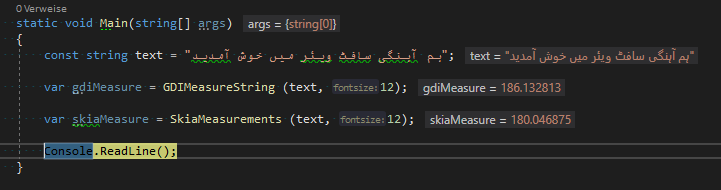
GDI includes extra whitespace so you get a slightly different result. I will not spend more time on this issue.
Good luck
Gillibald
on 6 Feb 2020
Gillibald
on 6 Feb 2020
Hi @Gillibald ,
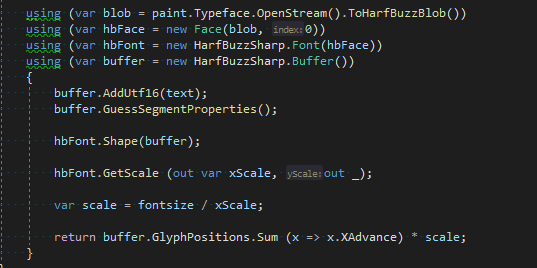
Thank you so much, for the last update, i actually got correct measurement by implementing code from the above picture, i have checked for few font, it really worked for some fonts, so i started a benchmark test to compare the result of GDI, Skia sharp, Skia sharp +harfbuzz implementation, at last i got moderate result, on my further analysis, i have found it works great for some font's only,
The reason why i am comparing for many different font variation because, i need to completely replace normal Skia sharp measurement implementation to Skia sharp + harfbuzz implementation on our project, which is really a big step to take, but this current result, even though i worked for some font, the result were not that great.
Please find these comparison results
comparision.docx
Is there any way to improve this results, it would to so much appreciable if i could find better results.
Jack-Paul
on 20 Feb 2020
Not all fonts support all scripts, etc. So for unsupported glyphs a replacement glyph is used. That glyph is also different for most fonts. So to properly compair results you have make sure all codepoints can be mapped to glyphs. Before you shape the codepoints should be 0 in the buffer.
Gillibald
on 20 Feb 2020
GDI might perform a font fallback and HarfBuzz doesn't do that for you. So all codepoints that can't be mapped need to be shaped with a different typeface that supports the codepoints.
Gillibald
on 20 Feb 2020
Fill the buffer. Split the buffer when a sequence of 0 values occurs. Try to find a fallback via SKFontManager.Default.MatchCharacter and shape that portion of the original buffer again.
Gillibald
on 20 Feb 2020
Related issues
 antongit
·
3Comments
antongit
·
3Comments
 AwsomeCode
·
4Comments
antongit
·
4Comments
AwsomeCode
·
4Comments
antongit
·
4Comments
 PieroCastillo
·
3Comments
PieroCastillo
·
3Comments
 NotOfficer
·
3Comments
NotOfficer
·
3Comments
Most helpful comment
Hi,
Any updates to resolve my issue, it would be so much appreciable.