Sitespeed.io: Broken link(s) in results dashbaord when using urls.txt in combination with Aliases
Prerequisits:
This is the command I use:
docker run --rm -v "$(pwd):/sitespeed.io" sitespeedio/sitespeed.io:16.2.1 urls.txt --cookie remember_web_xxx=eyJpdiI6IkRoXC8wSExZZkIyM0t
This is my urls.txt:
https://staging.example.org/admin/dashboard Admin_Dashboard
https://staging.example.org/admin/users Admin_Members
(according to https://www.sitespeed.io/documentation/sitespeed.io/configuration/)
Issue
When I navigate through the results on Pages, the links to the subpages are broken:
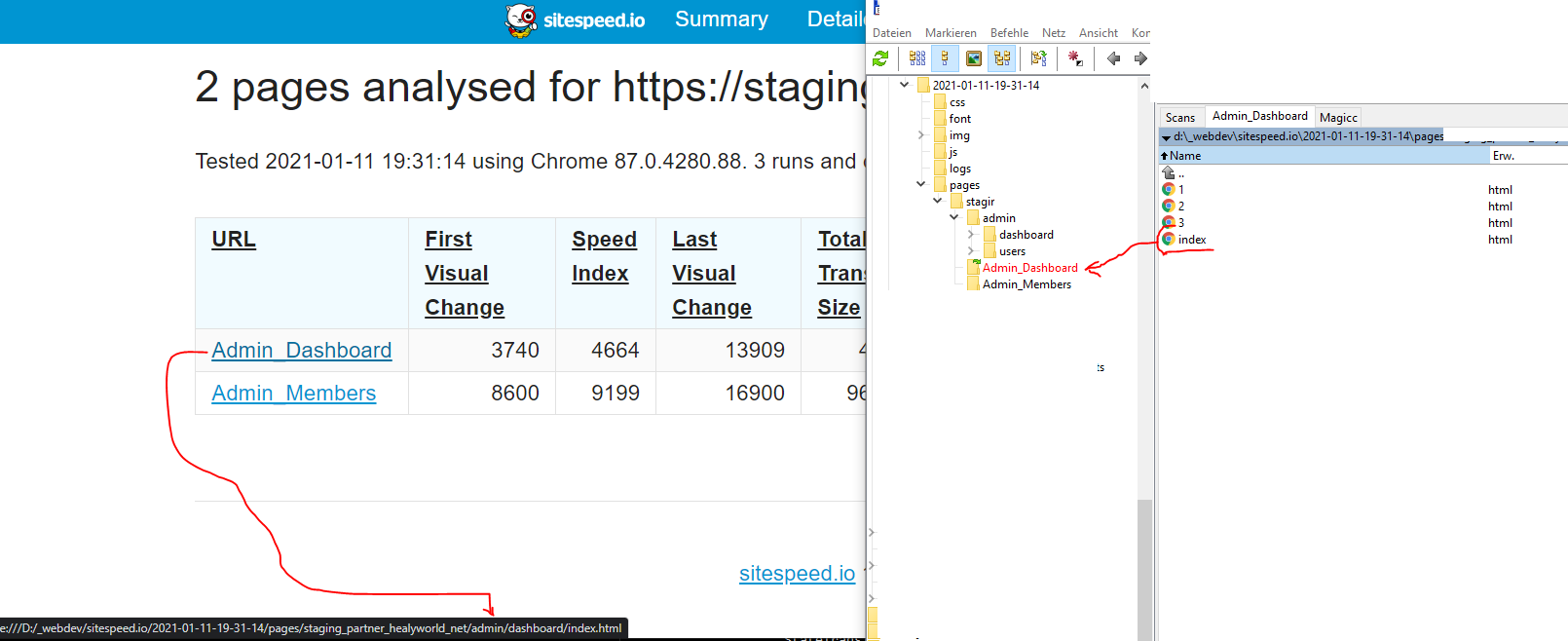
There is a mismatch between the URL of the actual Admin_Dashboard Link:
./2021-01-11-19-31-14/pages/staging_example_org/admin/dashboard/index.html
and the location where I find the file in my folder:
./2021-01-11-19-31-14/pages/staging_example_org/Admin_Dashboard/index.html
 AntoniusGolly
All 17 comments
Hi @AntoniusGolly thanks for creating the bug report, yep I've broke that when changing the how alias work (alias are now also used in the path-name). I'll have a look and try to fix it tomorrow.
 soulgalore
on 11 Jan 2021
soulgalore
on 11 Jan 2021
I've fixed this and will release it either tonight or early tomorrow.
soulgalore
on 12 Jan 2021
Absolutely terrific.
AntoniusGolly
on 12 Jan 2021
I just released the fix in 16.3.0, please verify that it works for you @AntoniusGolly when you have time!
soulgalore
on 13 Jan 2021
@soulgalore I had the same issue and have just run with 16.3 the link from the annotation in grafana works OK, but we have a slack hook and the link from slack has the full url in rather than the alias
e.g. grafana link (works)
https://s3.xxxxxxxxxxxxxx/www.theoutnet.com/20210113-08:21:22.116/pages/www_theoutnet_com/pdp/index.html
slack link
https://s3.xxxxxxxxxxxxxx/www.theoutnet.com/20210113-08:21:22.116/pages/www_theoutnet_com/en-gb/shop/product/17476499599333733/index.html
I assume this is part of the same issue
 fmacgregor-wt
on 13 Jan 2021
fmacgregor-wt
on 13 Jan 2021
@fmacgregor-wt can you show me how you add the alias? At the moment its three different ways: inside a script, through the cli and using a file. If I know that its easier for me to reproduce and fix. Thanks!
soulgalore
on 13 Jan 2021
I use a url file @soulgalore
https://www.theoutnet.com/ home
https://www.theoutnet.com/en-gb/shop/clothing plp
https://www.theoutnet.com/en-gb/shop/designers/valentino dlp
https://www.theoutnet.com/en-gb/shop/search/dresses search
https://www.theoutnet.com/en-gb/shop/product/17476499599333733 pdp
https://www.theoutnet.com/en-at/shop/clothing test
fmacgregor-wt
on 13 Jan 2021
Thanks for sharing @fmacgregor-wt let me fix that tonight.
soulgalore
on 13 Jan 2021
Hi @soulgalore - we have another use case where the alias change is causing issues. From within the 'Pages' section of the HTML report, the links are also not referencing the alias correctly.
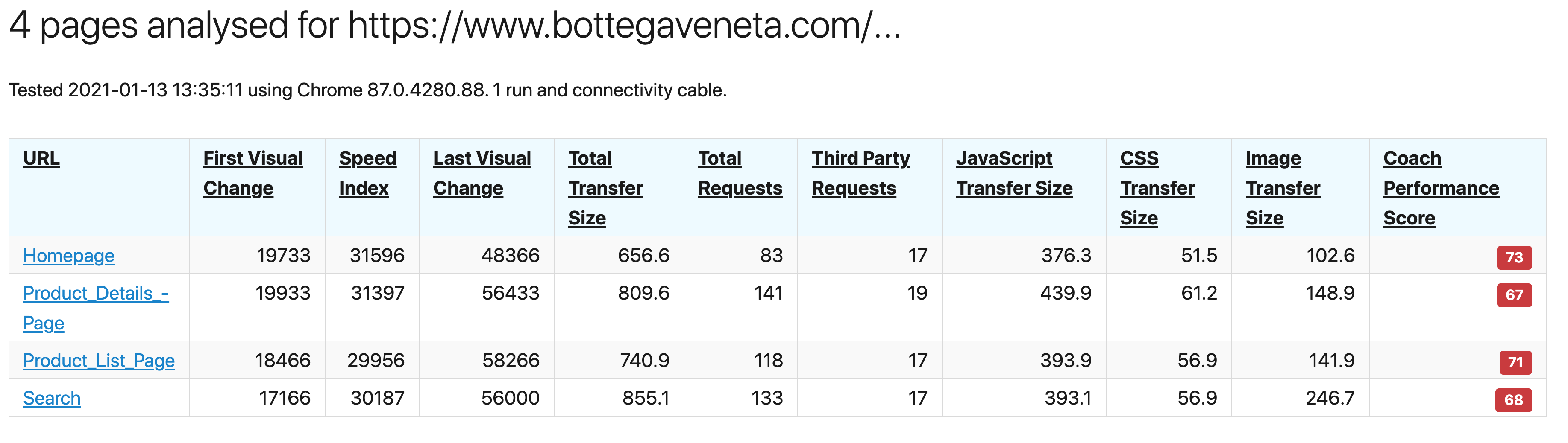
The aliases are there, but the hyperlink for the reports does not use the alias, so the report is effectively a broken link.
In this example the link is: http:/xxx.xxx.xxx/desktop/www.bottegaveneta.com/2021-01-13-13-35-11/pages/www_bottegaveneta_com/gb/women/onlineboutique/bags/index.html
whereas it should be: http://xxx.xxx.xxx/desktop/www.bottegaveneta.com/2021-01-13-13-35-11/pages/www_bottegaveneta_com/Product_Details_Page/index.html
This is on version 16.3.0
 shaqb
on 13 Jan 2021
shaqb
on 13 Jan 2021
Hi @shaqb can you share how you add the alias? See https://github.com/sitespeedio/sitespeed.io/issues/3244#issuecomment-759332093
soulgalore
on 13 Jan 2021
Hi @soulgalore - I use a url file.
https://www.bottegaveneta.com/gb Homepage
https://www.bottegaveneta.com/gb/women/onlineboutique/bags Product_List_Page
https://www.bottegaveneta.com/Search/Index?textsearch=bags&siteCode=BOTTEGAVENETA_GB&season=&department=llmnwmn&gender=D%2CU%2CE Search
https://www.bottegaveneta.com/gb/clutch_cod45459788pd.html Product_Details_Page
shaqb
on 13 Jan 2021
@shaqb hmm that is strange that works for me. I made a generic fix, when the Docker container is built you can have a bio and see if fixes it. I'll ping the issue when its done.
soulgalore
on 13 Jan 2021
@shaqb I pushed a new release today, can you check if it works there? @fmacgregor-wt that release also contains a fix for Slack, so if you also can test that would be great! Thanks.
soulgalore
on 14 Jan 2021
Hi @soulgalore - tested and confirmed it’s working now. Thanks for sorting so quickly!
shaqb
on 14 Jan 2021
Same here👌
Thanks for the fast response.
AntoniusGolly
on 14 Jan 2021
Well I broke it so I needed to fix it, isn't that how it works :) Thank you both for testing!
soulgalore
on 14 Jan 2021
Hi @soulgalore yes the slack links are fixed now - thank you
fmacgregor-wt
on 15 Jan 2021
Related issues
 Nuoky
·
6Comments
Nuoky
·
6Comments
 gfoxCartrawler
·
4Comments
gfoxCartrawler
·
4Comments
 jangrewe
·
7Comments
jangrewe
·
7Comments
 davidgrankvist
·
6Comments
davidgrankvist
·
6Comments
 matti
·
5Comments
matti
·
5Comments
Most helpful comment
Thanks for sharing @fmacgregor-wt let me fix that tonight.